Freshworks vs Pipedrive (2026): Which CRM Wins for B2B Sales?
Freshworks sells an all-in-one suite. Pipedrive sells a pipeline that reps actually update. Here is how the two CRMs compare on price, automation, AI, and the contact data neither one gives you.
Freshworks vs Pipedrive comes down to one question: do you want a suite or a pipeline? Freshworks bundles sales, support, and marketing under one login. Pipedrive does one job — move deals through stages — and does it fast. Here is how the two compare on price, automation, AI, and the contact data neither one gives you.
TL;DR
- Pipedrive wins on pipeline discipline. It is the fastest CRM to roll out, the easiest to get reps to actually update, and the cheapest way to run a deal-stage-driven sales motion.
- Freshworks wins on suite economics. If you also need support ticketing, marketing email, and chat under one login, Freshworks CRM (Freshsales) is materially cheaper than buying three tools.
- Entry pricing is close; upper tiers are not. Freshsales starts around $9/user/mo annually and tops out near $59; Pipedrive starts near $14 and climbs past $99 for Enterprise.
- Both CRMs are containers, not data sources. Neither ships verified prospect emails or phone numbers — that gap is why most teams bolt on an email finder.
- Rule of thumb: under 20 reps selling one product with a clear pipeline → Pipedrive. Multi-department GTM with support and marketing in scope → Freshworks.
What are Freshworks and Pipedrive, actually?#
They solve different problems that look identical on a feature grid.
Pipedrive is a sales CRM built around one idea: a visual pipeline where every deal sits in a stage and gets dragged forward. Founded in Estonia in 2010 by salespeople who hated Salesforce, it has stayed narrow on purpose. Deals, activities, and forecasting are first-class. Everything else is an add-on you pay extra for. Their official product pages barely mention anything outside sales, which is the point.
Freshworks CRM — the sales product is Freshsales — is one module inside a broader business software suite that also includes Freshdesk (support), Freshchat, Freshmarketer, and Freshservice (ITSM). Freshsales is a competent CRM on its own. But most companies buy it for one of two reasons: they already run Freshworks somewhere else, or they want to fold three vendors into one contract.
That framing matters more than any feature comparison. You are not choosing between two CRMs. You are choosing between a specialist tool and a suite play.
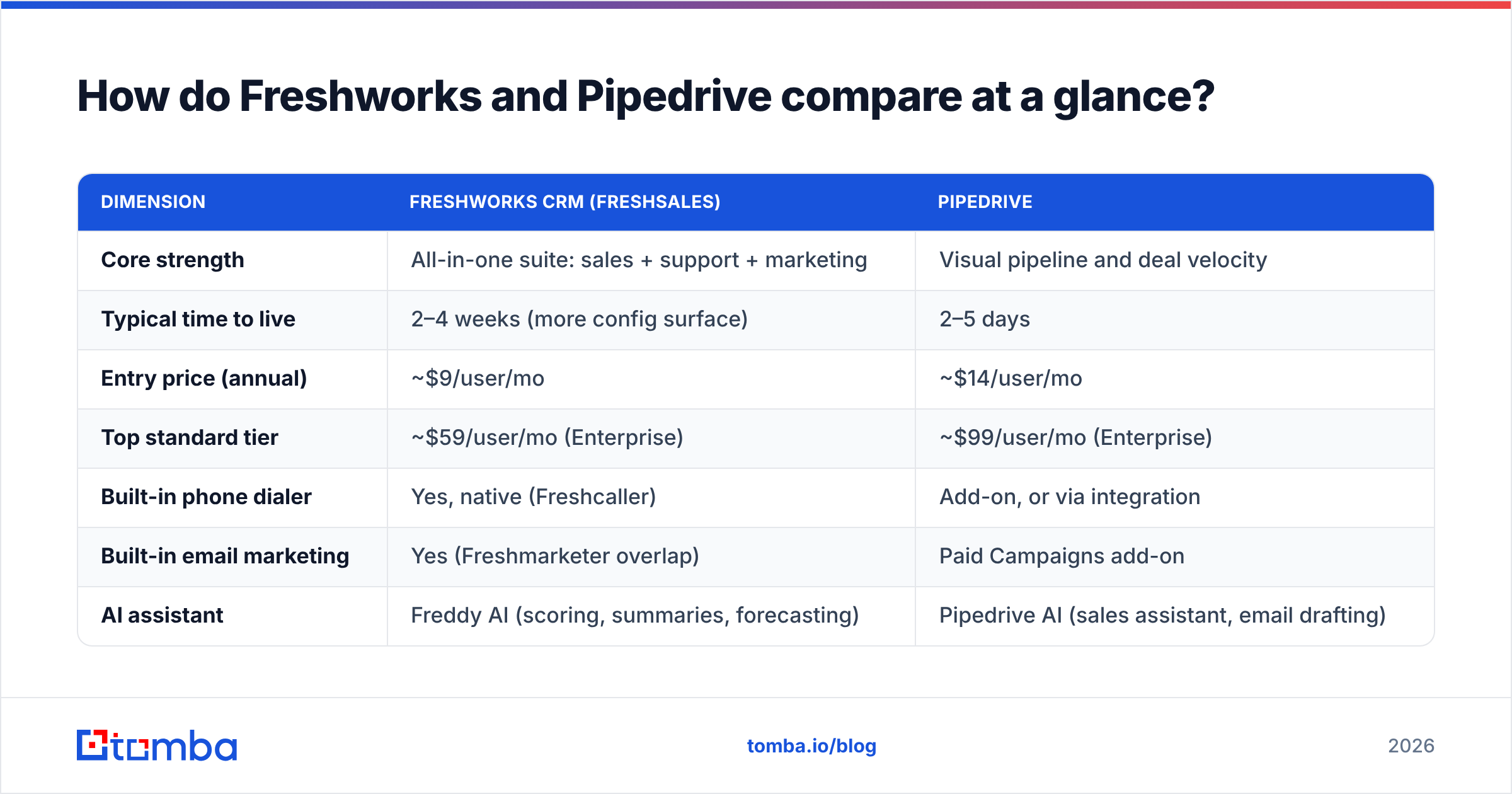
Freshworks vs Pipedrive: how do they compare at a glance?#
| Dimension | Freshworks CRM (Freshsales) | Pipedrive |
|---|---|---|
| Core strength | All-in-one suite: sales + support + marketing | Visual pipeline and deal velocity |
| Typical time to live | 2–4 weeks (more config surface) | 2–5 days |
| Entry price (annual) | ~$9/user/mo | ~$14/user/mo |
| Top standard tier | ~$59/user/mo (Enterprise) | ~$99/user/mo (Enterprise) |
| Built-in phone dialer | Yes, native (Freshcaller) | Add-on, or via integration |
| Built-in email marketing | Yes (Freshmarketer overlap) | Paid Campaigns add-on |
| AI assistant | Freddy AI (scoring, summaries, forecasting) | Pipedrive AI (sales assistant, email drafting) |
| Workflow automation | Available from mid tiers, generous limits | Available from Advanced, tier-capped |
| Reporting depth | Strong, more dimensions out of the box | Clean but shallower until Professional |
| Best-fit team size | 15–200 reps, multi-department | 3–50 reps, single sales motion |
| Learning curve | Moderate to steep | Low |
The pattern repeats across every row: Freshworks gives you more surface area per dollar, Pipedrive gives you less surface area that people actually use.
How much do Freshworks and Pipedrive cost in 2026?#
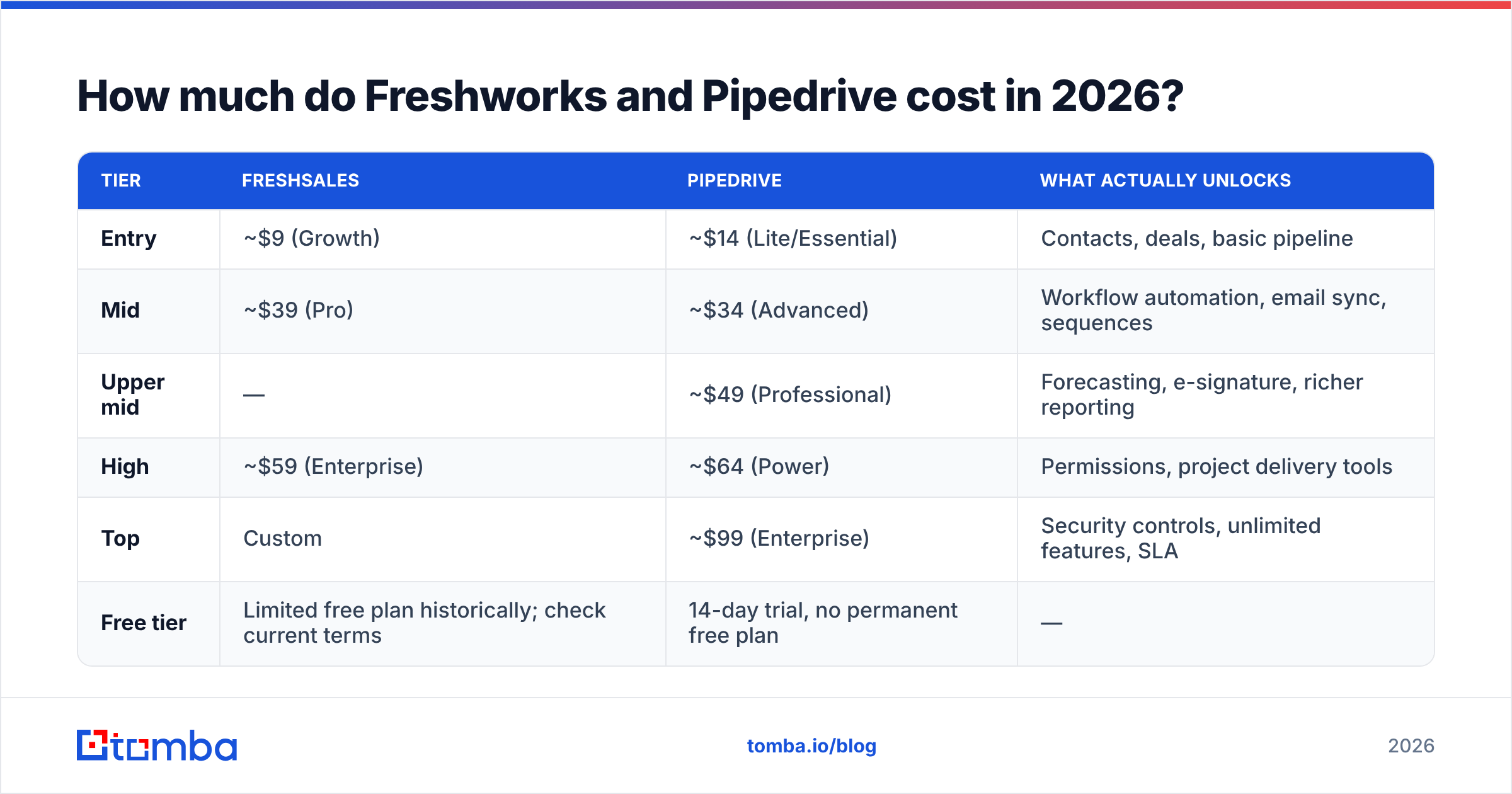
Both vendors change list prices often. Treat these numbers as directional and confirm on the vendor pricing pages before you sign. All figures assume annual billing per user per month.
| Tier | Freshsales | Pipedrive | What actually unlocks |
|---|---|---|---|
| Entry | ~$9 (Growth) | ~$14 (Lite/Essential) | Contacts, deals, basic pipeline |
| Mid | ~$39 (Pro) | ~$34 (Advanced) | Workflow automation, email sync, sequences |
| Upper mid | — | ~$49 (Professional) | Forecasting, e-signature, richer reporting |
| High | ~$59 (Enterprise) | ~$64 (Power) | Permissions, project delivery tools |
| Top | Custom | ~$99 (Enterprise) | Security controls, unlimited features, SLA |
| Free tier | Limited free plan historically; check current terms | 14-day trial, no permanent free plan | — |
Three cost traps to price in before you compare headline numbers:
- Pipedrive's add-ons. LeadBooster, Campaigns, Projects, and Smart Docs are separately billed. A Professional seat with two add-ons lands closer to $80–$90/user/mo than the $49 on the page.
- Freshworks' bundle logic. Freshsales alone is cheap. Freshsales plus Freshdesk plus Freshmarketer is a real contract negotiation, and the discount usually depends on committing to all three.
- Data costs sit outside both. Neither price includes enriched contact records. Budget separately for data enrichment and verification, or your reps will spend their expensive CRM seats copy-pasting from LinkedIn.
Check current numbers on the vendors' own pages. Cross-reference verified reviews on G2 too. Buyers routinely report negotiated rates 15–30% under list on annual deals over 25 seats.
Which CRM manages pipelines better?#
Pipedrive, and it is not particularly close for a pure sales team.
Pipedrive's pipeline view is the product. Stages are drag-and-drop. Deals turn red once they sit idle past a limit you set. The "next activity" field is mandatory by design, so the UI nags you until every deal has a scheduled follow-up. That one constraint is why Pipedrive adoption rates beat those of heavier CRMs. Reps update it because updating it takes eight seconds.
Freshsales has a perfectly good kanban pipeline too, plus a few things Pipedrive lacks natively: multi-currency deal handling at lower tiers, built-in territory management, and a contact timeline that pulls in support tickets if you run Freshdesk. But there is more chrome. More tabs, more modules in the left rail, more settings that a sales manager has to decide about before launch.
If your problem is "my reps do not update the CRM," Pipedrive fixes it faster. If your problem is "our account view is missing half the customer's history," Freshworks fixes that instead.
Which one automates more of your day?#
Freshworks gives you more automation for less money. Pipedrive gives you automation that is easier to configure without help.
Freshsales automation includes workflow rules, sales sequences, auto-assignment by territory or round-robin, and Freddy AI-driven deal scoring. Journey-style multi-step automation is available once you touch Freshmarketer. Limits are relatively generous per tier compared to competitors at the same price.
Pipedrive automation starts at the Advanced tier with a trigger-action builder that any ops-literate rep can use in an afternoon. Workflow counts are capped per tier: 30 on Advanced, 60 on Professional at time of writing. That sounds limiting, but it rarely binds for teams under 30 reps. Email sequences live inside the core product; heavier cadence work usually goes to a dedicated sequencer.
Neither replaces a real outbound engine. If your motion is high-volume cold outreach, you will still run a sending tool alongside the CRM. That is why teams comparing these two often look at an Outreach alternative or a lighter sequencer instead of stretching the CRM past its design.
How do the AI features compare in 2026?#
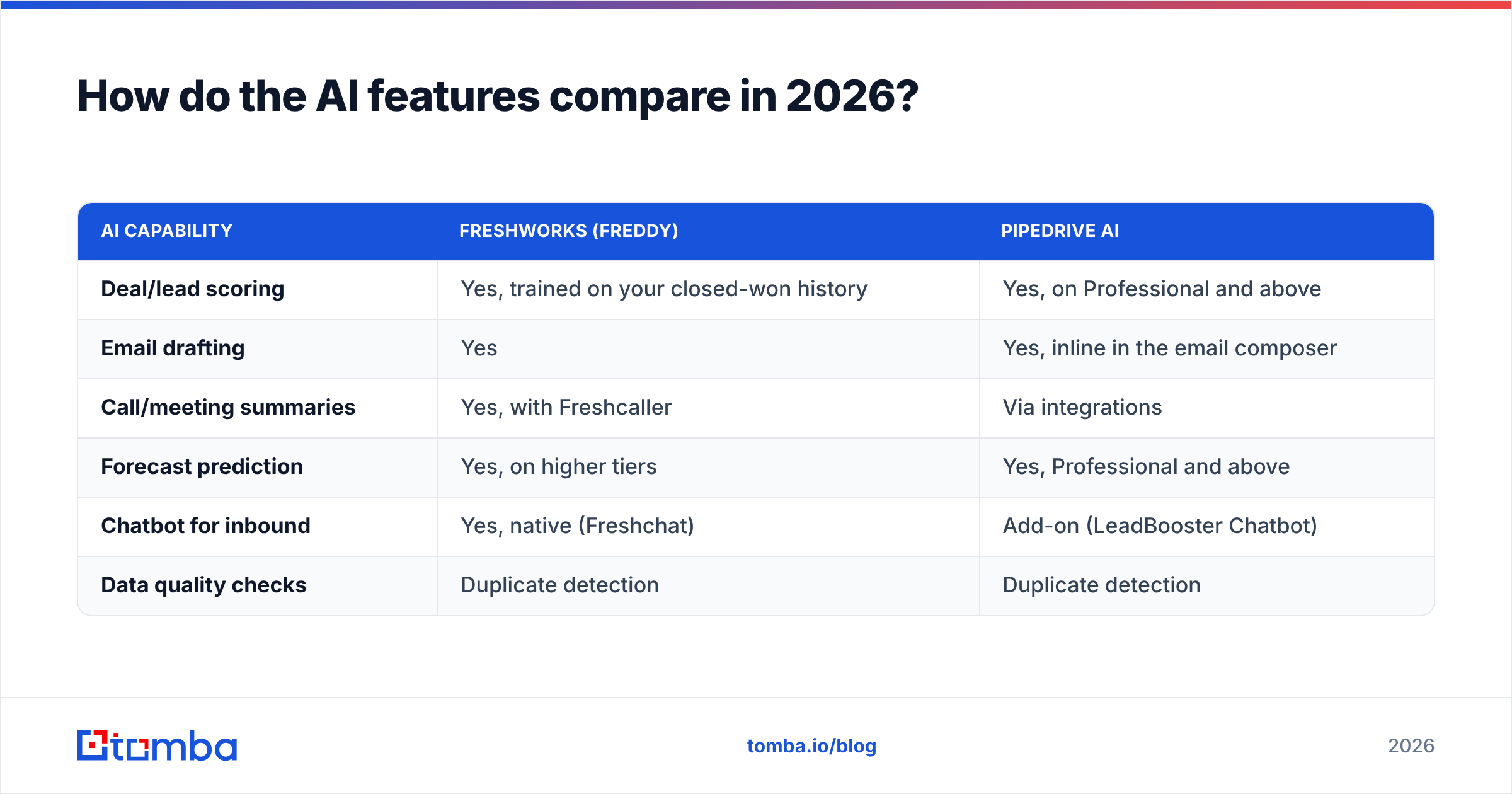
Both shipped AI. Both AI features are useful in narrow ways and oversold in marketing.
| AI capability | Freshworks (Freddy) | Pipedrive AI |
|---|---|---|
| Deal/lead scoring | Yes, trained on your closed-won history | Yes, on Professional and above |
| Email drafting | Yes | Yes, inline in the email composer |
| Call/meeting summaries | Yes, with Freshcaller | Via integrations |
| Forecast prediction | Yes, on higher tiers | Yes, Professional and above |
| Chatbot for inbound | Yes, native (Freshchat) | Add-on (LeadBooster Chatbot) |
| Data quality checks | Duplicate detection | Duplicate detection |
The honest read: AI scoring is only as good as the data underneath it. Train a model on 400 deals where half the contacts have a dead email address and it will produce confident nonsense. Before you evaluate either vendor's AI, check what share of your existing CRM contacts still resolve to a valid mailbox. Run a sample through a free email checker and you will usually find 20–30% decay on records older than 18 months.
Which integrates better with your data stack?#
Pipedrive has the larger, more sales-specific marketplace — roughly 500+ apps, heavily weighted toward outbound tooling, proposal software, and revenue intelligence. It is the default integration target for most sales tech built in the last five years.
Freshworks has fewer third-party integrations but deeper first-party ones. If you run Freshdesk, the support-to-sales handoff is native and instant rather than a Zapier hop.
Both offer solid REST APIs and both connect to the usual middleware. For prospect data specifically, the practical path is the same either way: pull verified contacts into the CRM through an API or a spreadsheet workflow. Tomba supports both — the Tomba API for programmatic enrichment on record creation, and a Google Sheets add-on for the list-building work that happens before anything reaches the CRM.

Where do both CRMs leave you exposed?#
Neither Freshworks nor Pipedrive is a data provider. This is the single biggest planning mistake teams make when switching CRMs: they assume the new system will somehow arrive populated.
What you actually get from both:
- A schema, not records. Contacts, companies, deals, activities. Empty on day one apart from whatever you import.
- Enrichment that is thin or paid. Pipedrive's Smart Data enriches some company fields. Freshsales pulls limited public profile data. Neither reliably produces a verified work email for a named person at a named company.
- No verification layer. Both will happily store
jsmith@company.comforever, whether or not that mailbox has existed since 2023. Bounce damage lands on your sending domain, not theirs. - No catch-all handling. Roughly 15–20% of B2B domains accept all mail, which defeats naive SMTP checks and inflates your "valid" counts.
- No phone coverage. Dialer functionality exists in both. Actual mobile numbers do not.
The fix is a separate data layer that feeds the CRM. In practice that means three jobs: find the address, verify it, then push it in. A domain search handles the first when you know the account but not the person. An email verifier handles the second. A catch-all verifier covers the awkward middle case where standard verification returns "unknown."
Cost-wise this is not a large line item. Tomba's Starter plan runs $49/mo, Growth $99/mo, and Pro $249/mo. A free tier gives you 25 searches a month, so you can test accuracy against your own known-good list before spending anything. See full Tomba pricing for tier limits.
Freshworks vs Pipedrive: which should you choose?#
Pick by constraint, not by feature count.
- Choose Pipedrive if adoption is your risk. Small-to-mid sales teams, one clear pipeline, reps who have abandoned a CRM before. Fastest rollout, lowest training cost, highest chance the thing is still in use in month six.
- Choose Freshworks if consolidation is your goal. You already pay for a helpdesk and a marketing email tool. One vendor contract with one support relationship is worth real money to you.
- Choose Freshworks if you need native telephony. Freshcaller in the box removes a whole procurement cycle for inside sales teams that live on the phone.
- Choose Pipedrive if you run a lot of third-party sales tech. The marketplace depth and the maturity of its API mean fewer custom builds.
Two cases argue for pausing the decision entirely.
- Choose neither yet if your data is the bottleneck. Do your reps spend more than three hours a week hunting for contact details? Fixing that returns more than any CRM migration will. Sort the data pipeline first, then move systems.
- Choose enterprise CRMs instead if you have 200+ reps with complex CPQ, partner channels, or heavy compliance needs. Both tools start creaking at that scale. Vendor-neutral analysis from firms like Gartner is worth the read before you commit.
What does a realistic migration look like?#
Whichever way you go, budget for the same three phases.
Week 1 — export and clean. Pull your existing contacts, deduplicate, and verify. Do not migrate rot. Bulk verification on a 20,000-record export usually removes 15–25% of addresses outright. That is 15–25% less noise your new CRM has to carry. A bulk verify run costs less than one wasted rep-week.
Week 2 — map fields and stages. Both CRMs let you define custom fields and pipeline stages. Resist the urge to recreate 60 legacy fields. Keep what drives a decision or a report; archive the rest in a CSV.
Weeks 3–4 — pilot with one team. Run one pod on the new system while the old one stays read-only. Measure two things: percentage of deals with a next activity scheduled, and average days-in-stage. If those numbers do not improve versus the old CRM, the tool was not your problem.
The verdict#
For most B2B sales teams under 50 reps running a single motion, Pipedrive is the better CRM — cheaper to operate in practice, faster to adopt, and less likely to become shelfware. For companies consolidating sales, support, and marketing under one vendor, Freshworks is the better business decision even if Freshsales alone is not the better sales tool.
But the CRM you pick matters less than what you put in it. Both systems are excellent at organizing contact data and completely incapable of producing it. Deals do not stall because the pipeline view is the wrong shade of blue. They stall because the email bounced, the phone number was a switchboard, and the champion left four months ago.
Start there. Use the Tomba Email Finder to build verified contact lists before they hit Freshworks or Pipedrive. Find addresses by name and domain, verify them, and push them straight in through the API or your spreadsheet workflow. The free tier gives you 25 searches a month to benchmark accuracy against your own list, and Starter is $49/mo if it holds up. Fill the CRM with contacts that actually resolve, and either tool will look like the right choice.
Related guides#
Ready to find emails that actually work?
Join 150,000+ professionals who stopped guessing and started sending. Free credits on signup — no credit card required.
Get the Tomba newsletter
Practical outbound tactics and product updates — once every two weeks.
About the author