Generect vs Null Bounce: Which B2B Email Tool Wins in 2026
One tool builds your list, the other protects your sender reputation. We break down Generect vs Null Bounce on coverage, accuracy, pricing model and workflow fit — and name the better buy for outbound teams in 2026.
TL;DR
- Generect and Null Bounce solve different halves of the same problem. Generect is a lead-sourcing and contact-data platform built around LinkedIn-shaped B2B records. Null Bounce sits in the email-verification lane — its job is to stop bad addresses from ever hitting your sequencer.
- If you only buy one, buy the one that plugs your current leak. Empty pipeline means you need sourcing. A 6%+ bounce rate means you need verification.
- Neither is a complete outbound data stack on its own. Sourcing tools ship stale addresses; verifiers can't invent contacts you never found.
- Pricing models differ structurally: lead-data platforms tend toward seats plus credits and sales-led quotes, verification tools toward pay-as-you-go credit packs. Compare cost per usable contact, not cost per record.
- The pragmatic 2026 setup is one platform that finds, verifies and enriches through a single API — which is where a email finder with built-in verification saves you a vendor.
What are Generect and Null Bounce?#
Generect is a B2B lead-generation data provider. Its pitch is real-time, LinkedIn-shaped B2B records: search companies and people by ICP filters, pull decision-maker lists, and push them into your CRM or sequencer via integrations and an API. You can see its current positioning on the Generect homepage. Teams buy it to answer "who should we email?"
Null Bounce operates in the email-verification category. The category job is narrow and mechanical: take an address, run syntax checks, MX lookups, SMTP handshakes, disposable/role-account detection and catch-all classification, then return valid / invalid / risky. Teams buy it to answer "will this email bounce?"
That distinction is the whole comparison. Reviewers who put these two head-to-head and score them on the same rubric are grading a hammer against a saw. The useful question is not "which is better" but "which gap is costing you more revenue this quarter."
A quick reality check on why the verification half matters at all: mailbox providers score you on how many of your sends hit nonexistent addresses. Push a list with 8% dead contacts and your sender reputation drops, your inbox placement follows, and the good contacts in that same list stop seeing you. Sourcing without verification is a slow-motion self-inflicted wound.

How do Generect and Null Bounce compare head-to-head?#
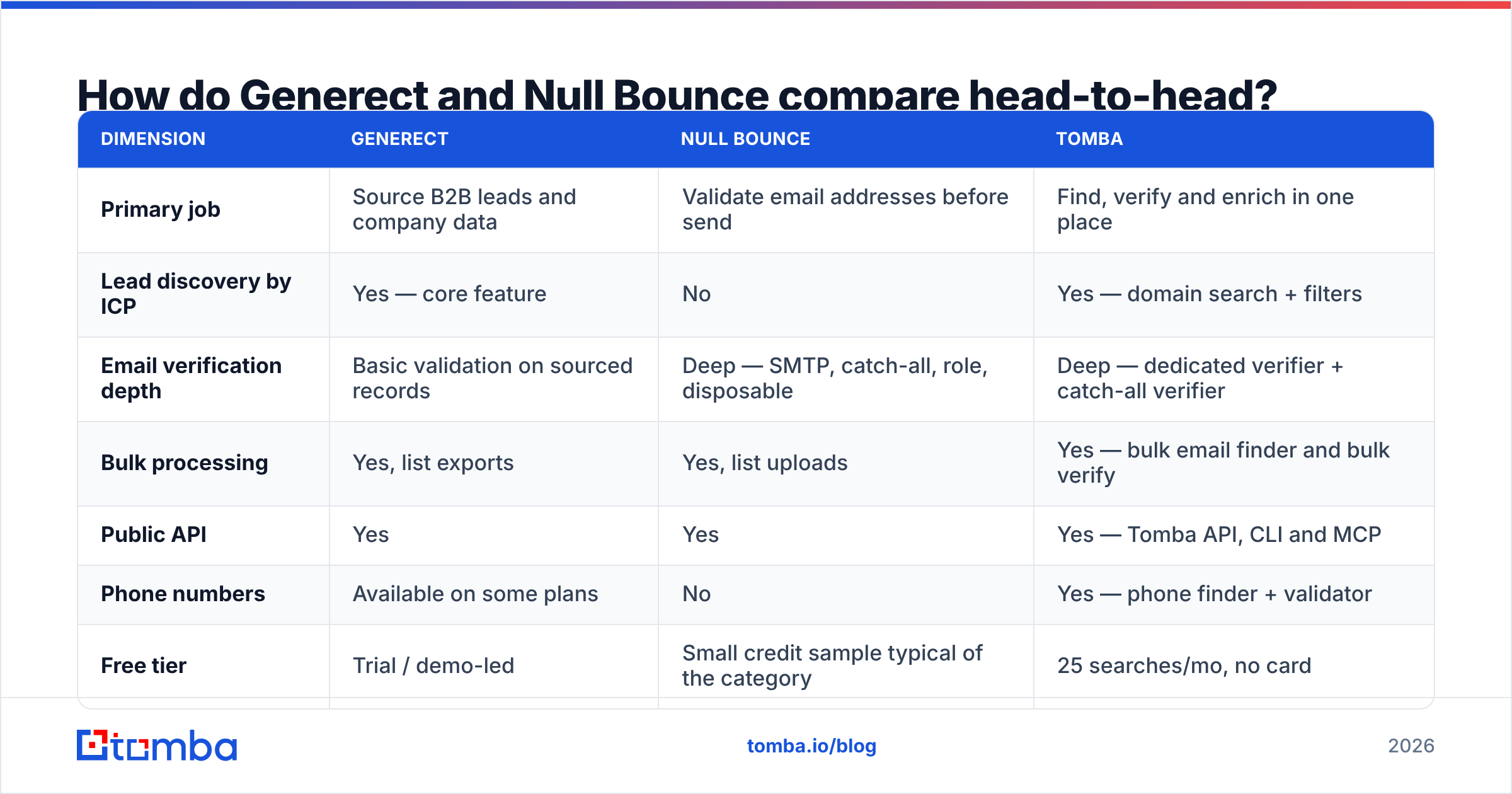
Here is the honest side-by-side. Feature sets and pricing shift, so treat vendor pages as the source of truth before you sign anything — this table reflects category positioning as of 2026.
| Dimension | Generect | Null Bounce | Tomba |
|---|---|---|---|
| Primary job | Source B2B leads and company data | Validate email addresses before send | Find, verify and enrich in one place |
| Lead discovery by ICP | Yes — core feature | No | Yes — domain search + filters |
| Email verification depth | Basic validation on sourced records | Deep — SMTP, catch-all, role, disposable | Deep — dedicated verifier + catch-all verifier |
| Bulk processing | Yes, list exports | Yes, list uploads | Yes — bulk email finder and bulk verify |
| Public API | Yes | Yes | Yes — Tomba API, CLI and MCP |
| Phone numbers | Available on some plans | No | Yes — phone finder + validator |
| Free tier | Trial / demo-led | Small credit sample typical of the category | 25 searches/mo, no card |
| Pricing shape | Seats + credits, often quote-based | Credit packs, pay-as-you-go | Public tiers: $49, $99, $249/mo |
| Best fit | Teams that need net-new lists | Teams with lists that bounce | Teams that want both without a second vendor |
Two things jump out. First, only one column in that table covers both jobs. Second, the pricing shapes aren't comparable line-for-line: a sourcing platform charges you for records you may never email, while a verifier charges you for checks on records you already own.
Which one should you buy first?#
Work through these in order. Most teams self-diagnose wrong, so use the numbers, not the vibe.
- Check your hard bounce rate. Above 4–5% on a recent campaign, verification is your bottleneck. Buy the verifier first — no amount of new leads fixes a burned domain.
- Check your list exhaustion rate. If reps run out of accounts to work before month-end, sourcing is the bottleneck. Buy the data platform first.
- Check your catch-all percentage. If 30%+ of your list sits on catch-all domains, generic verifiers return "unknown" and you're guessing. You need a catch-all verifier, not a basic syntax checker.
- Check how many tools your data crosses. Every hop between a sourcing export and a verification upload is a CSV, a mapping error and a day of latency. Two vendors means two invoices, two rate limits and two support queues.
- Check whether you need phones. If your motion is multithreaded — email plus calls — neither a pure verifier nor a lightweight sourcing tool covers you. You'll want B2B phone numbers in the same record.
- Check your engineering appetite. If you're wiring data into a product or an internal ops pipeline, API quality and documentation matter more than any UI feature comparison.
How accurate is the data, really?#
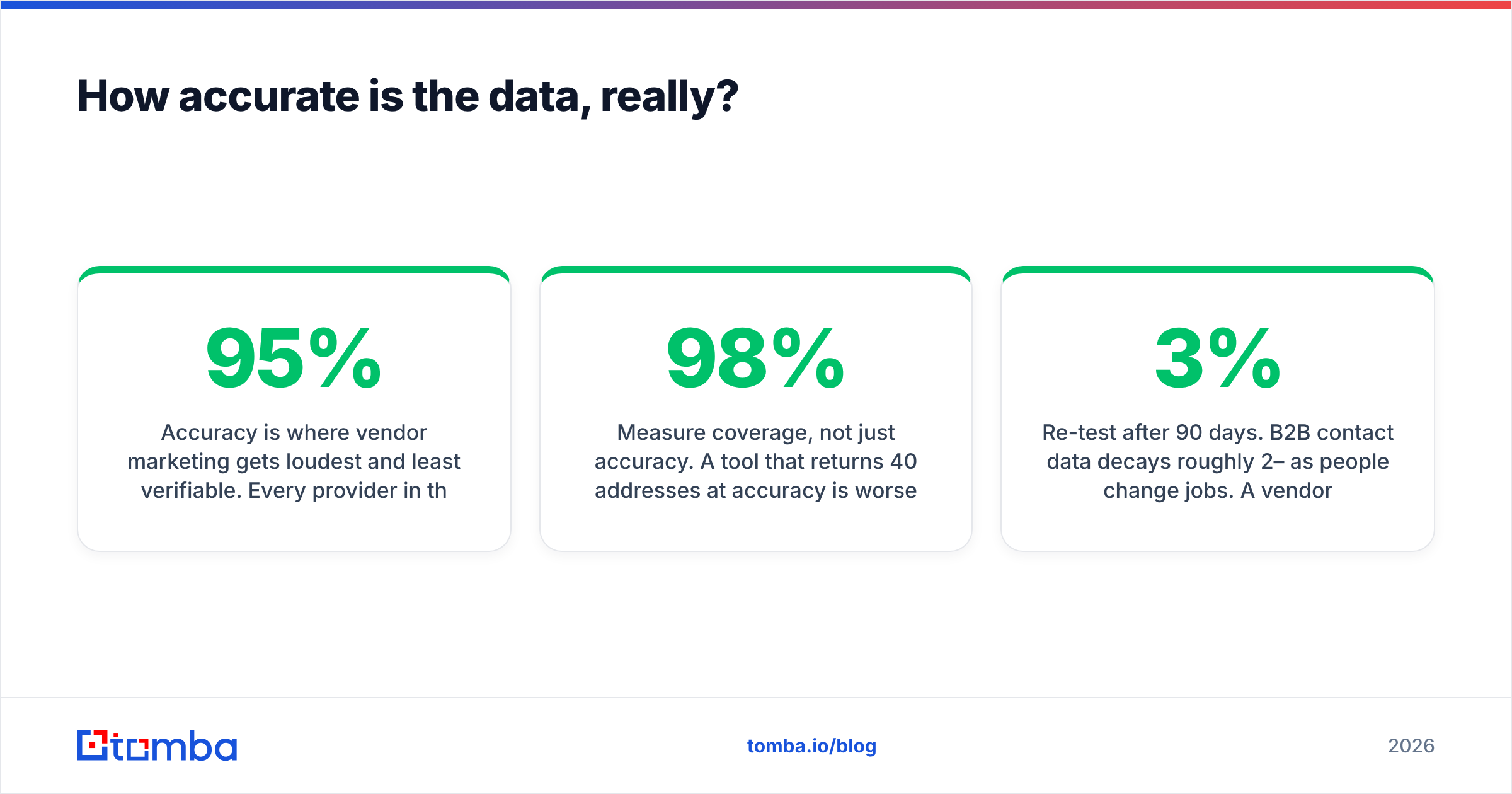
Accuracy is where vendor marketing gets loudest and least verifiable. Every provider in this space claims 95%+ something. The claims aren't lies exactly — they're measured on favorable subsets.

Here's how to run your own test in under an hour, which beats any review including this one:
- Build a 100-contact control list from accounts you already closed, where you know the real email format. Mix company sizes and regions — accuracy collapses differently on 20-person startups versus enterprises.
- Measure coverage, not just accuracy. A tool that returns 40 addresses at 98% accuracy is worse than one returning 85 at 92%. Coverage × accuracy = usable contacts. That's the only number that maps to pipeline.
- Track the "risky" bucket separately. Verifiers that dump catch-all domains into "unknown" are shifting the decision back to you. Ask what percentage of your list lands there.
- Re-test after 90 days. B2B contact data decays roughly 2–3% per month as people change jobs. A vendor with great point-in-time accuracy and no refresh cadence gets stale fast. See how data sources are refreshed before you commit to an annual contract.
- Check the invalid-credit policy. Some providers charge for every lookup; others only bill for found-and-valid results. Over a year, that's a material difference in effective cost per contact.
Independent review platforms like G2 are useful for spotting patterns in complaints — billing surprises, support latency, sudden coverage drops — but treat individual star ratings as noise. Read the 3-star reviews; they're the only honest ones.
What does each tool cost in practice?#
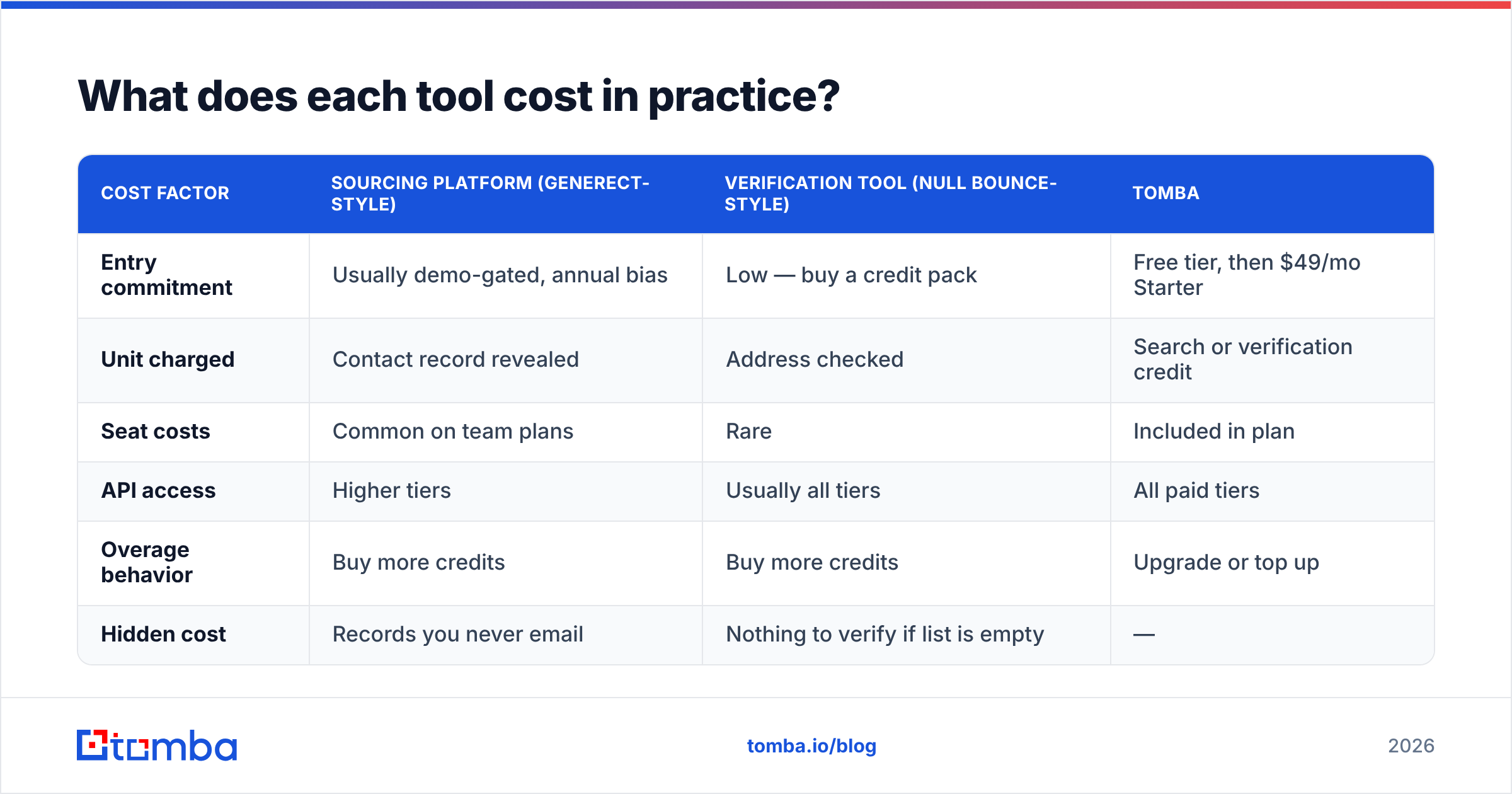
Published pricing in this category changes often and both vendors run sales-led motions for larger volumes, so verify current numbers directly. What's stable is the shape of the cost.
| Cost factor | Sourcing platform (Generect-style) | Verification tool (Null Bounce-style) | Tomba |
|---|---|---|---|
| Entry commitment | Usually demo-gated, annual bias | Low — buy a credit pack | Free tier, then $49/mo Starter |
| Unit charged | Contact record revealed | Address checked | Search or verification credit |
| Seat costs | Common on team plans | Rare | Included in plan |
| API access | Higher tiers | Usually all tiers | All paid tiers |
| Overage behavior | Buy more credits | Buy more credits | Upgrade or top up |
| Hidden cost | Records you never email | Nothing to verify if list is empty | — |

The honest math: if you run a two-vendor stack, budget for both floors. A sourcing seat plus a verification credit pack routinely lands north of a single consolidated plan — before you count the engineering hours spent gluing them together. Tomba pricing is public precisely because that comparison usually favors the consolidated option: Free (25 searches/mo), Starter $49/mo, Growth $99/mo, Pro $249/mo, Enterprise custom.
That said, consolidation isn't automatically right. If your company already standardized on a data vendor at the org level, bolting on a specialist verifier is cheaper and less political than replacing the whole stack.
Is a two-tool stack ever the right answer?#
Yes, in three situations.
You have a large legacy database. If you're sitting on 400,000 contacts from five years of inbound, you don't need sourcing — you need a scrub. A dedicated verifier plus a free email checker for spot checks handles that job without a data subscription.
Your ICP is unusually narrow. Some niches — regional manufacturers, public-sector procurement, specific European mid-market segments — are covered well by one provider and poorly by everyone else. If a specialist nails your segment, pay for the specialist and verify elsewhere.
Compliance drives the decision. If your legal team has already cleared one vendor's GDPR posture and data-sourcing methodology, that clearance has real value. Wikipedia's overview of the General Data Protection Regulation is a reasonable starting point for understanding what your DPA actually needs to cover, but your counsel makes the call, not a blog post.
Outside those cases, the second vendor is usually paying for a hand-off you could have avoided.

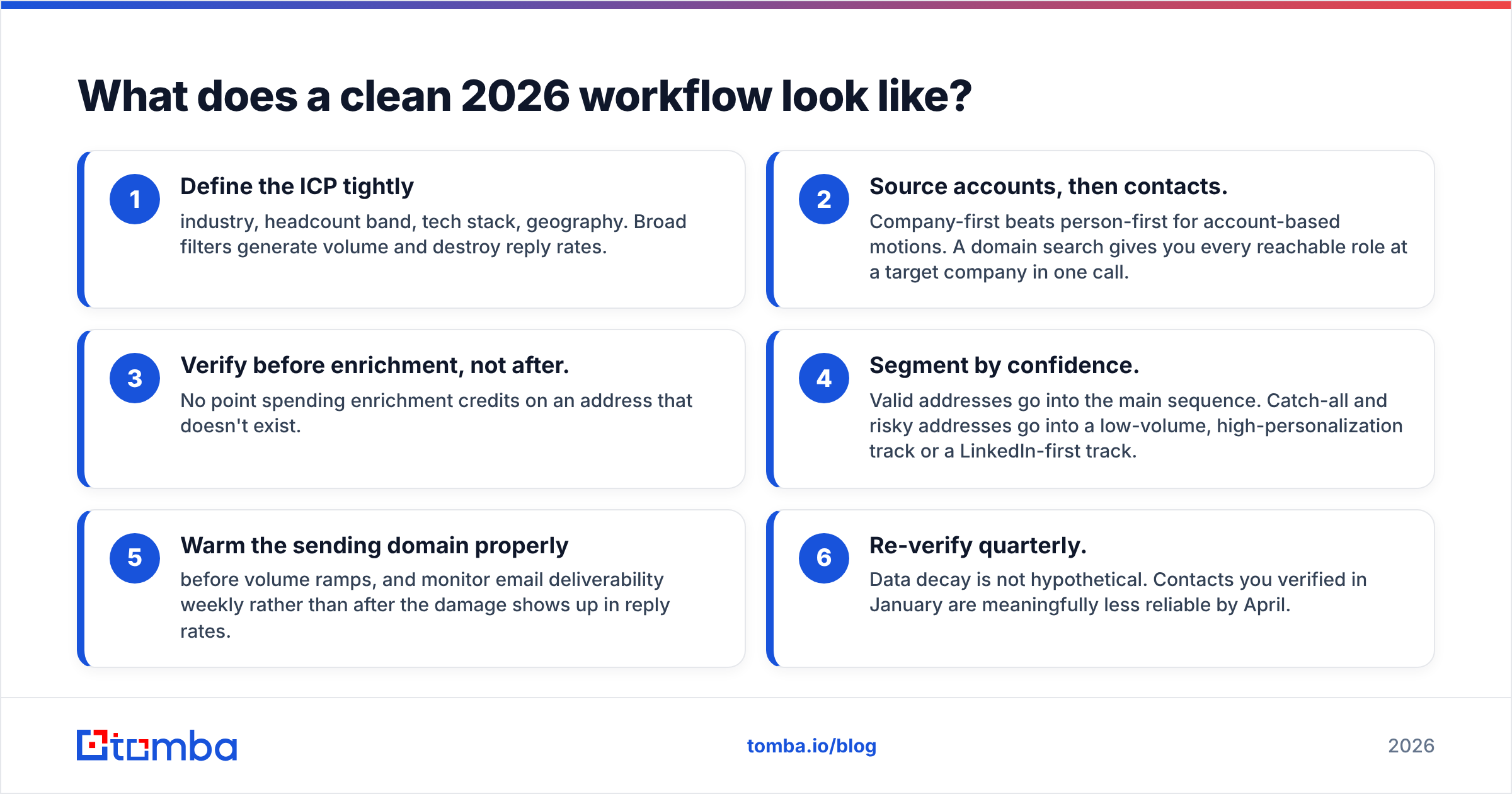
What does a clean 2026 workflow look like?#
Regardless of which vendor you pick, the sequence is the same. Skipping a step is where teams burn domains.
- Define the ICP tightly — industry, headcount band, tech stack, geography. Broad filters generate volume and destroy reply rates.
- Source accounts, then contacts. Company-first beats person-first for account-based motions. A domain search gives you every reachable role at a target company in one call.
- Verify before enrichment, not after. No point spending enrichment credits on an address that doesn't exist.
- Segment by confidence. Valid addresses go into the main sequence. Catch-all and risky addresses go into a low-volume, high-personalization track or a LinkedIn-first track.
- Warm the sending domain properly before volume ramps, and monitor email deliverability weekly rather than after the damage shows up in reply rates.
- Re-verify quarterly. Data decay is not hypothetical. Contacts you verified in January are meaningfully less reliable by April.
Automate steps 2 through 4 with an API and the whole loop takes minutes instead of a rep's afternoon. That's the practical argument for consolidation: not that any single feature is better, but that the hand-offs disappear.
Generect vs Null Bounce: what's the verdict?#
Pick Generect if your problem is an empty list and your ICP maps cleanly to LinkedIn-shaped B2B data. It's a sourcing tool and it should be judged as one — coverage in your segment is the only benchmark that matters, so run the 100-contact control test before committing to an annual term.
Pick Null Bounce if your problem is bounces. If you already have contacts and your sender reputation is sliding, a dedicated verifier fixes that faster and cheaper than any data subscription. Judge it on catch-all handling and how honestly it labels the "risky" bucket.
Pick neither as a standalone if you're building an outbound motion from scratch in 2026. You'll end up buying the other half within two quarters, and the migration will cost more than choosing a consolidated stack on day one.
The strongest position for most teams: one provider that finds the address, verifies it, checks the catch-all domain, and enriches the record through the same API — with public pricing so you can model cost before a sales call.
That's what Tomba is built for. Start with the Tomba Email Finder on the free tier — 25 searches a month, no card — and run it against the same control list you'd use to test Generect or Null Bounce. If the coverage-times-accuracy number beats your current stack, upgrading to Starter at $49/mo consolidates two invoices into one and removes the CSV hand-off from your workflow entirely.
Related guides#
Ready to find emails that actually work?
Join 150,000+ professionals who stopped guessing and started sending. Free credits on signup — no credit card required.
Get the Tomba newsletter
Practical outbound tactics and product updates — once every two weeks.
About the author