GetProspect vs LakeB2B (2026): Which B2B Data Tool Wins?
GetProspect is a self-serve email finder with a free tier. LakeB2B is a managed, custom-built list provider. We compare accuracy, pricing, and fit — plus when neither is the right call.
TL;DR
- GetProspect is a self-serve email finder and LinkedIn-based prospecting tool. You search, you export, you pay per credit. Free tier exists (50 valid emails/mo), paid starts around $49/mo.
- LakeB2B is a managed data vendor. You brief a rep, they build a custom list from a claimed 100M+ contact database, and you get a one-time file plus optional appending and campaign services. Pricing is quote-only.
- The real split is not accuracy — it's operating model. Self-serve gives you fresh, verified-on-demand records. Managed lists give you volume and human-curated targeting, but the file starts decaying the day it lands.
- For most 2026 outbound teams running continuous prospecting, a verify-at-send-time API beats both a credit-metered UI and a static CSV.
- Skip both if your workflow is enrichment-inside-CRM. That's a different tool category.
What are GetProspect and LakeB2B, actually?#
They compete for the same budget line but they are not the same species.
GetProspect is a product. You log in, run a search (by domain, by name, or via a LinkedIn Chrome extension), and get email addresses back. Credits deplete as you find. Records go into lists you can export to CSV or push to a CRM. Nobody at GetProspect touches your account unless you file a ticket.
LakeB2B is a service. You describe an ICP — say, "IT directors at US hospitals with 500+ beds" — and a team assembles a file against it. They also sell healthcare-specific data, technographic appends, intent signals, and even outsourced campaign execution. There's no self-serve search bar. There's a "request a quote" form.
That distinction drives every downstream difference: speed, price predictability, refresh cadence, and how much of the workflow you own.
How do GetProspect and LakeB2B compare head to head?#
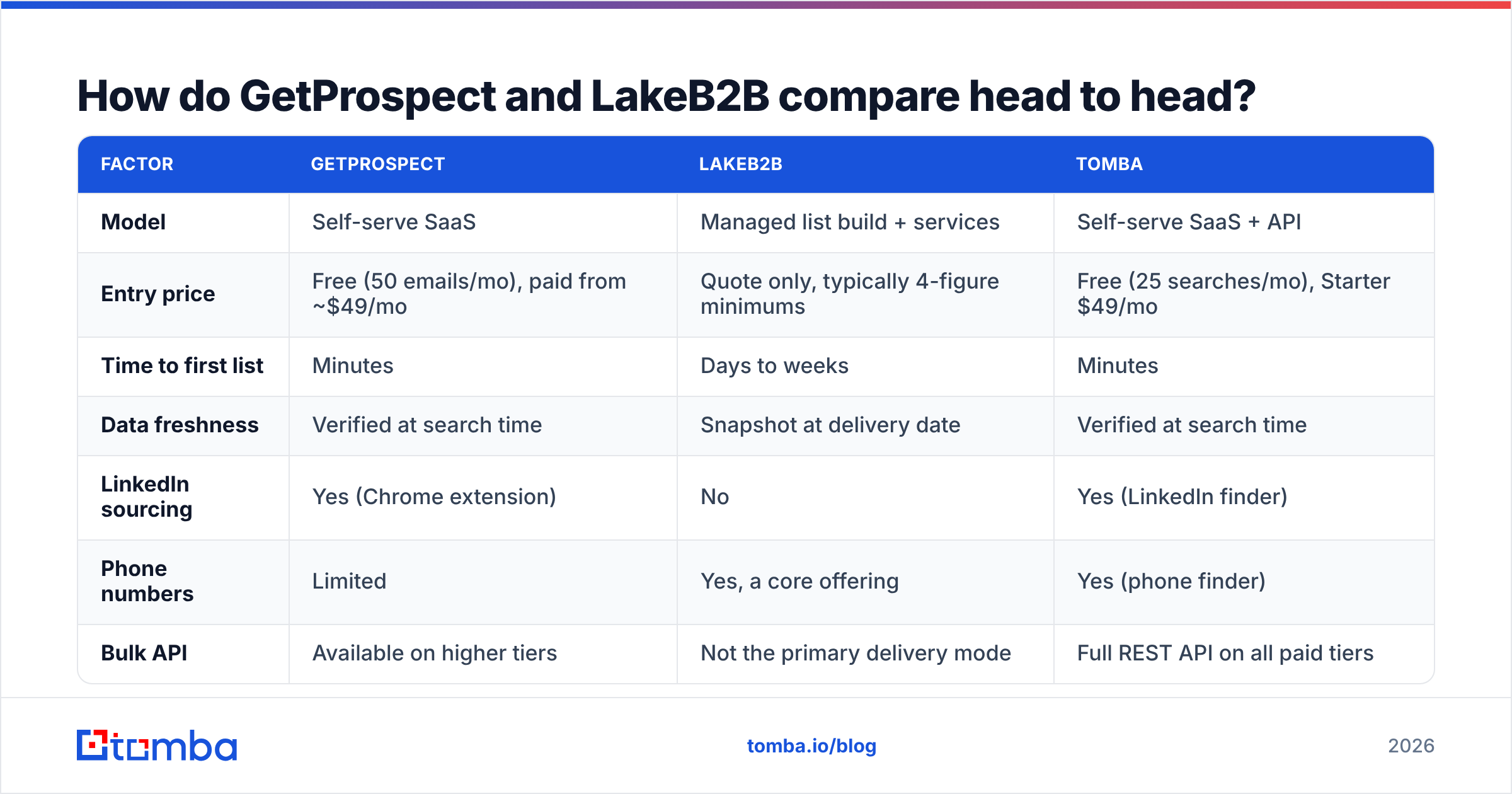
| Factor | GetProspect | LakeB2B | Tomba |
|---|---|---|---|
| Model | Self-serve SaaS | Managed list build + services | Self-serve SaaS + API |
| Entry price | Free (50 emails/mo), paid from ~$49/mo | Quote only, typically 4-figure minimums | Free (25 searches/mo), Starter $49/mo |
| Time to first list | Minutes | Days to weeks | Minutes |
| Data freshness | Verified at search time | Snapshot at delivery date | Verified at search time |
| LinkedIn sourcing | Yes (Chrome extension) | No | Yes (LinkedIn finder) |
| Phone numbers | Limited | Yes, a core offering | Yes (phone finder) |
| Bulk API | Available on higher tiers | Not the primary delivery mode | Full REST API on all paid tiers |
| Custom ICP research | No | Yes — the main selling point | No (self-serve only) |
| Best for | SMB/mid-market outbound teams | Niche verticals, healthcare, event lists | Continuous, programmatic prospecting |
The table hides one thing worth saying plainly: LakeB2B's value is human research, GetProspect's value is instant self-service. If you compare them on "who has more emails," you're asking the wrong question.
Which one has better data accuracy?#
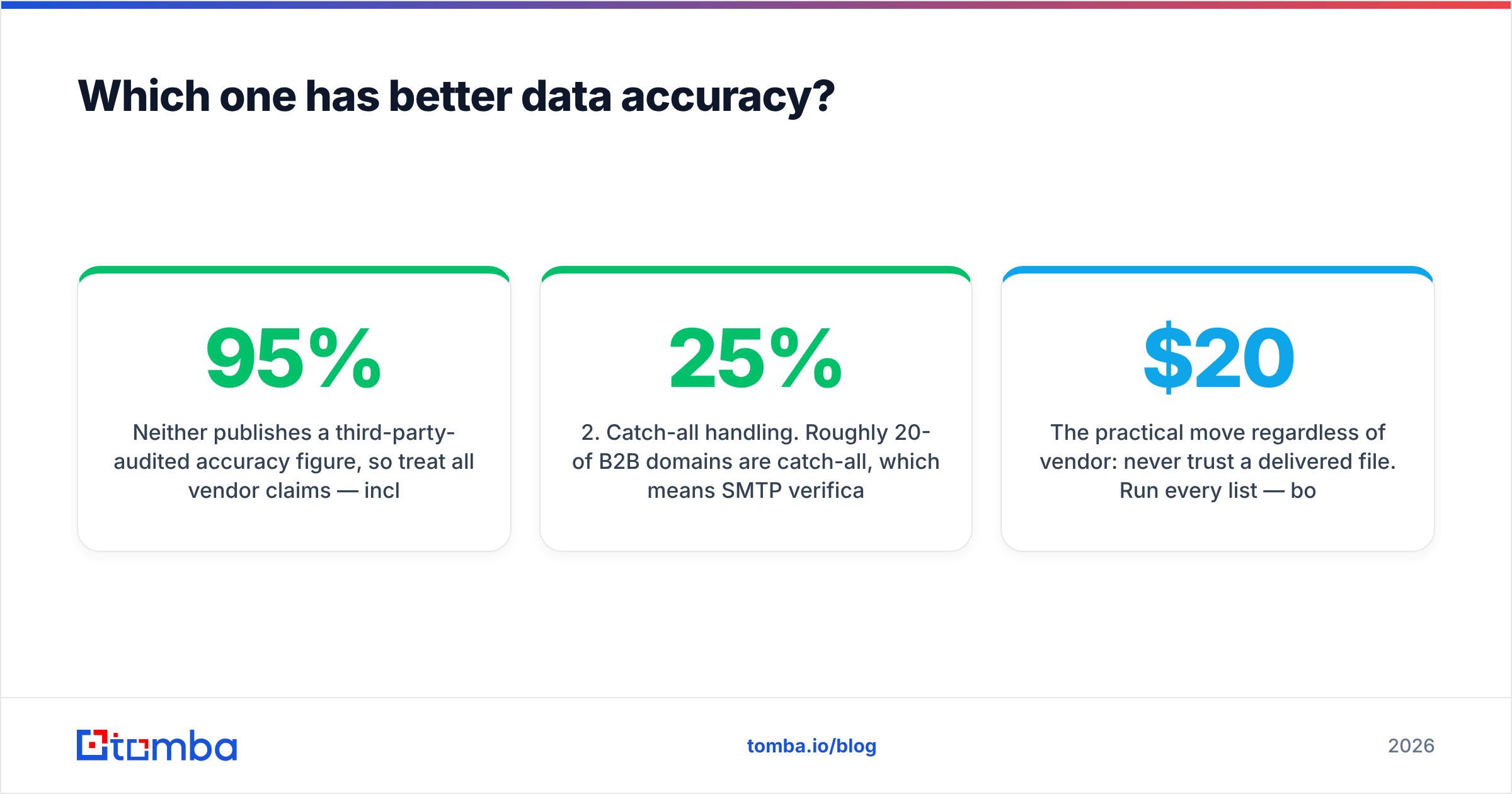
Neither publishes a third-party-audited accuracy figure, so treat all vendor claims — including the 95%+ numbers both sides gesture at — as marketing until you test them.
Here's what actually determines the bounce rate you'll see:
- When the record was last verified. A self-serve tool running an SMTP check at query time will beat a six-month-old file almost every time, regardless of whose database is bigger.
- Catch-all handling. Roughly 20-25% of B2B domains are catch-all, which means SMTP verification returns "accept" for everything. Tools that mark these honestly as risky are more useful than tools that report them as valid. Run them through a catch-all verifier before you send.
- Role-account contamination. Bought lists frequently pad counts with info@, sales@, and support@ addresses. Those inflate your record count and tank your reply rate.
- Vertical fit. LakeB2B genuinely does better than generic databases in healthcare and education, because that's where its research effort concentrates. In tech and SaaS, a generic finder usually matches or beats it.
The practical move regardless of vendor: never trust a delivered file. Run every list — bought, scraped, or found — through an independent email verifier before it touches your sending domain. A $20 verification pass is cheaper than a two-week reputation recovery.

What does GetProspect cost versus LakeB2B?#
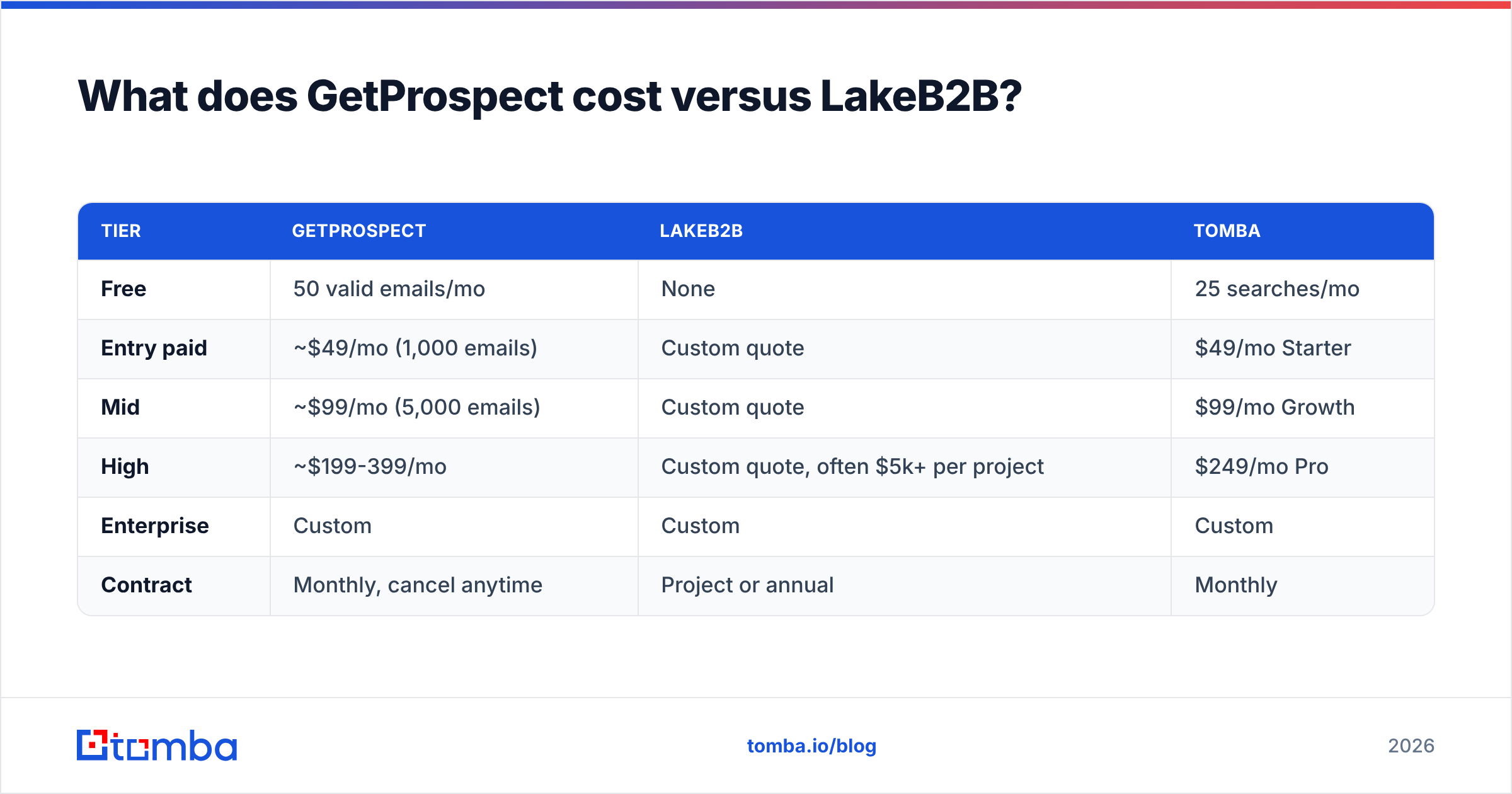
GetProspect publishes pricing. LakeB2B does not. That asymmetry matters more than the raw numbers.
| Tier | GetProspect | LakeB2B | Tomba |
|---|---|---|---|
| Free | 50 valid emails/mo | None | 25 searches/mo |
| Entry paid | ~$49/mo (1,000 emails) | Custom quote | $49/mo Starter |
| Mid | ~$99/mo (5,000 emails) | Custom quote | $99/mo Growth |
| High | ~$199-399/mo | Custom quote, often $5k+ per project | $249/mo Pro |
| Enterprise | Custom | Custom | Custom |
| Contract | Monthly, cancel anytime | Project or annual | Monthly |
Two cost traps to watch:
- GetProspect's credit math. Credits burn on searches that return nothing useful on some plans. Read the terms on the tier you're buying, not the marketing page.
- LakeB2B's per-record economics. A custom list at $0.30-$1.00 per record sounds cheap until you realize you can't refresh it. When 25-30% of B2B contacts change jobs annually, a static file loses roughly a quarter of its value per year — and you pay again to rebuild it.
If you want a like-for-like anchor on what modern self-serve costs, Tomba pricing is published in full with no sales call.

When should you choose LakeB2B?#
Pick the managed route when these are true:
- You're in a vertical where generic databases are thin. Healthcare provider data (NPI-linked, specialty-segmented), education, and certain manufacturing niches are genuinely hard to self-serve.
- You need firmographic depth you can't query for. "Companies that just opened a second facility in the Southeast" is a research question, not a filter.
- You want phone-heavy data. LakeB2B leans into direct dials and mailing addresses in a way most email-first tools don't.
- You have budget approval but no ops headcount. Buying a finished file is faster than building a prospecting motion from scratch — if you only need it once.
- You're running an event or a multichannel campaign where the list is a one-time input, not a continuous feed.
Do not pick it if you need the list to stay current. That's the structural weakness of any delivered-file model, and no vendor solves it.
When should you choose GetProspect?#
Pick self-serve when:
- Your ICP lives on LinkedIn. GetProspect's extension turns a Sales Navigator search into an exportable list, which is the fastest path from "I know who I want" to "I have their email."
- You prospect continuously. Weekly list-building beats quarterly file purchases for freshness.
- You want to start free. The free tier lets you validate whether the data covers your market before spending anything.
- Your team is small. No procurement, no SOW, no account manager scheduling.
Its ceiling: coverage outside tech and professional services thins out, phone data is weak, and the API is gated to higher tiers. If you're building automated enrichment into a product, you'll hit that wall.
Is there a third option that beats both?#
Yes, for one specific and very common use case: programmatic, always-fresh prospecting.
The gap both tools leave open is the same. GetProspect gives you a UI when you want an endpoint. LakeB2B gives you a file when you want a stream. If your motion looks like "a new account enters the CRM → find the right contact → verify → sequence," neither model fits cleanly.
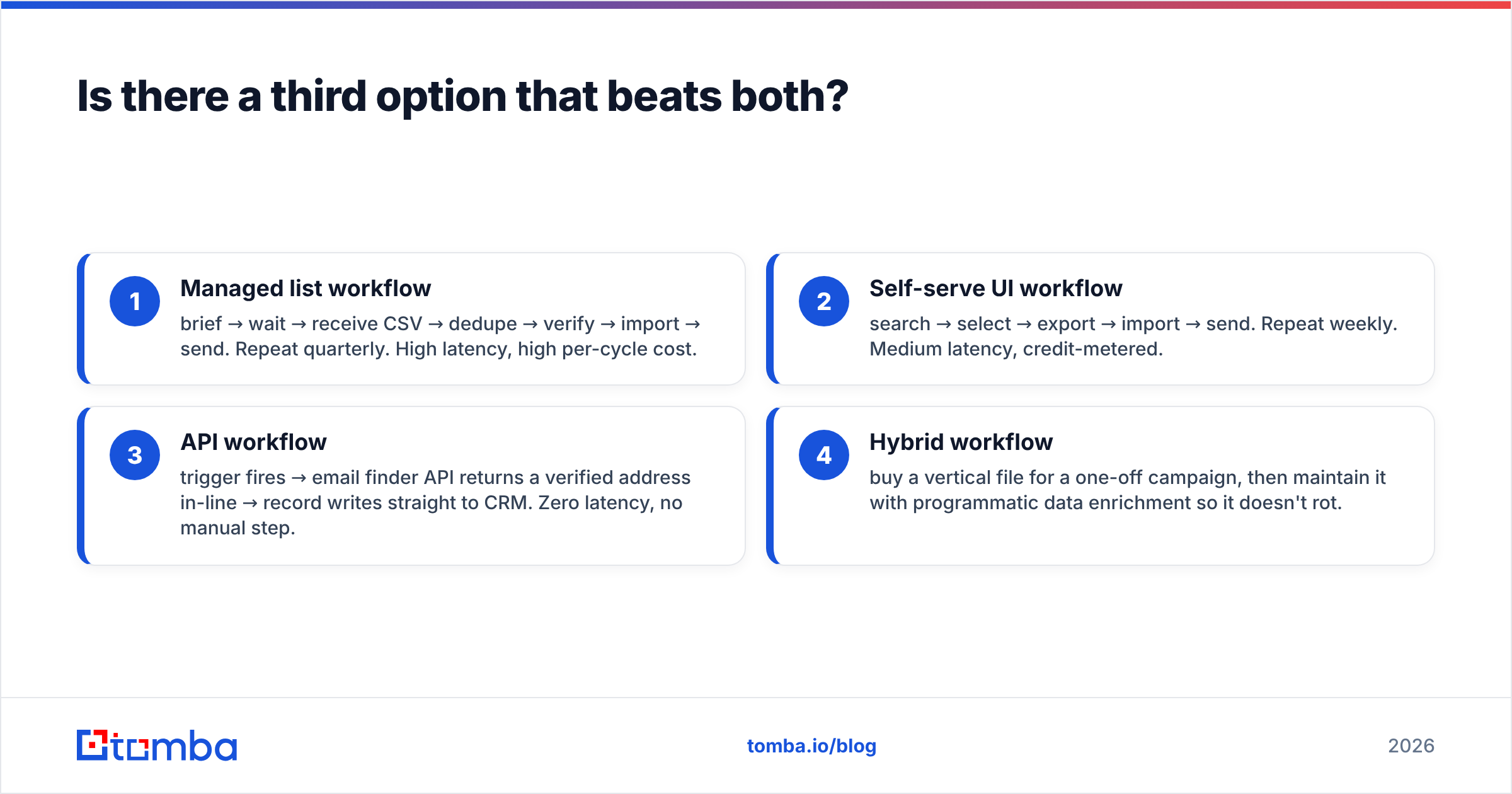
That's the case for an API-first approach. Here's how the workflows differ:
- Managed list workflow — brief → wait → receive CSV → dedupe → verify → import → send. Repeat quarterly. High latency, high per-cycle cost.
- Self-serve UI workflow — search → select → export → import → send. Repeat weekly. Medium latency, credit-metered.
- API workflow — trigger fires → email finder API returns a verified address in-line → record writes straight to CRM. Zero latency, no manual step.
- Hybrid workflow — buy a vertical file for a one-off campaign, then maintain it with programmatic data enrichment so it doesn't rot.
Option 4 is what most mature teams actually run. They stop treating "buy vs build" as binary.
How do you test any of these before committing?#
Run the same 100-contact benchmark against every vendor on your shortlist. This takes an afternoon and saves quarters of regret.
- Build a control set. Pick 100 contacts you already have verified emails for — past customers, closed-lost, partners. You know the right answer.
- Query each tool blind. Ask each vendor for those 100 records by name + company. Don't tell them it's a test.
- Score three metrics separately. Match rate (did it return anything?), accuracy (was it right?), and catch-all share (how many are unfalsifiable?). Vendors conflate these deliberately.
- Send a real 200-contact pilot. Measure hard bounce rate over 72 hours. Anything above 3% is a deliverability problem, and above 5% you're actively damaging sender reputation.
- Check refresh policy in writing. Ask: "If a contact changes jobs next month, what happens?" A vendor without a good answer is selling you a depreciating asset.
Independent review platforms like G2 are useful for spotting recurring complaints — billing surprises, support latency, refund friction — but ignore the aggregate star rating. Read the two-star reviews specifically. That's where the real limitations live.
What about protected niches and compliance?#
If you're prospecting into the EU, UK, or California, the vendor's data provenance is a legal question, not just a quality one. Ask any list provider — including LakeB2B — for their lawful-basis documentation and opt-out handling before signing. GDPR treats a B2B contact record as personal data. "We bought it from someone else" is not a defense.
Self-serve tools shift some of that burden to you, since you're the one running the query. That's not automatically better, but it is more auditable: you can point at exactly when and how a record entered your system. Check where each vendor sources records — Tomba publishes its data sources openly, and you should expect the same transparency from anyone you buy from.
It's also worth naming that this market is crowded and the good options genuinely differ by use case. Vendors like BookYourData compete on verified, pay-as-you-go B2B lists with a bounce guarantee — a middle ground between LakeB2B's full-service builds and GetProspect's credit model. Shortlist by workflow fit, not by which brand has the loudest comparison page.
So which one wins?#
GetProspect wins for most self-serve teams under 50 reps. Faster, cheaper, transparent, and the free tier lets you de-risk the decision. Its data ages well because it's verified when you pull it.
LakeB2B wins for vertical-specific, research-heavy, one-time list needs — especially healthcare, education, and phone-first campaigns where a generic database won't cover you.
Neither wins if your prospecting is continuous and automated. In that case you want an endpoint, not a login or a CSV.
The honest framing: these two tools aren't really competing. They're answering different questions. Figure out which question you're asking — "who do I email this quarter?" or "how does my system find contacts forever?" — and the choice makes itself.
If your answer is the second one, start with the Tomba Email Finder. Search by domain, name, or company, verify in the same call, and wire it into your CRM through the API when you're ready to automate. The free tier gives you 25 searches a month to run the 100-contact benchmark above before you spend a cent — and paid plans start at $49/mo with no sales call, no SOW, and no quote form.
Related guides#
Ready to find emails that actually work?
Join 150,000+ professionals who stopped guessing and started sending. Free credits on signup — no credit card required.
Get the Tomba newsletter
Practical outbound tactics and product updates — once every two weeks.
About the author