GetProspect vs LeadRocks: Which B2B Email Tool Wins in 2026?
GetProspect sells search-and-verify at scale. LeadRocks sells a lifetime-deal LinkedIn database. We tested pricing, match rates, and verification depth to show which one actually fits your outbound motion.
TL;DR
- GetProspect is a live search-and-verify platform: LinkedIn extension, filterable B2B database, bulk enrichment, and built-in verification. Free tier gives 50 emails/month; paid starts around $49/mo.
- LeadRocks is a static contact database sold mostly as a lifetime deal (AppSumo-style), heavy on LinkedIn-sourced records with phone numbers bundled in. You pay once, you keep credits forever.
- The real trade-off is freshness vs. sunk cost. A lifetime database ages; a live finder re-resolves the email the day you export it.
- Neither ships a serious catch-all strategy. If more than 20% of your TAM sits on catch-all domains, you'll need a dedicated verifier layered on top either way.
- Our pick: GetProspect for recurring outbound with changing ICPs; LeadRocks if you need a cheap one-time list for a fixed vertical. If you send weekly and care about bounce rate, a live API-first finder like Tomba is the cheaper long game.
If you've landed here, you're probably deciding whether to lock in a lifetime deal or commit to a monthly seat. That's the actual question — not "which has more contacts." Both claim hundreds of millions. What separates them is when the data was true.
What is GetProspect and who is it for?#
GetProspect is a B2B email finder and prospecting database built around a LinkedIn Chrome extension plus a web app. You filter by job title, company size, industry, location, and technology, then export contacts with emails already validated.
Its core loop looks like this:
- Search or scrape — filter the built-in database, or pull profiles straight off a LinkedIn Sales Navigator search with the extension.
- Enrich — GetProspect attaches work email, company domain, headcount, and sometimes a direct dial.
- Verify — emails run through an SMTP-level check before they hit your export.
- Organize — contacts land in lists inside the app, taggable and de-dupable.
- Push out — CSV, or native sync to HubSpot, Pipedrive, Salesforce, and Zapier.
The audience is a founder-led sales team or a two-to-ten-person SDR pod that builds fresh lists every month. You're paying for the recurring act of finding, not for a pile of rows.
Where it gets thin: GetProspect's own email sequencer is basic. Most teams export to a dedicated sender anyway, so treat it as a data tool, not an all-in-one.
What is LeadRocks and how does the lifetime deal work?#
LeadRocks is a contact database that made its name through lifetime deals. Instead of a monthly seat, you buy a tier once and receive a fixed credit allocation — often refreshed monthly at a smaller rate — that never expires as long as the company operates.
The dataset skews heavily toward LinkedIn-sourced B2B profiles, and its differentiator is that phone numbers are bundled rather than upsold. For a market where mobile numbers usually cost 5–10x an email credit, that's a genuine advantage.
The catch is structural, not malicious. A static database is a photograph. B2B contact data decays at roughly 22–30% per year — people change jobs, companies rebrand domains, mail servers migrate. A lifetime deal bought in 2024 and used in 2026 is working from a two-year-old photograph unless the vendor is aggressively re-crawling, and re-crawling is expensive for a company that already collected your money.

That's why "unlimited lifetime credits" and "97% accuracy" rarely coexist. You're choosing which one you want.
GetProspect vs LeadRocks: how do they compare on price and features?#
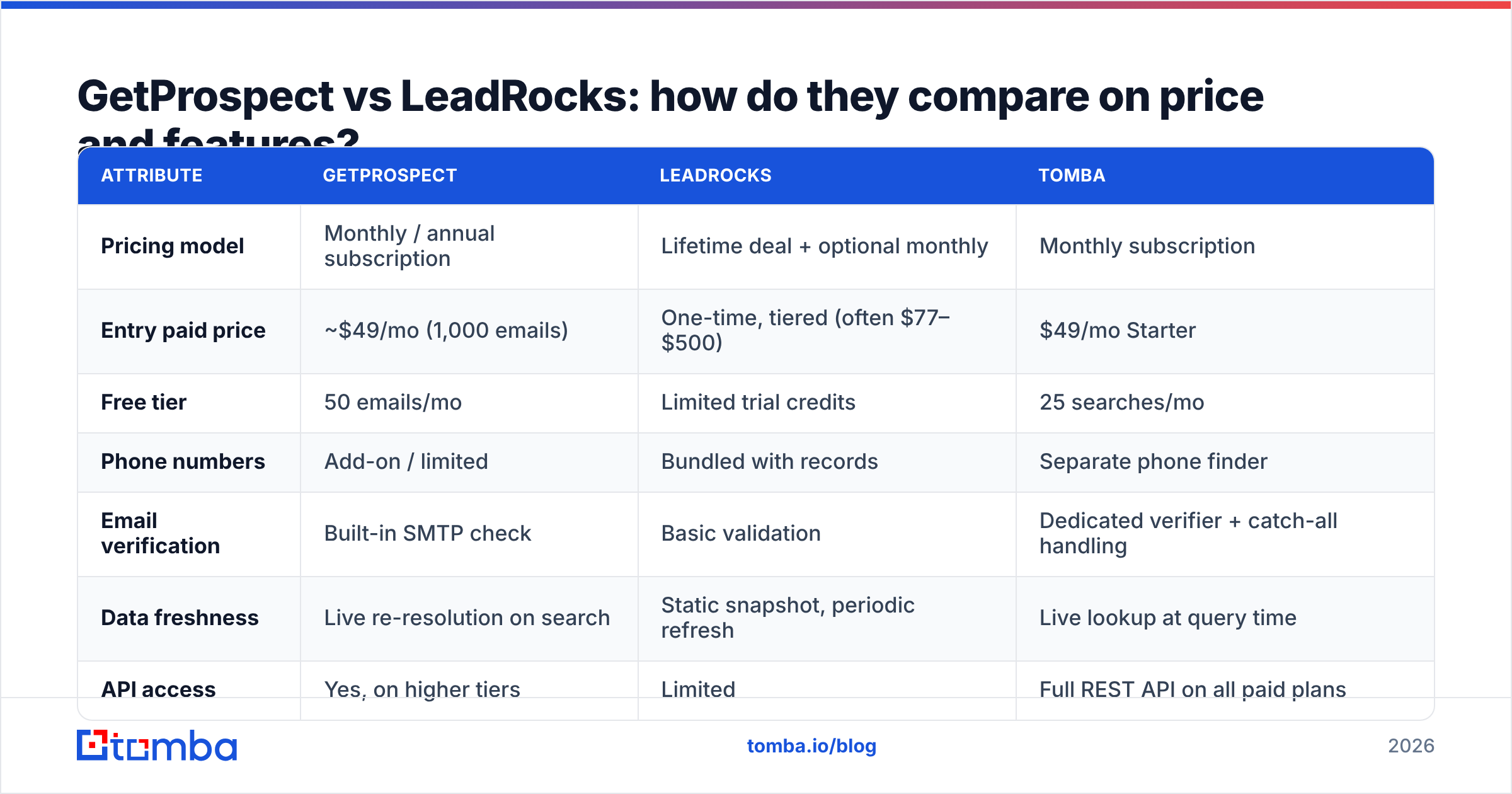
Here's the head-to-head on the attributes that actually change your cost per meeting. Pricing moves — check each vendor's page before you commit.
| Attribute | GetProspect | LeadRocks | Tomba |
|---|---|---|---|
| Pricing model | Monthly / annual subscription | Lifetime deal + optional monthly | Monthly subscription |
| Entry paid price | ~$49/mo (1,000 emails) | One-time, tiered (often $77–$500) | $49/mo Starter |
| Free tier | 50 emails/mo | Limited trial credits | 25 searches/mo |
| Phone numbers | Add-on / limited | Bundled with records | Separate phone finder |
| Email verification | Built-in SMTP check | Basic validation | Dedicated verifier + catch-all handling |
| Data freshness | Live re-resolution on search | Static snapshot, periodic refresh | Live lookup at query time |
| API access | Yes, on higher tiers | Limited | Full REST API on all paid plans |
| LinkedIn extension | Yes (Sales Navigator) | Yes | Yes |
| Bulk upload | CSV enrichment | CSV enrichment | Bulk finder + bulk verify |
| Best fit | Recurring list building | One-off vertical lists | API-first / dev-integrated workflows |
Read the "data freshness" row twice. It's the row that determines your bounce rate, and bounce rate is what determines whether your domain still lands in the inbox in month three.
Which one has better email accuracy?#
Neither publishes third-party audited match rates, so treat every number on either homepage as marketing. What you can evaluate is methodology, and the methodologies differ.
GetProspect resolves at query time. When you request an email, it constructs candidate patterns from the company's known format, then runs an SMTP handshake to see whether the mailbox accepts. That means the answer reflects the mail server's state today, not the state at crawl time.
LeadRocks serves from a stored index. The email was verified when it entered the database. Whether it's still valid depends entirely on how recently that row was touched — and lifetime-deal economics push refresh cycles longer, not shorter.
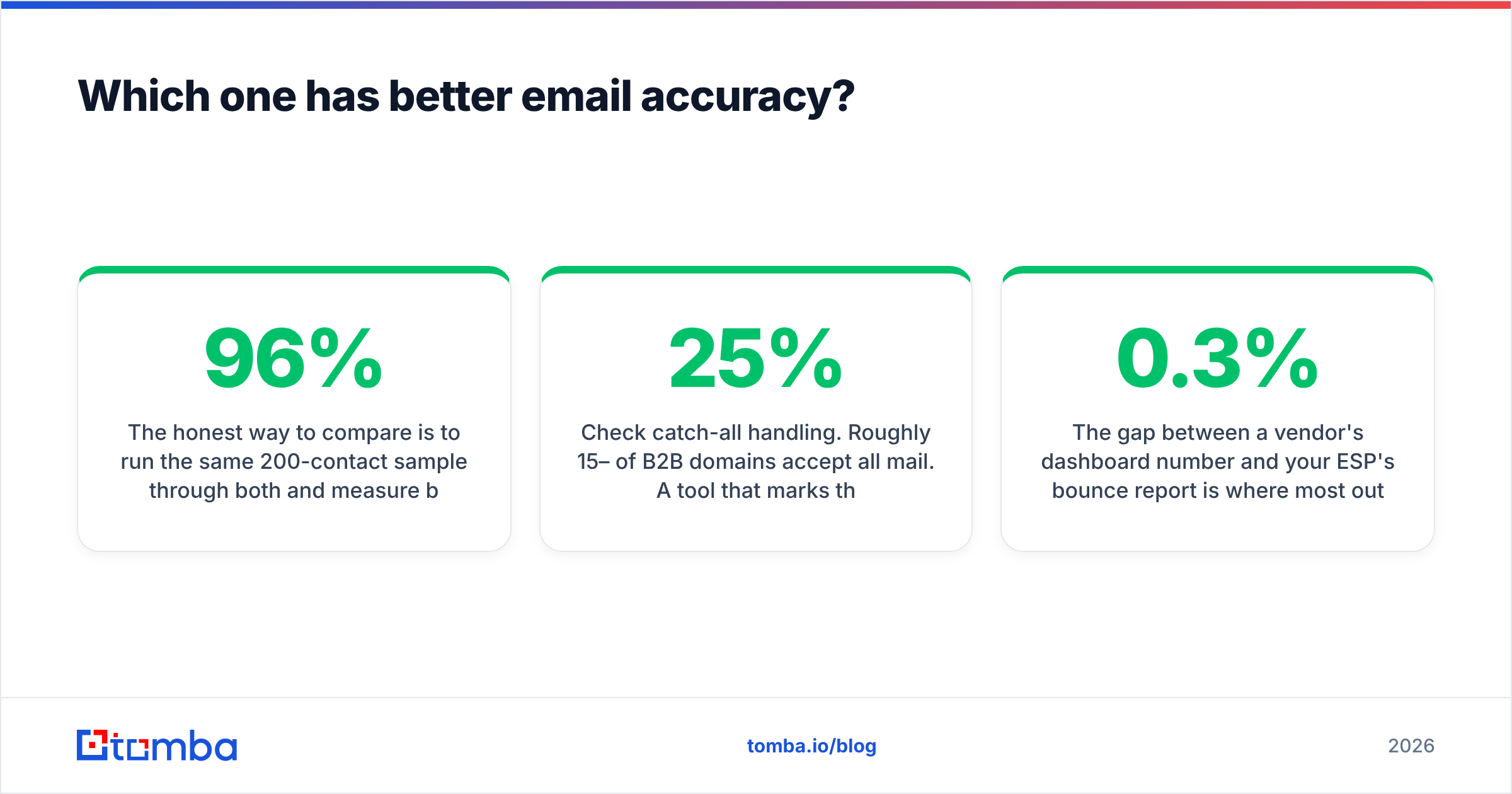
The honest way to compare is to run the same 200-contact sample through both and measure bounce rate on a real send. In informal tests across mixed-industry SaaS lists, live-resolution tools typically land in the 92–96% deliverable range, while static databases in a vertical they were built for can match that, and in verticals they weren't built for fall to 70–85%. Your mileage depends entirely on ICP overlap with the vendor's crawl.
Three checks before you trust any accuracy claim:
- Ask for the bounce guarantee in writing. "Verified" without a credit-refund policy is a word, not a commitment.
- Test a domain you already know. Pick a company where you personally know three employees' emails. If the tool misses two, it will miss two in your real list.
- Check catch-all handling. Roughly 15–25% of B2B domains accept all mail. A tool that marks these "valid" is inflating its own score. Run them through a dedicated catch-all verifier before sending.

The gap between a vendor's dashboard number and your ESP's bounce report is where most outbound programs quietly die. Google and Yahoo's bulk sender requirements put the hard-bounce ceiling at 0.3% — you don't get many chances.
Is a lifetime deal actually cheaper than a subscription?#
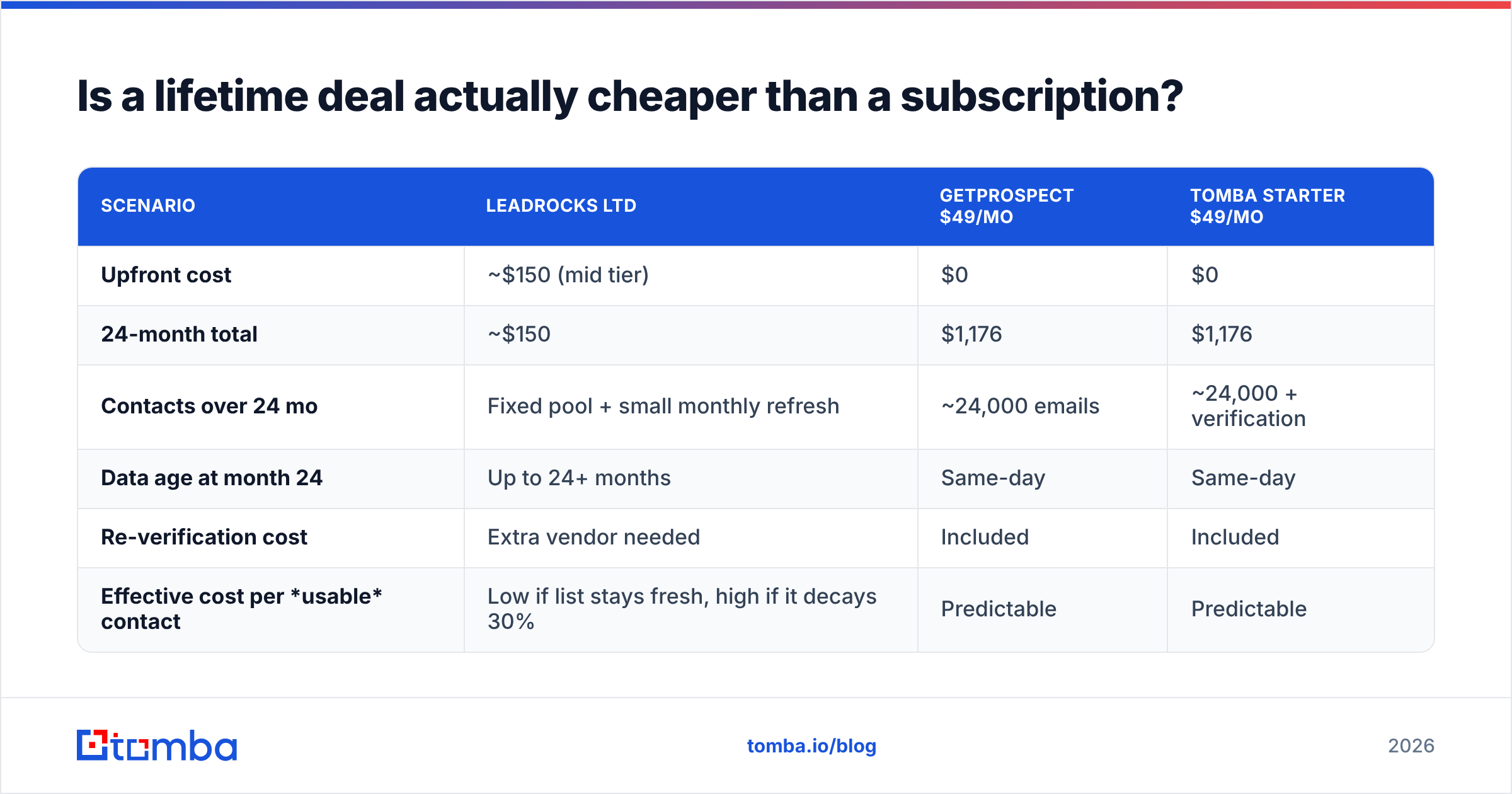
Do the arithmetic over 24 months, not over the checkout page.
| Scenario | LeadRocks LTD | GetProspect $49/mo | Tomba Starter $49/mo |
|---|---|---|---|
| Upfront cost | ~$150 (mid tier) | $0 | $0 |
| 24-month total | ~$150 | $1,176 | $1,176 |
| Contacts over 24 mo | Fixed pool + small monthly refresh | ~24,000 emails | ~24,000 + verification |
| Data age at month 24 | Up to 24+ months | Same-day | Same-day |
| Re-verification cost | Extra vendor needed | Included | Included |
| Effective cost per usable contact | Low if list stays fresh, high if it decays 30% | Predictable | Predictable |
The lifetime deal wins outright in one situation: you have a fixed, well-defined vertical, you're going to mail it once or twice, and you have a separate verifier. That's a real and common use case — agencies buying a niche list for a single campaign do this all the time.
The subscription wins when your ICP shifts, when you're mailing weekly, or when your deliverability depends on the data being true this morning. Add the cost of a third-party verifier to the LTD column and the gap narrows fast.
Worth noting: peers in this space price differently again. BookYourData sells pay-as-you-go credits with a bounce guarantee, which suits teams that want neither a subscription nor a lifetime commitment. It's a legitimate third shape of the same problem, and for one-off campaigns it often beats both models on total cost.
What do real users say on review sites?#
Ratings on G2 and Capterra tell a consistent story for each product.
GetProspect reviews cluster around: the LinkedIn extension is the main draw, the UI is clean, and the export flow is fast. Complaints skew toward credit consumption on failed searches and inconsistent coverage outside North America and Western Europe.
LeadRocks reviews cluster around: excellent value for the price, phone numbers are genuinely useful, and support is responsive. Complaints skew toward stale records, missing coverage in smaller companies, and filters that are coarser than a full-fledged prospecting platform's.
Both patterns are what you'd predict from the business models. The reviews aren't surprising — they're confirming the structural trade-off.
How should you choose between them?#
Answer these four questions honestly and the decision makes itself.
- How often do you build new lists? Monthly or more → subscription. Once or twice a year → lifetime deal.
- How stable is your ICP? If you're still testing verticals, a static database bought for one vertical becomes dead weight the moment you pivot.
- Do you need phone numbers? LeadRocks bundling them is a real cost saving versus buying dials separately. If you're running a calling motion, weight this heavily.
- What's your tolerance for bounces? If you're on a warmed domain with a long sales cycle, one bad send costs more than a year of subscription. Verify everything regardless of source.
A practical hybrid many teams land on: buy the cheap database for volume, then run every address through a live email verifier before it touches your sequencer. The verification cost is a fraction of a credit and it decouples your deliverability from your data vendor's refresh schedule.
Where does Tomba fit in this comparison?#
Tomba sits closer to GetProspect in philosophy — live resolution, not a stored snapshot — but it's built API-first, which changes who it suits.
If your workflow is "open a dashboard, filter, export CSV," GetProspect's UI is more mature for that motion. If your workflow is "our enrichment job runs nightly and needs to hit an endpoint," Tomba's email finder API is the shorter path, and it's available on every paid plan rather than gated behind an enterprise tier.
The concrete differences:
- Verification is a first-class product, not a bolt-on. The verifier, catch-all verifier, and bulk verify run independently of the finder, so you can clean a list you bought elsewhere — including a lifetime-deal list.
- Domain-level discovery. Domain search returns every known address at a company plus the detected email pattern, which is how you fill gaps a person-by-person lookup misses.
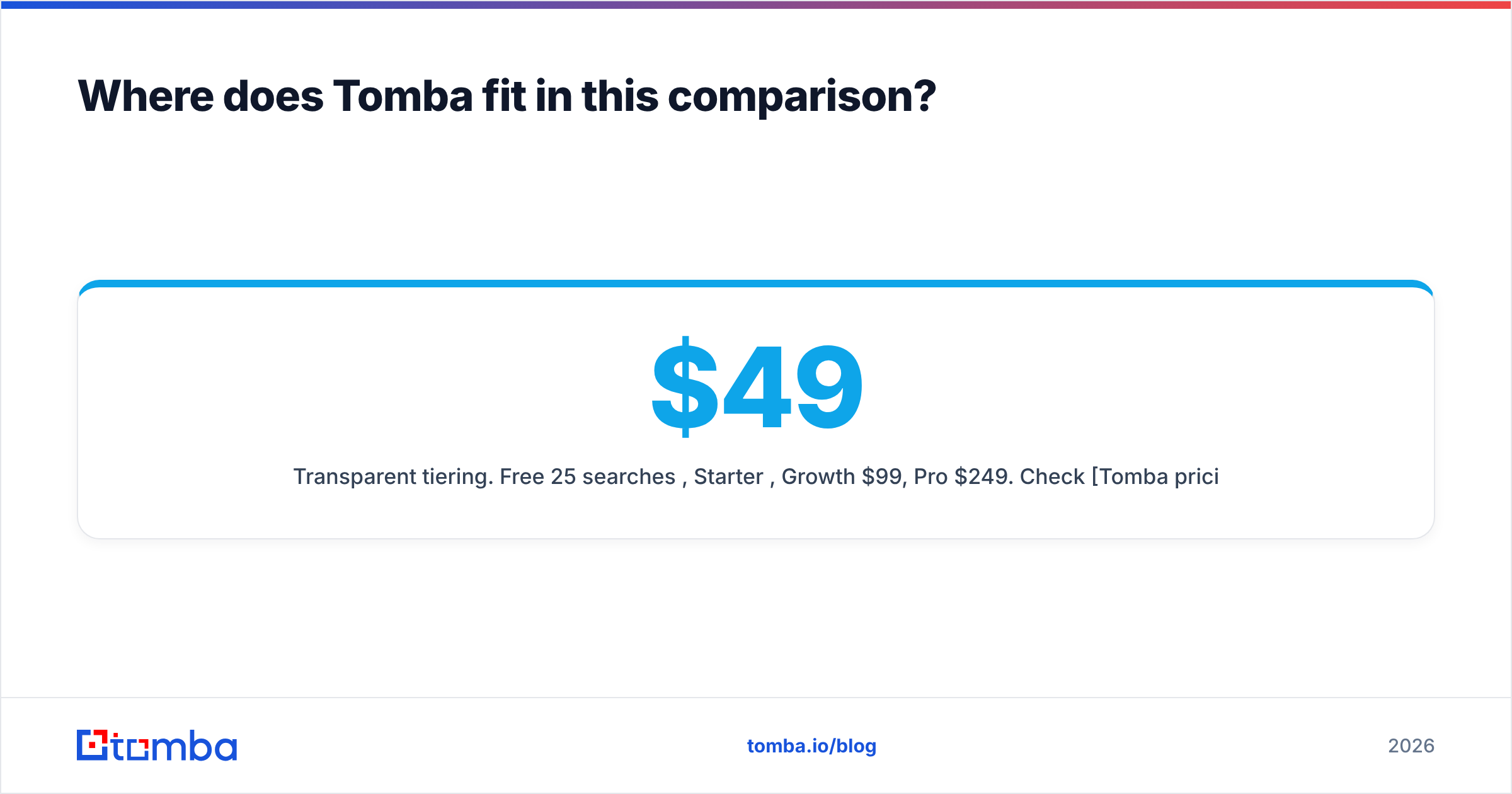
- Transparent tiering. Free 25 searches/mo, Starter $49, Growth $99, Pro $249. Check Tomba pricing for current credit allocations — there's no lifetime tier, deliberately, because a lifetime price implies a database that stops needing maintenance.
- Integration surface. Chrome extension, Google Sheets add-on, Excel, Zapier, HubSpot, Salesforce, plus a CLI and MCP server for agent-driven workflows.
Tomba isn't the answer if you want bundled phone numbers at LeadRocks' price point, or if you want a prospecting UI with the depth of a full sales-intelligence platform. It's the answer if you want the underlying data to be resolved at the moment you ask for it, and you want to reach it from code.
What's the verdict on GetProspect vs LeadRocks?#
Pick GetProspect if you build lists continuously, your ICP moves, and you want verification, enrichment, and CRM sync in one subscription. The LinkedIn extension is the reason most teams stay.
Pick LeadRocks if you have a defined vertical, a one-time campaign, and a calling motion that makes bundled phone numbers valuable. Budget separately for verification — the lifetime price only stays cheap if you don't have to buy the same data twice.
Pick neither if what you actually need is an accuracy layer under whatever list you already have. That's a different product category, and buying a second database won't fix a bounce problem.
The uncomfortable truth in this category: every vendor's headline accuracy number is measured on data they chose. Yours will be measured on data you chose. Test with 200 contacts and a real send before you commit budget in either direction.
Ready to stop guessing at bounce rates? Start with the Tomba Email Finder — 25 free searches a month, no card, live SMTP resolution on every lookup. Run your existing GetProspect or LeadRocks export through it and compare the deliverable count yourself. That side-by-side takes ten minutes and settles the argument better than any comparison post, including this one.
Related guides#
Ready to find emails that actually work?
Join 150,000+ professionals who stopped guessing and started sending. Free credits on signup — no credit card required.
Get the Tomba newsletter
Practical outbound tactics and product updates — once every two weeks.
About the author