GetProspect vs LeadsGorilla: Which Lead Tool Wins in 2026?
GetProspect finds verified B2B emails from a contact database. LeadsGorilla finds local businesses with weak online presence for agencies. Here is which one actually belongs in your stack — and when neither is the right buy.
GetProspect vs LeadsGorilla is an odd matchup. One tool finds work emails at companies. The other finds local shops with a weak online presence. This guide shows which one belongs in your pipeline.
TL;DR
- These two are not real competitors. GetProspect is a B2B contact database and email finder for outbound sales teams. LeadsGorilla is a local prospecting tool for agencies. Its users sell websites, SEO, and reputation work to plumbers, dentists, and restaurants.
- Pick GetProspect if your buyer is "VP of Engineering at a 200-person SaaS company." You need verified work emails at scale.
- Pick LeadsGorilla if your buyer is "a med spa in Phoenix with 2.9 stars and no Google Business Profile." Your pitch is a fixable audit.
- The pricing models differ completely. GetProspect is a monthly subscription with credit tiers. LeadsGorilla is usually sold as a one-time or lifetime license, with paid upsells on top.
- Data accuracy is the real cost. A cheap tool that returns 25% invalid emails costs more than a $49/mo tool at 95% deliverable. Bounces damage your sending domain, and that domain is hard to replace.
GetProspect vs LeadsGorilla: what does each tool do?#
Start here. Most GetProspect vs LeadsGorilla comparisons treat the two as swappable lead-gen products. They are not. They solve different problems for different buyers.
GetProspect is a B2B email finder and contact database. You search by company domain, job title, industry, headcount, or location. It returns names with work email addresses.
It also ships a LinkedIn Chrome extension that pulls contacts off search results and profiles. You get a built-in verifier and a simple list manager that acts like a stripped-down CRM. The buyer is an SDR, a founder doing outbound, or a growth marketer building a target list.
LeadsGorilla is a local-business lead finder for agencies. You search a city and a business category. It scrapes Google Maps and Facebook business pages.
Each business then gets a score. The score looks at whether the business has a website, whether the Google Business Profile is claimed, review count, star rating, and page setup. The tool also builds a branded PDF audit you can attach to a cold email — "here are 7 problems with your listing." Outreach templates come with it. The buyer is a freelancer or small agency selling local marketing.
So the honest framing is simple. One tool finds people at companies. The other finds companies with problems. The overlap is thin. They collide at one moment only: you have a target, and you need a real address for a decision-maker. Both tools show their limits right there.

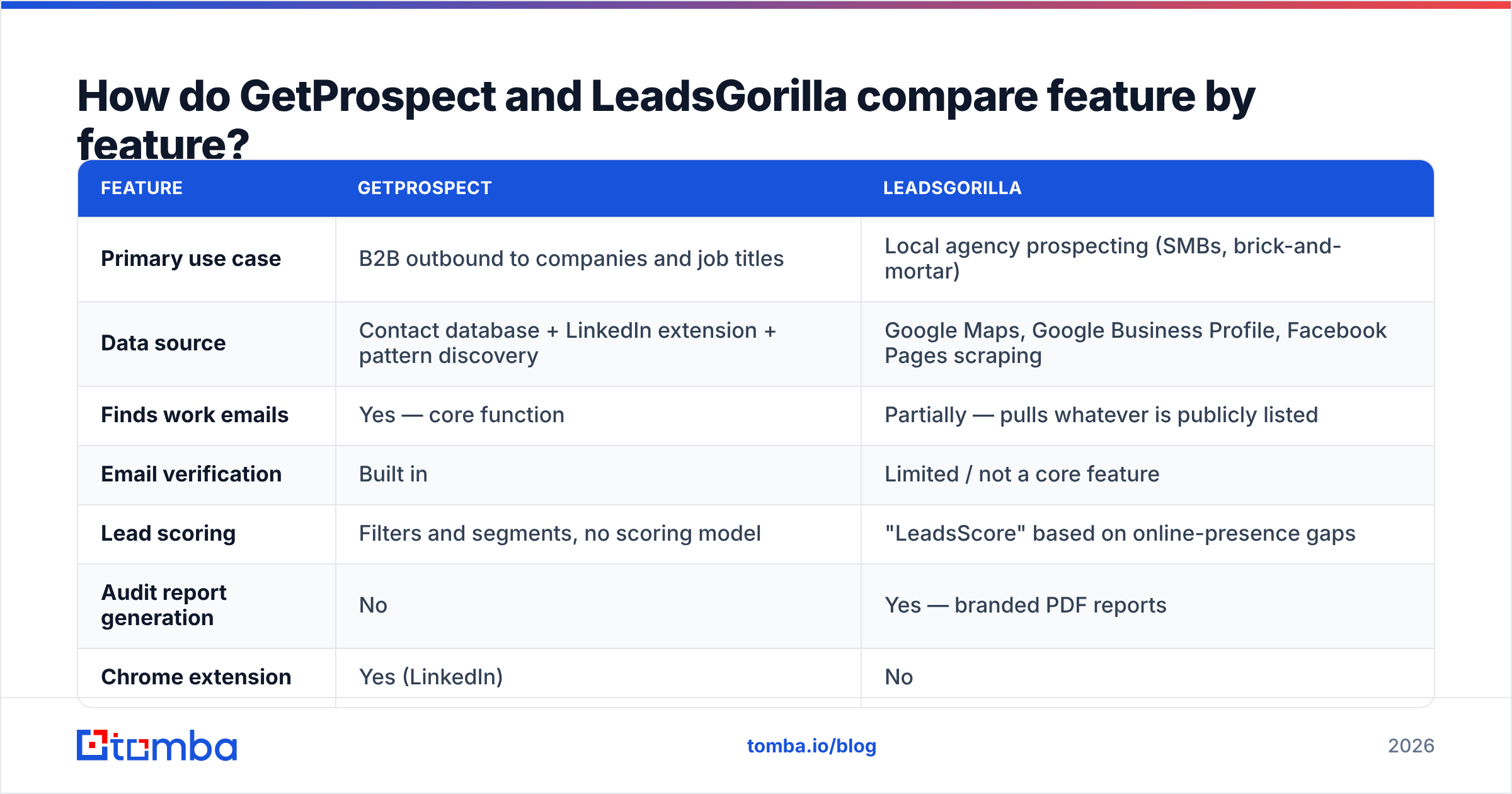
GetProspect vs LeadsGorilla: feature by feature#
| Feature | GetProspect | LeadsGorilla |
|---|---|---|
| Primary use case | B2B outbound to companies and job titles | Local agency prospecting (SMBs, brick-and-mortar) |
| Data source | Contact database + LinkedIn extension + pattern discovery | Google Maps, Google Business Profile, Facebook Pages scraping |
| Finds work emails | Yes — core function | Partially — pulls whatever is publicly listed |
| Email verification | Built in | Limited / not a core feature |
| Lead scoring | Filters and segments, no scoring model | "LeadsScore" based on online-presence gaps |
| Audit report generation | No | Yes — branded PDF reports |
| Chrome extension | Yes (LinkedIn) | No |
| API access | Yes, on higher tiers | Not meaningfully |
| Pricing model | Monthly SaaS subscription | One-time/lifetime license + upsells |
| Best-fit buyer | SDR, founder, growth marketer | Local marketing agency, freelancer |
Read the table row by row and the choice usually makes itself.
Say your target list is "companies in Series B fintech with a Head of Revenue Operations." LeadsGorilla has nothing for you. It does not index job titles at all.
Now say your list is "auto repair shops in Dallas without a website." Here GetProspect comes up short. Shops like that rarely have named staff on a corporate email domain, so B2B datasets barely cover them.
Which one fits your go-to-market motion?#
The GetProspect vs LeadsGorilla call comes down to five checks. If three or more point the same way, you have your answer.
- Is your buyer a person or a business? Need to reach a named human by job title? That is GetProspect territory. Need to find businesses with a visible problem and pitch the owner? That is LeadsGorilla.
- Do you sell to companies with corporate email domains? GetProspect coverage improves as company size grows. Below roughly 10 employees, coverage thins fast. That segment is LeadsGorilla's core market.
- Is your pitch diagnostic or value-based? LeadsGorilla's whole wedge is the audit PDF: "your listing is unclaimed, and here is what it costs you." If your pitch does not run on a hook like that, you are paying for a feature you will never open.
- Do you need volume or depth? Outbound SaaS teams burn thousands of contacts a month. They need bulk email finder throughput and an API. Agency owners work 50–200 local leads a month. They need better qualification, not more rows.
- How much does a bounce cost you? Sending from one domain that took months to warm? Then bad data is an existential risk, not a nuisance. That points you toward tools with real verification.
Here is the uncomfortable answer for many readers. You may need neither tool as your primary data source. Both have narrow sweet spots. Both leave you cleaning up the contact layer by hand.
GetProspect vs LeadsGorilla: how accurate is the data?#
Accuracy decides this comparison. It is also the hardest thing to judge from a pricing page.
GetProspect behaves like most database-plus-pattern tools. On mid-market and enterprise domains with common formats — first.last@, flast@ — hit rates and validity are strong.
Coverage weakens elsewhere. On small companies, freelancers, agencies, and non-English domains, you see more empty results. You also see more "risky" and catch-all verdicts passed through as fine. The built-in verifier catches syntax errors, disposable domains, and dead mailboxes. Like every SMTP-based verifier, it cannot resolve catch-all domains. That gap is why a dedicated catch-all verifier exists as its own product.
LeadsGorilla data is a different animal. It does not query a B2B contact graph. It scrapes public listings.
So you get whatever the business published: often info@, contact@, or a Gmail address on the Facebook page. Those addresses are real, and they do belong to the business. They are also shared inboxes. That means low reply rates and no personal hook. Listing data also goes stale. Businesses close, numbers change, and Facebook pages sit abandoned.
Three practical rules apply either way:
- Never trust a "valid" flag from the tool that sourced the address. Run a second pass with an independent email verifier before the list touches your sending domain.
- Segment catch-all results. Keep them out of your main send. Route them to a small test batch and watch how they bounce first.
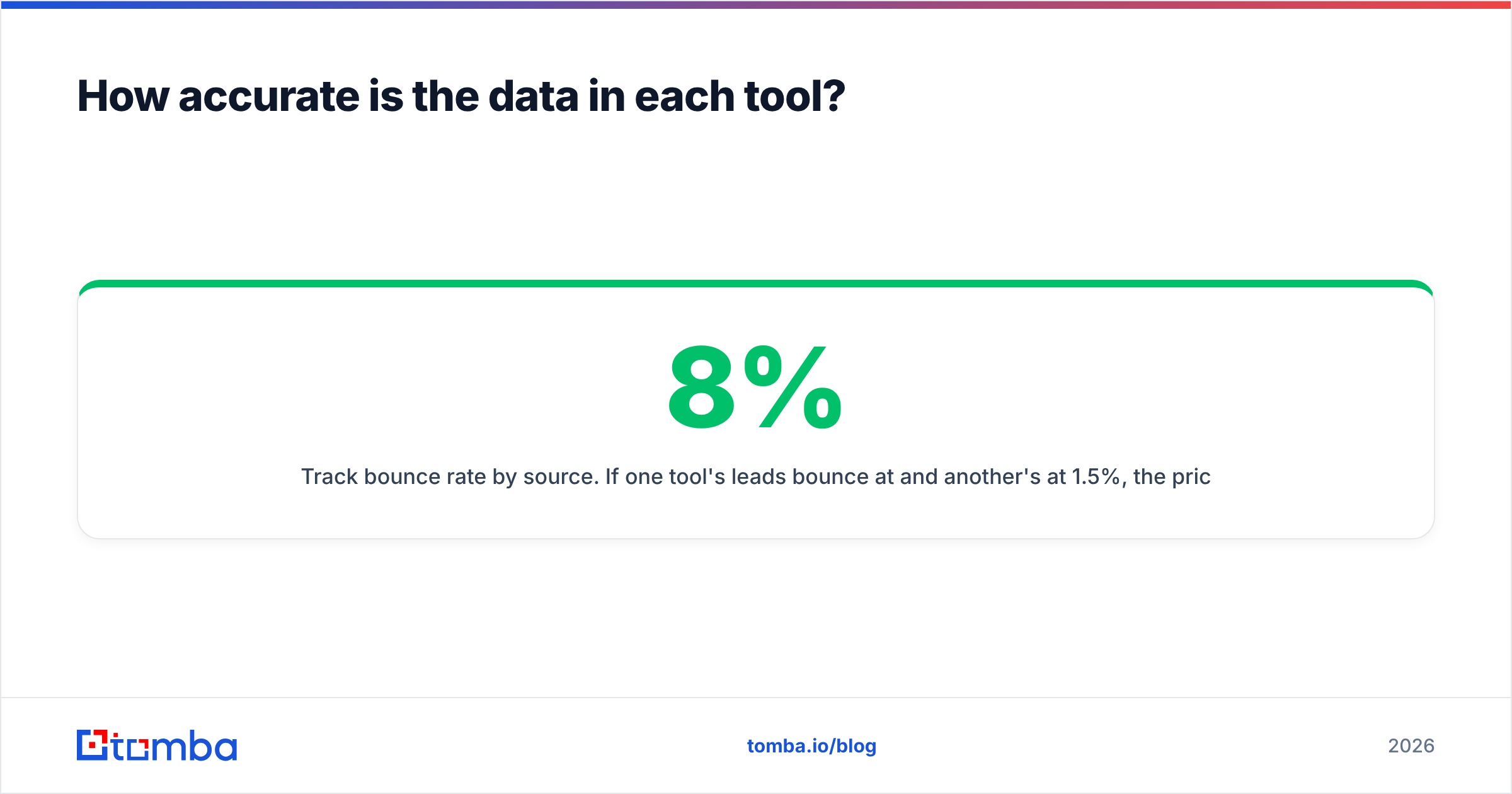
- Track bounce rate by source. If one tool bounces at 8% and another at 1.5%, the price gap stopped mattering three campaigns ago. Keep bounces under 2% and your sender reputation holds.
What does each one actually cost in 2026?#
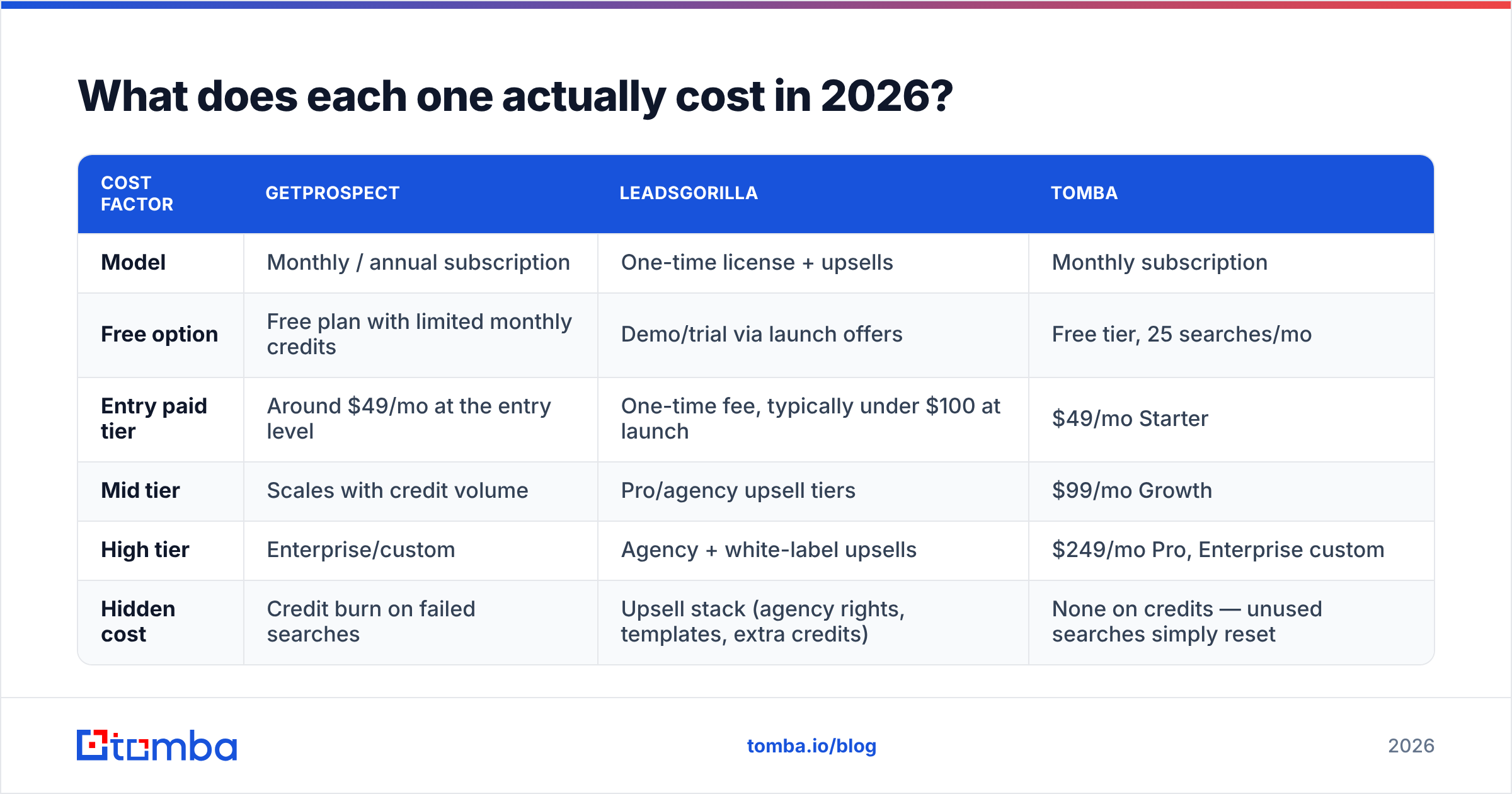
On money, GetProspect vs LeadsGorilla is not a like-for-like fight. The two use different billing models, so budget for them differently.
| Cost factor | GetProspect | LeadsGorilla | Tomba |
|---|---|---|---|
| Model | Monthly / annual subscription | One-time license + upsells | Monthly subscription |
| Free option | Free plan with limited monthly credits | Demo/trial via launch offers | Free tier, 25 searches/mo |
| Entry paid tier | Around $49/mo at the entry level | One-time fee, typically under $100 at launch | $49/mo Starter |
| Mid tier | Scales with credit volume | Pro/agency upsell tiers | $99/mo Growth |
| High tier | Enterprise/custom | Agency + white-label upsells | $249/mo Pro, Enterprise custom |
| Hidden cost | Credit burn on failed searches | Upsell stack (agency rights, templates, extra credits) | None on credits — unused searches simply reset |
Two warnings on the money side.
For GetProspect, watch how credits burn. Some email-finder plans charge per attempt. Others charge per returned result. On a hard ICP, the two produce very different real costs. Model your own hit rate before you sign an annual plan. Check current numbers on the vendor page too, since reviews on G2 trail pricing changes by months.
For LeadsGorilla, the sticker price is genuinely low. The launch-platform model sells a cheap core license first. The useful parts — agency and white-label rights, extra lead credits, done-for-you templates — sit behind later upsells. Budget the whole bundle, not the front-end price. Also ask what "lifetime" means when the scrapers need constant upkeep. That is the built-in risk of every one-time-payment data product.

Where does each tool break down?#
GetProspect's weak points:
- Coverage drops on very small businesses, sole traders, and regions outside its core Western markets.
- The LinkedIn extension inherits LinkedIn's own limits. Rate limiting and account risk sit with you, not the vendor.
- The list manager works for staging, but it is not a CRM. You still sync to HubSpot or Pipedrive.
- Phone data is thin. For multi-channel outreach, you add a separate phone finder.
LeadsGorilla's weak points:
- Contact data is generic.
info@inboxes are the norm, and owner emails are rare. - There is no job-title targeting at all. It is a company-level tool by design.
- Scraped listing data decays, and verification is too light to catch it.
- The audit-report hook works, but it is everywhere. In busy metros, owners have seen the same PDF from four other agencies this quarter.
- Support and roadmap continuity matter more with lifetime licenses than with subscription SaaS.
None of this is disqualifying. These are simply the constraints to price in before you buy.
Can you use both — and where does Tomba fit?#
Yes. For some agencies the combination is the right stack. Use LeadsGorilla to find and qualify local businesses worth pitching. Then use a dedicated email finder to get a real person's address instead of the listed inbox.
That second step is where local outbound quietly fails. The audit PDF is strong, but it lands in an unwatched info@ mailbox and nobody opens it.
That is the gap Tomba fills in either workflow:
- Working from a domain list (LeadsGorilla export, scraped listings, exhibitor list): run domain search to pull every address on the domain plus the company's email pattern. Then filter to the owner or marketing lead.
- Working from names and companies (GetProspect export, LinkedIn list, CRM gaps): the Tomba Email Finder turns name plus domain into a verified address. Enrichment fills in the rest of the record.
- Working at volume: the Tomba API and bulk tools handle list-level jobs. Sheets, Excel, and Airtable add-ons cover the no-code path.
- Working with dirty inherited data: verification and catch-all handling run as their own pass, so you can clean a list you did not source.
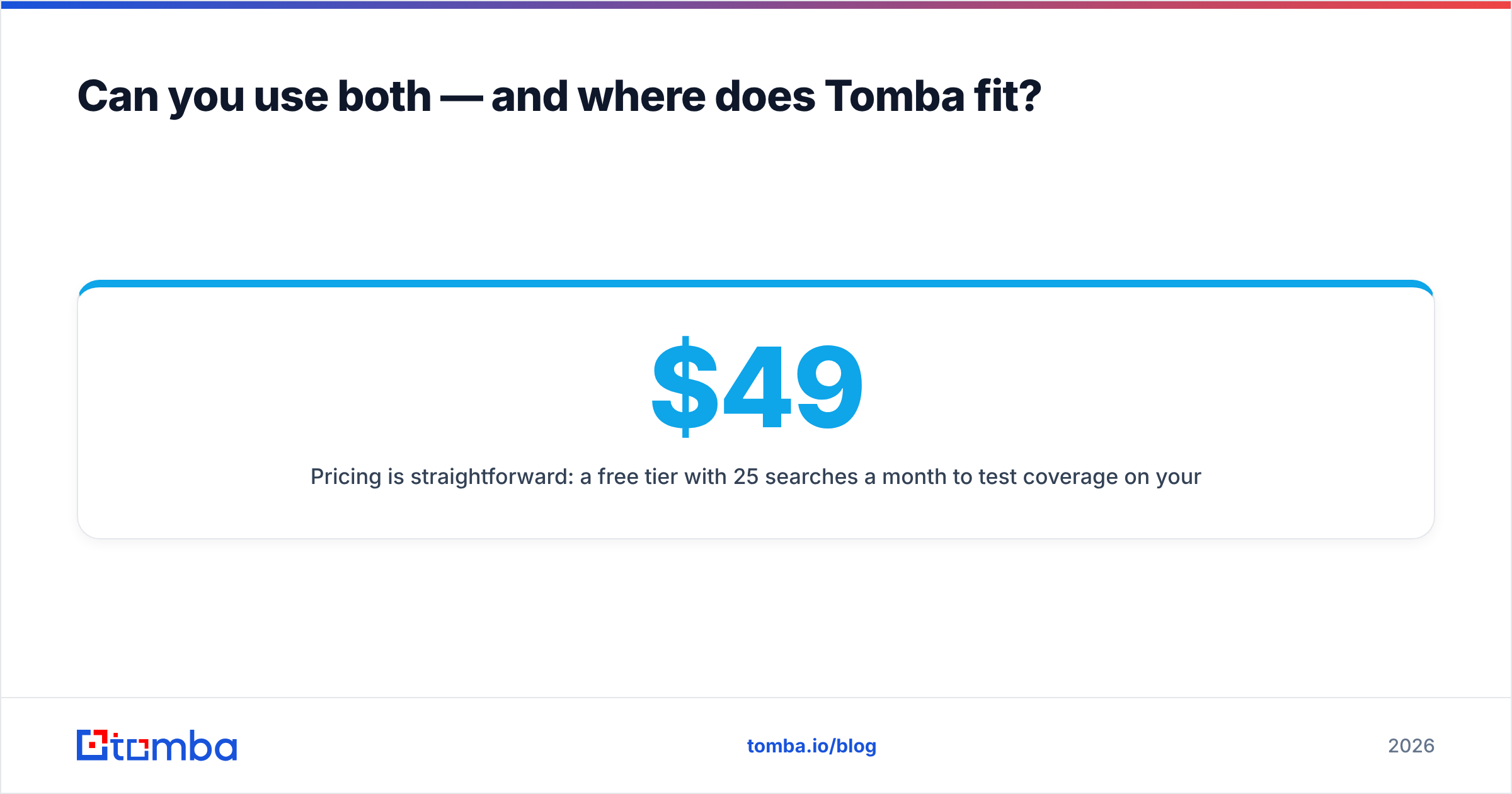
Pricing is simple. Start free with 25 searches a month and test coverage on your own ICP. Paid plans run $49/mo Starter, $99/mo Growth, and $249/mo Pro, with Enterprise custom. Full details sit on the Tomba pricing page.
Test on your own list, not a vendor demo. Average accuracy claims mean nothing if your ICP sits where a database is thin. Run 50 of your target accounts through each tool and compare.
So which one wins in 2026?#
GetProspect vs LeadsGorilla has no single winner, because the real question is your ICP.
- Selling B2B software or services to a named decision-maker at a company with a corporate domain? GetProspect is the relevant tool of the two. Benchmark it against dedicated email finders on your own list first.
- Selling web design, SEO, ads, or reputation management to local shops? LeadsGorilla is built for that motion. Nothing in GetProspect replaces the audit-report hook.
- Doing both, or still unsure? Start with the data layer. Sourcing tools come and go. A clean, verified contact list survives every stack change you make.
Is the contact itself your bottleneck? You know who to reach and you just need a deliverable address. Start with the Tomba Email Finder. Run your hardest 25 accounts on the free tier, check the bounce rate, and let the numbers pick your stack.
Related guides#
Ready to find emails that actually work?
Join 150,000+ professionals who stopped guessing and started sending. Free credits on signup — no credit card required.
Get the Tomba newsletter
Practical outbound tactics and product updates — once every two weeks.
About the author