GetProspect vs ListKit (2026): Which B2B Data Tool Wins?
GetProspect sells email finding by the credit. ListKit sells ready-made verified lists. We compared pricing, data accuracy, workflow fit, and where each one quietly costs you more than the sticker price.
GetProspect vs ListKit comes down to one choice: build the list yourself, or buy it ready-made. Both sell B2B contact data. They just sell it in very different shapes.
TL;DR
- GetProspect is a credit-based email finder plus a light CRM layer. You search, filter, export, and pay per verified contact. Good if you want control over who you pull.
- ListKit sells pre-built, pre-verified B2B lists with intent signals baked in and pushes them straight into your sequencer. Good if you want lists without doing the list-building.
- Price shape differs more than price level. GetProspect starts around $49/mo for a few thousand credits; ListKit's entry tiers run higher and are sold as monthly lead allotments, not searches.
- The real cost is bounce rate. Any provider quoting "95%+ deliverable" is quoting a lab number. Re-verify every list before it touches your sending domain — that step matters more than which vendor you picked.
Our pick: GetProspect if you already know your ICP and want granular control. ListKit if you're a small team that wants leads handed to you. Want raw find-and-verify accuracy at API level with a cheaper floor? A dedicated email finder like Tomba is the better primitive under either.
What are GetProspect and ListKit, actually?#
They solve the same end problem — get contactable B2B leads into your outbound stack — but from opposite directions.
GetProspect is a prospecting database and email finder. You define filters (job title, industry, headcount, tech stack, geography), the platform returns matching people, and you spend credits to unlock verified emails. It ships a Chrome extension for LinkedIn, a lightweight built-in CRM for organizing lists, and an API. The mental model is a search engine: you drive, it retrieves.
ListKit is a done-for-you list product. It grew out of the cold-email agency world, and it shows. The pitch: skip list-building entirely. You pick your filters once, then receive verified, triple-checked contacts with intent data attached. They arrive ready to push into Instantly, Smartlead, or Clay. The mental model is a subscription box: you set preferences, leads arrive.
That difference drives everything else — pricing shape, who each fits, and where each one leaks money.
Think of it like buying groceries. GetProspect is the supermarket: you walk the aisles, pick exactly what you want, pay per item. ListKit is a meal kit: someone else shopped, portioned, and delivered — convenient, but you eat what's in the box.
GetProspect vs ListKit: how do they compare head-to-head?#
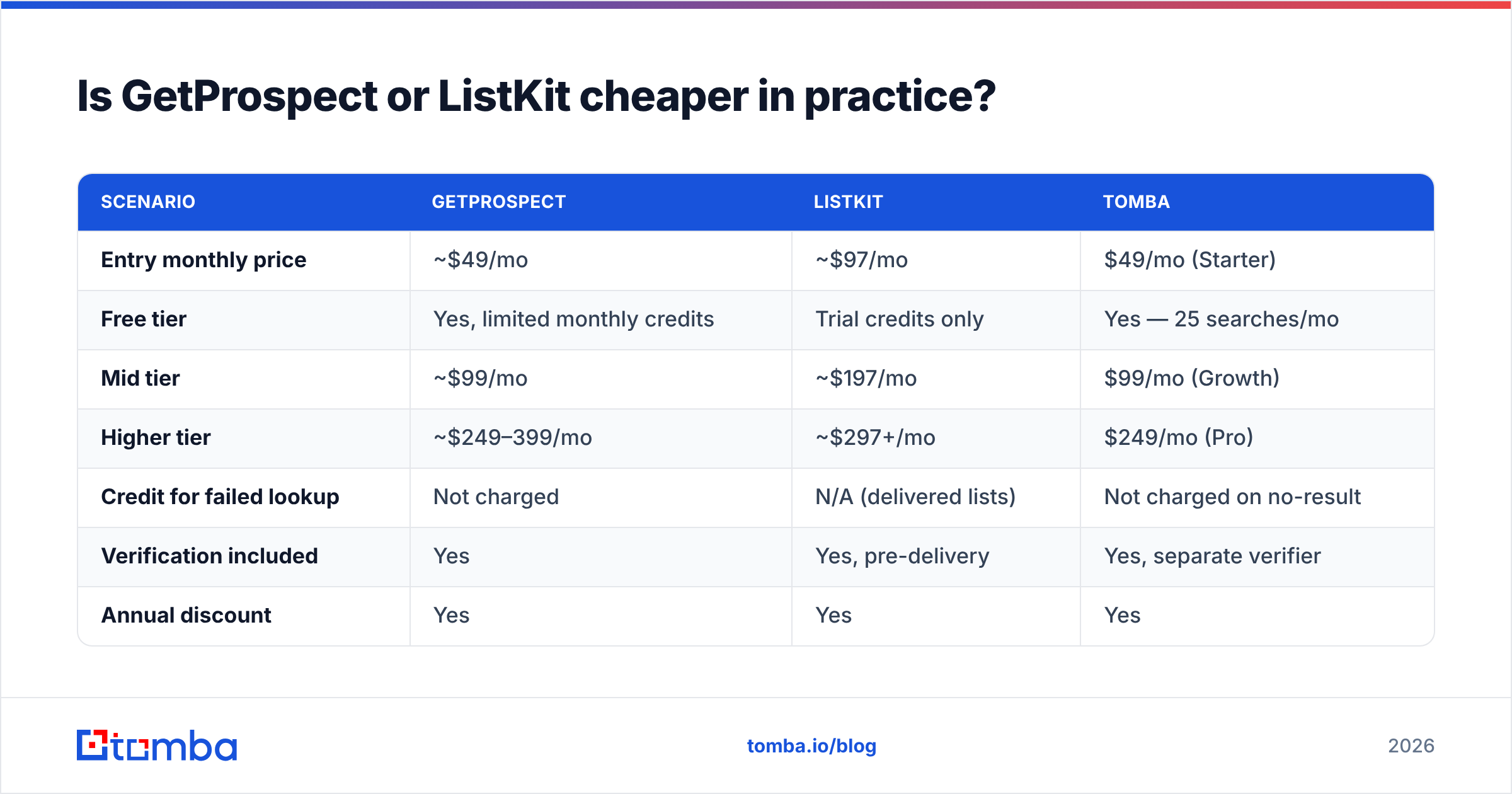
| Dimension | GetProspect | ListKit |
|---|---|---|
| Core model | Credit-based search + email finder | Subscription list delivery |
| Entry price | ~$49/mo (approx. 1,000 credits) | ~$97/mo entry tier, lead-allotment based |
| Free option | Free plan with limited monthly credits | Trial credits, no true free tier |
| Database size (vendor claim) | 200M+ contacts | 500M+ contacts (via partners) |
| Verification | Built-in verifier, real-time on export | Triple-verified before delivery |
| Intent data | No | Yes — buyer-intent signals included |
| Phone numbers | Limited | Yes, on higher tiers |
| CRM / list management | Built-in lightweight CRM | No CRM; export-first |
| Native LinkedIn extension | Yes | Limited |
| API access | Yes | Limited / higher tiers |
| Sequencer integrations | Zapier, HubSpot, Pipedrive, others | Instantly, Smartlead, Clay (native push) |
| Best for | Teams that want to control targeting | Teams that want lists handed over |
Two things jump out of that table.
First, GetProspect gives you the controls, ListKit gives you the output. If your ICP shifts weekly, credits and filters beat a delivered list. If your ICP has been stable for a year, delivery wins on time saved.
First-party control matters more than most buyers assume. G2 reviews of both categories repeatedly flag the same complaint: not "the data was bad" but "the data didn't match my segment." That is a targeting problem, not a database problem. Only one of these tools lets you fix it yourself in the UI.
Second, intent data is ListKit's genuine differentiator. Whether that intent signal is worth the premium depends entirely on your ACV. At a $500 deal size, intent is noise you're paying for. At $50K, one correctly-timed account pays for the year.

Which one has better data accuracy?#
Neither vendor's marketing number should decide this for you.
Both quote deliverability in the 95–98% range. Every provider in this category does. Those figures come from internal samples run under easy conditions. They usually skip catch-all domains — the exact records that wreck real campaigns.
Here's what actually determines the bounce rate you'll see:
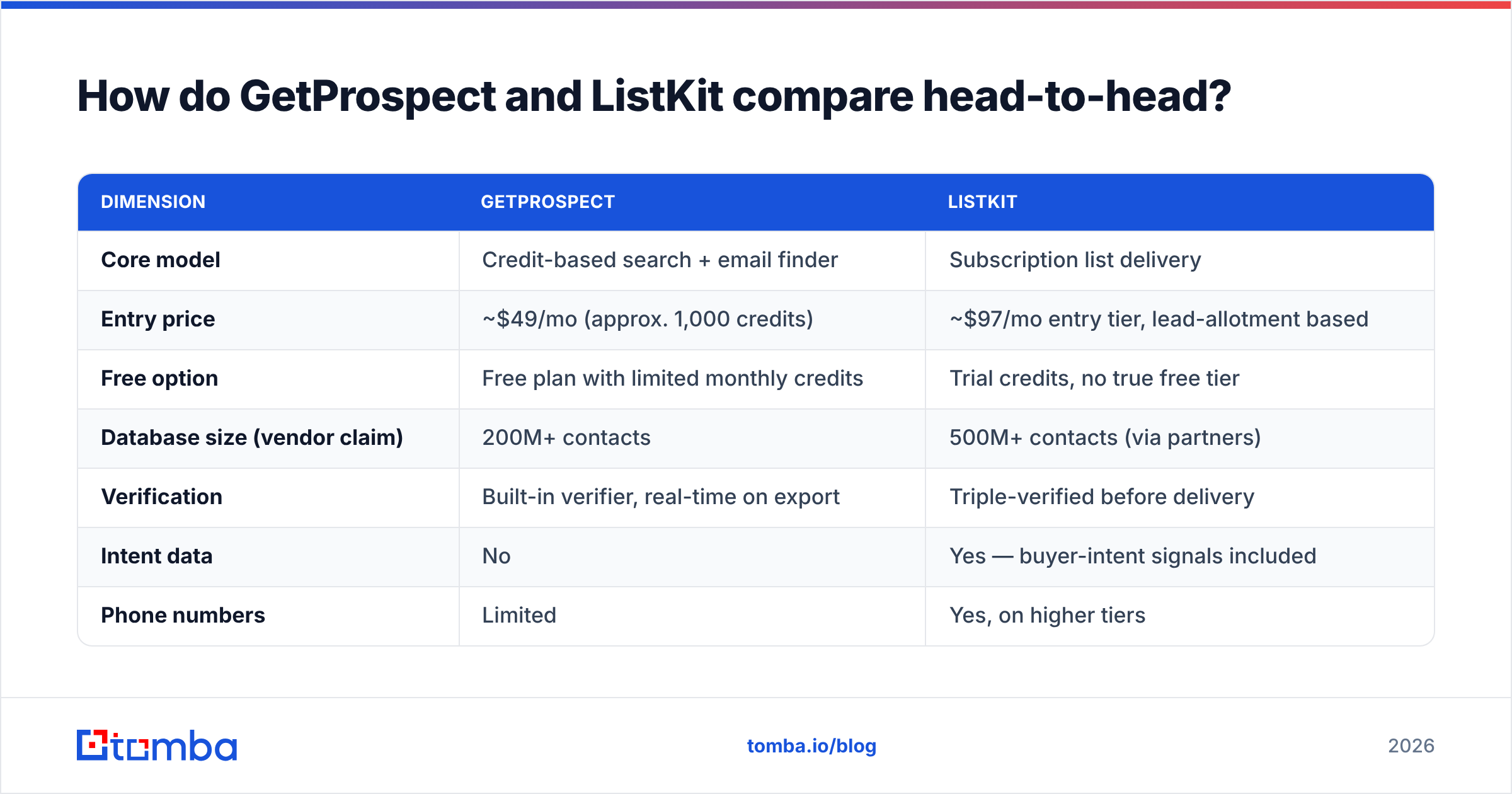
- Recency of the record. A verified-in-2023 email at a company with 30% annual churn is a coin flip today. Ask when the record was last re-checked, not when it was verified.
- Catch-all handling. Most databases mark catch-all domains "valid" because SMTP can't prove otherwise. They're roughly a third of B2B domains. Run them through a dedicated catch-all verifier before sending, or accept a bounce lottery.
- Role-based and shared inboxes.
info@,sales@,team@— technically deliverable, commercially useless, and they inflate a vendor's "valid" percentage. - Segment coverage. Both tools are strongest in US/EU SaaS and tech. Coverage thins fast for manufacturing, LATAM, APAC mid-market, and anything below 20 employees.
- Verification timing. ListKit verifies before delivery. If your list sits for three weeks before you send, that verification is stale. Re-verify at send time.
The practical move regardless of vendor: pull 200 records, run them through an independent email verifier, and compare the real valid rate to what the vendor promised. That 20-minute test tells you more than a month of review-reading.
If the independent check comes back well below the claim, you've learned something important about the vendor. You've also protected your sender reputation, which is the asset that takes months to rebuild.
Is GetProspect or ListKit cheaper in practice?#
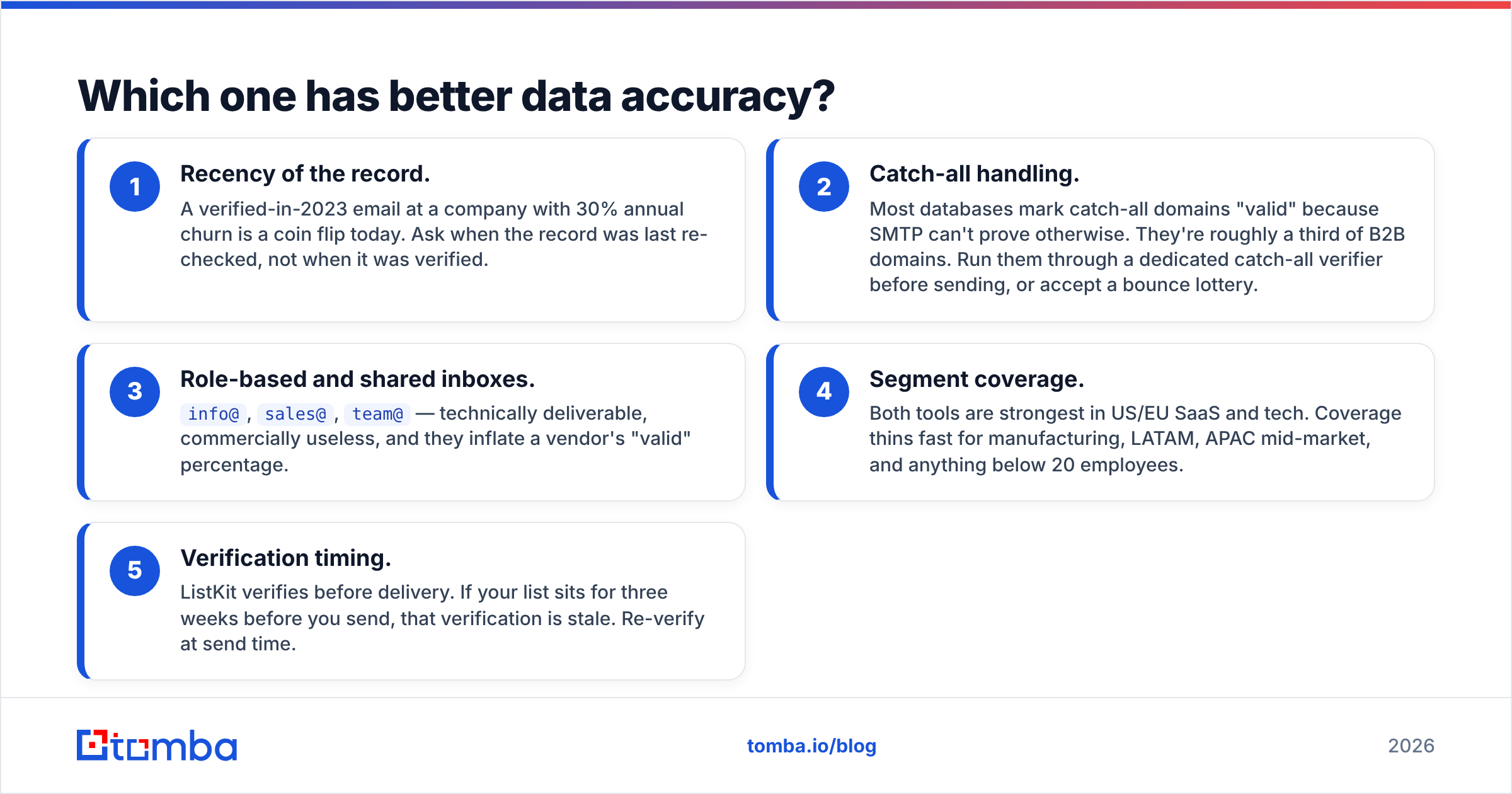
Sticker price is misleading because the units differ. GetProspect sells credits; ListKit sells leads-per-month. Normalize to cost-per-usable-contact.
| Scenario | GetProspect | ListKit | Tomba |
|---|---|---|---|
| Entry monthly price | ~$49/mo | ~$97/mo | $49/mo (Starter) |
| Free tier | Yes, limited monthly credits | Trial credits only | Yes — 25 searches/mo |
| Mid tier | ~$99/mo | ~$197/mo | $99/mo (Growth) |
| Higher tier | ~$249–399/mo | ~$297+/mo | $249/mo (Pro) |
| Credit for failed lookup | Not charged | N/A (delivered lists) | Not charged on no-result |
| Verification included | Yes | Yes, pre-delivery | Yes, separate verifier |
| Annual discount | Yes | Yes | Yes |
| Overage handling | Buy more credits | Upgrade tier | Buy more credits |
Pricing on both platforms moves, so treat these as shape-not-gospel and check the vendor pages before you buy. What doesn't move is the structural difference:
- GetProspect punishes broad, sloppy searching. Every unlock costs a credit. Loose filters burn budget fast.
- ListKit punishes narrow ICPs. If your addressable segment is 4,000 companies, a monthly lead allotment will exhaust your entire market in two months, then start recycling.
A third pattern is worth naming. Many teams run a cheap, high-volume finder as the base layer. They then reserve a premium product for the accounts that matter. Tomba sits in that base-layer slot. The Tomba pricing ladder starts at a free tier with 25 searches, then $49/mo Starter, $99/mo Growth, and $249/mo Pro. There's also an email finder API, so the lookup happens inside your own enrichment pipeline rather than in someone's UI.
Worth noting: neither GetProspect nor ListKit is a bad product. They're differently-shaped. The buying mistake is picking on price when the shapes don't match your motion.

Who should pick GetProspect?#
Pick GetProspect if most of these are true:
- Your ICP changes. You test segments, kill them, test new ones. Filter control beats delivery.
- You want a CRM-lite workflow. The built-in list management means you don't need a separate tool to organize prospects before they hit your sequencer.
- You live on LinkedIn. The Chrome extension pulls contacts while you browse, which is how a lot of AE-led prospecting actually happens.
- You need a low floor. The free plan plus a $49 entry tier makes it cheap to validate whether the data covers your market before committing.
- You want auditability. You can see exactly which record came from which search — helpful when a campaign underperforms and you're diagnosing whether it was targeting or copy.
Where it frustrates people: coverage gaps outside core tech/SaaS segments, and the fact that you're doing the list-building labor yourself. That labor is real. Budget an hour a week minimum.
Who should pick ListKit?#
Pick ListKit if most of these are true:
- Your bottleneck is time, not targeting. You know exactly who to sell to and just need the rows.
- You run agency-style volume. ListKit's DNA is cold-email agencies; the native pushes into Instantly and Smartlead reflect that.
- Intent signals matter at your ACV. Mid-market and enterprise deals where timing changes the outcome.
- You don't want to manage a data stack. One subscription, leads arrive, done.
- Your ICP is broad enough that a monthly allotment won't exhaust it in a quarter.
Where it frustrates people: less granular control, higher floor price, and the recycling problem when your addressable market is small. You also inherit whatever the underlying data partners have — you can't reach in and fix a bad segment yourself.
What about the alternatives to both?#
The GetProspect vs ListKit framing assumes you need a full platform. Often you don't — you need one reliable primitive plugged into a stack you already have.
| Need | Best fit |
|---|---|
| Find emails at scale via API | Tomba, Findymail |
| Ready-made verified lists | ListKit, BookYourData |
| All-in-one prospecting + sequencing | Apollo, Amplemarket |
| Pure verification (no finding) | ZeroBounce, Tomba Email Verifier |
| LinkedIn-native extraction | Wiza, Tomba LinkedIn Finder |
| Intent-led account targeting | ListKit, 6sense |
BookYourData deserves a mention alongside ListKit — it's a strong pay-as-you-go option if you want purchased lists without a monthly subscription commitment, with a similar accuracy-guarantee posture. For teams that buy lists irregularly, the non-subscription model can be the deciding factor.
For the build-your-own-stack route, the pattern that works: a finder API for discovery, a verifier for hygiene, a sequencer for sending. Tomba covers the first two — domain search for mapping every contactable person at a target company, bulk email finder for list-scale runs, and native pushes through integrations into HubSpot, Pipedrive, Sheets, and Zapier. You keep sequencing wherever you already are.
This route costs less and gives you more control, but it costs you setup time. If your team is two people and one of them is the founder, buy the packaged product. If you have a RevOps function, build the stack.
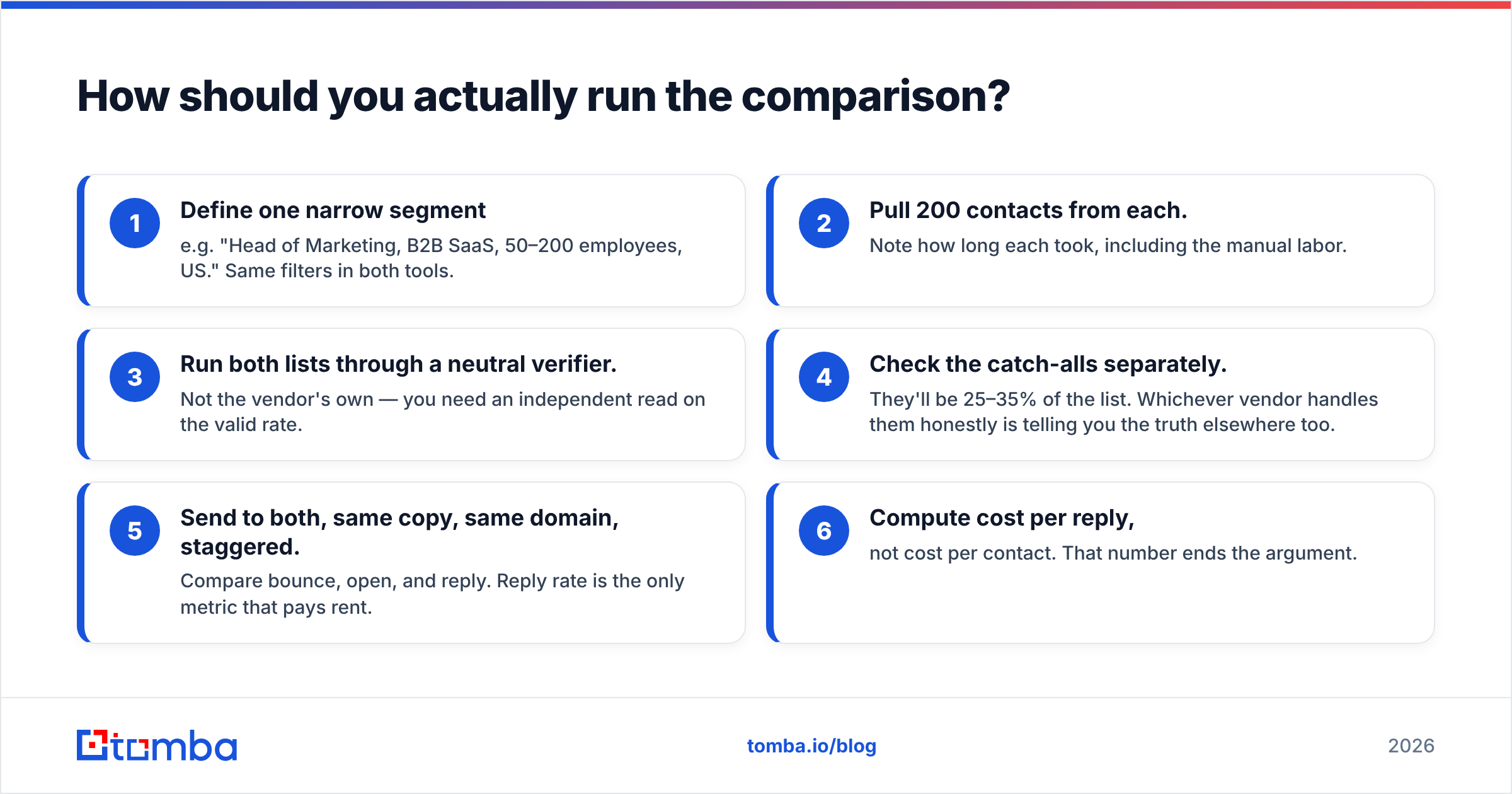
How should you actually run the comparison?#
Don't decide from review sites. Run a 200-record bake-off, same week, same ICP:
- Define one narrow segment — e.g. "Head of Marketing, B2B SaaS, 50–200 employees, US." Same filters in both tools.
- Pull 200 contacts from each. Note how long each took, including the manual labor.
- Run both lists through a neutral verifier. Not the vendor's own — you need an independent read on the valid rate.
- Check the catch-alls separately. They'll be 25–35% of the list. Whichever vendor handles them honestly is telling you the truth elsewhere too.
- Send to both, same copy, same domain, staggered. Compare bounce, open, and reply. Reply rate is the only metric that pays rent.
- Compute cost per reply, not cost per contact. That number ends the argument.
Most teams find the gap between vendors is smaller than the gap between a well-targeted small list and a badly-targeted big one. Data quality is table stakes; targeting is the variable you control.
The verdict#
GetProspect wins on control, price floor, and workflow flexibility. If you're a founder or a small sales team that wants to steer your own targeting and prove ROI cheaply before scaling, start there.
ListKit wins on time saved and intent signals. If you're running high-volume cold email, already know your ICP cold, and value hours over granularity, the premium is defensible.
Neither wins if your real problem is the plumbing. Maybe you're enriching CRM records, running lookups inside a script, or feeding an AI SDR workflow. Then you don't need a prospecting UI. You need a fast, accurate lookup endpoint that doesn't charge you for misses.
That's the gap the Tomba Email Finder fills. Start on the free tier with 25 searches a month. Test it against whatever list you pay for now, and see how the valid rate compares before you renew anything. If it holds up, $49/mo Starter and a working API beat a subscription you're only half-using.
Related guides#
Ready to find emails that actually work?
Join 150,000+ professionals who stopped guessing and started sending. Free credits on signup — no credit card required.
Get the Tomba newsletter
Practical outbound tactics and product updates — once every two weeks.
About the author