GetProspect vs Mailshunt (2026): Which Email Finder Wins?
GetProspect and Mailshunt both promise verified B2B emails at a low price. We break down match rates, credit math, verification depth, and the real cost per usable contact so you can pick without wasting a trial.
TL;DR
- GetProspect is a lead-database-first tool: you search a B2B contact index by filters (title, industry, headcount), export lists, and get emails attached. Strongest when you don't already know who you're targeting.
- Mailshunt is a lighter, cheaper utility bundle: email finder, verifier, and basic sending. Strongest when you already have domains or names and just need addresses cheaply.
- Neither publishes an independently audited match rate. Treat both vendors' "98% accuracy" claims as marketing until you run your own list through them.
- Cost per usable email matters more than cost per credit. A $19/mo plan that returns 40% unverified addresses is more expensive than a $49/mo plan that returns 92% deliverable ones.
- If you need API-grade reliability, catch-all handling, and one vendor for finding and verifying, a dedicated provider like Tomba usually beats both on total cost of ownership.
What are GetProspect and Mailshunt?#
They solve the same surface problem — "give me this person's work email" — from opposite directions.
GetProspect is built around a searchable B2B contact database plus a LinkedIn Chrome extension. You filter by job title, company size, location, and technology, then export a list with emails appended. It also does bulk enrichment from a CSV of names and domains. The pitch is discovery: you don't need a list, you build one inside the product.
Mailshunt takes the toolbox approach. It bundles an email finder, an email verifier, and cold-email sending under one cheap subscription. There's no meaningful prospecting database behind it — you bring the names and domains, it resolves and validates them. The pitch is price: get the utility functions without paying database-tier money.
That difference drives almost every trade-off below. GetProspect charges you for knowing who exists. Mailshunt charges you for resolving who you already found.
How do GetProspect and Mailshunt compare on features?#
Here's the head-to-head on the attributes that actually change your workflow. Vendor pricing moves — confirm on their pages before you commit annually.
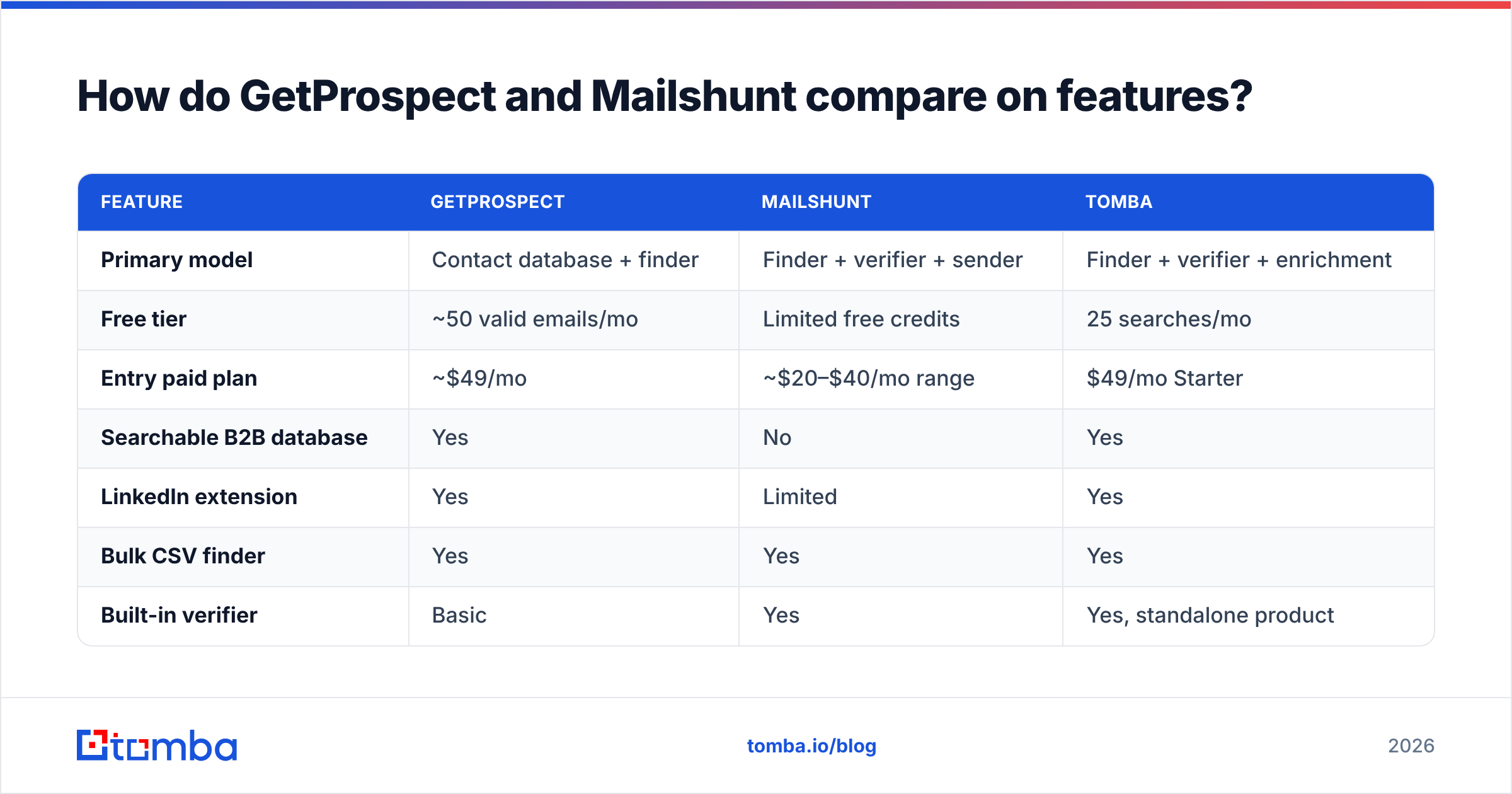
| Feature | GetProspect | Mailshunt | Tomba |
|---|---|---|---|
| Primary model | Contact database + finder | Finder + verifier + sender | Finder + verifier + enrichment |
| Free tier | ~50 valid emails/mo | Limited free credits | 25 searches/mo |
| Entry paid plan | ~$49/mo | ~$20–$40/mo range | $49/mo Starter |
| Searchable B2B database | Yes | No | Yes |
| LinkedIn extension | Yes | Limited | Yes |
| Bulk CSV finder | Yes | Yes | Yes |
| Built-in verifier | Basic | Yes | Yes, standalone product |
| Catch-all handling | Marked, not resolved | Marked, not resolved | Dedicated catch-all verifier |
| Cold email sending | No | Yes, basic | No (integrations instead) |
| Public API | Yes | Limited | Full REST API + CLI + MCP |
| Confidence score per email | Yes | Partial | Yes, with source attribution |
Two rows deserve extra weight.
Catch-all handling. Most mid-market B2B domains are configured to accept any address at the MTA level. A verifier that returns "accept-all — unknown" on 20–30% of a list has effectively handed you back the problem. GetProspect and Mailshunt both flag catch-alls; neither resolves them into a confident verdict the way a catch-all verifier does. If your ICP skews toward Google Workspace or Microsoft 365 tenants with permissive routing, that gap is the whole ballgame.
Sending. Mailshunt's built-in campaign feature sounds like a free upgrade. In practice, bolting sequencing onto a finder tool means you're sending from infrastructure that isn't the vendor's core competency. Most teams that scale past a few hundred sends a month move to a dedicated sender anyway, at which point you paid for a feature you abandoned.

Which one actually finds more valid emails?#
Neither vendor publishes a third-party audit, so the honest answer is: run both on the same 100 rows and count.
That said, the structural factors are predictable.
- Database coverage beats pattern guessing on obscure domains. GetProspect's index gives it a fallback when SMTP probing fails. For a 300-person SaaS company in Germany, an indexed record often exists where a pattern guess would misfire.
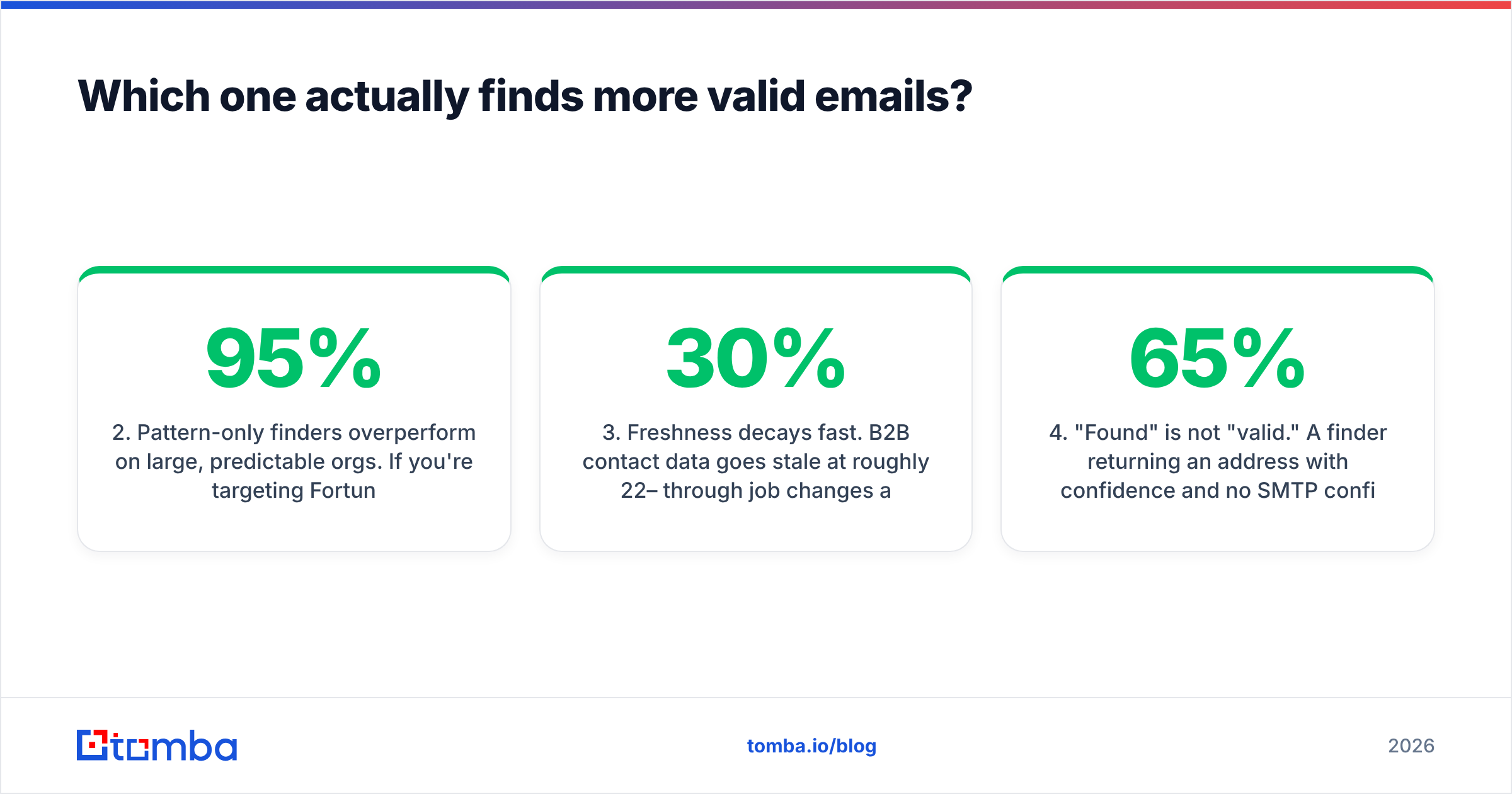
- Pattern-only finders overperform on large, predictable orgs. If you're targeting Fortune 1000 companies where
first.last@holds for 95% of employees, Mailshunt's cheaper resolution gets you the same answer for less money. - Freshness decays fast. B2B contact data goes stale at roughly 22–30% per year through job changes alone. A database record found in 2024 and never re-verified is a bounce waiting to happen. Ask both vendors when a record was last re-checked, not when it was first collected.
- "Found" is not "valid." A finder returning an address with 65% confidence and no SMTP confirmation has produced a guess. Count only addresses that survive independent verification, not raw returns.
The practical test: take 100 contacts you can independently confirm (customers, ex-colleagues, people who replied to you last quarter). Run them through both. Compare confirmed correct against returned. Most teams discover the gap between headline match rate and usable match rate is 15–25 percentage points.
What do they really cost per verified email?#
Credit pricing hides the real number. Here's how to compute it honestly.
Take your monthly plan cost, divide by credits, then divide again by your measured usable rate. A tool at $0.02/credit with a 55% usable rate costs $0.036 per usable email. A tool at $0.05/credit with a 92% usable rate costs $0.054. Closer than the sticker suggests — and that's before you count the deliverability damage from the extra bounces in the cheaper list.
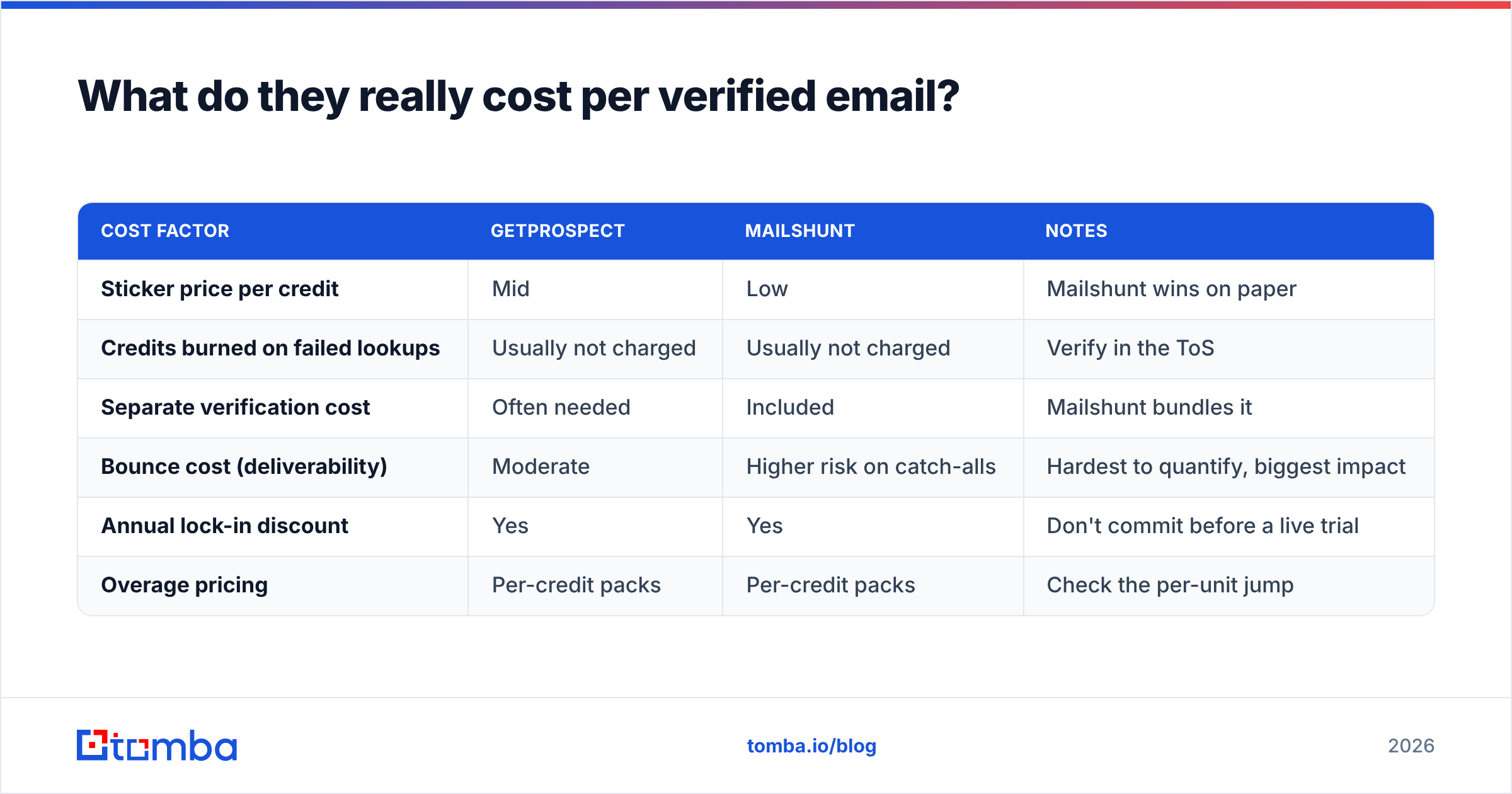
| Cost factor | GetProspect | Mailshunt | Notes |
|---|---|---|---|
| Sticker price per credit | Mid | Low | Mailshunt wins on paper |
| Credits burned on failed lookups | Usually not charged | Usually not charged | Verify in the ToS |
| Separate verification cost | Often needed | Included | Mailshunt bundles it |
| Bounce cost (deliverability) | Moderate | Higher risk on catch-alls | Hardest to quantify, biggest impact |
| Annual lock-in discount | Yes | Yes | Don't commit before a live trial |
| Overage pricing | Per-credit packs | Per-credit packs | Check the per-unit jump |
Two costs never appear on a pricing page:
Bounce cost. Once your bounce rate crosses roughly 2%, mailbox providers start throttling. Cross 5% and you're rebuilding sender reputation for weeks. The cheapest finder that pushes you over that line is the most expensive purchase you'll make this quarter.
Rework cost. If your SDR re-checks 30% of exports manually on LinkedIn, that's four hours a week. At a loaded rate, that dwarfs the difference between a $29 and a $49 plan.
Run everything you export through a dedicated email verifier before it touches a sequence, regardless of which finder produced it. Verification is cheap; a burnt sending domain is not.

Which one fits your workflow?#
Pick by the input you have, not the feature list you want.
- You have a target account list, no contact names. GetProspect. Filter by company + title, export contacts. Mailshunt can't do this — it has no discovery layer.
- You have names and domains from a scrape, event list, or CRM export. Mailshunt, or a bulk finder. You're paying for resolution, not discovery, so buy the cheaper resolution.
- You prospect one contact at a time on LinkedIn. GetProspect's extension is the stronger of the two. A dedicated LinkedIn finder is stronger still if volume matters.
- You need emails inside a product, script, or automation. Neither is ideal. Mailshunt's API surface is thin; GetProspect's is workable but rate-limited on lower tiers. An API-first provider is the right call here.
- You need one invoice covering finding, verifying, and enrichment. Consolidate. Two vendors means two credit pools, two failure modes, and two contract renewals.

Where do both tools fall short?#
Be clear-eyed about the shared ceiling.
Neither is a compliance product. If you sell into the EU or UK, GDPR legitimate-interest documentation is your responsibility, not the vendor's. Check what each provider offers for suppression and data-subject requests before you export a European list. Read the reviews on G2 with this filter on — compliance complaints are the ones that cost real money.
Neither resolves ambiguity well. Two people named "J. Smith" at the same company, an acquisition that changed the mail domain, a contractor on a personal address — these are the rows that quietly generate bounces. Any tool that returns a single confident answer for these is guessing.
Phone data is an afterthought at both. If your motion is multichannel, you'll need a separate phone finder either way. Don't buy an email tool expecting usable mobile numbers.
Both charge you for the database, not the freshness. The question to ask a rep on a demo call: "what percentage of your index was re-verified in the last 90 days?" A vendor that can't answer is telling you the answer.
Is there a better option than either?#
Depends what you're optimizing for — and this is where an honest comparison stops being a two-way race.
If you want discovery-first prospecting with a big filterable index, GetProspect is a reasonable buy and there are stronger database players at higher price points. If you want the cheapest possible resolution of a list you already own, Mailshunt does the job, and so do several free-tier tools if your volume is small.
But if your bottleneck is data you can actually send to — the case for most outbound teams — the winning setup is usually a single provider that does finding and verification with the same underlying data, exposed through a real API.
That's the gap Tomba occupies. The email finder resolves by name, domain, or company, and every result carries a confidence score plus source attribution so you can see why an address was returned. Domain search pulls every discoverable address at a company in one call. Verification, catch-all resolution, and enrichment run on the same credit pool rather than a second subscription. Tomba pricing starts free with 25 searches a month, then $49/mo Starter, $99/mo Growth, and $249/mo Pro — no separate verification invoice, and the API is available on every paid tier rather than gated behind an enterprise call.
For engineering-led teams, the Tomba API matters more than any UI comparison above. If email lookup lives inside your enrichment pipeline, signup flow, or CRM sync, a rate-limited extension is not a substitute for a documented REST endpoint.
How should you run the trial?#
Don't compare marketing pages. Compare outputs, on your data, in an afternoon.
- Build a 100-row control set. Real companies in your ICP, with 20 rows where you already know the correct email.
- Run the same file through every candidate. Same columns, same order.
- Score three numbers: returned rate, confirmed-correct rate on the 20 known rows, and catch-all/unknown rate.
- Verify all outputs with a neutral verifier. Never let a finder grade its own homework.
- Divide plan cost by confirmed-usable results. That's your real cost per contact.
- Send 50 of them. Bounce rate after a real send is the only metric that isn't self-reported.
Most teams find the ranking flips at step 5. The cheapest credit rarely wins once you price in the rows you couldn't use.
Which should you choose?#
Choose GetProspect if you need to find who to contact, work primarily in a browser, and value a filterable database over API access.
Choose Mailshunt if you already have your target list, your volume is modest, and price per lookup is the constraint that matters most.
Choose a consolidated provider if you're running outbound at volume, care about catch-all domains, need programmatic access, or are tired of reconciling two credit balances.
Start with the free tiers on all three, run the 100-row test above, and let the confirmed-correct column decide. It takes an afternoon and saves a quarter of bounced sends.
Ready to test it on your own list? Run your next 25 lookups free with the Tomba Email Finder — no credit card, confidence scores and source attribution on every result, and the same credits cover verification. Compare the confirmed-correct rate against whatever you're using now, and switch only if the numbers say so.
Related guides#
Ready to find emails that actually work?
Join 150,000+ professionals who stopped guessing and started sending. Free credits on signup — no credit card required.
Get the Tomba newsletter
Practical outbound tactics and product updates — once every two weeks.
About the author