GetProspect vs Mailtact (2026): Which Email Finder Wins?
GetProspect and Mailtact both promise verified B2B emails, but they solve different problems. Here is how they compare on coverage, verification, pricing, and real cost per usable lead in 2026.
TL;DR
- GetProspect is the more established of the two: a LinkedIn-first email finder with a large public B2B database, Chrome extension, list management, and a CSV-heavy workflow. It is built for prospectors who live inside LinkedIn Sales Navigator.
- Mailtact is the smaller, newer, outreach-leaning option. It bundles finding and sending, which suits solo founders and small agencies who want one bill instead of three — but it publishes far less about data sourcing and verification methodology.
- The real cost gap is not the sticker price. It is credits burned on unverified or catch-all addresses. A tool at $49/mo with 95%+ deliverable rates beats a $29/mo tool that returns 30% bounces.
- If you need API-first infrastructure rather than a UI to click around in, neither is the natural pick. Tools like Tomba start at $49/mo with a documented API, CLI, and bulk pipeline.
- Verdict: GetProspect for LinkedIn-sourced list building at volume. Mailtact if you want find-and-send in one tab and can live with less transparency. Verify with a dedicated verifier either way.
What are GetProspect and Mailtact?#
GetProspect (getprospect.com) launched as a LinkedIn email extractor and grew into a lead-database product. You install the Chrome extension, run a Sales Navigator search, and pull profiles into lists with enriched email addresses attached. It also offers a searchable B2B database with filters for job title, company size, industry, and location, plus CSV enrichment for lists you already own. Its centre of gravity is list building.
Mailtact is positioned differently. It sits in the "find leads and email them from the same dashboard" category — closer to a lightweight outreach suite than a pure data vendor. That bundling is genuinely useful for a one-person GTM motion, but it changes what you should evaluate. With GetProspect you are buying data. With Mailtact you are buying data plus a sending layer, and the sending layer is usually the weaker half of any bundle at this price point.
One honest caveat before we go further: GetProspect publishes pricing, coverage claims, and G2 reviews openly. Mailtact is a smaller vendor with a thinner public footprint, so some of what follows is framed as "what to test" rather than "what is proven." Check current plan pages before you commit — pricing in this category changes every few quarters.

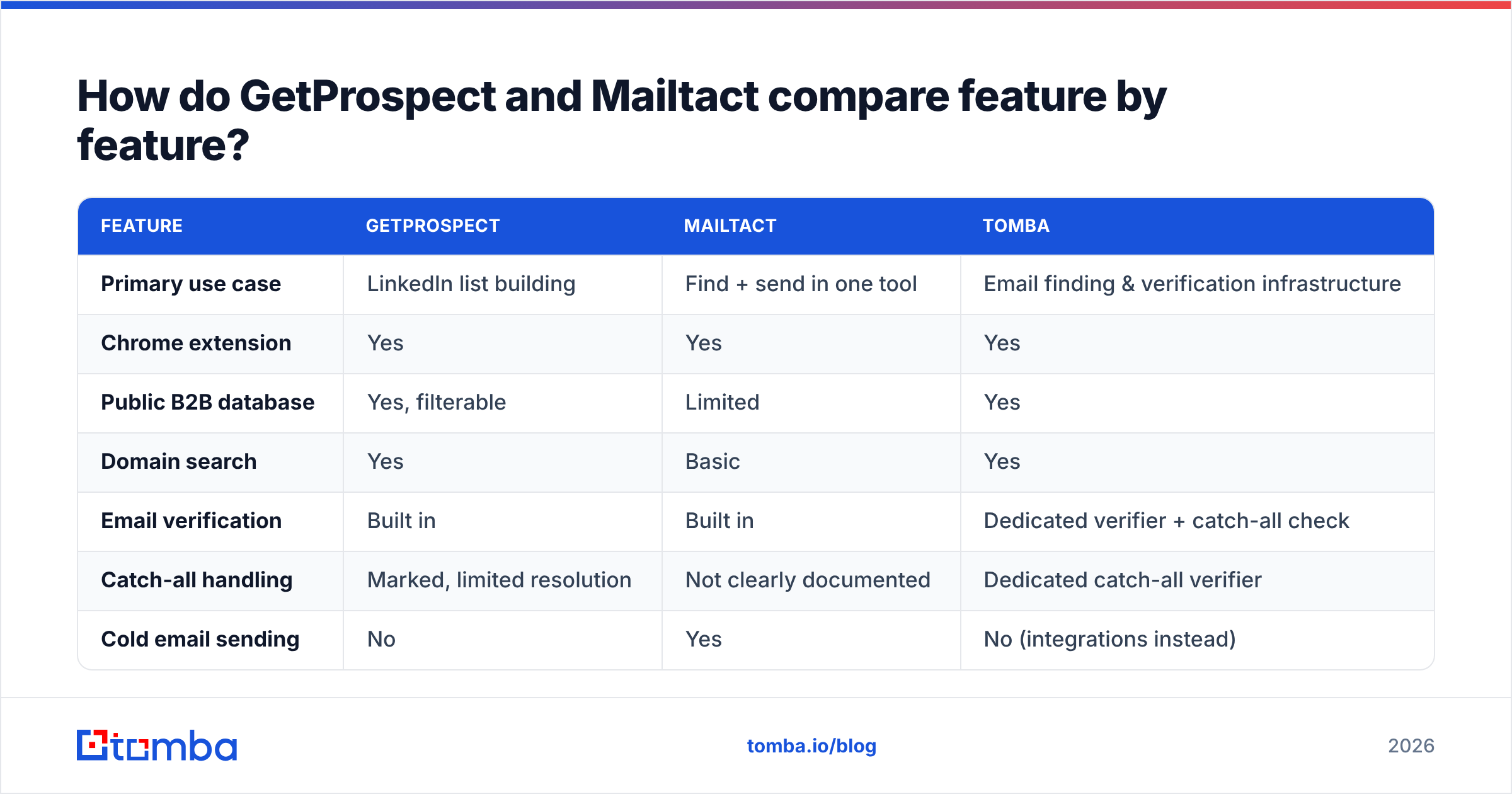
How do GetProspect and Mailtact compare feature by feature?#
| Feature | GetProspect | Mailtact | Tomba |
|---|---|---|---|
| Primary use case | LinkedIn list building | Find + send in one tool | Email finding & verification infrastructure |
| Chrome extension | Yes | Yes | Yes |
| Public B2B database | Yes, filterable | Limited | Yes |
| Domain search | Yes | Basic | Yes |
| Email verification | Built in | Built in | Dedicated verifier + catch-all check |
| Catch-all handling | Marked, limited resolution | Not clearly documented | Dedicated catch-all verifier |
| Cold email sending | No | Yes | No (integrations instead) |
| Public API | Yes | Limited | Yes, documented |
| Bulk CSV enrichment | Yes | Yes | Yes |
| Free tier | Yes, limited credits | Trial-based | 25 searches/mo |
| Entry paid plan | ~$49/mo range | Lower entry, fewer credits | $49/mo Starter |
Two things stand out.
First, only Mailtact sends email. If your entire stack is "find leads, write sequence, hit send," that consolidation saves you a subscription. But sending is where deliverability lives, and deliverability is unforgiving. A bundled sender with no dedicated warmup pool, no per-inbox rotation, and no bounce-suppression logic will quietly cost you more in burned domains than you saved on the second subscription. Read up on email deliverability before you consolidate.
Second, only GetProspect and Tomba expose a real database you can query without scraping. Mailtact's model leans on enrichment of contacts you bring. That distinction matters when you need net-new accounts rather than better data on accounts you already know.
Which tool finds more valid email addresses?#
This is the question that decides everything else, and it is the one both vendors are vaguest about.
Here is the framework that actually works: run the same 200-contact test list through both tools and score three numbers, not one.
- Hit rate — of 200 contacts, how many returned any email address? Vendors advertise this number because it is the flattering one.
- Deliverable rate — of those hits, how many survive an independent verification pass? Run them through a third-party email verifier rather than trusting the finder's own green checkmark. A finder grading its own homework is not evidence.
- Catch-all share — how many results landed on catch-all domains? These are neither valid nor invalid. They accept everything at the SMTP layer and bounce later, or route to a black hole. If a tool reports catch-alls as "valid," its accuracy number is inflated.

In practice, GetProspect performs well on mid-market and enterprise contacts with a strong LinkedIn presence — its sourcing is tied to that graph, so coverage tracks it. It weakens on small companies, non-US regions, and roles that do not maintain profiles: operations, finance, technical staff at private firms.
Mailtact's coverage is harder to characterise because the vendor does not publish sourcing detail. In a category where data provenance is increasingly a compliance question, that opacity is a legitimate reason for a procurement team to hesitate. Ask directly: where does the data come from, how often is it refreshed, and what is the documented deliverable rate?
A rule of thumb across this whole category: treat any advertised accuracy figure above 95% as a claim about verified subsets, not about everything the tool returns. And always resolve catch-alls separately with a catch-all verifier before a large send.
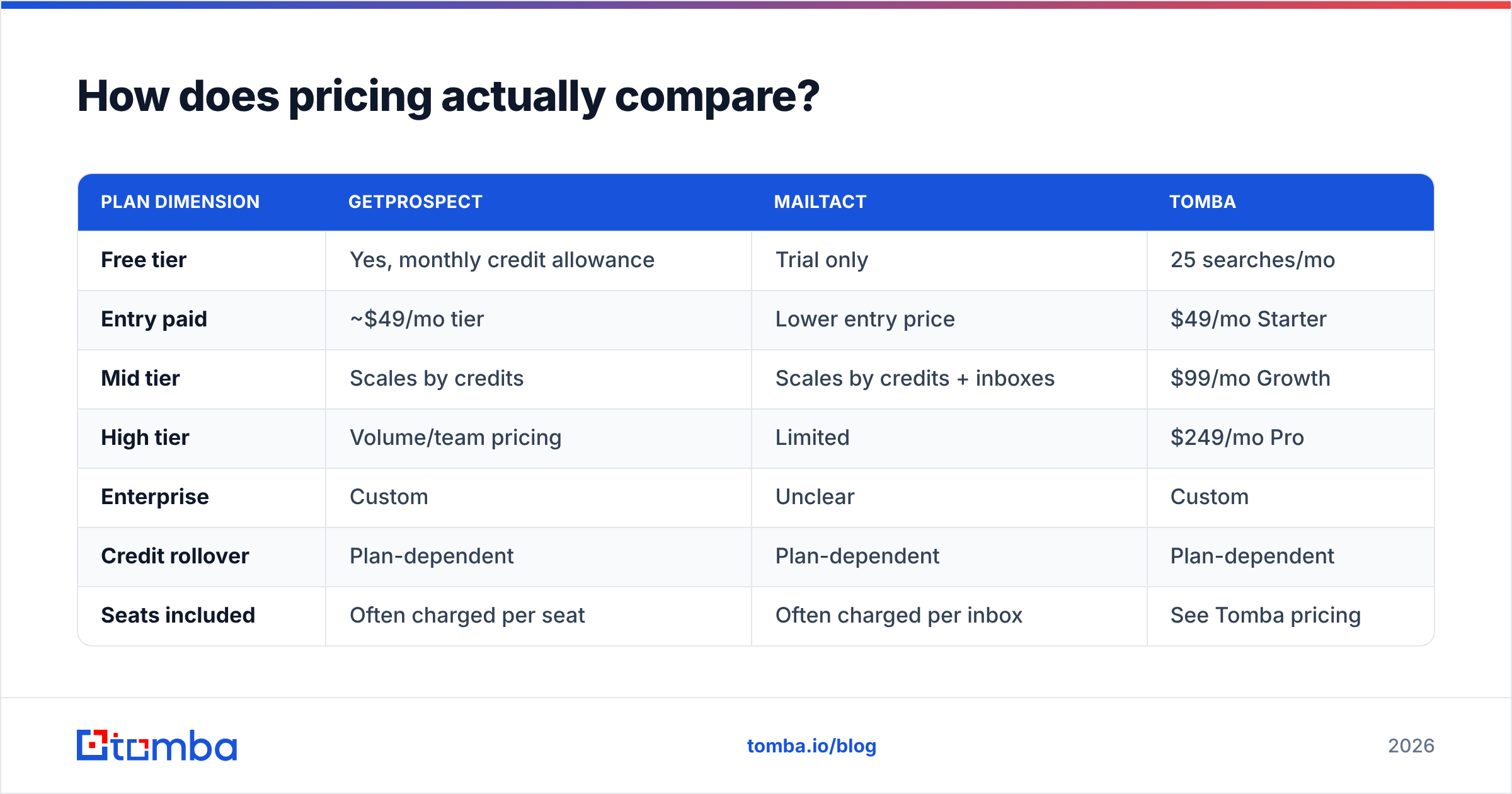
How does pricing actually compare?#
Sticker price is the wrong unit. The right unit is cost per verified, deliverable, sendable contact.
Work it out like this: take the monthly price, divide by credits, then divide by your measured deliverable rate. A $29/mo plan with 1,000 credits and a 65% deliverable rate costs $0.045 per usable contact. A $49/mo plan with 1,000 credits at 95% costs $0.052. Nearly identical — except the cheap one also sent 350 bounces through your domain, which is a cost that does not appear on any invoice.
| Plan dimension | GetProspect | Mailtact | Tomba |
|---|---|---|---|
| Free tier | Yes, monthly credit allowance | Trial only | 25 searches/mo |
| Entry paid | ~$49/mo tier | Lower entry price | $49/mo Starter |
| Mid tier | Scales by credits | Scales by credits + inboxes | $99/mo Growth |
| High tier | Volume/team pricing | Limited | $249/mo Pro |
| Enterprise | Custom | Unclear | Custom |
| Credit rollover | Plan-dependent | Plan-dependent | Plan-dependent |
| Seats included | Often charged per seat | Often charged per inbox | See Tomba pricing |
| API access | Paid plans | Limited | All paid plans |

Watch for three pricing traps in this segment:
- Per-seat multipliers. A $49 plan for a five-person SDR team is a $245 plan. Ask whether credits pool across seats or are allocated per user.
- Verification charged separately. Some vendors bill a credit to find an address and a second credit to verify it. Your effective price doubles.
- Per-inbox fees on bundled senders. Outreach-inclusive tools frequently meter connected mailboxes. If you run a multi-domain setup with eight inboxes, that line item dominates.

What does GetProspect do best?#
LinkedIn-native list building. If your ICP definition is a Sales Navigator saved search, GetProspect converts that into a usable list faster than most alternatives. The extension is stable, list management is decent, and the enrichment fields are reasonable for a mid-priced tool.
A real searchable database. You can prospect without a LinkedIn seat, which matters when Sales Navigator licences are rationed.
Established review base. You can read hundreds of independent opinions on G2's lead intelligence category before you buy. That is not a small advantage over a vendor with a dozen reviews.
Where it disappoints: bulk and API workflows feel bolted on rather than native, catch-all resolution is shallow, and international coverage outside North America and Western Europe thins out quickly.
What does Mailtact do best?#
Consolidation. One login, one bill, one place where a lead goes from discovery to first touch. For a solo founder doing 200 emails a week, that removes real friction. Multi-tool stacks have a hidden tax: CSV exports, field mismatches, and the twenty minutes a week you spend reconciling them.
Lower entry cost. The starting tier is typically cheaper than GetProspect's, which makes it a low-risk trial for someone testing whether outbound works at all.
Where it disappoints: transparency. Data sourcing, refresh cadence, and verification methodology are not well documented publicly, and the sending infrastructure is a bundled feature rather than a specialised product. If you scale past a few thousand sends a month, you will likely outgrow the sending half and be paying for it anyway.
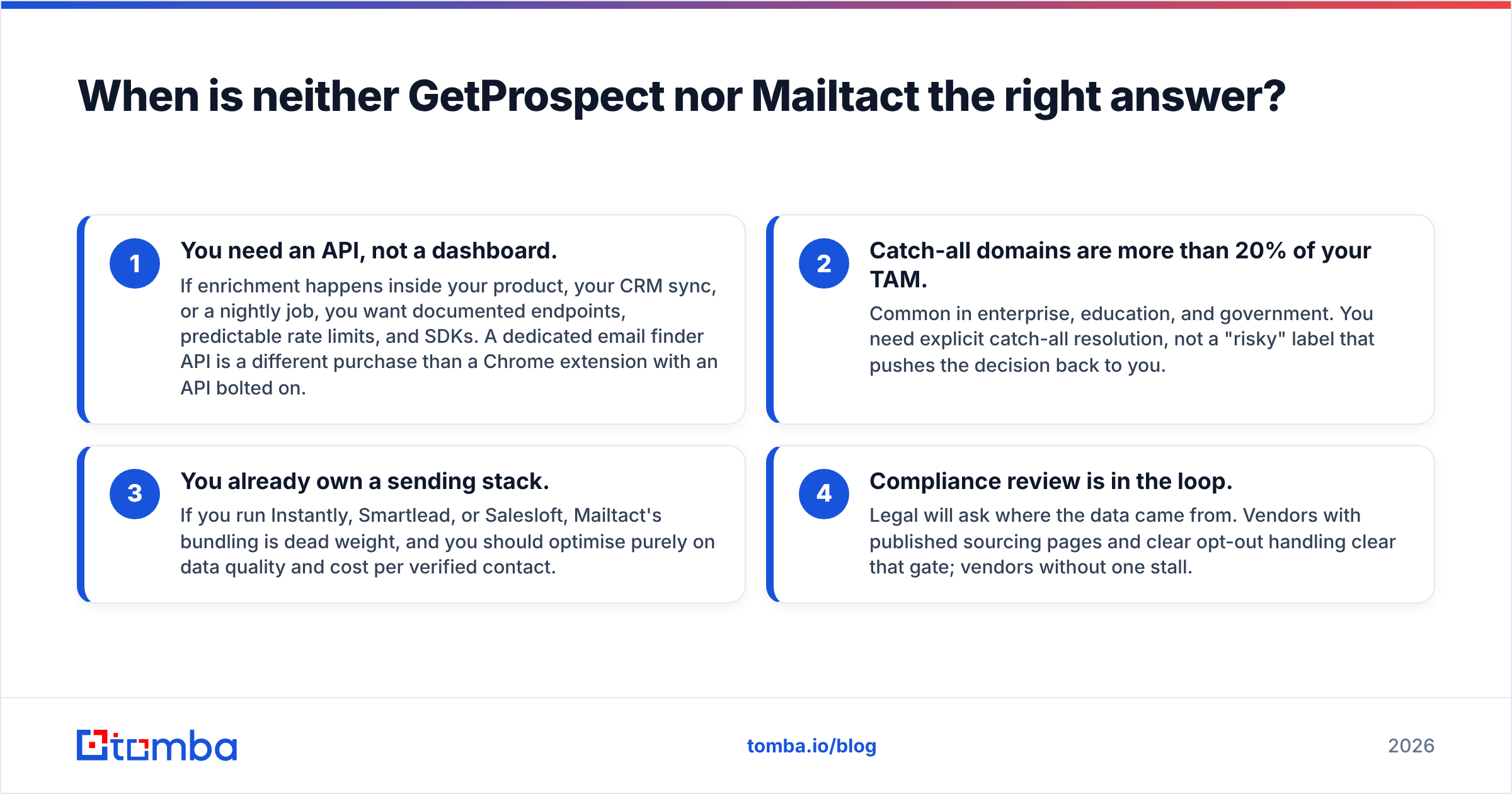
When is neither GetProspect nor Mailtact the right answer?#
Four scenarios push you toward a different shape of tool:
- You need an API, not a dashboard. If enrichment happens inside your product, your CRM sync, or a nightly job, you want documented endpoints, predictable rate limits, and SDKs. A dedicated email finder API is a different purchase than a Chrome extension with an API bolted on.
- Catch-all domains are more than 20% of your TAM. Common in enterprise, education, and government. You need explicit catch-all resolution, not a "risky" label that pushes the decision back to you.
- You already own a sending stack. If you run Instantly, Smartlead, or Salesloft, Mailtact's bundling is dead weight, and you should optimise purely on data quality and cost per verified contact.
- Compliance review is in the loop. Legal will ask where the data came from. Vendors with published sourcing pages and clear opt-out handling clear that gate; vendors without one stall.
For the fourth case in particular, it is worth reading how the underlying mechanics work — email address formats, MX records, and SMTP acceptance behaviour explain most of what a verifier can and cannot promise.
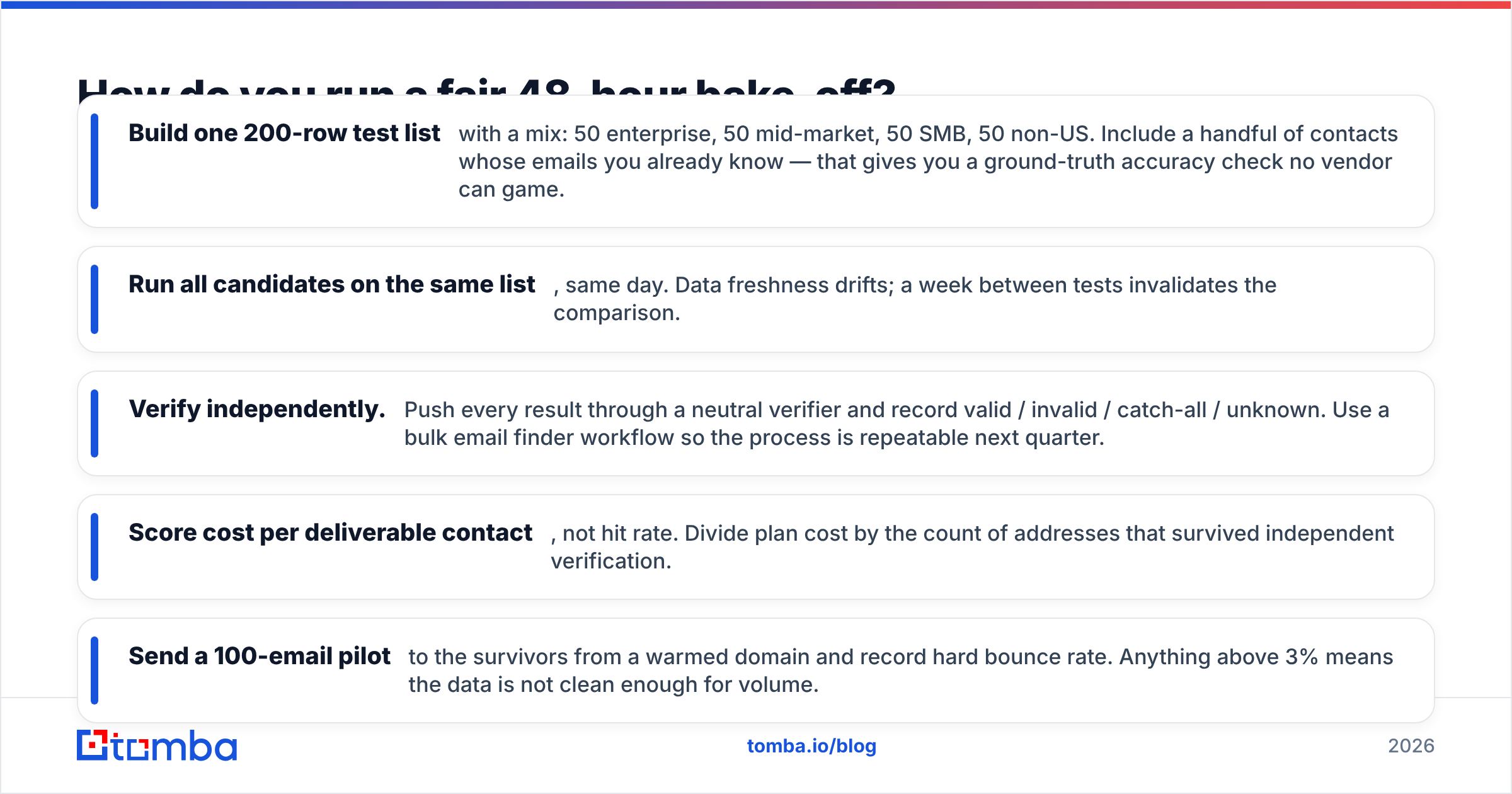
How do you run a fair 48-hour bake-off?#
Do not decide from feature pages. Run this instead:
- Build one 200-row test list with a mix: 50 enterprise, 50 mid-market, 50 SMB, 50 non-US. Include a handful of contacts whose emails you already know — that gives you a ground-truth accuracy check no vendor can game.
- Run all candidates on the same list, same day. Data freshness drifts; a week between tests invalidates the comparison.
- Verify independently. Push every result through a neutral verifier and record valid / invalid / catch-all / unknown. Use a bulk email finder workflow so the process is repeatable next quarter.
- Score cost per deliverable contact, not hit rate. Divide plan cost by the count of addresses that survived independent verification.
- Send a 100-email pilot to the survivors from a warmed domain and record hard bounce rate. Anything above 3% means the data is not clean enough for volume.
Most teams find the results reorder their preference list. The tool with the best-looking dashboard rarely wins on cost per deliverable contact.
Which should you pick?#
- Pick GetProspect if LinkedIn is your sourcing layer, you build lists in batches, and you want a vendor with an established review trail and a searchable database you can filter without a Sales Navigator seat.
- Pick Mailtact if you are a solo operator or small agency, your volume is modest, and the operational simplicity of one tool for finding and sending outweighs the lack of published data methodology.
- Pick neither if you need API-first enrichment, deep catch-all resolution, or a bill that does not scale per seat and per inbox.
- Whatever you pick, verify externally. A finder's self-reported confidence score is not an independent verification, and your sender reputation pays for the difference.
The honest summary: these are not really competitors. GetProspect is a data product with prospecting UX on top. Mailtact is an outreach product with data attached. Choose based on which half you are actually short of.
Ready to test your own list?#
If your bottleneck is data quality rather than sending, run your next 200 prospects through the Tomba Email Finder. The free tier gives you 25 searches a month with no card, which is enough to score hit rate, deliverable rate, and catch-all share against whatever you are using today. Paid plans start at $49/mo for Starter and $99/mo for Growth, with the API, CLI, bulk enrichment, and catch-all verification included rather than metered separately. Run the bake-off, keep the winner, and let the numbers decide instead of the feature page.
Related guides#
Ready to find emails that actually work?
Join 150,000+ professionals who stopped guessing and started sending. Free credits on signup — no credit card required.
Get the Tomba newsletter
Practical outbound tactics and product updates — once every two weeks.
About the author