GetProspect vs Manyreach: Which One Does Your Outbound Need?
GetProspect finds the emails. Manyreach sends them. Comparing the two is a category error most teams only notice after they've paid for the wrong one — here's the honest breakdown, with pricing, data quality, and a stack recommendation.
GetProspect vs Manyreach is the wrong shopping question. One tool finds emails. The other sends them. Here is the GetProspect vs Manyreach breakdown, layer by layer, so you buy the right one first.
TL;DR
- GetProspect and Manyreach are not rivals. GetProspect is a B2B contact database and email finder. Manyreach is a cold email sending tool.
- Picking "one or the other" usually ends with you paying for both.
- No contacts? Buy a data tool. Plenty of contacts but no send capacity? Buy a sending tool.
- GetProspect's edge is a free tier of 50 valid emails a month, plus a LinkedIn Chrome extension. Credits get pricey at scale.
- Manyreach's edge is unlimited mailboxes, unlimited seats, and pay-as-you-go credits. Agencies with many client domains like that math.
- Bounce rate is a data problem, not a sending problem. Feed either tool clean addresses, or you will burn domains.
GetProspect vs Manyreach: what does each tool do?#
Start here. Half the confusion comes from comparing a shovel to a wheelbarrow.
GetProspect is a B2B contact database with an email finder on top. You search company and people records. You filter by title, industry, headcount, and location. Then you export emails. Its most-used feature is the Chrome extension. It pulls emails while you browse LinkedIn Sales Navigator lists. GetProspect also ships a light CRM view and basic sending. Sending is a side feature, not the product.
Manyreach runs the send. You connect mailboxes, warm them up, and build sequences. You rotate sends across domains and read replies in one inbox. It does not build your list. It assumes you show up with a CSV or an API feed. Pricing is pay-as-you-go, with unlimited mailboxes and unlimited seats. That pitch is what pulls agencies away from per-seat tools.
That is the GetProspect vs Manyreach split in one sentence: one fills the list, one works the list. So the real question is not which one wins. Ask which layer of your stack is broken.
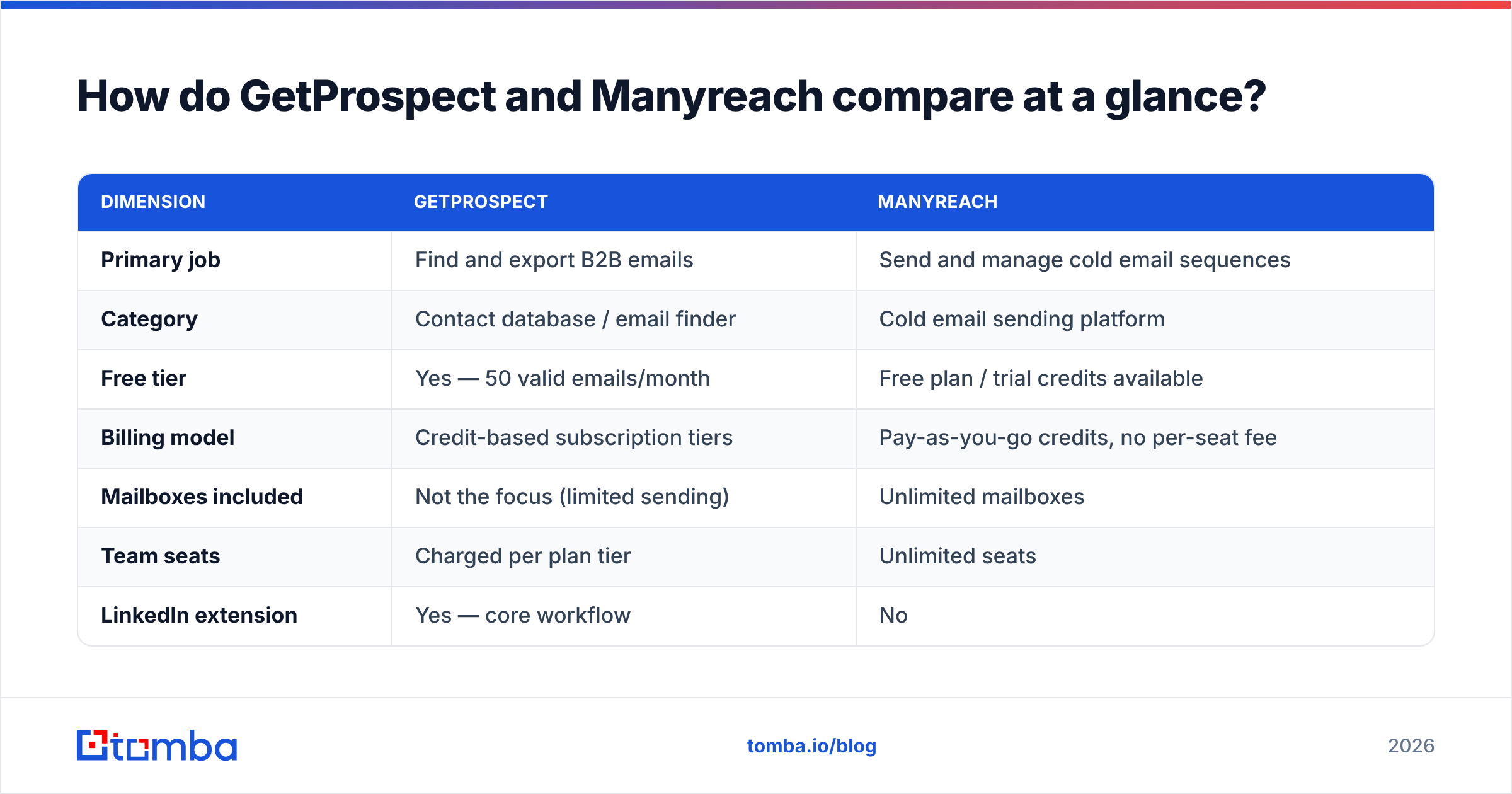
GetProspect vs Manyreach at a glance#
| Dimension | GetProspect | Manyreach |
|---|---|---|
| Primary job | Find and export B2B emails | Send and manage cold email sequences |
| Category | Contact database / email finder | Cold email sending platform |
| Free tier | Yes — 50 valid emails/month | Free plan / trial credits available |
| How you pay | Credit-based plan tiers | Pay-as-you-go credits, no per-seat fee |
| Mailboxes included | Not the focus (limited sending) | Unlimited mailboxes |
| Team seats | Charged per plan tier | Unlimited seats |
| LinkedIn extension | Yes — core workflow | No |
| Built-in email checks | Basic, included in credit cost | None — it relies on your list |
| Inbox tools | Minimal | Warmup, inbox rotation, spintax, shared inbox |
| API | Yes | Yes |
| Best for | Reps building lists from LinkedIn | Agencies running many client domains |
Read the GetProspect vs Manyreach table as two shopping lists, not one scoreboard. Nothing on the left competes with anything on the right.
GetProspect vs Manyreach: which problem are you solving?#
Diagnose before you spend a dollar. Pick the line that sounds like your last pipeline review.
- "Our list is thin." You cannot find enough good contacts. That is a data problem. GetProspect, an email finder, or a database plan fixes it. Manyreach does nothing for you here.
- "Our bounce rate is over 5%." Your contacts are stale or guessed. Run an email verifier before you send. A sending tool will not fix this.
- "We are capped at 200 sends a day." Good data, not enough mailboxes. That is Manyreach's exact job.
- "We pay per seat and the team grew." Per-seat tools punish agency headcount. Unlimited seats answer that.
- "Replies get lost across five client inboxes." You need one shared inbox. Sending tools do that.
- "We pay for three tools that overlap." Map each tool to data or to sending. Cut the rest.
Items 1 and 2 are data. Items 3 to 5 are sending. Item 6 is a buying problem. Most teams who ask about GetProspect vs Manyreach sit on problem 1 or 2. They are shopping in the wrong aisle.

How does GetProspect handle data quality?#
GetProspect is database-first. It stores a large index of contacts and refreshes it on a cycle. You reach that index through search filters and the LinkedIn extension. The design has one clear weak spot: decay. B2B contact data rots by roughly 22–30% a year as people change jobs. Those figures come from widely cited vendor and analyst estimates on CRM hygiene. A record from nine months ago may point at someone who left.
Database tools answer decay in two ways. They re-crawl often, or they check each address at export. The second way costs more per lookup. It is also the only one that guards your sender score. GetProspect does run a check on exported emails. That is why the free tier says "50 valid emails" and not 50 lookups. Still, treat any vendor's own valid label as a first pass, not a final answer.
Two kinds of address slip through anyway:
- Catch-all domains. The server accepts every address. A plain SMTP check returns "valid" even when the mailbox does not exist. Use a catch-all verifier to sort them out, or pay a hidden bounce tax.
- Role accounts.
info@,sales@,support@. Mail lands, but nobody replies. They also draw spam complaints.
Do you push GetProspect exports straight into Manyreach with no check in between? Those two kinds of address are where your bounce rate hides.
How does Manyreach keep email landing in the inbox?#
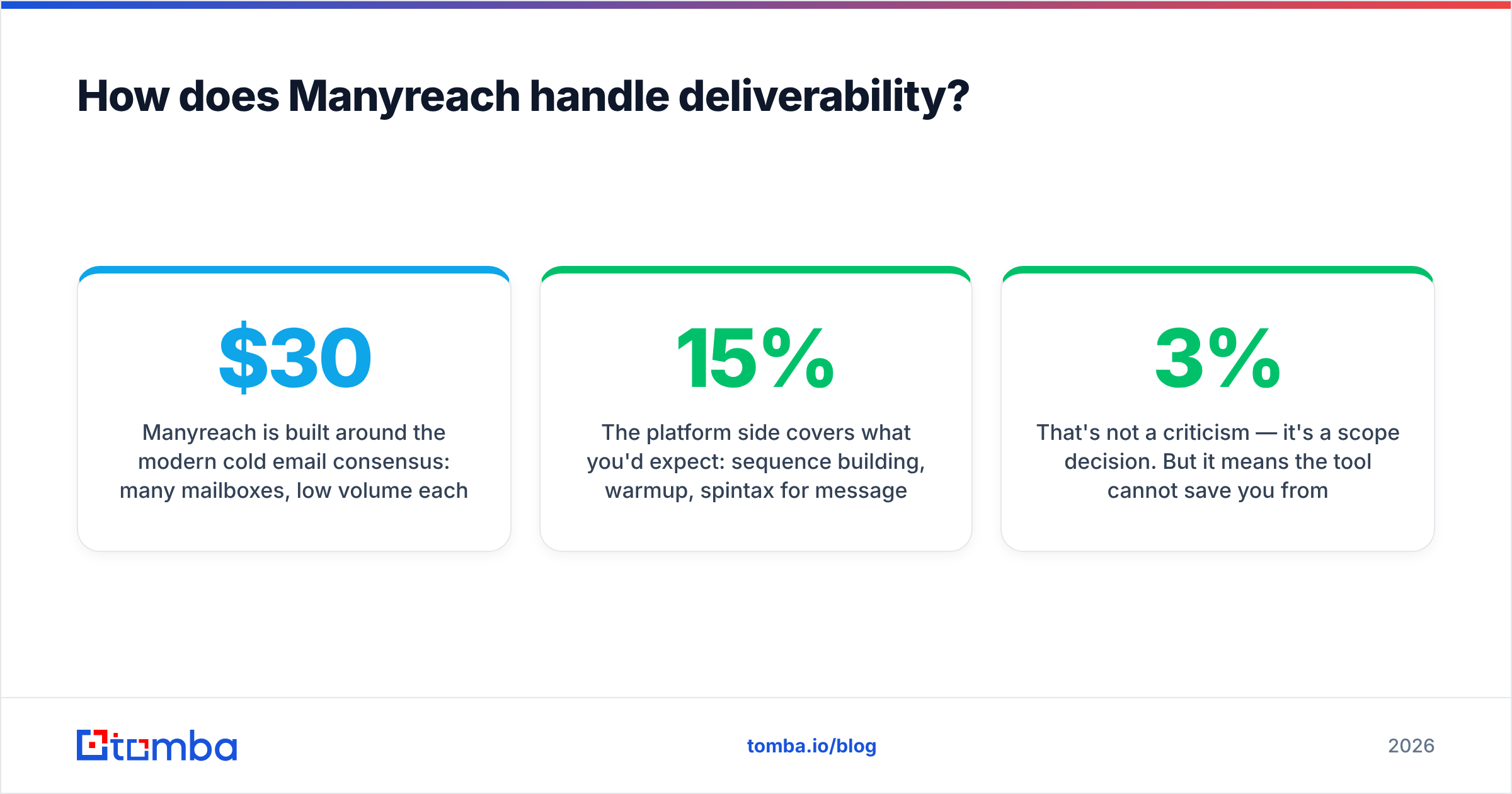
Manyreach follows the modern cold email playbook. Use many mailboxes. Send a little from each. Rotate them. One domain sending 500 emails a day is fragile. Twenty mailboxes sending 25 each is not. Extra mailboxes cost nothing here. Rivals charge $30–40 per added inbox, which makes that setup too pricey to run.
The rest is what you would expect. You get sequences, warmup, spintax, one shared inbox for replies, and an API for feeding in contacts. Where the tool stops is data. In the GetProspect vs Manyreach split, data is not Manyreach's job. It will send to a list with a 15% bounce rate and let your domain take the hit.
That is a scope choice, not a flaw. But it means the tool cannot save you from a bad list. Google and Microsoft now police bulk senders much harder. Bounce rates above roughly 3% get you filtered. Google's bulk sender rules also ask for signed domains, one-click unsubscribe, and a spam complaint rate under 0.3%. Mailbox providers enforce all of that, not your sending tool.
Want to check your setup before you scale? Run an SPF checker and a spam checker on a live send. Five minutes there beats a week of guessing why open rates fell.
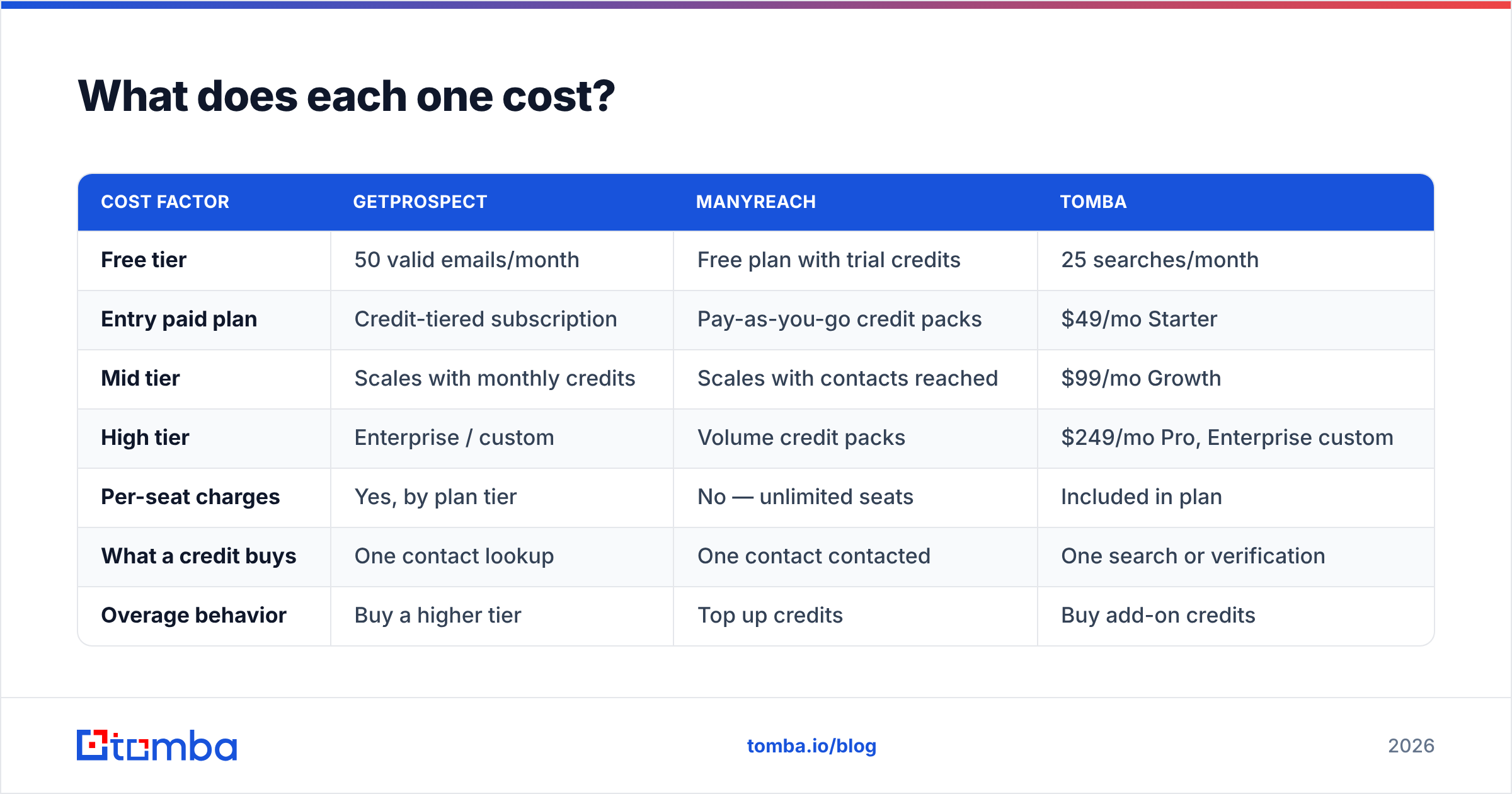
GetProspect vs Manyreach pricing: what does each one cost?#
Prices move on both tools, so check the vendor pages before you buy. The shape of the pricing is stable, and shape is what drives the choice.
| Cost factor | GetProspect | Manyreach | Tomba |
|---|---|---|---|
| Free tier | 50 valid emails/month | Free plan with trial credits | 25 searches/month |
| Entry paid plan | Credit-tiered plan | Pay-as-you-go credit packs | $49/mo Starter |
| Mid tier | Scales with monthly credits | Scales with contacts reached | $99/mo Growth |
| High tier | Enterprise / custom | Volume credit packs | $249/mo Pro, Enterprise custom |
| Per-seat charges | Yes, by plan tier | No — unlimited seats | Included in plan |
| What a credit buys | One contact lookup | One contact contacted | One search or check |
| Overage behavior | Buy a higher tier | Top up credits | Buy add-on credits |
GetProspect vs Manyreach pricing splits in one key way. GetProspect bills you for finding a contact. Manyreach bills you for reaching one. Tomba bills for finding and checking. Its pricing starts at $49/mo on Starter. The verifier, domain search, and API sit in that same plan, not in separate add-ons.
Say you are a two-person team working 2,000 contacts a month. You will need a data tool and a sending tool. Budget for both layers. One purchase does not cover it.

Is there a combo that beats picking one?#
Yes. The best answer to GetProspect vs Manyreach is often both, kept in separate layers. Most veteran outbound teams end up here.
- Data layer. A finder plus a checker you trust to keep bounces under 3%. Accuracy compounds here. Open rate, reply rate, and domain health all ride on it.
- Sending layer. A tool with enough mailboxes, rotation, and reply handling for your volume. These are swappable. The switching cost is mostly moving sequences.
- Glue. API or CSV. Prefer the API. GetProspect and Manyreach both offer one, and so does the Tomba API.
That last point is easy to miss. Check at export, and your data is only as fresh as the export date. Check by API when a contact joins the sequence, and it is fresh that morning. For a sequence that adds contacts over six weeks, that gap shows up in your bounce rate.
Would you rather buy a list than build one? BookYourData sells contacts pay-as-you-go with a stated accuracy promise. That model differs from both plan-based databases and per-lookup finders. If you buy one big list a quarter, it is a fair third path. It still sits in the data layer.
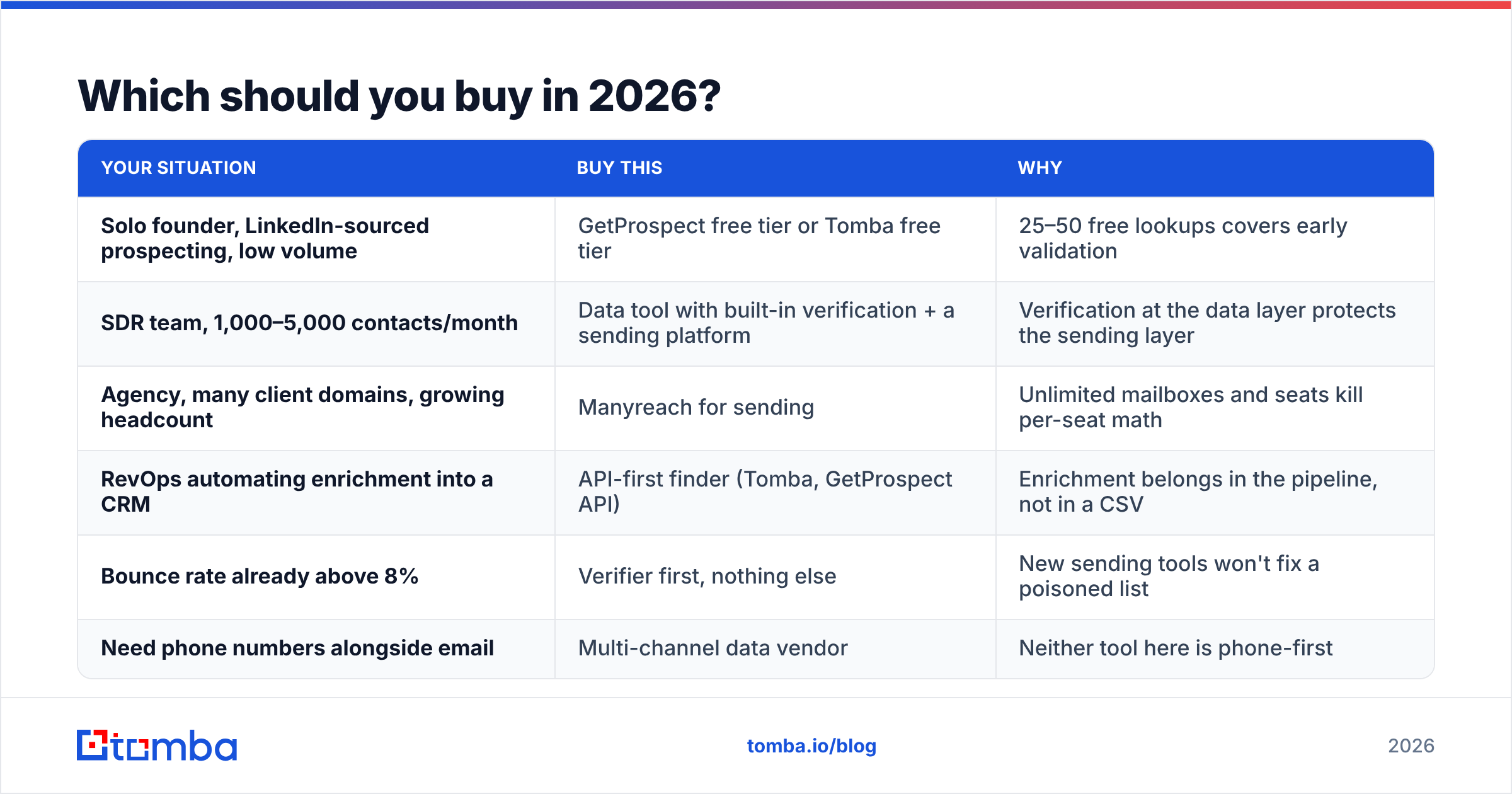
Which should you buy in 2026?#
| Your situation | Buy this | Why |
|---|---|---|
| Solo founder, LinkedIn lists, low volume | GetProspect free tier or Tomba free tier | 25–50 free lookups cover early testing |
| Sales team, 1,000–5,000 contacts/month | Data tool with built-in checks, plus a sending tool | Clean data protects the sending layer |
| Agency, many client domains, growing team | Manyreach for sending | Unlimited mailboxes and seats kill per-seat math |
| RevOps pushing data into a CRM | API-first finder (Tomba, GetProspect API) | Enrichment belongs in the pipeline, not a CSV |
| Bounce rate already above 8% | A verifier first, nothing else | A new sending tool cannot fix a poisoned list |
| Need phone numbers too | A multi-channel data vendor | Neither tool here is phone-first |
The GetProspect vs Manyreach answer moves with your headcount and your volume. Do you run LinkedIn-heavy outreach? A LinkedIn finder or GetProspect's extension both fit. Is your gap company-wide coverage instead of single lookups? Domain search is faster. One query returns every address it can find at a company, with the pattern and a confidence score.
What do reviewers actually say?#
Check G2 before you buy either tool. Two gripes show up again and again in this category.
- Credit burn on failed lookups. Some vendors charge even when they return nothing. Get the policy in writing.
- Export limits and plan downgrades. Annual deals often refuse to flex down when your volume drops.
Neither gripe is unique to these two tools. Both are the top source of buyer's remorse in outbound software. Ask about them during the trial, not after.
GetProspect vs Manyreach: the honest verdict#
GetProspect vs Manyreach is the wrong fight. GetProspect is a solid email finder. The free tier is genuinely useful, and reps do adopt the LinkedIn workflow. Manyreach is a well-built sending tool. Unlimited mailboxes and unlimited seats give agencies a real edge.
The two sit in different layers. So work out which layer is failing. Fix that one. Do not buy the other until it becomes your real limit. That is the honest GetProspect vs Manyreach call.
Both leave you holding the same risk. Are the addresses real on the day you send?
That is the part worth over-investing in. Tomba Email Finder covers the data layer end to end. Find addresses by domain, name, or company. Check them, catch-all domains included, before they reach your sequence. Push them into your sending tool by API instead of a stale CSV. Start free at 25 searches a month. Move to Starter at $49/mo when your list building outgrows it. Then let Manyreach, or whatever you send with, do the job it is good at.
Related guides#
Ready to find emails that actually work?
Join 150,000+ professionals who stopped guessing and started sending. Free credits on signup — no credit card required.
Get the Tomba newsletter
Practical outbound tactics and product updates — once every two weeks.
About the author