GetProspect vs ReachInbox 2026: Which Tool Should You Buy?
GetProspect finds the contacts. ReachInbox sends to them. Comparing them like-for-like is where most teams waste budget — here's how the two actually split the outbound stack, and what each one costs.
TL;DR
- GetProspect and ReachInbox are not real competitors. GetProspect is a B2B contact database and email finder; ReachInbox is a cold email sending and inbox-management platform. Most teams that run outbound seriously end up paying for one of each.
- If your problem is "I don't have enough good contacts," GetProspect (or a dedicated finder) is the buy. If your problem is "my emails land in spam or I can't manage 40 inboxes," ReachInbox is the buy.
- ReachInbox is cheaper per seat at entry level and bundles warmup, inbox rotation, and a unified reply inbox. GetProspect charges by verified email credits, which is a completely different unit of value.
- The expensive mistake is buying a sending platform to fix a data problem. Bounce rates above 3% are almost always sourced from bad lists, not bad sequences.
- Cheapest sane stack in 2026: a high-accuracy finder plus verification for the data layer, and a sending platform for the delivery layer. Tomba's Free tier (25 searches/mo) and $49/mo Starter make the data half testable before you commit.
What is GetProspect?#
GetProspect is a B2B lead database and email finder. You search a contact database by job title, company size, industry, technology, or location, then export verified business emails — usually into a CSV or straight into a CRM.
Its core jobs:
- Database search — filter a contact index down to a target persona (e.g. "Head of RevOps, 50–200 employees, SaaS, US").
- Email finding — resolve a name plus a company domain into a work email address.
- Email verification — check that the address accepts mail before you send.
- Chrome extension — pull contacts while browsing LinkedIn profiles or company sites.
- CRM sync — push lists into HubSpot, Pipedrive, or a spreadsheet.
What GetProspect does not do: send your campaigns, warm your domains, rotate inboxes, or manage replies. It stops at the export.
What is ReachInbox?#
ReachInbox is a cold email infrastructure and sequencing platform. You connect mailboxes, load a list, write a sequence, and it handles the sending mechanics at volume.
Its core jobs:
- Unlimited mailbox connection — attach many sending accounts under one workspace.
- Inbox rotation — spread sends across mailboxes so no single domain gets hammered.
- Automated warmup — build sender reputation before real volume starts.
- AI sequencing and personalization — draft variants, spin copy, run multi-step follow-ups.
- Unified master inbox — every reply from every mailbox in one thread view, with AI categorization (interested, not now, out of office).
What ReachInbox does not do: source contacts from scratch. You bring the list. If the list is garbage, ReachInbox will faithfully deliver garbage at scale — which is worse than not sending at all, because bounces torch the domains you just spent six weeks warming.

How do GetProspect and ReachInbox compare head-to-head?#
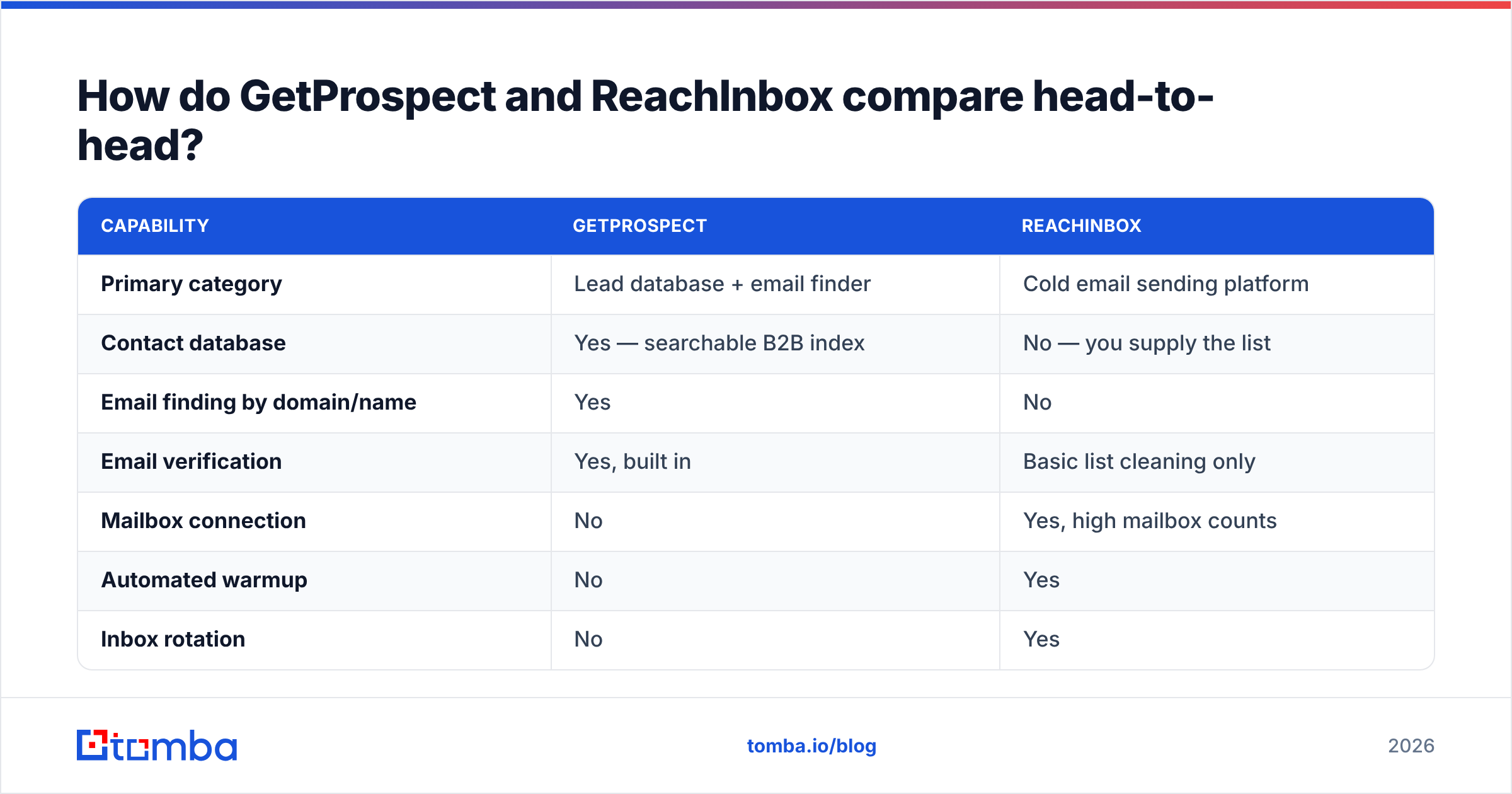
Here is the honest side-by-side. Note how few rows have a genuine overlap — that's the whole story of this comparison.
| Capability | GetProspect | ReachInbox |
|---|---|---|
| Primary category | Lead database + email finder | Cold email sending platform |
| Contact database | Yes — searchable B2B index | No — you supply the list |
| Email finding by domain/name | Yes | No |
| Email verification | Yes, built in | Basic list cleaning only |
| Mailbox connection | No | Yes, high mailbox counts |
| Automated warmup | No | Yes |
| Inbox rotation | No | Yes |
| Sequences / follow-ups | No | Yes, multi-step + AI variants |
| Unified reply inbox | No | Yes, with AI reply sorting |
| Chrome extension | Yes | No (not its job) |
| Billing unit | Verified email credits | Per user / per workspace |
| Best for | List building, TAM mapping | Sending at volume, deliverability ops |
Two products, one overlap row (basic list hygiene). That is not a versus — that's a supply chain.
Which one is more accurate, and does accuracy even mean the same thing?#
Accuracy means different things on each side, and conflating them is how teams misdiagnose a bounce problem.
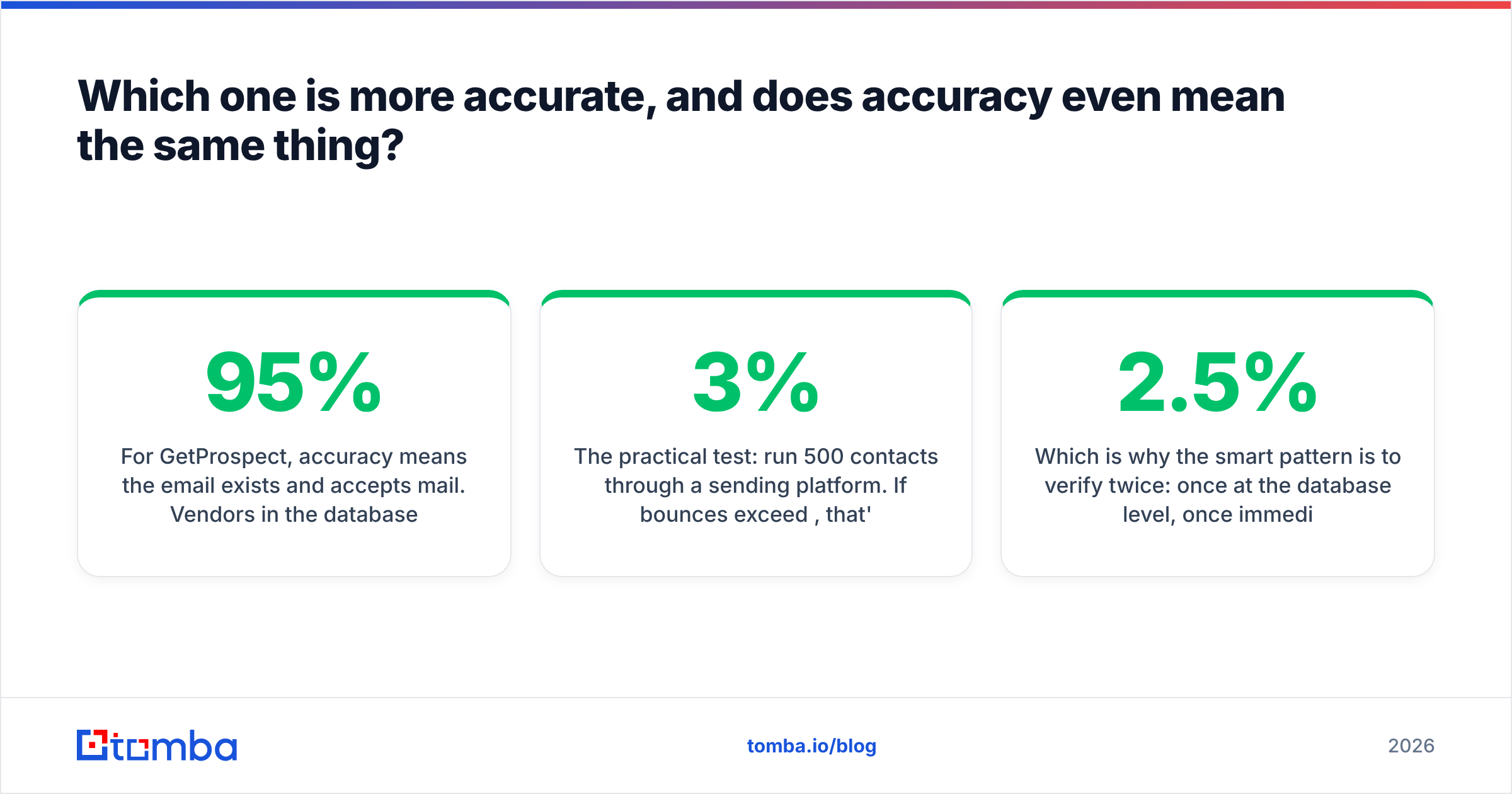
For GetProspect, accuracy means the email exists and accepts mail. Vendors in the database category typically claim 95%+ deliverable rates on verified exports, but the number you care about is the rate on your ICP, not the marketing average. Databases skew heavily toward US tech and large enterprises; coverage on European mid-market, non-English markets, or niche verticals is where claimed accuracy and real accuracy diverge hard.
For ReachInbox, "accuracy" is really deliverability — did the message reach the inbox rather than the spam folder. That depends on domain age, SPF/DKIM/DMARC alignment, warmup duration, send volume per mailbox, and content signals. Nothing in that list is a data-quality issue.
The practical test: run 500 contacts through a sending platform. If bounces exceed 3%, that's a data problem — no amount of warmup fixes it. If bounces are near zero but opens are under 15% on a fresh domain, that's a deliverability problem — no amount of better data fixes it.
Which is why the smart pattern is to verify twice: once at the database level, once immediately before send with a dedicated email verifier. Lists decay roughly 2–2.5% per month as people change jobs, so a list exported in January is measurably worse by March.
How does pricing compare in 2026?#
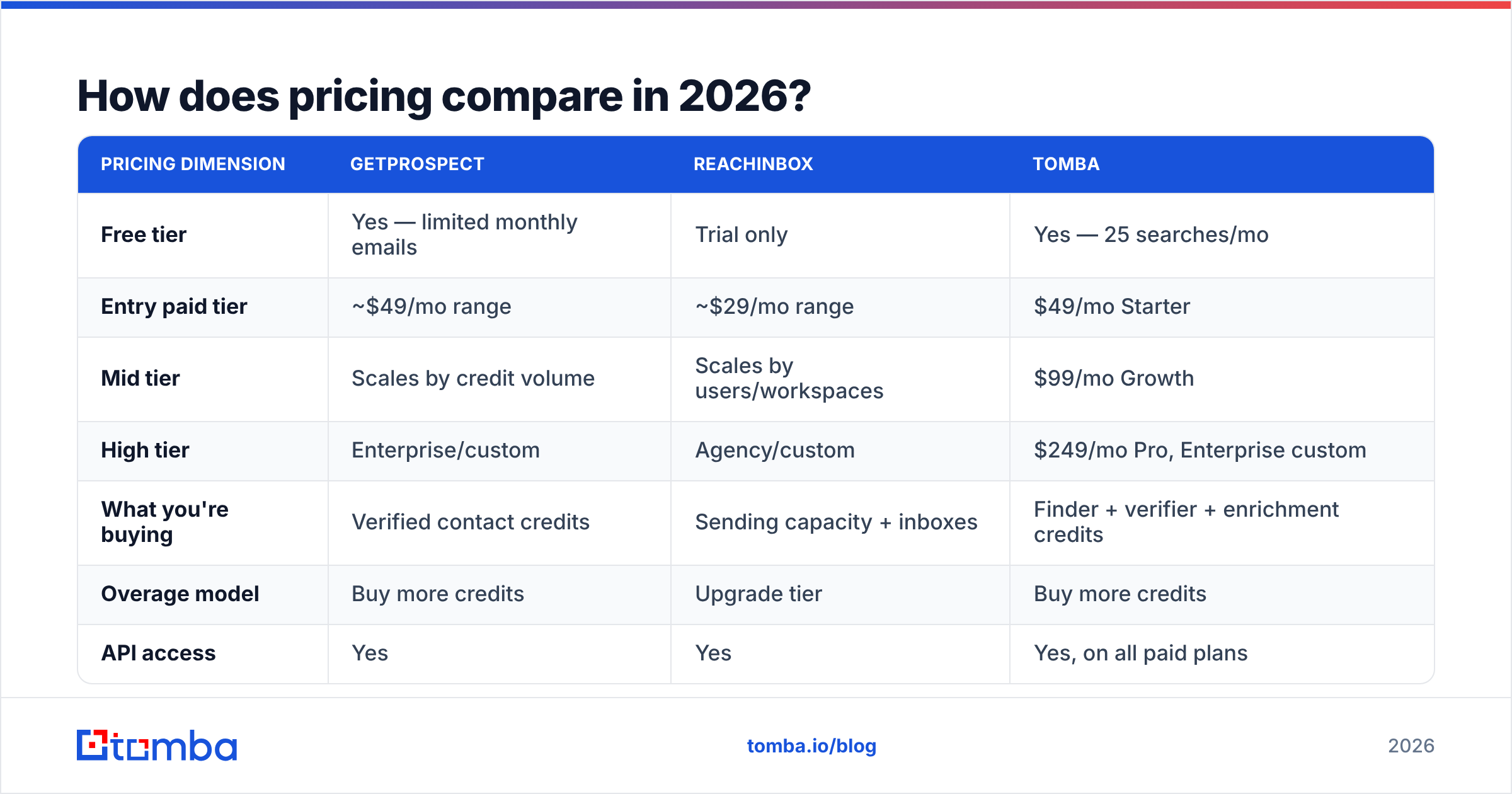
Both vendors revise tiers regularly, so treat these as directional and confirm on the vendor pages before you buy. The important thing is that they bill in different units — credits versus seats — which makes a straight dollar comparison misleading.
| Pricing dimension | GetProspect | ReachInbox | Tomba |
|---|---|---|---|
| Free tier | Yes — limited monthly emails | Trial only | Yes — 25 searches/mo |
| Entry paid tier | ~$49/mo range | ~$29/mo range | $49/mo Starter |
| Mid tier | Scales by credit volume | Scales by users/workspaces | $99/mo Growth |
| High tier | Enterprise/custom | Agency/custom | $249/mo Pro, Enterprise custom |
| What you're buying | Verified contact credits | Sending capacity + inboxes | Finder + verifier + enrichment credits |
| Overage model | Buy more credits | Upgrade tier | Buy more credits |
| API access | Yes | Yes | Yes, on all paid plans |
The real cost question is per-outcome, not per-month. Model it like this:
- Cost per verified contact — total data spend divided by contacts that actually accept mail. Not the raw export count. If 12% bounce, your effective cost per usable contact is 14% higher than the sticker price.
- Cost per sending seat — the sending platform's monthly fee plus mailbox and domain costs (typically $2–4/mailbox/month plus $10–15/domain/year).
- Cost per reply — combine the two above, divide by replies. This is the only number that survives a CFO conversation.
- Hidden cost: rework — every hour an SDR spends manually fixing a broken list is real money. Teams routinely underprice this at zero.
For a two-person outbound team sending 3,000 emails a month, the data layer usually runs $50–100/month and the sending layer $30–100/month. You do not need enterprise tiers of either until you're past roughly 20,000 sends per month.
Is ReachInbox better than GetProspect for cold email?#
For the sending half of cold email, yes — unambiguously, because GetProspect doesn't compete there. ReachInbox's inbox rotation and unified master inbox are genuinely useful once you're past three or four mailboxes, and the AI reply categorization saves real time when you're triaging a few hundred responses a week.
But "better for cold email" is a trap phrasing. Cold email has four failure points, and only two of them are ReachInbox's territory:
- Bad targeting — you picked the wrong personas. Neither tool fixes this.
- Bad data — emails bounce or belong to people who left. Data layer problem.
- Bad deliverability — messages land in spam. Sending layer problem.
- Bad copy — messages arrive and get ignored. Human problem, though the cold email AI writer and a spam checker both help you shorten the loop.
Buying ReachInbox to fix a bad-data problem is the single most common mis-purchase in outbound. Symptom check: if your bounce rate is over 3% and your spam-complaint rate is under 0.1%, you have a list problem wearing a deliverability costume.

Where does Tomba fit in this comparison?#
Tomba sits on the same side of the stack as GetProspect — the data layer — and is worth benchmarking against it before you standardize.
The practical differences that matter when you're choosing a data source:
- Search shapes. Beyond database filtering, Tomba's domain search returns every discoverable address at a company with role and confidence scores, which is how you map a buying committee rather than a single contact. The email finder handles the name-plus-domain case.
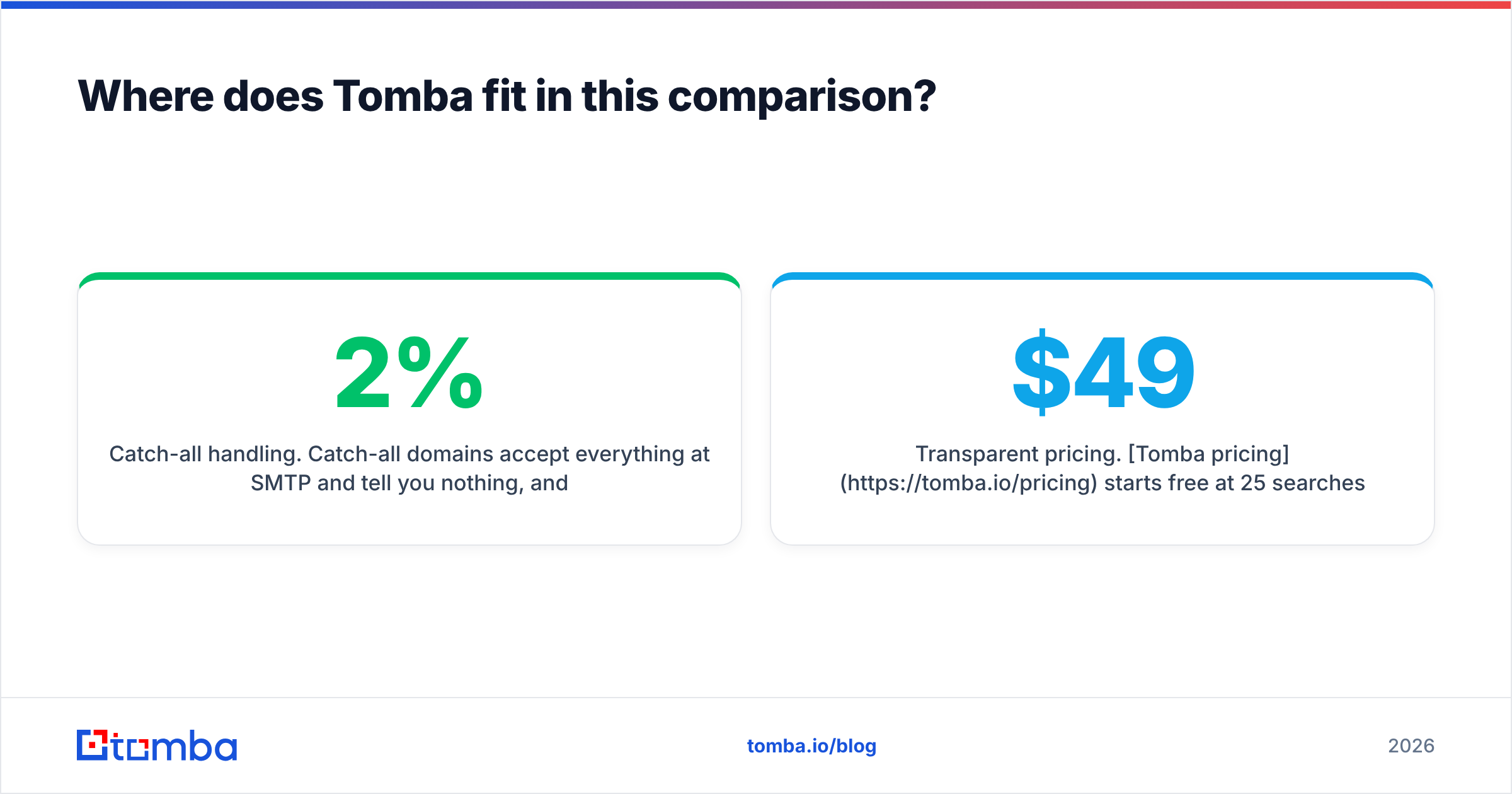
- Catch-all handling. Catch-all domains accept everything at SMTP and tell you nothing, and they're common in enterprise. A dedicated catch-all verifier is the difference between a 2% and a 9% bounce rate on enterprise lists.
- Bulk and API. Bulk enrichment plus a documented Tomba API means the data layer can run inside your own workflow rather than through CSV exports.
- Transparent pricing. Tomba pricing starts free at 25 searches/mo, then $49/mo Starter, $99/mo Growth, $249/mo Pro — no per-seat gate on the API.
None of that replaces ReachInbox. It replaces the data half. And if you want a third data reference point when evaluating, providers like BookYourData take a different approach — pay-as-you-go, human-verified B2B lists — which is a genuinely reasonable fit for teams that buy lists in bursts rather than continuously. Worth having on the shortlist alongside GetProspect when you run your accuracy test.
How should you actually run the evaluation?#
Don't trust anyone's accuracy claim, including ours. Run this in an afternoon:
- Build a 100-row control list. Pick real people at real companies in your actual ICP — not the vendor's demo segment. Include at least 20 non-US contacts and 20 from companies under 100 employees, because that's where coverage collapses.
- Run the same list through each data vendor. Record match rate (how many returned an email at all) and confidence score distribution.
- Verify externally. Push every result through a neutral checker so you're not grading a vendor's homework with its own pen. A free email checker works for spot checks.
- Send a small real campaign. 200 contacts, one mailbox, plain text. Measure hard bounce rate. This is the only number that reflects reality.
- Score cost per usable contact. Sticker price divided by contacts that survived step 4.
- Then, and only then, evaluate sending platforms. With a clean list, you can actually tell whether a deliverability tool is earning its keep.
Teams that skip step 4 buy on match rate, which vendors optimize for because it's the flattering metric. A tool can return a plausible-looking address for 90% of your list and still bounce 15% of them.
Which tool should you choose?#
Choose GetProspect if: you need a searchable database to build target lists from scratch, your ICP skews toward well-indexed US tech companies, and you want CRM-native exports. It's a list-building tool and it does that job.
Choose ReachInbox if: you already have a data source you trust, you're running more than three mailboxes, and your bottleneck is deliverability, warmup, or drowning in replies across accounts. Agencies running multiple clients get the most out of it.
Choose both if: you're running real outbound volume. This is the normal answer. Data layer plus sending layer, roughly $80–150/month combined for a small team.
Choose neither if: you're sending under 200 emails a month to a hand-built list. Use a verifier and your existing mailbox. Tooling doesn't fix a targeting problem at that volume — and per G2's category data, the tools with the best satisfaction scores are consistently the ones matched to the buyer's actual stage, not the most feature-dense.
What's the fastest way to fix the data half today?#
Start where the leverage is. Deliverability work compounds slowly — warmup takes weeks. Data quality improves the moment you swap sources, and it's the input to everything downstream.
Run 25 of your hardest contacts through the Tomba Email Finder on the free tier — no card, 25 searches a month — and compare match rate and bounce rate against whatever you're using now. If it wins on your list, the $49/mo Starter plan covers most two-person outbound teams; if it doesn't, you've spent an afternoon and learned something concrete about your current vendor. Either way you'll stop guessing which half of the stack is actually costing you meetings.
Related guides#
Ready to find emails that actually work?
Join 150,000+ professionals who stopped guessing and started sending. Free credits on signup — no credit card required.
Get the Tomba newsletter
Practical outbound tactics and product updates — once every two weeks.
About the author