GetProspect vs ReachStream 2026: Which B2B Data Tool Wins
One is a LinkedIn-driven email finder, the other is a static B2B contact database sold by the record. They fail in completely different ways — here is which one fits your outbound motion, and when neither does.
GetProspect vs ReachStream is a category choice, not a feature fight. One tool finds an email while you look at a profile. The other sells you a list you filter and download. Pick the wrong category and you pay twice — once for the tool, once for the bounces.
TL;DR
- GetProspect is a live finder. You feed it a LinkedIn profile, a name, or a domain, and it resolves an email at query time. Good for targeted, list-building-as-you-go prospecting.
- ReachStream is a static database. You filter a pre-built contact set, buy records, and export a CSV. Good for volume plays where you need 10,000 rows on Tuesday.
- The failure modes are opposite. GetProspect misses hard-to-find contacts and burns credits on empty results. ReachStream returns rows that were accurate 14 months ago.
- Neither ships a strong verification layer by default. Budget for a separate email verifier either way. Skip it, and your bounce rate picks the winner for you.
- If your bottleneck is API-driven discovery at scale, a finder-first platform like Tomba (free tier, then $49/mo) is usually the cheaper third option.
GetProspect vs ReachStream: what are they, exactly?#
Listicles lump them together under "B2B lead data." The two products are built differently.
GetProspect is an email finder with a Chrome extension and a lightweight CRM bolted on. Its core loop is: browse LinkedIn (or Sales Navigator), select profiles, and let the extension resolve work emails. It also does domain search — give it stripe.com and it returns the people it knows about there. It builds the answer when you ask, using crawled sources and pattern inference.
ReachStream is a contact database vendor. You filter a pre-compiled dataset by industry, job function, revenue band, geography, or installed technology. Then you preview the count, buy, and download. The product is the dataset, not the lookup. Pricing is per credit or per record, and the interface feels closer to a checkout than to a prospecting tool.
That difference drives everything else: workflow fit, accuracy profile, and cost per usable contact.
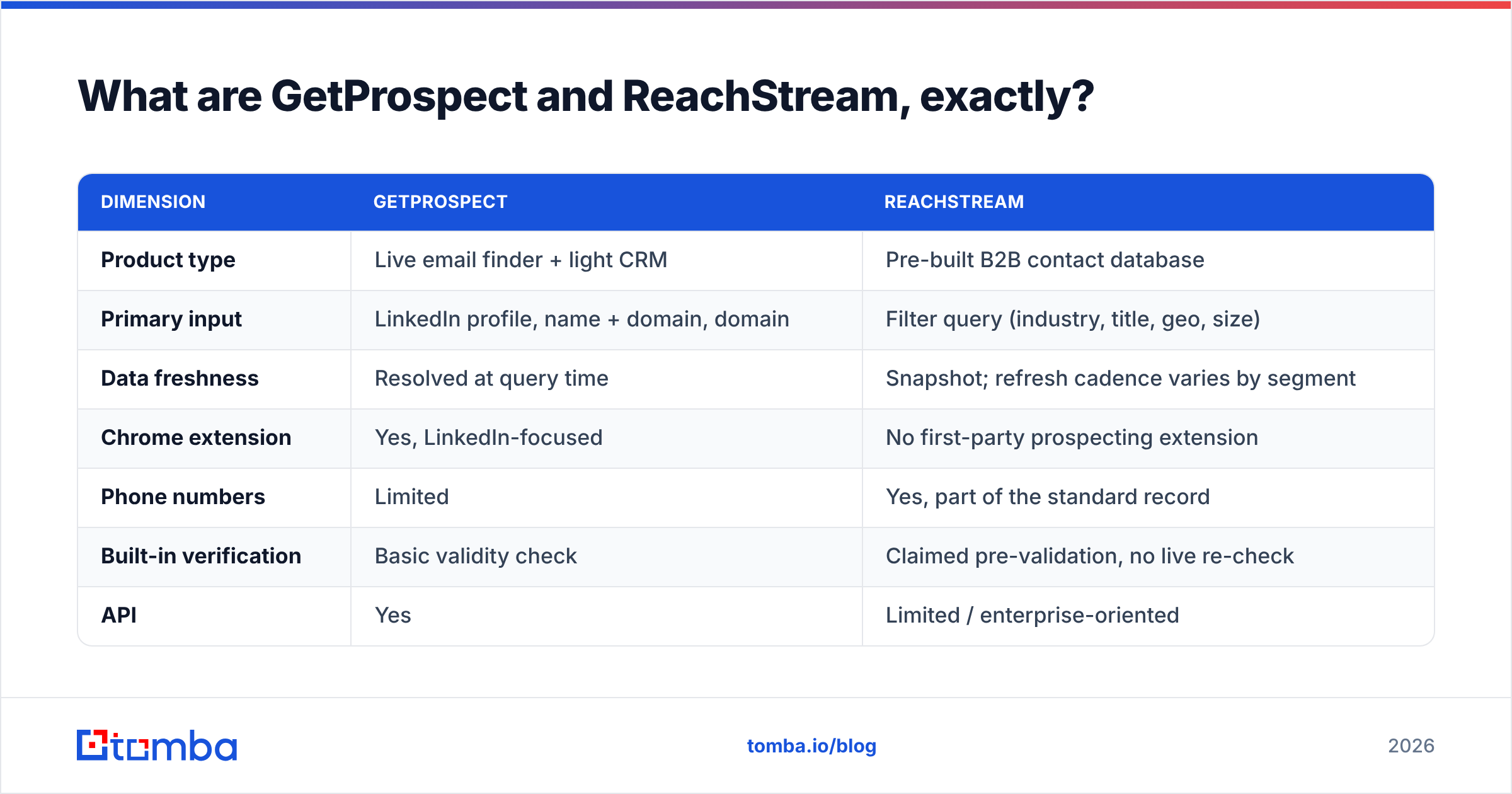
| Dimension | GetProspect | ReachStream |
|---|---|---|
| Product type | Live email finder + light CRM | Pre-built B2B contact database |
| Primary input | LinkedIn profile, name + domain, domain | Filter query (industry, title, geo, size) |
| Data freshness | Resolved at query time | Snapshot; refresh cadence varies by segment |
| Chrome extension | Yes, LinkedIn-focused | No first-party prospecting extension |
| Phone numbers | Limited | Yes, part of the standard record |
| Built-in verification | Basic validity check | Claimed pre-validation, no live re-check |
| API | Yes | Limited / enterprise-oriented |
| Export | CSV, integrations | CSV / XLS download |
| Best for | SDRs building targeted lists from LinkedIn | Marketers buying volume for one campaign |
Which one has better data accuracy?#
Neither is categorically "more accurate" — they are accurate about different things.
GetProspect wins on recency. When it returns first.last@company.com, that guess was formed against the current MX record and current pattern evidence for that domain. If someone changed jobs last month, a live finder is more likely to surface the new employer, because it works from a profile you just looked at.
ReachStream wins on coverage of long-tail fields. Firmographics, phone numbers, employee counts, and technographic tags come attached to the record. A finder generally makes you enrich those separately.
Both get punished in the same place: catch-all domains and role accounts. Roughly one in five B2B domains accepts every address at the SMTP layer. That means "valid" tells you nothing. Enterprise domains on Microsoft 365 often run a catch-all policy, so both vendors will hand you addresses that pass a syntax and MX check and still bounce. That is a job for a dedicated catch-all verifier, not a job either of these tools solves for you.

A practical accuracy test before you commit to either: pull 100 contacts you already know are correct — current customers, closed-won accounts, people who replied to you in the last 60 days — and run them through a trial of each tool. Measure three things:
- Match rate — how many of the 100 return any address at all.
- Exact-match rate — how many return the address you already know is right.
- False-confident rate — how many return a different address and still label it valid. This is the number that quietly kills domains.
Vendors publish match rates. Almost none publish false-confident rates, which is why running your own 100-row test beats reading any comparison post, including this one.

How does pricing actually compare?#
Both vendors have moved their pricing around, so treat the numbers below as directional and confirm on the live pricing pages before you buy. The shape of the pricing matters more than the exact figure anyway.
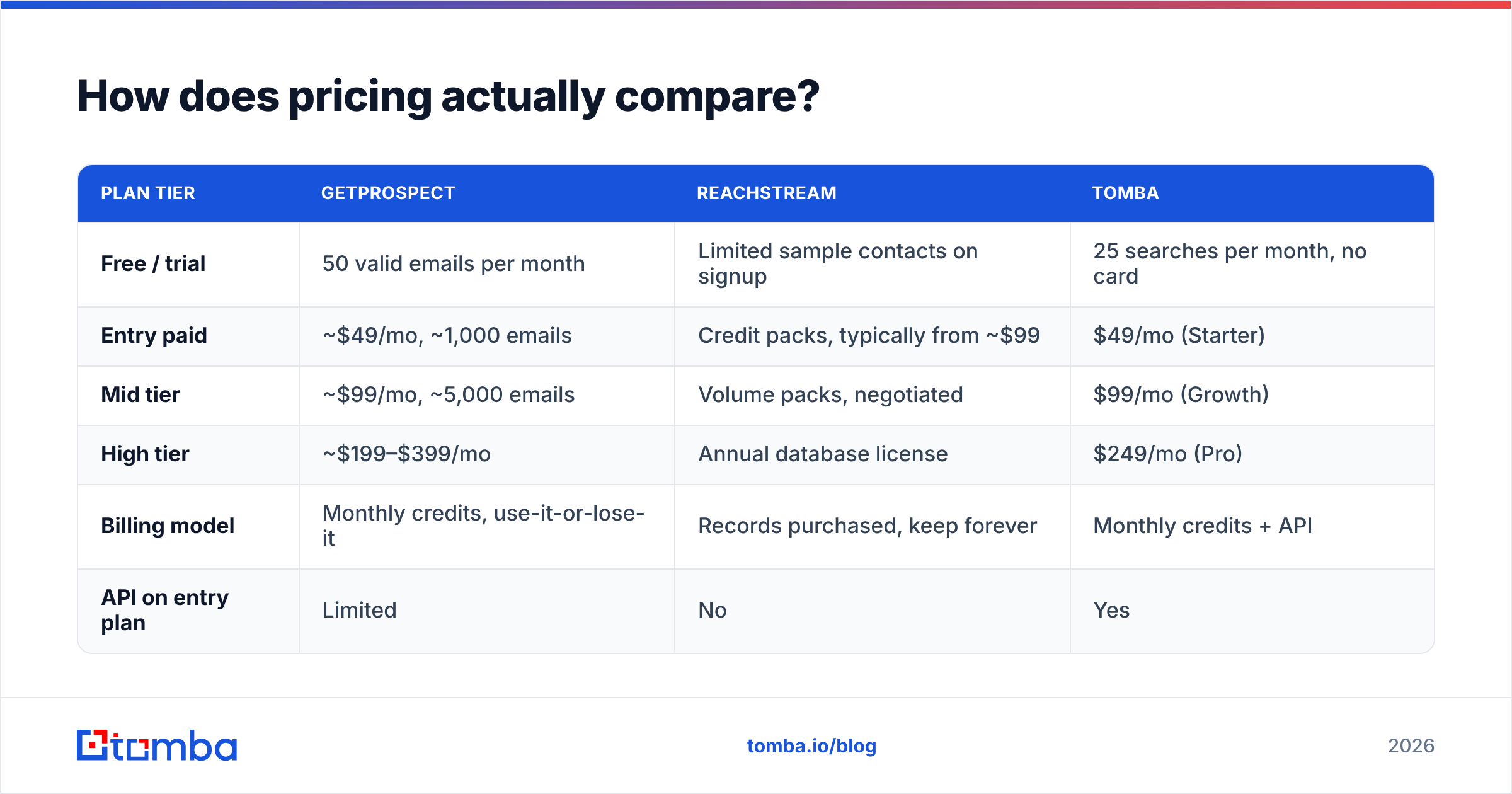
| Plan tier | GetProspect | ReachStream | Tomba |
|---|---|---|---|
| Free / trial | 50 valid emails per month | Limited sample contacts on signup | 25 searches per month, no card |
| Entry paid | ~$49/mo, ~1,000 emails | Credit packs, typically from ~$99 | $49/mo (Starter) |
| Mid tier | ~$99/mo, ~5,000 emails | Volume packs, negotiated | $99/mo (Growth) |
| High tier | ~$199–$399/mo | Annual database license | $249/mo (Pro) |
| Billing model | Monthly credits, use-it-or-lose-it | Records purchased, keep forever | Monthly credits + API |
| API on entry plan | Limited | No | Yes |
Two structural differences worth more than the sticker price:
Credits expire on subscription finders. GetProspect's monthly allowance resets. If you have a slow month, that budget evaporates. ReachStream's purchased records do not expire — you own the CSV. That is genuinely better for lumpy, campaign-driven usage.
Records you own decay anyway. B2B contact data degrades by roughly 22–30% a year, depending on which analyst you believe. A CSV you bought in January is measurably worse in October. "Keep forever" only helps if you re-verify before every send. Check Tomba pricing or any competitor's page against your actual monthly volume, not against your best month.
Which tool fits which workflow?#
Pick based on how your list gets built, not on feature counts.
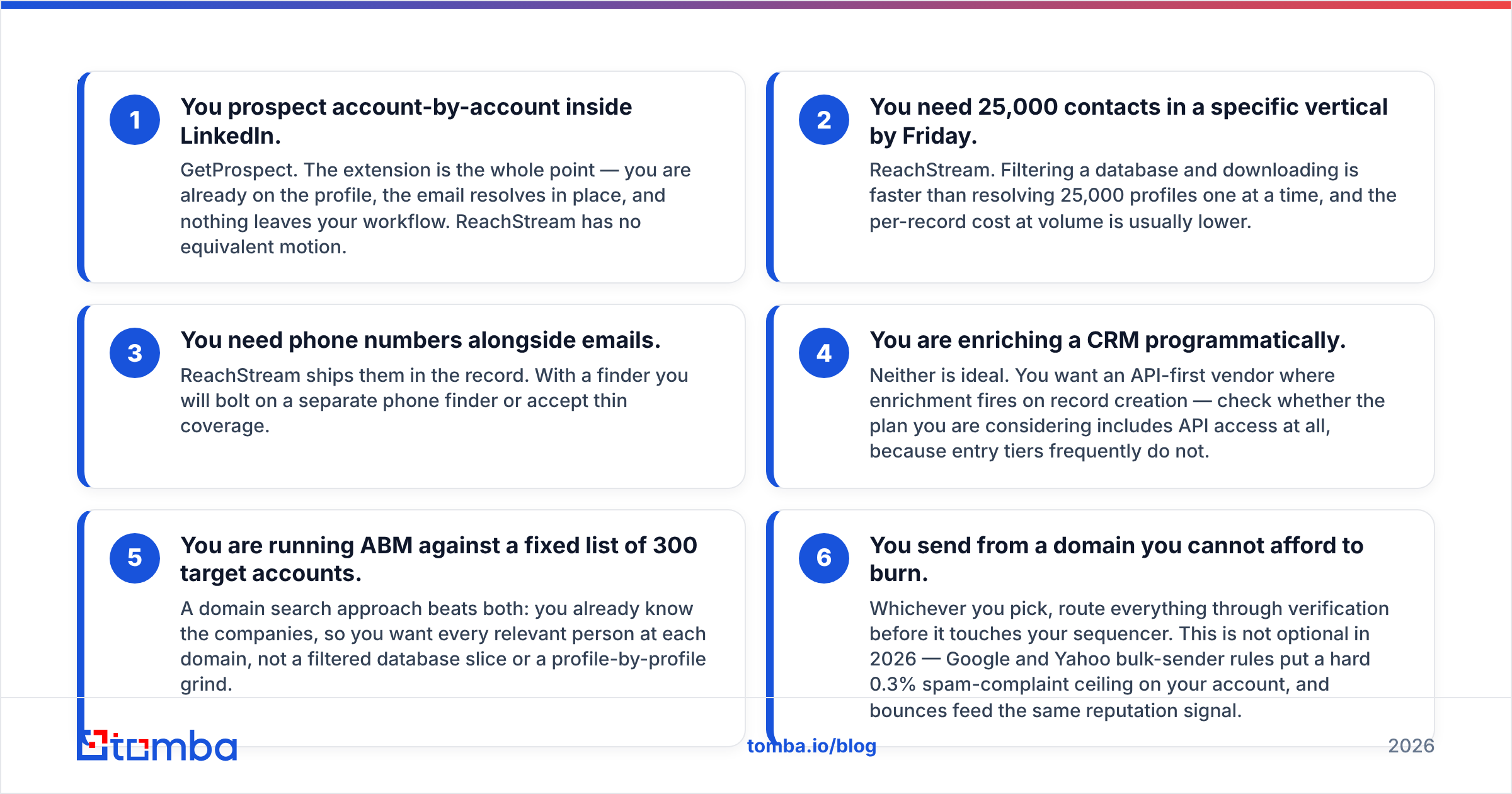
- You prospect account-by-account inside LinkedIn. GetProspect. The extension is the whole point — you are already on the profile, the email resolves in place, and nothing leaves your workflow. ReachStream has no equivalent motion.
- You need 25,000 contacts in a specific vertical by Friday. ReachStream. Filtering a database and downloading is faster than resolving 25,000 profiles one at a time, and the per-record cost at volume is usually lower.
- You need phone numbers alongside emails. ReachStream ships them in the record. With a finder you will bolt on a separate phone finder or accept thin coverage.
Those three are workflow calls. The next three are about the plumbing around the tool.
- You are enriching a CRM programmatically. Neither is ideal. You want an API-first vendor where enrichment fires on record creation. Check whether the plan you are considering includes API access at all, because entry tiers frequently do not.
- You are running ABM against a fixed list of 300 target accounts. A domain search approach beats both. You already know the companies, so you want every relevant person at each domain — not a filtered database slice, and not a profile-by-profile grind.
- You send from a domain you cannot afford to burn. Whichever you pick, route everything through verification before it touches your sequencer. This is not optional in 2026. Google and Yahoo cap bulk senders at a 0.3% spam-complaint rate, and bounces feed the same reputation signal.
Where do both tools fall short?#
Verification is treated as a checkbox. Both claim validated data. Neither exposes the granularity you need — accept-all status, role-account flags, disposable-domain detection, SMTP-level confidence tiers. If a tool returns a binary valid/invalid on a catch-all domain, it is guessing and not telling you it is guessing.
Compliance surface differs by geography. In the EU, purchased-list models carry more GDPR exposure than query-time lookups. You are holding personal data in bulk, at rest, for people you have no relationship with. If your ICP is European, get your legal team to read the vendor's data-sourcing statement before the trial ends, not after. Both vendors publish sourcing language; read it against your own basis for processing.
Neither is a sending platform. GetProspect's light CRM is not a sequencer. ReachStream is not one either. You will still pay for an outreach tool, which changes the real cost comparison substantially.
Support and refund policy on bad records. Ask, in writing, what happens when 18% of a purchased batch bounces. Some vendors credit back; some do not. That answer is worth more than any feature table. Check recent G2 reviews for both vendors and sort by lowest rating, because one-star reviews are where refund policy actually gets tested.
Is there a better alternative for email discovery?#
If your core problem is "find and verify work emails reliably, and let me automate it," a finder-first platform is usually the cheaper answer than either option above.

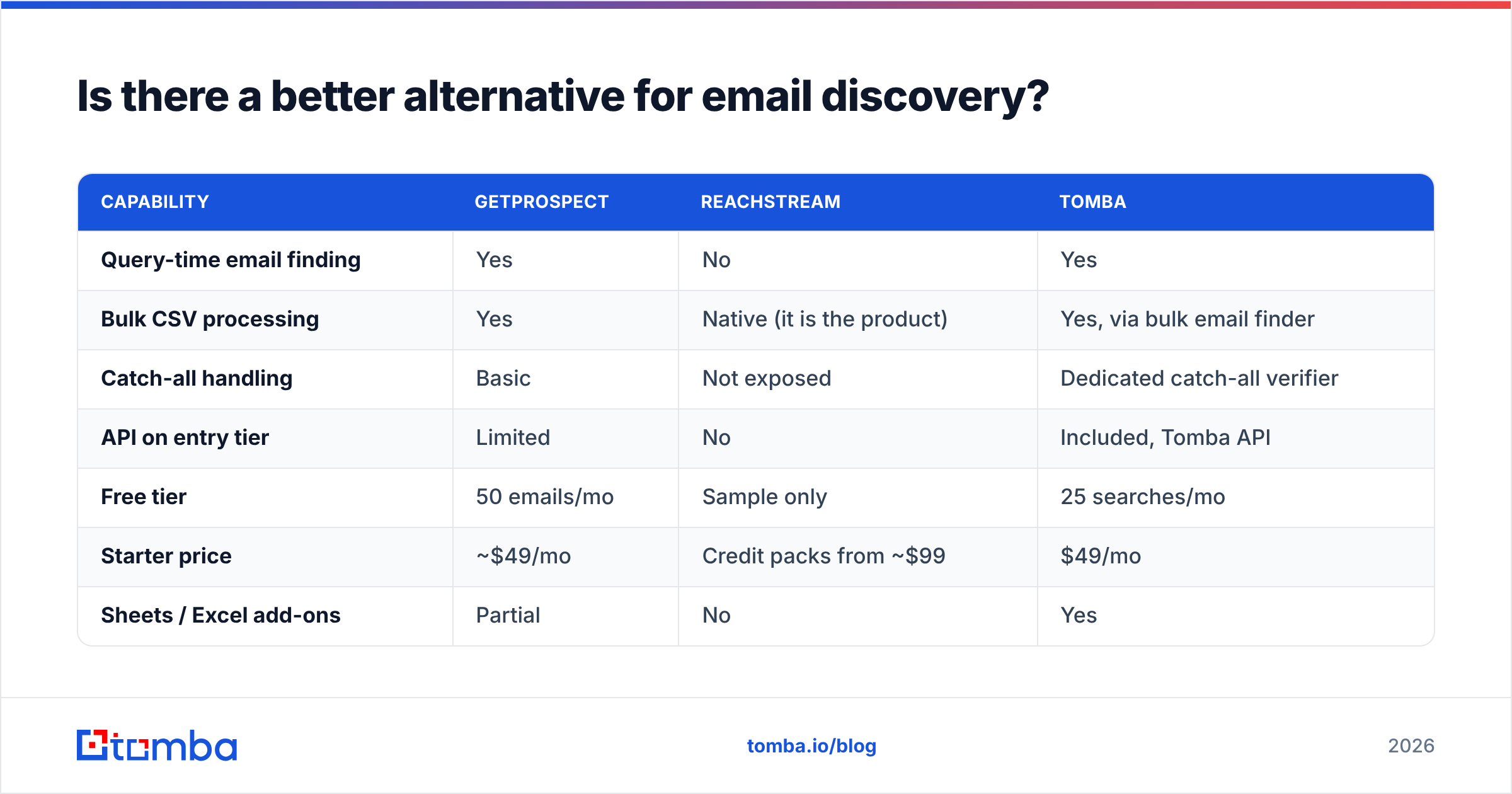
Tomba sits in the finder category with GetProspect rather than the database category with ReachStream, but with a wider verification layer around it. The relevant differences:
| Capability | GetProspect | ReachStream | Tomba |
|---|---|---|---|
| Query-time email finding | Yes | No | Yes |
| Bulk CSV processing | Yes | Native (it is the product) | Yes, via bulk email finder |
| Catch-all handling | Basic | Not exposed | Dedicated catch-all verifier |
| API on entry tier | Limited | No | Included, Tomba API |
| Free tier | 50 emails/mo | Sample only | 25 searches/mo |
| Starter price | ~$49/mo | Credit packs from ~$99 | $49/mo |
| Sheets / Excel add-ons | Partial | No | Yes |
| Author + LinkedIn lookups | LinkedIn only | No | Both |

The honest caveat: if what you actually need is 50,000 filtered records with phone numbers and firmographics in one download, a database vendor like ReachStream serves that better than any finder, Tomba included. Finders resolve contacts you can already identify. Databases hand you contacts you did not know existed. Know which problem you have.
Which should you pick in 2026?#
Pick GetProspect if your SDRs live inside LinkedIn, your lists are built one account at a time, and monthly volume is predictable enough that expiring credits do not sting. The extension workflow is genuinely good, and it is the reason most teams choose it.
Pick ReachStream if you buy lists in campaigns rather than building them continuously, you need phone plus firmographic data in the same row, and you have the verification stack to clean a purchased file before it ships. Owning the records outright is a real advantage for that motion.
Pick neither if your bottleneck is programmatic enrichment — CRM records created by a form fill, a signup, a webhook — where a lookup has to fire automatically and return a verified result in under a second. That is an API problem, and neither vendor's entry tier is built for it.
The GetProspect vs ReachStream decision usually collapses to one question: do you already know who you want to reach? If yes, you need a finder. If no, you need a database. Buying the wrong category costs more than picking the second-best product inside the right one.
Whichever way you go, run the 100-known-contacts test first. Two afternoons of testing beats twelve months of a contract you regret.
Ready to test a finder against your own list? Start with the Tomba Email Finder — 25 free searches a month, no card required, and full API access from the $49 Starter plan. Drop in 100 contacts you already know are correct, compare the exact-match rate against whatever you are using now, and let the numbers pick your vendor instead of a comparison table.
Related guides#
Ready to find emails that actually work?
Join 150,000+ professionals who stopped guessing and started sending. Free credits on signup — no credit card required.
Get the Tomba newsletter
Practical outbound tactics and product updates — once every two weeks.
About the author