GetProspect vs SalesBlink 2026: Which Tool Should You Pick?
GetProspect finds contacts. SalesBlink sends sequences. They overlap less than the comparison pages suggest — here is where each one actually earns its budget line in 2026.
GetProspect vs SalesBlink is the wrong fight for most teams. One tool finds contacts. The other sends email. This guide covers what each one does well, what the pair really costs, and when to skip both.
TL;DR#
- GetProspect is a contact database and email finder. SalesBlink is a cold-email sending platform. They are not real substitutes. Most teams that "choose one" buy the other six months later.
- Pick GetProspect if your problem is who to contact. It builds LinkedIn-sourced lists, filters by title and headcount, and exports enriched CSVs.
- Pick SalesBlink if your problem is getting mail delivered and replied to. You get multi-inbox rotation, warmup, sequences, and a built-in meeting scheduler.
- Real cost check: running both costs most 2-3 SDR teams $100–$200 a month. That is once you buy enough finder credits and enough sending seats. Budget for it before you sign an annual plan.
- The third path: keep the sending tool you already like (Instantly, Smartlead, Lemlist). Then put a dedicated data layer under it via API. A purpose-built email finder usually beats a bundled one.
What is GetProspect and what does it do?#
GetProspect is a B2B contact database with a LinkedIn Chrome extension on top. You can search its database with filters: job title, company size, industry, location, tech stack. Or you can browse LinkedIn and let the extension pull emails for the profiles you view. The output is a list. You enrich it, verify it, and export it to CSV or your CRM.
Its core loop is discovery → enrichment → export. Nothing in GetProspect sends an email. There is no sequencer, no warmup, no inbox rotation, no reply detection. Once your list is built, you leave the product.
What it does well:
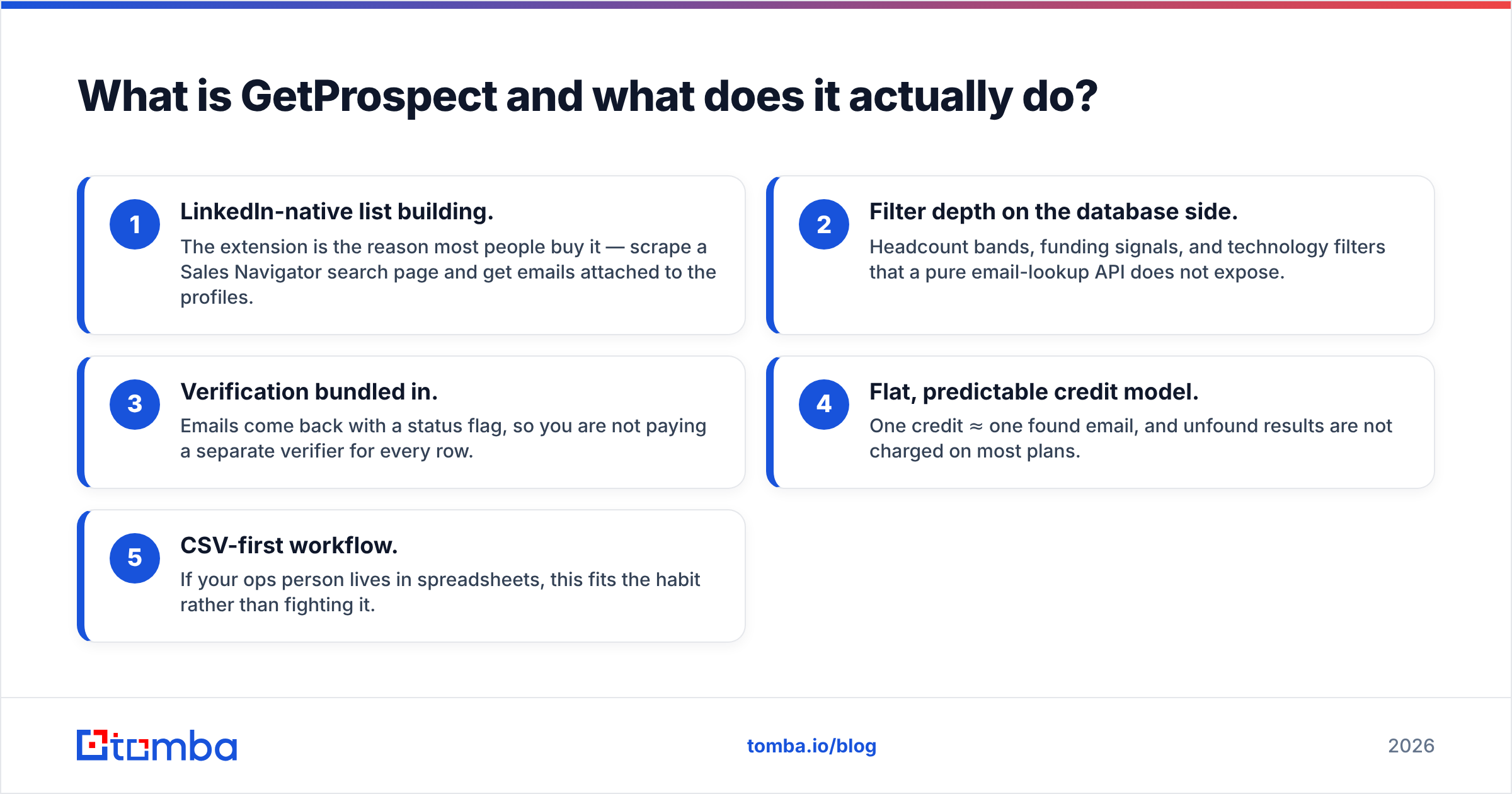
- LinkedIn-native list building. The extension is the reason most people buy it. Scrape a Sales Navigator search page and get emails attached to the profiles.
- Filter depth on the database side. Headcount bands, funding signals, and tech filters that a plain lookup API does not offer.
- Verification bundled in. Emails come back with a status flag. You do not pay a separate verifier for every row.
- Flat, clear credit model. One credit is one found email. Most plans do not charge you for misses.
- CSV-first workflow. If your ops person lives in spreadsheets, this fits the habit rather than fighting it.
The weakness is the one every LinkedIn-sourced database shares. Coverage is strong for tech, SaaS, and marketing roles in North America and Western Europe. It is much thinner for operations roles, small local services, and non-English markets. If your ICP is a 30-person maker in Lyon, expect a lower hit rate than the marketing page implies.
What is SalesBlink and where does it fit?#
SalesBlink went the other way. It started as a prospecting-plus-outreach bundle. Today it is mostly an email sending and deliverability platform with AI-assisted copy. The centre of gravity is:
- BlinkGPT — AI sequence and copy written from a prompt about your offer and ICP.
- Warmup — automatic inbox warmup across your mailboxes, included rather than sold separately.
- Multi-channel sequences — email steps with branching, plus call and LinkedIn tasks that route to a human.
- Unlimited email accounts on paid tiers, with rotation so no single mailbox carries the whole volume.
- Meeting scheduler — a built-in booking page, so replies do not bounce to Calendly.
SalesBlink does show prospect data. Treat it as a nice extra, not the reason to buy. Teams running real volume feed it lists built elsewhere. The tool earns its keep on the sending side. Rotation, warmup, and reply handling are fiddly problems, and having them in one place with a scheduler removes real friction.
If your campaigns land in spam, a finder will not fix it. Read up on email deliverability first. Domain authentication and list hygiene beat any sequencer feature.
GetProspect vs SalesBlink: the head-to-head table#
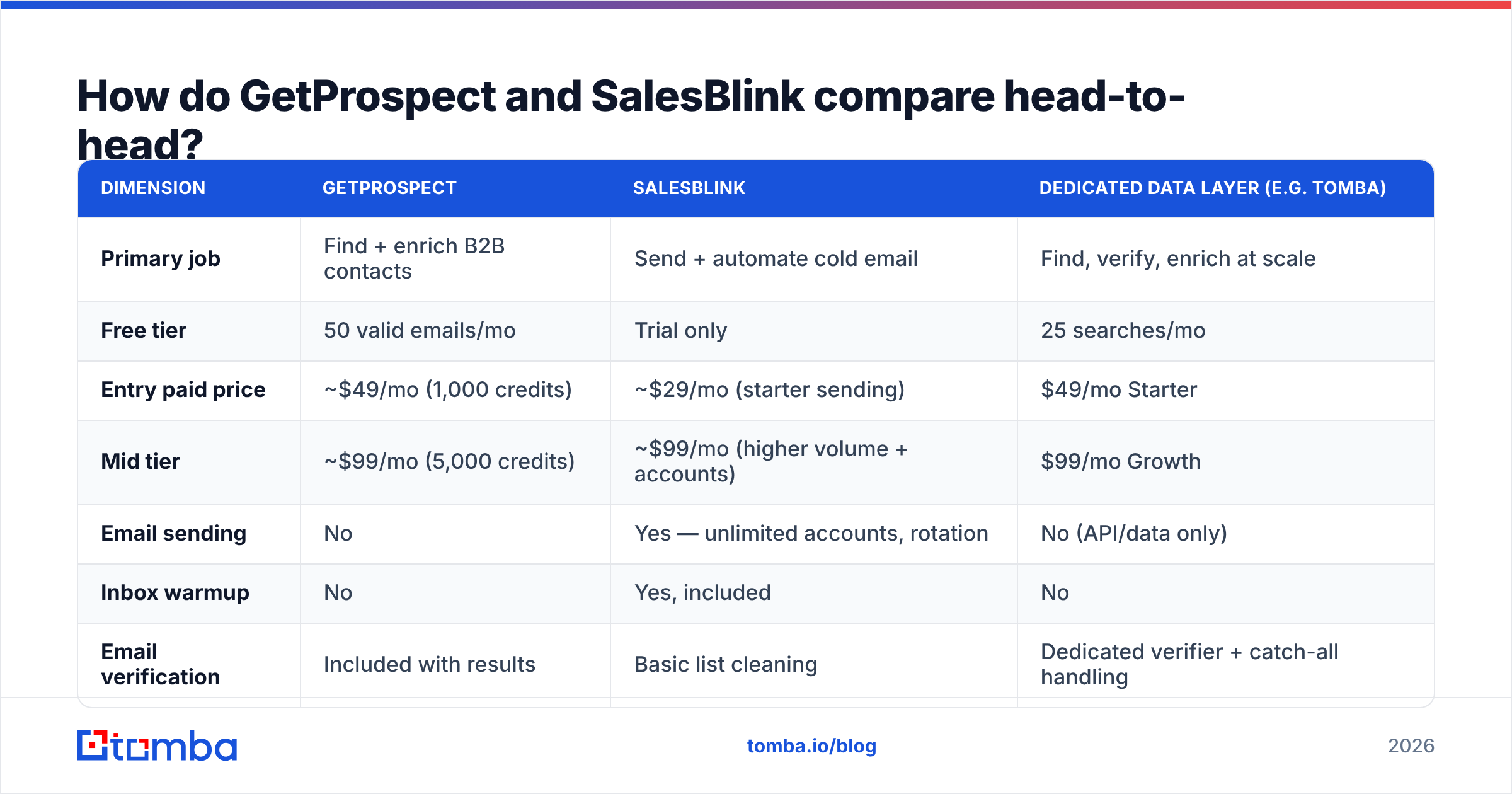
Here is the honest side-by-side. Pricing reflects listed entry tiers as of early 2026. Both vendors change promo pricing often, so check their own sites before you buy.
| Dimension | GetProspect | SalesBlink | Dedicated data layer (e.g. Tomba) |
|---|---|---|---|
| Primary job | Find + enrich B2B contacts | Send + automate cold email | Find, verify, enrich at scale |
| Free tier | 50 valid emails/mo | Trial only | 25 searches/mo |
| Entry paid price | ~$49/mo (1,000 credits) | ~$29/mo (starter sending) | $49/mo Starter |
| Mid tier | ~$99/mo (5,000 credits) | ~$99/mo (higher volume + accounts) | $99/mo Growth |
| Email sending | No | Yes — unlimited accounts, rotation | No (API/data only) |
| Inbox warmup | No | Yes, included | No |
| Email verification | Included with results | Basic list cleaning | Dedicated verifier + catch-all handling |
| LinkedIn extension | Yes — core feature | Limited | Yes |
| Bulk / CSV workflow | Strong | Adequate | Strong (bulk + Sheets + Excel) |
| Public API | Yes | Yes | Yes — full REST, CLI, MCP |
| CRM integrations | HubSpot, Pipedrive, Zapier | HubSpot, Pipedrive, Zapier | HubSpot, Salesforce, Pipedrive, Make, Zapier |
| Best for | List builders and researchers | Agencies and SDR teams sending volume | Ops teams automating enrichment |
The pattern is clear once it is laid out. The two products overlap on one column: prospect data. SalesBlink is the weaker side of that column. GetProspect is the weaker side of every sending row.
GetProspect vs SalesBlink: which has better data?#
Accuracy is where "vs" posts get lazy. So let's be precise about what you should measure.
Three numbers matter, not one:
- Coverage, or hit rate — of 1,000 target contacts, how many come back with an email at all? LinkedIn-sourced databases like GetProspect are strong here for tech roles. Every provider drops off on small business and non-Western markets.
- Bounce rate on send — of the emails returned, how many hard-bounce? Anything above 3–5% drags your sender reputation down. Google and Microsoft both tightened bulk-sender rules over the last two years.
- Catch-all handling — many corporate domains accept every address at the SMTP layer. A provider that marks these "valid" is inflating its own score. A provider that marks them "unknown" and gives you a catch-all verifier is being honest with you.
GetProspect returns a verification status with results. That is a real edge over raw scrapers. SalesBlink cleans lists, but it is not a verification product. Treat its output as a starting point, not a clean list.
The practical rule: never trust vendor accuracy claims, even the good ones. Take 200 known-good contacts from your CRM. Run them through each tool. Compare found-rate and bounce-rate against reality. That test takes an afternoon and settles the argument for good. Before any list hits your sequencer, run it through a standalone email verifier. The cost is tiny next to a burned domain.
What does each one cost at team scale?#
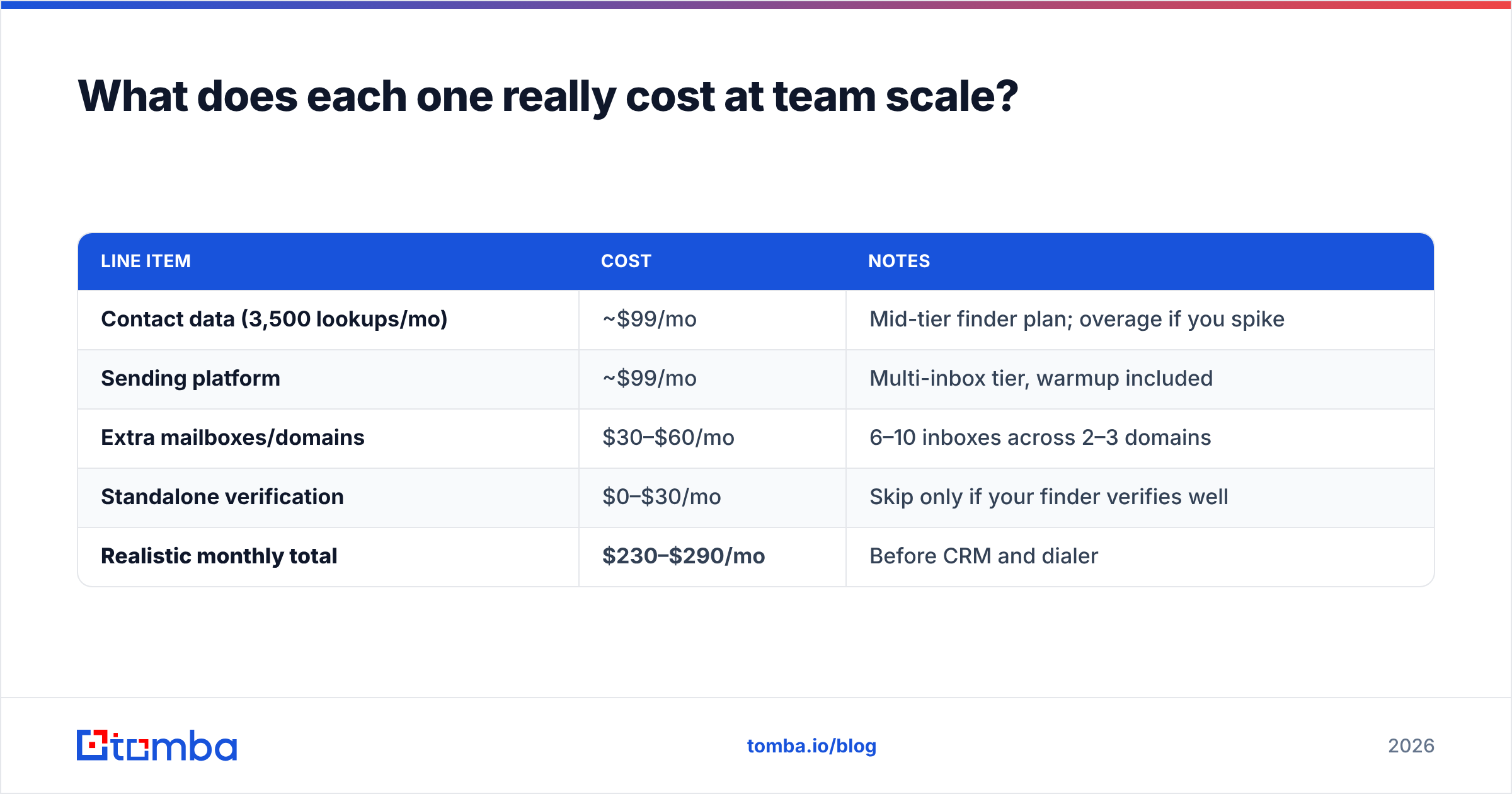
Sticker price misleads. The two tools price on different units. GetProspect prices on credits, or lookups. SalesBlink prices on sending capacity and seats. Your bill is both of them, not the cheaper one.
Model it for a realistic three-SDR team sending 3,000 emails a month:
| Line item | Cost | Notes |
|---|---|---|
| Contact data (3,500 lookups/mo) | ~$99/mo | Mid-tier finder plan; overage if you spike |
| Sending platform | ~$99/mo | Multi-inbox tier, warmup included |
| Extra mailboxes/domains | $30–$60/mo | 6–10 inboxes across 2–3 domains |
| Standalone verification | $0–$30/mo | Skip only if your finder verifies well |
| Realistic monthly total | $230–$290/mo | Before CRM and dialer |
Three cost traps to check before you sign:
- Annual lock-in on the finder side. Credit needs are spiky. One big campaign month can burn a quarter's allowance. Monthly billing costs more per credit, and it is still the right call for the first quarter.
- Credits that expire. Unused credits vanishing is the most common complaint in G2 reviews across this category. Ask about rollover.
- Per-seat sending fees. Some platforms charge per user, others per inbox. With a rotating multi-inbox setup, per-inbox pricing scales badly.
For reference, Tomba pricing runs Free (25 searches a month), Starter $49, Growth $99, and Pro $249, plus custom Enterprise. That is the same shape as GetProspect's ladder, so the credit-for-credit math is easy.

Is there a better way to build the stack?#
Yes. Most experienced outbound teams land on the same answer: split data from sending.
The bundled approach looks cheap on the invoice and hurts in practice. Three reasons:
- Different upgrade cycles. Data quality and deliverability tools improve on different timelines. Bundles make you swap both or neither.
- The weak half drags the strong half. Every bundle has one side it built first and one side it bolted on. You pay full price for a part you would never buy alone.
- Migration cost compounds. Sequences, templates, and warmup history are sticky. Contact data is not. Keeping data pluggable protects your leverage at renewal.
A split stack looks like this:
- Data layer — an API-first finder for domain search, single lookups, and bulk email finder jobs. It feeds your CRM on a schedule, not through manual CSV round-trips.
- Sending layer — whichever sequencer your team already knows: SalesBlink, Instantly, Smartlead, Lemlist. Switching costs are real here, so pick what your SDRs will use daily.
- Verification gate — verify every list between the two layers, not after. Bounces caught before the send never touch your reputation.
- CRM sync — HubSpot or Pipedrive as the system of record, with enrichment writing back on a cadence.
Checking alternatives on either side? Review sites like G2 and Capterra beat vendor comparison pages, this one included. Filter reviews to your own company size band. A 500-person enterprise and a 4-person agency describe two different products under one name.
GetProspect vs SalesBlink: which should you choose?#
Decision rules, in order:
Choose GetProspect if: your team builds lists from LinkedIn by hand, your ICP sits in tech, SaaS, or marketing in NA or Western Europe, and you already have a sending tool you like. You are buying the extension and the filter depth.
Choose SalesBlink if: you already have lists, your problem is deliverability and follow-up discipline, and you want warmup plus a scheduler without a fourth subscription. Agencies running many client inboxes get the most out of it.
Choose neither and build a data layer if: you have engineering or ops capacity, you enrich all the time rather than in campaign bursts, and you want contact data flowing into HubSpot or Salesforce on its own. This is where an API-first provider with a Tomba API, CLI, and MCP server does work a Chrome extension cannot.
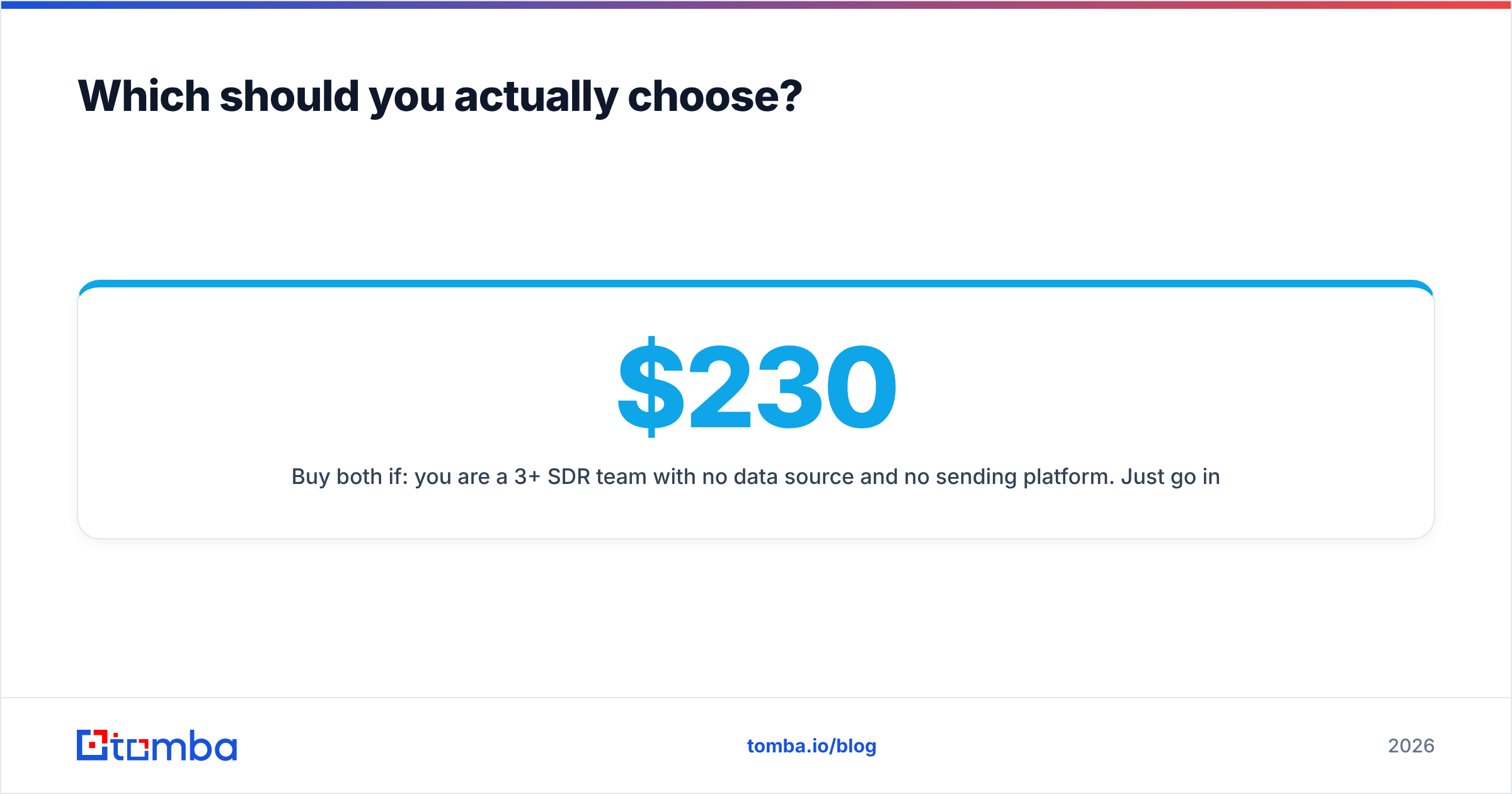
Buy both if: you are a 3+ SDR team with no data source and no sending platform. Just go in with the $230–$290 a month number in mind, not the $29 headline.
One last note on testing. Run the trials in parallel, on the same target list, in the same week. Sequential trials are worthless. Your list, your ICP, and your patience all change between them. Give each tool 100 identical target companies. Compare found-rate, bounce-rate, and time to first export. The winner is usually clear within two hours.
Ready to fix the data half of your stack?#
If your sending tool is fine and your lists are the problem, start there. Tomba Email Finder finds work email addresses by domain, name, or company. It verifies them before they reach your sequencer. You get a REST API, a Chrome extension, a Google Sheets add-on, and bulk uploads. The free tier gives you 25 searches a month. That is enough to run the 100-company test above before you spend a cent. Keep whichever sequencer your SDRs already love. Just stop feeding it lists you have not verified.
Related guides#
Ready to find emails that actually work?
Join 150,000+ professionals who stopped guessing and started sending. Free credits on signup — no credit card required.
Get the Tomba newsletter
Practical outbound tactics and product updates — once every two weeks.
About the author