GetProspect vs SMARTe: Which B2B Data Tool Wins in 2026?
GetProspect is a self-serve email finder built on LinkedIn workflows. SMARTe is an enterprise-leaning contact intelligence platform with heavy mobile-number coverage. Here is where each one actually wins.
TL;DR
- GetProspect is a self-serve email finder built around LinkedIn workflows. You install the extension, scrape a Sales Navigator list, and export verified emails. Transparent pricing, fast to start, weak on phone data.
- SMARTe is a contact intelligence platform aimed at bigger revenue teams. Its differentiator is mobile-number coverage and CRM-native workflows, but pricing is quote-only and you will talk to a rep before you touch the data.
- If your motion is "find work emails at scale for cold email," GetProspect is the cheaper, faster answer. If your motion is "dial 200 mobiles a week in North America," SMARTe is the stronger data asset.
- Neither is a great API-first choice. If you need programmatic lookup with published per-credit pricing, an email-finder API like Tomba fills that gap at $49/mo.
- Whatever you pick, verify before you send. Vendor-side "verified" flags are not the same as a fresh SMTP check on the day you launch.
What are GetProspect and SMARTe?#
They solve overlapping problems from opposite ends of the market.
GetProspect is a lead-generation tool best known for its Chrome extension and LinkedIn integration. The core loop is simple: browse LinkedIn or Sales Navigator, select a list, click extract, and GetProspect returns names, company data, and business emails into a spreadsheet-style workspace. It also offers domain-based search and bulk enrichment from an uploaded CSV. It is a prosumer product — a solo founder, an agency SDR, or a two-person growth team can sign up and be pulling emails in ten minutes without a sales call.
SMARTe sits closer to the ZoomInfo/Cognism end of the spectrum. It positions itself as a global B2B contact and company intelligence provider, with a heavy emphasis on direct dials and mobile numbers, technographic and firmographic filters, and CRM/sales-engagement integrations. Its buyers are usually revenue operations leads buying seats for a team, not individuals swiping a credit card.
That difference in market position explains almost every other difference between them: transparency of pricing, depth of phone data, contract length, and how much of the product you can evaluate before signing anything.

How do GetProspect and SMARTe compare on data coverage?#
Coverage splits into three questions, and the two tools answer them very differently.
- Work email coverage. Both claim large contact databases in the hundreds of millions. In practice, GetProspect performs well on the profiles you feed it — because you are supplying the LinkedIn identity, it only has to resolve the email, not discover the person. SMARTe performs well on database-first searches where you filter by geography, industry, and title and let the platform hand you a list.
- Phone and mobile coverage. This is SMARTe's strongest claim and GetProspect's weakest area. If your team runs a cold-calling motion alongside email, SMARTe's mobile-number density in North America is the reason people buy it. GetProspect is email-first and does not pretend otherwise.
- Geographic spread. SMARTe pushes EMEA and APAC coverage hard as a differentiator against US-centric databases. GetProspect's coverage follows LinkedIn's footprint, which is broad but thins out in markets where LinkedIn adoption is lower.
A fourth factor matters more than vendors like to admit: freshness. B2B contact data decays roughly 25–30% per year as people change jobs, according to widely cited industry benchmarks. A database that was excellent eighteen months ago is mediocre today unless it is being continuously re-verified. Ask both vendors when a given record was last confirmed, not just how many records they hold.
Which one has better email accuracy?#
Neither publishes an independently audited accuracy number, so treat marketing claims of "95%+ verified" as a starting hypothesis, not a fact.
Here is how to actually test it, in under an hour:
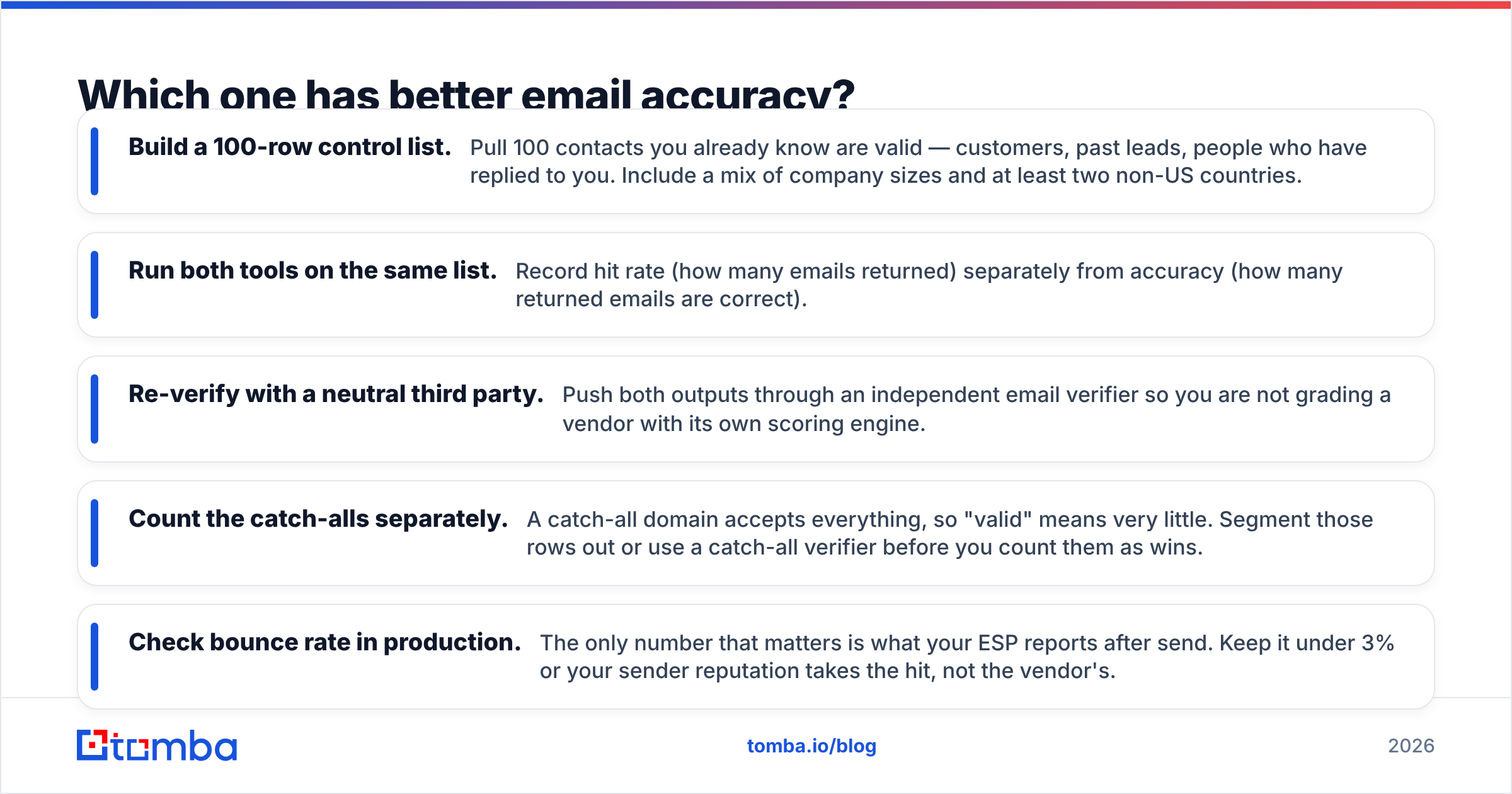
- Build a 100-row control list. Pull 100 contacts you already know are valid — customers, past leads, people who have replied to you. Include a mix of company sizes and at least two non-US countries.
- Run both tools on the same list. Record hit rate (how many emails returned) separately from accuracy (how many returned emails are correct).
- Re-verify with a neutral third party. Push both outputs through an independent email verifier so you are not grading a vendor with its own scoring engine.
- Count the catch-alls separately. A catch-all domain accepts everything, so "valid" means very little. Segment those rows out or use a catch-all verifier before you count them as wins.
- Check bounce rate in production. The only number that matters is what your ESP reports after send. Keep it under 3% or your sender reputation takes the hit, not the vendor's.
Most teams discover the same thing: hit rate varies wildly by vendor and segment, but accuracy on returned emails is fairly close across serious tools. The differentiator is how many of your target accounts each one can resolve at all.

One more accuracy nuance: some platforms count a "guessed" pattern email as a hit. If a tool returns first.last@company.com because that is the dominant pattern at that domain but never confirmed the specific mailbox, that is a prediction, not a find. Check whether the confidence score reflects a real check or a pattern inference — the company email pattern approach is useful, but only when it is paired with verification.
How do pricing and credits compare?#
This is the sharpest split between the two products.
GetProspect publishes its plans. There is a free tier with a small monthly allowance of valid emails, then paid tiers that scale by credit volume, typically starting in the $49/month range and climbing into the low hundreds for higher volumes and additional seats. You can self-serve the whole way.
SMARTe does not publish list pricing. You request a demo, describe your use case and seat count, and receive a quote — usually an annual contract with a credit pool. Reviews on G2 generally place it in the mid-market range below the largest incumbents, but you will not know your number without a call.
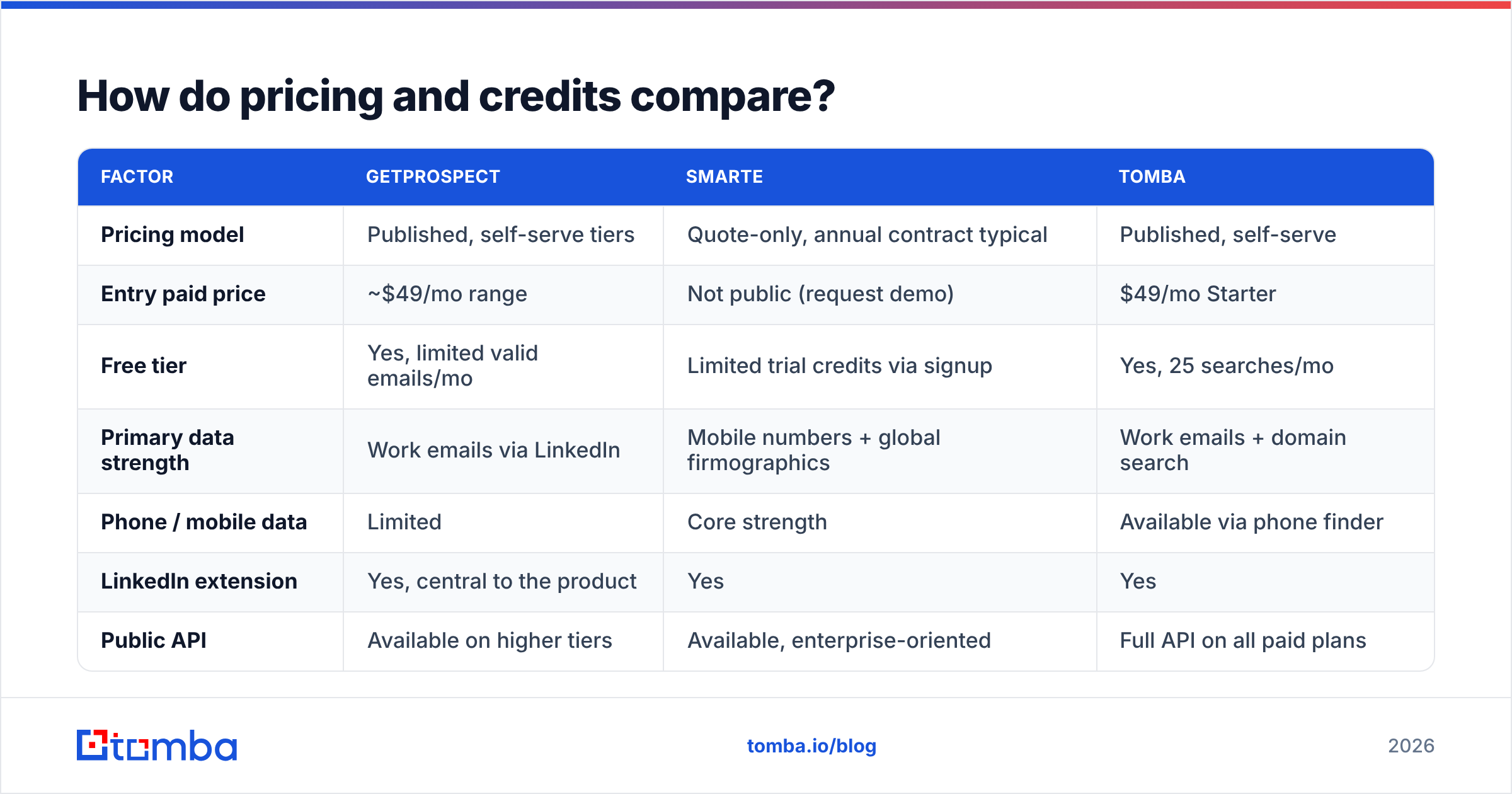
| Factor | GetProspect | SMARTe | Tomba |
|---|---|---|---|
| Pricing model | Published, self-serve tiers | Quote-only, annual contract typical | Published, self-serve |
| Entry paid price | ~$49/mo range | Not public (request demo) | $49/mo Starter |
| Free tier | Yes, limited valid emails/mo | Limited trial credits via signup | Yes, 25 searches/mo |
| Primary data strength | Work emails via LinkedIn | Mobile numbers + global firmographics | Work emails + domain search |
| Phone / mobile data | Limited | Core strength | Available via phone finder |
| LinkedIn extension | Yes, central to the product | Yes | Yes |
| Public API | Available on higher tiers | Available, enterprise-oriented | Full API on all paid plans |
| Buying friction | Card, no sales call | Demo required | Card, no sales call |
| Best fit | Solo/SMB email prospecting | Mid-market multi-channel teams | API + bulk email workflows |
Plan details change. Confirm current numbers on each vendor's pricing page before you commit; the figures above reflect publicly listed information at the time of writing.

The credit model deserves scrutiny too. Ask each vendor three questions: Do failed lookups consume a credit? Do credits roll over? Are exports metered separately from searches? Two tools with identical headline prices can differ 2x in effective cost once those rules apply. Tomba's pricing page is worth using as a baseline for what published, per-credit transparency looks like when you are comparing quotes.
Which one fits LinkedIn prospecting better?#
GetProspect, clearly — that is its center of gravity.
The typical GetProspect workflow is: build a Sales Navigator search, run the extension across the result pages, let the tool resolve emails, then export or sync to your outreach tool. It is fast, it is visual, and the list-building lives inside the product rather than in a spreadsheet.
SMARTe supports LinkedIn enrichment as well, but the platform is designed around database search first and browser workflows second. If your reps live in Sales Navigator all day and you want minimum friction between "found the profile" and "email in sequence," GetProspect wins on ergonomics.
Two caveats apply to both. First, LinkedIn's terms of service restrict automated scraping, and aggressive extension use has gotten accounts restricted. Use a real account, keep volumes sane, and do not run headless automation on a seat you cannot afford to lose. Second, LinkedIn profiles go stale. Someone who left a company three months ago still shows the old employer until they update it — which means the email you resolve may be dead on arrival. A LinkedIn finder step plus a fresh verification pass is not redundancy; it is the difference between a 2% and a 12% bounce rate.

What about compliance and data sourcing?#
If you sell into the EU or UK, this is a gating question, not a footnote.
SMARTe markets GDPR and CCPA alignment explicitly and documents its notification and opt-out processes — expected behavior for a vendor selling into enterprise procurement, where a legal review is part of the deal. GetProspect also states GDPR compliance and provides opt-out mechanisms, which is standard for European-facing data tools.
What you should actually ask, of either vendor:
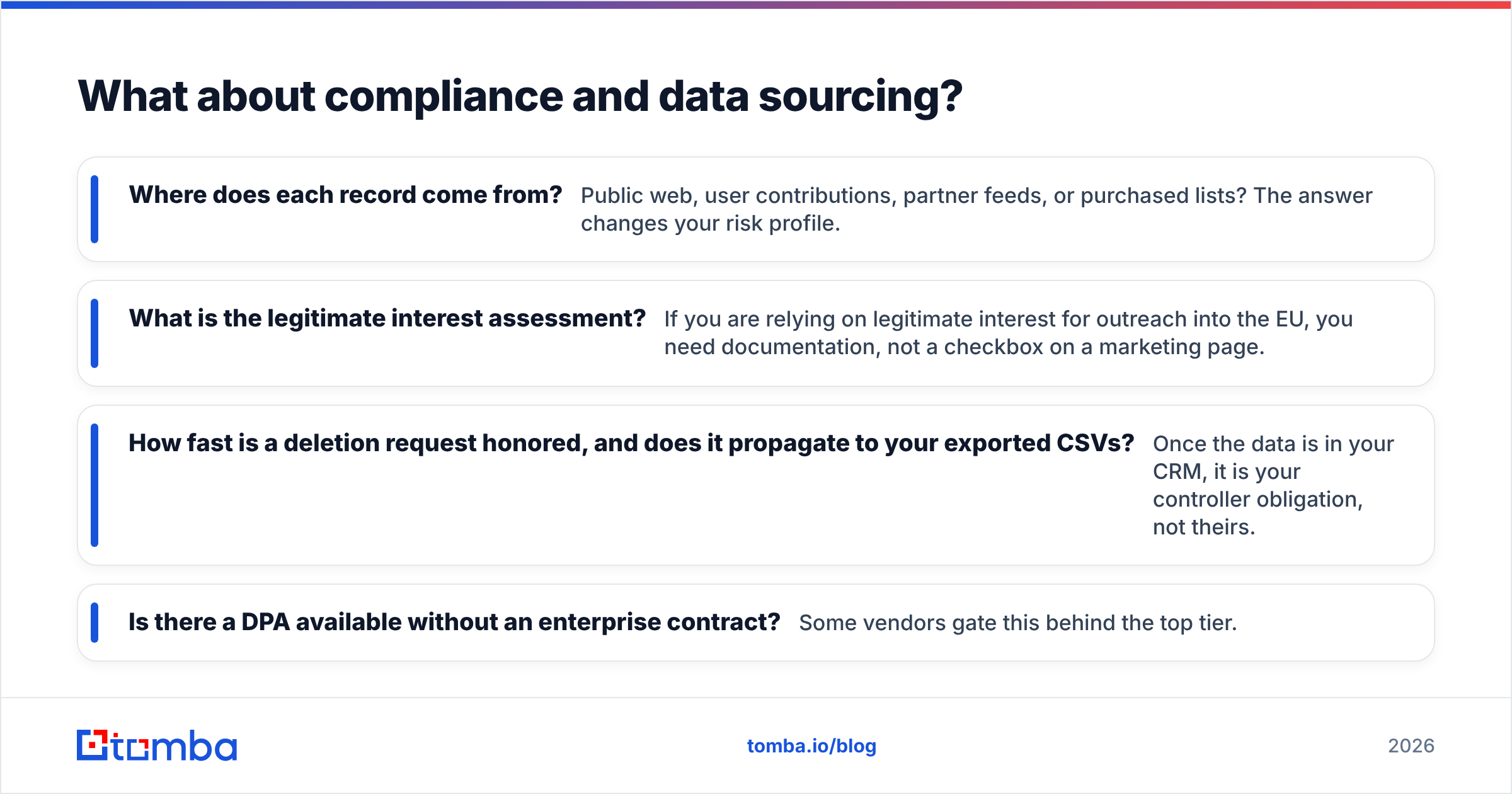
- Where does each record come from? Public web, user contributions, partner feeds, or purchased lists? The answer changes your risk profile.
- What is the legitimate interest assessment? If you are relying on legitimate interest for outreach into the EU, you need documentation, not a checkbox on a marketing page.
- How fast is a deletion request honored, and does it propagate to your exported CSVs? Once the data is in your CRM, it is your controller obligation, not theirs.
- Is there a DPA available without an enterprise contract? Some vendors gate this behind the top tier.
Vendors that publish data sources openly make this conversation shorter. Vendors that treat sourcing as a trade secret make it longer.
Which should you choose?#
Pick by motion, not by feature count.
Choose GetProspect if: you are a solo founder, agency, or small SDR team; email is your primary channel; you build lists from LinkedIn; and you need to start today without a procurement cycle. The published pricing and free tier let you validate the data quality on your own segment before spending real money.
Choose SMARTe if: you run a multi-channel outbound motion where cold calling matters as much as email; you sell across North America plus EMEA or APAC; you need CRM-native enrichment for a team of reps; and you have the budget and patience for an annual contract. The mobile-number coverage is the reason to be here.
Choose neither if: your requirement is programmatic. Both tools are built around a UI. If you need to resolve emails inside your own application, enrich a signup flow in real time, or run nightly batch jobs against your data warehouse, you want an API-first vendor with per-call pricing and documented rate limits, not a seat-based platform where the API is a higher-tier add-on.
What are the alternatives worth testing?#
Run a three-way bake-off rather than a two-way one. Coverage differences between vendors are segment-specific, and the winner on your ICP is rarely the winner on a generic benchmark.
Worth including in the test:
- Tomba — email finder, verifier, domain search, and catch-all handling behind one published API. Free tier at 25 searches/month, Starter at $49/mo, Growth at $99/mo, Pro at $249/mo.
- BookYourData — pay-as-you-go B2B lists with an accuracy guarantee, a good fit when you want to buy a defined list outright instead of renting seats.
- Apollo — database plus sequencing in one product; strong if you want prospecting and sending under a single subscription. See our take on Apollo alternatives for the trade-offs.
- Cognism / Lusha — the closest direct comparables to SMARTe on mobile-number coverage if that is the deciding factor.
Score each on the same 100-row control list, weight hit rate on your ICP above total database size, and factor in what the credits actually cost after failed-lookup rules.
Ready to test the data instead of the pitch deck?#
If your bottleneck is finding accurate work emails at volume — and you would rather integrate an API than negotiate a seat license — start with the Tomba Email Finder. Run your control list through the free tier at 25 searches a month, compare the hit rate against whatever GetProspect or SMARTe returns on the same accounts, and only then decide where your budget goes. Every paid plan includes full API access from $49/mo, so the workflow you validate in the dashboard is the same one you ship in production.
Related guides#
Ready to find emails that actually work?
Join 150,000+ professionals who stopped guessing and started sending. Free credits on signup — no credit card required.
Get the Tomba newsletter
Practical outbound tactics and product updates — once every two weeks.
About the author