GetProspect vs Span Global Services: Which B2B Data Wins?
One is a self-serve email finder you run yourself. The other is a managed list vendor that sells you a file. Here's how GetProspect and Span Global Services actually compare on accuracy, cost, and risk.
TL;DR
- They are not the same category. GetProspect is a self-serve email finder and LinkedIn-based prospecting tool. Span Global Services is a managed B2B data vendor that sells you compiled lists and appending services. Comparing them is comparing a search engine to a wholesaler.
- GetProspect wins on freshness and control. You pull contacts on demand, see the confidence score, and stop paying when you stop searching.
- Span Global wins on volume and hand-holding. If you need 200,000 healthcare IT decision-makers segmented by NPI and firmographics next Tuesday, a list vendor does that; a browser extension does not.
- Both fail the same test if you skip verification. Compiled lists decay 25–30% a year, and pattern-guessed emails from any finder still need SMTP-level checking before they touch your sending domain.
- Our pick for most outbound teams in 2026: self-serve finding plus an independent verification layer. Buy a list only when you need a market you cannot search your way into.
What are GetProspect and Span Global Services?#
GetProspect is a SaaS email finder. You give it a name and a company domain, a LinkedIn profile, a Sales Navigator search, or a CSV of companies, and it returns business email addresses with a validity indicator. It has a Chrome extension, a lightweight built-in CRM, and an API. It is bought with a credit card, used by an SDR, and cancelled without a phone call.
Span Global Services is a database marketing company. It sells pre-built and custom B2B contact lists segmented by industry, technology install base, job function, geography, revenue, and employee count, plus adjacent services: data appending, data cleansing, email campaign execution, and list management. You talk to a rep, describe your ICP, get a count and a quote, then receive a file.
That structural difference drives every other difference. One is a metered tool you operate. The other is a service you commission.
How do GetProspect and Span Global Services compare head to head?#
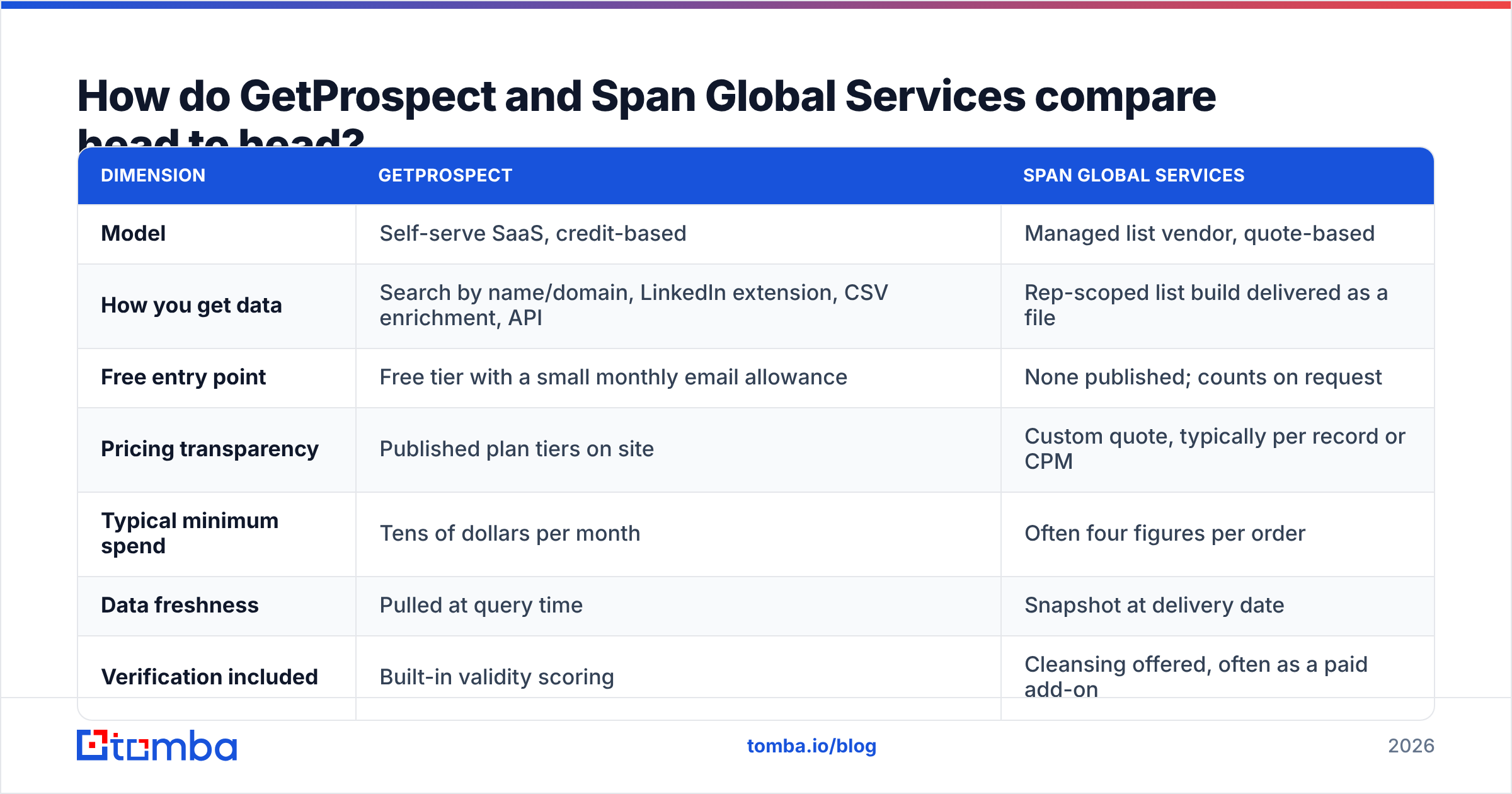
| Dimension | GetProspect | Span Global Services |
|---|---|---|
| Model | Self-serve SaaS, credit-based | Managed list vendor, quote-based |
| How you get data | Search by name/domain, LinkedIn extension, CSV enrichment, API | Rep-scoped list build delivered as a file |
| Free entry point | Free tier with a small monthly email allowance | None published; counts on request |
| Pricing transparency | Published plan tiers on site | Custom quote, typically per record or CPM |
| Typical minimum spend | Tens of dollars per month | Often four figures per order |
| Data freshness | Pulled at query time | Snapshot at delivery date |
| Verification included | Built-in validity scoring | Cleansing offered, often as a paid add-on |
| Phone numbers | Limited | Common in list builds |
| Best for | SDRs, founders, agencies, ABM lists under ~10k | Large-volume campaigns, niche install-base targeting |
| Worst for | 100k-record multi-country pulls | Small teams testing an ICP for the first time |
| Contract | Monthly, self-cancel | Order-based or annual agreement |
Read that table as a fork, not a scoreboard. If your ICP is 400 named accounts, the right column is overkill and the left column is enough. If your ICP is "every company in North America running a specific ERP," the left column will take you weeks of scraping and the right column will take a phone call.
Which one gives you more accurate emails?#
Neither vendor can promise you a clean list, and you should distrust any that does. What matters is where the error comes from, because the two failure modes need different fixes.
- Finder error is guess error. Tools like GetProspect infer patterns —
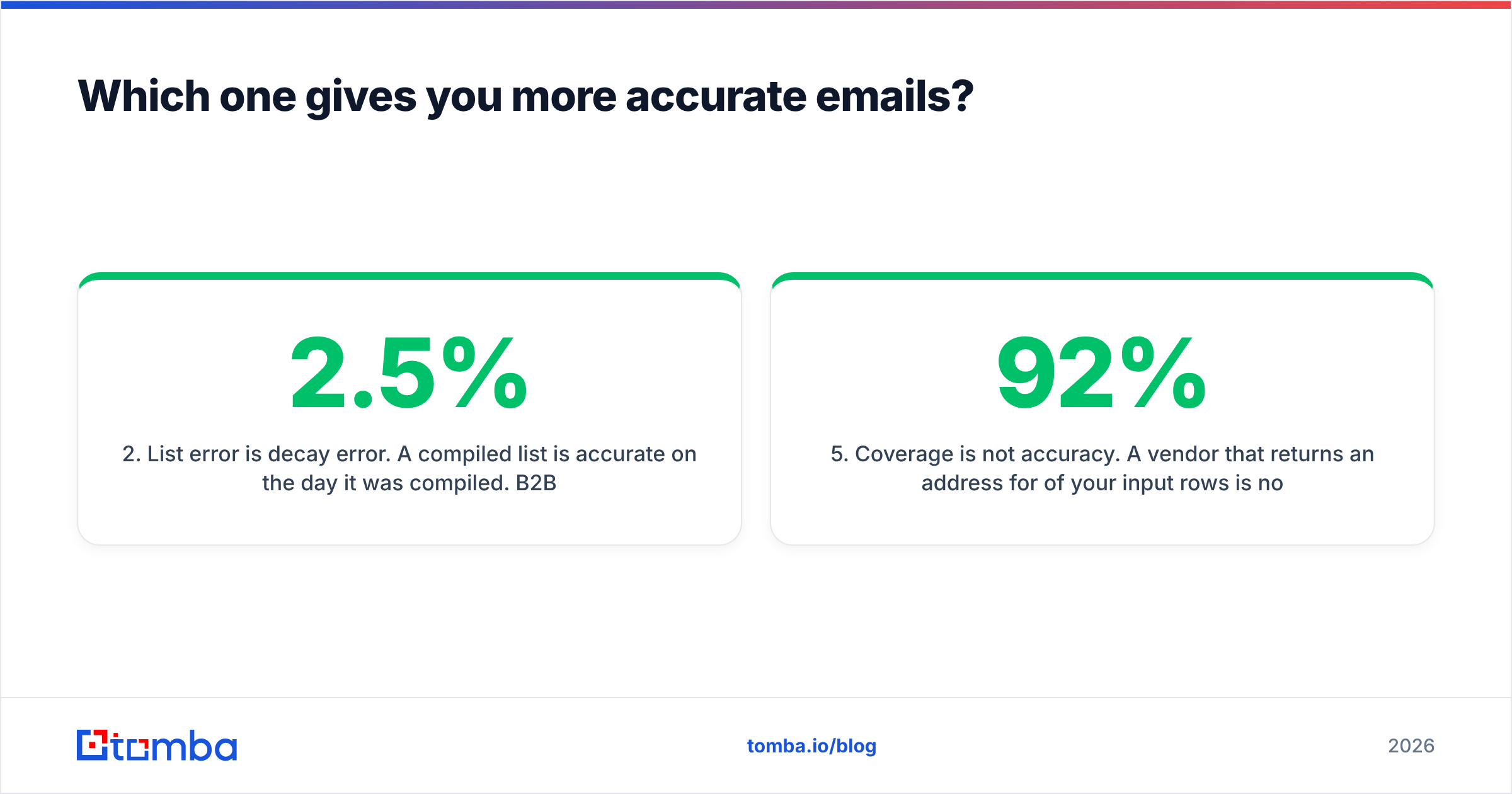
first.last@,flast@,first@— and score confidence. When a company changes its convention or runs multiple conventions after an acquisition, the guess misses. The fix is a real-time SMTP check at send time. - List error is decay error. A compiled list is accurate on the day it was compiled. B2B contact data degrades roughly 2–2.5% per month as people change roles, companies rebrand, and mailboxes are decommissioned. A file that was 95% deliverable in January can be under 80% by autumn. The fix is re-verification before every campaign, not just on delivery.
- Catch-all domains hide both problems. Roughly one in five B2B domains accepts everything at the gateway, so a naive validator returns "valid" for addresses that will hard-bounce internally. You need a dedicated catch-all verifier to separate real inboxes from accept-all noise.
- Role accounts inflate counts.
info@,sales@, andsupport@pad a record count without adding a human. Ask any list vendor what percentage of the file is role-based, and strip them from finder output too. - Coverage is not accuracy. A vendor that returns an address for 92% of your input rows is not better than one that returns 68% if a third of those addresses bounce. Measure verified hit rate, not raw match rate.
The practical benchmark: run 200 known-good contacts from your CRM through any source before you commit. Count exact matches, near-misses, and blanks. That single test tells you more than every case study on a vendor's site.
How does pricing actually work for each?#
GetProspect publishes tiers. There is a free plan with a small monthly allowance of valid emails, then paid plans that scale by the number of verified emails per month, with API access and team seats on higher tiers. Check their current page before budgeting — SaaS pricing moves — but the shape is predictable: you know your bill before you commit.
Span Global Services does not publish rate cards. List pricing in this segment is quoted per record or per thousand (CPM), and the number moves with selects: adding technology install-base filters, direct dials, or verified-within-90-days guarantees raises the price per record. Expect a minimum order, a usage license (many list vendors license the file for a defined number of uses rather than selling it outright), and a separate line item for appending or cleansing.
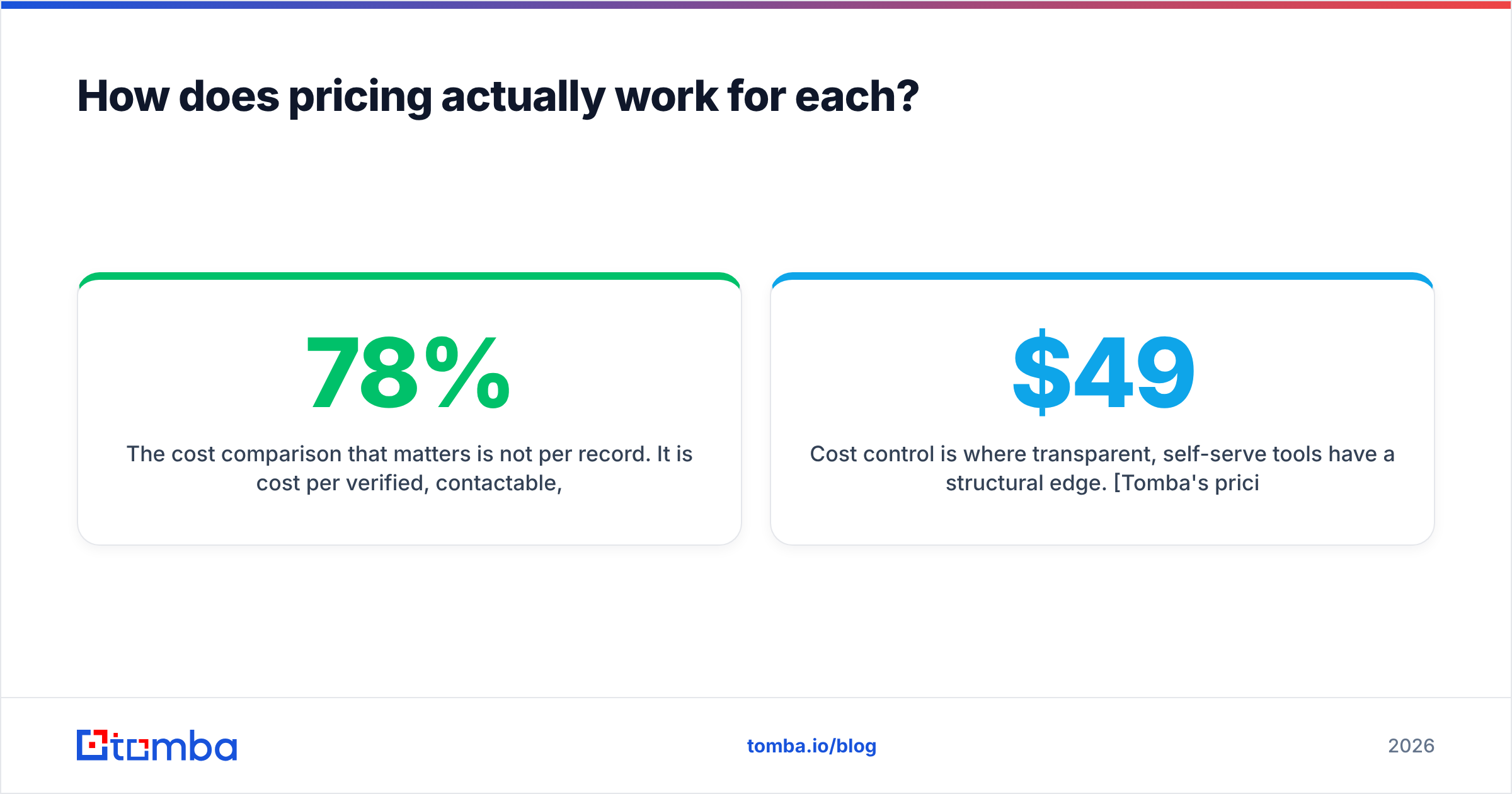
The cost comparison that matters is not per record. It is cost per verified, contactable, in-ICP record. Take a 50,000-record file at a seemingly cheap per-record rate, apply a 78% verified rate after decay, strip 12% role accounts, then strip the 30% who fall outside your real ICP once you look at titles, and your effective cost per usable contact can triple. Run the same math on finder credits: credits spent on failed lookups still count.
Cost control is where transparent, self-serve tools have a structural edge. Tomba's pricing follows the same logic — a free tier at 25 searches a month, Starter at $49/mo, Growth at $99/mo, Pro at $249/mo, and custom Enterprise — so you can model spend against a target account list before you spend anything. With a quote-based vendor, discovery costs you a sales cycle.
Is a bought list still a good idea in 2026?#
Sometimes. The honest answer depends on three things.
Your market. If your buyers are unusually hard to search — regional manufacturers with no LinkedIn presence, hospital administrators, franchise owners — compiled databases genuinely hold data that no LinkedIn-derived tool has. A list vendor earns its fee there.
Your compliance posture. Purchased data in the EU and UK carries consent and legitimate-interest obligations you inherit the moment you import it. In the US, CAN-SPAM permits cold B2B email with identification and opt-out requirements, but state privacy laws increasingly add disclosure duties. Ask any vendor, including Span Global, for the source and lawful basis of each segment in writing, and keep it. This is table stakes for a compiled file and less fraught for a targeted, self-sourced pull where you can document each record's provenance. Tomba publishes its data sources for exactly this reason.
Your sending infrastructure. This is the one teams underrate. A 50,000-record file blasted through a warm-ish domain is the fastest way to torch your sender reputation. Bounce rates above 3–4% get you throttled; above 8% you are effectively in spam folders for months. If you buy volume, you must budget for verification, list segmentation, and slow ramping — which erases much of the speed advantage that made buying attractive.
The pattern that works: use a list vendor for discovery of a market you cannot see, then re-verify everything, then send in small cohorts. The pattern that fails: treat the file as ready-to-send because you paid for it.

Which should you choose for your team size?#
Solo founder or two-person startup. GetProspect-style self-serve, every time. You need 300 good contacts, not 30,000. The free tier plus a paid month is enough to validate whether the ICP responds at all. A managed list order at this stage buys you a spreadsheet you will not have the sending capacity to use.
SDR team of 3–15. Self-serve with an API and bulk workflow. Your constraint is rep hours, not record count. What you want is CSV enrichment, a Chrome extension for LinkedIn workflows, CRM sync, and a bulk email finder that turns an account list into contacts overnight. GetProspect covers this; so do several peers, and the differentiator becomes hit rate on your accounts, which you should test rather than read about.
Demand-gen team running 100k+ programs. Now a list vendor makes sense — as one input among several. Span Global's install-base and industry selects can surface segments your rep-driven searching would never assemble. Pair it with an internal verification pipeline and treat delivered accuracy claims as a starting hypothesis.
Agencies. Mixed. You need per-client separation, predictable margins, and no surprise invoices. Metered self-serve tooling with an email finder API usually beats per-order list buys, because you can pass through a known unit cost.
What are the real limitations of each?#
GetProspect's limits are the category's limits. LinkedIn-derived tooling is strongest where professionals maintain public profiles — tech, SaaS, marketing, finance, consulting — and thinner in trades, logistics, local services, and parts of APAC and LATAM. Credit models punish low-hit-rate searches. And a lightweight built-in CRM is convenient, but it is not a replacement for your CRM; plan on syncing out.
Span Global's limits are the list model's limits. You cannot try before you buy at any meaningful scale, refresh cycles are opaque unless you negotiate them into the contract, and the file is stale the moment it lands. Counts quoted at the proposal stage often shrink after suppression and dedupe against your existing database — always ask for net-new counts after suppression, not gross counts. And you are buying a snapshot of a market that others are buying too; exclusivity is rare.
A fair note in the vendor's favour: managed service has real value when your team lacks data ops capacity. Someone else scoping the segment, running the append, and handing back a documented file is a legitimate purchase, not a scam. Judge it on delivered verified rate, not on the brochure.
How do you build a stack that beats either one alone?#
Stop treating this as a vendor choice and treat it as a pipeline.
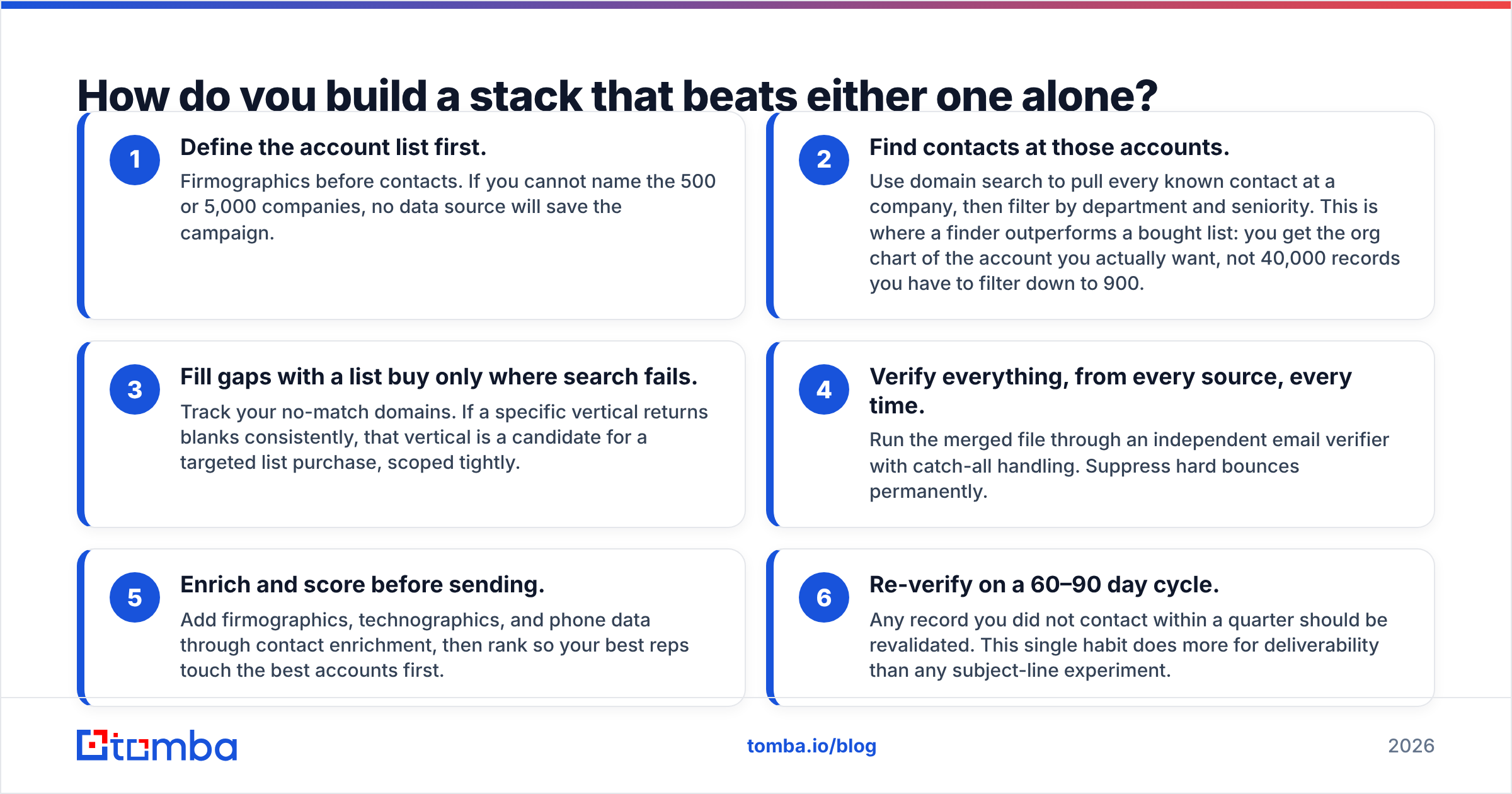
- Define the account list first. Firmographics before contacts. If you cannot name the 500 or 5,000 companies, no data source will save the campaign.
- Find contacts at those accounts. Use domain search to pull every known contact at a company, then filter by department and seniority. This is where a finder outperforms a bought list: you get the org chart of the account you actually want, not 40,000 records you have to filter down to 900.
- Fill gaps with a list buy only where search fails. Track your no-match domains. If a specific vertical returns blanks consistently, that vertical is a candidate for a targeted list purchase, scoped tightly.
- Verify everything, from every source, every time. Run the merged file through an independent email verifier with catch-all handling. Suppress hard bounces permanently.
- Enrich and score before sending. Add firmographics, technographics, and phone data through contact enrichment, then rank so your best reps touch the best accounts first.
- Re-verify on a 60–90 day cycle. Any record you did not contact within a quarter should be revalidated. This single habit does more for deliverability than any subject-line experiment.
Independent review sites like G2 are useful for spotting support and billing complaints in both categories, but they are close to useless for accuracy claims — reviewers rarely benchmark, and the vendors with the loudest review programs are not necessarily the most accurate. Run your own 200-contact test.
The verdict#
For most B2B teams in 2026, self-serve email finding plus a strict verification layer beats a purchased list on cost per usable contact, on compliance clarity, and on deliverability risk. GetProspect is a reasonable entry into that category. Span Global Services earns its place when you need scale, unusual selects, or a managed hand on the wheel — and it should be treated as a raw input that still passes through your verification pipeline like anything else.
Whichever side you land on, the leverage is in the layer you control: how precisely you target accounts, and how ruthlessly you verify before you send.
If you want to test the self-serve side without a sales call, start with the Tomba Email Finder. Run your 200 known-good contacts through it, check the match rate against your CRM, and see what your real cost per verified contact looks like. The free tier gives you 25 searches a month to run that test, and Starter is $49/mo if the numbers hold up — which is a cheaper way to answer this question than a quote request.
Related guides#
Ready to find emails that actually work?
Join 150,000+ professionals who stopped guessing and started sending. Free credits on signup — no credit card required.
Get the Tomba newsletter
Practical outbound tactics and product updates — once every two weeks.
About the author