GetProspect vs UpLead 2026: Which B2B Data Tool Wins?
GetProspect sells volume, UpLead sells a 95% accuracy guarantee. We break down credits, real cost per verified email, and which one actually fits your outbound motion in 2026.
TL;DR
- GetProspect is the volume play: a large contact database, a LinkedIn Chrome extension, a lightweight CRM, and a free tier that actually returns usable emails. Entry pricing starts around $49/mo.
- UpLead is the precision play: fewer contacts surfaced per dollar, but real-time verification at export time and a published 95% accuracy guarantee. Entry pricing starts around $99/mo for roughly 170 credits.
- The decision hinges on cost per verified email, not headline credit counts. A cheap credit you have to throw away costs more than an expensive one that lands.
- UpLead wins for enterprise-grade filtering, intent data, and compliance-sensitive teams. GetProspect wins for LinkedIn-heavy prospecting on a small budget.
- If neither pricing shape fits — especially if you need API-first lookups or bulk verification without a per-seat database subscription — a dedicated email finder is usually cheaper per landed email.
What are GetProspect and UpLead?#
Both tools solve the same job — turn "I know who I want to reach" into "I have their work email" — but they arrive from opposite directions.
GetProspect started as a LinkedIn email finder. You browse Sales Navigator or a company page, hit the extension, and it pulls matching contacts into a list. Over time it bolted on a searchable database, email verification, a basic CRM with pipeline stages, and a light sending layer. The product's center of gravity is still the browser extension and the list-building workflow around it.
UpLead started as a database-first platform. You open the web app, apply filters — industry, headcount, tech stack, revenue, job function, location — and it returns a list of matching people. The differentiator is what happens at the moment you spend a credit: UpLead runs a real-time verification on the email before it debits your balance, and it publishes a 95% accuracy guarantee backed by credit refunds on bounces.
That architectural difference explains almost every other difference in this comparison. GetProspect optimizes for reach: get more names in front of you, then sort them out. UpLead optimizes for precision: return fewer rows, but stand behind them.

How do GetProspect and UpLead compare on pricing?#
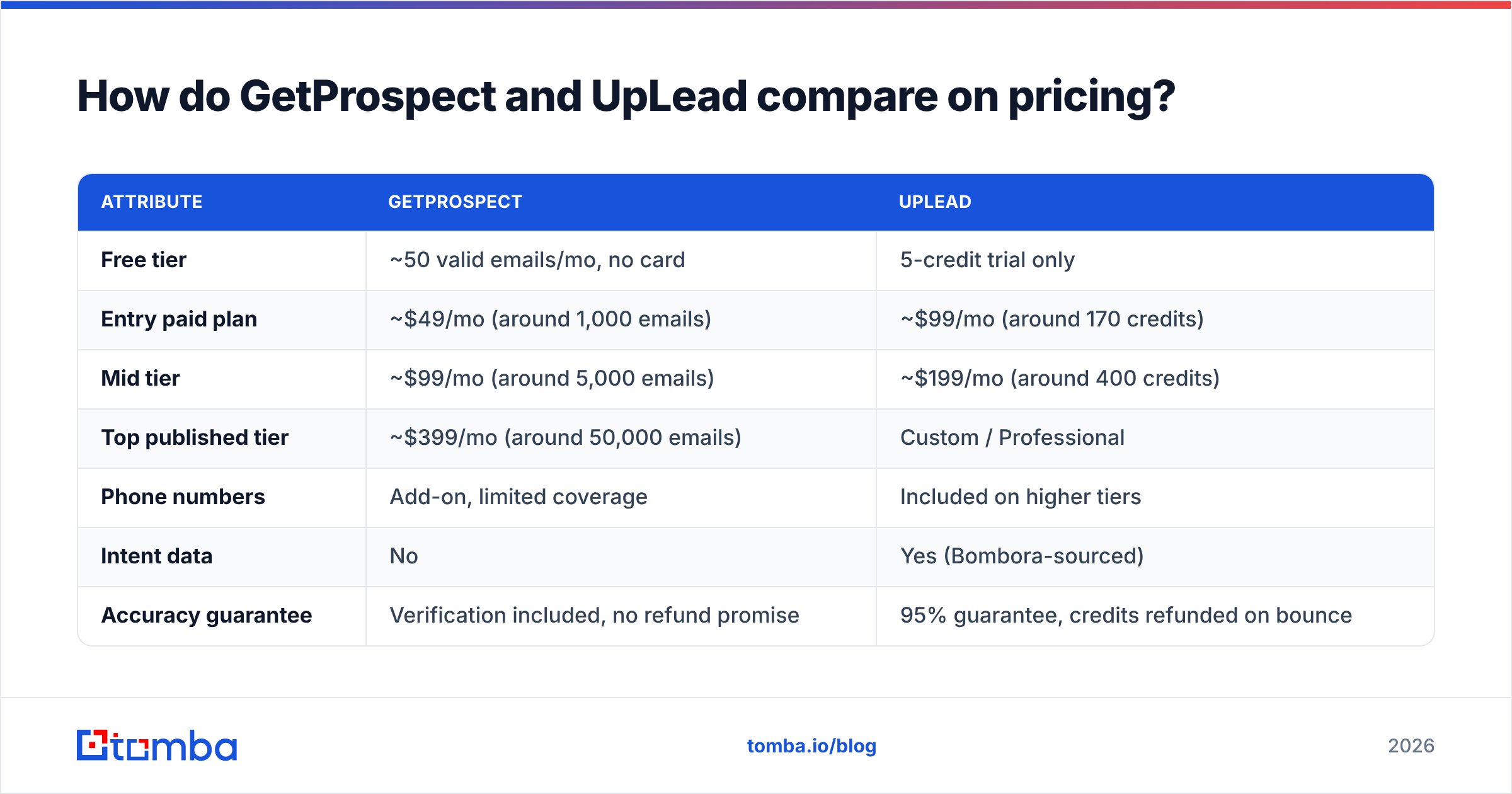
Here is the practical comparison. Published pricing changes often — treat these as directional and confirm on each vendor's page before you buy.
| Attribute | GetProspect | UpLead |
|---|---|---|
| Free tier | ~50 valid emails/mo, no card | 5-credit trial only |
| Entry paid plan | ~$49/mo (around 1,000 emails) | ~$99/mo (around 170 credits) |
| Mid tier | ~$99/mo (around 5,000 emails) | ~$199/mo (around 400 credits) |
| Top published tier | ~$399/mo (around 50,000 emails) | Custom / Professional |
| Phone numbers | Add-on, limited coverage | Included on higher tiers |
| Intent data | No | Yes (Bombora-sourced) |
| Accuracy guarantee | Verification included, no refund promise | 95% guarantee, credits refunded on bounce |
| Chrome extension | Core feature, LinkedIn-native | Yes, secondary to web app |
| CRM / pipeline | Built-in lightweight CRM | No — integrates with your CRM |
| API access | Yes, paid plans | Yes, higher tiers |
The headline numbers look brutal for UpLead: roughly 170 credits for $99 versus roughly 1,000 emails for $49. That is a ~12x gap in raw volume per dollar. But raw volume is the wrong unit, which is the next section.
Which tool has better data accuracy?#
UpLead is more accurate at the moment of export. GetProspect is more accurate than its reputation suggests, but it verifies differently.
UpLead's model is verify-then-charge. When you click reveal, it pings the mail server, and if the address doesn't validate, you don't lose the credit. That is why its credits are expensive: each one is closer to a guaranteed deliverable address than a lottery ticket. The 95% number is a published commitment, not a marketing claim you can't act on — bounces above that threshold are refundable.
GetProspect verifies in bulk after the fact. You pull a list, run the built-in verifier, and get status codes back — valid, invalid, catch-all, unknown. The valid rows are genuinely good. The problem is the ratio. On tight ICP filters (senior titles at mid-market companies in non-US geos), a meaningful share of pulled rows come back catch-all or unknown, and those still consumed quota.

Two things drive real-world accuracy on any platform in this category, and both are worth checking before you commit:
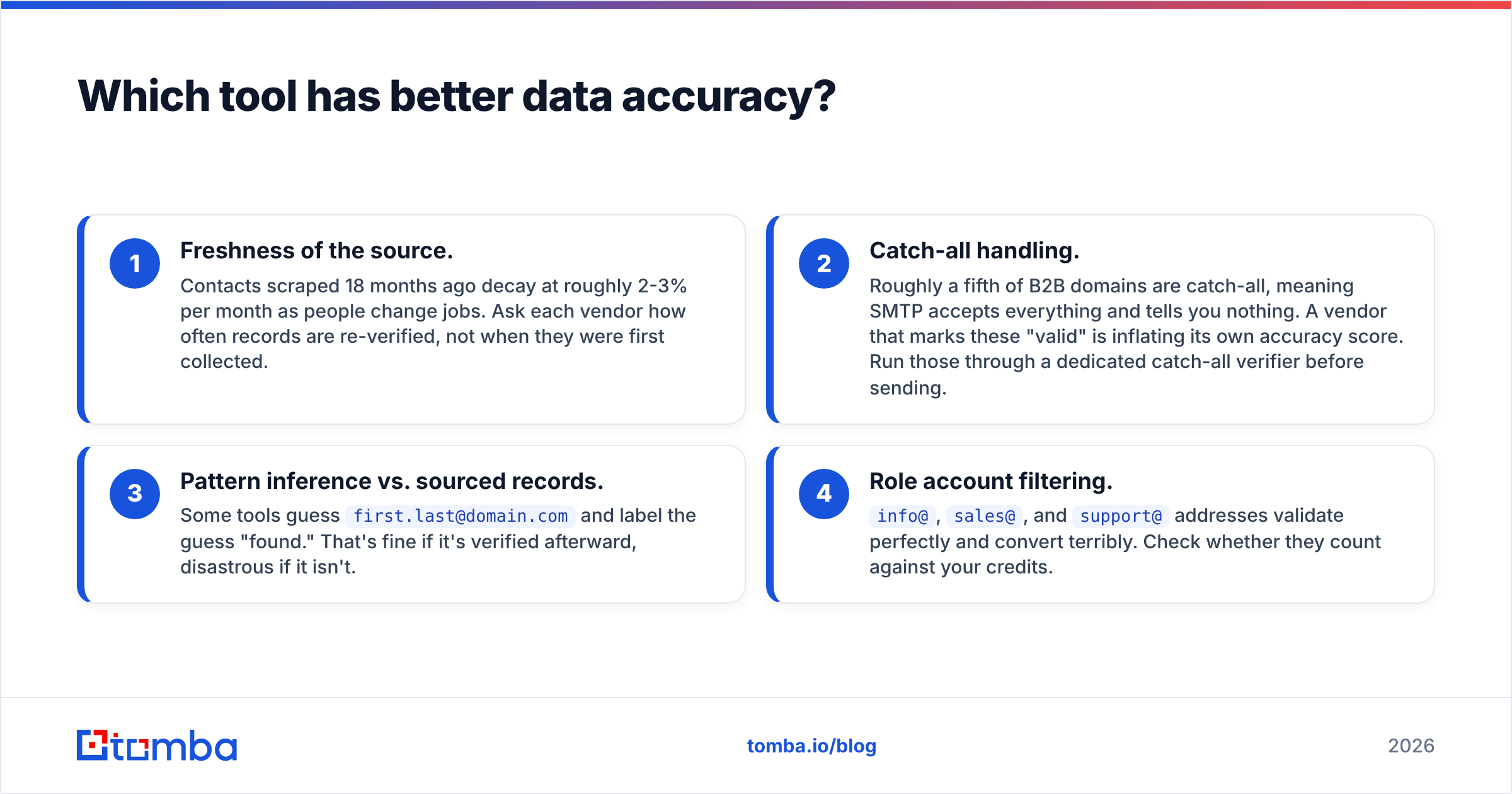
- Freshness of the source. Contacts scraped 18 months ago decay at roughly 2-3% per month as people change jobs. Ask each vendor how often records are re-verified, not when they were first collected.
- Catch-all handling. Roughly a fifth of B2B domains are catch-all, meaning SMTP accepts everything and tells you nothing. A vendor that marks these "valid" is inflating its own accuracy score. Run those through a dedicated catch-all verifier before sending.
- Pattern inference vs. sourced records. Some tools guess
first.last@domain.comand label the guess "found." That's fine if it's verified afterward, disastrous if it isn't. - Role account filtering.
info@,sales@, andsupport@addresses validate perfectly and convert terribly. Check whether they count against your credits.
Neither vendor is dishonest here. They just make different tradeoffs, and if you evaluate them on the same sample of 100 target accounts you'll see the split immediately.
What is the real cost per verified email?#
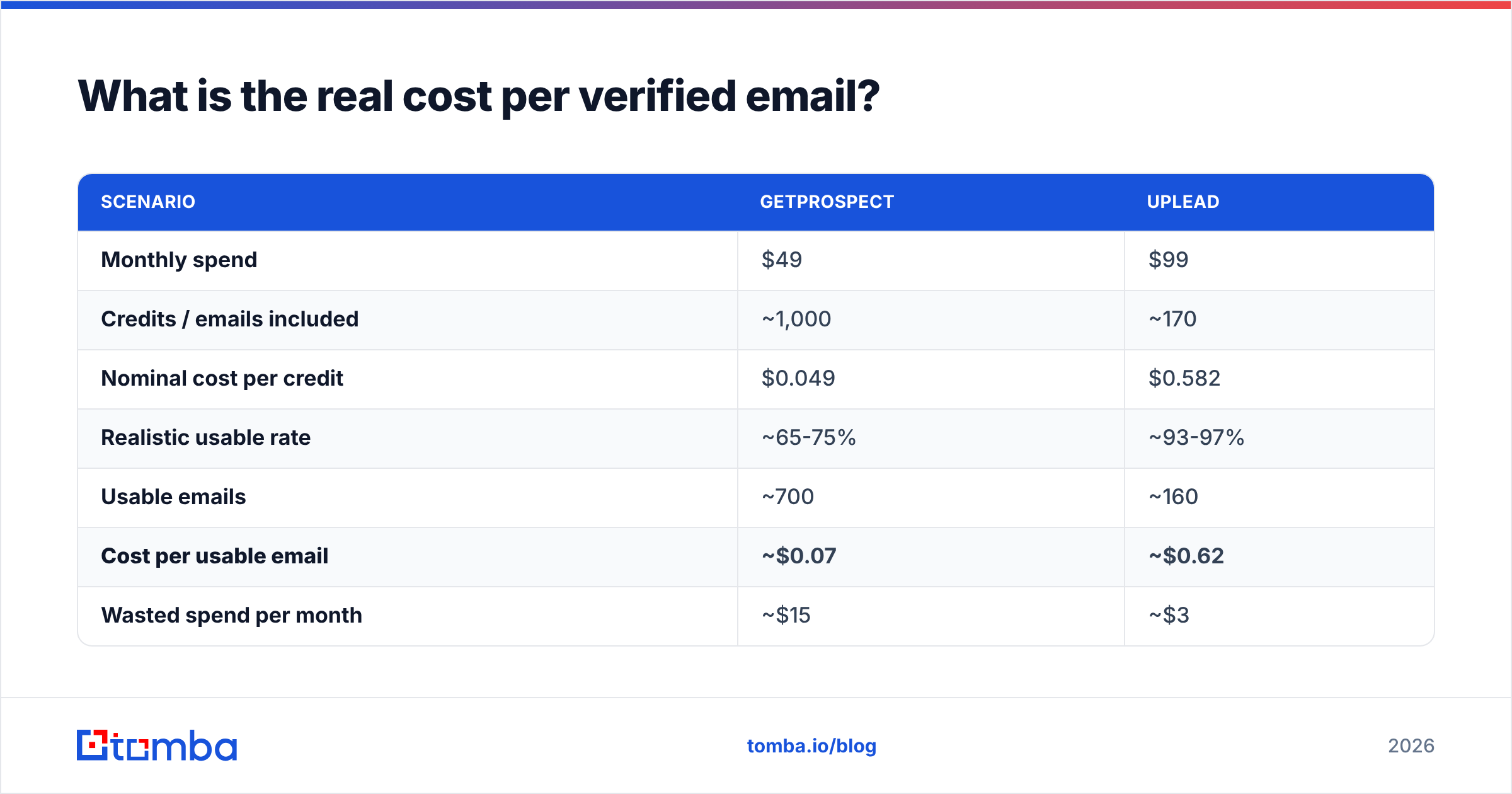
This is the only number that matters, and it reorders the leaderboard.
| Scenario | GetProspect | UpLead |
|---|---|---|
| Monthly spend | $49 | $99 |
| Credits / emails included | ~1,000 | ~170 |
| Nominal cost per credit | $0.049 | $0.582 |
| Realistic usable rate | ~65-75% | ~93-97% |
| Usable emails | ~700 | ~160 |
| Cost per usable email | ~$0.07 | ~$0.62 |
| Wasted spend per month | ~$15 | ~$3 |
GetProspect still wins on pure unit economics — by roughly 8x, not 12x. The gap narrows once you account for waste, but it doesn't close.
So why would anyone pay UpLead's price? Because cost per email is not cost per meeting. If your ICP is 400 accounts total and each closed deal is worth $60,000, the difference between $0.07 and $0.62 per record is $220 a year. Irrelevant. What matters is whether the filters can isolate the 400 accounts, whether the phone numbers connect, and whether the intent signals tell you who to hit this week. UpLead is built for that shape of business. GetProspect is built for the SDR who needs 3,000 names by Friday.
Flip it around: if you're running high-volume outbound into SMB, sending 8,000 emails a month, GetProspect's economics are the only ones that survive contact with a spreadsheet.
How do the day-to-day workflows differ?#
GetProspect's loop is: open LinkedIn → run a Sales Navigator search → click the extension → bulk-add to a list → verify → export or push to CRM. It's fast, it's familiar to anyone who has done LinkedIn prospecting, and the built-in CRM means a solo founder can run their entire pipeline in one tab. The downside is that your list quality is capped by your LinkedIn search quality, and Sales Navigator's filters are blunter than a proper B2B database.
UpLead's loop is: open the web app → stack 50+ filters → preview the result count → refine → reveal contacts → push to CRM. You never touch LinkedIn. This is better for account-based motions where you're defining a segment, not browsing profiles. It's worse if your prospecting instinct is "this specific person looks interesting."
A few workflow differences that surface after week two:
- Deduplication. UpLead flags contacts you've already revealed so you don't pay twice. GetProspect handles this at the list level, which is easier to get wrong across teams. If you're merging exports, run them through a deduplicate email list step before import.
- CRM sync. UpLead's Salesforce and HubSpot connectors are more mature. GetProspect exports cleanly but its native sync is thinner.
- API depth. Both offer APIs on paid tiers. Neither is API-first — if you're building enrichment into a product rather than a workflow, you'll find the rate limits and docs restrictive compared to a dedicated email finder API.
- Team seats. UpLead charges per seat and shares credits across the team. GetProspect's seat model is more permissive on lower tiers.

Is GetProspect or UpLead better for cold email deliverability?#
UpLead, by a clear margin — but the reason is boring.
Deliverability is mostly downstream of bounce rate. Mailbox providers treat a spike in hard bounces as a spam signal, and a sustained bounce rate above roughly 3% will damage your sender reputation fast. UpLead's verify-before-charge model means the list you export is already close to bounce-clean.
GetProspect can reach the same place, but you have to do the work: export, run the built-in verifier, drop everything that isn't a confirmed valid, and separately handle catch-alls. That's a 10-minute step most teams skip when they're behind on quota — and skipping it is how a two-month-old sending domain gets torched.
Whatever you pick, treat verification as a non-negotiable pre-send gate rather than a tool feature. Independent verification is cheap insurance: running an export through a standalone email verifier costs a fraction of a cent per row and catches the decayed records any database will eventually accumulate. Reviews on G2 for both products show the same pattern in the one-star complaints — bounces from stale records, not fabricated ones.
Which should you choose in 2026?#
Pick UpLead if:
- Your ICP is narrow and your ACV is high (think $20k+ deals).
- You need intent data, tech-stack filters, or direct dials bundled in.
- You're in a regulated or compliance-sensitive market and want a vendor with explicit data-sourcing documentation.
- Someone in your org will get blamed for a high bounce rate.
Pick GetProspect if:
- You're running volume outbound and need thousands of contacts monthly.
- LinkedIn is where your prospecting actually happens.
- You're a solo founder or two-person team who'd rather have one tool with a built-in CRM than three tools that integrate.
- Your budget is under $100/month and you'd rather spend the difference on sending infrastructure.
Pick neither if you're primarily doing enrichment — you already have a list of names and domains and just need emails attached. Both platforms charge you for database access you aren't using. That's the gap a focused finder fills.

How does Tomba compare to both?#
Honestly: it's a different product category that overlaps at the point of purchase.
Tomba isn't a filtered contact database with a CRM attached. It's a finder-and-verifier stack — domain search to map every published address at a company, email finder for name-plus-domain lookups, verification including catch-all handling, plus phone and enrichment endpoints. The Tomba pricing shape reflects that: Free at 25 searches/month, Starter at $49/mo, Growth at $99/mo, Pro at $249/mo, Enterprise custom.
Where that wins: you already know your target accounts (from a conference list, a funding announcement, a customer's competitor set) and need contacts attached at API speed. Where it doesn't: you want to discover accounts by revenue band and intent score. That's UpLead's job, and Tomba won't do it.
Many teams end up running both shapes — a database for discovery, a finder-plus-verifier for enrichment and for cleaning whatever the database returns. That's not a cop-out recommendation; it's what the unit economics push you toward once you're sending more than a few thousand emails a month.
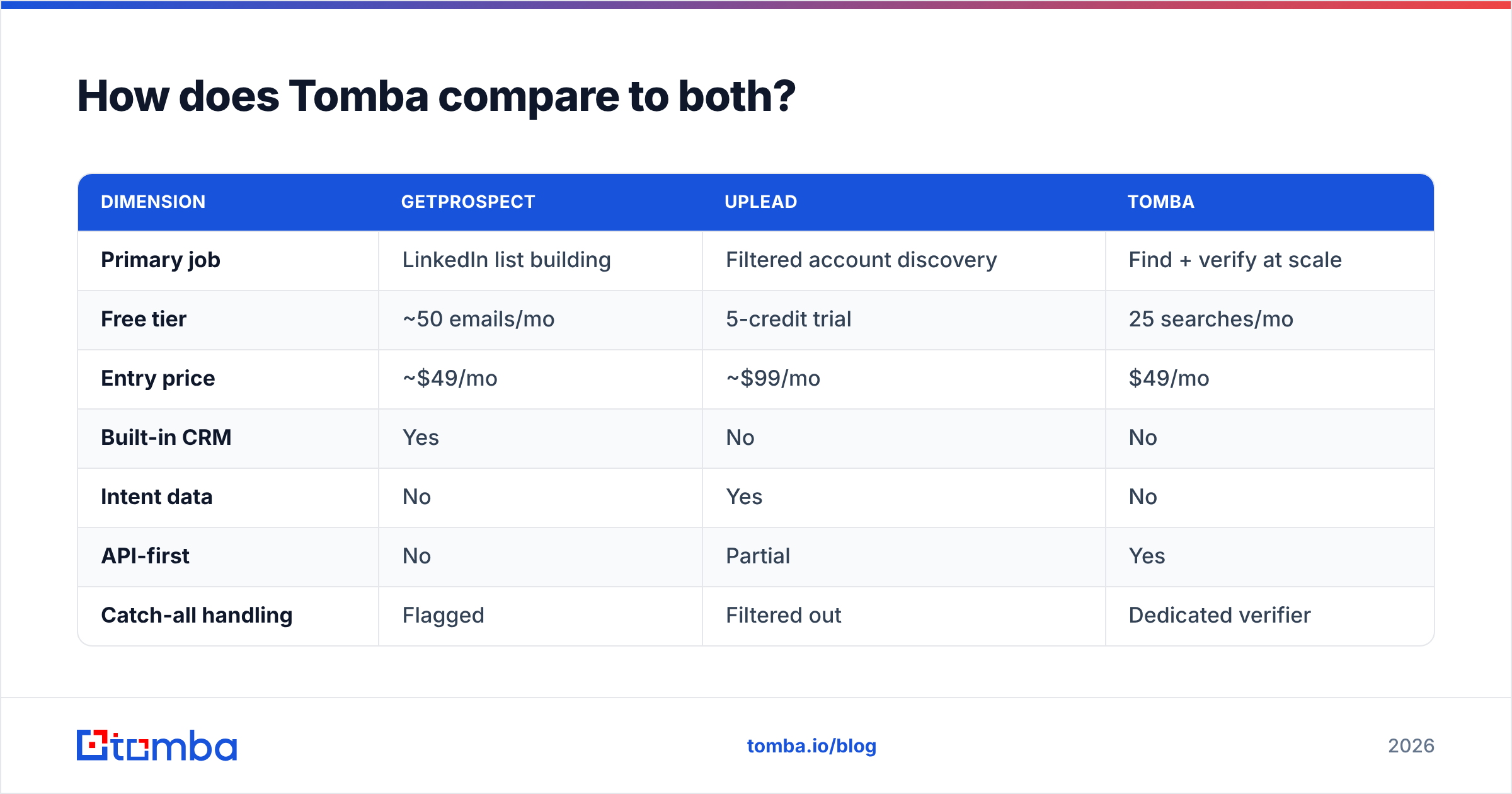
| Dimension | GetProspect | UpLead | Tomba |
|---|---|---|---|
| Primary job | LinkedIn list building | Filtered account discovery | Find + verify at scale |
| Free tier | ~50 emails/mo | 5-credit trial | 25 searches/mo |
| Entry price | ~$49/mo | ~$99/mo | $49/mo |
| Built-in CRM | Yes | No | No |
| Intent data | No | Yes | No |
| API-first | No | Partial | Yes |
| Catch-all handling | Flagged | Filtered out | Dedicated verifier |
Ready to stop paying for credits you throw away?#
If your bottleneck is discovery — figuring out which companies to target — UpLead earns its price and GetProspect undercuts it hard. But if you already know who you're chasing and just need accurate, deliverable addresses without a database subscription wrapped around them, start with the Tomba Email Finder. Twenty-five free searches a month, no card, and every result runs through the same verification layer that powers the paid tiers. Test it against a sample of 50 accounts you already know the answers for — that's the only benchmark that means anything.
Related guides#
Ready to find emails that actually work?
Join 150,000+ professionals who stopped guessing and started sending. Free credits on signup — no credit card required.
Get the Tomba newsletter
Practical outbound tactics and product updates — once every two weeks.
About the author