GetProspect vs Verifalia: Email Finder vs Verifier Compared
GetProspect finds emails. Verifalia verifies them. They are not really competitors — and picking the wrong one leaves half your outbound pipeline broken. Here is the honest breakdown.
TL;DR
- GetProspect and Verifalia solve two different halves of the same problem. GetProspect is a B2B contact database and email finder. Verifalia is a standalone email verification engine with a serious API.
- If you have zero contacts, Verifalia is useless to you. If you already have a 200k-row CRM export, GetProspect is overkill.
- Verifalia wins on verification depth (multi-tier SMTP checks, catch-all classification, GDPR-friendly EU processing). GetProspect wins on discovery (LinkedIn extension, filterable database, list building).
- Buying both means two subscriptions, two credit systems, and two CSV round-trips. Tools that do find and verify in one pass — Tomba, Hunter, Dropcontact — usually cost less than the pair.
- Skip to the comparison table if you just want the verdict.
What is GetProspect and what is Verifalia?#
They get compared constantly in "best email tool" roundups, which is how buyers end up on this page. But putting them side by side is a bit like comparing a fishing rod to a fish scale.
GetProspect is a lead generation platform built around a B2B contact database. You search by job title, company size, industry, location, or technology, and it returns a list of people with work emails attached. It ships a LinkedIn Chrome extension that pulls contact data off profiles and search results, a lightweight CRM-ish list manager, and CSV/integration export. Its verification is a bundled convenience feature — it filters out obviously dead addresses before handing you the list.
Verifalia does one thing: it tells you whether an email address is real, deliverable, risky, or dead. No database. No discovery. No Chrome extension for scraping LinkedIn. It runs syntax checks, DNS/MX resolution, mailbox-level SMTP probing, disposable-domain detection, role-account flags, and it grades catch-all domains rather than shrugging at them. It sells through a well-documented API with SDKs in a dozen languages, plus a browser dashboard for one-off list uploads.
So the real question is not "which is better." It is: which half of the pipeline is currently broken for you?
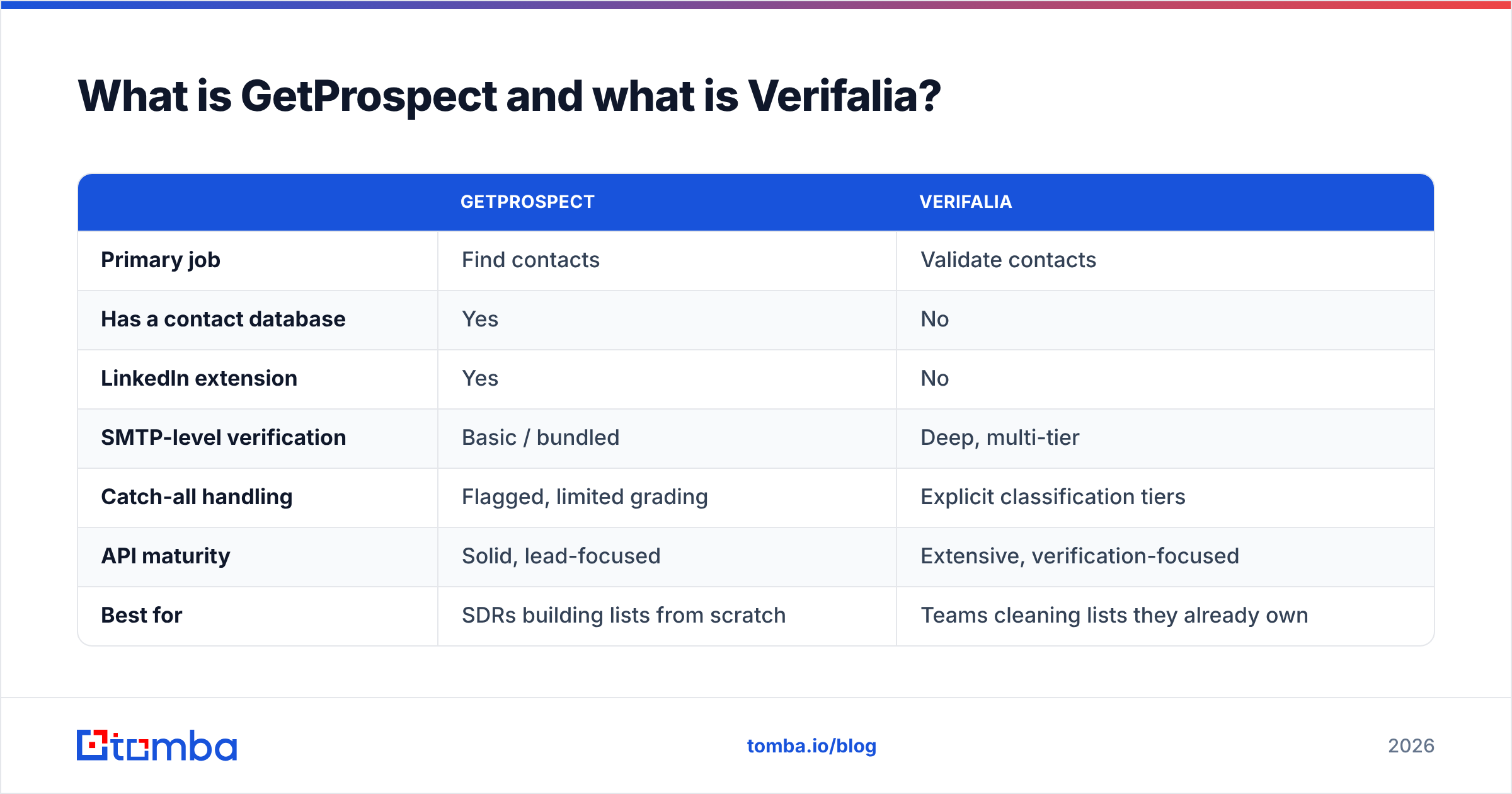
| GetProspect | Verifalia | |
|---|---|---|
| Primary job | Find contacts | Validate contacts |
| Has a contact database | Yes | No |
| LinkedIn extension | Yes | No |
| SMTP-level verification | Basic / bundled | Deep, multi-tier |
| Catch-all handling | Flagged, limited grading | Explicit classification tiers |
| API maturity | Solid, lead-focused | Extensive, verification-focused |
| Best for | SDRs building lists from scratch | Teams cleaning lists they already own |

How accurate is each one in practice?#
Accuracy means two different things here, and vendors exploit the ambiguity.
For GetProspect, accuracy = hit rate × correctness. How often does it return an email for a given person, and how often is that email actually theirs? Database-driven finders like GetProspect typically land somewhere in the 55–75% coverage range on mixed B2B lists, with correctness on the returned subset higher than that. Coverage collapses on small companies, non-US domains, and anyone who joined their employer in the last quarter — database freshness is the whole game.
For Verifalia, accuracy = classification correctness. Given an address, does it correctly call it deliverable or undeliverable? Good verifiers hit high 90s on clean, non-catch-all domains. Verifalia's differentiator is that it does not lump everything ambiguous into one "unknown" bucket — it separates catch-all, role accounts, disposables, and greylisted responses so you can decide your own risk tolerance instead of inheriting the vendor's.
The trap: a verifier cannot fix a fabricated address. If a finder guesses firstname.lastname@company.com using a pattern and the company actually uses flastname@, and the domain is catch-all, the verifier will return "accept-all" and you will send to nobody. Garbage in, plausible-looking garbage out. That is why verification quality only matters after you trust your sourcing.

Wait — that image reference is wrong. Here it is correctly:
What do GetProspect and Verifalia cost in 2026?#
Both run credit-style economics, but the credits mean completely different things. A GetProspect credit buys you a discovered contact. A Verifalia credit buys you a verdict on an address you already had. One is expensive to produce; the other is cheap. Price them per-outcome, not per-credit.
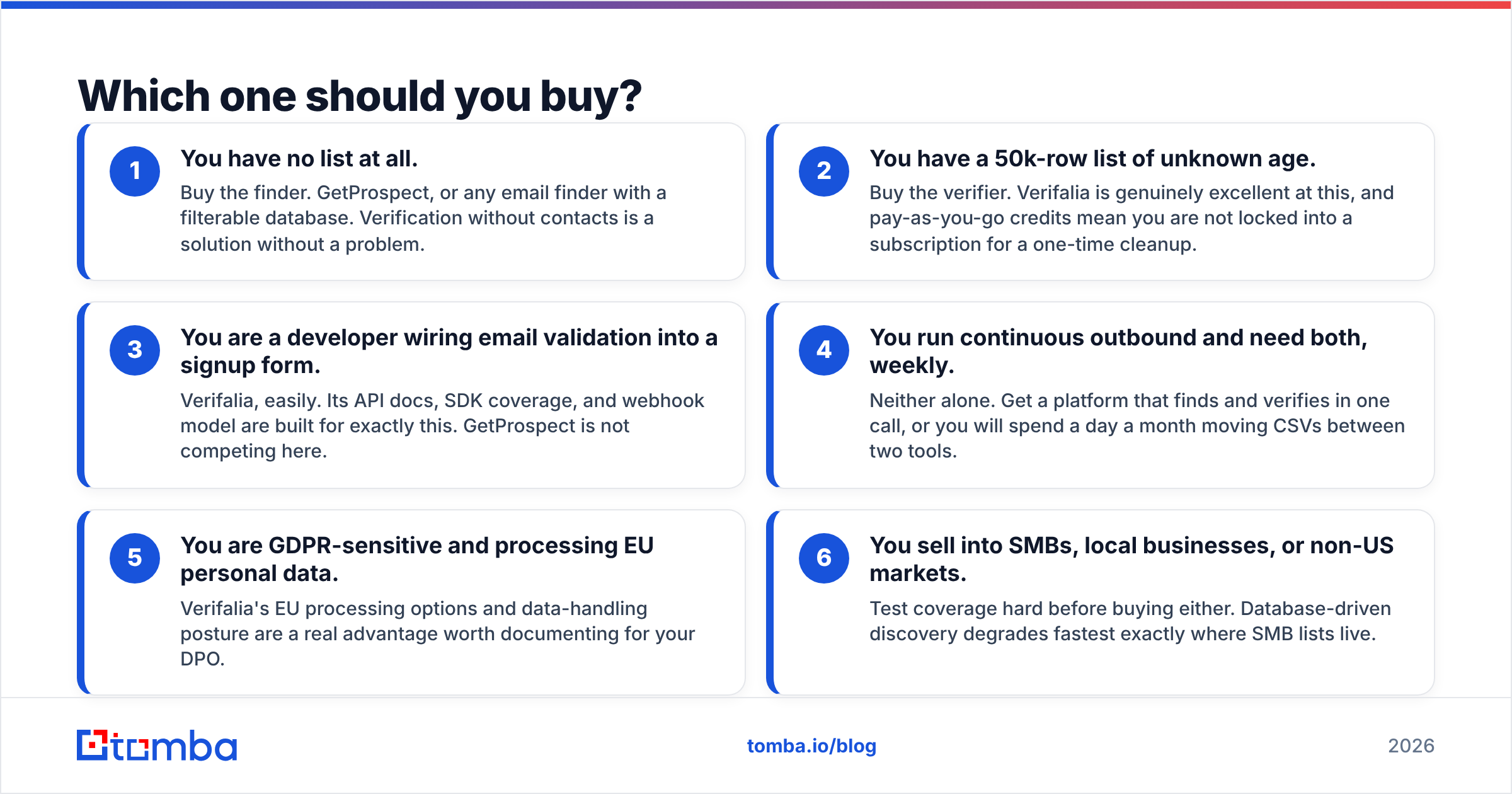
| GetProspect | Verifalia | Tomba | |
|---|---|---|---|
| Free tier | ~50 valid emails/mo | Small daily free quota | 25 searches/mo |
| Entry paid plan | Low tens of $/mo | Pay-as-you-go credit packs | $49/mo (Starter) |
| Mid tier | Scales with contact volume | Subscription or bulk packs | $99/mo (Growth) |
| High tier | Team/agency pricing | High-volume enterprise | $249/mo (Pro) |
| Finds new emails | Yes | No | Yes |
| Verifies emails | Bundled, basic | Yes, deep | Yes |
| Catch-all grading | Limited | Strong | Dedicated catch-all verifier |
| Phone numbers | Limited | No | Yes |
Vendor pricing shifts; check both pricing pages before you commit. The structural point does not shift: if you buy both, you are paying twice for one workflow. Two dashboards, two API keys, two billing cycles, and a CSV export/import step between them that someone on your team has to babysit every week.
Run the math on your actual volume. If you need 3,000 new contacts a month and want them verified, a stacked GetProspect + Verifalia setup often lands north of what a single combined platform charges. Tomba pricing starts at $49/mo for Starter and includes finding and verification in the same credit pool — worth benchmarking against the pair before you sign two contracts.
Which one should you buy?#
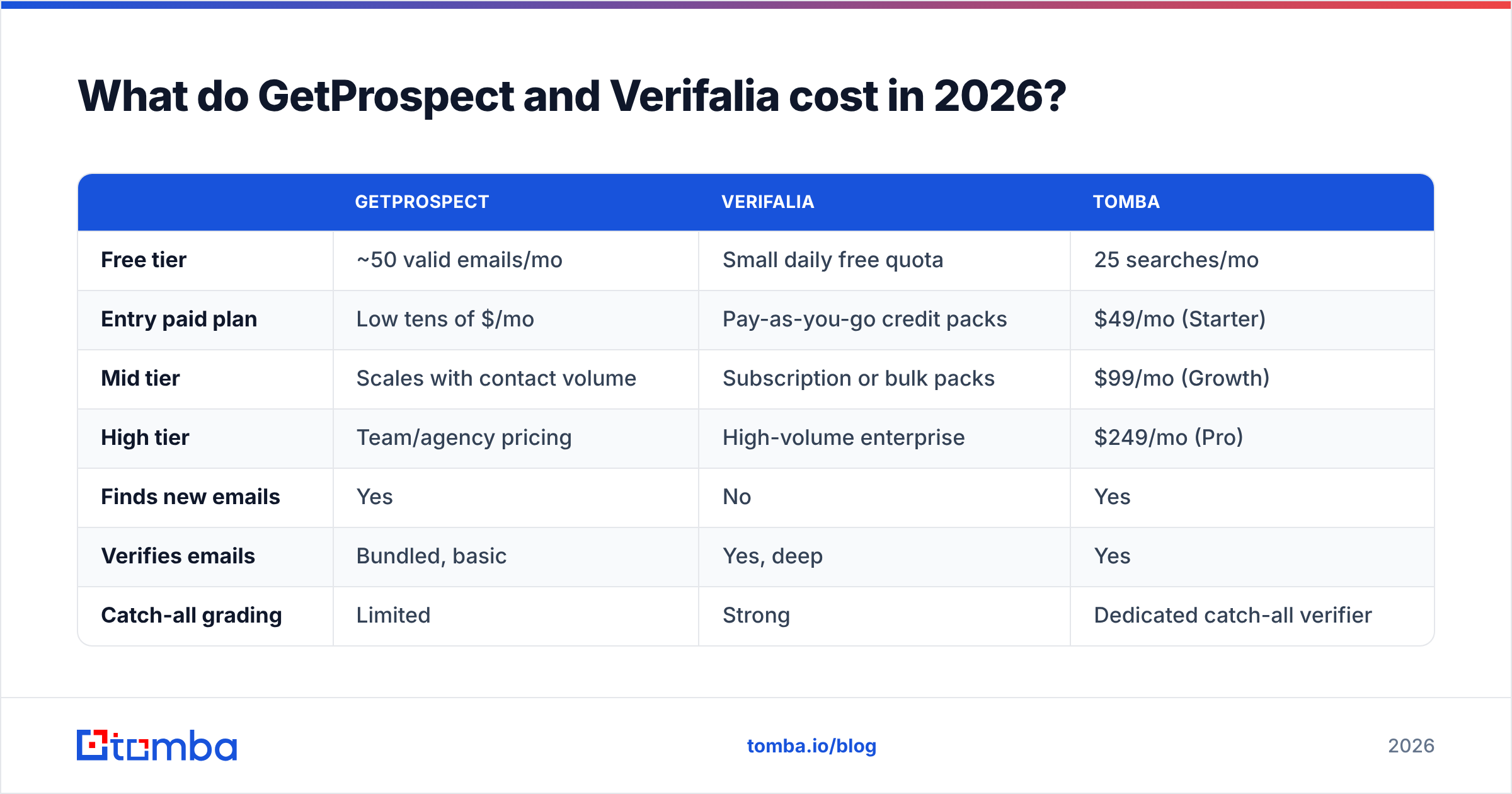
Pick by the constraint you actually have, not by feature-count:
- You have no list at all. Buy the finder. GetProspect, or any email finder with a filterable database. Verification without contacts is a solution without a problem.
- You have a 50k-row list of unknown age. Buy the verifier. Verifalia is genuinely excellent at this, and pay-as-you-go credits mean you are not locked into a subscription for a one-time cleanup.
- You are a developer wiring email validation into a signup form. Verifalia, easily. Its API docs, SDK coverage, and webhook model are built for exactly this. GetProspect is not competing here.
- You run continuous outbound and need both, weekly. Neither alone. Get a platform that finds and verifies in one call, or you will spend a day a month moving CSVs between two tools.
- You are GDPR-sensitive and processing EU personal data. Verifalia's EU processing options and data-handling posture are a real advantage worth documenting for your DPO.
- You sell into SMBs, local businesses, or non-US markets. Test coverage hard before buying either. Database-driven discovery degrades fastest exactly where SMB lists live.
Is a combined find-and-verify tool better than buying both?#
For most outbound teams, yes — and the reason is workflow, not features.
The stacked setup looks like this: search GetProspect, export CSV, upload to Verifalia, wait for the batch, download results, filter by status, re-import into your sequencer. Six steps, two tools, one human. Do that weekly and you have burned roughly a day a month on file shuffling — plus you have created a second copy of personal data sitting in a downloads folder, which your compliance lead will not love.
A combined tool collapses it to: search, get verified results, push to sequencer. One credit, one status field, one audit trail.
The honest counterargument: specialist verifiers are usually deeper than bundled ones. Verifalia has spent years on nothing but SMTP edge cases, greylisting behaviour, and catch-all inference. A finder's bundled verification is generally good enough to strip hard bounces but not always tuned for the weird 10%. If your risk profile is "one bounce spike destroys my domain reputation," a specialist pass on top is defensible. If it is "keep bounce rate under 3%," a good combined tool gets you there.
Where combined tools have closed the gap is catch-all domains — the single biggest source of false confidence in B2B lists. A dedicated catch-all verifier applies pattern inference and cross-source confirmation instead of returning a flat "unknown," which is the entire ballgame for enterprise domains that accept everything at the MTA.

What does each tool actually miss?#
GetProspect's gaps:
- No mobile/direct-dial phone data at meaningful depth, so you cannot run multichannel from one source.
- Database freshness varies by segment. Enterprise and tech coverage is decent; long-tail SMB is thin.
- Verification is a filter, not a product. Do not treat its "valid" flag with the same confidence you would give a dedicated engine.
- List-management UX is functional, not a CRM. You will still export.
Verifalia's gaps:
- It cannot help you find anyone. Full stop.
- No enrichment, no company data, no job-title filtering.
- Pay-as-you-go pricing is great for cleanups and less predictable for continuous high-volume outbound.
- No LinkedIn workflow at all — if your prospecting starts on a LinkedIn search page, Verifalia is not in that motion.
Neither of those lists is a knock. Both tools are honest about what they are; it is the roundup articles that pretend they compete. Cross-check the current state of both on G2 before you buy — review recency tells you more about database freshness than any vendor benchmark page.

How do you test them properly before buying?#
Run the same 100-row control list through every candidate. Not a vendor demo — your own list, from your own ICP.
- Build the control set. 100 real prospects you can verify by hand: 40 enterprise, 40 mid-market, 20 SMB. Include at least 15 non-US domains and 10 people who changed jobs in the last six months.
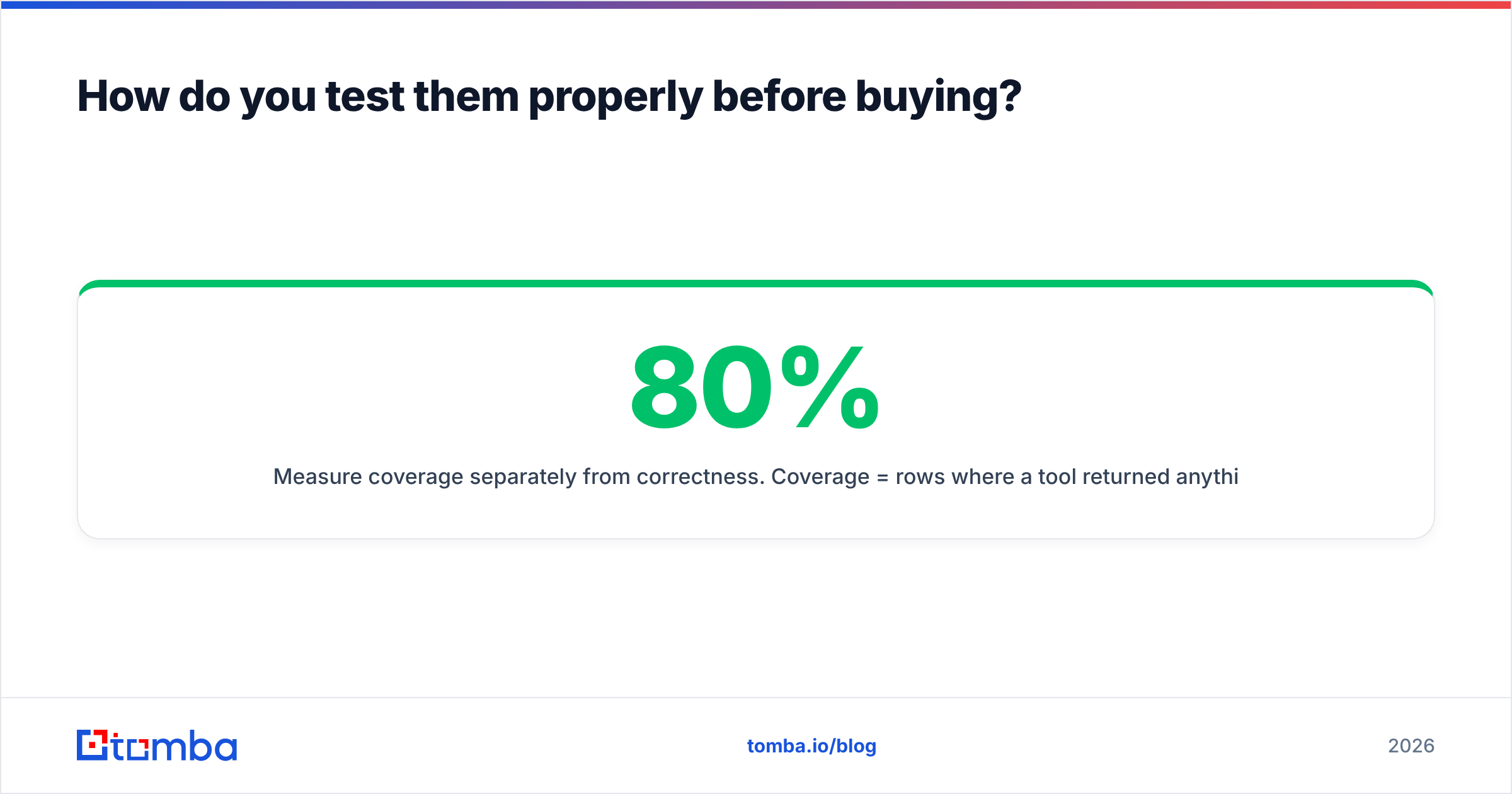
- Measure coverage separately from correctness. Coverage = rows where a tool returned anything. Correctness = of those, how many survive a manual or second-source check. A tool with 80% coverage and 70% correctness is worse than one with 60% coverage and 95% correctness, and the marketing page will only show you one of those numbers.
- Track catch-all rate. Count how many rows land in "accept-all" or "unknown." That percentage is your uncertainty budget, and it is where tools diverge most.
- Send a real 200-address test batch. Bounce rate on live sending is the only number that matters. Everything upstream is a proxy for it.
- Time the workflow. Stopwatch the end-to-end run including exports. The stacked setup usually loses here by a wide margin.
If you want an independent check on any address a tool returns, an email verifier run as a second opinion costs almost nothing and catches vendor optimism fast. For continuous pipelines, do it in code — most teams script this against a email verification API rather than uploading files by hand.
Frequently asked questions#
Is GetProspect a replacement for Verifalia? No. Its bundled verification will strip obvious dead addresses, but it is not a substitute for a dedicated verification engine on a large or aged list.
Is Verifalia a replacement for GetProspect? Not at all. Verifalia has no contact database and cannot discover an address it was not given.
Do I need both? Only if you have decided to run a two-tool stack. Most teams doing steady outbound get a better cost and time outcome from one platform that finds and verifies together, with a specialist verifier reserved for occasional deep cleanups.
Which is better for developers? Verifalia, for validation endpoints. Its API surface, SDK coverage, and documentation are stronger than most finders' verification endpoints.
What bounce rate should I target? Under 2% for cold outbound. Above 5% and mailbox providers start throttling you regardless of which vendor's badge is on your CSV.
The bottom line#
GetProspect and Verifalia are not rivals — they are two stages of one pipeline, sold separately. If you only have budget for one, buy the one that fixes your actual bottleneck: discovery or deliverability. If your bottleneck is both, buying two subscriptions to solve one workflow is the expensive path.
That is where a combined platform earns its keep. Tomba Email Finder finds work emails by domain, name, or company, verifies them in the same request, grades catch-all domains instead of dodging them, and returns everything through one API and one credit pool. The free tier gives you 25 searches a month to test against your own control list — run it head to head with whatever you are considering, and let your bounce rate pick the winner.
Related guides#
Ready to find emails that actually work?
Join 150,000+ professionals who stopped guessing and started sending. Free credits on signup — no credit card required.
Get the Tomba newsletter
Practical outbound tactics and product updates — once every two weeks.
About the author