GetProspect vs Vocusio: Which One Fits Your Outbound Stack?
GetProspect finds B2B emails. Vocus.io sends them from Gmail. Most teams compare the two as rivals when they solve different halves of outbound — here is the honest breakdown of data, pricing, and where each one breaks.
GetProspect vs Vocusio is not really a fair fight, and that is the point. GetProspect finds B2B emails. Vocusio — the tool brands itself Vocus.io — sends them from Gmail. Here is what each one does, what each really costs, and which half of outbound to buy first.
TL;DR
- They are not really competitors. GetProspect is a B2B contact database and email finder. Vocus.io is a Gmail-native mail merge, tracking, and follow-up tool. Comparing them head-to-head only makes sense if you are deciding which half of outbound to buy first.
- Pick GetProspect if your bottleneck is "I don't have enough verified contacts." Pick Vocus.io if your bottleneck is "I have a list but I'm sending one-by-one from Gmail."
- Vocus.io is dramatically cheaper — single-digit to low-double-digit dollars per user per month. It does not carry the cost of maintaining a contact database.
- Neither tool is a full stack. Buying only Vocus.io means manual list building. Buying only GetProspect means you still need a sender.
- Verification is where budgets die. Unverified list + high-volume sender = bounce rate that torches your domain in week two. Run every export through an email verifier before it touches a sequence.
What are GetProspect and Vocus.io, exactly?#
GetProspect is a lead database with a LinkedIn Chrome extension on top. Filter by job title, industry, headcount, tech stack, and location, or scrape a LinkedIn search. It returns work emails plus company firmographics. It also has a CRM-lite view, list management, CSV export, and an API. Email sending exists in newer plans, but it is a bolt-on, not the core.
Vocus.io comes at outbound from the opposite direction. It lives inside Gmail. You get mail merge from a Google Sheet, open and click tracking, scheduled sends, snippets, a shared team dashboard, and calendar links. Follow-up sequences stop as soon as someone replies. It ships a small contact-finder feature too, but nobody buys Vocus.io for its database.
So the honest framing of GetProspect vs Vocusio is simple: one fills the list, the other works it. The question is which gap costs you more revenue right now.
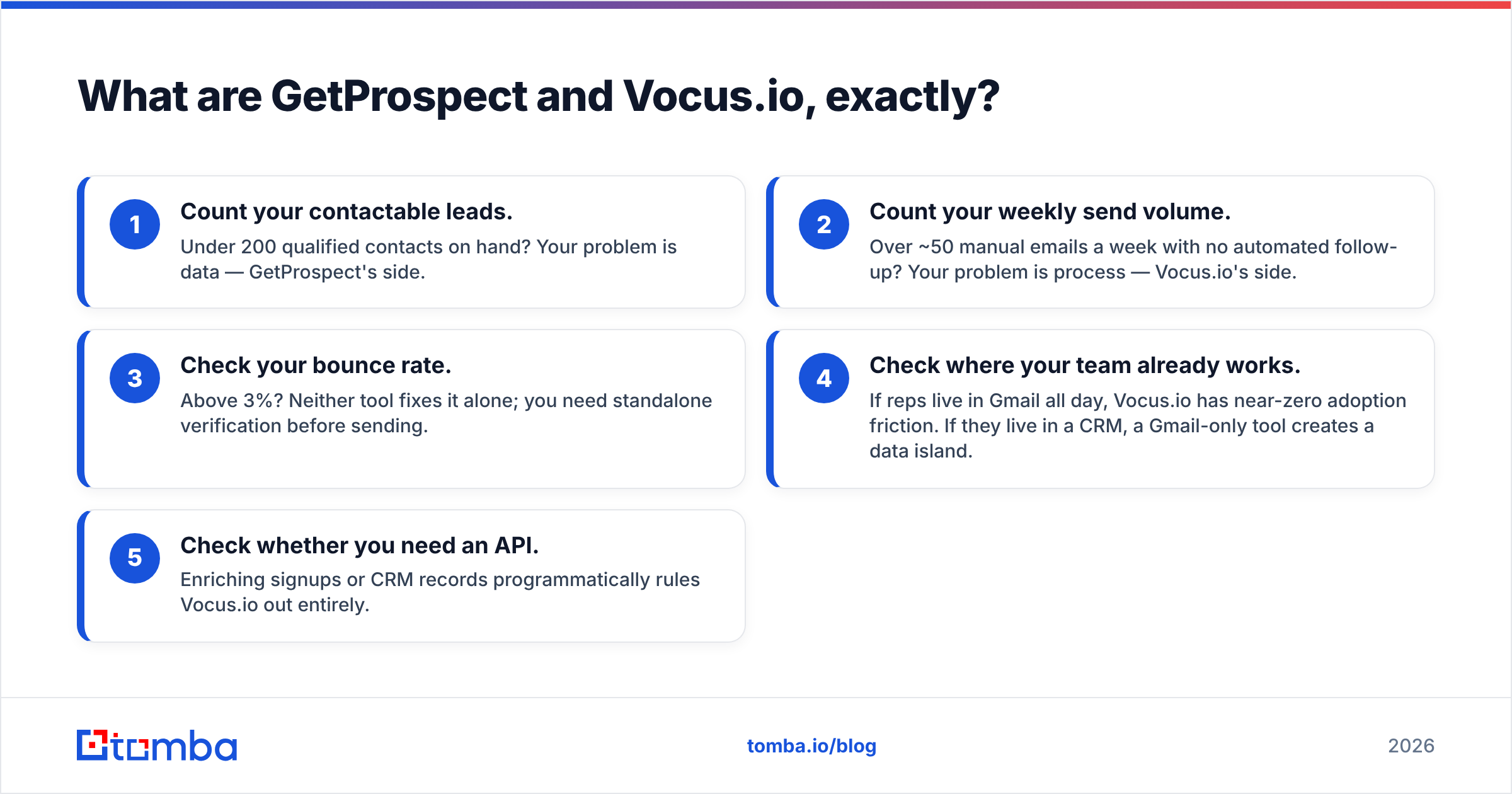
Here is the decision in five moves:
- Count your contactable leads. Under 200 qualified contacts on hand? Your problem is data — GetProspect's side.
- Count your weekly send volume. Over ~50 manual emails a week with no automated follow-up? Your problem is process — Vocus.io's side.
- Check your bounce rate. Above 3%? Neither tool fixes it alone. You need standalone verification before sending.
- Check where your team already works. If reps live in Gmail all day, Vocus.io has near-zero adoption friction. If they live in a CRM, a Gmail-only tool creates a data island.
- Check whether you need an API. Enriching signups or CRM records programmatically rules Vocus.io out entirely.
GetProspect vs Vocusio: how do they compare feature by feature?#
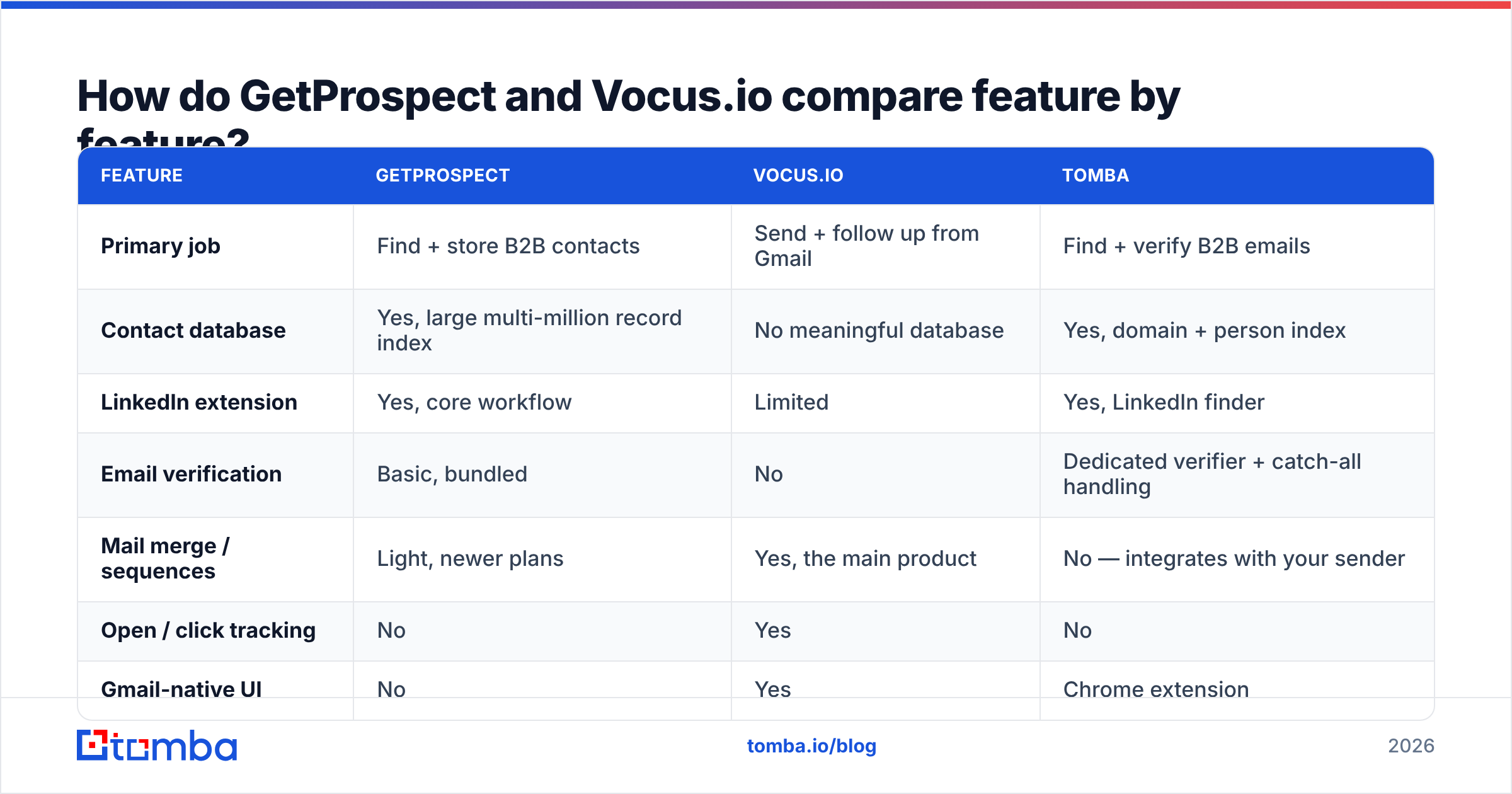
| Feature | GetProspect | Vocus.io | Tomba |
|---|---|---|---|
| Primary job | Find + store B2B contacts | Send + follow up from Gmail | Find + verify B2B emails |
| Contact database | Yes, large multi-million record index | No meaningful database | Yes, domain + person index |
| LinkedIn extension | Yes, core workflow | Limited | Yes, LinkedIn finder |
| Email verification | Basic, bundled | No | Dedicated verifier + catch-all handling |
| Mail merge / sequences | Light, newer plans | Yes, the main product | No — integrates with your sender |
| Open / click tracking | No | Yes | No |
| Gmail-native UI | No | Yes | Chrome extension |
| Public API | Yes | Not a real developer API | Yes, documented REST API |
| Bulk CSV enrichment | Yes | No | Yes |
| Free tier | Yes, limited monthly credits | Trial only | 25 searches/month |
| Typical entry price | ~$49/mo range | ~$5–$20 per user/mo | $49/mo Starter |
Read that table row by row and the split is obvious. Vocus.io owns a whole column in sending. GetProspect owns a whole column in data. Two rows go to neither one: verification and API depth. That is where a specialist tool earns its slot.
Which one finds more valid emails?#
GetProspect wins this by default, because Vocus.io barely competes here. The more useful question is this: how good is GetProspect's data, honestly?
In practice, expect a hit rate in the mid-to-high 60s on cold B2B lists built from LinkedIn. It runs higher for mid-market and enterprise targets, where email patterns are predictable. It drops for SMBs, agencies, and non-US domains. That is not a knock on GetProspect. It is the ceiling of pattern-plus-crawl data on long-tail domains. Anyone quoting you 95%+ coverage across every segment is quoting a marketing number, not a measured one.

Three things move accuracy more than vendor choice:
- Catch-all domains. A catch-all server accepts every address, so "valid" means very little on its own. If a big slice of your ICP runs catch-all (common in enterprise and in Microsoft 365 shops), you need a catch-all verifier, not a green checkmark.
- Data age. A contact record built 14 months ago has about a one-in-four chance of being stale after normal job churn. Fresh data beats a big database.
- Role vs personal addresses.
info@,sales@, andcontact@inflate coverage stats and kill reply rates. Filter them out before you count coverage.
Whatever you export from GetProspect — or anywhere else — treat it as a guess until it is verified. The gap between "found" and "safe to send" is where most cold email programs quietly break.
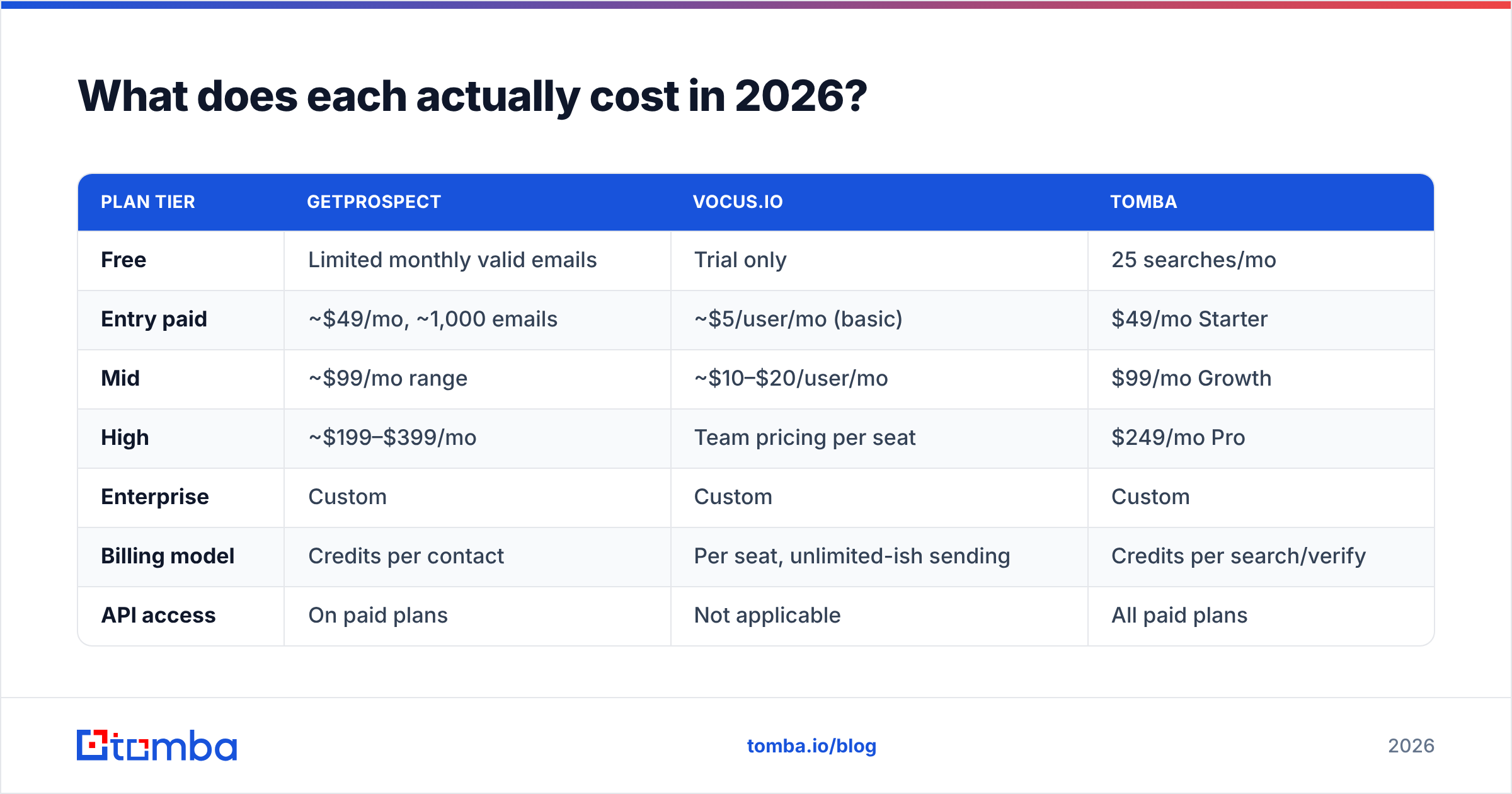
What does each actually cost in 2026?#
Pricing shifts, so check each vendor's page before you buy. As of this writing, the shape looks like this:
| Plan tier | GetProspect | Vocus.io | Tomba |
|---|---|---|---|
| Free | Limited monthly valid emails | Trial only | 25 searches/mo |
| Entry paid | ~$49/mo, ~1,000 emails | ~$5/user/mo (basic) | $49/mo Starter |
| Mid | ~$99/mo range | ~$10–$20/user/mo | $99/mo Growth |
| High | ~$199–$399/mo | Team pricing per seat | $249/mo Pro |
| Enterprise | Custom | Custom | Custom |
| Billing model | Credits per contact | Per seat, unlimited-ish sending | Credits per search/verify |
| API access | On paid plans | Not applicable | All paid plans |

The structural difference matters more than the sticker price. Vocus.io bills per seat; GetProspect bills per record. A three-person team sending 3,000 emails a month pays Vocus.io about the price of two coffees per rep. That same team burning 3,000 contact credits pays a database vendor real money. Every month, forever, because contact data decays. The GetProspect vs Vocusio budget gap is structural, not a promo.
That is also why credit math deserves five minutes of your attention. Say a "1,000 emails" plan returns 650 usable, non-role, deliverable addresses. Your real cost per usable contact is about 54% higher than the headline. Ask any vendor — including Tomba, whose pricing is public — whether failed lookups burn credits. That answer changes your spend more than a 20% discount would.

Is Vocus.io enough on its own for cold outreach?#
For warm and semi-warm outbound, yes, more often than you would think. Say you are emailing inbound leads, conference contacts, existing customers, or people who already know your name. Vocus.io covers the whole job: personalize from a sheet, sequence three follow-ups, stop on reply, track opens, book the meeting. It is the least-friction way to make a Gmail-based rep 3x more productive.
For cold outbound at volume, no. The reason is infrastructure, not features. Vocus.io sends through your real Google Workspace mailbox. That is great for deliverability per message and bad for scale. You inherit Google's sending limits, and you put your main domain's sender reputation at risk. Dedicated cold-email platforms exist because they rotate secondary domains, throttle sends, and warm inboxes. Vocus.io does none of that.
The practical rule: Vocus.io for the mailbox you actually care about, a dedicated sender for the burner domains. Either way, verify first. Google and Microsoft both tightened their bulk sender rules. A spike in hard bounces is one of the fastest ways to get filtered. The free email checker catches the obvious garbage in seconds. A bulk pass catches the rest.
Where does GetProspect fall short?#
Three complaints show up again and again across G2 reviews and hands-on use:
- Coverage cliffs outside core markets. North American and Western European mid-market data is solid. Latin America, MENA, and Southeast Asia thin out fast, and small local domains often return nothing.
- Credits consumed on weak results. If a lookup returns a role address or a low-confidence guess, you still paid for it. Watch this closely during a trial with your own ICP, not the vendor's sample list.
- The CRM-lite trap. GetProspect's built-in list management is handy enough that teams stop syncing to a real CRM. Six months later, half the pipeline context lives in a lead tool with no reporting. Push contacts out to HubSpot, Pipedrive, or Salesforce on day one.
None of that makes it a bad tool. It makes it a data tool, and a data tool should be a source, not a system of record.
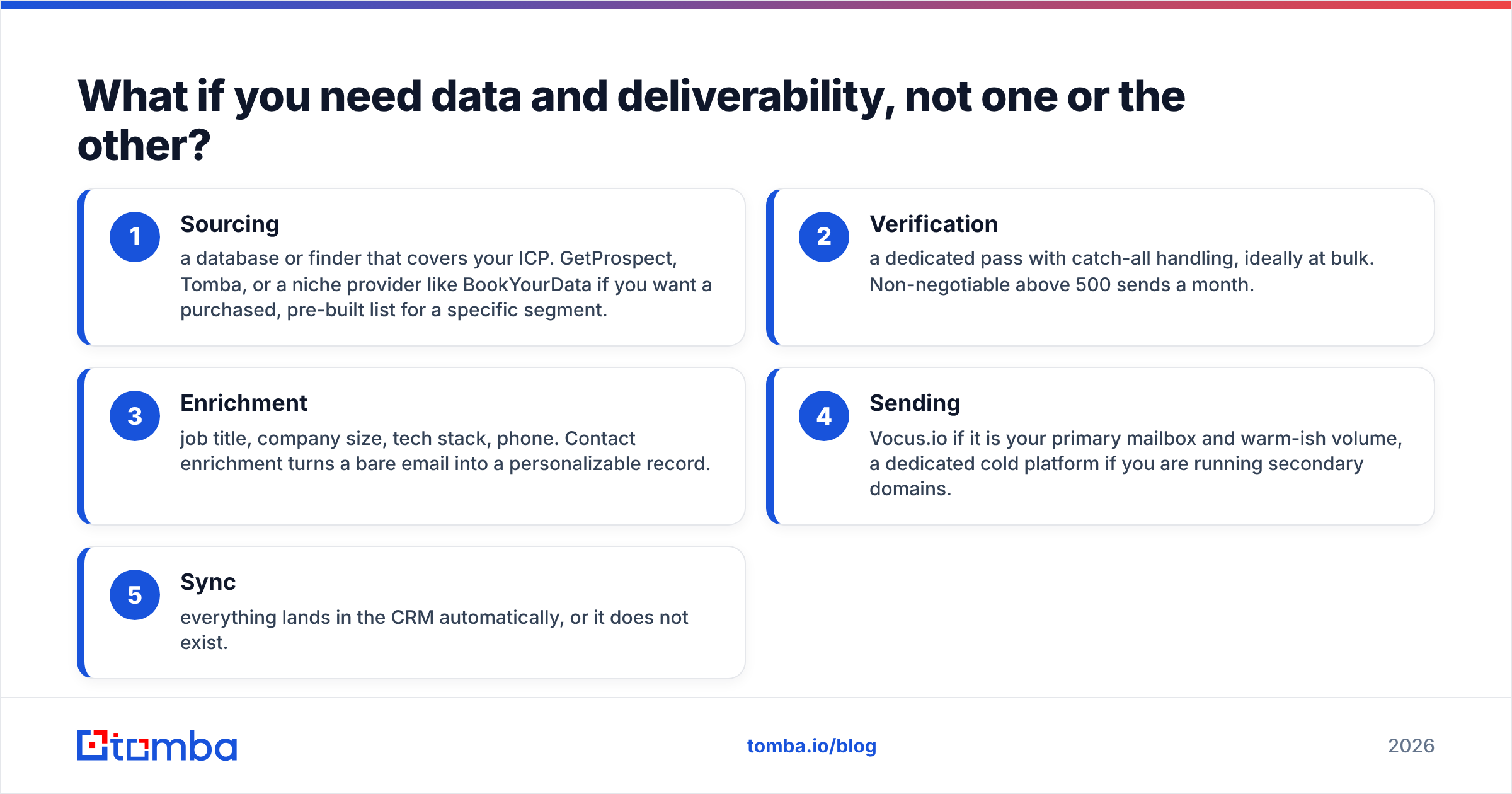
What if you need data and deliverability, not one or the other?#
This is the common real answer, and it is why a two-tool comparison usually resolves into a three-part stack: a finder, a verifier, and a sender.
Split that way, the shopping list gets simple:
- Sourcing — a database or finder that covers your ICP. GetProspect, Tomba, or a niche provider like BookYourData if you want a pre-built list for one segment.
- Verification — a dedicated pass with catch-all handling, ideally at bulk. Non-negotiable above 500 sends a month.
- Enrichment — job title, company size, tech stack, phone. Contact enrichment turns a bare email into a record you can personalize from.
- Sending — Vocus.io if it is your primary mailbox and warm-ish volume, a dedicated cold platform if you run secondary domains.
- Sync — everything lands in the CRM automatically, or it does not exist.
Tomba slots into steps one through three rather than replacing your sender. That is deliberate. Finding an address, confirming it accepts mail, and enriching the record are API problems. Sequencing is a workflow problem. Tools that claim to be great at both usually are not. If you already like Vocus.io's Gmail workflow, the cheapest upgrade is not a new sender. It is a cleaner list.
Which should you buy?#
The GetProspect vs Vocusio call comes down to which bottleneck you feel every day.
Buy GetProspect if: your reps spend more time hunting for contacts than writing emails, your ICP is North American or Western European mid-market, and you want a self-serve database with LinkedIn scraping built in.
Buy Vocus.io if: your team lives in Gmail, your volume is modest, your list already exists, and you want follow-up automation for less than the cost of a team lunch.
Buy both if: you are a 2–5 person outbound team and you want the cheapest stack that works. GetProspect for the list, Vocus.io for the send, and a real verifier in between.
Buy neither if: you need programmatic enrichment inside your own product or CRM. That is API territory, and neither tool is built for it at depth.
One last thing to remember: the tool that finds the address is rarely the reason a campaign works. Targeting and message do that. Tooling decides whether your emails arrive at all, and that comes down to list hygiene, not the logo on your invoice.
Ready to fix the data half? Start with the Tomba Email Finder. Search by domain, name, or company, and get a confidence score plus sources on every result. Verify before export, so your Vocus.io sequences hit real inboxes. The free tier gives you 25 searches a month to test against your own ICP, and paid plans start at $49/mo with full API access.
Related guides#
Ready to find emails that actually work?
Join 150,000+ professionals who stopped guessing and started sending. Free credits on signup — no credit card required.
Get the Tomba newsletter
Practical outbound tactics and product updates — once every two weeks.
About the author