Goava vs Tomba (2026): Which B2B Prospecting Tool Wins?
Goava sells Nordic company intelligence with demo-gated pricing. Tomba sells verified contact data from $49/mo with a public API. Here is which one actually fits your outbound motion in 2026.
TL;DR
- Goava and Tomba solve different halves of the same problem. Goava is Nordic-focused sales intelligence — it tells you which companies to approach. Tomba is a contact data layer — it tells you which person to email and at what address.
- Geography is the deciding factor. Goava's edge is depth on Swedish, Norwegian, Danish and Finnish registry data. If more than half your pipeline sits outside the Nordics, that edge evaporates.
- Pricing transparency is not close. Tomba publishes its tiers (Free 25 searches/mo, Starter $49/mo, Growth $99/mo, Pro $249/mo). Goava runs a demo-led, quote-based sales process — budget for a call before you see a number.
- Developers should look at the API story. Tomba ships a documented REST API, CLI, Chrome extension, Sheets/Excel add-ins and an MCP server. Goava is built around its web app and CRM sync.
- The honest answer for most teams: if you sell to Nordic mid-market and need account scoring, Goava earns its seat. If you need verified emails at volume, in any market, Tomba is cheaper, faster to deploy, and easier to automate.
What are Goava and Tomba, exactly?#
They get lumped into the same "prospecting tool" bucket on review sites, but they were built for different jobs.
Goava is a Stockholm-built sales intelligence platform. Its core value is aggregating Nordic company data — official registry filings, financials, employee counts, technographics, industry classification — and layering AI-driven recommendations on top. You open Goava and it tells you: these 40 Swedish companies look like your best customers, here's why, and here's what changed this quarter. It plugs into your CRM so those recommendations land where reps already work.
Tomba is a contact data platform. Its core is the email finder: give it a domain and a name, get back a professional email address with a confidence score and the sources it was found in. Around that sit an email verifier, domain search, catch-all detection, phone finder, reverse email lookup, and data enrichment.
The simplest framing: Goava answers "who should I sell to?" Tomba answers "how do I actually reach them?" Those are complementary questions, which is why the honest comparison is less "which one wins" and more "which gap are you filling."
How do Goava and Tomba differ on data coverage?#
This is where the comparison gets concrete, and where most buyers make the wrong call by reading a feature list instead of a coverage map.
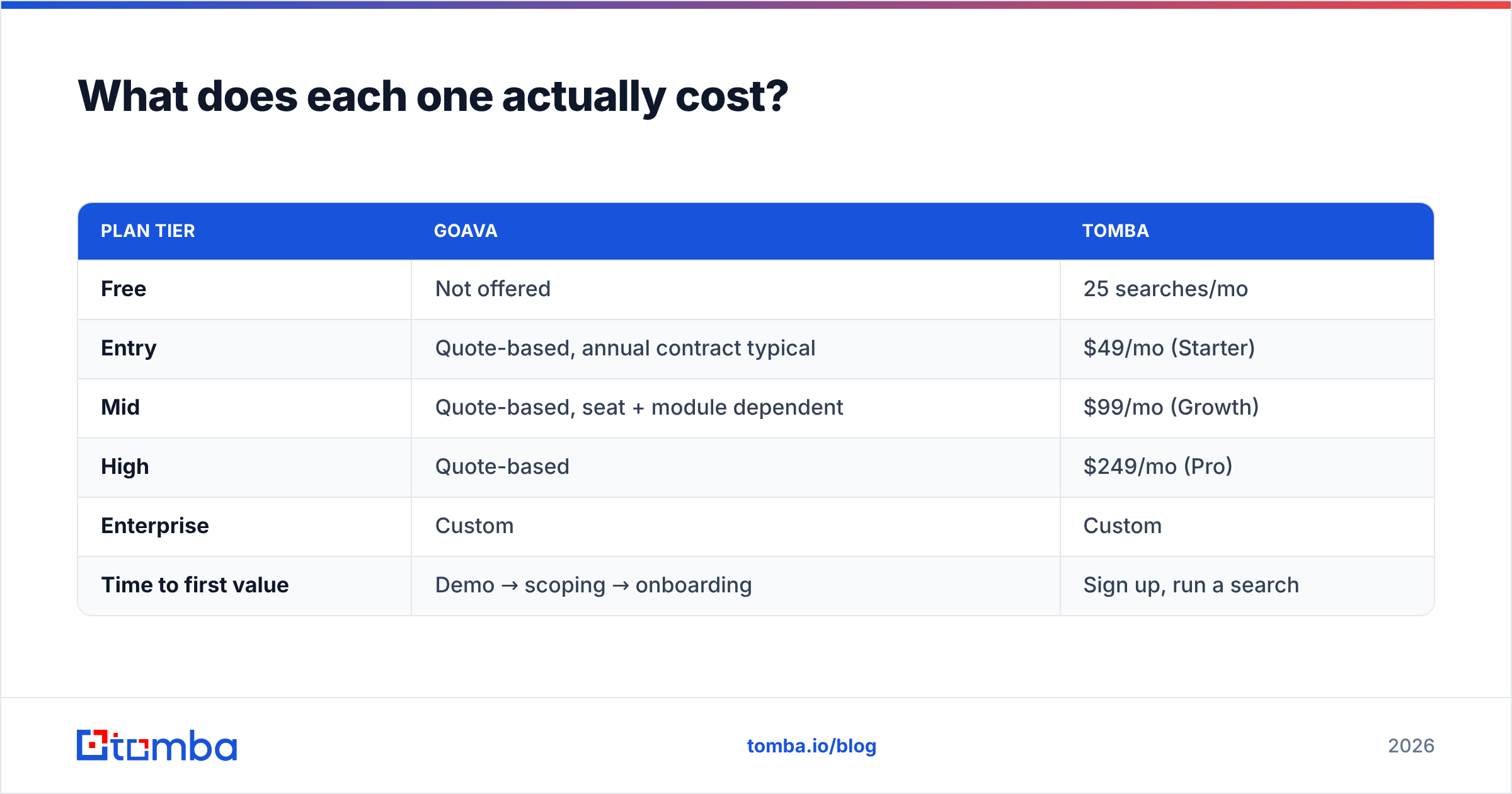
- Geographic depth. Goava's data foundation is Nordic company registries — the kind of structured, government-filed information that is genuinely hard to replicate. Swedish and Norwegian financials, board changes, and org numbers are first-class citizens. Tomba's coverage is global and domain-driven: if a company has a website and public web footprint, it's in scope regardless of country.
- Record type. Goava is company-first. Accounts, firmographics, signals, scores. Tomba is person-first. Names, roles, verified emails, phone numbers, LinkedIn associations.
- Freshness mechanism. Registry data updates on filing cycles — accurate but slow-moving. Contact data decays fast (B2B email lists lose roughly 20–30% of their validity per year as people change jobs), which is why Tomba pairs finding with real-time SMTP-level verification rather than serving a static database dump.
- Signal layer. Goava invests heavily in why now triggers: hiring spikes, financial changes, tech stack shifts. Tomba does not compete here — it has no intent or scoring product, and pretending otherwise would be dishonest.
- Delivery surface. Goava lives in its app and your CRM. Tomba lives wherever you put it: API, CLI, browser extension, Google Sheets, Excel, Airtable, Zapier, or bulk CSV.

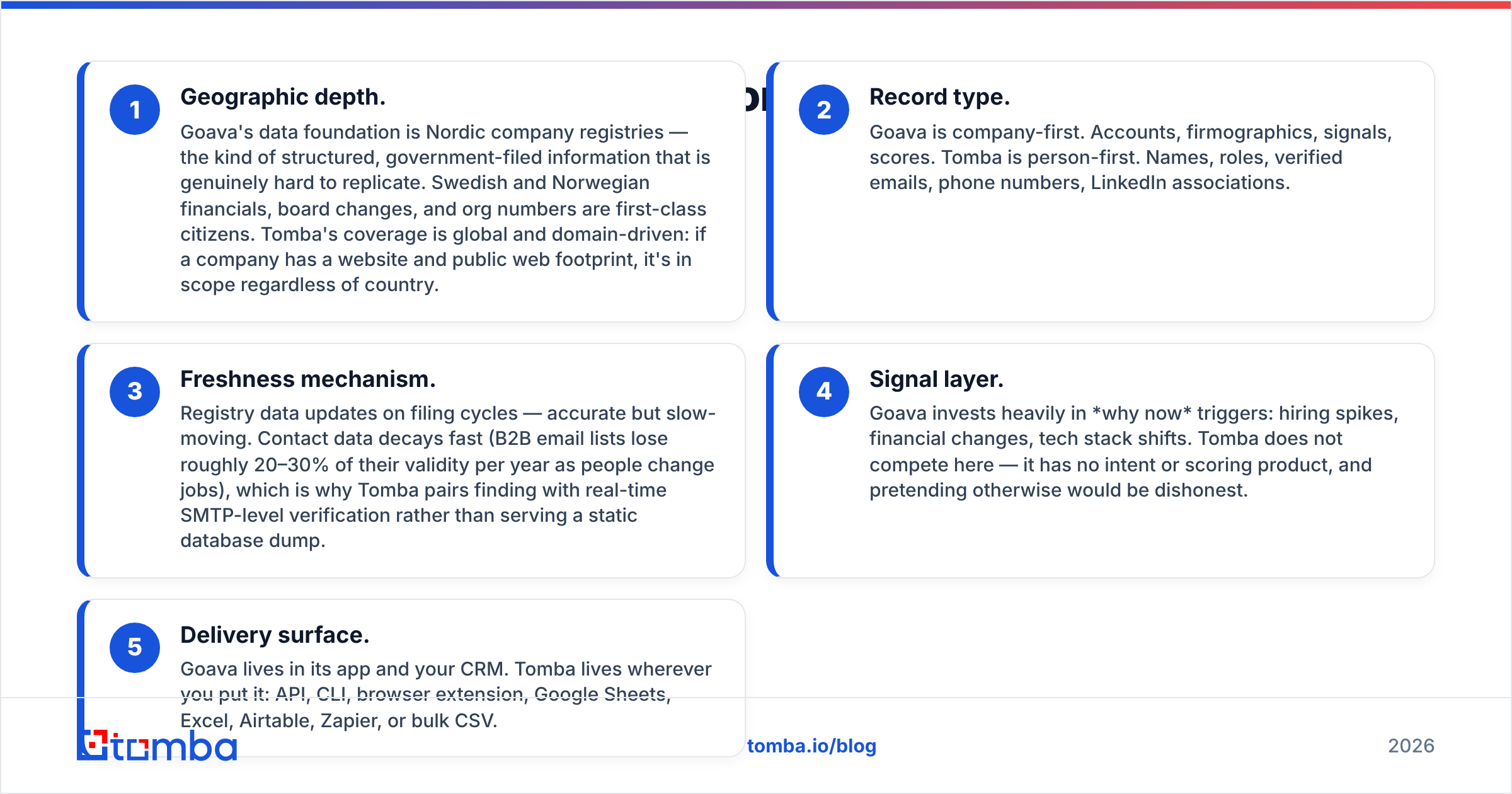
Goava vs Tomba: how do the features compare?#
| Capability | Goava | Tomba |
|---|---|---|
| Primary job | Account targeting & scoring | Finding + verifying contacts |
| Core data unit | Company (registry-backed) | Person + email address |
| Geographic strength | Nordics (SE, NO, DK, FI) | Global, domain-driven |
| Email finding | Not the core product | Core product |
| Email verification | Limited | SMTP + catch-all detection |
| Phone numbers | Company-level | Direct + company via phone finder |
| Buying signals / intent | Yes — a core strength | No |
| Lead scoring / AI recommendations | Yes | No |
| Public REST API | Available on request | Documented, self-serve |
| Bulk processing | Via lists / CRM sync | Bulk finder + verifier, CSV in/out |
| Browser extension | Yes | Yes |
| CRM integrations | HubSpot, Salesforce, Pipedrive, Nordic CRMs | HubSpot, Salesforce, Pipedrive, Zapier, Make |
| Free tier | No — demo required | Yes, 25 searches/mo |
| Published pricing | No | Yes |
Read that table as two shapes rather than a scoreboard. Goava wins every row about targeting. Tomba wins every row about contactability, access, and automation. Neither list is padded — a tool that claims to win all fourteen rows is a tool whose marketing you should distrust.
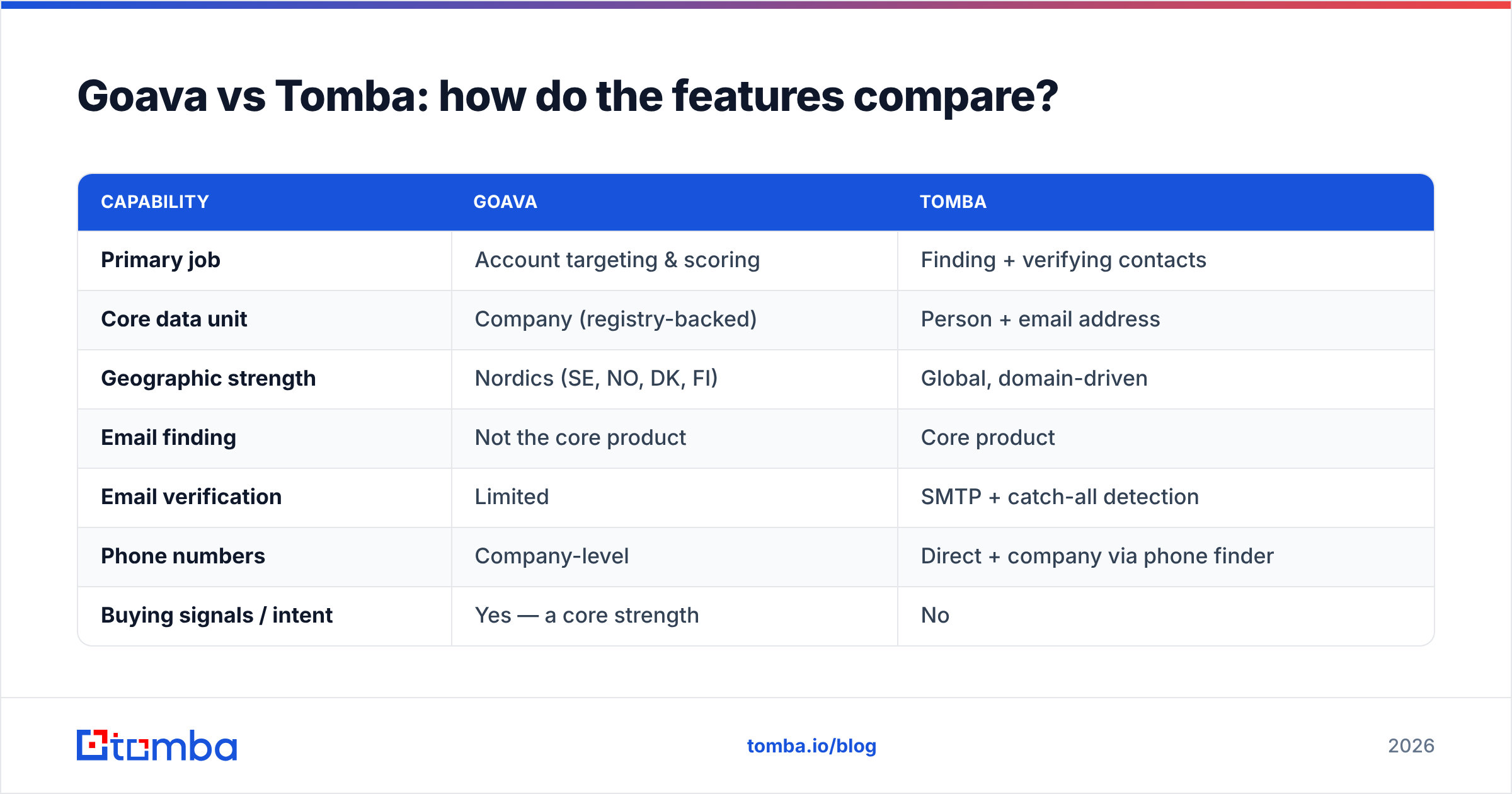
What does each one actually cost?#
| Plan tier | Goava | Tomba |
|---|---|---|
| Free | Not offered | 25 searches/mo |
| Entry | Quote-based, annual contract typical | $49/mo (Starter) |
| Mid | Quote-based, seat + module dependent | $99/mo (Growth) |
| High | Quote-based | $249/mo (Pro) |
| Enterprise | Custom | Custom |
| Time to first value | Demo → scoping → onboarding | Sign up, run a search |
Goava does not publish list pricing, which is normal for demo-led sales intelligence vendors but has real consequences: you cannot pilot it on a Tuesday afternoon, and you cannot easily benchmark cost-per-account against alternatives without entering a sales cycle. Check current Tomba pricing directly rather than trusting any third-party table, including this one — vendor plans move.
The practical difference for a small team: Tomba's Starter plan costs less than most companies spend on coffee, and you can validate the data quality before a purchase order exists. Goava's model assumes you already know you need account intelligence and have budget approval to match. Neither model is wrong. They target different buyers.
Which tool is more accurate for contact data?#
Accuracy claims in this category are close to meaningless unless you define the metric. "95% accurate" can mean syntax validity, deliverability, or role-correctness — three very different things.
Here is how to run a fair test, which takes about an hour:
- Build a 100-row control list from accounts you already closed or lost, where you know the real contact and the real email. Do not use a random export.
- Split it by geography. Fifty Nordic rows, fifty everywhere else. This single step usually settles the Goava vs Tomba question on its own.
- Measure three numbers separately: hit rate (did the tool return anything?), validity (did it survive verification?), and bounce rate (what actually happened when you sent).
- Count catch-all domains separately. They are the noisiest bucket in B2B data. A tool that marks catch-alls honestly is more useful than one that guesses and inflates its hit rate — this is what a dedicated catch-all verifier is for.
- Log cost per usable contact, not cost per credit. A cheap credit that returns an unverifiable address is more expensive than an expensive one that lands.
On Nordic accounts, expect Goava's company-level information — org numbers, revenue bands, employee counts — to be stronger and better structured. On individual email addresses in any market, expect a purpose-built finder to win, because that is the only thing it does. Cross-check both against reviews on G2 before you commit to an annual contract; look specifically at reviews from companies matching your headquarters country, since data quality in this category is intensely regional.
Who should choose Goava?#
Pick Goava if three or more of these describe you:
- Your ICP is Nordic mid-market or enterprise. This is the single strongest reason. Registry-grade Swedish, Norwegian, Danish and Finnish data is genuinely differentiated and hard to source elsewhere.
- You have more accounts than you can prioritise. Scoring and recommendations only pay off when the problem is "too many options," not "too few contacts."
- Reps live in the CRM. Goava's value shows up when intelligence is pushed into HubSpot or Salesforce rather than sitting in another tab nobody opens.
- You sell high-ACV deals. A quote-based contract amortises fine against six-figure deals. It does not against $2k ACV self-serve.
- You need "why now" triggers. Funding, hiring, tech-stack changes — Tomba does not offer these, and no amount of email data substitutes for timing.
Who should choose Tomba?#
Pick Tomba if this sounds like your week:
- You already know your target list — from LinkedIn, a conference, a scraped niche directory, an existing CRM — and the bottleneck is reachable addresses, not account selection.
- You sell outside the Nordics, or across many markets at once, where a region-specialised database leaves gaps.
- You want to test before you buy. The free tier and public pricing mean evaluation costs you an afternoon, not a procurement cycle.
- You are automating. A documented API, CLI, MCP server and spreadsheet add-ins mean the data goes wherever your workflow already runs. This matters more every year as teams build agentic pipelines rather than clicking through dashboards.
- Deliverability is a live concern. Finding and verifying in one place — including catch-all handling — protects sender reputation better than finding in one tool and hoping for the best.
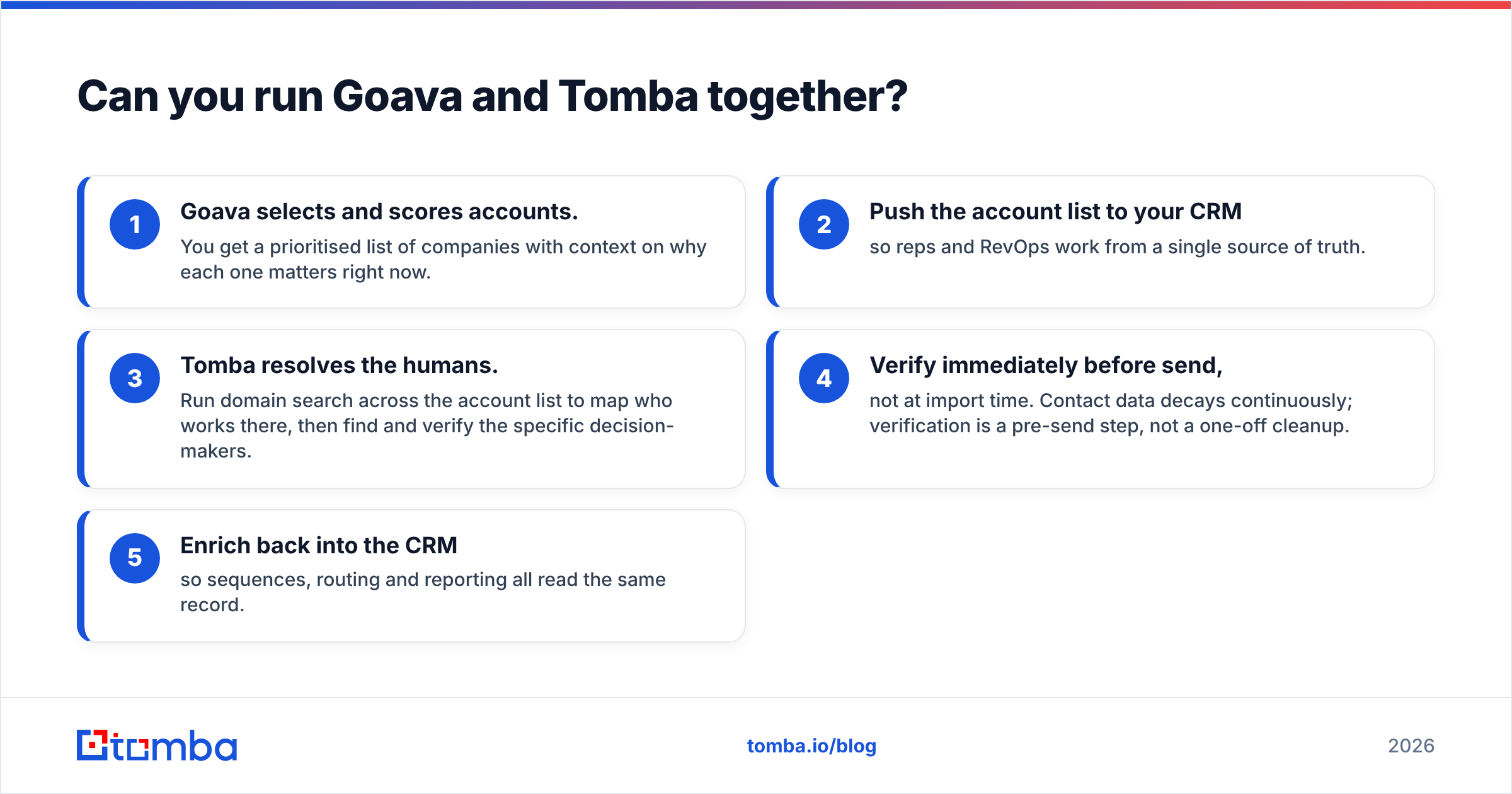
Can you run Goava and Tomba together?#
Yes, and for Nordic-focused teams with budget, that stack is stronger than either tool alone.
The pattern is simple:
- Goava selects and scores accounts. You get a prioritised list of companies with context on why each one matters right now.
- Push the account list to your CRM so reps and RevOps work from a single source of truth.
- Tomba resolves the humans. Run domain search across the account list to map who works there, then find and verify the specific decision-makers.
- Verify immediately before send, not at import time. Contact data decays continuously; verification is a pre-send step, not a one-off cleanup.
- Enrich back into the CRM so sequences, routing and reporting all read the same record.
The failure mode to avoid is paying two vendors for overlapping company firmographics while still having no verified email addresses — which is exactly what happens when teams buy a sales intelligence platform expecting it to double as a contact finder.
What is the verdict on Goava vs Tomba in 2026?#
If you had to pick one and your market is global: Tomba. It costs less, deploys in minutes, publishes its prices, and solves the bottleneck most outbound teams actually hit — reaching the right person at a deliverable address.
If you had to pick one and your market is the Nordics with high-ACV deals: Goava. Registry-grade regional intelligence and account scoring are things a contact-data tool honestly cannot replicate, and pretending otherwise would waste your quarter.
The wrong move is choosing on brand recognition or on a feature grid that ignores geography. Run the 100-row test above, split by region, and measure cost per usable contact. The data will tell you which side of this comparison you are on faster than any blog post can.
Ready to test the contact-data half? Start with the Tomba Email Finder — the free tier gives you 25 searches a month with no card, enough to benchmark hit rate and bounce rate against whatever you use today. If it holds up on your own control list, Starter is $49/mo, and the API is there when you are ready to automate the whole thing.
Related guides#
Ready to find emails that actually work?
Join 150,000+ professionals who stopped guessing and started sending. Free credits on signup — no credit card required.
Get the Tomba newsletter
Practical outbound tactics and product updates — once every two weeks.
About the author