GoHighLevel Pricing Reviews Pros and Cons (2026 Guide)
GoHighLevel costs $97, $297, or $497 a month before add-ons. Here is what agencies actually pay, where the platform wins, and the three limits reviewers keep flagging.
Want the GoHighLevel pricing reviews pros and cons in one place? Here is the short version: $97, $297, or $497 a month, plus usage fees most buyers miss. Below is what agencies really pay, where the platform wins, and where it falls short.
TL;DR
- GoHighLevel has three prices: $97/mo (Starter), $297/mo (Unlimited), and $497/mo (Agency Pro / SaaS Pro). Annual billing knocks about two months off.
- The sticker price is not the bill. Email, SMS, calls, and AI run on a separate usage wallet. Most agencies add $50–$300/mo on top.
- G2 and Capterra reviewers agree on the verdict: strong value if it replaces four or five tools, frustrating if you need only one of them.
- Three complaints repeat: slow support, a steep first 90 days, and shallow native data. GoHighLevel manages contacts. It does not find them.
- Best fit: marketing agencies reselling a white-labeled stack. Worst fit: one in-house sales team that just needs a CRM.
What is GoHighLevel and who actually buys it?#
GoHighLevel (often written HighLevel) is an all-in-one marketing and sales platform built for agencies. One login gives you a CRM, funnel and website builder, email and SMS campaigns, calendars and booking, call tracking, review management, course hosting, and workflow automation. The differentiator is white-labeling. On the higher tiers you resell the whole platform under your own brand and your own pricing.
That positioning explains the pricing logic. GoHighLevel is not priced per seat like most CRM tools. It is priced per sub-account capacity. The assumption is that you run twenty client accounts inside it and charge each one $200–$500 a month.
If you are a solo consultant or an in-house RevOps team, you are buying a bus to drive to work. It runs fine. You are just paying for 40 empty seats.
What does GoHighLevel pricing actually look like in 2026?#
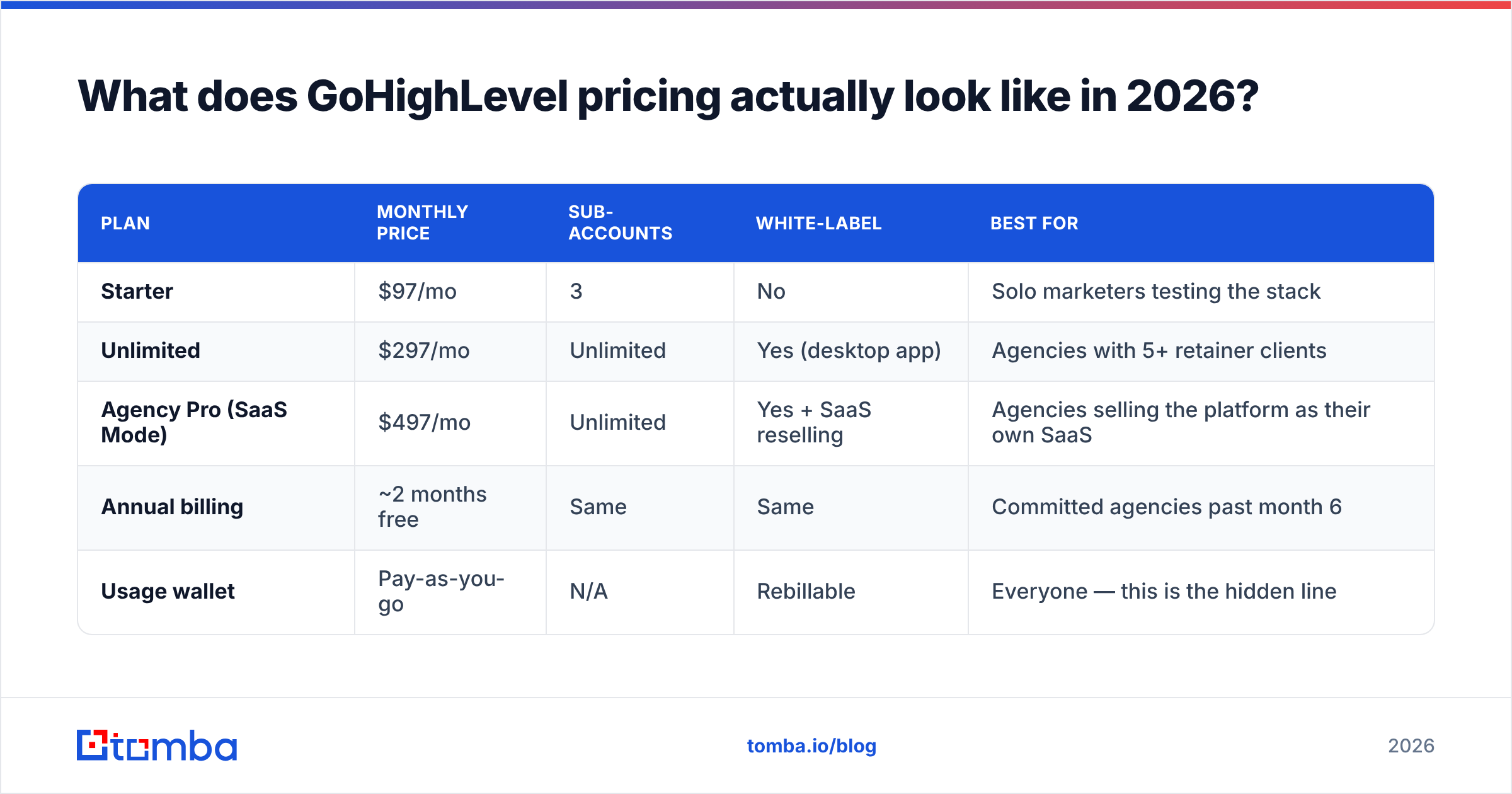
Three public tiers, billed monthly or annually. The official numbers live on gohighlevel.com, and the structure has been stable for a while.
| Plan | Monthly price | Sub-accounts | White-label | Best for |
|---|---|---|---|---|
| Starter | $97/mo | 3 | No | Solo marketers testing the stack |
| Unlimited | $297/mo | Unlimited | Yes (desktop app) | Agencies with 5+ retainer clients |
| Agency Pro (SaaS Mode) | $497/mo | Unlimited | Yes + SaaS reselling | Agencies selling the platform as their own SaaS |
| Annual billing | ~2 months free | Same | Same | Committed agencies past month 6 |
| Usage wallet | Pay-as-you-go | N/A | Rebillable | Everyone — this is the hidden line |
The jump most buyers underestimate is Starter to Unlimited. Three sub-accounts sound generous until you plan them out. You want one for your own agency, one for staging, and one for a snapshot template. You are now at three clients: zero.

What are the hidden costs nobody mentions in the reviews?#
The subscription is the floor, not the ceiling. Three cost lines hit your card every month:
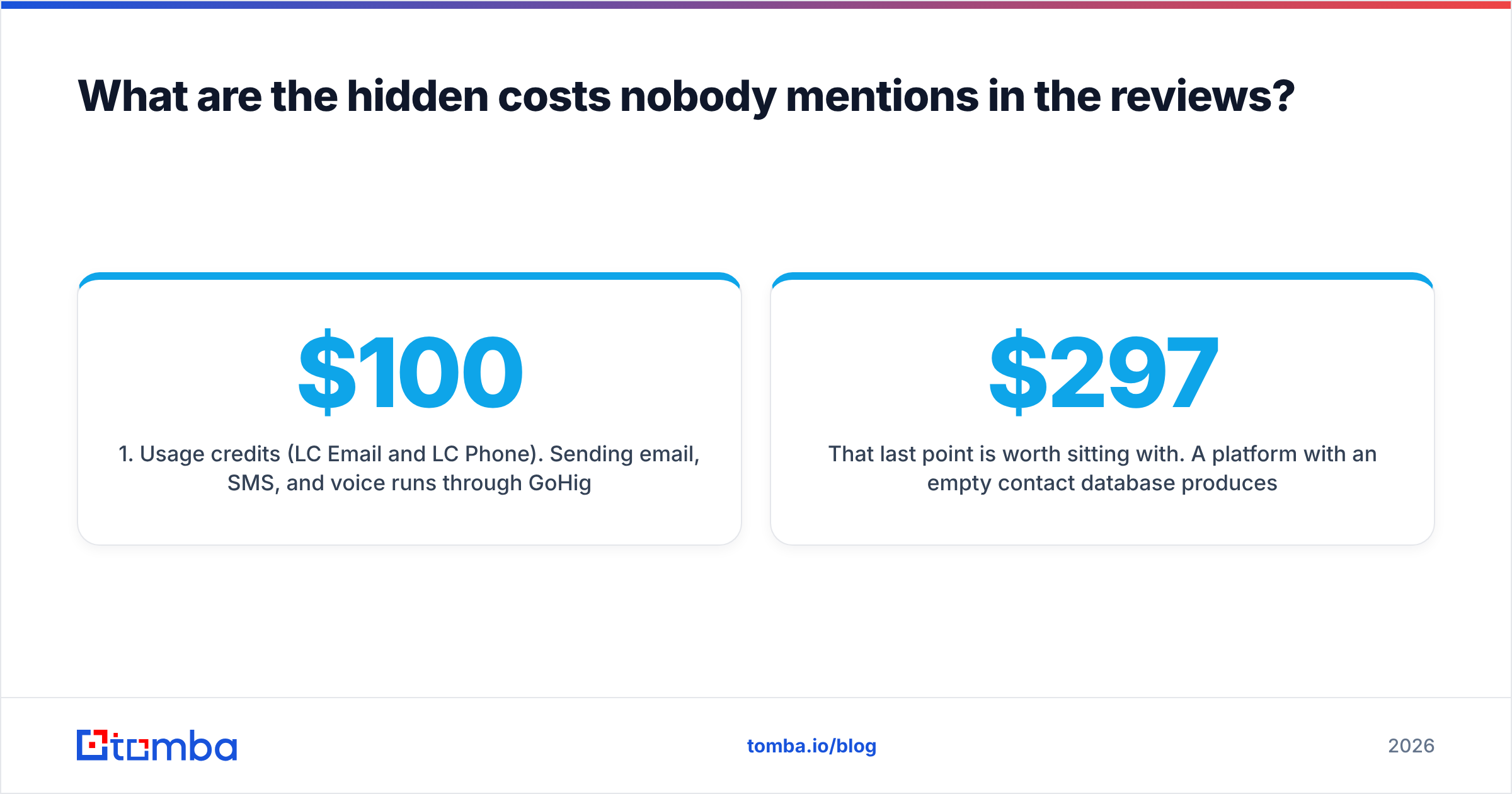
- Usage credits (LC Email and LC Phone). Email, SMS, and voice run through GoHighLevel's rebilling layer at per-unit rates. An agency sending 40,000 emails and 8,000 SMS a month routinely adds $100–$250. You can rebill clients at a markup, which is the point. You still front it.
- AI features. Conversation AI, Workflow AI, Content AI, and Voice AI each bill separately per usage. Agencies leaning on the AI booking bot report this as the second-largest line item after the base plan.
- Premium workflow actions and third-party triggers. Some automation actions carry a per-execution charge. On high-volume accounts these compound quietly.
Two more costs never reach an invoice:
- Implementation time. The most under-priced cost. Expect 40–80 hours to configure snapshots, pipelines, calendars, and automations properly. At agency rates that is a real number.
- Data. GoHighLevel stores and works contacts. It does not source them. Prospecting data — verified work emails, direct dials, firmographics — is a separate budget line. It is the one most first-year agencies forget.
That last point is worth sitting with. A $297/mo platform with an empty contact database produces exactly $0 in pipeline. You still need a way to find email addresses for your target companies before any of the automation matters.
Is GoHighLevel good value compared to buying tools separately?#
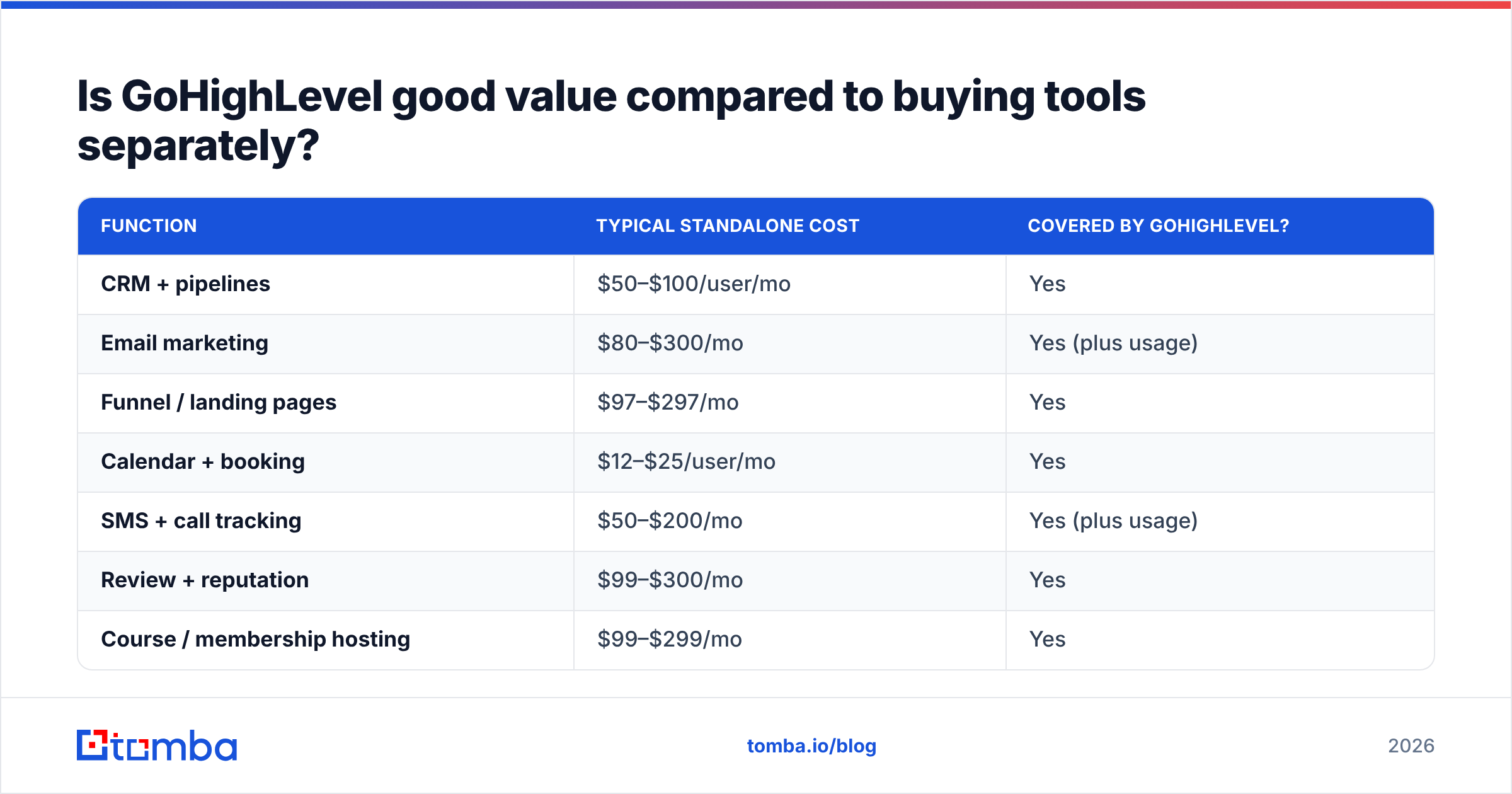
This is the strongest argument in its favor, and it holds up. Price out the equivalent standalone stack:
| Function | Typical standalone cost | Covered by GoHighLevel? |
|---|---|---|
| CRM + pipelines | $50–$100/user/mo | Yes |
| Email marketing | $80–$300/mo | Yes (plus usage) |
| Funnel / landing pages | $97–$297/mo | Yes |
| Calendar + booking | $12–$25/user/mo | Yes |
| SMS + call tracking | $50–$200/mo | Yes (plus usage) |
| Review + reputation | $99–$300/mo | Yes |
| Course / membership hosting | $99–$299/mo | Yes |
| Contact data / email finding | $49–$99/mo | No |
| Rough monthly total | $536–$1,620 | $297 + usage |
Replacing six subscriptions with one at $297 is a genuine 50–75% reduction for a working agency. That is why the G2 reviews skew positive on value even when they are critical on polish.
The math inverts if you only need two of those seven functions. Paying $297 to replace a $99 email tool and a $50 CRM is a downgrade dressed as consolidation.
What do real GoHighLevel reviews say — the pros?#
Pulling the consistent themes from Capterra and G2 rather than cherry-picking:
- Consolidation genuinely works. Users repeatedly describe cancelling four to six subscriptions in the first quarter. The link between funnel, CRM, and automation is native, not duct-taped through Zapier.
- White-labeling is a real revenue line. Agencies on SaaS Mode resell at $197–$497 per client. Ten clients covers the $497 plan eleven times over. No other platform in this price band offers that.
- Automation depth is serious. The workflow builder handles multi-branch logic, conditional waits, and cross-channel sequences that normally need a dedicated sales automation tool.
- Shipping cadence is fast. New features land constantly, and the community (Facebook groups, snapshot marketplaces) is unusually active for a tool this size.
- Snapshots save weeks. Clone a configured account — pipelines, automations, funnels — into a new client sub-account in minutes.
What do the reviews flag as cons?#
The criticism is just as consistent, and it is not trivial:
- Support is the number-one complaint. Chat and ticket response times draw the most negative sentiment on both review sites. Agencies on higher tiers report better outcomes, but nobody calls it excellent.
- The learning curve is steep. Plan on 4–8 weeks before the platform feels natural. The interface exposes a huge surface area with few guardrails, and a misconfigured workflow can quietly email the wrong segment.
- Feature breadth beats feature depth. Each module is good enough rather than best in class. The email builder is not Klaviyo. The CRM reporting is not Salesforce. If one function is mission-critical, you will feel the ceiling.
Two more come up often enough to plan around:
- Occasional stability wobbles. Rapid shipping has a cost. Users report bugs in newer modules and uneven deliverability when they send on shared infrastructure without domain warmup.
- No native data sourcing. Worth repeating because it is structural, not a bug. GoHighLevel gives you an automated machine and expects you to bring the fuel.
How does GoHighLevel compare to the alternatives?#
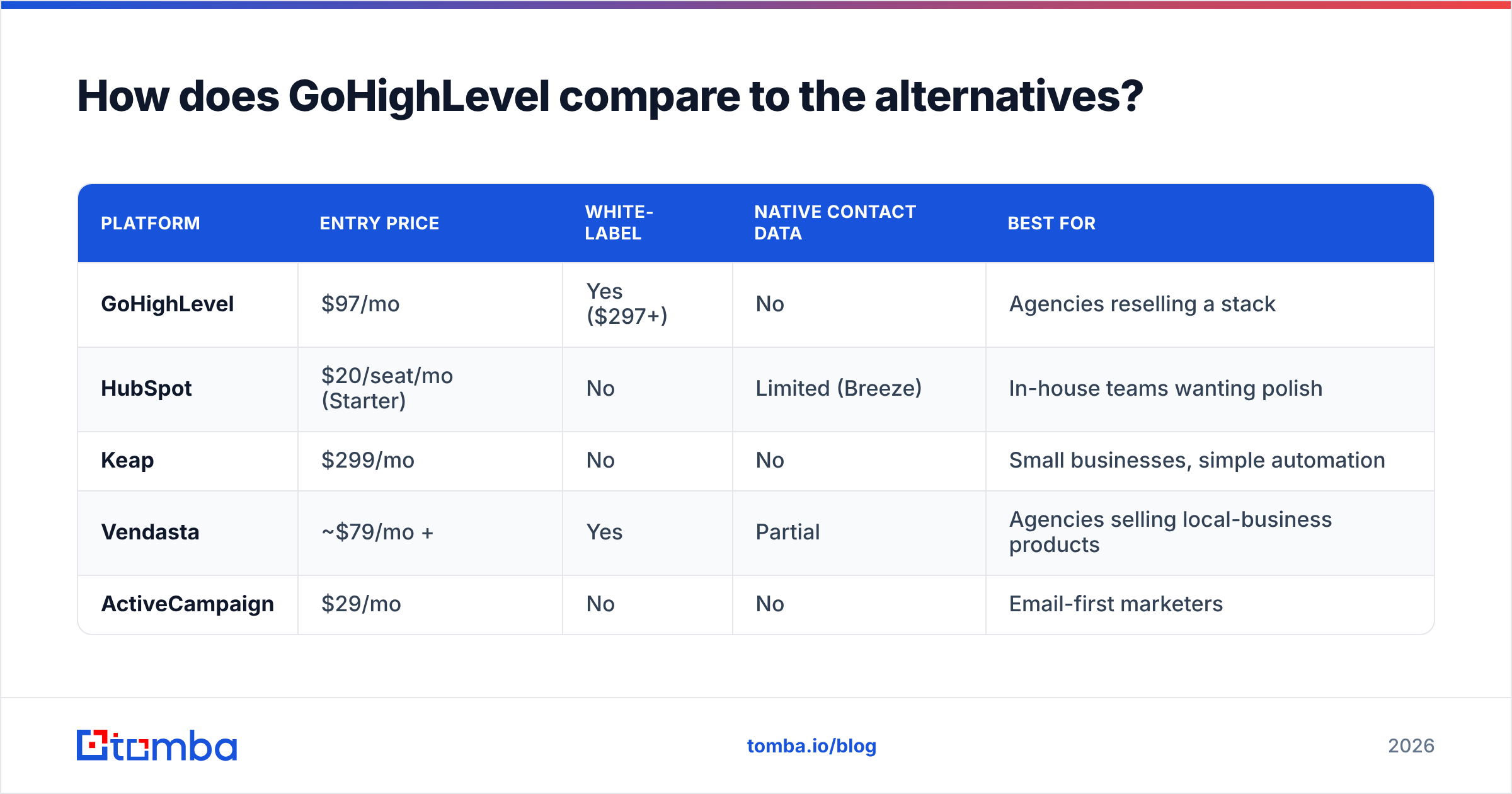
| Platform | Entry price | White-label | Native contact data | Best for |
|---|---|---|---|---|
| GoHighLevel | $97/mo | Yes ($297+) | No | Agencies reselling a stack |
| HubSpot | $20/seat/mo (Starter) | No | Limited (Breeze) | In-house teams wanting polish |
| Keap | $299/mo | No | No | Small businesses, simple automation |
| Vendasta | ~$79/mo + | Yes | Partial | Agencies selling local-business products |
| ActiveCampaign | $29/mo | No | No | Email-first marketers |
HubSpot is the clearest fork in the road. It is cleaner, better documented, and better supported. It also gets expensive fast as seats and contact tiers climb, and there is no reselling model at all. Choose HubSpot if you are one company with one team. Choose GoHighLevel if you are one company serving twenty.
Keap and ActiveCampaign are narrower: strong automation, no white-label, no funnel-plus-reputation breadth. Vendasta is the closest competitor for agencies, with a marketplace-first rather than automation-first approach.
None of them — including GoHighLevel — solve the contact acquisition problem. That layer sits upstream of all of them.
What should you pair with GoHighLevel to make it profitable?#
Three gaps to fill before your GoHighLevel investment pays back:
- A contact data source. Before a workflow can nurture anyone, someone has to be in the database. A domain search returns every public work email at a target company and turns a prospect list into an importable CSV in minutes.
- Verification before import. GoHighLevel bills you for sends, and your domain absorbs the bounces. Run lists through an email verifier before import to protect your usage wallet and your sender reputation. A 6% bounce rate on a 20,000-contact import takes a month to recover from.
- Enrichment for segmentation. GoHighLevel's automation is only as smart as the fields you fill. Job title, company size, and industry drive branching logic, and none of them arrive by default.
Budget-wise, a data layer runs $49–$99/mo alongside the platform. Against a $297 base, that is about a 20% increase for the input that decides whether the other 80% does anything.
Who should buy GoHighLevel — and who should skip it?#
Buy it if: you run a marketing agency with three or more retainer clients, you pay for four or more overlapping tools, and you want a reselling revenue line. Start on Unlimited at $297. Starter's three sub-accounts run out immediately. Move to Agency Pro at $497 only when SaaS Mode revenue justifies it, which usually means eight or more paying sub-accounts.
Skip it if: you are an in-house sales team under ten people, your email volume is modest, or you need one function done exceptionally well. A focused CRM plus a strong email tool will cost less, break less, and take a fraction of the setup time.
The honest middle case: consultants and small agencies with one or two clients. GoHighLevel will work. You will also spend six weeks configuring a platform whose main advantage — multiplying across accounts — you are not yet using. Revisit at client number four.
GoHighLevel pricing reviews pros and cons: the bottom line#
GoHighLevel's pricing is fair for what it does, provided you match the plan to the business model. $97 is a trial tier, not a working tier. $297 is the real entry point for agencies. $497 unlocks reselling and pays for itself around the eighth sub-account. Add $50–$300 of usage on top, and budget 40–80 hours of setup.
The pros are consolidation, white-label revenue, and automation depth. The cons are support, the learning curve, shallow modules, and zero native contact data. Reviewers have listed the same GoHighLevel pricing reviews pros and cons for three years, which is a good sign the assessment is accurate.
Fill the data gap first. GoHighLevel automates what happens after a contact exists. Tomba's Email Finder handles what happens before, returning verified work emails by domain, name, or company, so your sub-accounts import clean lists instead of guesses. It starts free at 25 searches a month, with paid Tomba plans from $49/mo. It plugs into your stack through the API or the HubSpot and Zapier integrations you already run.
Related guides#
Ready to find emails that actually work?
Join 150,000+ professionals who stopped guessing and started sending. Free credits on signup — no credit card required.
Get the Tomba newsletter
Practical outbound tactics and product updates — once every two weeks.
About the author