Grasshopper vs MightyCall (2026): Which Phone System Wins
Grasshopper sells a flat-rate business line. MightyCall sells per-seat call handling. That single pricing difference decides which one fits your team — here's the honest breakdown, plus where both leave you stuck.
TL;DR
- Grasshopper is a flat-rate business line. You pay per plan, not per person, and you get a number, extensions, texting, and voicemail transcription. There is no call recording, no dialer, and no native CRM sync.
- MightyCall is a per-seat phone system with contact-center features. IVR, call queues, recording, live monitoring, CRM integrations, and a dialer on the top tier — but the bill scales with headcount.
- Under roughly 3 people who just need a separate business number, Grasshopper is cheaper and simpler. Past 3–5 people making outbound calls all day, MightyCall's feature set justifies the per-user cost.
- Neither tool gives you numbers to call. Both are pipes, not data. You still need a source of accurate direct dials and emails.
- The real cost driver isn't the subscription — it's dial accuracy. A rep burning 40% of their day on disconnected numbers costs more than any plan on this page.
What are Grasshopper and MightyCall, actually?#
Both are virtual phone systems. Neither requires desk phones, PBX hardware, or an office. Both give you a business number that rings on devices you already own. That's where the similarity stops.
Grasshopper, now part of GoTo, was built for solo operators and micro-businesses. Its whole pitch is "a second, professional line on your existing phone." You pick a local, toll-free, or vanity number, set up a handful of extensions, and calls forward to whatever phones you want. Think of it as a business-grade call-forwarding layer with a nice app on top — a mailbox with a professional address, not a warehouse.
MightyCall is a different animal. It's a cloud phone system that has spent the last several years moving toward light contact-center territory: multi-level IVR, call queues, live call monitoring, agent-level reporting, call recording, CRM integrations, and dialer functionality on its highest plan. It's priced per user, the way most business VoIP is.
The mental model that keeps people out of trouble:
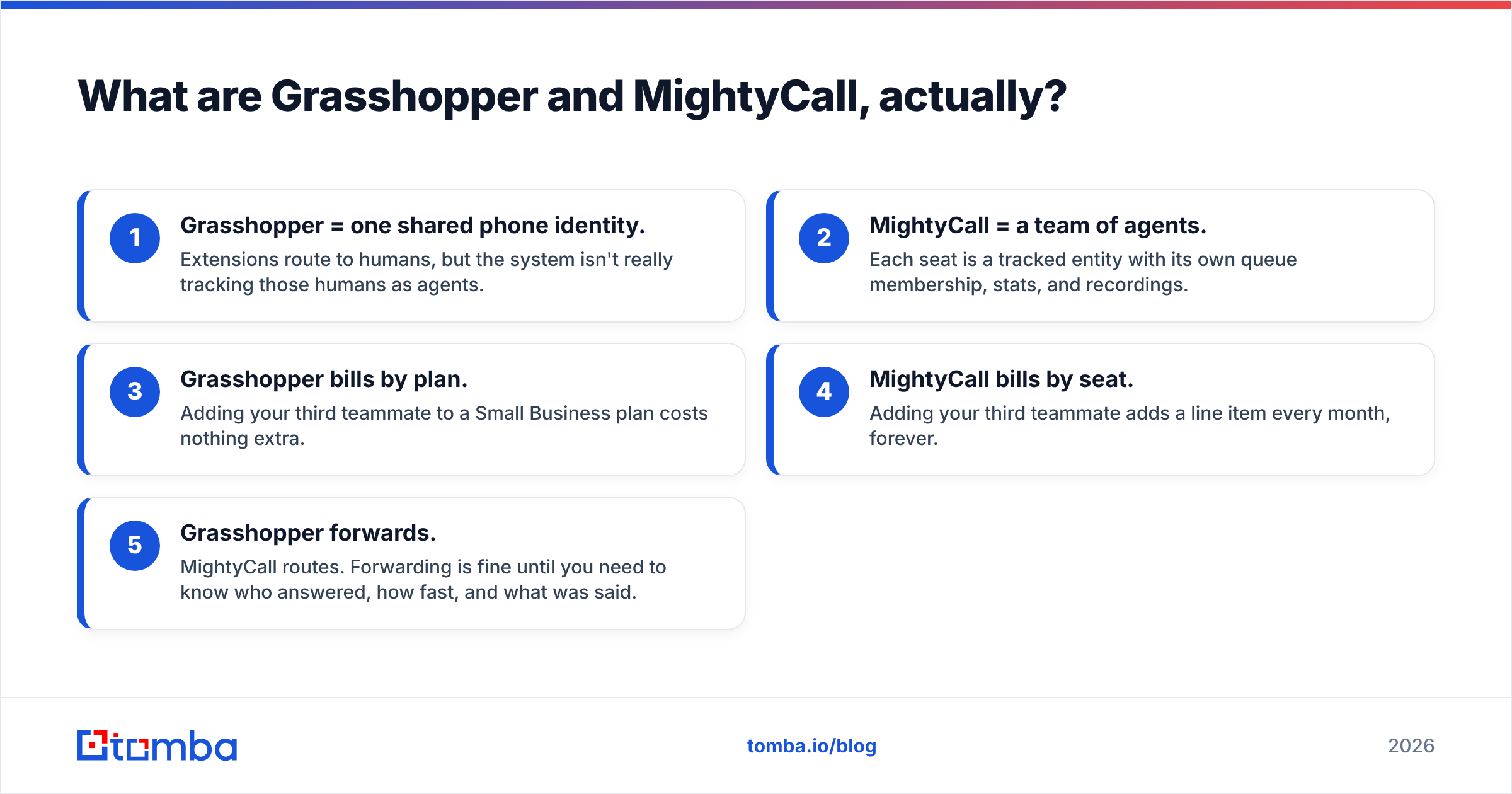
- Grasshopper = one shared phone identity. Extensions route to humans, but the system isn't really tracking those humans as agents.
- MightyCall = a team of agents. Each seat is a tracked entity with its own queue membership, stats, and recordings.
- Grasshopper bills by plan. Adding your third teammate to a Small Business plan costs nothing extra.
- MightyCall bills by seat. Adding your third teammate adds a line item every month, forever.
- Grasshopper forwards. MightyCall routes. Forwarding is fine until you need to know who answered, how fast, and what was said.

How do Grasshopper and MightyCall compare head-to-head?#
Here's the side-by-side on the attributes that actually change your workday. Feature sets shift — verify anything critical on the vendor's own page before you buy.
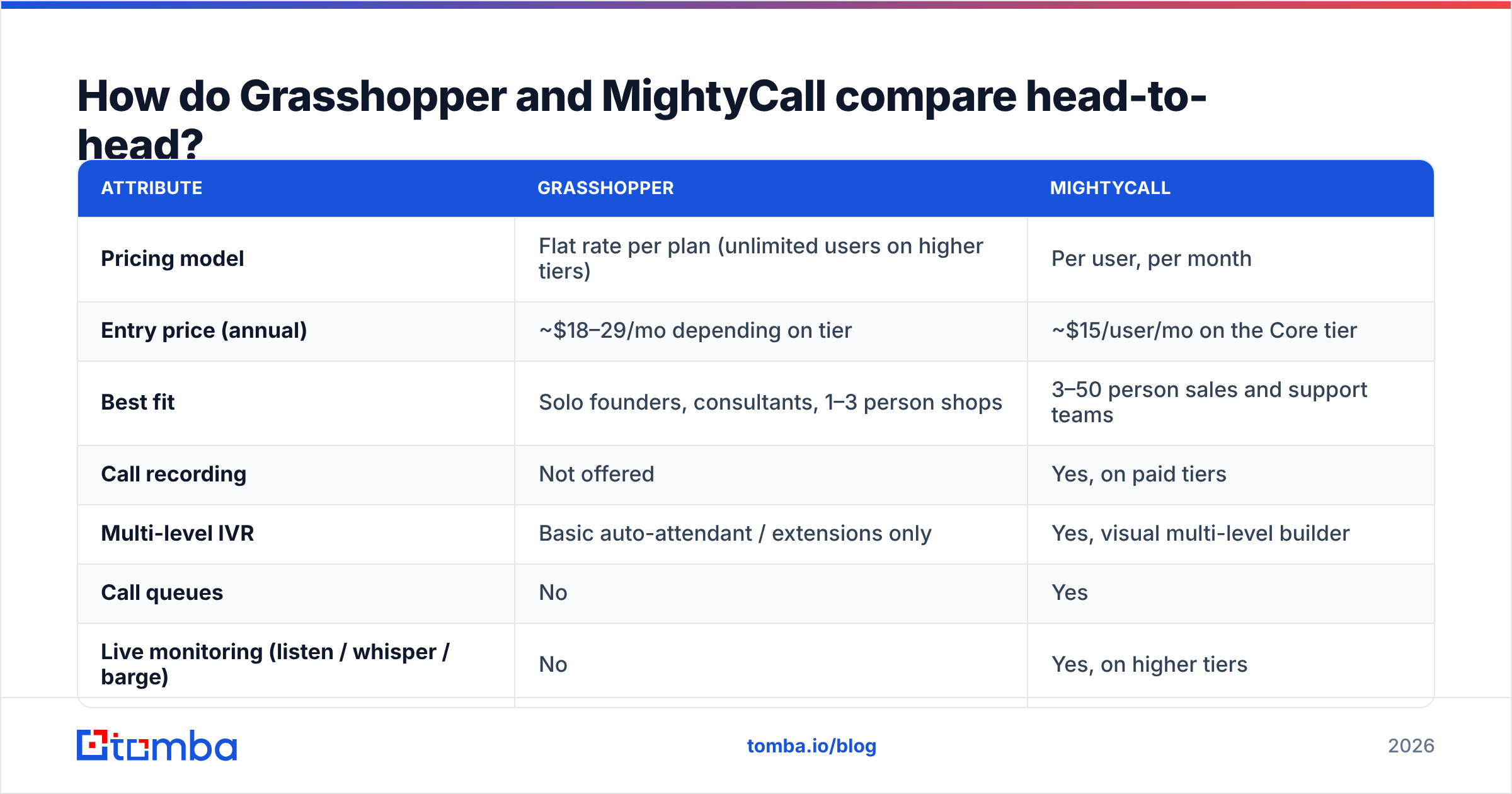
| Attribute | Grasshopper | MightyCall |
|---|---|---|
| Pricing model | Flat rate per plan (unlimited users on higher tiers) | Per user, per month |
| Entry price (annual) | ~$18–29/mo depending on tier | ~$15/user/mo on the Core tier |
| Best fit | Solo founders, consultants, 1–3 person shops | 3–50 person sales and support teams |
| Call recording | Not offered | Yes, on paid tiers |
| Multi-level IVR | Basic auto-attendant / extensions only | Yes, visual multi-level builder |
| Call queues | No | Yes |
| Live monitoring (listen / whisper / barge) | No | Yes, on higher tiers |
| Native CRM integrations | Very limited | HubSpot, Salesforce, Zoho, Zapier and others |
| Dialer (power / predictive) | No | Yes, on the top tier |
| Business SMS | Yes (US/Canada) | Yes (US/Canada) |
| Voicemail transcription | Yes | Yes |
| Agent-level analytics | Minimal | Yes, supervisor dashboards and reports |
| Setup time | Under an hour | Half a day if you build IVR and queues properly |
Read that table twice and the split is obvious. Grasshopper wins on simplicity and cost predictability. MightyCall wins on everything you'd need to manage a team of callers.
What does each one actually cost in 2026?#
Both vendors reprice regularly, so treat the numbers below as shape, not gospel — check the live pricing pages before you commit.
Grasshopper's structure has historically been three flat tiers: a solo plan in the high-teens-to-thirty-dollar range annually, a mid plan around $32–49/mo with more numbers and extensions, and a small-business plan around $80–89/mo with the most numbers and unlimited extensions. Every plan includes unlimited domestic calling and texting. The number that matters: your bill doesn't move when you hire.
MightyCall's structure is typically Core ($15/user/mo annual), Pro ($23/user/mo), and a Power/contact-center tier (~$30+/user/mo), with monthly billing running roughly 25–30% higher than annual. Lower tiers have historically included a bundled pool of minutes and texts rather than genuinely unlimited usage, and some tiers carry a user minimum. Confirm both before you sign.
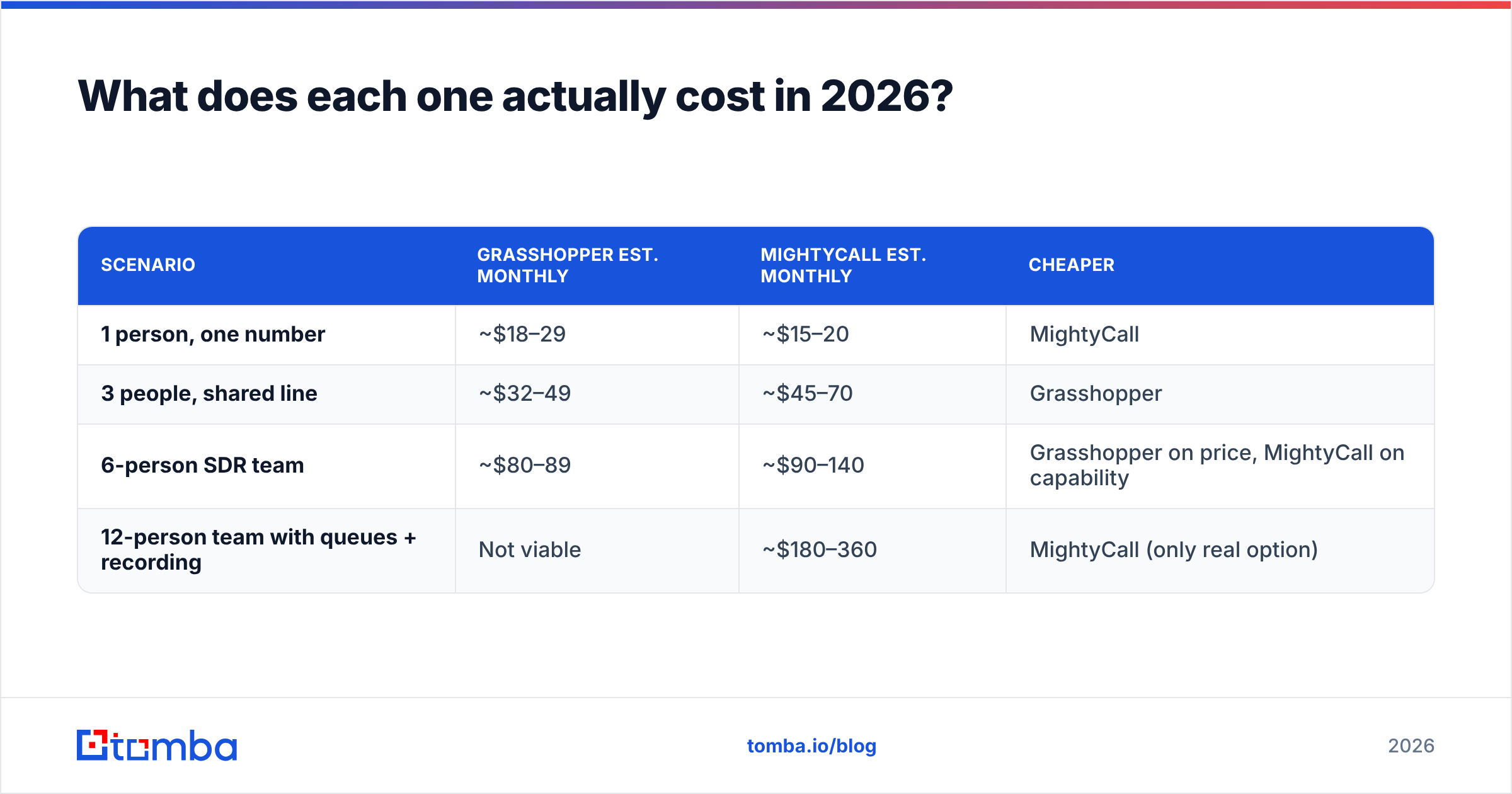
| Scenario | Grasshopper est. monthly | MightyCall est. monthly | Cheaper |
|---|---|---|---|
| 1 person, one number | ~$18–29 | ~$15–20 | MightyCall |
| 3 people, shared line | ~$32–49 | ~$45–70 | Grasshopper |
| 6-person SDR team | ~$80–89 | ~$90–140 | Grasshopper on price, MightyCall on capability |
| 12-person team with queues + recording | Not viable | ~$180–360 | MightyCall (only real option) |
The crossover is around three users. Below it, MightyCall can undercut Grasshopper on raw price. Above it, Grasshopper's flat rate is unbeatable — right up until you need a feature Grasshopper doesn't have, at which point price stops being the deciding factor.
Which one should a solo operator or small shop pick?#
Grasshopper, almost always.
If you're a consultant, agency owner, real-estate agent, or two-person services business, the job to be done is narrow: stop giving clients your personal cell, look professional when you call out, and never miss an inbound. Grasshopper does exactly that, sets up in under an hour, and doesn't ask you to think about queue strategy.
The specific wins:
- Flat pricing survives growth. Bring on a part-time assistant and an ops contractor and the invoice doesn't budge.
- Extensions are enough routing. "Press 2 for billing" covers most micro-businesses. You don't need a five-level IVR tree.
- Instant-response texting catches missed calls. A missed call that auto-replies with a text is worth more than a fancy report you'll never open.
- Nothing to administer. No seat provisioning, no license reclamation when someone leaves.
Where it breaks: the moment you want to hear a call back, know who picked up fastest, or push call activity into a CRM, Grasshopper leaves you flat. There's no recording. Reporting is thin. Integrations are minimal. Those are deliberate product choices for the market it serves, not bugs — but they're hard walls.
Which one should an outbound sales team pick?#
MightyCall, once you're past three or four people who dial for a living.
Managing callers requires three things Grasshopper simply doesn't provide: recordings for coaching, queue routing so inbound doesn't die on one person's voicemail, and per-agent metrics so you know whether your worst rep has a skill problem or a list problem. MightyCall ships all three, plus live monitoring so a manager can whisper coaching mid-call without the prospect hearing it.
The dialer on the top tier matters more than it looks. Manual dialing costs a rep roughly 20–30 seconds per attempt in dead time. At 80 attempts a day that's over half an hour of pure friction, per rep, per day. Automating it back is usually worth more than the plan difference.
MightyCall's CRM integrations are the other structural advantage. Call activity that doesn't land in your CRM effectively didn't happen — nobody reports on it, nobody follows up on it, and your revenue operations picture stays fiction. Grasshopper users end up doing this by hand or through brittle Zapier chains.
The honest catch: MightyCall isn't Five9 or Genesys. If you're running 30+ agents with workforce management, omnichannel routing, and compliance recording requirements, you'll outgrow it. It occupies the middle — better than a virtual line, lighter than an enterprise contact center. For most B2B teams under 50 seats, that middle is exactly right.
What do real users complain about?#
Both tools have well-documented friction. Check current reviews on G2 before you buy, but the recurring themes are stable.
Grasshopper complaints cluster around: call quality when forwarding over poor mobile networks (forwarding inherits whatever the carrier gives you), the absence of call recording as an upgrade path, per-number costs adding up if you want several local presences, and support responsiveness since the GoTo acquisition.
MightyCall complaints cluster around: onboarding complexity relative to the simpler competitors, app stability on mobile varying by release, minute and text allowances on lower tiers surprising heavy users, and per-seat costs climbing faster than expected once you add supervisors who mostly listen rather than dial.
Neither pattern is disqualifying. Both are the predictable cost of the design each vendor chose.
Does the phone system actually matter as much as the list?#
No — and this is where most teams misallocate.
A phone system is a distribution channel. It determines how efficiently you place calls. It has nothing to do with whether the number you're dialing belongs to a decision-maker who still works there. Direct-dial data decays fast; a meaningful share of B2B contact records go stale within a year through job changes, restructures, and number reassignments.
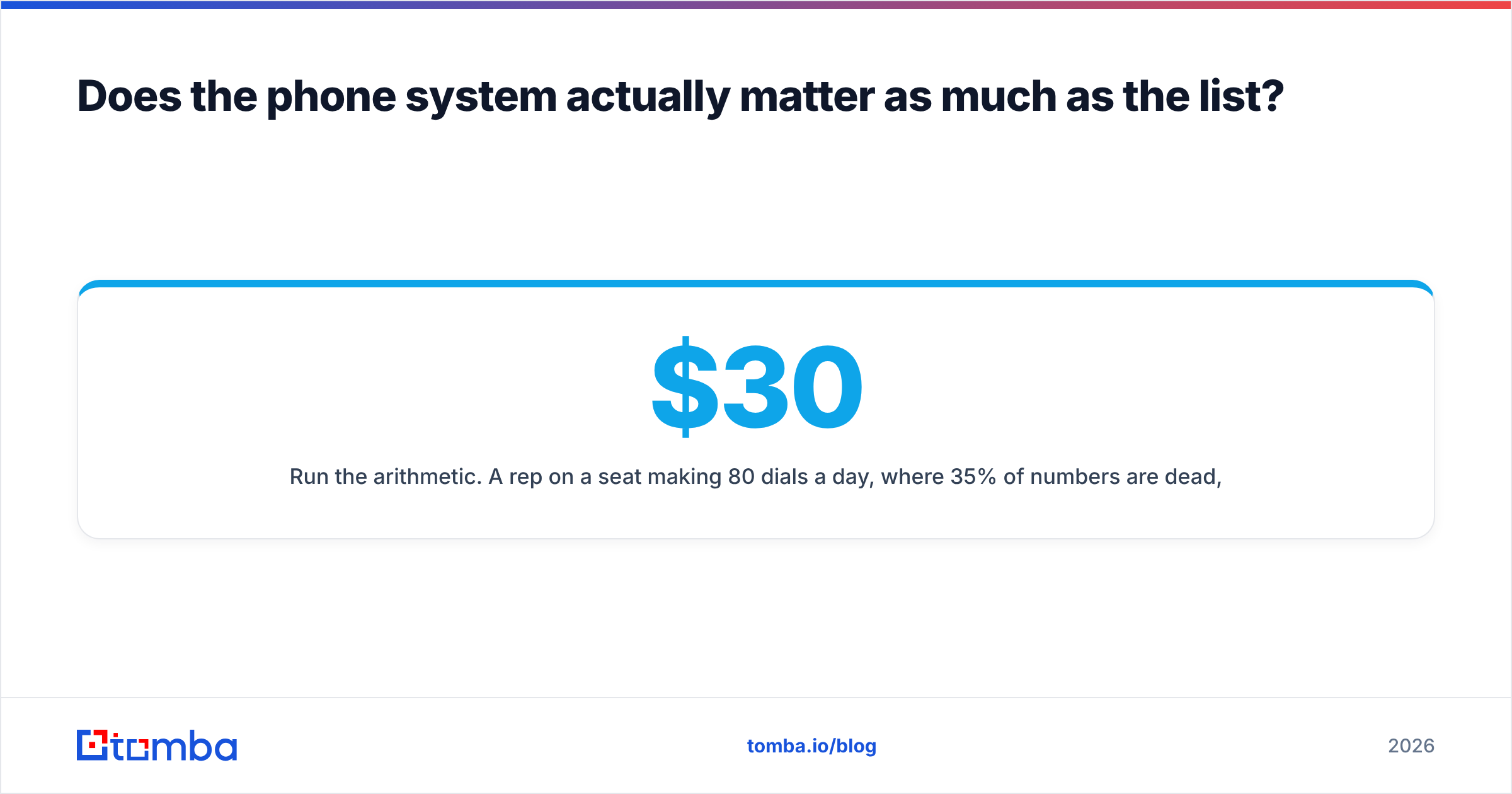
Run the arithmetic. A rep on a $30/mo seat making 80 dials a day, where 35% of numbers are dead, wastes roughly a quarter of their productive hours reaching disconnect tones. At a $70K base that's thousands of dollars a month of burned salary — an order of magnitude more than the difference between any two plans discussed here.

So sequence your spend correctly:
- Fix data accuracy first. Validate numbers before they enter the dial queue, not after. A phone validator that flags disconnected and reassigned lines pays for itself in the first week.
- Source direct dials deliberately. Switchboard numbers gate you behind receptionists. A phone finder that returns direct lines changes your connect rate more than any dialer feature.
- Pair every call with an email touch. Call-plus-email sequences consistently beat either channel alone. Build the address list with an email finder and confirm it with an email verifier so your follow-ups don't bounce.
- Enrich before you route. Knowing company size and role before the call decides who gets priority in your queue. That's what data enrichment is for.
- Then pick the phone system. By this point you'll actually know whether you need queues and recording or just a clean second line.
Teams that do this in reverse buy a contact center and feed it a bad list. The dashboards look great and the pipeline doesn't move.
Grasshopper vs MightyCall: which should you choose?#
Pick Grasshopper if you're 1–3 people, want a professional line on your existing phone, value setup speed over depth, and would rather have a bill that never changes than features you'll never configure.
Pick MightyCall if you have 4+ people dialing, need recordings for coaching, need queues so inbound reaches whoever is free, want call activity syncing to your CRM automatically, or want a dialer without buying enterprise contact-center software.
Pick neither yet if your connect rate is the bottleneck. No phone system fixes a stale list. Get the data right, then buy the pipe that fits the team you actually have — not the one you hope to have in two years.
Before you compare another dialer, fix what you're dialing. Tomba's Email Finder builds verified contact lists for the accounts you're targeting, so every call and every follow-up email lands on a real person at a real company. Start free with 25 searches a month, or move to Starter at $49/mo when your team is dialing at volume — see full Tomba pricing for the Growth and Pro tiers.
Related guides#
Ready to find emails that actually work?
Join 150,000+ professionals who stopped guessing and started sending. Free credits on signup — no credit card required.
Get the Tomba newsletter
Practical outbound tactics and product updates — once every two weeks.
About the author