Grasshopper vs Talkroute (2026): Which Virtual Phone Wins?
Grasshopper charges per plan, Talkroute charges per user — and that single difference decides which one is cheaper for your team. Here's the honest breakdown, with pricing, routing, texting, and the exact team size where each one wins.
Grasshopper vs Talkroute comes down to one thing: how each vendor charges. Grasshopper bills per plan. Talkroute bills per user. That single line on the invoice decides which tool is cheaper for your team.
TL;DR
- Grasshopper prices by plan, Talkroute prices by user. That one structural difference decides most of these comparisons. A 5-person team on Grasshopper's Small Business plan pays one flat fee; the same team on Talkroute pays for seats.
- Grasshopper wins for solo operators and 2-3 person shops who want a business line on a personal phone with zero setup.
- Talkroute wins when you need real call routing — multi-level menus, scheduled routing, desktop apps that behave like a phone system rather than a forwarding service.
Two more things to know before you compare tiers:
- Neither is a dialer, a CRM, or a data source. Both give you a number to call from. Getting numbers to call to is a separate problem you still have to solve.
- Rough entry pricing: Talkroute starts around $19/mo for a single user. Grasshopper's entry tier lands in the high teens to high twenties, depending on annual vs monthly billing. Check the live pricing page before you commit — both vendors have re-packaged tiers more than once.
What are Grasshopper and Talkroute?#
Both are virtual phone systems: software that gives your business a real phone number and routes calls to devices you already own. No desk phones, no PBX hardware, no telecom contract.
Think of them like a receptionist who lives in the cloud. Someone dials your business number, the receptionist answers, figures out where the call should go, and forwards it to a cell phone, a laptop app, or voicemail. The difference between the two products is how much authority you can give that receptionist.
Grasshopper launched in 2003 and was acquired by LogMeIn (now GoTo) in 2015. Its pitch has always been simplicity: get a business number in five minutes, keep your personal number private, sound bigger than you are. It's aimed squarely at solo professionals, consultants, trades, and very small teams.
Talkroute is the smaller, scrappier independent. Same core promise — virtual numbers routed to existing devices. But the emphasis falls on routing logic, multi-user teams, and desktop/browser apps. It reads less like "business line for freelancers" and more like "lightweight phone system for a real company."
Neither is a full VoIP platform in the RingCentral or Dialpad sense. Neither does power dialing, call cadences, or conversation intelligence. If you're building an outbound SDR motion with 200 dials per rep per day, you're shopping in the wrong category.

Grasshopper vs Talkroute: how do they compare on price?#
This is where most buying decisions get made. It's also where the marketing pages help least, because the two companies count things differently.
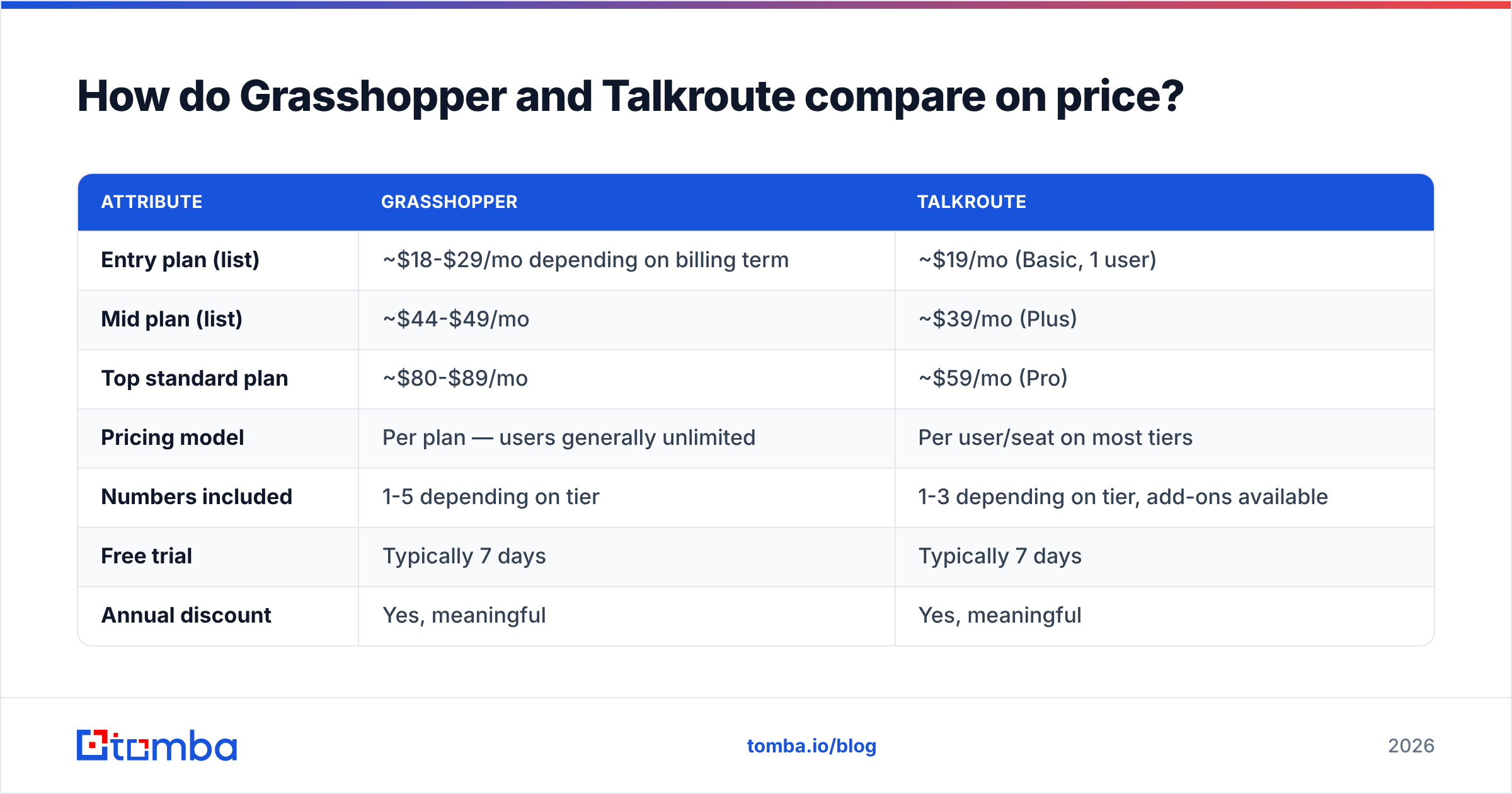
Grasshopper bundles numbers and extensions into fixed plan tiers with unlimited users. Talkroute bundles users and numbers into tiers where adding a seat usually costs more. Compare headline prices without that in mind and you'll be surprised at month three.
| Attribute | Grasshopper | Talkroute |
|---|---|---|
| Entry plan (list) | ~$18-$29/mo depending on billing term | ~$19/mo (Basic, 1 user) |
| Mid plan (list) | ~$44-$49/mo | ~$39/mo (Plus) |
| Top standard plan | ~$80-$89/mo | ~$59/mo (Pro) |
| Pricing model | Per plan — users generally unlimited | Per user/seat on most tiers |
| Numbers included | 1-5 depending on tier | 1-3 depending on tier, add-ons available |
| Free trial | Typically 7 days | Typically 7 days |
| Annual discount | Yes, meaningful | Yes, meaningful |
| Contract | Month-to-month available | Month-to-month available |
| Toll-free / vanity | Yes | Yes |
| International calling | Limited, add-on rates | Limited, add-on rates |
Pricing shown is list pricing observed at the time of writing and changes frequently. Verify on each vendor's pricing page before purchase.
The math that matters: at one or two users, Talkroute is usually the cheaper line item. At five-plus users who all need to make and receive calls, Grasshopper's flat-plan model often flips the advantage. You pay for a plan, not for headcount. Model your actual seat count for 12 months before you sign anything annual.
Which one has better call routing?#
Talkroute, clearly, and it isn't especially close.
Grasshopper's routing is a straight line: call comes in, hits a greeting, gets forwarded to an extension or a number, falls through to voicemail. Extensions can ring simultaneously or in sequence. That covers 90% of what a three-person business needs, and it's genuinely hard to misconfigure.
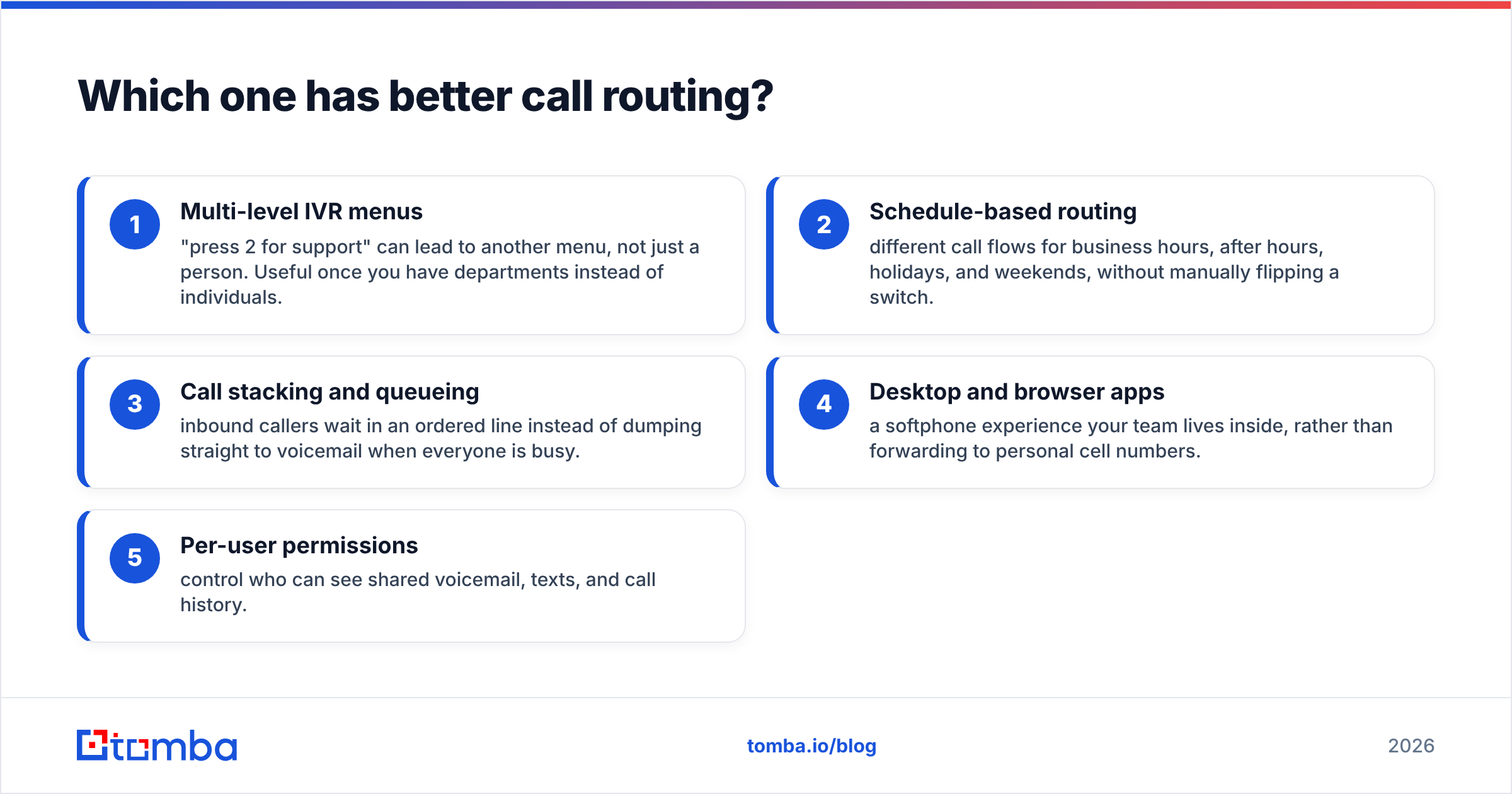
Talkroute layers on things you'd expect from a small PBX:
- Multi-level IVR menus — "press 2 for support" can lead to another menu, not just a person. Useful once you have departments instead of individuals.
- Schedule-based routing — different call flows for business hours, after hours, holidays, and weekends, without manually flipping a switch.
- Call stacking and queueing — inbound callers wait in an ordered line instead of dumping straight to voicemail when everyone is busy.
- Desktop and browser apps — a softphone experience your team lives inside, rather than forwarding to personal cell numbers.
- Per-user permissions — control who can see shared voicemail, texts, and call history.
If your inbound volume is low and predictable, Grasshopper's simplicity is a feature, not a limitation. Complexity you don't need is just another thing to break at 4:55 on a Friday.
What about texting, voicemail, and shared inboxes?#
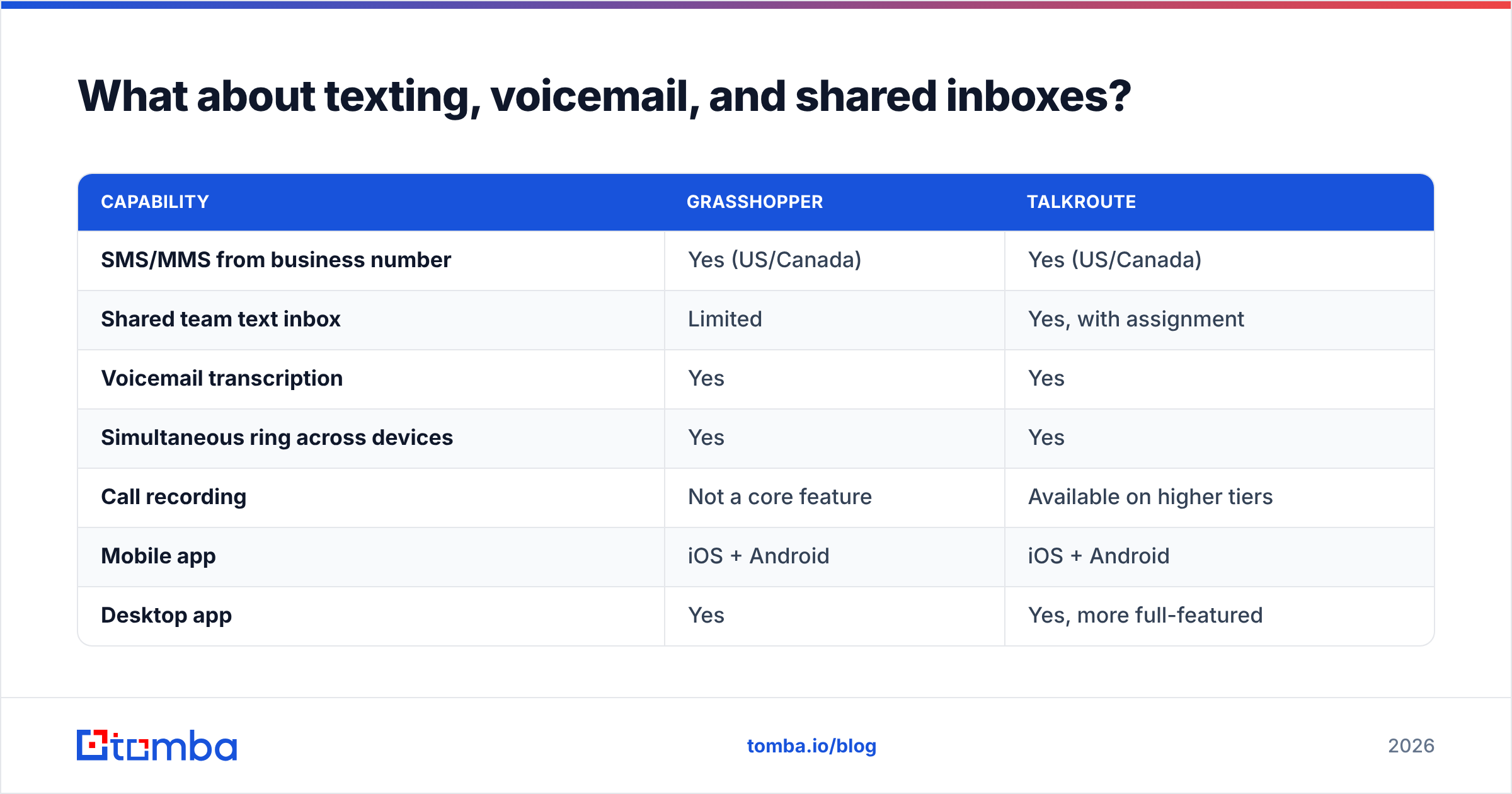
Both support business SMS from your main number, and both transcribe voicemail. The differences are in the team layer.
| Capability | Grasshopper | Talkroute |
|---|---|---|
| SMS/MMS from business number | Yes (US/Canada) | Yes (US/Canada) |
| Shared team text inbox | Limited | Yes, with assignment |
| Voicemail transcription | Yes | Yes |
| Simultaneous ring across devices | Yes | Yes |
| Call recording | Not a core feature | Available on higher tiers |
| Mobile app | iOS + Android | iOS + Android |
| Desktop app | Yes | Yes, more full-featured |
| Custom greetings | Yes | Yes |
| Reporting / call analytics | Basic | Moderate |
| Integrations / API | Very limited | Limited |
One thing to flag honestly for both: integration depth is thin. Neither product has a rich ecosystem of native CRM connectors. Say you need every call logged against a HubSpot or Salesforce record automatically. You'll build that with Zapier-style glue, or you'll shop a different tier of tool. That's the trade you accept for the price point.
A2P 10DLC registration also applies to both if you're texting US numbers at any volume. Budget a few days and some paperwork for carrier registration. It's a regulatory requirement, not a vendor quirk, and skipping it gets your messages filtered.
Is Grasshopper better for solo founders and small teams?#
Yes, for a specific profile.
Pick Grasshopper if:
- You're one to three people and everyone works off a cell phone.
- You want setup measured in minutes. Choose a number, record a greeting, done.
- You'll add people without adding cost. Unlimited users on a flat plan is the single most underrated part of the Grasshopper model.
- You value the brand's stability. GoTo's backing means the service isn't going anywhere, and support infrastructure is mature.
- Your call flows are simple. Sales rings the owner, support rings the ops person, everything else goes to voicemail.
Where it disappoints: reporting is shallow, call recording isn't a first-class feature, and the routing ceiling arrives fast. Reviews on G2 and similar directories consistently praise the simplicity and ding the same limitations. That's a product with clear boundaries, not a broken one.
Is Talkroute better for growing sales teams?#
Also yes — for a different profile.
Pick Talkroute if:
- You need real call flows. Departments, schedules, menus, queues.
- Your team works at desks. The desktop and browser apps are genuinely more usable than forwarding to personal mobiles all day.
- You want call recording without jumping to a $50-per-seat enterprise platform.
- You're 1-2 users today and want the lowest reasonable entry price with room to grow.
- You want permission control over who sees which conversations.
Where it disappoints: per-user pricing compounds. A ten-person team will do the math and start looking at full UCaaS platforms. Brand recognition is lower, so if your procurement process cares about vendor size, that's a real friction point. And like Grasshopper, integrations are the weak spot.

Grasshopper vs Talkroute: which should you pick?#
Run this in order:
- Count your seats honestly for 12 months, not today. Under 3 and staying there? Talkroute's entry tier is cheap. Growing past 5 people who all take calls? Grasshopper's flat model likely wins on total cost.
- Diagram one real call flow. If it fits on a sticky note, Grasshopper. If it needs a whiteboard with time-of-day branches, Talkroute.
- Decide whether you need recording. If yes, Talkroute's higher tiers handle it natively; Grasshopper will push you toward workarounds.
- Test both trials with real inbound calls. Seven days is enough to feel the difference. Call your own number from a cell, from a landline, and from a blocked number. Check how voicemail transcription handles accents and background noise.
- Check texting compliance early. Start 10DLC registration during the trial so it isn't blocking you on day one of a campaign.
Verdict: Grasshopper vs Talkroute comes down to one question. Are you building a phone system or buying a phone line? Talkroute for the system. Grasshopper for the line, and for the team that would rather spend the afternoon selling.
What neither Grasshopper nor Talkroute solves?#
Here's the part vendor comparison posts skip: a virtual phone system is a pipe. It doesn't fill itself.
Both tools answer "what number do I call from?" Neither answers "who should I call, at what number, and does that person still work there?" That second question is where most outbound programs actually fail. You can have the cleanest IVR in your industry and still burn a quarter dialing disconnected mainlines and gatekeepers.
The fix is upstream, in your data layer:
- Source direct dials rather than switchboard numbers. A phone finder that returns direct lines saves a rep the two-minute gatekeeper dance on every attempt.
- Validate before you dial. Running a list through a phone validator strips disconnected, invalid, and mistyped numbers, so your connect rate reflects your pitch and not your list hygiene.
- Pair phone with email. Cold calling in isolation underperforms; calling someone who's already seen two emails from you converts better. Use an email finder to build the parallel channel.
- Enrich for context. Job title, company size, and recent role changes turn a cold dial into a relevant one. Contact enrichment is what makes the first fifteen seconds of a call survivable.
Tools like Grasshopper and Talkroute are cheap precisely because they solve a narrow problem well. Don't ask them to be a data platform. Buy the phone system on routing and price, and buy your data separately from something built for it.
Frequently asked questions#
Can I port my existing business number to either? Yes. Both support number porting from most US carriers. Expect 1-3 weeks and don't cancel your old service until the port completes.
Do either work internationally? Both are US/Canada-centric. International calling exists at per-minute rates, and international numbers are limited. If your team is outside North America, look elsewhere.
Is there a free tier? No. Both offer roughly a week-long trial, then paid plans only.
Which has better customer support? Grasshopper has the larger support organization by virtue of GoTo's scale. Talkroute users frequently report faster access to a human. Different tradeoff, no universal winner.
Can I use either as a cold calling dialer? Technically you can dial out from both. Practically, neither offers power dialing, local presence, or cadence automation. High-volume outbound teams should look at purpose-built sales dialers instead.
Pick your phone system on routing and seat math — then fix the list. The number you dial from matters far less than whether the person on the other end is the right one. Tomba's Email Finder helps you build verified, enriched contact lists so your reps spend their day in conversations instead of voicemail loops. Start free with 25 searches a month, or see Tomba pricing — Starter is $49/mo, Growth $99/mo, Pro $249/mo.
Related guides#
Ready to find emails that actually work?
Join 150,000+ professionals who stopped guessing and started sending. Free credits on signup — no credit card required.
Get the Tomba newsletter
Practical outbound tactics and product updates — once every two weeks.
About the author