GrowMeOrganic vs FindEmails.com (Toofr): Which Wins in 2026?
GrowMeOrganic bundles LinkedIn scraping with sequences; FindEmails.com (formerly Toofr) is a lean email lookup service. We compare accuracy, pricing, and fit — plus where both fall short.
GrowMeOrganic vs FindEmails.com (Toofr) is a choice between a bundle and a single tool. One scrapes LinkedIn and sends your cold email. The other just returns an address. Here is how the two compare on accuracy, price, and fit.
TL;DR
- GrowMeOrganic is an all-in-one LinkedIn scraper + email finder + drip sequencer sold on unlimited-flavored annual plans. It wins on breadth, not on data precision.
- FindEmails.com (the rebrand of Toofr, founded 2013) is a narrow, cheap email lookup and verification service. It wins on simplicity and price-per-credit, but the product has barely moved in years.
- Neither publishes an independently audited accuracy number. Expect 70–85% deliverable rates on GrowMeOrganic's scraped exports and mid-80s on FindEmails.com's verified-only results.
- If you need volume LinkedIn data plus sending in one tab, GrowMeOrganic. If you need a cheap lookup endpoint and nothing else, FindEmails.com.
- If bounce rate is the metric your boss actually checks, run either output through a dedicated verifier before you send — that step matters more than which of these two you pick.
GrowMeOrganic vs FindEmails.com (Toofr): what is each tool?#
These two tools get compared because they both sit in the "cheap email finder" bucket on G2 and Capterra. That's where the similarity ends.
GrowMeOrganic launched in 2020 as an India-based, lifetime-deal-friendly platform. It bundles a Chrome extension that scrapes LinkedIn and Sales Navigator search results, a B2B contact database, an email finder, an email verifier, and a cold email sequencer with rotating inboxes. The pitch is "cancel your five subscriptions." Plans are marketed as unlimited on the higher tiers, with fair-use throttles applied in practice.
FindEmails.com is the current name for Toofr, a bootstrapped email-finding service that Ryan Buckley started in 2013 and later sold. It does one thing: you give it a name and a company domain, it returns a best-guess email address with a confidence score, optionally verified. There's an API, a bulk CSV upload, and a simple credit-based pricing table. No sequencer, no CRM, no LinkedIn scraper.
So the real question isn't "which is better." It's "do you want a suite that does eight things at B-minus quality, or a single endpoint that does one thing at B quality for less money?"
How do GrowMeOrganic and FindEmails.com compare on features and price?#
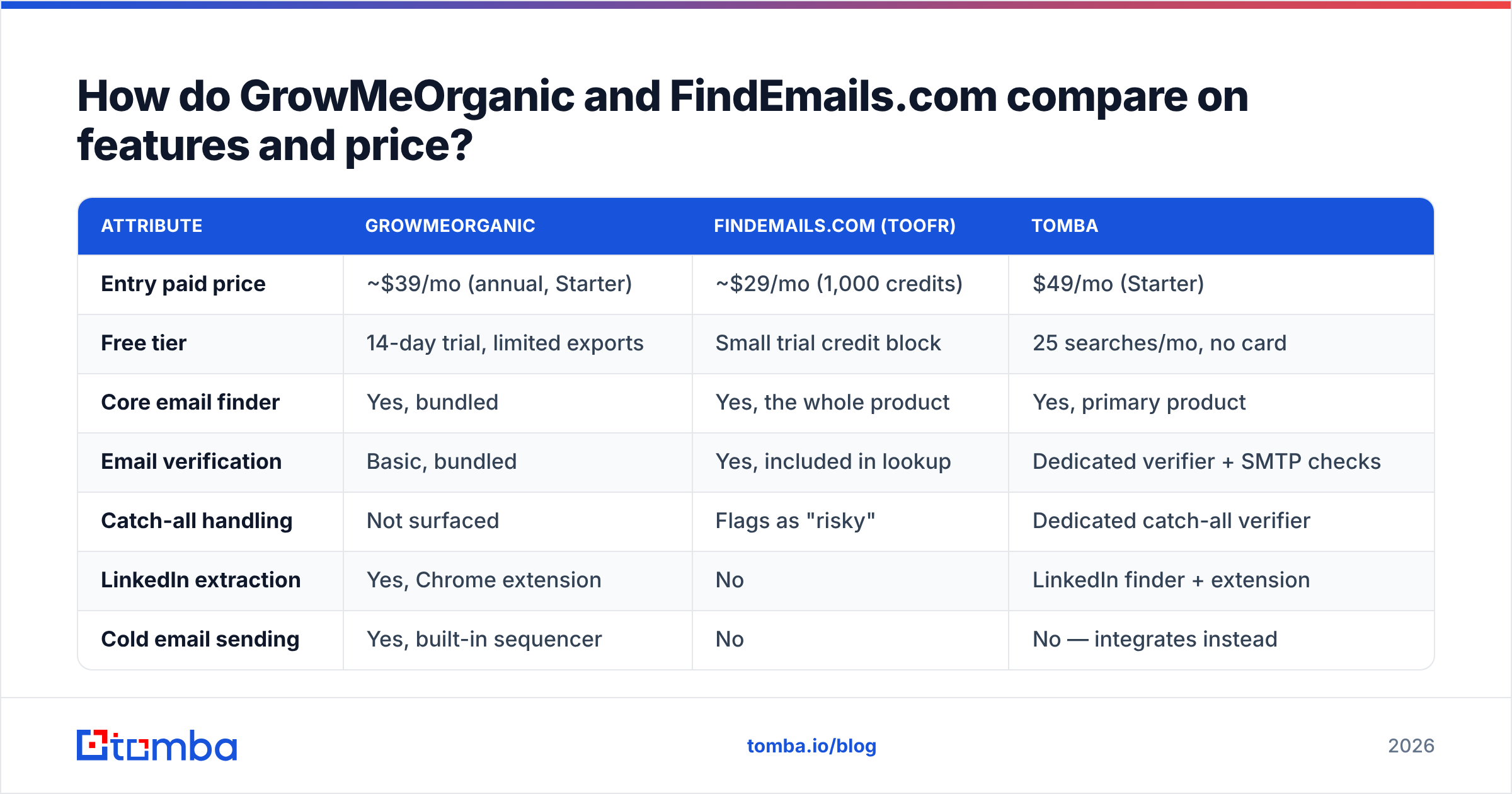
Here's the side-by-side. Prices reflect publicly listed 2026 rates; both vendors run frequent promotions, so treat these as list-price anchors rather than what you'll pay.
| Attribute | GrowMeOrganic | FindEmails.com (Toofr) | Tomba |
|---|---|---|---|
| Entry paid price | ~$39/mo (annual, Starter) | ~$29/mo (1,000 credits) | $49/mo (Starter) |
| Free tier | 14-day trial, limited exports | Small trial credit block | 25 searches/mo, no card |
| Core email finder | Yes, bundled | Yes, the whole product | Yes, primary product |
| Email verification | Basic, bundled | Yes, included in lookup | Dedicated verifier + SMTP checks |
| Catch-all handling | Not surfaced | Flags as "risky" | Dedicated catch-all verifier |
| LinkedIn extraction | Yes, Chrome extension | No | LinkedIn finder + extension |
| Cold email sending | Yes, built-in sequencer | No | No — integrates instead |
| Phone numbers | Limited | No | Phone finder + validator |
| Public API | Limited, tier-gated | Yes, simple REST | Full REST API, CLI, MCP server |
| Native integrations | Zapier, HubSpot (basic) | Zapier, API only | HubSpot, Salesforce, Pipedrive, Sheets, Airtable, Make |
| Best for | Solo founders wanting one tool | Devs needing a cheap lookup call | Teams where bounce rate is a KPI |
The pattern that jumps out: GrowMeOrganic sells you workflow, FindEmails.com sells you a lookup, and dedicated data platforms sell you accuracy. Those are three different purchases, and people conflate them constantly.
Which one has better email accuracy?#
In the GrowMeOrganic vs FindEmails.com (Toofr) accuracy debate, neither vendor publishes a methodology you can audit. Treat every marketing percentage on both sites with suspicion. What you can judge is how each one produces an address.
GrowMeOrganic mostly derives emails from scraped LinkedIn profiles plus pattern inference. It sees "Jane Doe, VP Marketing at Acme," looks up Acme's dominant pattern, and builds jane.doe@acme.com. Pattern inference is useful, but the failure mode is silent. If Acme switched from first.last to flast in 2023 and half the directory still shows the old format, you get a plausible-looking address that hard-bounces. Users on review sites flag export quality and bounce rates as the weak spot, especially on large scrapes.
FindEmails.com takes a different path. It generates candidate permutations, scores them, and runs a verification pass before returning a result with a confidence rating. That is a more honest architecture, because it tells you when it isn't sure. The tradeoff is coverage. When the tool can't confirm anything, it returns nothing, and its source data has aged since the Toofr days. You'll see more blanks on newer companies, non-US domains, and anyone who joined a startup in the last 18 months.
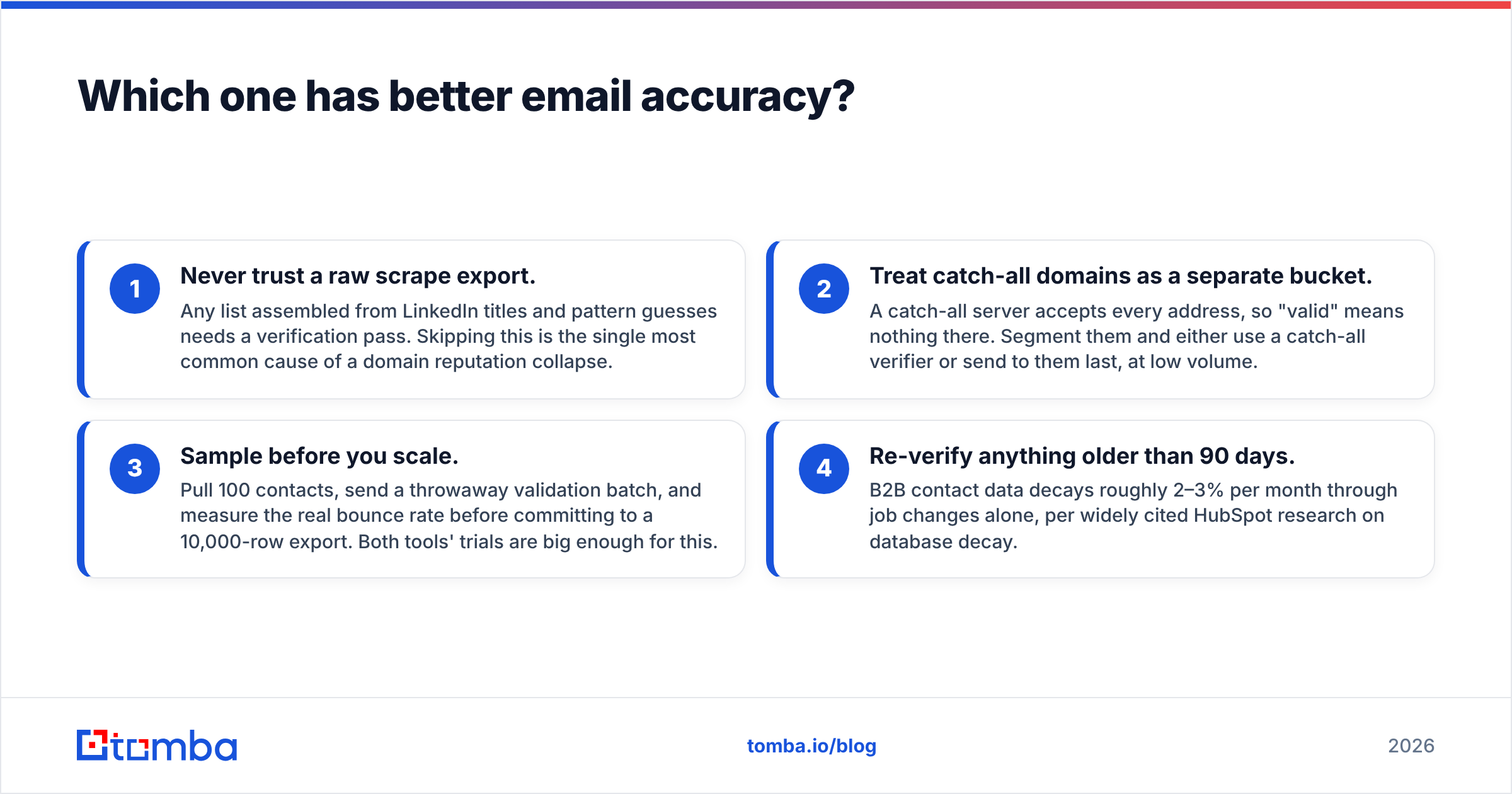
Three practical accuracy rules regardless of which you buy:
- Never trust a raw scrape export. Any list built from LinkedIn titles and pattern guesses needs a verification pass. Skipping this is the most common cause of a domain reputation collapse.
- Treat catch-all domains as a separate bucket. A catch-all server accepts every address, so "valid" means nothing there. Segment them and either use a catch-all verifier or send to them last, at low volume.
- Sample before you scale. Pull 100 contacts, send a throwaway validation batch, and measure the real bounce rate before you commit to a 10,000-row export. Both tools' trials are big enough for this.
- Re-verify anything older than 90 days. B2B contact data decays roughly 2–3% per month through job changes alone, per widely cited HubSpot research on database decay.
Because both tools stop at "here's an address," the verification layer usually ends up being someone else's product. A dedicated email verifier that does MX, SMTP, disposable, role-account, and catch-all checks will catch things a bundled checkbox verifier won't.

Is GrowMeOrganic's unlimited plan actually unlimited?#
Short answer: no, and you should plan around that.
"Unlimited" in this category almost always means "unlimited subject to fair use," where fair use is defined in a support ticket rather than in the contract. In practice, heavy GrowMeOrganic users report throttling on large LinkedIn extraction jobs, daily caps on the sequencer, and slowdowns during peak hours. That's not unique to GrowMeOrganic — it's how every unlimited-branded data product works, because the vendor's own upstream costs are metered even if yours aren't.
The other cost you should model: GrowMeOrganic's headline price is annual-billing-only on the good tiers. Monthly rates are meaningfully higher, and lifetime deals sold through AppSumo-style channels come with grandfathered limits that don't always survive product changes. Read what the LTD actually grants before you assume it covers the sequencer.
FindEmails.com is the opposite: transparent credit blocks, no unlimited fiction, no annual lock-in required. You buy 1,000 credits, you get 1,000 lookups. Refreshingly boring. The downside is that per-credit pricing punishes you at volume — at 50,000 lookups a month the "cheap" tool stops being cheap relative to platforms with tiered pricing.

Which should you pick for your use case?#
Match the tool to the job rather than to the feature count. Start with the two simple cases.
- Solo founder doing 200 outbound emails a week, wants one login. GrowMeOrganic. The bundled sequencer saves you a subscription. At that volume the accuracy gap costs you a handful of bounces, not your domain.
- Developer who needs an email lookup inside an existing app or script. FindEmails.com, or a platform with a real email finder API. The endpoint is simple. The open question is coverage in your target market. Test with 500 real records from your ICP.
The harder cases need more than one tool.
- Agency running outbound for multiple clients. Neither, alone. You need per-client workspaces, audit trails, and a verification step you can show a client. Pair a dedicated finder with a separate sending platform, so a deliverability problem in one client's domain stays contained.
- RevOps team enriching an existing CRM. Neither is built for this. You want data enrichment that writes back to HubSpot or Salesforce natively, not a CSV round-trip.
- Anyone selling into EU markets. Scraped LinkedIn data raises GDPR legitimate-interest questions, and a bundled scraper doesn't answer them for you. Check the vendor's DPA and where they say the data originated. G2 reviews show which vendors actually respond to compliance requests.
One alternative people also shortlist: BookYourData. It sells pre-built, pay-as-you-go B2B lists with a stated accuracy guarantee rather than an on-demand lookup. That's a different purchase model, and it suits teams who'd rather buy a clean list once than run searches all month. Worth a look alongside both tools here.
What does a realistic monthly cost look like?#
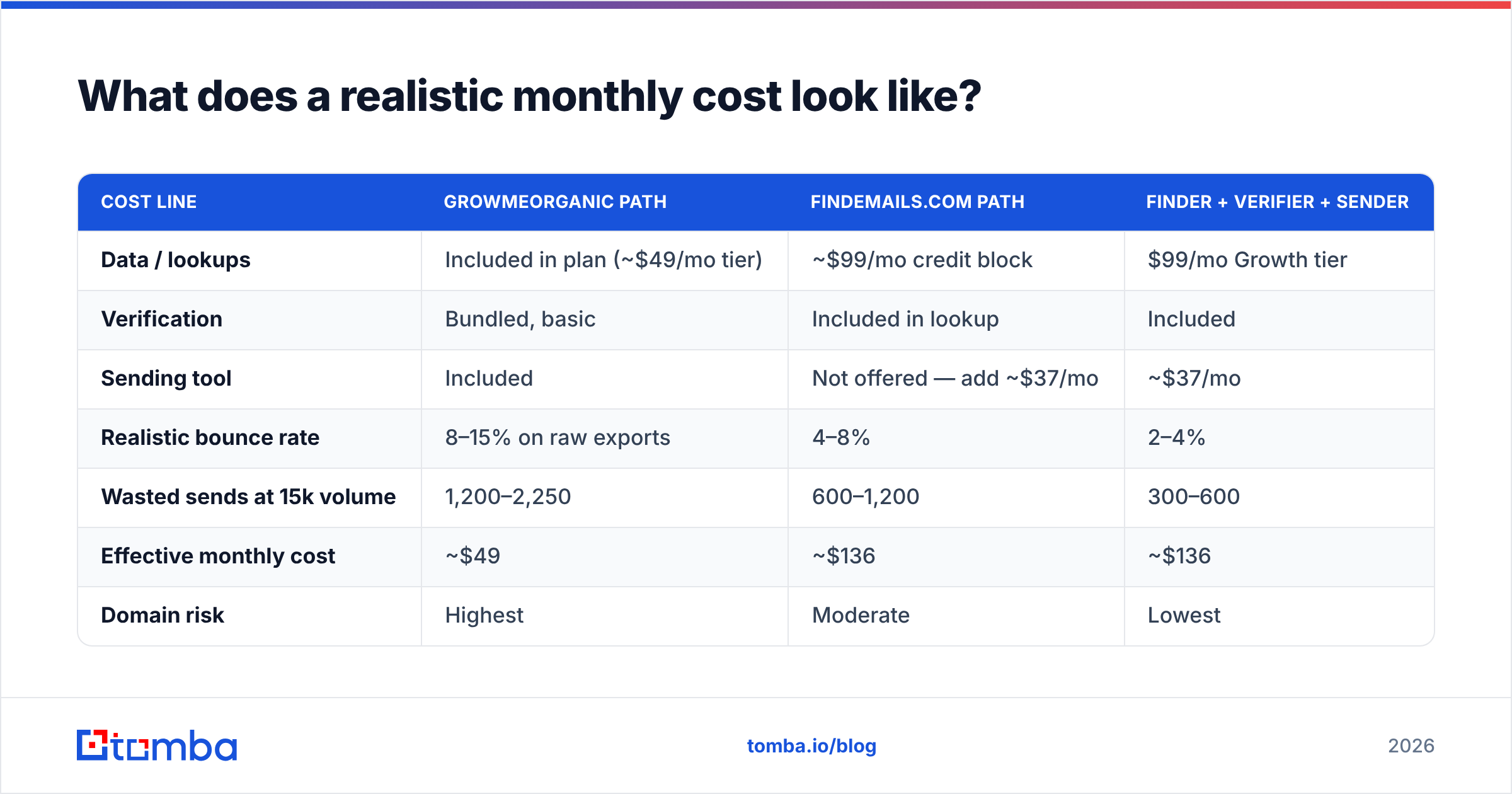
Feature tables hide the real number. Here's the same job — 5,000 verified contacts and a 15,000-email sending month — costed across three setups.
| Cost line | GrowMeOrganic path | FindEmails.com path | Finder + verifier + sender |
|---|---|---|---|
| Data / lookups | Included in plan (~$49/mo tier) | ~$99/mo credit block | $99/mo Growth tier |
| Verification | Bundled, basic | Included in lookup | Included |
| Sending tool | Included | Not offered — add ~$37/mo | ~$37/mo |
| Realistic bounce rate | 8–15% on raw exports | 4–8% | 2–4% |
| Wasted sends at 15k volume | 1,200–2,250 | 600–1,200 | 300–600 |
| Effective monthly cost | ~$49 | ~$136 | ~$136 |
| Domain risk | Highest | Moderate | Lowest |
GrowMeOrganic is genuinely the cheapest line item. Whether it's the cheapest outcome depends on what a damaged sending domain costs you. If you're one or two domains deep with no backup inboxes, that number is large. Bounce rates above 5% are where mailbox providers start throttling, which is why email deliverability tends to decide this more than the sticker price does.
What are the main downsides of each?#
GrowMeOrganic weak points:
- Data freshness. Scraped profile data reflects whatever LinkedIn showed at scrape time. Job changes go unnoticed until you bounce.
- Support depth. Reviewers consistently note slow ticket resolution on data-quality disputes and credit refunds.
- Annual lock-in. Best pricing requires committing before you know if the data works for your ICP.
- Deliverability is on you. Built-in sending means built-in risk if the built-in verification misses.
FindEmails.com weak points:
- Product stagnation. The Toofr codebase and its data sources predate the current wave of enrichment tooling. Coverage on newer, smaller, and non-US companies is thin.
- No enrichment beyond email. No phone, no firmographics, no reverse email lookup — if you need more than an address, you're buying a second tool.
- Credit expiry. Unused credits on some plans don't roll over indefinitely. Check before buying a big block.
- Minimal integrations. Zapier and the API cover it. Native CRM sync is absent.

How should you run a fair 30-minute bake-off?#
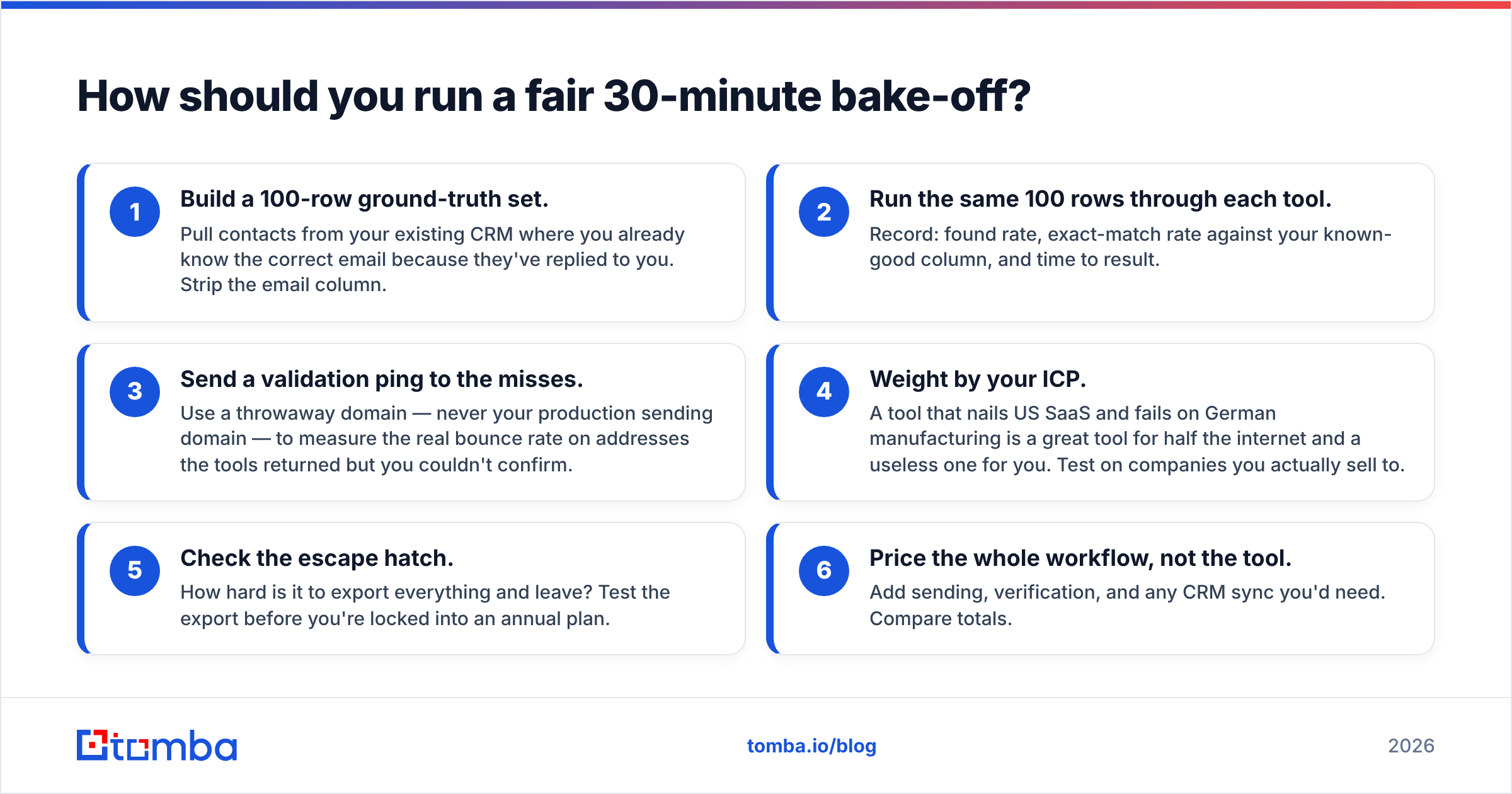
Don't take anyone's word for accuracy — including this post's. Run the test:
- Build a 100-row ground-truth set. Pull contacts from your CRM where you already know the correct email because they've replied to you. Strip the email column.
- Run the same 100 rows through each tool. Record: found rate, exact-match rate against your known-good column, and time to result.
- Send a validation ping to the misses. Use a throwaway domain, never your production sending domain. That gives you the real bounce rate on addresses the tools returned but you couldn't confirm.
The last three steps are the ones people skip, and they matter most.
- Weight by your ICP. A tool that nails US SaaS and fails on German manufacturing is great for half the internet and useless for you. Test on companies you actually sell to.
- Check the escape hatch. How hard is it to export everything and leave? Test the export before you're locked into an annual plan.
- Price the whole workflow, not the tool. Add sending, verification, and any CRM sync you'd need. Compare totals.
That test takes under an hour and beats every comparison article, including this one.
The verdict#
Here is how GrowMeOrganic vs FindEmails.com (Toofr) settles in practice.
GrowMeOrganic if you're a one-person outbound operation who values having everything in one tab more than you value precision, and your sending volume is low enough that an 8–12% bounce rate won't cook your domain.
FindEmails.com (Toofr) if you need a dead-simple lookup call at low volume, you're comfortable with older underlying data, and you already have a sending stack you like.
Neither if the thing you're actually optimizing is deliverable contacts per dollar at scale. Both stop short of the verification depth that keeps bounce rates under 3%, and both leave catch-all domains as an unsolved problem you'll discover after your first big send.
That's the gap worth naming. Finding an address is the easy half. Confirming it's real, current, and safe to send to is where campaigns are won or quietly lost.
If deliverable-on-the-first-send is your standard, start with the Tomba Email Finder — search by domain, name, or company, get confidence-scored results, and push them straight into a verification pass before anything hits your sequencer. The free tier gives you 25 searches a month with no card, which is enough to run the 100-row bake-off above and see the numbers for yourself. Compare what comes back against your GrowMeOrganic export or your FindEmails.com credits, and let the exact-match rate decide.
Related guides#
Ready to find emails that actually work?
Join 150,000+ professionals who stopped guessing and started sending. Free credits on signup — no credit card required.
Get the Tomba newsletter
Practical outbound tactics and product updates — once every two weeks.
About the author