GrowMeOrganic vs LeadRocks: Which B2B Lead Tool Wins in 2026?
GrowMeOrganic sells an all-in-one outbound suite. LeadRocks sells a contact database with a LinkedIn extension. They solve different problems — here is which one actually fits your team, and where both leave gaps.
TL;DR
- GrowMeOrganic is a suite; LeadRocks is a database. GrowMeOrganic bundles scraping, email finding, and cold email sending. LeadRocks sells access to a stored B2B contact list plus a LinkedIn Chrome extension.
- If you need sequences, GrowMeOrganic wins. LeadRocks has no sending engine — you export CSVs into something else.
- If you only need contacts, LeadRocks is cheaper per record, especially if you caught one of its lifetime deals. But stored databases decay, and decay is the whole ballgame.
- Neither is a strong verifier. Both hand you addresses; neither gives you the SMTP-level confidence you need before a 5,000-send week. Budget for a separate verification step.
- Best combo for most teams: a real-time finder plus verifier (Tomba, Starter $49/mo) for accuracy, and whichever sender you already pay for. Buying accuracy and sending from one vendor is where budgets quietly break.
What are GrowMeOrganic and LeadRocks?#
These two tools get compared constantly because they show up in the same "cheap Apollo alternative" listicles. That framing is wrong. They are built on opposite assumptions.
- GrowMeOrganic is an India-based all-in-one outbound platform. You scrape LinkedIn, Google Maps, or a company list, enrich the rows with emails, then run drip sequences from your own mailbox — all inside one dashboard. Its pitch is "unlimited" usage on higher tiers. See growmeorganic.com for current packaging.
- LeadRocks is a B2B contact database with a LinkedIn extension. You search its stored index by title, company, industry, or location, reveal emails and phone numbers, and export. Its pitch is volume-for-price, and it became widely known through AppSumo lifetime deals. See leadrocks.io.
- The data model differs. GrowMeOrganic leans on scraping plus pattern-based email discovery at request time. LeadRocks serves records that already exist in its index — fast, but only as fresh as the last refresh.
- The workflow differs. GrowMeOrganic wants to be your whole outbound stack. LeadRocks wants to be one node in it.
- The failure mode differs. GrowMeOrganic fails when sending deliverability degrades because bad addresses went out. LeadRocks fails when a record is 18 months stale and the person changed jobs.
Understanding that split answers most "which is better" questions before you compare a single feature.
How do GrowMeOrganic and LeadRocks compare at a glance?#
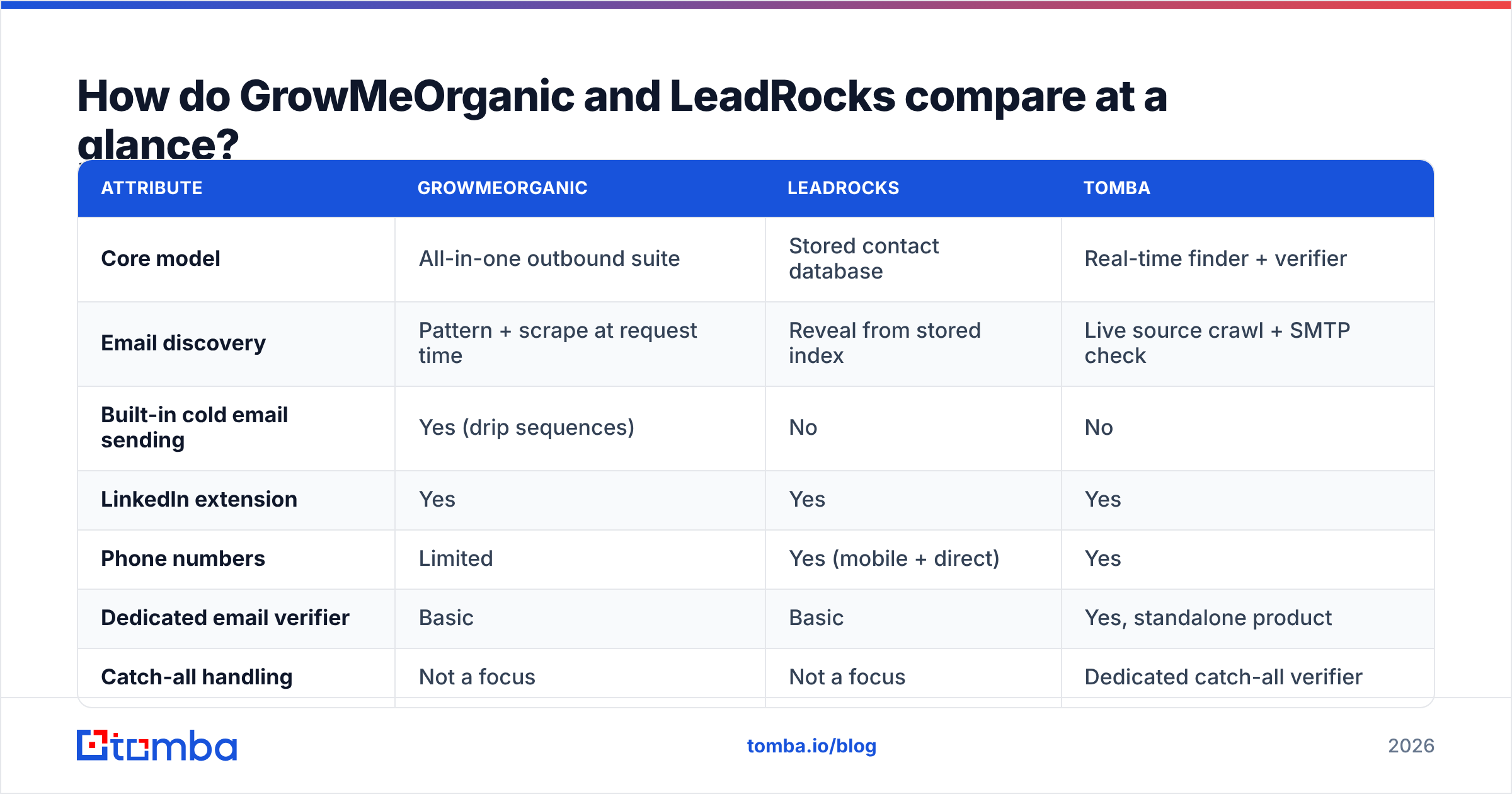
| Attribute | GrowMeOrganic | LeadRocks | Tomba |
|---|---|---|---|
| Core model | All-in-one outbound suite | Stored contact database | Real-time finder + verifier |
| Email discovery | Pattern + scrape at request time | Reveal from stored index | Live source crawl + SMTP check |
| Built-in cold email sending | Yes (drip sequences) | No | No |
| LinkedIn extension | Yes | Yes | Yes |
| Phone numbers | Limited | Yes (mobile + direct) | Yes |
| Dedicated email verifier | Basic | Basic | Yes, standalone product |
| Catch-all handling | Not a focus | Not a focus | Dedicated catch-all verifier |
| API for developers | Limited | Limited | Full REST API + CLI + MCP |
| Free tier | Trial-based | Trial-based | 25 searches/mo, no card |
| Entry paid price | ~$49/mo (annual billing) | ~$39/mo entry tier | $49/mo Starter |
| Best for | Solo founders wanting one bill | Bulk list building on a budget | Accuracy-critical outbound at scale |
Pricing on both vendors has moved more than once and lifetime-deal grandfathering muddies it further. Treat the numbers above as directional and confirm on each vendor's live pricing page before you commit. Tomba's numbers are firm: Free, Starter $49/mo, Growth $99/mo, Pro $249/mo — see Tomba pricing.
Which one gives you more accurate email data?#
Accuracy is where the "all-in-one vs database" split stops being academic.
GrowMeOrganic finds addresses largely by inferring patterns — it knows firstname.lastname@ is the format at a domain, applies it to the name you scraped, and hands you a result. That works well at large companies with rigid conventions and poorly at the 20-to-200-employee firms most B2B teams actually sell into, where formats drift and personal aliases proliferate.
LeadRocks has the opposite profile. Its records were real at collection time, which makes them high-confidence on the day they were indexed. The question is what day that was. B2B contact data decays at roughly 22–30% per year — people change roles, companies rebrand, mailboxes get decommissioned. A database record with no visible "last verified" timestamp is a claim you cannot audit. Independent reviews on G2 repeat this pattern across the entire budget-database category: strong hit rates in some verticals, noticeably weaker coverage in others, especially outside US tech.

The practical consequence: with either tool, you should not send to a raw export. Run the list through a real email verifier first. A 6% invalid rate on a 5,000-contact campaign is 300 bounces — enough to visibly dent your sender reputation and, on a new domain, enough to get you filtered for weeks. Verification is the cheapest insurance in the entire outbound stack, and it is the step both of these platforms treat as an afterthought rather than a product.
How does pricing actually compare?#
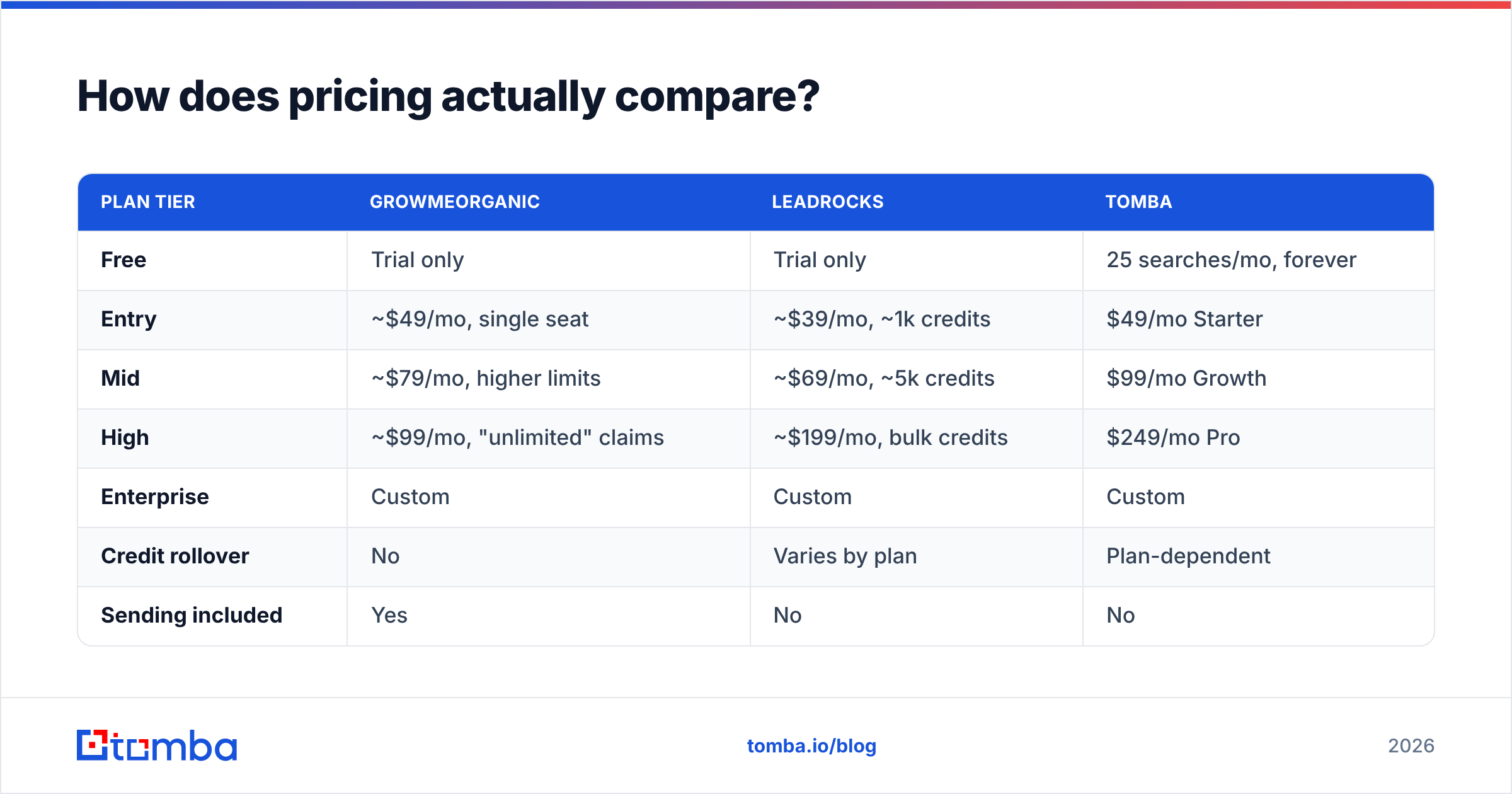
| Plan tier | GrowMeOrganic | LeadRocks | Tomba |
|---|---|---|---|
| Free | Trial only | Trial only | 25 searches/mo, forever |
| Entry | ~$49/mo, single seat | ~$39/mo, ~1k credits | $49/mo Starter |
| Mid | ~$79/mo, higher limits | ~$69/mo, ~5k credits | $99/mo Growth |
| High | ~$99/mo, "unlimited" claims | ~$199/mo, bulk credits | $249/mo Pro |
| Enterprise | Custom | Custom | Custom |
| Credit rollover | No | Varies by plan | Plan-dependent |
| Sending included | Yes | No | No |
| Verification included | Basic | Basic | Yes |
Two traps hide in that table.
Trap one: "unlimited" is never unlimited. Fair-use caps, daily rate limits, and per-domain throttles apply on every vendor that markets unlimited usage. Read the fair-use clause before you plan a 50,000-contact quarter around it.
Trap two: the bundle isn't free. GrowMeOrganic's sending engine looks like a saving until you compare it against a dedicated sequencer you may already run. If you already pay for a sender, the bundle is a duplicate line item, not a discount. Conversely, LeadRocks' lower sticker price ignores the sender you still have to buy separately. Price the whole stack, not the tool.
Is GrowMeOrganic better for cold email automation?#
Yes — for the specific buyer it targets.
If you are a solo founder or a two-person agency and your goal is "one login, one invoice, campaigns live by Friday," GrowMeOrganic is genuinely the shorter path. Scrape a LinkedIn Sales Navigator search, enrich, write a three-step sequence, connect your Google Workspace mailbox, send. No CSV shuttling, no Zapier glue.
The trade-offs show up as you scale:
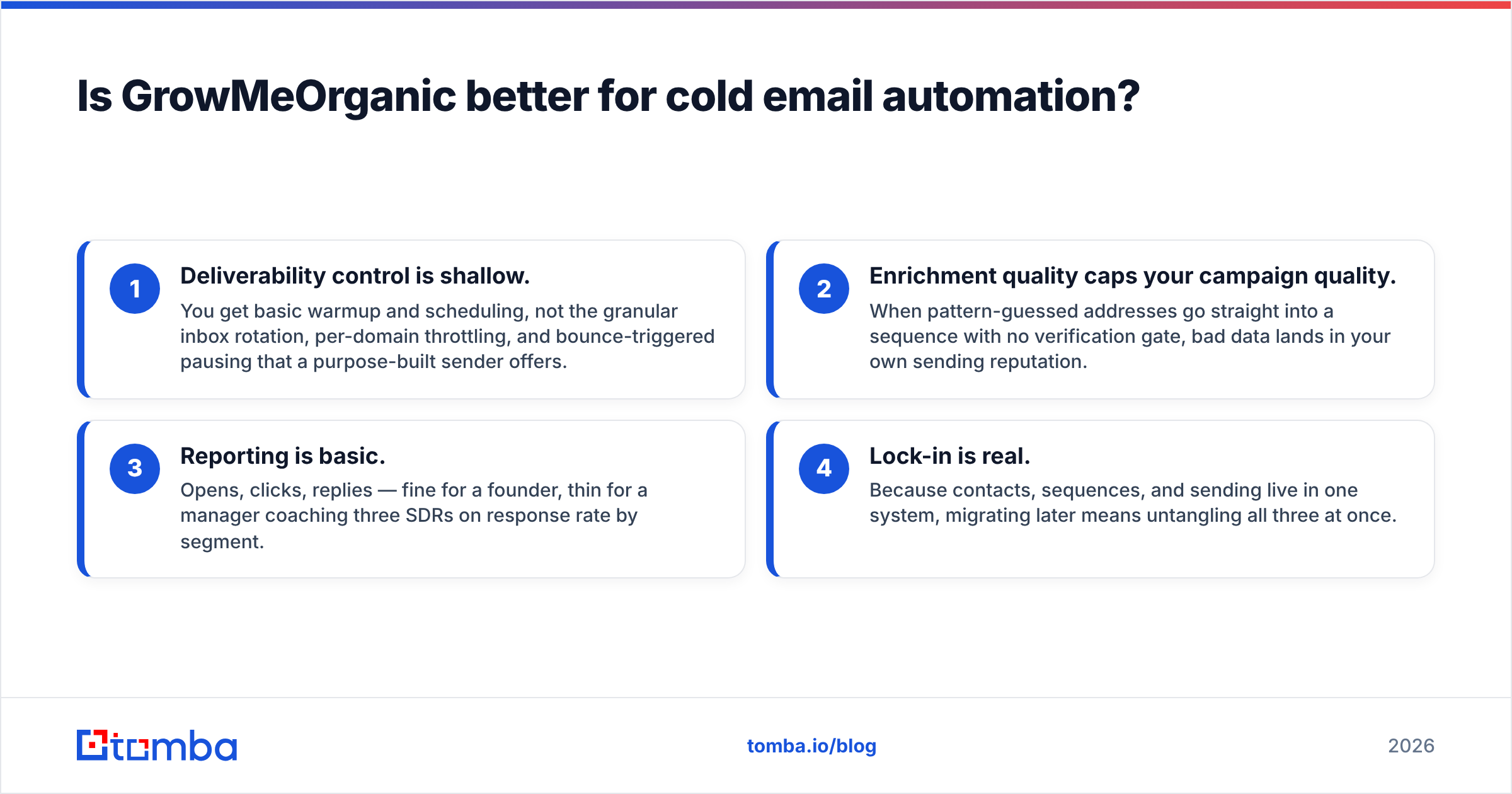
- Deliverability control is shallow. You get basic warmup and scheduling, not the granular inbox rotation, per-domain throttling, and bounce-triggered pausing that a purpose-built sender offers.
- Enrichment quality caps your campaign quality. When pattern-guessed addresses go straight into a sequence with no verification gate, bad data lands in your own sending reputation.
- Reporting is basic. Opens, clicks, replies — fine for a founder, thin for a manager coaching three SDRs on response rate by segment.
- Lock-in is real. Because contacts, sequences, and sending live in one system, migrating later means untangling all three at once.
The honest summary: GrowMeOrganic is a very good starting stack and a mediocre scaling stack. That is not an insult — it is the standard lifecycle of all-in-one tools, and plenty of teams get 18 useful months out of one.
Is LeadRocks better for LinkedIn prospecting?#
For raw list building, LeadRocks is the more efficient of the two.
Its Chrome extension works the way you want it to: open a LinkedIn search or a company page, pull matching contacts, push them to a list, export. If your motion is "build a 3,000-person TAM list this week and hand it to the SDRs," LeadRocks does that with less friction and lower cost per record than most named-brand databases.
What you should verify before committing:
- Coverage in your ICP. Budget databases skew heavily toward US and Western European tech. If you sell into APAC manufacturing or LATAM logistics, run a sample search on your actual target accounts before buying an annual plan.
- Phone number validity. Mobile numbers are the most decay-prone field in B2B data. Validate them separately rather than trusting the export — a phone validator pass costs far less than a week of SDRs dialing dead lines.
- Credit semantics. Ask what consumes a credit: a search, a reveal, or a successful reveal. The difference between "charged on reveal" and "charged only when we return a valid email" changes effective cost by a wide margin.
- Lifetime-deal terms. If you bought an LTD, check whether database refreshes are included or whether they sit behind a newer paid tier.
For the LinkedIn-first workflow specifically, a dedicated LinkedIn finder that resolves addresses live from a profile URL is the higher-accuracy alternative, because it queries current sources instead of returning whatever was indexed last year.
Where do both tools fall short?#
Three gaps show up in nearly every review thread for this category.
Catch-all domains. A large share of mid-market companies run catch-all mail servers that accept everything at the SMTP layer. Standard verification returns "unknown" and most tools shrug. That is not a rounding error — depending on your vertical, catch-alls can be 15–25% of your list. Handling them requires dedicated logic, which is why a catch-all verifier exists as its own product rather than a checkbox.
Programmatic access. Both platforms are dashboard-first. If your RevOps team wants enrichment to fire automatically when a lead hits the CRM, you need a documented, rate-limited API — not a manual export. A proper email finder API turns enrichment from a weekly chore into an invisible background process.
Compliance paper trail. If you sell into the EU or UK, "where did this record come from?" is a question you may have to answer in writing. Vendors that publish their sourcing methodology make that easy. Vendors that do not make it your problem. Ask both for their data-sourcing documentation before you sign, and check how their terms handle deletion requests. HubSpot's guidance on GDPR-compliant prospecting is a reasonable baseline for what your process should look like.

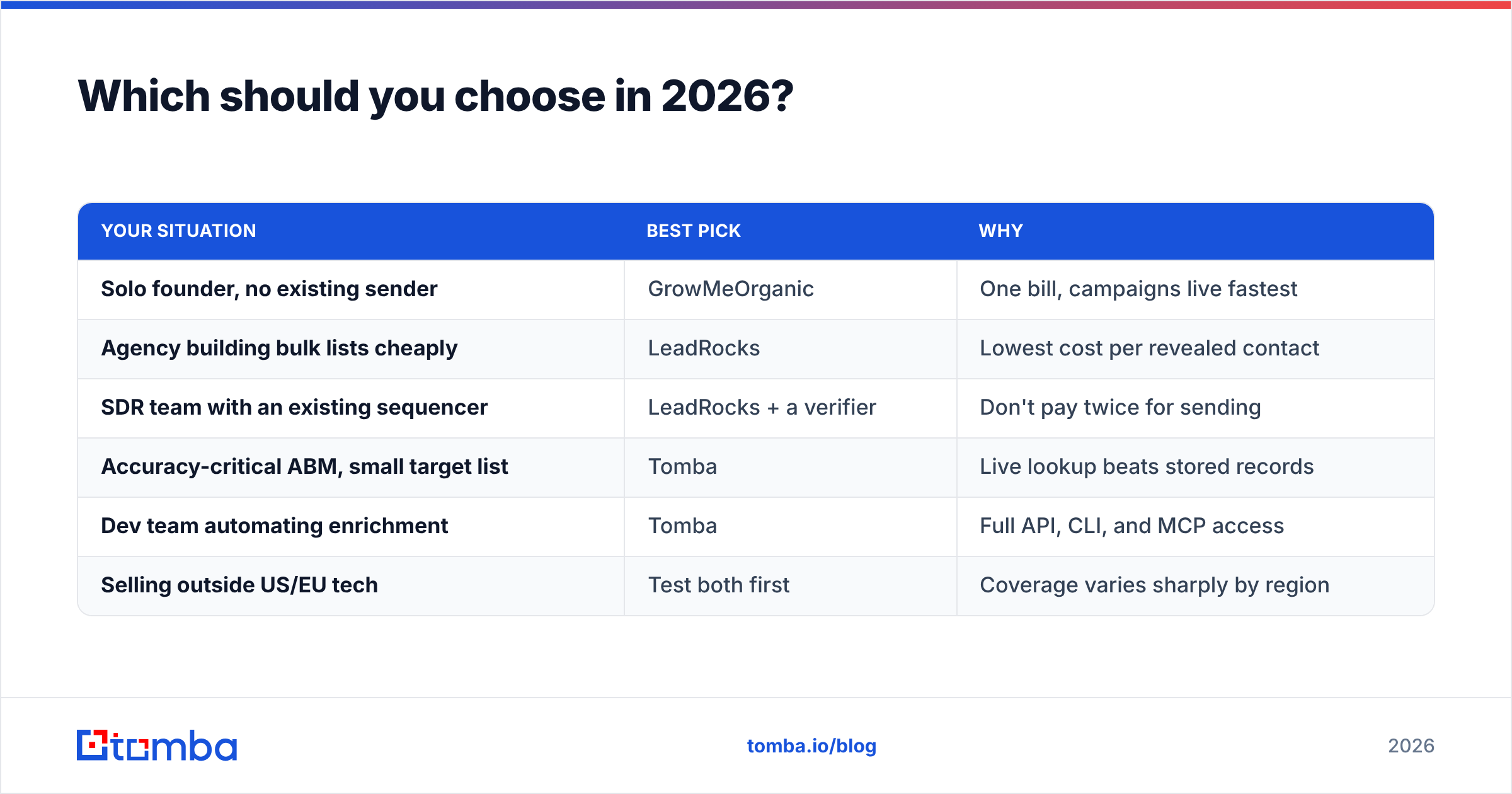
Which should you choose in 2026?#
| Your situation | Best pick | Why |
|---|---|---|
| Solo founder, no existing sender | GrowMeOrganic | One bill, campaigns live fastest |
| Agency building bulk lists cheaply | LeadRocks | Lowest cost per revealed contact |
| SDR team with an existing sequencer | LeadRocks + a verifier | Don't pay twice for sending |
| Accuracy-critical ABM, small target list | Tomba | Live lookup beats stored records |
| Dev team automating enrichment | Tomba | Full API, CLI, and MCP access |
| Selling outside US/EU tech | Test both first | Coverage varies sharply by region |
The decision rule is simple. Do you already pay for cold email sending? If yes, GrowMeOrganic's main differentiator is redundant, and you should compare LeadRocks against other data sources on cost per verified contact. If no, and you want one vendor, GrowMeOrganic is the more complete answer.
Either way, add a verification layer. The single most expensive mistake in this category is treating a tool's raw output as send-ready. Both platforms optimise for volume of results; neither optimises for the confidence score that keeps your domain out of the spam folder. That is a separate job, and it should be a separate tool.
What is the fastest way to test all three?#
Run the same 100 contacts through each. Pick real accounts from your pipeline — not a sample list a vendor gives you. Then measure three things: hit rate (how many returned an address), bounce rate (send a small verified batch and count), and time-to-list (how long the whole workflow took). One afternoon of that beats a month of reading comparison posts, including this one.
If you want a zero-risk baseline for that test, start with Tomba's email finder. The free tier gives you 25 searches a month with no card required — enough to benchmark accuracy on your own ICP before you commit budget anywhere. Every result comes with a confidence score and the sources behind it, so you can see why an address was returned rather than trusting a number on a dashboard. Pair it with the verifier, and you can hand your SDRs a list you'd be willing to stake your sending domain on.
Related guides#
Ready to find emails that actually work?
Join 150,000+ professionals who stopped guessing and started sending. Free credits on signup — no credit card required.
Get the Tomba newsletter
Practical outbound tactics and product updates — once every two weeks.
About the author