GrowMeOrganic vs LimeLeads: Which B2B Lead Tool Wins in 2026?
One sells unlimited LinkedIn scraping, the other sells a curated US contact database. We compare data freshness, export limits, pricing, and where each one quietly falls apart.
GrowMeOrganic vs LimeLeads comes down to one question. Do you want to build lists from LinkedIn, or pull them from a US database? Here is the short answer.
TL;DR
- GrowMeOrganic is an all-in-one prospecting suite. It pairs a LinkedIn and Sales Navigator extractor with a built-in cold email sender. You bring the search, it builds the list.
- LimeLeads is a curated, search-first B2B contact database. It covers US companies almost exclusively. You filter, preview, and export. No sequencer attached.
The real split is workflow, not features:
- GrowMeOrganic wins if your prospecting starts on LinkedIn. LimeLeads wins if you want firmographic filters and clean CSVs without a browser extension.
- Both share the same weak spot: email accuracy at export time. Neither one replaces a proper verification step before you send.
- Do you need reliable emails on demand rather than a database subscription? An API-first finder like Tomba (free tier, then $49/mo) is often the cheaper third path.
What are GrowMeOrganic and LimeLeads?#
They solve the same business problem — "get me contactable B2B leads" — from opposite directions.
GrowMeOrganic is an India-built, all-in-one growth platform. At its center sits a Chrome extension. It scrapes LinkedIn and Sales Navigator searches, adds emails and phone numbers where it can, then drops the result into a campaign. You send from inside the same tool. It also bundles a Google Maps scraper, a domain-level email finder, and a basic drip sequencer. The pitch is breadth: one subscription instead of four.
LimeLeads is narrower and more old-school, in the best sense. It is a searchable database of US business contacts. Filters cover industry, employee count, revenue band, location, seniority, and job title. You build a segment, preview a sample, then spend credits to unlock and export the rows you want. There is no sequencer, no extension, no scraping. It is a list vendor with a good UI.
That difference drives almost every tradeoff below. GrowMeOrganic builds its data at the moment you scrape. It is as fresh as the LinkedIn profile you pulled it from, and as shaky as the pattern-guessing behind the email. LimeLeads' data is pre-collected and stored. It is consistent, filterable, and available instantly. But it is only as current as the last refresh of that record.
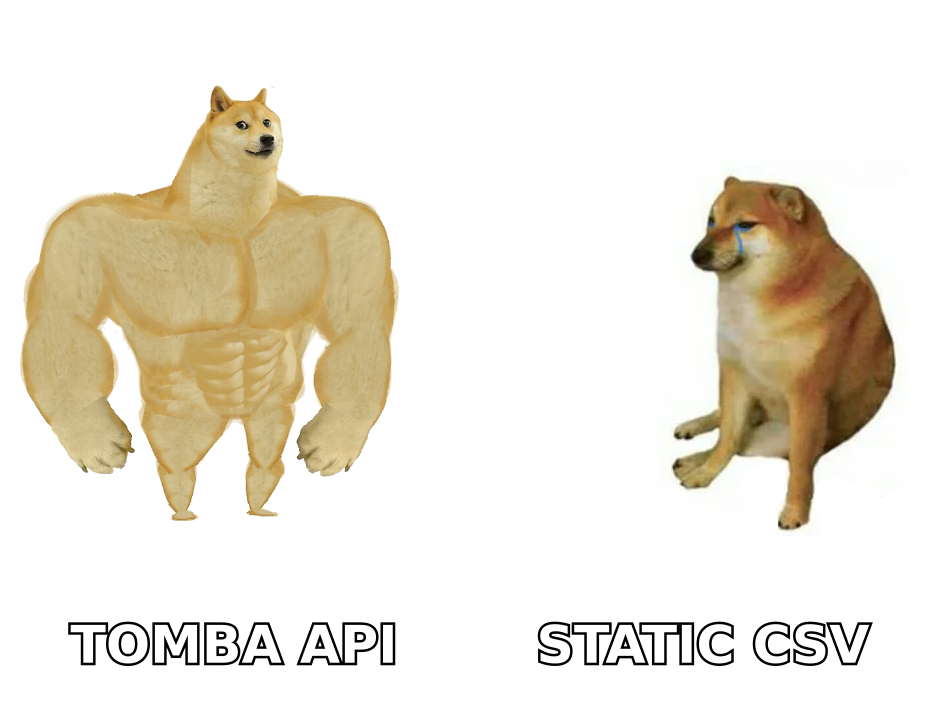
GrowMeOrganic vs LimeLeads: head-to-head comparison#
| Dimension | GrowMeOrganic | LimeLeads |
|---|---|---|
| Core model | Scrape-on-demand (LinkedIn, Maps, domains) | Pre-built searchable US contact database |
| Primary geography | Global, LinkedIn-dependent | Heavily US-focused |
| Built-in email sending | Yes — drip sequencer included | No — export and send elsewhere |
| Data freshness | Live at scrape time | Depends on database refresh cadence |
| Email verification | Basic, bundled | Claimed verified at export |
| Phone / mobile data | Sometimes, via enrichment | Company-level phone, limited direct dials |
| Export format | CSV, CRM push | CSV, CRM integrations |
| Credit model | Monthly plan quotas | Credits consumed per unlocked lead |
| Chrome extension required | Yes, for LinkedIn workflows | No |
| Free entry point | Limited trial | Free sample leads on signup |
| Best for | Founders and small teams running LinkedIn-led outbound | RevOps and SDRs building ICP-filtered US lists |
The table hides one thing worth saying plainly. These two tools are not really competitors for the same buyer. They look like competitors because both sell "B2B leads." In practice, teams that pick GrowMeOrganic are usually replacing a stack of three cheap tools. Teams that pick LimeLeads are usually replacing an expensive ZoomInfo or Apollo seat they could not justify.
Which one has better data accuracy?#
Neither vendor publishes an audited accuracy figure. So treat any number on either homepage as marketing until you test it on your own domain list. That is not a dig at these two. It is true of nearly every vendor in this category.
What you can reason about is how each one produces an email. The method predicts the failure mode.
- GrowMeOrganic's failure mode is pattern guessing. When it scrapes a profile, it knows the person's name and employer. To build an email it must find the company domain, guess the format (
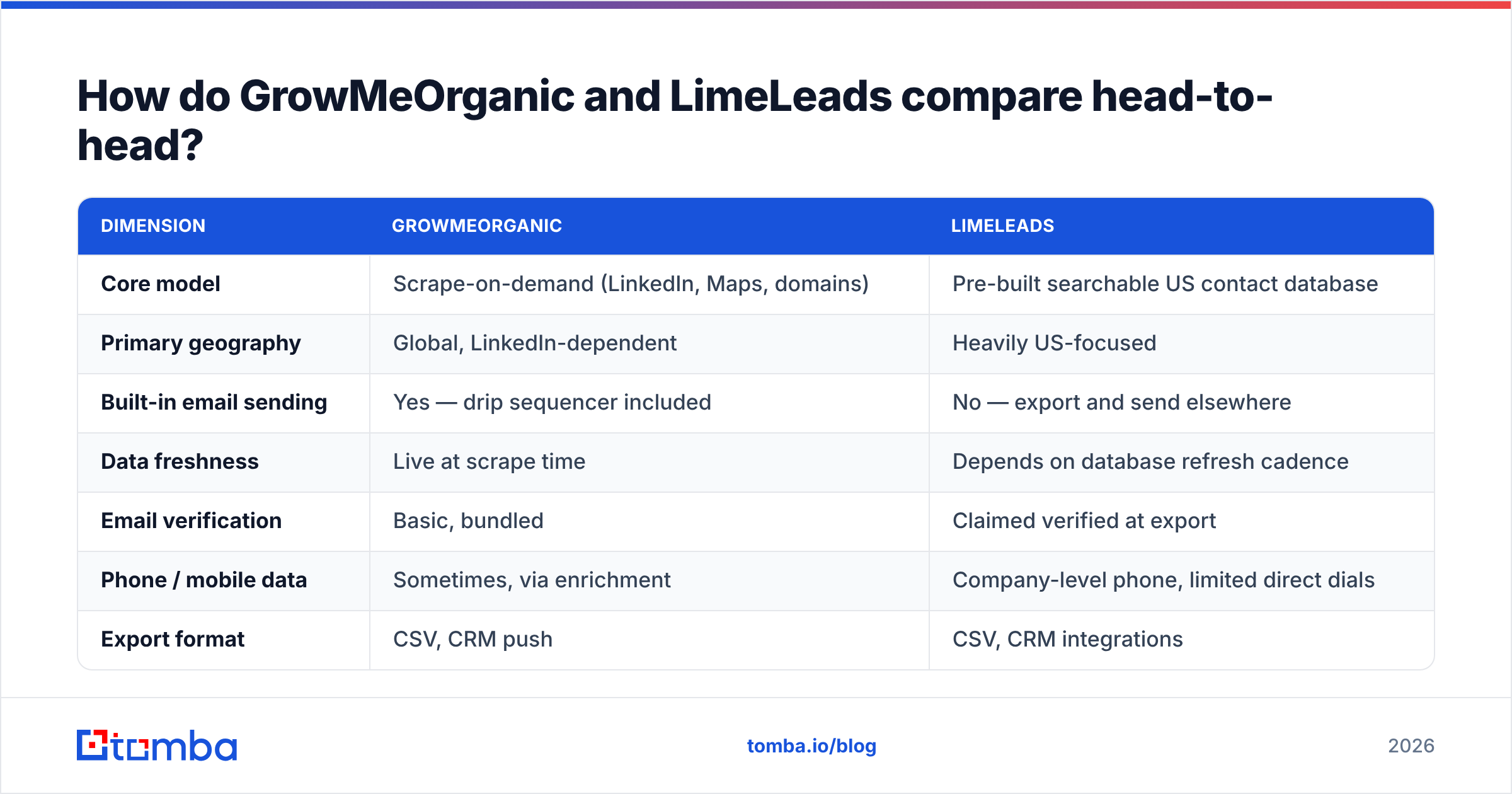
first.last@,flast@,first@), and validate. On large, well-indexed companies this works fine. On small firms with odd formats, hit rates drop and you get plausible addresses that bounce. - LimeLeads' failure mode is decay. A stored record was accurate when collected. B2B contact data decays roughly 2–3% per month through job changes alone. Over a year that adds up. A record that was perfect eighteen months ago may point at someone who left.
The last two problems belong to both tools.
- Both share a catch-all blind spot. Some domains accept all mail, so they return "valid" to simple SMTP checks. Without a catch-all verifier, those rows inflate your deliverable count and quietly hurt your sender reputation.
- Neither replaces a pre-send check. Whichever you buy, run the export through an email verifier first. A 4% bounce rate is the gap between the inbox and the spam folder for the next quarter.
Want to benchmark this properly? Pull 200 contacts you know are correct from your CRM. Strip the emails. Re-source them through each tool. Measure match rate and bounce rate separately. A tool with a 90% match rate and a 12% bounce rate is worse than one with a 65% match rate and a 1% bounce rate. No marketing page will tell you that.
What does GrowMeOrganic actually do well?#
The bundling helps small teams. If you are a two-person startup, paying separately for a scraper, an enrichment tool, and a sending platform hurts. GrowMeOrganic folds that into one line item. For a founder doing 200 touches a month, "good enough at everything" beats "excellent at one thing, plus three more invoices."
The LinkedIn workflow is fast. Run a Sales Navigator search, click the extension, walk away, come back to a list. No CSV shuffling between tools. If your ICP is defined by LinkedIn attributes, this is the shortest path from idea to sendable list.
The Google Maps scraper is an underrated extra. For local services and SMB targeting, Maps often beats LinkedIn as a source. Most rivals in this price band leave it out.
Where it gets shaky:
- A bundled sequencer ties your email deliverability to a company whose main business is data, not sending. Dedicated sending tools invest far more in warmup, rotation, and reputation.
- LinkedIn scraping carries account risk. Heavy extraction has gotten users restricted. That is a platform policy, not a vendor flaw. But it is your account on the line.
- Support and docs are thinner than a US or EU vendor at the same price. Check recent reviews on G2 before you commit annually.
Where does LimeLeads win?#
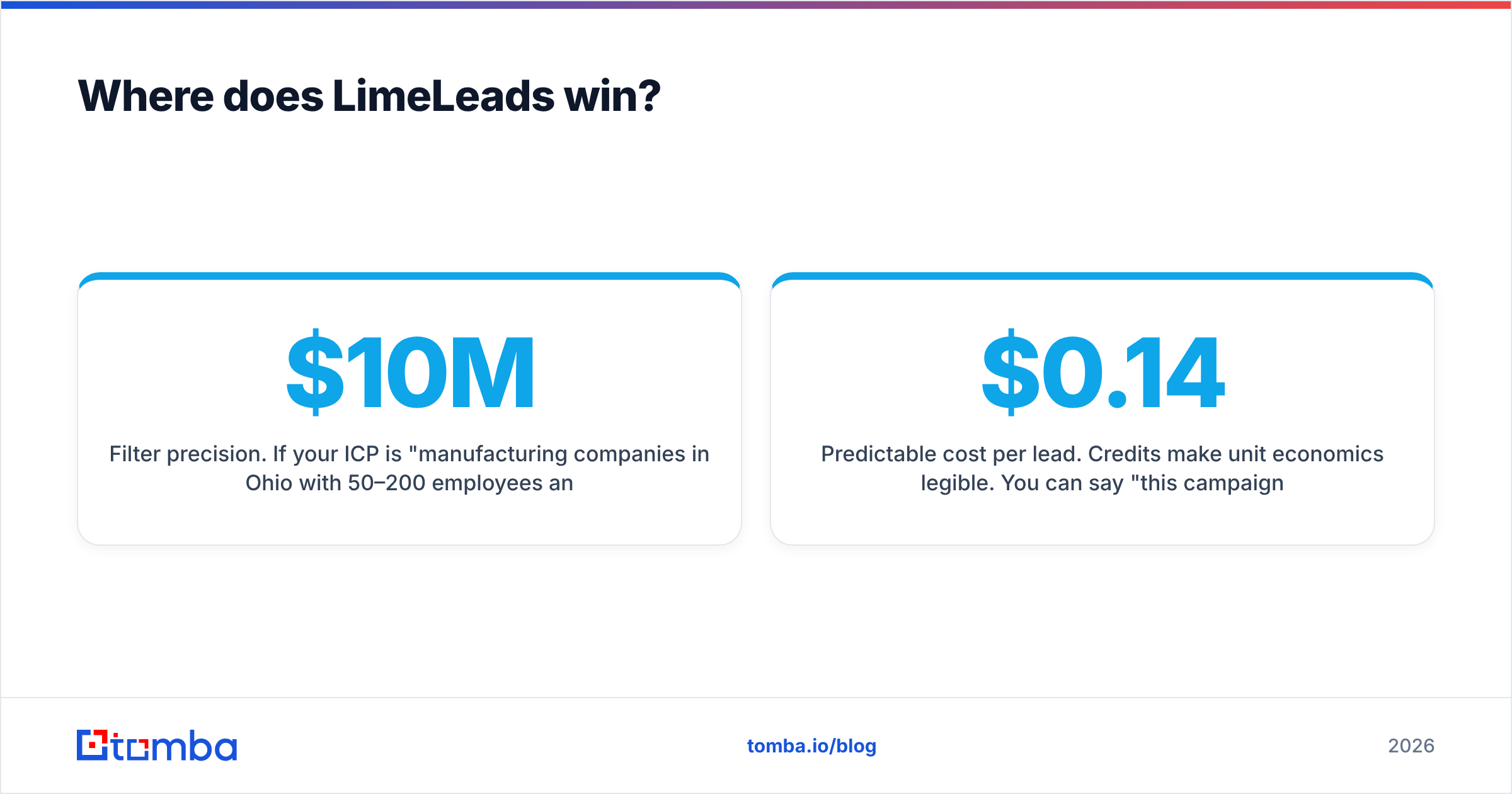
Filter precision. Say your ICP is "manufacturing companies in Ohio, 50–200 employees, $10M–$50M revenue, VP Operations and above." LimeLeads gives you that in about ninety seconds. Doing the same by scraping means fighting Sales Navigator's revenue filters, which are shaky for private companies.
Preview before you pay. The credit model lets you sample a segment before spending anything. That beats subscription tools, where you burn quota just to learn the segment was junk.
No extension, no scraping, no account risk. Everything runs server-side in LimeLeads' own UI. Nobody's LinkedIn account gets flagged.
Predictable cost per lead. Credits make unit economics easy to read. You can say "this campaign cost $0.14 per contact" without dividing a subscription by a fuzzy usage number.
Where it falls short:
- US-centric. Selling into EMEA, APAC, or LATAM? Coverage thins out fast. This is the single biggest disqualifier.
- No sending layer. You need a separate sequencer. For some teams that re-splits the stack GrowMeOrganic was trying to merge.
- Static records. Nothing tells you a contact changed jobs last month. You find out when the email bounces.
What do GrowMeOrganic and LimeLeads cost in 2026?#
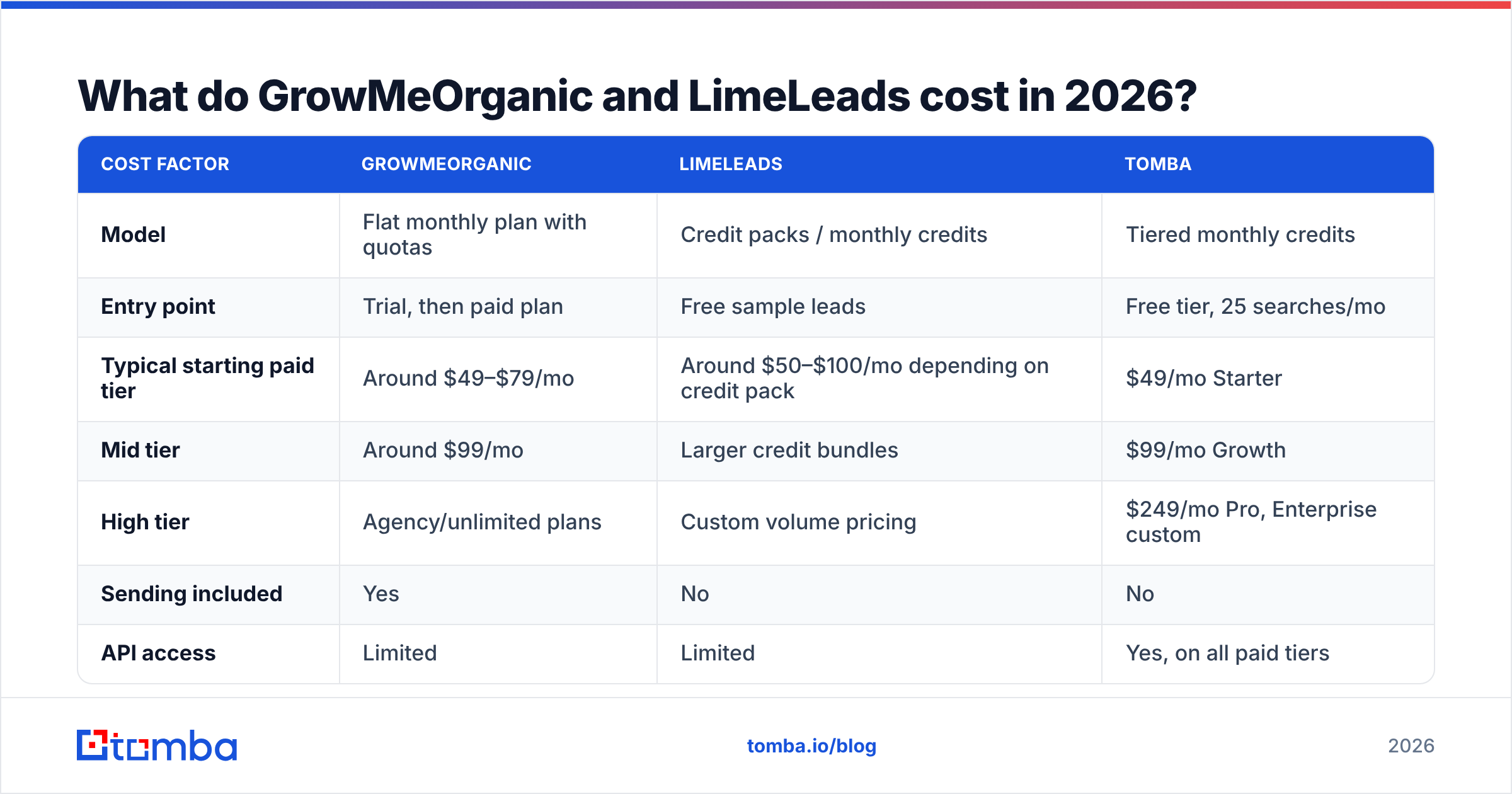
Pricing shifts on both platforms. Both also run promos and lifetime deals. Check their own sites before you budget. The structure matters more than the exact number.
| Cost factor | GrowMeOrganic | LimeLeads | Tomba |
|---|---|---|---|
| Model | Flat monthly plan with quotas | Credit packs / monthly credits | Tiered monthly credits |
| Entry point | Trial, then paid plan | Free sample leads | Free tier, 25 searches/mo |
| Typical starting paid tier | Around $49–$79/mo | Around $50–$100/mo depending on credit pack | $49/mo Starter |
| Mid tier | Around $99/mo | Larger credit bundles | $99/mo Growth |
| High tier | Agency/unlimited plans | Custom volume pricing | $249/mo Pro, Enterprise custom |
| Sending included | Yes | No | No |
| API access | Limited | Limited | Yes, on all paid tiers |
| Pay only for what you unlock | No | Yes | Credits roll against plan |
The honest read on GrowMeOrganic vs LimeLeads pricing is simple. GrowMeOrganic is cheaper if you would otherwise buy a sequencer too. LimeLeads is cheaper if your usage is spiky. Three big list pulls a year beats twelve months of a subscription you barely touch.
Both get expensive in the same case: high-volume, nonstop prospecting where you re-source the same accounts again and again. That is where a per-lookup API model beats a seat-and-quota model.
Which should you pick for your motion?#
Match the tool to how your team works, not to the feature list.
- Founder-led outbound, LinkedIn-native ICP, no existing stack — GrowMeOrganic. The bundle saves real money and real setup time. Accept the accuracy tradeoff and verify before sending.
- US-only SMB or mid-market targeting with tight filters — LimeLeads. The filters are the product, and they are good. Pair it with a sequencer you trust.
- Global or EMEA-heavy targeting — Neither, alone. LimeLeads' US focus is a hard wall. GrowMeOrganic's coverage depends on LinkedIn density in your market.
The next three cases point away from both tools.
- Engineering-led GTM, enrichment inside your own product or warehouse — Neither. You want an email finder API you can call from your pipeline, not a UI to click through.
- A CRM full of accounts missing contact data — Skip the subscriptions. Run a bulk email finder pass over domains you already own. It is cheaper, and match rates run higher.
- Compliance-sensitive industries — Ask both vendors how they source data and handle opt-outs before you sign. Scraping and stored databases carry different GDPR postures. "Our data is public" is not a legal basis.
Is there a better third option?#
Often, yes. Most teams should not ask "which database do I rent?" The better question is "how do I get a correct email for a person I already identified?"
Maybe you already know who you want to reach. The name came from your CRM, a conference list, a content audit, or your own site traffic. Then you do not need a database subscription. You need a lookup. That is the case for a dedicated finder instead of a suite.
Tomba sits in that lane. Run a domain search to pull every discoverable address at a company. Resolve individual contacts through the email finder. Verify the whole batch before it hits your sequencer. It all runs through one API, plus a CLI, Chrome extension, and Google Sheets add-on. The free tier covers 25 searches a month. Paid plans start at $49/mo, and Tomba pricing is published rather than quote-gated.
It does not replace LimeLeads' filters, and it does not send email like GrowMeOrganic. But for turning "name + company" into a verified, sendable address, a specialist beats a suite. And it slots cleanly into the sequencer and CRM you already run.
The verdict#
Here is the GrowMeOrganic vs LimeLeads call in one line each. Pick GrowMeOrganic if your prospecting starts on LinkedIn and you want one bill. Pick LimeLeads if you need precise US filtering and prefer paying per lead unlocked. Neither should hand you a send-ready list without a verification step in between. That step decides whether your campaign lands in inboxes or spam folders.
Are you paying for a database mostly to look up contacts you already knew about? Then stop renting the haystack. Run those names through the Tomba Email Finder instead. Start on the free tier, benchmark it against your own known-good list, and pay once the match rate proves itself.
Related guides#
Ready to find emails that actually work?
Join 150,000+ professionals who stopped guessing and started sending. Free credits on signup — no credit card required.
Get the Tomba newsletter
Practical outbound tactics and product updates — once every two weeks.
About the author