GrowMeOrganic vs Mailead (2026): Which Outbound Tool Wins?
One is a lead database with a sender bolted on. The other is a sending engine built for unlimited inboxes. Here is how GrowMeOrganic and Mailead actually differ in 2026 — and which one belongs in your outbound stack.
TL;DR
- They are not the same category. GrowMeOrganic is a lead-data platform (B2B database, LinkedIn extraction, email finding) that added sequences. Mailead is a cold email sending platform (multi-inbox, warmup, rotation) that added a light data layer.
- If your bottleneck is "who do I email," GrowMeOrganic wins. If your bottleneck is "how do I send 3,000 emails a day without burning domains," Mailead wins.
- Both flatten out on data accuracy. Bundled database emails from all-in-one tools typically verify well below dedicated finders — budget for a separate verification step regardless of which you pick.
- Price is close enough that it should not decide this. Both sit in the $40–$160/mo range for a small team. The cost that actually hurts is bounced sends and burned domains.
- The stable setup for most teams in 2026 is unbundled: a dedicated finder/verifier for data, a dedicated sender for volume. All-in-ones are convenience, not accuracy.
What are GrowMeOrganic and Mailead, exactly?#
GrowMeOrganic is an all-in-one B2B prospecting suite. Its center of gravity is data: a contact database, a Chrome extension that pulls contacts from LinkedIn and Sales Navigator, an email finder, and a domain-level search. Email sequencing sits on top of that, wired to your own Gmail or Outlook accounts. You can read the vendor's own positioning at growmeorganic.com.
Mailead comes at outbound from the opposite end. It is a cold email sending platform: connect many mailboxes, warm them, rotate sends across them, run sequences, track replies. The pitch is volume without throttling — unlimited connected inboxes and unlimited warmup on most plans, rather than per-seat inbox caps. Lead data is available but it is not what the product is engineered around.
That distinction matters more than any feature checkbox. Asking "GrowMeOrganic vs Mailead" is a bit like asking whether you need a warehouse or a delivery fleet. Both are part of shipping. Neither replaces the other.
How do GrowMeOrganic and Mailead compare head-to-head?#
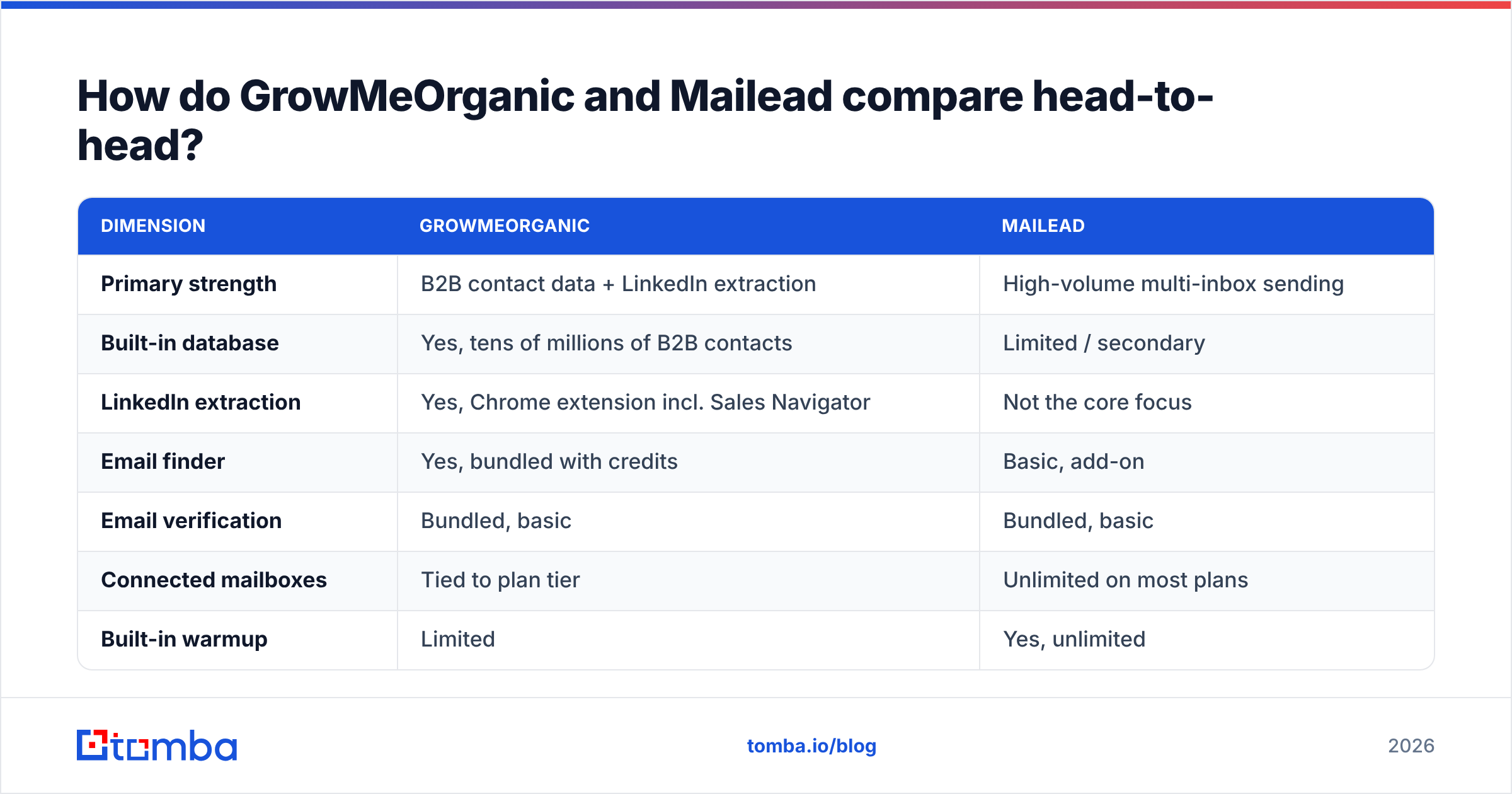
Here is the honest side-by-side. Pricing and limits are as published at the time of writing — both vendors adjust tiers frequently, so confirm on their own pages before you buy.
| Dimension | GrowMeOrganic | Mailead |
|---|---|---|
| Primary strength | B2B contact data + LinkedIn extraction | High-volume multi-inbox sending |
| Built-in database | Yes, tens of millions of B2B contacts | Limited / secondary |
| LinkedIn extraction | Yes, Chrome extension incl. Sales Navigator | Not the core focus |
| Email finder | Yes, bundled with credits | Basic, add-on |
| Email verification | Bundled, basic | Bundled, basic |
| Connected mailboxes | Tied to plan tier | Unlimited on most plans |
| Built-in warmup | Limited | Yes, unlimited |
| Inbox rotation | Basic | Core feature |
| Sequences / multichannel | Email + LinkedIn steps | Email-first |
| Entry price (approx.) | ~$49/mo billed annually | ~$49/mo entry tier |
| Best for | Founders and small teams who need lists | Agencies and teams scaling send volume |
| Weakest point | Sending infrastructure at volume | Data depth and accuracy |
Read that table as a decision tree, not a scorecard. If four or more of the rows you care about are in the left column, GrowMeOrganic is your pick. If they cluster right, Mailead is.

Which one gives you better lead data?#
GrowMeOrganic, comfortably — but with a ceiling you should know about before you sign.
The strength is coverage and workflow. You can filter a database by industry, headcount, geography and title, or you can run the extension across a Sales Navigator search and pull hundreds of contacts into a list in minutes. For a founder building a first 5,000-contact ICP list, that is genuinely fast.
The ceiling is accuracy. Bundled databases inside all-in-one platforms are usually assembled from broad third-party aggregation and refreshed on a slower cycle than dedicated data products. In practice that shows up three ways:
- Stale role data. The contact was a VP of Marketing in 2024 and is not there now. The mailbox may still accept mail, so verification passes and your reply rate silently dies.
- Pattern-guessed addresses.
first.last@domain.comis inferred rather than sourced. On a catch-all domain, an inferred guess and a real address look identical to a basic verifier. - Catch-all blind spots. Roughly a fifth of B2B domains accept everything at the SMTP layer. A basic bundled verifier marks these "unknown" or, worse, "valid," and they land in your send.
This is where an unbundled data layer earns its cost. A dedicated email finder sources addresses rather than permuting them, a real email verifier separates deliverable from risky, and a catch-all verifier resolves the domains that break basic checks. Tomba's pricing runs from a free tier at 25 searches/month to Starter at $49/mo, Growth at $99/mo, and Pro at $249/mo — you can see the full breakdown on the Tomba pricing page.
Mailead's data layer is thinner by design. If you pick Mailead, plan on importing lists from elsewhere. That is not a criticism; it is the architecture.
Which one sends better at volume?#
Mailead, and the gap is wider here than the data gap runs the other way.
Cold email in 2026 is an infrastructure problem more than a copy problem. Google and Microsoft both tightened bulk-sender enforcement, and the practical consequence is that a single mailbox sending 200 cold emails a day is a domain you are choosing to lose. The surviving pattern is many mailboxes across several secondary domains, each sending 20–40 a day, warmed continuously, rotated automatically.
Mailead is built for exactly that shape. Unlimited inbox connections means you can attach twelve mailboxes across three throwaway domains without a per-inbox fee, and unlimited warmup means every one of them keeps a heartbeat. Rotation and per-mailbox throttling are first-class settings rather than afterthoughts.
GrowMeOrganic's sequencer works, but it is sized for a smaller footprint — a couple of connected accounts, moderate daily volume, straightforward drip logic. Push past that and you will feel the seams: fewer rotation controls, thinner warmup, less granular per-mailbox reporting. If you are an agency running outbound for eight clients, you will outgrow it.
Before you blame either tool for weak results, check the boring stuff: run an SPF checker on every sending domain, confirm DKIM and DMARC are aligned, and score your template with a spam checker. Most "deliverability problems" attributed to a platform are unauthenticated domains and link-heavy copy. HubSpot's sales blog has solid baseline material if you are still building that discipline.
How much do they actually cost?#
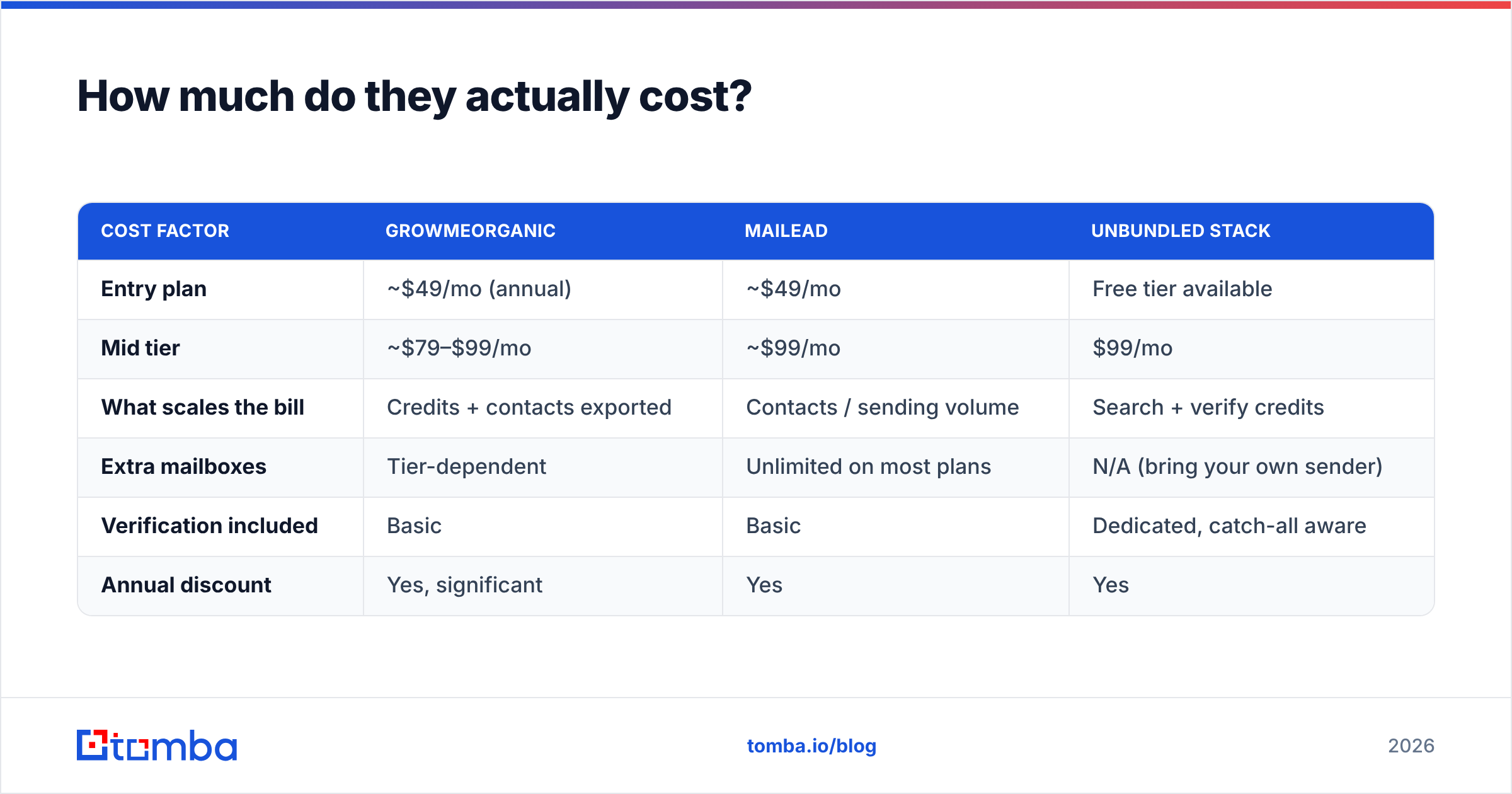
Both sit in the same neighborhood, which is exactly why price should not be your tiebreaker. Treat these as approximate entry points and verify current tiers directly.
| Cost factor | GrowMeOrganic | Mailead | Unbundled stack |
|---|---|---|---|
| Entry plan | ~$49/mo (annual) | ~$49/mo | Free tier available |
| Mid tier | ~$79–$99/mo | ~$99/mo | $99/mo |
| What scales the bill | Credits + contacts exported | Contacts / sending volume | Search + verify credits |
| Extra mailboxes | Tier-dependent | Unlimited on most plans | N/A (bring your own sender) |
| Verification included | Basic | Basic | Dedicated, catch-all aware |
| Annual discount | Yes, significant | Yes | Yes |
The hidden line item is not on either invoice. If 22% of a 10,000-contact list bounces, you have not lost credit value — you have lost domain reputation on the mailboxes that sent those 2,200 messages. Recovering a burned sending domain takes weeks. That is why the "cheaper" all-in-one frequently costs more in outcomes than a slightly pricier split stack.
If you want a third data point on how buyers actually rate tools in this space, the G2 sales intelligence category is a reasonable sanity check against vendor marketing.
Who should choose GrowMeOrganic?#
Pick GrowMeOrganic if you recognize yourself here:
- You have no list. You are starting from zero and need a database plus a LinkedIn extractor in one login.
- Your volume is modest. Under roughly 1,000 sends a week across one or two mailboxes.
- You want LinkedIn and email in one sequence. Multichannel steps in a single tool beat stitching two subscriptions together at small scale.
- You are one to three people. The all-in-one tax is worth paying when nobody on the team owns "ops."
Skip it if your daily send volume is the constraint, or if your ICP sits in a segment where database coverage is thin — deep tech, regional non-English markets, sub-20-employee companies.
Who should choose Mailead?#
Pick Mailead if this sounds like your week:
- You already have data. Lists come from a finder, a scraper, a partner, or a CRM export.
- Volume is the whole problem. You need thousands of sends per day without tripping provider limits.
- You run multiple domains or clients. Agencies and outbound-as-a-service teams live in this shape.
- You want warmup included, not metered. Unlimited warmup across unlimited inboxes removes a real budget line.
Skip it if you expected the built-in data to carry the campaign. It will not, and the resulting bounce rate will be blamed on the sender when the list was the problem.

Is there a better setup than either one alone?#
For most teams past the first hundred contacts, yes: unbundle. Buy data from a data company and sending from a sending company. It costs marginally more and it removes the single biggest failure mode in outbound — a mediocre list going out on good infrastructure.
Here is the build order that holds up:
- Define the ICP before you touch a tool. Industry, headcount band, geography, and two or three trigger events. A tight 800-contact list beats a loose 8,000-contact one every time.
- Source addresses from a dedicated finder. Use domain search to map every reachable contact at a target company, and the bulk email finder when you are working from a company list rather than a name list.
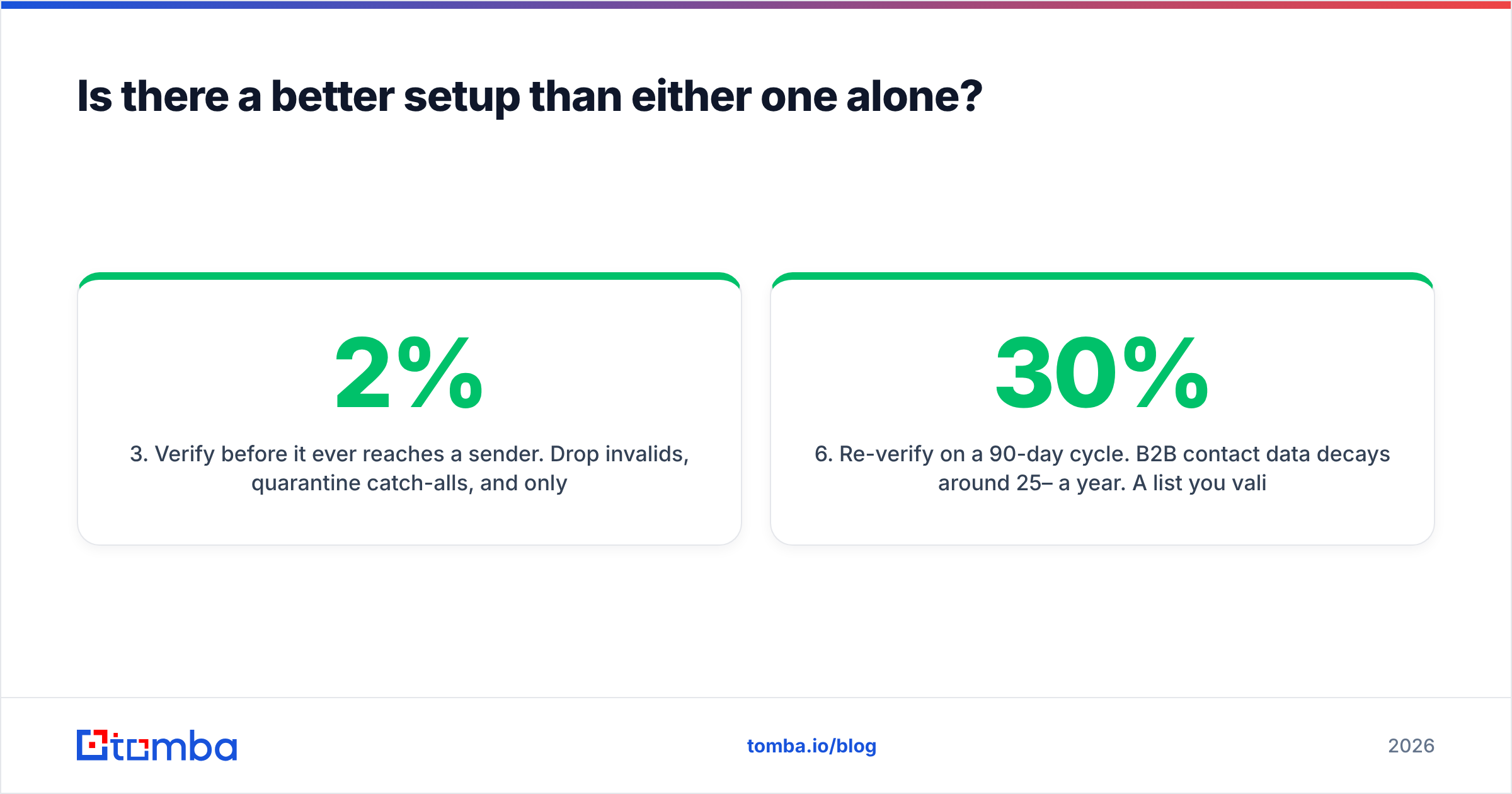
- Verify before it ever reaches a sender. Drop invalids, quarantine catch-alls, and only then hand the clean file to your sending platform. This single step is what separates a 2% bounce rate from a 20% one.
- Warm and rotate on dedicated infrastructure. Several secondary domains, several mailboxes each, 20–40 sends per mailbox per day, continuous warmup. This is where Mailead-class tooling belongs.
- Enrich what replies. Push responders into your CRM with firmographics and phone numbers attached via data enrichment so the rep working the reply is not starting cold.
- Re-verify on a 90-day cycle. B2B contact data decays around 25–30% a year. A list you validated in January is materially worse by April.
The tools change; that sequence does not. Whichever of GrowMeOrganic or Mailead you choose, you are choosing which step it owns — and which steps you still have to cover.
What is the verdict on GrowMeOrganic vs Mailead?#
GrowMeOrganic wins on data and workflow breadth. Mailead wins on sending infrastructure and volume economics. Neither wins on accuracy, and accuracy is what decides whether outbound works.
If you can only buy one and you are early, buy GrowMeOrganic — you cannot email people you cannot find. If you are scaling and already have a data source, buy Mailead — your problem is throughput, not discovery. If you can buy two, split the stack: dedicated data, dedicated sending, verification in between.
And if what you actually need is the missing piece — accurate, sourced, verified B2B email addresses that do not torch the domains you spent months warming — start with the Tomba Email Finder. The free tier gives you 25 searches a month to test coverage against your own ICP before spending anything, Starter is $49/mo, and the Tomba API drops straight into whatever sender you land on. Run 200 of your existing contacts through it and compare the verified rate against your current source. That test takes ten minutes and it will settle this debate faster than any feature table.
Related guides#
Ready to find emails that actually work?
Join 150,000+ professionals who stopped guessing and started sending. Free credits on signup — no credit card required.
Get the Tomba newsletter
Practical outbound tactics and product updates — once every two weeks.
About the author