GrowMeOrganic vs MailMerge365: Which Outreach Tool Wins?
One is an all-in-one lead database with built-in sending. The other is a mail merge add-in that lives inside Outlook. Here is the honest breakdown of which one fits your outbound motion — and where both fall short.
GrowMeOrganic vs MailMerge365 is a strange fight. One tool sells you leads. The other just sends mail from Outlook. This guide compares them on data, sending, pricing, and deliverability, so you know which one fits your stack.
TL;DR
- GrowMeOrganic is an all-in-one outbound suite: a bundled B2B contact database, a LinkedIn scraper, an email finder, and a drip-campaign sender. One subscription, one dashboard.
- MailMerge365 is a Microsoft 365 / Outlook add-in. It does not give you leads. It merges a spreadsheet into personalised emails and sends them from your real mailbox, through Exchange.
- They are not really competitors. GrowMeOrganic replaces your prospecting stack. MailMerge365 replaces your "BCC everyone and hope" habit.
- Pick GrowMeOrganic if you have no list and no budget for three separate tools. Pick MailMerge365 if you already have your list, live in Outlook, and care about compliance.
- Either way, bundled data is the weak link. Verify before you send. Bounce rate is what kills domains, not the tool you picked.
What is GrowMeOrganic and what is MailMerge365?#
They solve different halves of the same problem. That is why the comparison keeps coming up.
GrowMeOrganic is an India-built outbound platform. It bundles four things people usually buy on their own: a claimed 575M+ contact database, a Chrome extension that pulls profiles from LinkedIn and Sales Navigator, an email finder and verifier, and a cold email sequencer. It also tracks site visitors and scrapes Google Maps. Higher tiers promise "unlimited" use with no credit counter. That is rare in this category.
MailMerge365 is much narrower on purpose. It is an Outlook add-in. You install it from the Microsoft 365 admin center or AppSource. It takes an Excel sheet, a SharePoint list, or a CSV. Then it turns each row into a personalised email, sent from your own Exchange mailbox. There is no database, no scraper, no enrichment. You get merge fields, attachments, scheduling, follow-ups on no-reply, and tracking. That is the whole scope.
The mental model is simple. GrowMeOrganic is a stocked kitchen with an oven included. MailMerge365 is a very good oven, and you bring your own food.
GrowMeOrganic vs MailMerge365: head-to-head comparison#
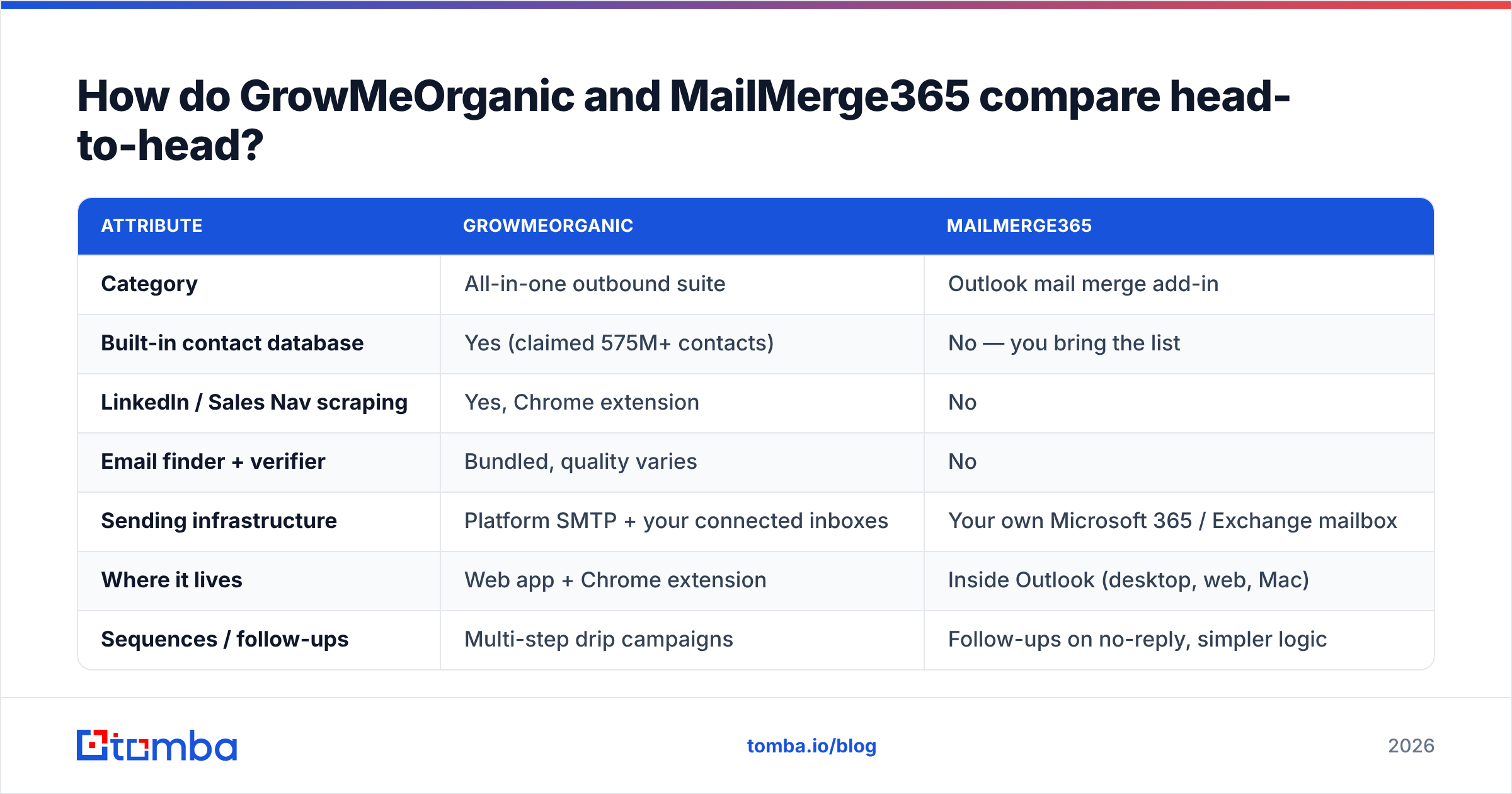
| Attribute | GrowMeOrganic | MailMerge365 |
|---|---|---|
| Category | All-in-one outbound suite | Outlook mail merge add-in |
| Built-in contact database | Yes (claimed 575M+ contacts) | No — you bring the list |
| LinkedIn / Sales Nav scraping | Yes, Chrome extension | No |
| Email finder + verifier | Bundled, quality varies | No |
| Sending infrastructure | Platform SMTP + your connected inboxes | Your own Microsoft 365 / Exchange mailbox |
| Where it lives | Web app + Chrome extension | Inside Outlook (desktop, web, Mac) |
| Sequences / follow-ups | Multi-step drip campaigns | Follow-ups on no-reply, simpler logic |
| CRM sync | Native + Zapier | Via SharePoint / Dynamics / Power Automate |
| Typical entry price | ~$49/user/mo (annual), higher tiers ~$99–$199 | ~$10–$20/user/mo |
| Pricing model | Seat + tier, "unlimited" claims on upper plans | Per-user, per-mailbox |
| Best for | Founders and small teams with no list yet | Teams already sitting on a clean list in Microsoft 365 |
| Biggest weakness | Data accuracy and support responsiveness | Zero lead sourcing, limited scale per mailbox |
Pricing on both moves. Treat the numbers above as directional. Check the vendor page before you sign an annual plan. GrowMeOrganic in particular has run lifetime deals and deep annual discounts that skew the comparison.
Which one has better data — and does that question even apply?#
Only one of them has data at all. So the honest answer is that GrowMeOrganic wins by default. That is not the same as winning.
Bundled databases inside all-in-one suites follow a predictable curve. Coverage looks huge in the marketing copy. Then you export 500 contacts in a niche vertical. A third are role accounts, stale titles, or people who left in 2023. Reviewers on G2 flag the same two things about GrowMeOrganic. The price-to-volume ratio is genuinely good. The email accuracy is shaky enough that you need a second check before you send.
That is not a GrowMeOrganic problem. It is structural. One engineering team is building a scraper, a database, a sequencer, a visitor tracker, and a CRM sync. They cannot fund data quality the way a specialist does. Something gives. It is usually the part you cannot see until your bounce rate spikes.

MailMerge365 skips the question by shipping no data. Your campaign is only as accurate as the sheet you loaded. Did that sheet come from a badge scan, a partner list, or an intern's afternoon on LinkedIn? Then you own that risk.
Both paths end at the same checkpoint. Run the list through a dedicated email verifier before the first send. A verification pass costs cents per contact. A burned sending domain costs weeks.
How does sending infrastructure differ, and why does it matter?#
This is the biggest difference between the two. Almost nobody compares them on it.
MailMerge365 sends from your actual mailbox. The message leaves through Exchange Online. It lands in your Sent Items. It threads properly when the prospect replies. It also inherits the authentication your IT team already set up: SPF, DKIM, and DMARC. Microsoft's own throttling limits apply — about 10,000 recipients per day and 30 messages per minute on a standard mailbox. That ceiling is a feature. It keeps volume at a level a human could have typed.
GrowMeOrganic sends through inboxes connected inside its own platform. You get more automation, more scale, and inbox rotation. You also get more distance between you and the sending path. When mail stalls at 4pm on a Friday, you are debugging someone else's delivery stack instead of your own tenant.
Some teams need the native model. A regulated business, a finance team, or any legal department that asks where outbound mail is stored will find it a much easier conversation. A startup sending 3,000 emails a week across four rotating domains will find it a hard limit.
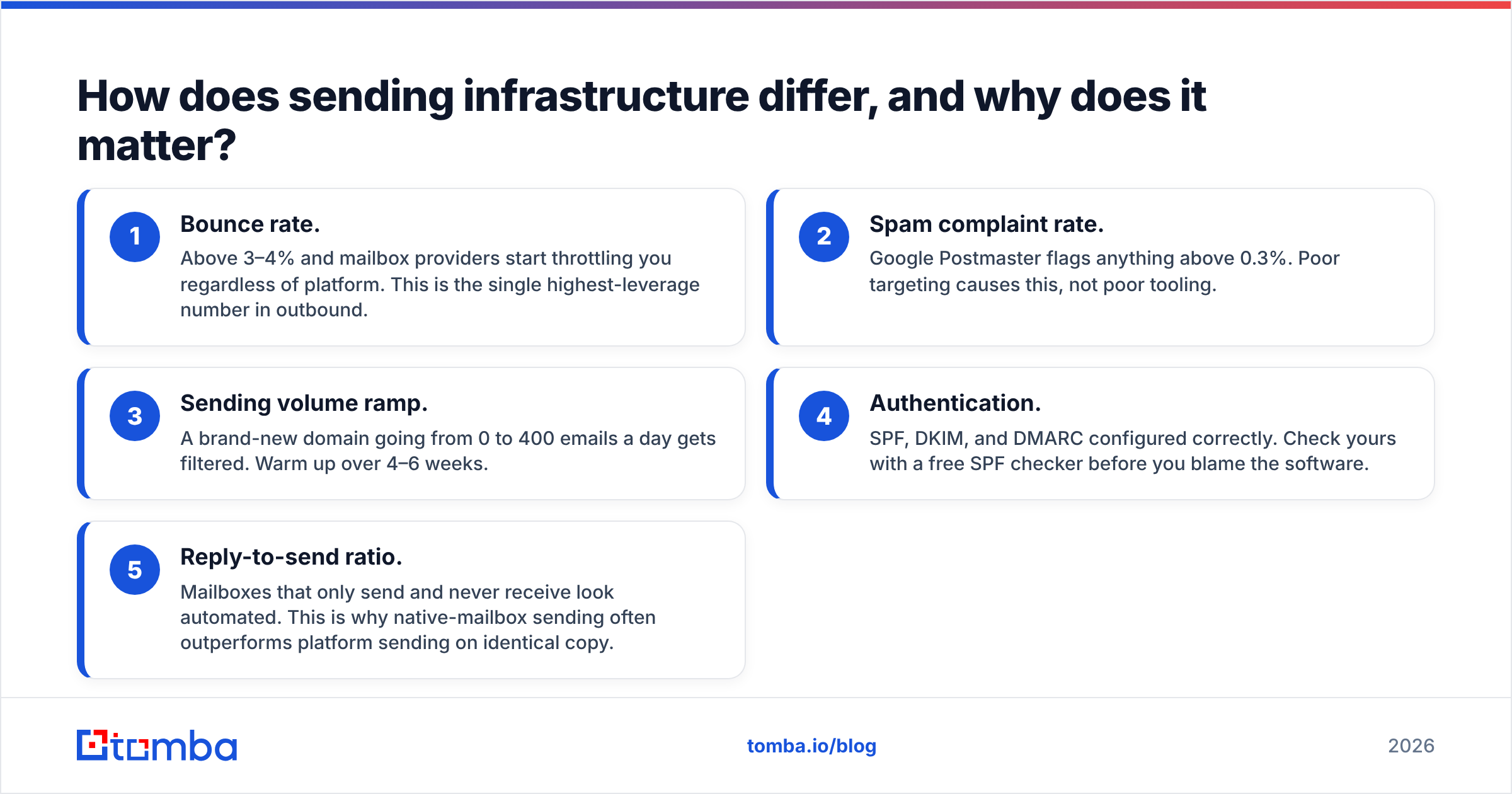
Neither model saves you from a dirty list. Email deliverability comes down to a few things you control before the tool shows up:
- Bounce rate. Go above 3–4% and mailbox providers throttle you. The platform does not matter. This is the highest-leverage number in outbound.
- Spam complaint rate. Google Postmaster flags anything above 0.3%. Bad targeting causes this, not bad tooling.
- Sending volume ramp. A brand-new domain that jumps from 0 to 400 emails a day gets filtered. Warm up over 4–6 weeks.
- Authentication. Set up SPF, DKIM, and DMARC. Check yours with a free SPF checker before you blame the software.
- Reply-to-send ratio. A mailbox that only sends and never receives looks like a robot. This is why native sending often beats platform sending on the same copy.
Where does GrowMeOrganic actually win?#
Give it credit. Say you are a solo founder or a two-person sales team starting from zero. GrowMeOrganic turns a $300 per month stack into one $49–$99 line item. You get sourcing, finding, verifying, and sending in one place. No stitching together four vendors and four billing cycles.
The Chrome extension is the strongest piece. Pull a Sales Navigator search into a list, enrich it, drop it into a sequence. The loop is fast. Speed beats polish when you are still testing whether a segment replies at all.
The "unlimited" tiers help too. Credit-metered tools punish you for testing broadly. GrowMeOrganic does not, at least until fair-use limits kick in.
Now the shaky part. Support response times come up again and again in reviews. The UI covers a lot of ground for a small team to maintain. Enrichment quality is the piece most likely to let an experienced operator down. If you have run campaigns before, you will notice.
Where does MailMerge365 actually win?#
Three places, clearly.
Trust and compliance. Email comes from your mailbox. It is stored in your tenant. It follows your retention rules. Nothing leaves the Microsoft boundary. For internal notes, customer notices, invoice runs, event invites, and regulated outreach, that is not a nice-to-have.
Deliverability on smaller volumes. Think of a warm, two-year-old Exchange mailbox with normal reply traffic. Mail from it clears filters that a cold platform send does not. If your world is 800 named accounts, MailMerge365 will likely beat any automation suite on inbox placement.
Simplicity. There is no learning curve. If someone can build a spreadsheet, they can run a merge in about ten minutes. That matters for marketing teams, ops teams, and account managers who will never open a sales engagement platform.
The limits are just as clear. No lead sourcing. No enrichment. Thin multi-step logic next to a real sequencer. And a hard ceiling set by Microsoft's throttles. It cannot run a 12-touch outbound program across five SDRs.

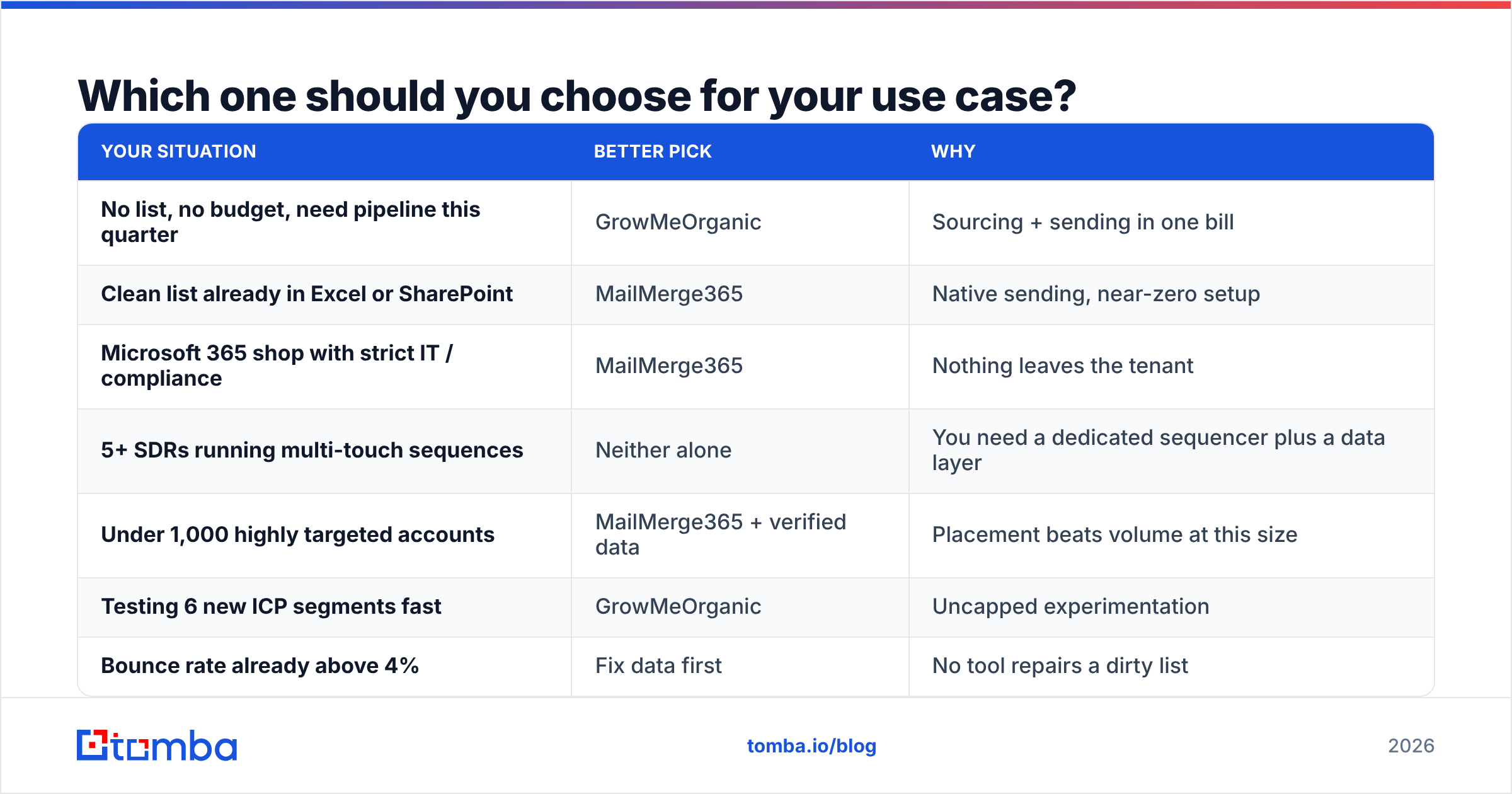
Which one should you choose for your use case?#
| Your situation | Better pick | Why |
|---|---|---|
| No list, no budget, need pipeline this quarter | GrowMeOrganic | Sourcing + sending in one bill |
| Clean list already in Excel or SharePoint | MailMerge365 | Native sending, near-zero setup |
| Microsoft 365 shop with strict IT / compliance | MailMerge365 | Nothing leaves the tenant |
| 5+ SDRs running multi-touch sequences | Neither alone | You need a dedicated sequencer plus a data layer |
| Under 1,000 highly targeted accounts | MailMerge365 + verified data | Placement beats volume at this size |
| Testing 6 new ICP segments fast | GrowMeOrganic | Uncapped experimentation |
| Bounce rate already above 4% | Fix data first | No tool repairs a dirty list |
Most people skip the last row. If your bounce rate is already bad, switching sending tools changes nothing. The list is the problem.
What does a better stack look like?#
The best outbound teams do not run one platform for everything. They run a thin stack. Each layer can be swapped without ripping out the rest:
- Sourcing layer — LinkedIn, Sales Navigator, conference lists, your own site traffic, intent signals.
- Data layer — a specialist email finder and verifier with a measurable accuracy rate. One job, done well. Not a database thrown in as a feature.
- Sending layer — MailMerge365 for native, low-volume, high-trust sends. A dedicated sequencer if you truly need multi-inbox scale.
- Enrichment layer — job title, company size, tech stack, phone. Pull it with data enrichment at import time, not by hand.
Separating them buys you leverage. When your data vendor slips, you swap the data vendor in an afternoon. When your all-in-one slips, you rebuild the whole outbound motion and re-import everything.
Work in batches if your lists are large. A bulk email finder turns a 5,000-row CSV into a verified, sendable list in one pass. A Tomba API call does the same inside a workflow you already run.
GrowMeOrganic vs MailMerge365: the final call#
Forced to pick one, and you have nothing? Take GrowMeOrganic. Just plan to re-verify every export before it touches a sequence.
Already have your list and live in Outlook? Take MailMerge365, without hesitation. It is cheaper, simpler, more deliverable at small volumes, and far easier to defend to IT.
Building something meant to last past this quarter? Do not treat GrowMeOrganic vs MailMerge365 as a binary. The tool that sends your email is the least special part of your stack. The data going into it decides whether the campaign works.
Start there. Run your existing list through a verification pass. Look at the reject rate. That number tells you more about your next quarter than any feature table will. Then plug a data source into whichever sender you picked, and check current Tomba pricing against what you already pay for bundled data you do not trust.
Ready to fix the data layer first? Tomba Email Finder finds and verifies work email addresses by domain, name, or company. The free tier gives you 25 searches a month. Starter is $49/mo and Growth is $99/mo. Point it at your GrowMeOrganic export or your MailMerge365 spreadsheet. Clear the bounces before you send, and let the sending tool do the one job it is good at.
Related guides#
Ready to find emails that actually work?
Join 150,000+ professionals who stopped guessing and started sending. Free credits on signup — no credit card required.
Get the Tomba newsletter
Practical outbound tactics and product updates — once every two weeks.
About the author