GrowMeOrganic vs Mailmeteor: Full 2026 Comparison Guide
GrowMeOrganic builds and sends lists. Mailmeteor sends personalized mail merges from Gmail. They are not the same product — here is which one actually fits your outbound motion in 2026.
TL;DR
- They are not competitors in the strict sense. GrowMeOrganic is an all-in-one prospecting suite (B2B database, LinkedIn scraping, email finding, drip campaigns). Mailmeteor is a Gmail-native mail merge and tracking tool. One finds people; the other emails them from your own inbox.
- Pick Mailmeteor if you already have your list, live in Google Workspace, and want personalized 1:1-looking sends with the least setup and the lowest cost per seat.
- Pick GrowMeOrganic if you have no list, need contact data plus sending in one subscription, and can tolerate a broader tool that is average at several jobs rather than excellent at one.
- The overlap is thin. GrowMeOrganic's sending is weaker than a dedicated sequencer; Mailmeteor has no contact data at all. Most teams that compare these two end up using a data layer plus a sender.
- Data quality is the real variable. Neither tool wins if 30% of your list bounces — verify before you send, whichever sender you choose.
What are GrowMeOrganic and Mailmeteor, actually?#
GrowMeOrganic is a prospecting platform built around unlimited-ish usage pricing. You get a B2B contact database, a Chrome extension that pulls contacts out of LinkedIn and Sales Navigator, an email finder and verifier, and a built-in drip campaign sender that connects to your own SMTP or Google account. The pitch is "replace four tools with one subscription."
Mailmeteor is narrower on purpose. It is a Gmail and Google Sheets mail merge: your rows are the recipients, your columns are the merge fields, and every email leaves from your real Gmail or Workspace address as a normal message. It adds open and click tracking, scheduling, follow-ups, unsubscribe handling, and templates. It does not tell you who to email.
That difference decides almost everything downstream. GrowMeOrganic answers "who do I contact?" Mailmeteor answers "how do I contact 400 people without it looking like a blast?" If you are searching growmeorganic vs mailmeteor, you are usually really asking: do I buy a suite, or do I assemble a stack?
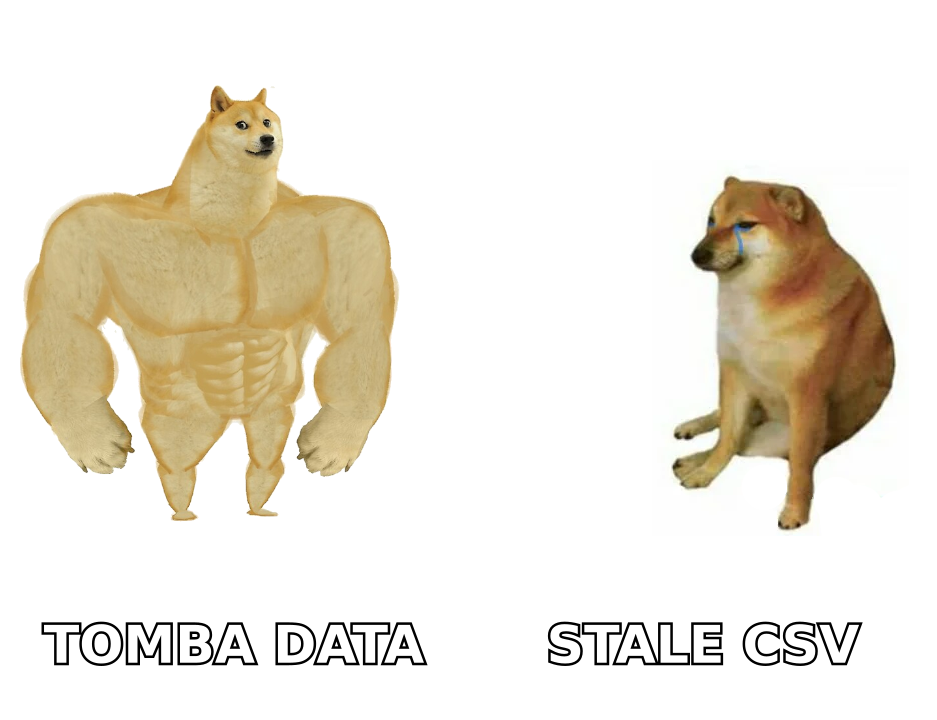
How do GrowMeOrganic and Mailmeteor compare head-to-head?#
| Capability | GrowMeOrganic | Mailmeteor |
|---|---|---|
| Primary job | Find prospects + send campaigns | Send personalized mail merges from Gmail |
| Contact database | Yes — company and people search | None |
| LinkedIn extraction | Yes (Chrome extension, Sales Navigator) | No |
| Email finder | Built in | No |
| Email verification | Built in (basic) | No |
| Sending infrastructure | Own SMTP / connected mailbox | Your Gmail or Google Workspace account |
| Native surface | Web app | Gmail + Google Sheets add-on |
| Follow-up sequences | Multi-step drips | Automatic follow-ups on no-reply |
| Open / click tracking | Yes | Yes (with privacy-friendly options) |
| Deliverability tooling | Basic warmup and throttling | Relies on Google's own sending reputation |
| CRM depth | Lightweight built-in CRM | None — export to Sheets |
| Best for | Founders and small teams with no list | Teams that already have the list |
| Learning curve | Medium — several modules to learn | Low — it is a spreadsheet and an inbox |
Read that table twice before you compare prices, because the price comparison is meaningless if the two products do not do the same work.
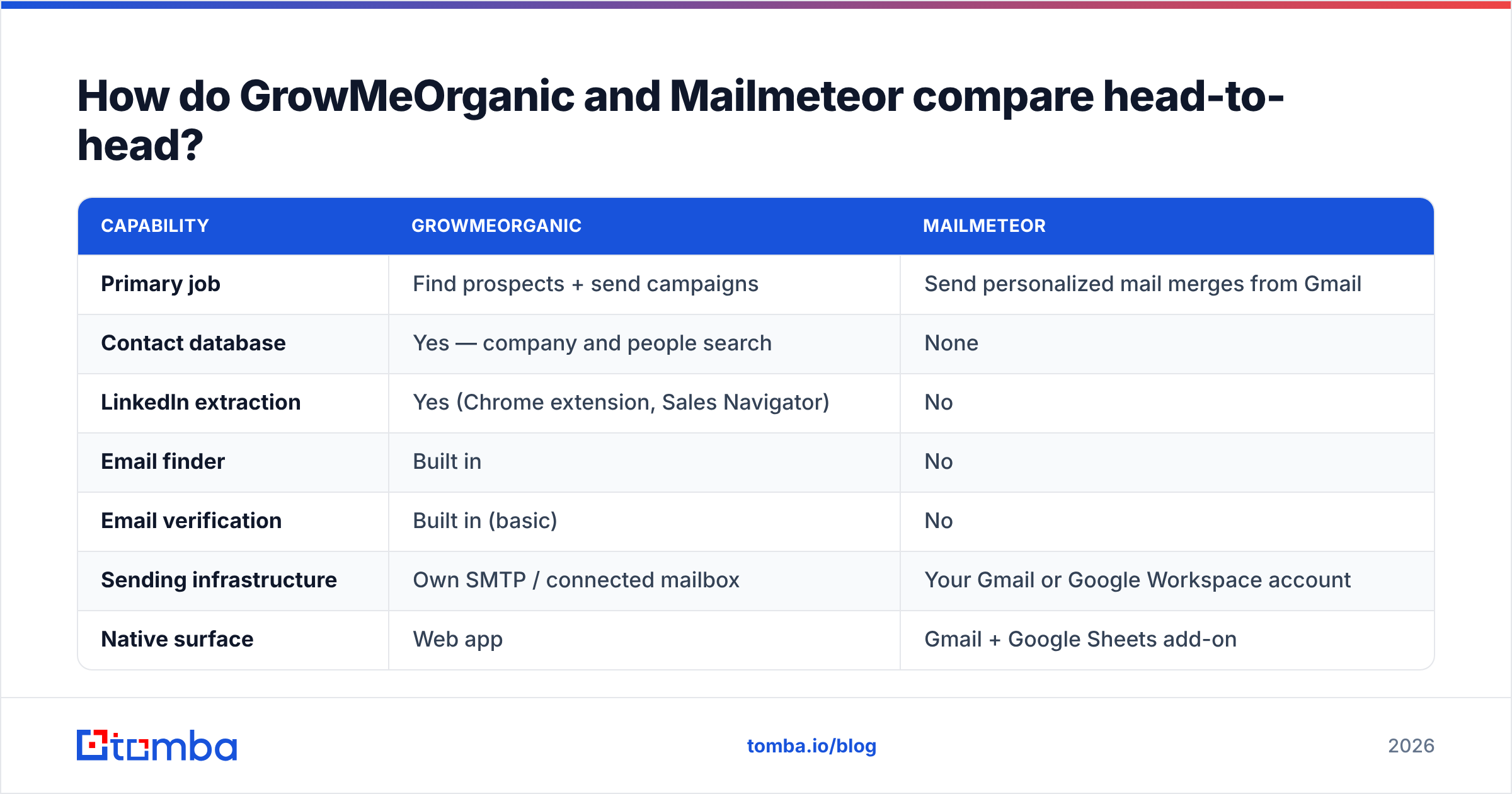
Which one is cheaper in 2026?#
Cheaper depends on what you are counting. Mailmeteor is priced per user in a consumer-friendly band and includes a genuinely usable free tier for small daily sends. GrowMeOrganic is priced as a business tool with lead credits and campaign volume folded in.
| Pricing dimension | GrowMeOrganic | Mailmeteor |
|---|---|---|
| Free tier | Limited trial credits | Yes — small daily send quota |
| Entry paid plan | Business-tool pricing per user, annual discount pushes it down | Low double-digit per user per month |
| What the price includes | Database credits, extension, email finder, campaigns | Sending, tracking, follow-ups, templates |
| Extra cost to get contacts | None — included | Yes — you need a data source |
| Extra cost to send | None — included | None if you have Workspace |
| Scaling cost driver | Credits and seats | Seats and daily send volume |
| Contract friction | Annual billing pushed hard | Month-to-month is normal |
Vendors change plans often, so confirm the current numbers on each vendor's own pricing page rather than trusting any blog table — including this one. The structural point holds regardless: Mailmeteor's sticker price is lower, but Mailmeteor's total cost includes whatever you pay for data. GrowMeOrganic's sticker price is higher and bundles the data.
The honest math for a two-person outbound team: Mailmeteor plus a dedicated email finder usually lands in the same monthly range as a GrowMeOrganic subscription, with better data accuracy and worse consolidation. You are trading one invoice for two, and buying precision with the difference.
Is GrowMeOrganic's built-in data good enough?#
This is where suites usually get graded generously and shouldn't be.
Bundled databases have a structural problem: the vendor's incentive is to show you a big number of contacts, not a small number of correct ones. Records get scraped once and aged for years. Job changes, which run roughly 20% annually across B2B roles, quietly rot the file. You do not notice until your bounce rate crosses 5% and your domain starts landing in spam.
GrowMeOrganic's finder is fine for pattern-based guesses on well-known domains. It gets shakier on:
- Catch-all domains. A server that accepts everything tells you nothing. Without a dedicated catch-all verifier, a "valid" result on a catch-all is a coin flip you are paying for with sender reputation.
- Non-US and non-English domains. Coverage thins fast outside the Anglosphere, and pattern guessing on unfamiliar name formats produces false positives.
- Small companies under 20 employees. These are underrepresented in every bundled database because there is little public signal to scrape.
- Recently changed roles. The record says VP Sales. The person left in Q3. The email still resolves to a catch-all. You get silence, not a bounce, which is worse because you never learn.
- Generic role addresses. info@, sales@, and contact@ inflate contact counts and destroy reply rates.
None of that is unique to GrowMeOrganic — it is true of every all-in-one that treats data as a feature rather than the product. The fix is not to abandon the suite; it is to run your list through a real email verifier before it touches a sender, whichever sender you pick.
Does Mailmeteor have deliverability advantages?#
Yes, and it is the strongest argument in its favor.
Mailmeteor sends through your actual Gmail or Google Workspace mailbox using Google's own infrastructure. There is no third-party SMTP relay, no shared IP pool, no unfamiliar sending domain. To the receiving server, your mail merge looks like you, because it is you. That inherits Google's sender reputation instead of asking you to build one from scratch.
The constraint is the flip side of the same coin: Google's sending limits cap you. Workspace accounts sit in the low hundreds of external recipients per day, and free Gmail is far lower. Mailmeteor does not remove that ceiling — it respects it. If your plan requires 3,000 sends a day, this is the wrong architecture and you need a dedicated cold email platform with multiple warmed domains.
GrowMeOrganic's sending is more flexible and less protected. Connecting your own SMTP means you own the reputation problem entirely. Its warmup and throttling features are present but shallow compared to tools that do nothing else. If you are sending real volume, budget for a separate warmup product and a burner sending domain, and keep your primary domain out of the campaign entirely.
Which should you choose for your use case?#
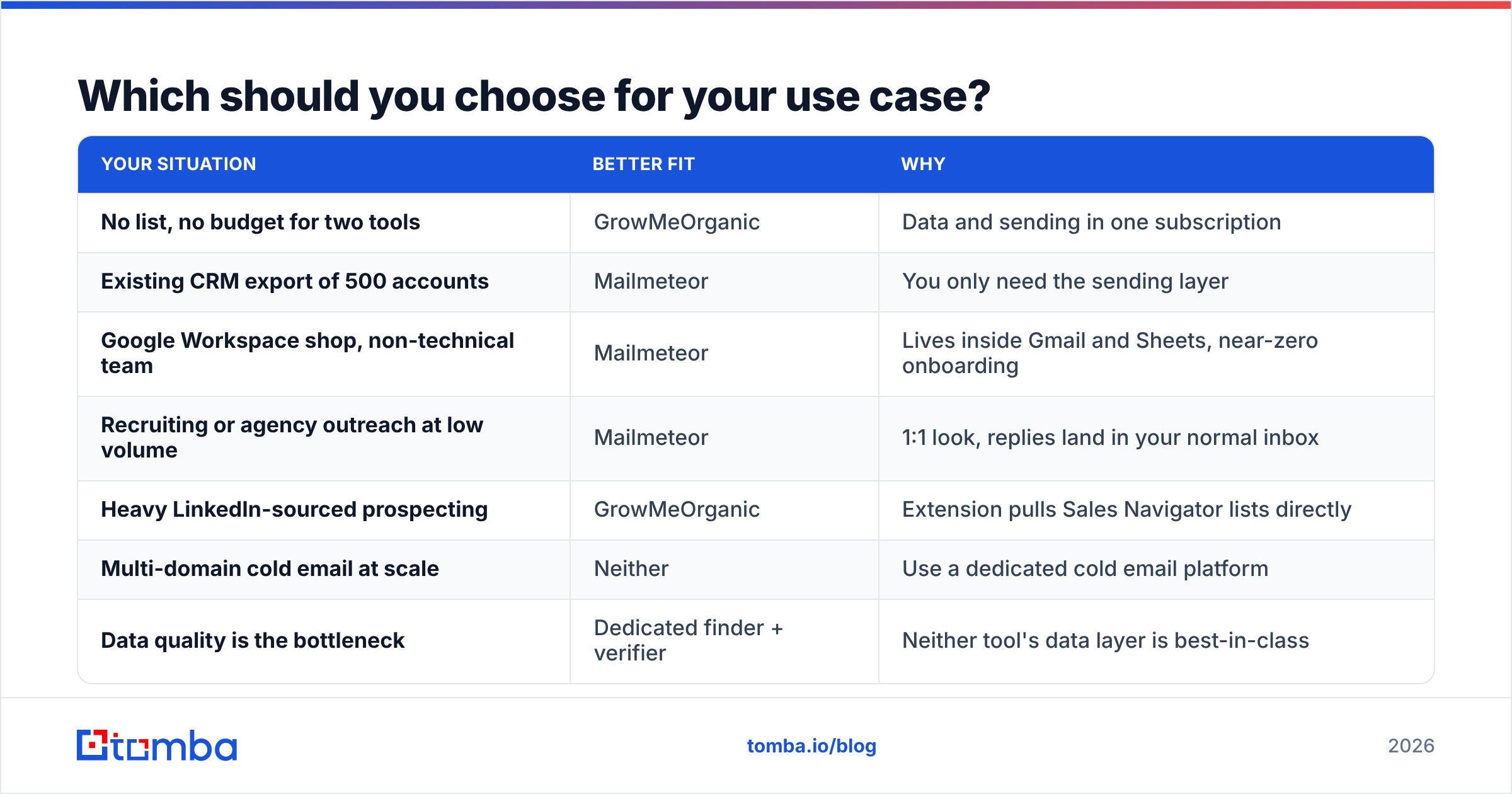
| Your situation | Better fit | Why |
|---|---|---|
| No list, no budget for two tools | GrowMeOrganic | Data and sending in one subscription |
| Existing CRM export of 500 accounts | Mailmeteor | You only need the sending layer |
| Google Workspace shop, non-technical team | Mailmeteor | Lives inside Gmail and Sheets, near-zero onboarding |
| Recruiting or agency outreach at low volume | Mailmeteor | 1:1 look, replies land in your normal inbox |
| Heavy LinkedIn-sourced prospecting | GrowMeOrganic | Extension pulls Sales Navigator lists directly |
| Multi-domain cold email at scale | Neither | Use a dedicated cold email platform |
| Data quality is the bottleneck | Dedicated finder + verifier | Neither tool's data layer is best-in-class |
A pattern worth naming: teams that start with GrowMeOrganic for the bundle often keep the prospecting side and replace the sending side within six months. Teams that start with Mailmeteor rarely replace it — they add a data source beside it. That asymmetry tells you which product is doing its one job well.
What does a better stack look like?#
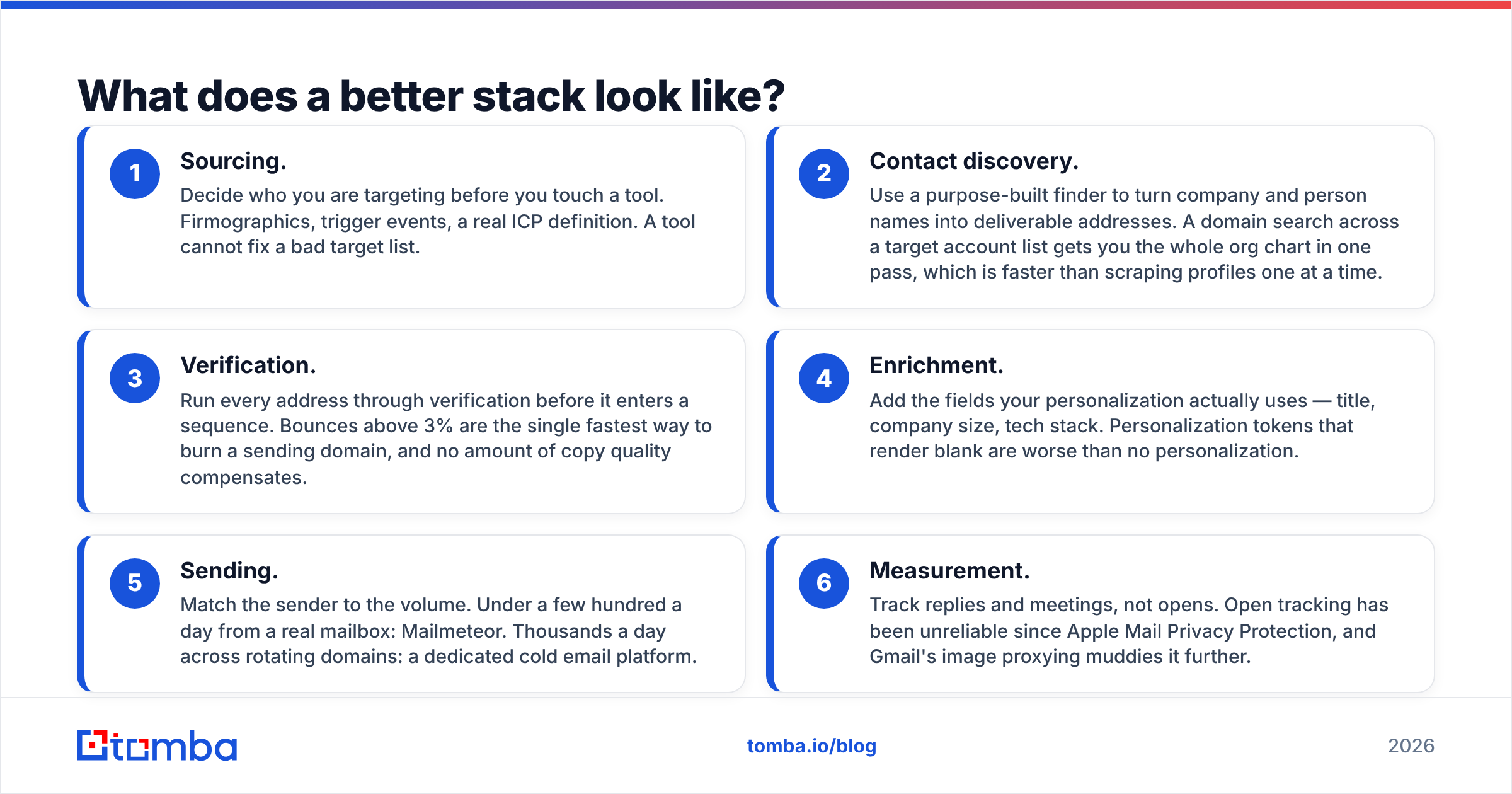
If you refuse to accept "average at everything," split the job into three layers and buy the best available for each.
- Sourcing. Decide who you are targeting before you touch a tool. Firmographics, trigger events, a real ICP definition. A tool cannot fix a bad target list.
- Contact discovery. Use a purpose-built finder to turn company and person names into deliverable addresses. A domain search across a target account list gets you the whole org chart in one pass, which is faster than scraping profiles one at a time.
- Verification. Run every address through verification before it enters a sequence. Bounces above 3% are the single fastest way to burn a sending domain, and no amount of copy quality compensates.
- Enrichment. Add the fields your personalization actually uses — title, company size, tech stack. Personalization tokens that render blank are worse than no personalization.
- Sending. Match the sender to the volume. Under a few hundred a day from a real mailbox: Mailmeteor. Thousands a day across rotating domains: a dedicated cold email platform.
- Measurement. Track replies and meetings, not opens. Open tracking has been unreliable since Apple Mail Privacy Protection, and Gmail's image proxying muddies it further.
That is six line items, not six invoices. Steps 2 through 4 collapse into one vendor if you pick a data platform with an API. Users on G2 consistently rate specialist data tools above bundled suite databases on accuracy, which is the metric that survives contact with your bounce rate.
For teams with engineering support, running discovery through an email finder API inside your own enrichment job is cheaper and more controllable than paying per seat for a UI you use twice a week. For teams without engineers, bulk email finder uploads do the same work with a CSV.
Frequently asked questions#
Can Mailmeteor find email addresses? No. It is a sending and tracking layer only. Bring your own list from a CRM export, a data provider, or a finder tool.
Does GrowMeOrganic replace a cold email platform? For low volume, yes. For serious outbound with domain rotation, inbox warmup, and reply routing, no — it is a prospecting tool with sending attached, not a sending platform with prospecting attached.
Which is safer for my domain reputation? Mailmeteor, because it sends through Google's infrastructure at Google's rate limits. That safety comes from the limits, not despite them.
Can I use both? Yes, and some teams do — GrowMeOrganic for list building, Mailmeteor for the actual send. It works, though you are then paying suite pricing for one module of the suite.
What about free options? Mailmeteor's free tier handles genuinely small sends. GrowMeOrganic's free access is a trial, not a plan. For data, most finders including Tomba offer a free monthly allowance — enough to test accuracy on your own domains before you commit.
The verdict#
Mailmeteor wins on focus, price, and deliverability safety. GrowMeOrganic wins on breadth for someone starting from zero with no list and no stack. Neither wins on data accuracy, because that is not what either product is optimized for.
If your bottleneck is finding correct, deliverable addresses — and for most outbound teams it is — fix that layer first. The Tomba Email Finder starts free with 25 searches a month so you can benchmark accuracy against your own target accounts before paying anything; paid plans open at $49/mo with verification, domain search, and API access included. See Tomba pricing for the full breakdown, run 50 of your real target domains through it, and compare the bounce rate against whatever list you are working from now. That single test will tell you more than any comparison table, including this one.
Related guides#
Ready to find emails that actually work?
Join 150,000+ professionals who stopped guessing and started sending. Free credits on signup — no credit card required.
Get the Tomba newsletter
Practical outbound tactics and product updates — once every two weeks.
About the author