GrowMeOrganic vs Snappy Leads: Which B2B Lead Tool Wins?
Both promise LinkedIn-sourced emails and cheap credits, but they break in different places. Here is an honest look at pricing, data accuracy, export limits, and who each tool actually suits.
GrowMeOrganic vs Snappy Leads is a choice between a bundle and a focused data tool. Here is the short version first.
TL;DR
- GrowMeOrganic bundles a lot. LinkedIn scraping, email finding, and a cold email sender, all on one flat seat price. Breadth is the selling point. Depth is not.
- Snappy Leads is narrower. It is a browser extension plus bulk lookups. It pulls emails and phone numbers from LinkedIn profiles and company pages.
- The real question is not features. It is data quality and export freedom. Both tools hand you addresses. Neither is built to check them.
- Do you already own a sender, like Instantly, Smartlead, or Lemlist? Then GrowMeOrganic charges you for a sequencer you will never open.
- Many teams pair a focused finder like Tomba Email Finder with the sender they already trust.
GrowMeOrganic vs Snappy Leads: what does each tool do?#
They solve the same problem from opposite ends.
GrowMeOrganic started as a growth suite for small teams and agencies. The pitch is simple. One flat plan, and it feels unlimited. You scrape LinkedIn and Sales Navigator lists with a Chrome extension. You pull a local business database. You add emails to your contacts. Then you run drip campaigns from your own mailbox. It all sits behind one login. Agencies on tight budgets like it, because one plan replaces three.
Snappy Leads plays in the contact-data lane. It finds work emails and direct dials for people you have already picked out. There is an extension for one-off lookups. There is bulk lookup for lists you upload. You export to your CRM or a CSV. There is no real sequencing layer. The tool assumes you have one.
So GrowMeOrganic vs Snappy Leads comes down to a simple trade. Do you want a bundle that does five jobs at a 7 out of 10? Or one tool that does a single job well, and hands the rest to your stack?

GrowMeOrganic vs Snappy Leads: how do the plans compare?#
Prices move on both platforms. Credit packs get repackaged. "Unlimited" tiers get capped later. So read the table as a shape, not a quote. Check each vendor's live pricing page before you buy. Then read recent reviews on G2 or Capterra to see what users say about renewals.
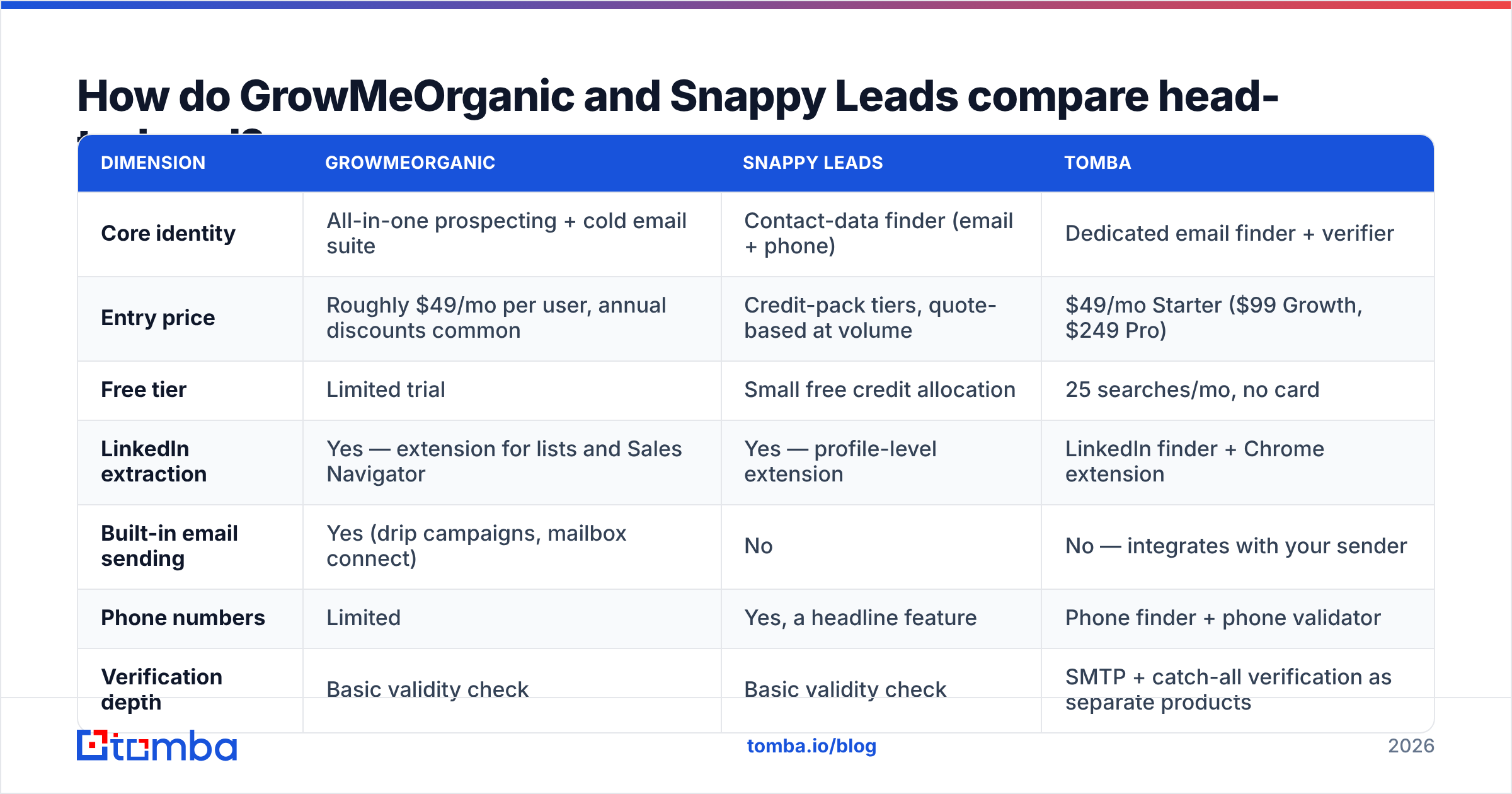
| Dimension | GrowMeOrganic | Snappy Leads | Tomba |
|---|---|---|---|
| Core identity | All-in-one prospecting + cold email suite | Contact-data finder (email + phone) | Dedicated email finder + verifier |
| Entry price | Roughly $49/mo per user, annual discounts common | Credit-pack tiers, quote-based at volume | $49/mo Starter ($99 Growth, $249 Pro) |
| Free tier | Limited trial | Small free credit allocation | 25 searches/mo, no card |
| LinkedIn extraction | Yes — extension for lists and Sales Navigator | Yes — profile-level extension | LinkedIn finder + Chrome extension |
| Built-in email sending | Yes (drip campaigns, mailbox connect) | No | No — integrates with your sender |
| Phone numbers | Limited | Yes, a headline feature | Phone finder + phone validator |
| Verification depth | Basic validity check | Basic validity check | SMTP + catch-all verification as separate products |
| Public API | Limited / plan-gated | Available on higher tiers | Full REST API, CLI, and MCP server |
| Best for | Solo founders and agencies wanting one bill | Reps who need direct dials fast | Teams that want clean data feeding an existing stack |

Two things fall out of that table.
First, GrowMeOrganic is only cheap if you use the sequencer. Take the sending module away, and you have a mid-tier data tool. Next to a focused data tool, it stops looking cheap.
Second, the phone angle from Snappy Leads matters if your team dials. It pairs well with cold calling. If you only send email, you pay for data you will never use.
Which tool gives you more accurate emails?#
On raw accuracy, GrowMeOrganic vs Snappy Leads is close to a tie. That is the problem. Bundled suites tend to lose here, and it is worth saying why.
Finding a likely address is easy. Any tool can read "Sarah Chen, Director of Ops, Acme Inc." off a profile. It looks up the pattern Acme uses. Then it spits out sarah.chen@acme.com. That is pattern guessing. You can do it free with an email permutator.
The hard part comes next. You have to prove the mailbox exists before you send. That means SMTP checks, MX checks, and role-account checks. It also means catch-all handling. A catch-all domain accepts every address. So a weak checker marks junk as valid. You send 400 emails. 180 land nowhere. Your sender reputation takes the hit.

Neither tool sells itself as a checking engine. Both add a validity flag. Neither treats that flag as its own product. It is a fair choice for them. But it means one thing for you. Assume the check step is missing from your workflow.
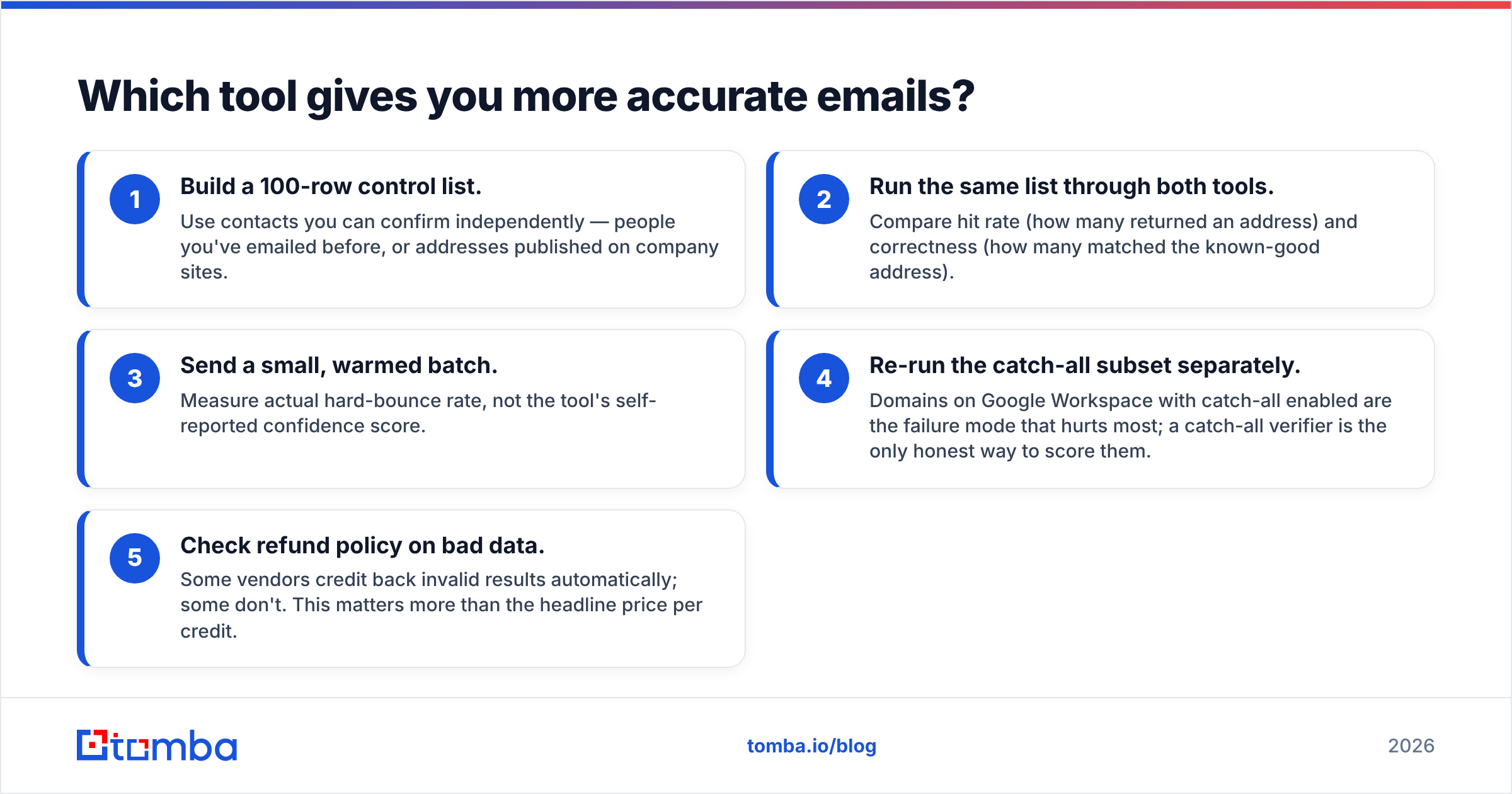
Here is the test to run before you commit:
- Build a 100-row control list. Use contacts you can confirm yourself. People you have emailed. Addresses posted on company sites.
- Run that list through both tools. Compare hit rate and correctness.
- Send a small, warmed batch. Measure the real bounce rate, not the tool's own score.
- Re-run the catch-all rows on their own. Those domains hurt the most. A catch-all verifier is the only fair way to score them.
- Check the refund policy on bad data. Some vendors credit back bad results. Some do not. That matters more than the price per credit.
Vendors dislike this test. A demo dataset cannot game it. Run it anyway.
Is the GrowMeOrganic bundle a good deal?#
On price, GrowMeOrganic vs Snappy Leads looks lopsided at first glance. It is not. It comes down to one question. Do you already own a sending tool?
If you do not, the bundle math works. Maybe you are a solo founder, a first outbound hire, or a small agency with three clients. One plan. One login. One place where a list turns into a sequence. That saved friction is real. An average sequencer still beats no sequencer.
If you do own a sender, the bundle costs you. You pay for a tool you never open. You also get less data quality per dollar. GrowMeOrganic spreads its budget across five modules.
One more thing catches agencies: control over inbox placement. Bundled senders differ a lot here. Some show you warmup, sending windows, and domain rotation. Some hide all of it. If email deliverability is your bottleneck, pick a sender on its own merits. For most outbound teams in 2026 it is the bottleneck, thanks to Google and Yahoo bulk-sender rules. Do not inherit a sender because it came free with a data tool.
Where does Snappy Leads fit better?#
In the GrowMeOrganic vs Snappy Leads split, Snappy Leads wins three specific jobs.
Direct dials. If your team calls, mobile numbers next to emails save real research time. Email-only finders force a second pass in another tool.
Rep-driven work. The extension suits reps who work one account at a time. Open the profile. Click. Get the contact. Move on. That beats "upload 5,000 rows and wait."
Stacks that are already built. Say you run HubSpot or Salesforce plus a sequencer. You do not want a second sequencer. You want a data tap that feeds what you have.
The weak spots: patchy coverage outside its best regions and industries, plus the same gap in checking. Phone data ages fast. Mobile numbers go stale at roughly 2-3% a month as people switch jobs. So screen them with a phone validator before you dial.
What does a better stack look like?#
Most strong teams split the work into three layers. Each layer gets picked on its own merits.
- Sourcing — where the list comes from. Sales Navigator, a B2B database, old CRM records, or website visitors.
- Enrichment and checking — turning names into addresses that deliver. A specialist earns its money here. Errors in this layer pile up as bounce damage.
- Sending — picked on track record, not features.
In that model, GrowMeOrganic plays in layers one and three. Snappy Leads plays in layers one and two. Neither covers all three well. That is why "all-in-one" so often becomes "all-in-one, plus the two tools you bought later."
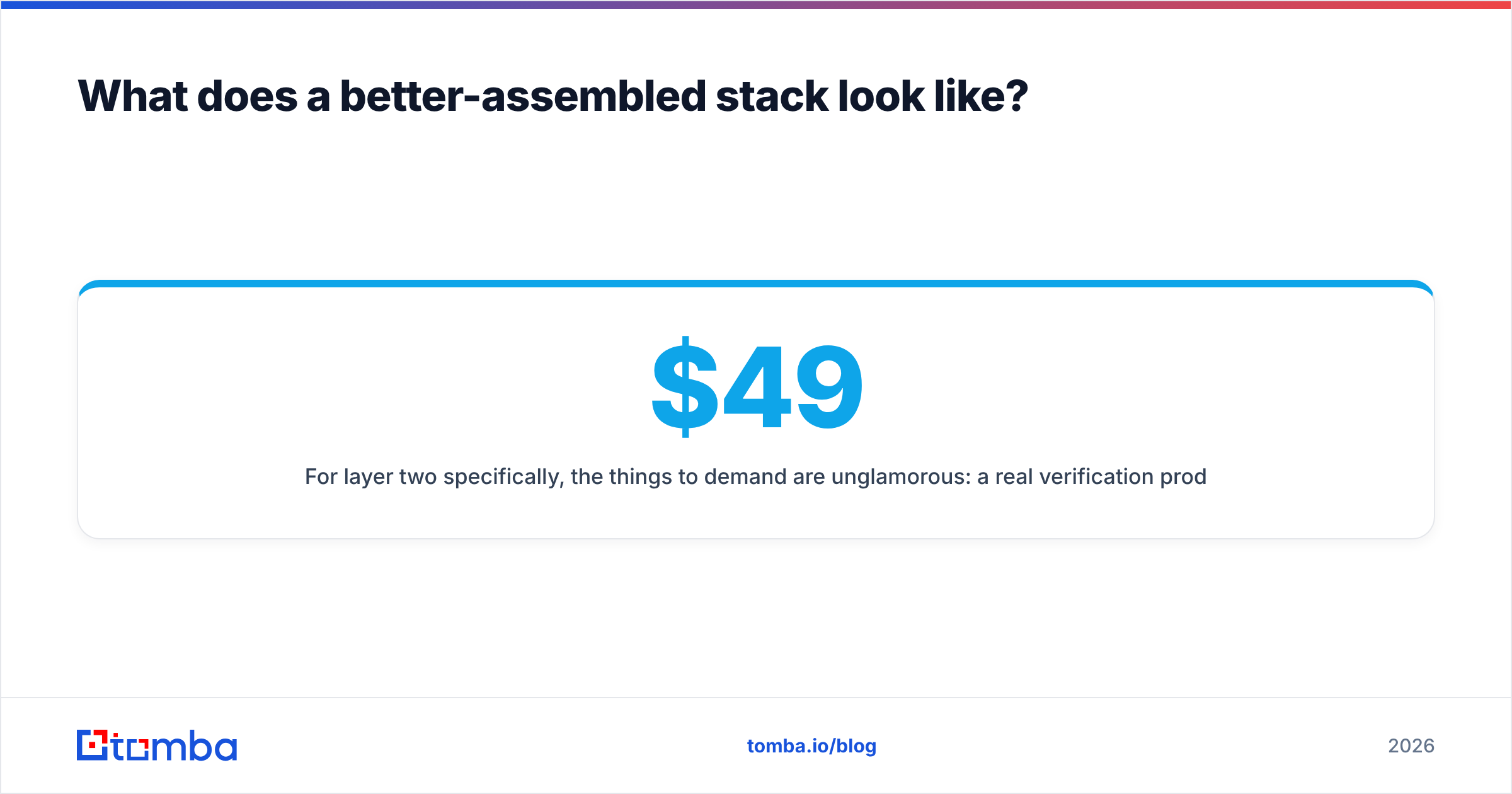
For layer two, ask for plain things. A real checking product, not a flag. Catch-all handling that admits doubt instead of guessing. A documented email finder API so the work runs in your pipeline, not in a browser tab. And clear pricing that does not jump at renewal. Tomba's free tier gives you 25 searches a month. Run the control-list test with it before you spend. Starter is $49/mo, Growth is $99/mo, and Pro is $249/mo.
Other tools hold nearby lanes well. BookYourData sells prebuilt lists pay-as-you-go, with a bounce guarantee. That suits teams who want to buy a list, not build one. Different job, done well. No vendor wins every layer. Buy each layer from a team that treats it as their main product.
GrowMeOrganic vs Snappy Leads: which should you choose?#
Straight answers, by situation:
- Solo founder, no sender, tight budget → GrowMeOrganic. The bundle saves money and setup time. Each module is fine, not great.
- SDR team that calls and emails → Snappy Leads, for the phone data. Add a check step before both channels.
- Agency running outbound for clients → Neither alone. Client inbox rules will push you to a real sender within a quarter.
- RevOps building a pipeline → Neither as the core. You need an API that fills in data on record creation, not an extension a human clicks.
- You need clean emails at volume → A focused finder plus a verifier. Spend the savings on better sending.
Here is the awkward part of the GrowMeOrganic vs Snappy Leads debate. The winner is usually set by what you already own. So audit your stack first. Half the teams asking this are about to buy a second sequencer.
How do you test this before paying?#
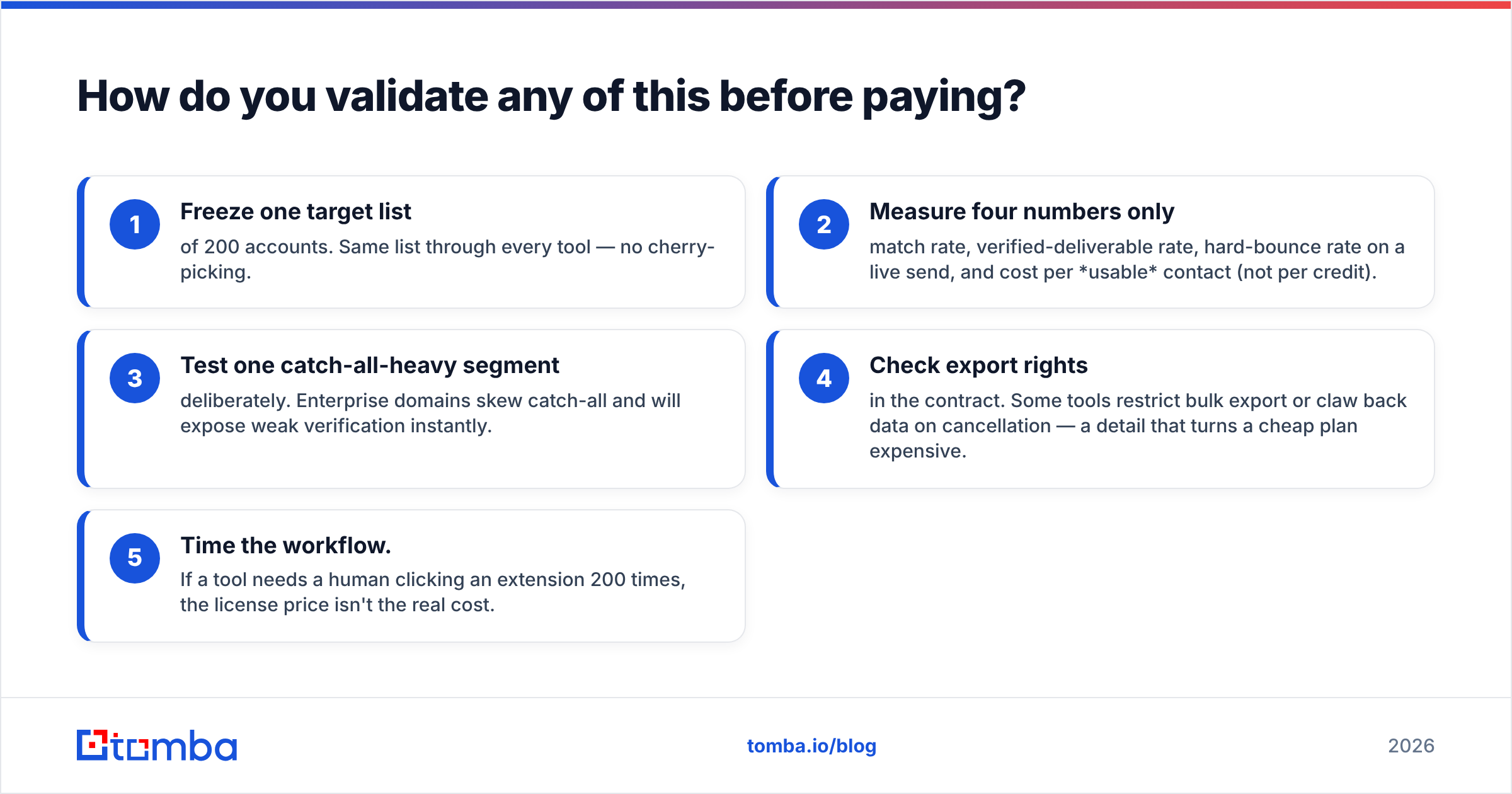
Give yourself two weeks. Run a real bake-off.
- Freeze one list of 200 accounts. Same list for every tool. No cherry-picking.
- Track four numbers. Match rate. Verified rate. Bounce rate on a live send. Cost per usable contact, not per credit.
- Test one catch-all-heavy segment. Big company domains skew catch-all. They expose weak checks fast.
- Check export rights in the contract. Some tools cap bulk export or claw back data when you cancel. That turns a cheap plan expensive.
- Time the workflow. If a human clicks an extension 200 times, the license is not the real cost.
Write the numbers down. Six months from now, someone will propose another switch. Your control-list results are the only argument that settles it.
Want to test the data layer on your own list? Start with the Tomba Email Finder free tier. You get 25 searches a month, no card. Run your 100-row control list. Compare the verified rate against your current tool. If your tool wins, keep it. If it does not, you have the evidence to switch.
Related guides#
Ready to find emails that actually work?
Join 150,000+ professionals who stopped guessing and started sending. Free credits on signup — no credit card required.
Get the Tomba newsletter
Practical outbound tactics and product updates — once every two weeks.
About the author