GrowMeOrganic vs VerifyEmailAddress.com: Which One Wins?
One is a full prospecting suite with unlimited-style pricing. The other is a free one-email-at-a-time SMTP checker. Here is where each one actually earns its place in a 2026 outbound stack.
GrowMeOrganic vs VerifyEmailAddress is not a fair fight, and that is the point. One tool builds lead lists in bulk. The other checks one address at a time, for free. Here is how the GrowMeOrganic vs VerifyEmailAddress choice plays out in a real outbound stack.
TL;DR
- These two tools are not real competitors. GrowMeOrganic is a full prospecting suite: database, email finder, sequences, LinkedIn scraping. VerifyEmailAddress.com is a free SMTP checker for one address at a time. It builds no lists.
- Need to build a list? VerifyEmailAddress.com cannot help. It only tells you whether one address you already have looks deliverable.
- Need to clean a list at volume? GrowMeOrganic bundles verification as a side feature, not a specialist engine. Free web checkers also choke on catch-all domains.
- GrowMeOrganic's "unlimited" pricing looks great on paper. The real cost shows up in data freshness and export caps per tier.
- Most teams run a separate finder and verifier. That is where a tool like Tomba fits (Free 25 searches/mo, Starter $49/mo).
What is GrowMeOrganic?#
GrowMeOrganic is an India-based B2B prospecting platform. It bundles four things most teams buy separately: a contact database, an email finder, a LinkedIn/Sales Navigator scraper, and a cold email sequencer. The pitch is volume. Plans are flat-rate and marketed as unlimited email extraction, not metered by credit.
In practice, you use it like this. Search the built-in database, or run the Chrome extension over a LinkedIn search page. Pull names, companies, and emails into a list. Then push that list into a drip sequence inside the same tool. No Zapier. No CSV shuffling between four vendors.
That bundling is the whole value. It is also the whole risk. One vendor owns discovery, enrichment, verification, and sending. A weak link anywhere shows up as bounced mail, and you have no second opinion to catch it.
Worth knowing before you evaluate:
- Data model. GrowMeOrganic scrapes public profiles and guesses emails from name patterns. That is a fair approach. But guessed addresses need harder verification than sourced ones.
- Sequencing included. You connect your own mailbox and send from it. Deliverability is your domain's problem, not the vendor's.
- Seat-based pricing. Costs scale with users, not just data volume. That matters once an SDR team grows past two or three people.
What is VerifyEmailAddress.com?#
VerifyEmailAddress.com is a free, single-purpose web tool. You paste one email address into a box. It runs syntax validation, an MX record lookup, and an SMTP handshake with the receiving server. Then it returns a verdict: valid, invalid, or unknown.
That is the entire product. There is no real list upload, no CRM sync, no finder, and no API tier you could build a workflow on. There is no support contract either. It is the email version of a free DNS lookup page: handy, sometimes essential, and unfit for production work.
The mechanic behind it explains every limit. An SMTP check opens a conversation with the recipient's mail server. It asks, in effect, "would you accept mail for this address?" Then it hangs up before sending anything. Three things break that trick:
- Catch-all domains accept every address at the SMTP layer. The answer is always yes, so it means nothing.
- Greylisting and rate limits make providers return soft failures to unknown IPs. You get false "unknown" results.
- Microsoft 365 and Google Workspace now block probe traffic much harder. Free checkers get worse each year, while paid engines invest in other signals.
A free checker runs from a shared IP. It hits all three problems harder than a paid service with a reputation-managed IP pool.
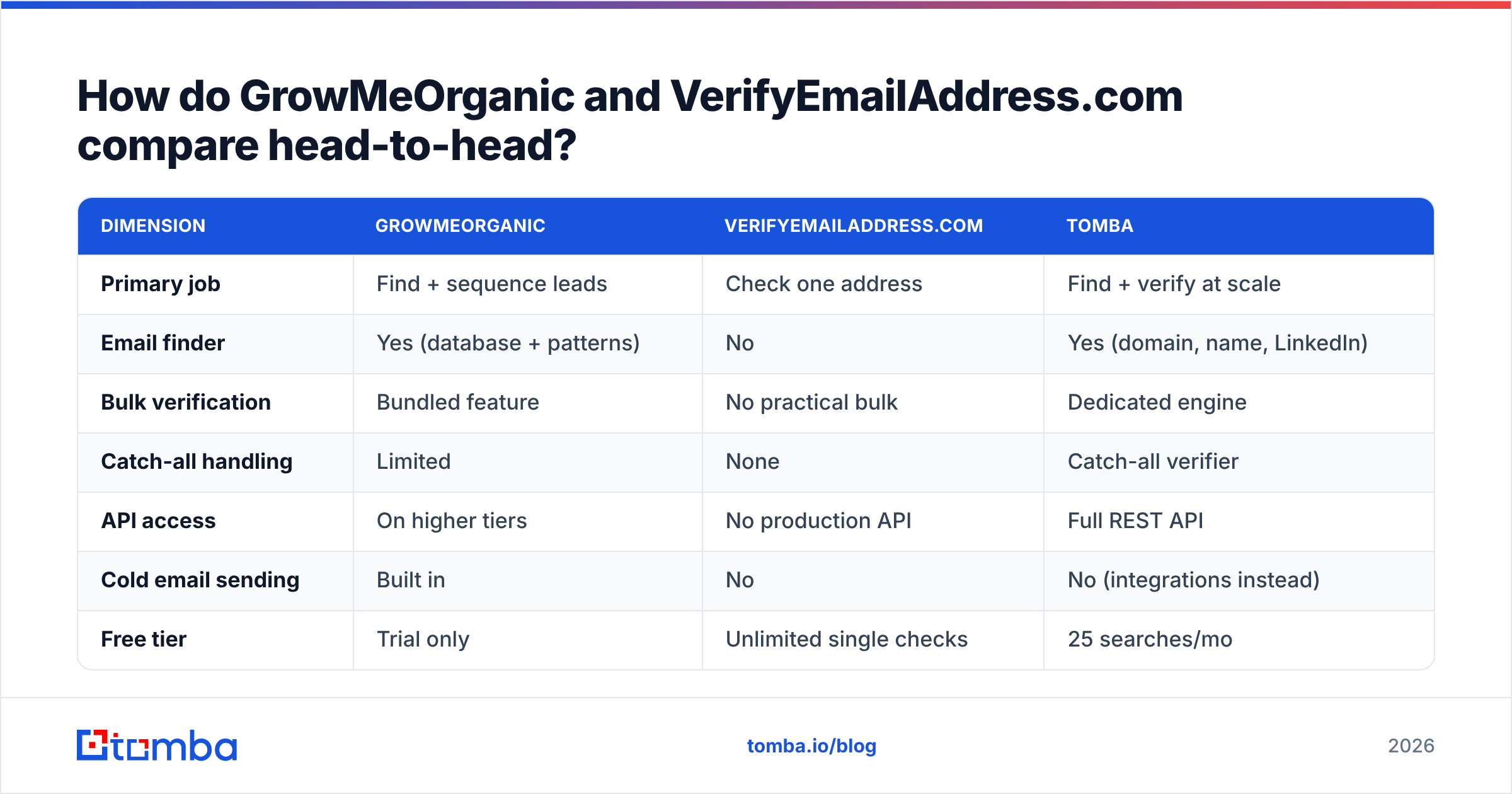
GrowMeOrganic vs VerifyEmailAddress: the head-to-head table#
| Dimension | GrowMeOrganic | VerifyEmailAddress.com | Tomba |
|---|---|---|---|
| Primary job | Find + sequence leads | Check one address | Find + verify at scale |
| Email finder | Yes (database + patterns) | No | Yes (domain, name, LinkedIn) |
| Bulk verification | Bundled feature | No practical bulk | Dedicated engine |
| Catch-all handling | Limited | None | Catch-all verifier |
| API access | On higher tiers | No production API | Full REST API |
| Cold email sending | Built in | No | No (integrations instead) |
| Free tier | Trial only | Unlimited single checks | 25 searches/mo |
| Entry paid price | ~$49/mo range | Free only | $49/mo Starter |
| Best for | Solo founders, small SDR teams | One-off manual checks | Data teams, RevOps, developers |
The table makes the honest answer obvious: this is not a like-for-like matchup. Comparing them is like comparing a kitchen to a thermometer. You can own both. You cannot swap one for the other.
So the useful question is not "which is better." It is "which gap in my stack am I filling right now?"
Which one is more accurate?#
Accuracy means two different things here. Mixing them up is the most common evaluation mistake.
Finder accuracy is the share of returned addresses that actually deliver. Only GrowMeOrganic is in play here, since VerifyEmailAddress.com finds nothing. Pattern-generated addresses are cheap to produce and always a guess. The tool sees that a company uses first.last@domain.com, then builds the rest to match. Without a confidence layer, it will hand you addresses for people who left in 2023.
Verification accuracy is the share of verdicts that are correct. This is where VerifyEmailAddress.com competes, and where free tools lose to paid ones. The SMTP logic is the same. The infrastructure is not. Verdict quality is mostly an IP reputation and retry-strategy problem.

Three practical rules hold for any vendor:
- Never trust one verdict on a catch-all domain. If the tool cannot tell you why it said "accept-all," treat the address as unverified. A proper catch-all verifier uses other signals, not just the SMTP handshake.
- Re-verify anything older than 90 days. B2B contact data decays about 2–3% per month from job changes alone. A list verified in January is clearly worse by April.
- Keep "unknown" apart from "invalid." Suppressing unknowns costs you reachable prospects. Sending to them costs you sender reputation. Route them to a small warm segment instead of your main sequence.
Neither tool here shows enough verdict detail for rule three. That gap is why most serious senders add a dedicated email verifier as a final gate before import.
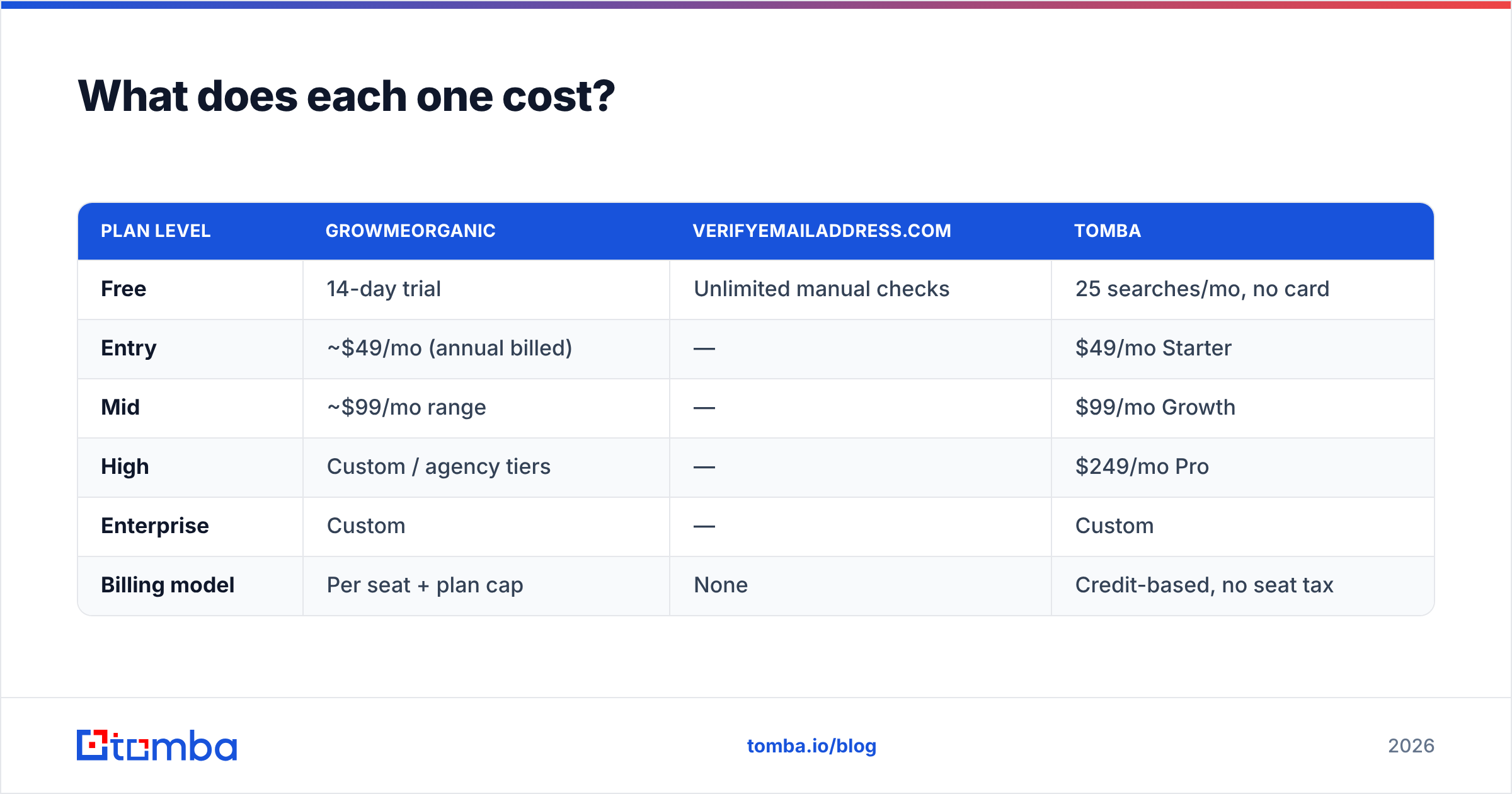
What does each one cost?#
| Plan level | GrowMeOrganic | VerifyEmailAddress.com | Tomba |
|---|---|---|---|
| Free | 14-day trial | Unlimited manual checks | 25 searches/mo, no card |
| Entry | ~$49/mo (annual billed) | — | $49/mo Starter |
| Mid | ~$99/mo range | — | $99/mo Growth |
| High | Custom / agency tiers | — | $249/mo Pro |
| Enterprise | Custom | — | Custom |
| Billing model | Per seat + plan cap | None | Credit-based, no seat tax |
Two cost realities that pricing pages tend to gloss over:
"Unlimited" is never unlimited. There is always a cap: daily extraction limits, export row caps, or fair-use throttling. Read the fine print on the tier you are actually buying, not the one in the comparison chart. Check GrowMeOrganic's current terms directly. Then cross-reference user reports on G2 before you commit to annual billing.
Free tools cost labor. VerifyEmailAddress.com is free in dollars. At one address per manual paste, a 2,000-row list eats a full workday of clicking. Above roughly fifty addresses, a paid bulk run is cheaper than your own time. That is the practical case for a bulk email finder workflow.

Who should choose which tool?#
Match the tool to the constraint you actually have.
- No list, no budget process. GrowMeOrganic. One vendor, one invoice, finder and sequencer in the same login. That bundling saves a solo founder or a two-person team real setup time.
- One address and a doubt. VerifyEmailAddress.com. It costs nothing and takes ten seconds. It is exactly right for checking a single high-value contact before you send. Use it like a free email checker: spot checks, not pipelines.
The next three cases need something neither tool provides.
- A list and a deliverability problem. You need a specialist verifier with catch-all logic, an API, and per-verdict detail. Then you can segment risky addresses instead of deleting them all.
- Engineers and a data pipeline. You need a documented email finder API that returns confidence scores and sources. Enrichment then runs on a schedule, not as a monthly manual chore.
- A sequencer you already like. Avoid all-in-one suites. Buying GrowMeOrganic for its finder means paying for a sequencer you will never open. Buy the data layer on its own and connect it.
Where does Tomba fit between these two?#
Tomba sits in the middle that neither tool covers: bulk-grade finding and bulk-grade verification, without the sequencer.
That scope is deliberate. Sending is a mailbox-reputation job with its own dedicated vendors. Data sourcing is an infrastructure job. Bundle them and one half is always weaker. Tomba's email finder finds addresses by domain, name, or LinkedIn profile. The verification layer, including catch-all handling, then gates what reaches your CRM.

Against these two tools, concretely:
- Versus GrowMeOrganic: you lose the built-in sequencer. You gain an API, credit-based billing with no seat multiplier, and verification as a first-class product rather than a bundled checkbox. Pricing starts at $49/mo Starter, then $99/mo Growth and $249/mo Pro — see Tomba pricing for current limits per tier.
- Versus VerifyEmailAddress.com: you lose "free forever for one address." You gain batch processing, catch-all resolution, and integrations with HubSpot, Salesforce, Sheets, and Airtable. The free tier is 25 searches a month, so you can test without a card.
One honest caveat. If your whole workflow is one manual check a week, a free web tool is the right answer. Tools earn their price at volume, not in principle.
How should you actually test them?#
Run a controlled bake-off. Do not trust anyone's marketing, including this post.
Take 100 contacts you already know are valid: past customers, current partners, teammates at other companies. Run them through each tool. Measure three numbers.
- Match rate — how many addresses the finder returns at all.
- Precision — how many returned addresses are the correct ones you already knew.
- False confidence — how many wrong addresses came back with a high-confidence label. This number predicts your bounce rate, and almost nobody measures it.
A tool with an 80% match rate and 95% precision beats one with 95% match and 70% precision. The second one quietly poisons your domain reputation. Then re-run the same set 60 days later. If the numbers hold, the data is genuinely refreshed. If they drop, you bought a stale snapshot.
The bottom line#
VerifyEmailAddress.com is a fine free utility for one-off checks. As infrastructure, it is a non-starter. GrowMeOrganic is a reasonable bundled suite for small teams who value one login over best-in-class parts. Neither is built for a team that needs verified contact data flowing into a CRM on a schedule.
That last line describes most outbound teams. So in the GrowMeOrganic vs VerifyEmailAddress debate, the real answer is often a third tool. Start with the Tomba Email Finder. The free tier gives you 25 searches a month, no card required. That is enough to run the 100-contact bake-off above against whatever you use today, then decide with your own numbers.
Related guides#
Ready to find emails that actually work?
Join 150,000+ professionals who stopped guessing and started sending. Free credits on signup — no credit card required.
Get the Tomba newsletter
Practical outbound tactics and product updates — once every two weeks.
About the author