HitHorizons vs Skrapp: Which B2B Data Tool Wins in 2026?
HitHorizons sells registry-grade company records. Skrapp sells LinkedIn-sourced work emails. They solve different halves of the same prospecting problem — here is which one you actually need, and what to pair it with.
TL;DR
- These tools are not substitutes. HitHorizons is a company-data platform built on official business registers. Skrapp is an email finder built on LinkedIn and domain patterns. Comparing them is comparing a phone book to a map.
- Pick HitHorizons if your bottleneck is which European companies to target — legal entities, registration IDs, sector codes, size bands.
- Pick Skrapp if your bottleneck is who to email at companies you already know, and your prospecting happens inside LinkedIn.
- Neither one solves verification well enough to protect your domain. Both hand you addresses; you still need a separate deliverability check before you press send.
- The realistic stack is firmographics for targeting, a contact-level finder for the addresses, and a verifier as the last gate. That is three jobs, and one vendor rarely does all three.
What is HitHorizons, exactly?#
HitHorizons is a company-information platform. Its differentiator is provenance: the records come from official national business registers and related public filings rather than from scraped social profiles. You search a company name or ID and get back the legal entity — registered address, registration and VAT identifiers, industry classification, estimated size, and links to related entities in a corporate group.
That provenance matters more than it sounds. Registry data is slow-moving and boring, which is exactly what makes it reliable. A company's legal name and registration number do not churn the way a job title does. If you sell into regulated markets, run KYC-adjacent checks, or need to prove where a record came from, that lineage is the product.
What HitHorizons is not: a contact database. You will not walk away with a named VP of Engineering and her work email. You walk away with a defensible list of companies that match your ICP. Coverage skews heavily European, which is a real advantage if you sell into the EU and a real limitation if your ICP is US mid-market SaaS. Check the current country and record counts on hithorizons.com before you assume your territory is covered — vendor coverage claims move quarter to quarter.
What is Skrapp and who is it for?#
Skrapp.io sits at the opposite end of the funnel. It is an email-finding tool whose center of gravity is a Chrome extension that runs over LinkedIn and LinkedIn Sales Navigator. You browse a profile or a search result page, the extension surfaces likely work emails, and you push them into a list. It also offers domain search (pull the addresses associated with a company domain), a bulk finder for uploaded lists, and a built-in verification step.
The mechanic under the hood is the standard one for this category: infer the company's email pattern (first.last@, flast@, first@), apply it to a name harvested from LinkedIn, then test the result. When the pattern is well-established and the mail server answers honestly, that works well. When the domain is a catch-all or the pattern is inconsistent, confidence drops fast — and that is true of every tool in the category, not a Skrapp-specific flaw.
Skrapp's audience is the SDR or founder who lives in LinkedIn. If your prospecting motion is "search Sales Navigator, build a list, export, sequence," it fits the muscle memory. See how users describe that workflow in the wild on G2 rather than trusting any vendor's own case studies, including ours.

How do HitHorizons and Skrapp compare head-to-head?#
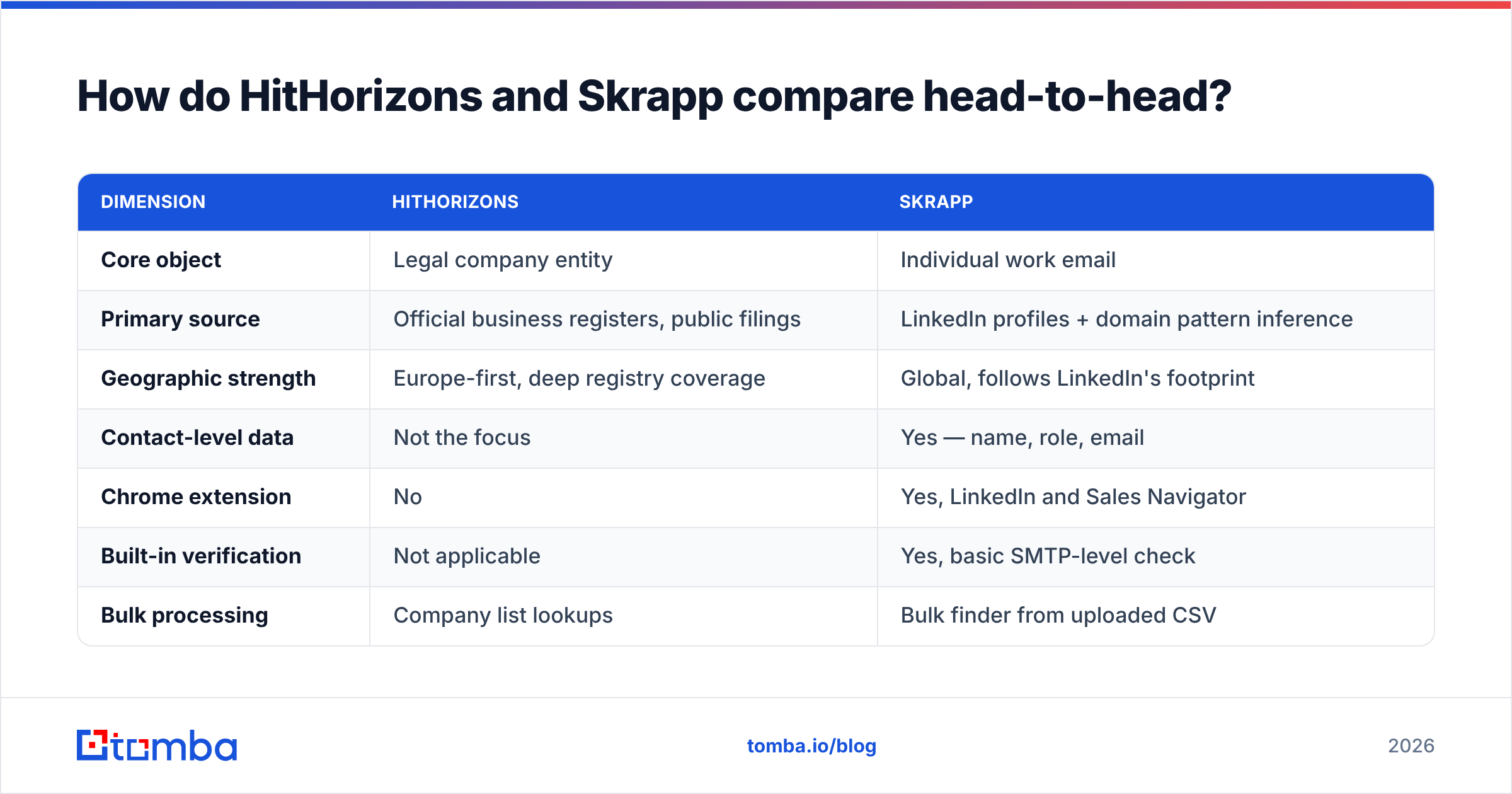
| Dimension | HitHorizons | Skrapp |
|---|---|---|
| Core object | Legal company entity | Individual work email |
| Primary source | Official business registers, public filings | LinkedIn profiles + domain pattern inference |
| Geographic strength | Europe-first, deep registry coverage | Global, follows LinkedIn's footprint |
| Contact-level data | Not the focus | Yes — name, role, email |
| Chrome extension | No | Yes, LinkedIn and Sales Navigator |
| Built-in verification | Not applicable | Yes, basic SMTP-level check |
| Bulk processing | Company list lookups | Bulk finder from uploaded CSV |
| Typical buyer | RevOps, compliance, market research | SDRs, founders, agency prospectors |
| Weakest point | No decision-maker contacts | Thin firmographics for targeting |
Read that table as a division of labor, not a scoreboard. HitHorizons answers "is this a real 200-person manufacturing company registered in Poland?" Skrapp answers "what is the head of procurement's email address there?" A team doing outbound into European mid-market needs both answers, and getting one without the other stalls the pipeline in a different place each time.
Which one has better data coverage?#
Wrong question — better on what axis?
Entity coverage. HitHorizons wins outright in Europe because registry filing is legally mandatory. Every registered company appears whether or not anyone at that company has ever touched LinkedIn. That includes the unglamorous industrials, logistics firms, and family-owned suppliers that are invisible to social-graph tools.
Person coverage. Skrapp wins wherever LinkedIn adoption is high — tech, professional services, North America and Western Europe. It is structurally weaker in sectors and regions where people simply do not maintain profiles. You cannot infer an email for a person your source has never heard of.
Freshness. Registry data updates when a filing happens, which can lag months behind reality. LinkedIn data updates when a person edits their profile, which is fast but self-reported and frequently stale in the other direction — people leave jobs long before they change their headline. Neither model is "fresher"; they decay differently.
Accuracy of the deliverable. For HitHorizons the deliverable is a fact about a legal entity, and it is either correct or it is not. For Skrapp the deliverable is a probabilistic guess that gets tested. That is why every email finder publishes a confidence score and why you should treat any tool's headline accuracy claim as a ceiling under lab conditions rather than what your specific list will return. Run a 200-row sample against your own ICP before signing anything — that number is the only one that matters.
What does each one cost?#
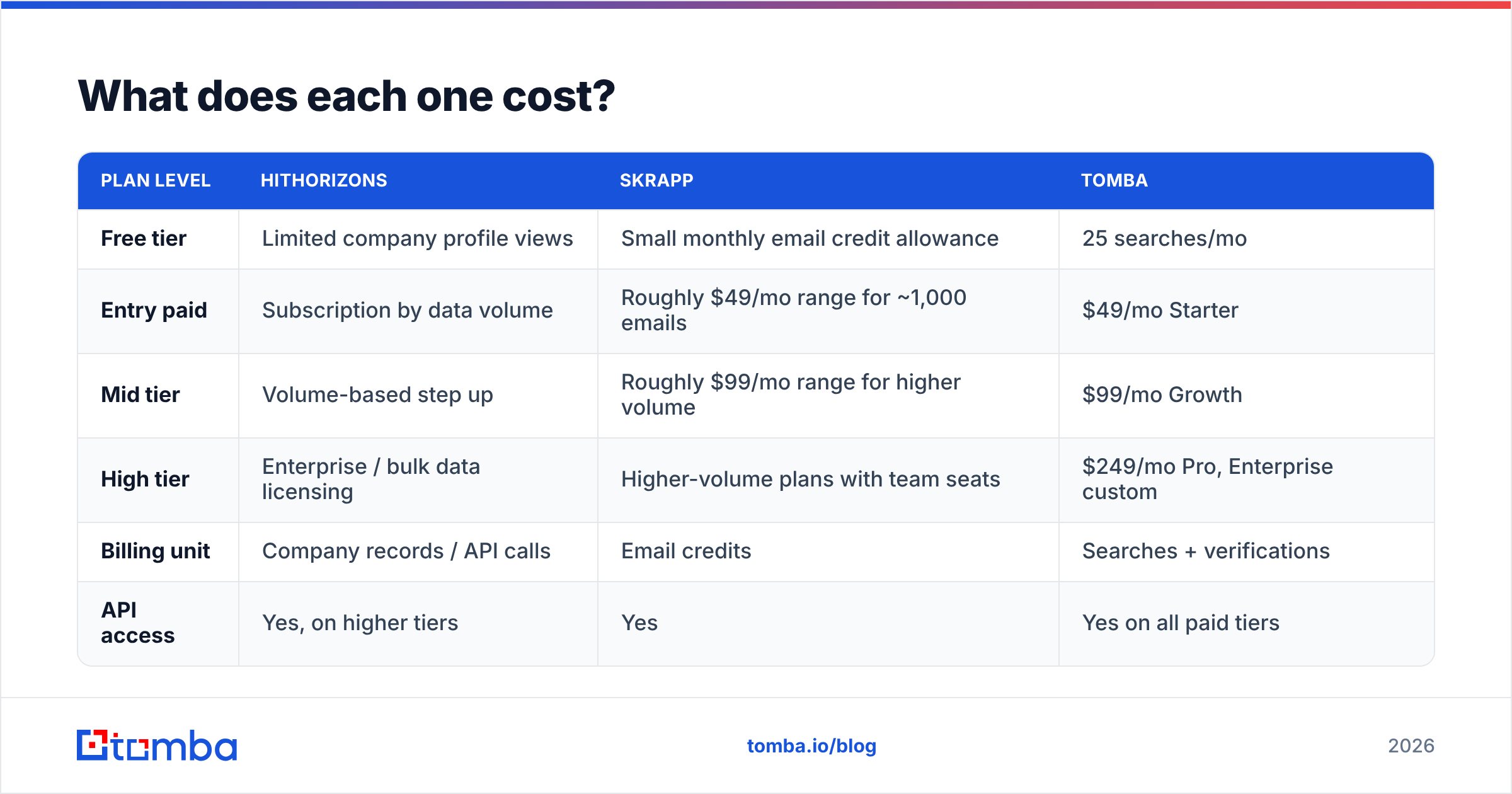
Pricing on both platforms changes, and both use different units — company lookups versus email credits — so a straight per-dollar comparison is misleading. Here is the shape of it, with the caveat that you must confirm current numbers on each vendor's own page.
| Plan level | HitHorizons | Skrapp | Tomba |
|---|---|---|---|
| Free tier | Limited company profile views | Small monthly email credit allowance | 25 searches/mo |
| Entry paid | Subscription by data volume | Roughly $49/mo range for ~1,000 emails | $49/mo Starter |
| Mid tier | Volume-based step up | Roughly $99/mo range for higher volume | $99/mo Growth |
| High tier | Enterprise / bulk data licensing | Higher-volume plans with team seats | $249/mo Pro, Enterprise custom |
| Billing unit | Company records / API calls | Email credits | Searches + verifications |
| API access | Yes, on higher tiers | Yes | Yes on all paid tiers |
Two cost traps worth naming. First, credit burn on failed lookups — check whether a tool charges you when it returns nothing or returns an unverifiable catch-all. That policy quietly doubles effective cost on hard lists. Second, seat pricing — a $49/mo tool for one SDR is a $245/mo tool for five. Compare against Tomba pricing on total workflow cost, not the sticker on the entry plan.
Which is better for cold outreach?#
Skrapp, if you are forced to pick one and outreach is the job. It produces the artifact a sequencer consumes: a name, a company, and an address. HitHorizons produces an account list, which is upstream of that and requires a second tool before anyone gets emailed.
But the honest answer is that a LinkedIn-extension workflow has a ceiling, and you hit it around the point where you need volume. Manually browsing profiles does not scale past a few hundred contacts a week per rep. Once you are building lists of thousands, you want a bulk email finder or an API call inside your enrichment pipeline, not a person clicking through Sales Navigator pages.
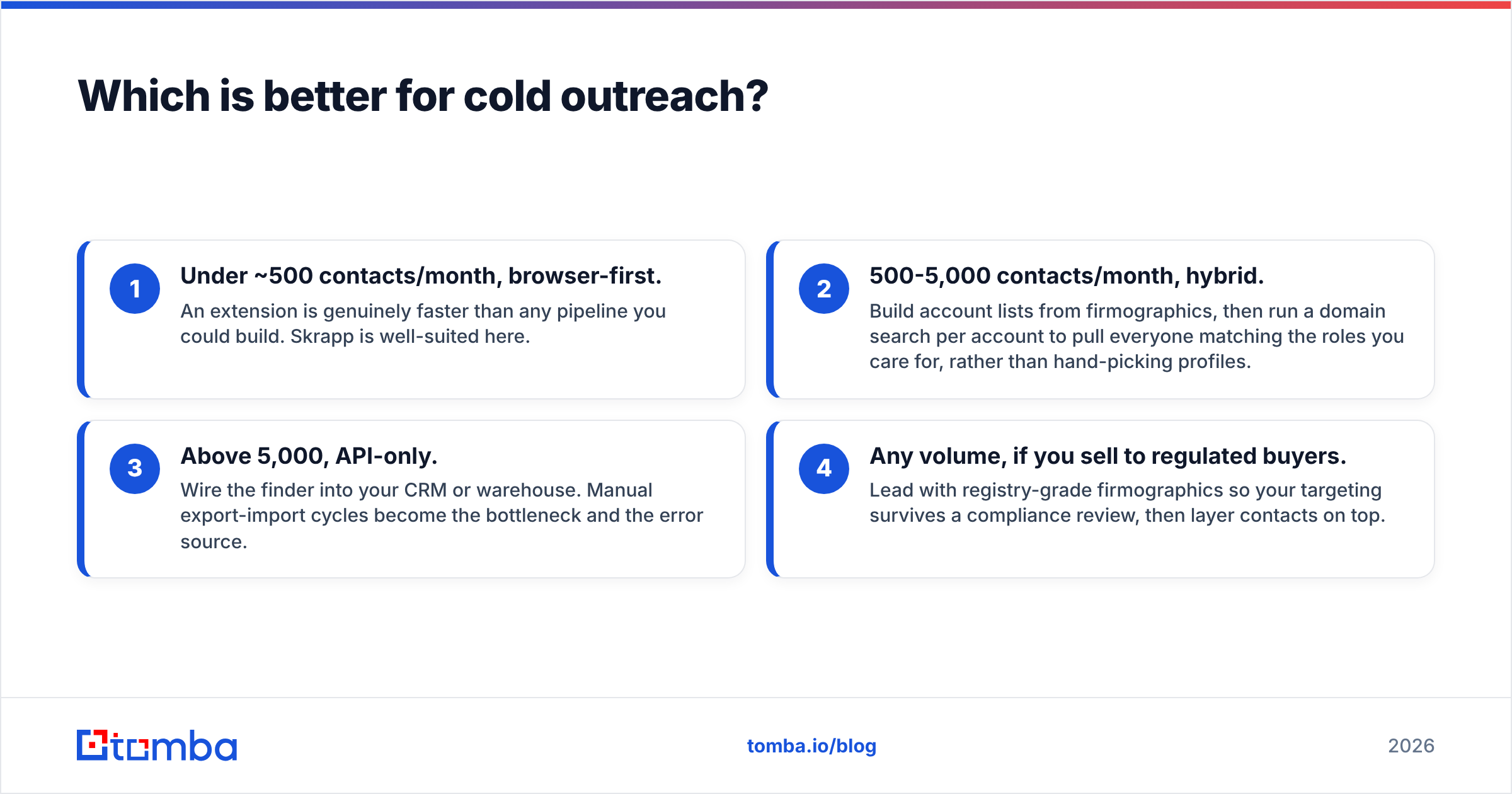
That is the practical fork in the road:
- Under ~500 contacts/month, browser-first. An extension is genuinely faster than any pipeline you could build. Skrapp is well-suited here.
- 500-5,000 contacts/month, hybrid. Build account lists from firmographics, then run a domain search per account to pull everyone matching the roles you care for, rather than hand-picking profiles.
- Above 5,000, API-only. Wire the finder into your CRM or warehouse. Manual export-import cycles become the bottleneck and the error source.
- Any volume, if you sell to regulated buyers. Lead with registry-grade firmographics so your targeting survives a compliance review, then layer contacts on top.
Where do both tools fall short?#
Verification depth. A find-and-send workflow without an independent verification gate is how domains get burned. Bounce rates above roughly 3% start attracting filtering attention, and sender reputation is far cheaper to protect than to repair. Run everything through a dedicated email verifier as the final step, regardless of what confidence score the finder attached. Belt and braces on a list of 10,000 costs you an afternoon; a burned sending domain costs you a quarter.
Catch-all domains. Roughly a fifth of business domains accept mail to any address, which makes SMTP-level checks useless there. Most tools mark these "risky" and move on, leaving you to guess. A dedicated catch-all verifier that uses secondary signals is the difference between discarding those records and using them.
Single-channel dependency. Skrapp's reliance on LinkedIn means LinkedIn's rate limits and anti-scraping posture are your rate limits too. HitHorizons' reliance on registries means jurisdictions with weak filing requirements are your blind spots. Both risks are structural, not fixable by a feature request.
No phone layer. Neither is a phone-first product. If your motion is multichannel you will need a phone finder alongside whichever you choose.

Can you use HitHorizons and Skrapp together?#
Yes, and for European outbound it is arguably the strongest pairing of the two. The sequence:
- Define the ICP in registry terms. Sector code, employee band, country, entity age. This produces a defensible target list rather than a vibes-based one.
- Export the company domains. This is the join key for everything downstream. Registry records that lack a website domain are dead ends for email work — filter them out early.
- Run contact discovery per domain. Either via the LinkedIn extension for high-value accounts or a domain-level API sweep for the long tail.
- Enrich to fill gaps. Job title, seniority, and department rarely come through cleanly from either source. Contact enrichment closes that gap before the data reaches your CRM.
- Verify, then segment by confidence. Send to valid addresses from your primary domain. Route risky and catch-all addresses to a secondary domain or a lower-volume cadence.
The failure mode teams hit here is stitching those steps together with CSV exports. Every manual handoff is a place where fields get mangled, duplicates creep in, and someone emails the same prospect twice. If you are running this monthly or more, wire it through an API or an integration instead.
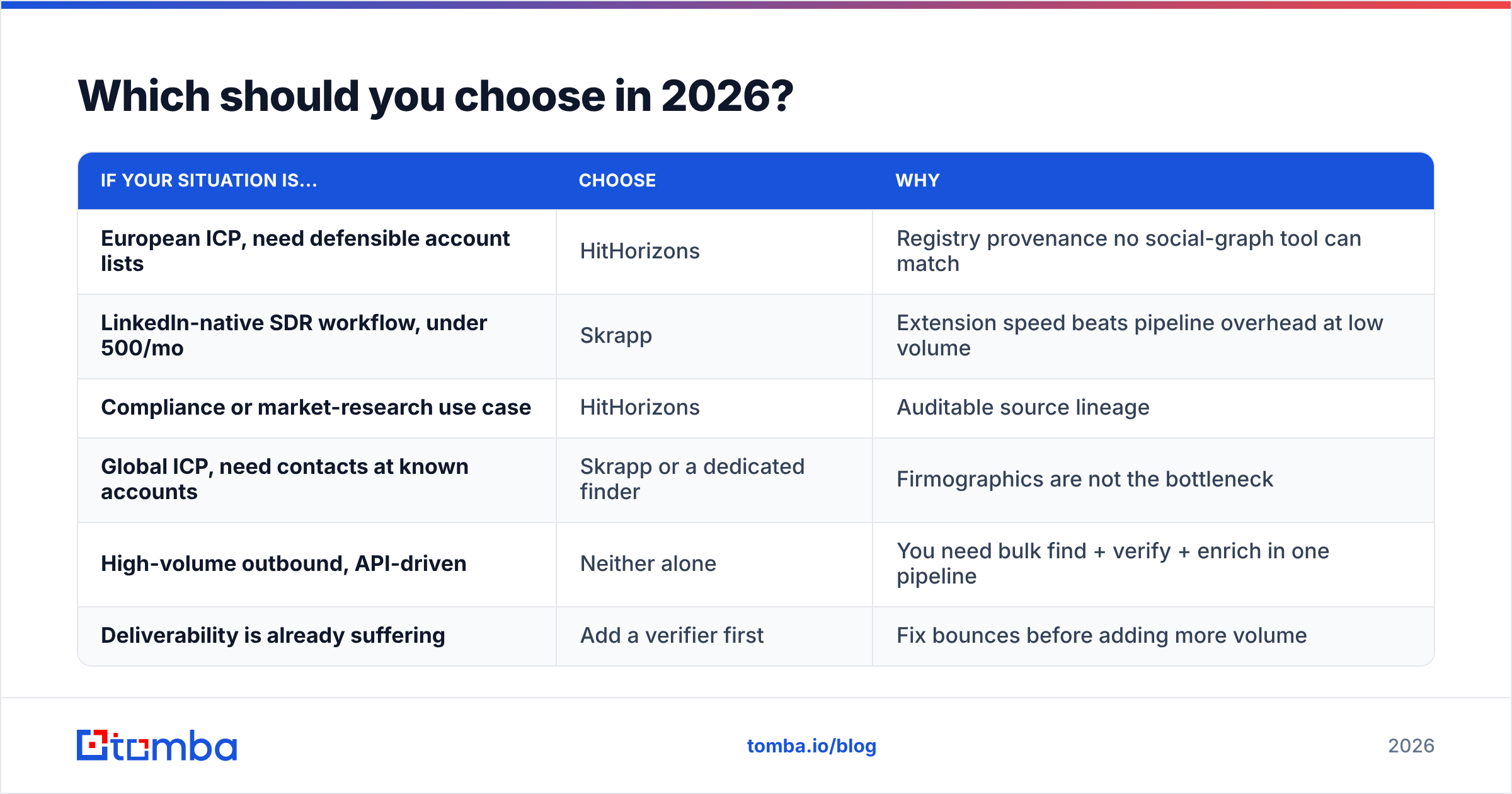
Which should you choose in 2026?#
| If your situation is... | Choose | Why |
|---|---|---|
| European ICP, need defensible account lists | HitHorizons | Registry provenance no social-graph tool can match |
| LinkedIn-native SDR workflow, under 500/mo | Skrapp | Extension speed beats pipeline overhead at low volume |
| Compliance or market-research use case | HitHorizons | Auditable source lineage |
| Global ICP, need contacts at known accounts | Skrapp or a dedicated finder | Firmographics are not the bottleneck |
| High-volume outbound, API-driven | Neither alone | You need bulk find + verify + enrich in one pipeline |
| Deliverability is already suffering | Add a verifier first | Fix bounces before adding more volume |
The uncomfortable conclusion of a hithorizons vs skrapp comparison is that most teams asking the question are trying to solve two problems with one budget line. If you genuinely only have one problem — targeting or contacts — pick the tool that matches it and skip the other. If you have both, budget for both, or consolidate onto a platform that covers finding, verification, and enrichment in a single credit pool so you are not reconciling three billing models and three data schemas.
And whichever you choose, benchmark on your own list. Vendor accuracy claims are measured on the domains that behave well. Your ICP is whatever it is.
Ready to close the contact-data gap?#
If your targeting is solid but the addresses are the weak link, start with the Tomba Email Finder. You get 25 free searches a month to test it against your own list — no card — and paid plans start at $49/mo with verification, domain search, catch-all handling, and API access in the same credit pool, so you are not paying three vendors to complete one workflow. Run your hardest 100 domains through it, compare the hit rate against whatever you use today, and let the sample decide.
Related guides#
Ready to find emails that actually work?
Join 150,000+ professionals who stopped guessing and started sending. Free credits on signup — no credit card required.
Get the Tomba newsletter
Practical outbound tactics and product updates — once every two weeks.
About the author