How Does ZoomInfo Work? Data Sources, Pricing, and Setup
ZoomInfo collects contact data from web crawls, a contributory network, and AI enrichment, then sells it as seats plus credits. Here is the full mechanic, what it costs, and when a cheaper tool wins.
How does ZoomInfo work? Short version: it crawls the public web, reads email data shared by its own users, and merges both into one large B2B contact graph. Then it sells you access by the seat and by the credit. Here is the full mechanic, the real cost, and the cases where a smaller tool wins.
TL;DR
- How does ZoomInfo work? It runs on three inputs: a large-scale web crawler, a contributory network that reads participating users' email metadata and contact lists, and an AI plus human research layer that merges records into company and person profiles.
- You buy it as seats + credits on an annual contract. Credits unlock contact records. Seats unlock the platform. Most teams underestimate how fast credits burn.
- Its edge is breadth. Firmographics, technographics, intent signals, org charts, and direct dials sit in one graph — not just email addresses.
- Its cost is commitment. Entry deals often land in the five figures per year with a 12-month minimum, so a two-person team paying per lookup usually overpays.
- Need verified work emails and a domain-level contact list, nothing more? A per-credit tool like Tomba, Hunter, or Apollo does that job for a fraction of the spend.
How does ZoomInfo work? The short answer#
ZoomInfo is a B2B data platform. Think of it as a searchable graph of companies and the people inside them, sold to sales, marketing, and recruiting teams. You filter by attributes — industry, headcount, revenue, tech stack, job title, seniority, location, buying intent. It returns matching contacts with emails, direct dials, and job context.
Think of it like a credit bureau, but for companies instead of consumers. A credit bureau never watches you spend. It pulls reports from banks, merchants, and public records into one score. ZoomInfo does the same with business contact data. It merges signals from many sources into one profile, then sells access to the result.
Under the hood, ZoomInfo runs a four-stage pipeline:
- Ingest — crawlers, the contributory network, partner feeds, public filings.
- Resolve — match "J. Smith, VP Eng, Acme" from five sources into one person record.
- Enrich — append phone, email, LinkedIn, tech stack, funding.
- Verify — machine checks plus a human research team that re-confirms records.
What you query is the output of that pipeline, not a raw scrape.
How does ZoomInfo get its data?#
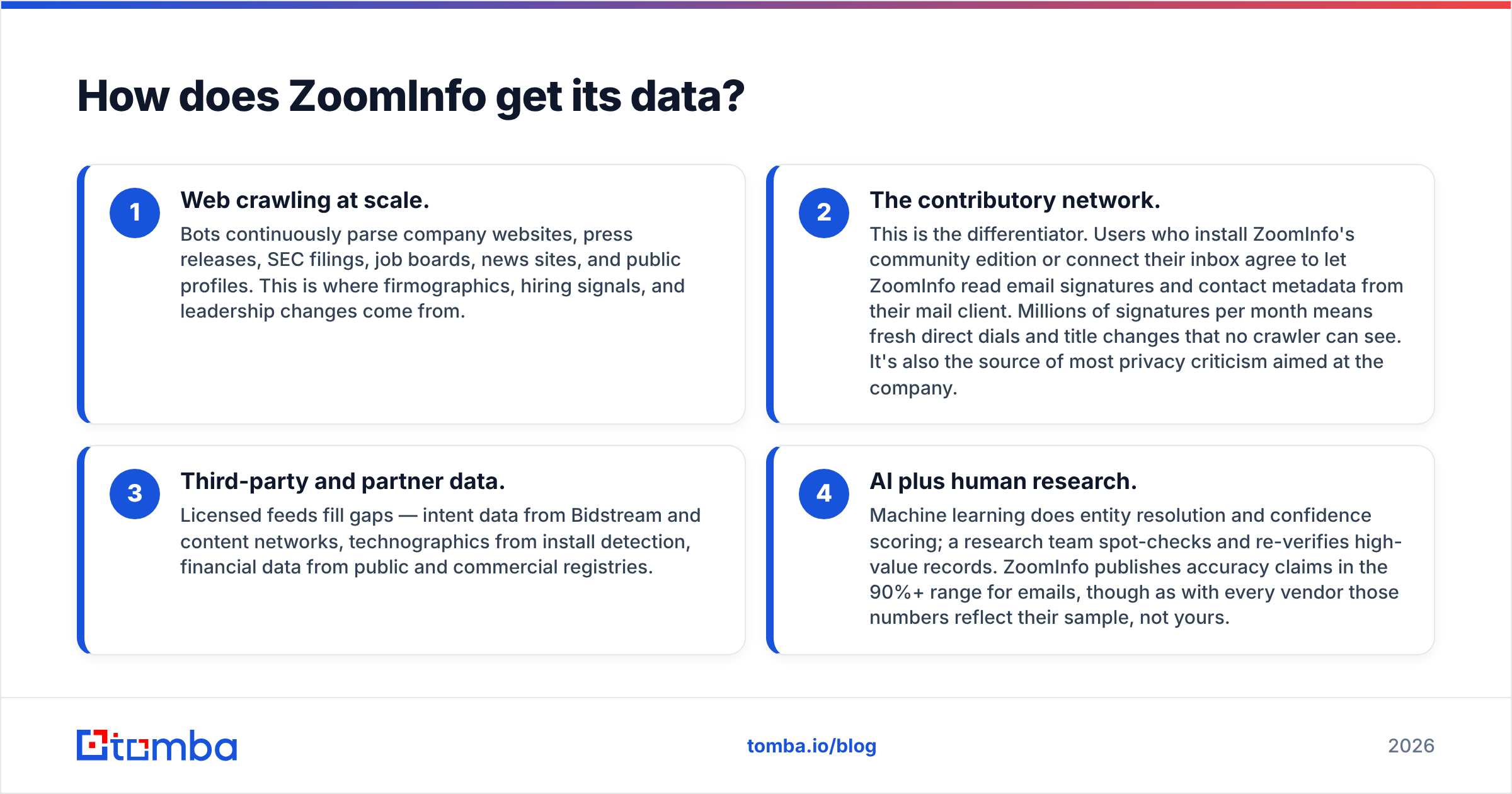
Vendors describe this part vaguely. Buyers should understand it precisely. Four inputs feed the graph.
1. Web crawling at scale. Bots parse company websites, press releases, SEC filings, job boards, news sites, and public profiles around the clock. Firmographics, hiring signals, and leadership changes come from here.
2. The contributory network. This is the differentiator. Users who install the community edition or connect their inbox let ZoomInfo read email signatures and contact metadata from their mail client. Millions of signatures a month means fresh direct dials and title changes that no crawler can see. It is also the source of most privacy criticism aimed at the company.
3. Third-party and partner data. Licensed feeds fill the gaps: intent data from bidstream and content networks, technographics from install detection, financials from public and commercial registries.
4. AI plus human research. Machine learning handles entity resolution and confidence scoring. A research team spot-checks and re-verifies the high-value records. ZoomInfo claims accuracy above 90% for emails. Those numbers reflect their sample, not yours.
The practical takeaway: ZoomInfo is strongest where the contributory network is dense. That means US-based mid-market and enterprise companies, in sales and marketing roles. It is weaker on EU SMBs, non-English markets, and people who rarely email outside their own company.

How does ZoomInfo's credit system work?#
Every ZoomInfo contract has two axes. Confusing them is the most common budgeting mistake.
Seats are named licenses. Each rep who logs in needs one. Seats decide which modules you can touch: Sales, Marketing, Talent, Operations, Copilot.
Credits are consumption. Revealing a contact's email or phone spends credits. So do bulk exports and API enrichment calls. On most contracts credits reset annually, not monthly. A team that front-loads prospecting in Q1 can run dry by August, then get quoted an overage package at a worse per-credit rate.
Four mechanics worth knowing before you sign:
- Viewing is cheap, exporting is not. Searching and viewing a record in the UI rarely costs much. Exporting or pushing to CRM is what draws the pool down.
- Bulk enrichment is metered per matched row, not per row you submit. A low match rate on your file still burns budget in wasted effort.
- API access is a separate line item. Programmatic enrichment inside your product or data warehouse means a distinct contract and a distinct credit pool.
- Rollover is negotiable, but rarely the default. Ask for it explicitly.
Is your workflow "find 200 verified emails a month for a targeted list"? Then an annual credit pool is the wrong shape of product. That is the job a bulk email finder with monthly credits handles more cleanly.
What does ZoomInfo cost in 2026?#
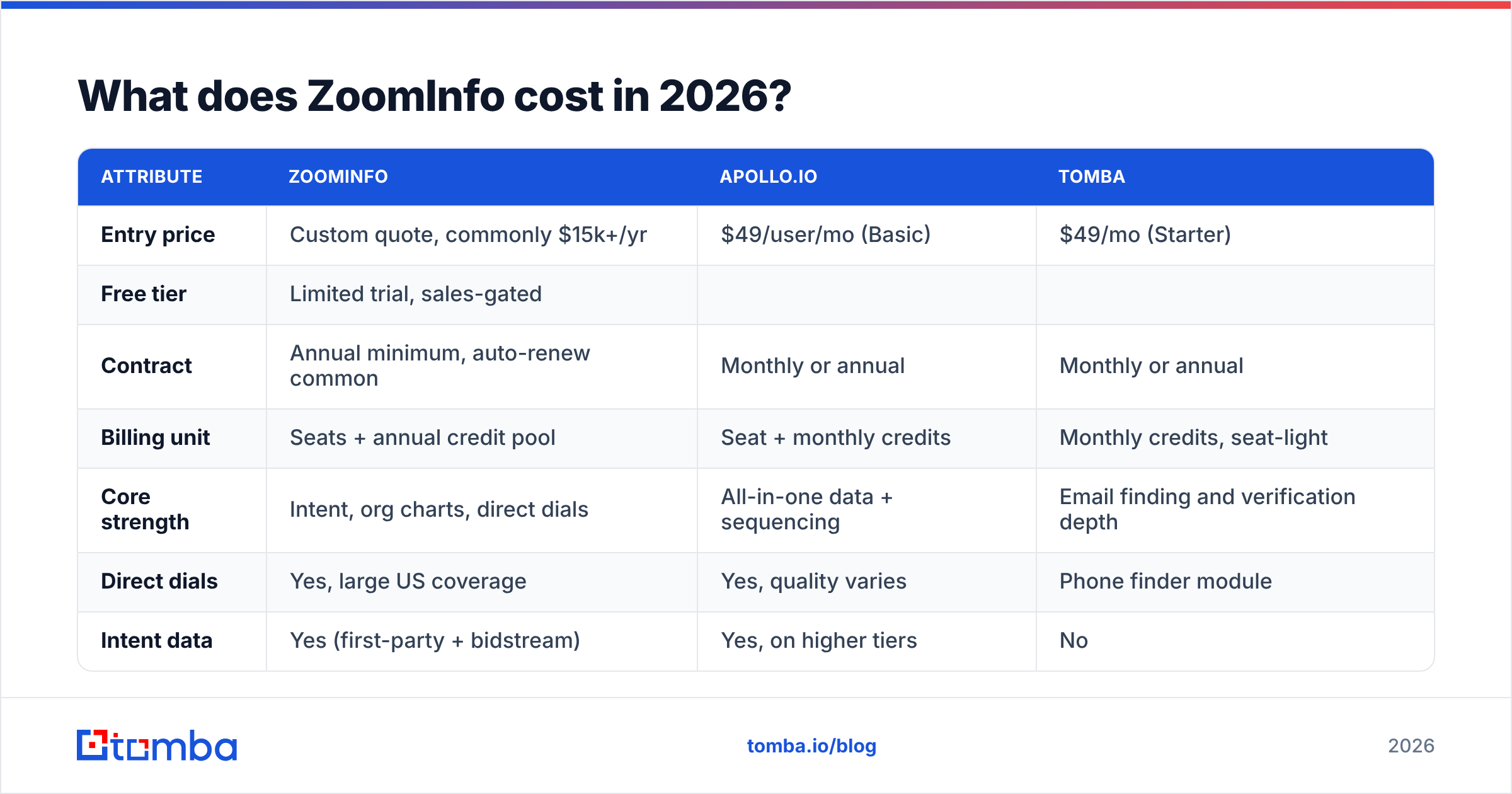
ZoomInfo publishes no price list, which is itself informative. Quotes vary by seats, credits, modules, and data scope. Public ranges on G2 and buyer reports put entry packages in the low five figures per year. The number climbs fast as you add seats and intent data.
Here is how that compares with per-credit tools that solve a narrower problem:
| Attribute | ZoomInfo | Apollo.io | Tomba |
|---|---|---|---|
| Entry price | Custom quote, commonly $15k+/yr | $49/user/mo (Basic) | $49/mo (Starter) |
| Free tier | Limited trial, sales-gated | Free plan with monthly credits | 25 searches/mo, no card |
| Contract | Annual minimum, auto-renew common | Monthly or annual | Monthly or annual |
| Billing unit | Seats + annual credit pool | Seat + monthly credits | Monthly credits, seat-light |
| Core strength | Intent, org charts, direct dials | All-in-one data + sequencing | Email finding and verification depth |
| Direct dials | Yes, large US coverage | Yes, quality varies | Phone finder module |
| Intent data | Yes (first-party + bidstream) | Yes, on higher tiers | No |
| API | Separate contract | Included on paid tiers | Included, documented |
| Best for | Enterprise GTM teams with RevOps | SMB full-cycle outbound | Teams that need verified emails at volume |
Two honest notes. First, the price is not irrational for what it is. Org charts, intent data, and a maintained data operation cost real money to run. Second, most teams who buy it never use the modules that justify that price. If you never open the intent dashboard, you are paying for a car's engine to use its radio.
For a narrower budget comparison, Tomba pricing runs Free (25 searches/mo), Starter $49/mo, Growth $99/mo, Pro $249/mo, and Enterprise custom. No annual lock to start.
How do you set up ZoomInfo without wasting the first quarter?#
Most of the value leaks in weeks one through six, before anyone has defined what "good data" means. Five steps actually matter.
1. Define the ICP filter set before you get access. Write down the exact firmographic and technographic filters that describe a real customer. Cannot write them? Then you will browse instead of prospect, and browsing burns credits.
2. Connect the CRM early, with field mapping locked. ZoomInfo pushes to Salesforce, HubSpot, Dynamics, and Marketo. Decide which ZoomInfo fields overwrite your CRM fields and which never do. Get this wrong and you pollute records you already trusted.
3. Enrich the records you already own first. Before you hunt new names, run a pass on your own database. The match rate tells you more about the vendor's fit for your market than any demo.
4. Set credit guardrails per rep. Admin controls let you cap the monthly draw. Use them. Without caps, one rep exporting a 10,000-row list in March defines everyone's Q4.
5. Add a verification step. No provider is 100% accurate, and stale records damage sender reputation fast. Route exported emails through an email verifier before they reach a sending tool. Once bounce rate passes 3%, inbox placement starts sliding.
That last step is the one buyers skip. Vendor-reported accuracy is a population statistic. Your slice — your industry, your geography, your seniority band — can sit far below the headline number.

Is ZoomInfo worth it compared to cheaper alternatives?#
How does ZoomInfo work out financially? It comes down to one question: do you need the graph, or just the addresses?
ZoomInfo earns its price when you have a defined enterprise ICP, several reps working named accounts, a RevOps function that will act on intent signals, and a CRM mature enough that enrichment compounds. Org charts and direct dials matter when you sell six-figure deals into a nine-person buying committee.
ZoomInfo is the wrong purchase when you are a founder or a small team doing targeted outbound, your volume is a few hundred contacts a month, you sell mostly outside the US, or your motion is inbound-led and you only need to enrich form fills.
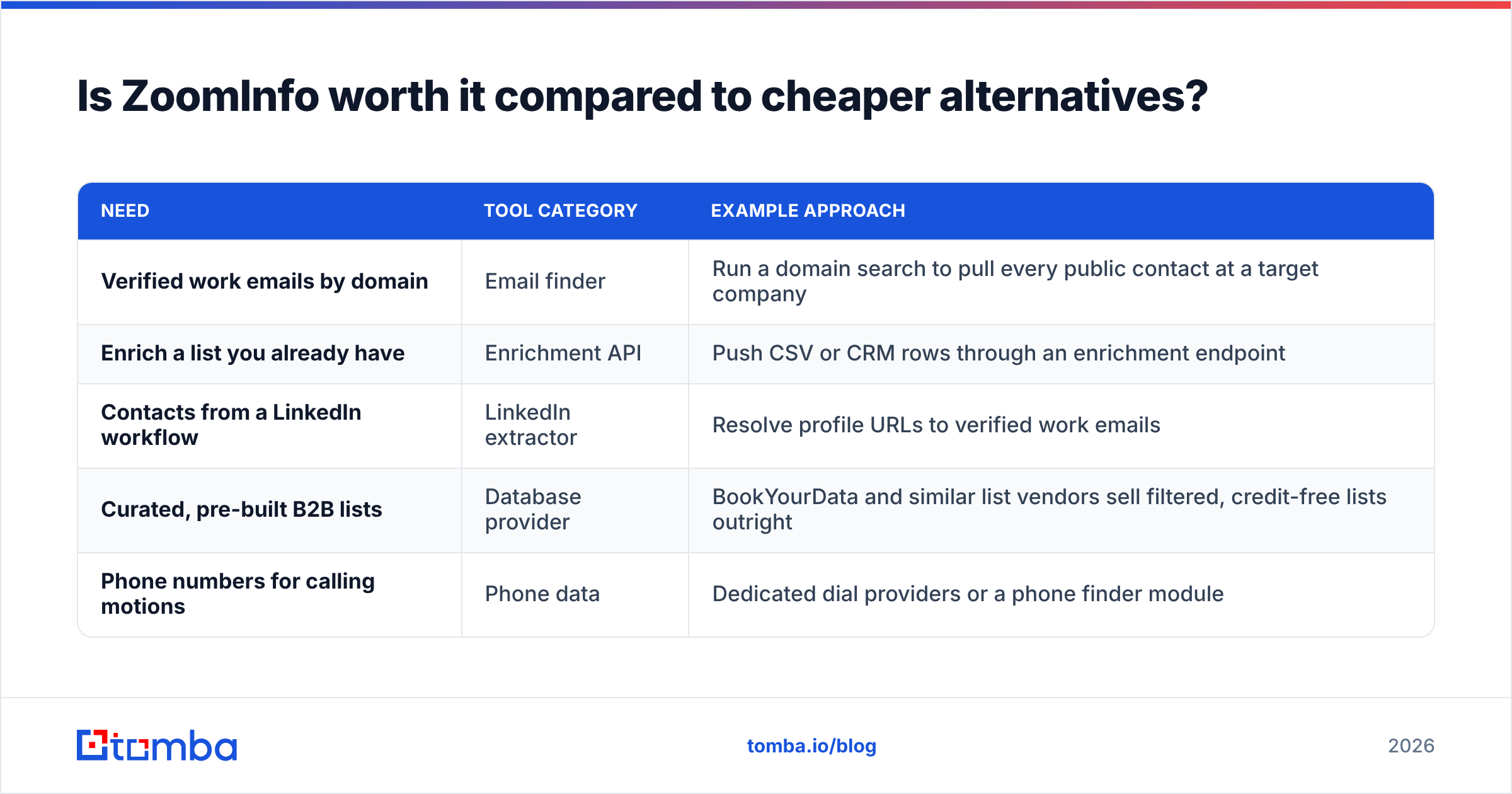
For that second group, the alternatives split into categories:
| Need | Tool category | Example approach |
|---|---|---|
| Verified work emails by domain | Email finder | Run a domain search to pull every public contact at a target company |
| Enrich a list you already have | Enrichment API | Push CSV or CRM rows through an enrichment endpoint |
| Contacts from a LinkedIn workflow | LinkedIn extractor | Resolve profile URLs to verified work emails |
| Curated, pre-built B2B lists | Database provider | BookYourData and similar list vendors sell filtered, credit-free lists outright |
| Phone numbers for calling motions | Phone data | Dedicated dial providers or a phone finder module |
That fourth row deserves a note. If your objection is the subscription model rather than the data, a pay-per-list provider like BookYourData skips the annual commitment. You buy the records you need, keep them, and drop the credit accounting. It is a different purchasing shape, and for some teams it fits better.
Also check the platform you may already own. HubSpot ships free CRM contact management that covers much of what small teams buy ZoomInfo for. Pair it with a focused finder and the stack gets cheaper.
What are the real limitations of ZoomInfo?#
Four to weigh honestly:
- Privacy and compliance exposure. The contributory model has drawn regulatory and legal attention, including US class actions over profile data. Under GDPR, your DPO will ask about the lawful basis for European records. Get the answers in writing before you sign.
- Contract rigidity. Expect annual minimums, auto-renewal clauses, and no mid-term seat reductions. Read the renewal notice window closely. It is often 30–60 days before the term ends.
- International coverage gaps. US data is strong and EMEA enterprise data keeps improving. SMBs outside North America and non-English markets stay thin.
- Data decay is universal. B2B contact data goes stale at roughly 25–30% a year as people change jobs. No static export beats that. Whatever you buy, re-verify before every send.
That decay rate is the best argument for treating any data provider as a pipeline input, not a source of truth. Pull, verify, send, discard. A record that sat in your CRM untouched for 14 months is a guess wearing a suit.
How do you decide? A quick self-test#
Answer these five, honestly:
- Do you have a RevOps or marketing ops person who will own the integration? No → skip ZoomInfo.
- Is your average deal size above $25k? No → the price is hard to recover.
- Do you need direct dials, or just emails? Emails only → a finder plus verifier stack costs 90% less.
- Do you sell primarily into the US? No → test international match rates on your own list first.
- Will you use intent data within 60 days of signing? No → you are buying a feature you will pay for annually and never open.
Three or more "no" answers? Then the enterprise platform is not your bottleneck. Your bottleneck is a repeatable way to turn a target account into a verified, deliverable contact. That problem is much cheaper to solve. Start with data enrichment on the accounts you already know, then expand.
Where should you start instead?#
Are you evaluating ZoomInfo because outbound stalled on bad contact data? Fix the contact data first. It is the cheaper experiment, and it tells you whether a platform purchase is even the right answer.
Run a test. Take 100 target companies, pull the decision-maker emails, verify them, send, and measure bounce rate and response rate. If bounce drops under 2% and replies come in, you never had a data-platform problem. You had a data-quality problem, and you just solved it for a couple hundred dollars.
Try it with the Tomba Email Finder. Enter a name and a company domain. You get a verified work email with a confidence score and the sources behind it. The free tier gives you 25 searches a month with no card. Starter is $49/mo, and there is no annual contract to negotiate out of. Run your 100-account test this week. Then decide whether you need the enterprise graph — or just the addresses.
Related guides#
Ready to find emails that actually work?
Join 150,000+ professionals who stopped guessing and started sending. Free credits on signup — no credit card required.
Get the Tomba newsletter
Practical outbound tactics and product updates — once every two weeks.
About the author