How Recruiters Find Candidates in 2026: 9 Sourcing Channels
Recruiters do not wait for applicants. They source. Here is how recruiters find candidates in 2026: the nine channels that work, what each one costs, and the workflow you can copy.
TL;DR
- Here is how recruiters find candidates at top companies: they source. They go out and reach people who never applied.
- Nine channels do the work in 2026. LinkedIn Recruiter, ATS re-engagement, referrals, GitHub and Dribbble, resume databases, Boolean search, Slack groups, events, and contact-data tools.
- The hard part is not the name. It is the email. That is why lookup tools sit under every modern sourcing stack.
- Reply rates split by channel. Referrals hit 30-50%. Cold InMail sits near 10-25%. Cold email to a verified address runs 15-30% when the note is specific.
- Build one loop and repeat it. Identify, find the email, verify, personalize, follow up four times.
Why do recruiters source instead of waiting for applicants?#
The people you want are not looking. LinkedIn's own workforce research puts the passive pool far above the active one. Read only inbound applications and you fight over the smallest slice of the market.
Speed is the second reason. An open role costs money every week it stays open. Teammates pick up the slack. Posting and praying adds a wait you do not control. Sourcing removes that wait. You decide how many good people enter the funnel this week.
Quality is the third reason. A recruiter who sources writes the target profile first. Then they go find people who match it. Wait for applications instead, and the applicant pool writes the profile for you. That is how teams hire the best of who showed up, not the best out there.

How recruiters find candidates: the 9 main channels#
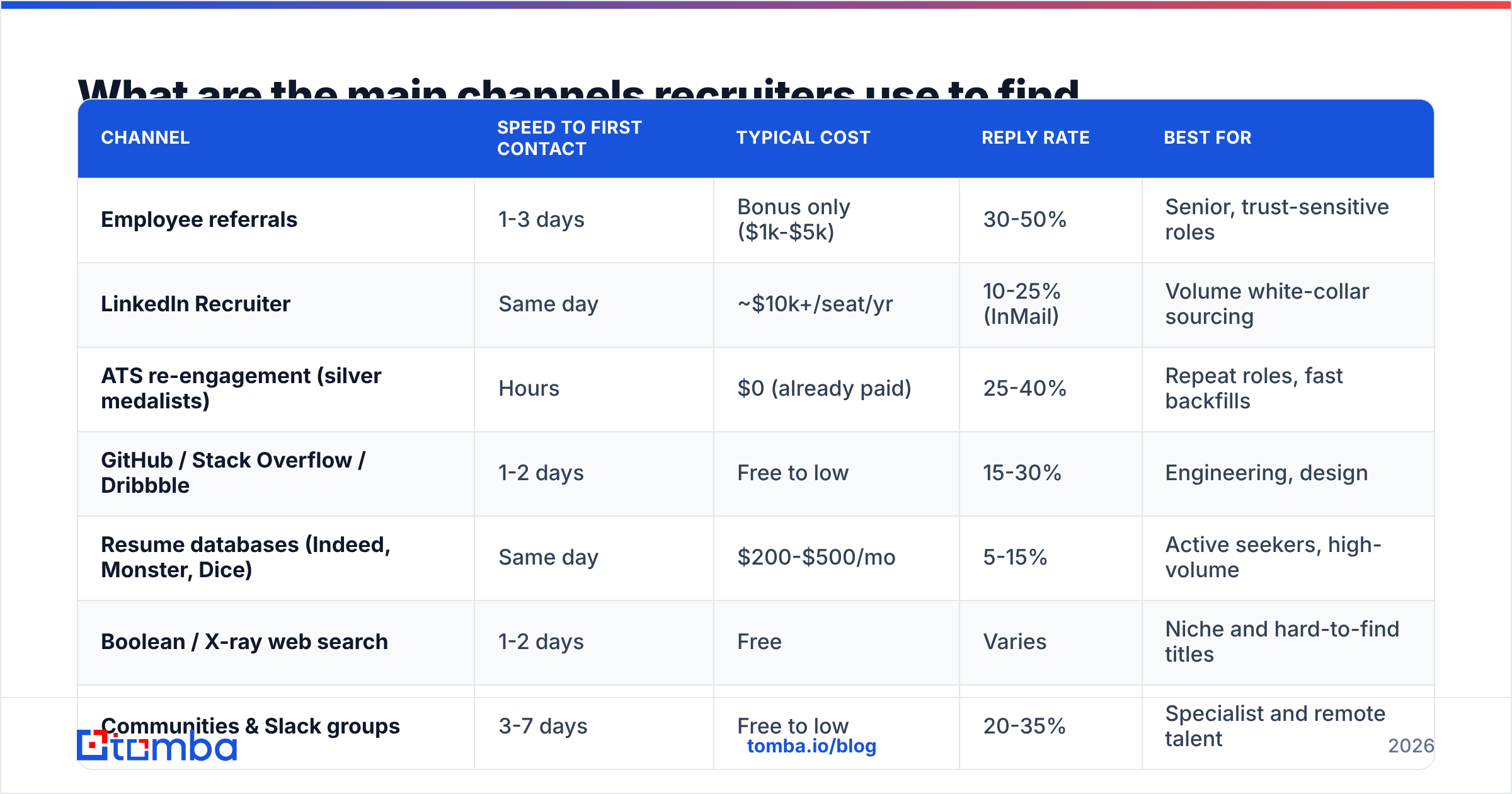
Nine channels do most of the work. Here is how they compare on the things that matter during a live search.
| Channel | Speed to first contact | Typical cost | Reply rate | Best for |
|---|---|---|---|---|
| Employee referrals | 1-3 days | Bonus only ($1k-$5k) | 30-50% | Senior, trust-sensitive roles |
| LinkedIn Recruiter | Same day | ~$10k+/seat/yr | 10-25% (InMail) | Volume white-collar sourcing |
| ATS re-engagement (silver medalists) | Hours | $0 (already paid) | 25-40% | Repeat roles, fast backfills |
| GitHub / Stack Overflow / Dribbble | 1-2 days | Free to low | 15-30% | Engineering, design |
| Resume databases (Indeed, Monster, Dice) | Same day | $200-$500/mo | 5-15% | Active seekers, high-volume |
| Boolean / X-ray web search | 1-2 days | Free | Varies | Niche and hard-to-find titles |
| Communities & Slack groups | 3-7 days | Free to low | 20-35% | Specialist and remote talent |
| Events, meetups, alumni | Weeks | Travel + time | 40%+ warm | Executive and local hires |
| Contact-data tools (email/phone lookup) | Minutes | $0-$249/mo | Amplifies all above | Turning names into reachable people |
Look at the last row. Contact data is not really a ninth channel. It is the layer that makes the other eight usable.
You can find a name on GitHub in ten seconds. Getting a message in front of that person is the slow part. Done by hand, it eats an hour.
How does LinkedIn sourcing actually work?#
LinkedIn is the default. No other site covers white-collar roles as well. The workflow splits into three tiers.
- Free LinkedIn search — Boolean works, but limits hit fast. Fine for one or two roles a quarter. A real pipeline will blow past the search cap.
- Sales Navigator — Built for sellers. Recruiters use it anyway. You get better filters, such as years in role, headcount growth, and recent job changes. The base tier has no InMail credits.
- LinkedIn Recruiter — The purpose-built product. Full filters, project pipelines, bulk InMail, and team sharing. It is pricey. It pays off only if you hire all year.
The common mistake is treating InMail as the only way out. Reply rates sit in the 10-25% band. They keep sliding as inboxes fill up.
Top recruiters pull profiles out of LinkedIn and switch to email. LinkedIn does not give you that step.
That step is contact discovery. Give a LinkedIn finder a name and an employer. It returns a work email. Now you own the channel. No credit limits. No throttling. No feed to fight.
How do recruiters find a candidate's email address?#
Four methods, most reliable first.
1. Direct lookup tools. Feed in a name and a company domain. Get back the work address with a confidence score. This is the fast path, and it scales. Tomba's email finder does exactly this. Its domain search returns every known address at a company when you want to map a whole team.
2. Pattern inference. Most firms use one of six formats: first.last@, flast@, first@, firstl@, f.last@, lastf@. Work out the pattern from one known employee. Then apply it to your target. A company email pattern checker does this in seconds.
3. Public footprint. Try speaker bios, GitHub commit data, papers, personal sites, and newsletter signatures. It is slow work. Sometimes it is the only route left.
4. Ask. Use referrals, mutual contacts, or a short LinkedIn note. Best quality, lowest volume.
Verify before you send, whatever method you pick. A bounced email does more than miss one candidate. It hurts your sender reputation. That quietly pushes later messages out of the inbox. Run the list through an email verifier and drop anything invalid or risky.
One rule of thumb: keep bounce rate under 2%. Past 3%, mailbox providers treat your domain as a low-quality sender. Your best-written note then lands in spam.
What is the difference between sourcing personal and work emails?#
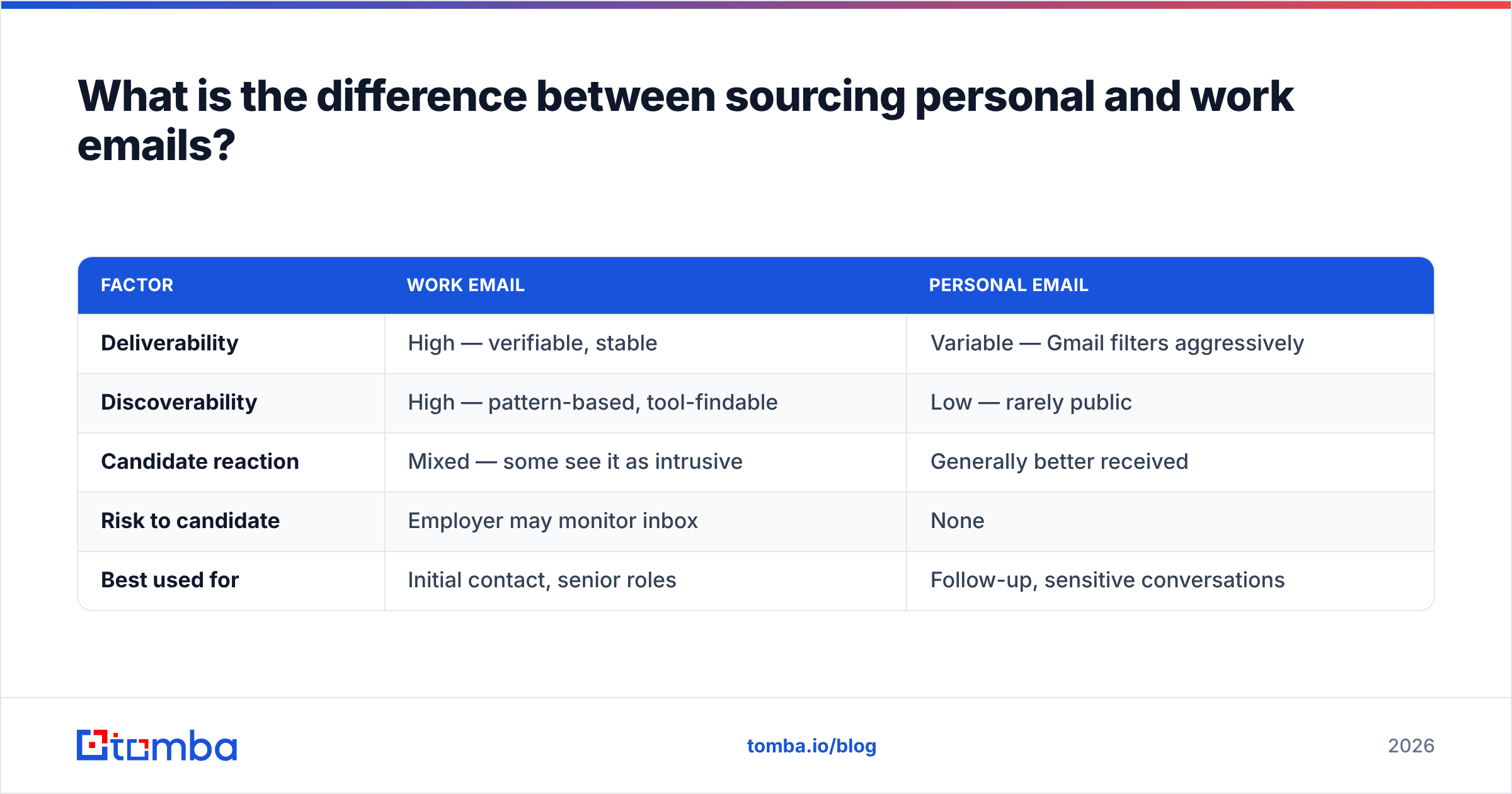
This trips up recruiters who come from sales. In B2B sales you almost always want the work address. In hiring, the math changes.
| Factor | Work email | Personal email |
|---|---|---|
| Deliverability | High — verifiable, stable | Variable — Gmail filters aggressively |
| Discoverability | High — pattern-based, tool-findable | Low — rarely public |
| Candidate reaction | Mixed — some see it as intrusive | Generally better received |
| Risk to candidate | Employer may monitor inbox | None |
| Best used for | Initial contact, senior roles | Follow-up, sensitive conversations |
The practical play is simple. Open on the work email, because you can find it and verify it. Keep the note short and safe. Write nothing that would embarrass someone if a manager read it over their shoulder.
Move to personal email or phone once they reply. Some recruiters skip ahead. A phone finder drops the email step for roles where a two-minute call beats a three-email thread.

Which channels produce the highest-quality hires?#
Referrals win, every time. Benchmark studies, including work published by SHRM, put referred hires ahead on retention, ramp time, and time-to-hire.
The reason is the filter. A referrer stakes their name on the match. That screens out people who look good on paper and fall apart in week three.
Referrals have one flaw. They do not scale. A 40-person company has a small network. Work it once and you are back to outbound.
Ranked by hire quality per hour of recruiter effort:
- Referrals — Best quality. Lowest volume. Almost no cost.
- ATS re-engagement — People who reached the final round and lost. Your team already vetted them. Most recruiters never reopen that pool.
- Targeted outbound — Highest ceiling on volume. Quality tracks how sharply you define the profile.
- Communities and niche sites — Strong in specialist fields. A GitHub history or a Dribbble portfolio is a work sample, not a claim.
- Resume databases — High volume, mixed quality. These people are looking now. That is a different pool, not always a worse one.
How do you build a repeatable sourcing workflow?#
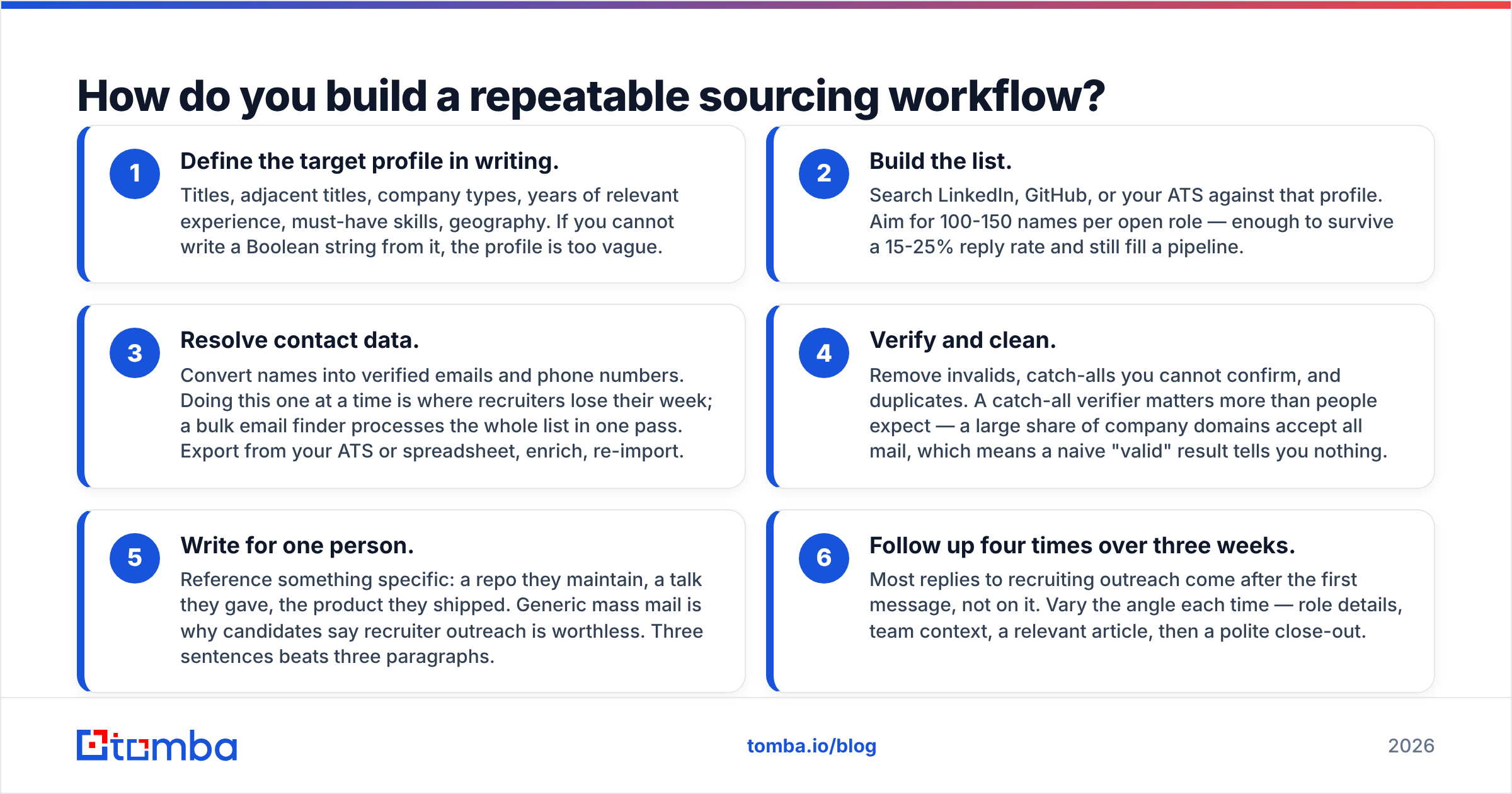
Six steps. Run them the same way every time and the channel stops mattering much. This loop is how recruiters find candidates week after week without luck.
1. Write the target profile down. List titles, nearby titles, company types, years of experience, must-have skills, and location. If you cannot turn it into a Boolean string, it is too vague.
2. Build the list. Search LinkedIn, GitHub, or your own ATS against that profile. Aim for 100-150 names per open role. That survives a 15-25% reply rate.
3. Get the contact data. Turn names into verified emails and phone numbers. One at a time is where recruiters lose the week. A bulk email finder runs the whole list in one pass. Export, enrich, re-import.
4. Verify and clean. Cut invalids, duplicates, and catch-alls you cannot confirm. A catch-all verifier matters more than people expect. Many domains accept all mail, so a plain "valid" result means little.
5. Write for one person. Name something real: a repo they run, a talk they gave, a product they shipped. Mass mail is why candidates ignore recruiters. Three sentences beat three paragraphs.
6. Follow up four times over three weeks. Most replies come after the first note, not on it. Change the angle each time: role details, team context, a useful link, then a polite close.
Step 3 splits recruiters who fill roles from recruiters who stay busy. Guess email formats by hand and you spend sourcing hours on data entry.
Push that work into tools. Use a Google Sheets add-on, the Tomba Chrome extension while you browse, or the Tomba API if your team can wire it into the ATS.
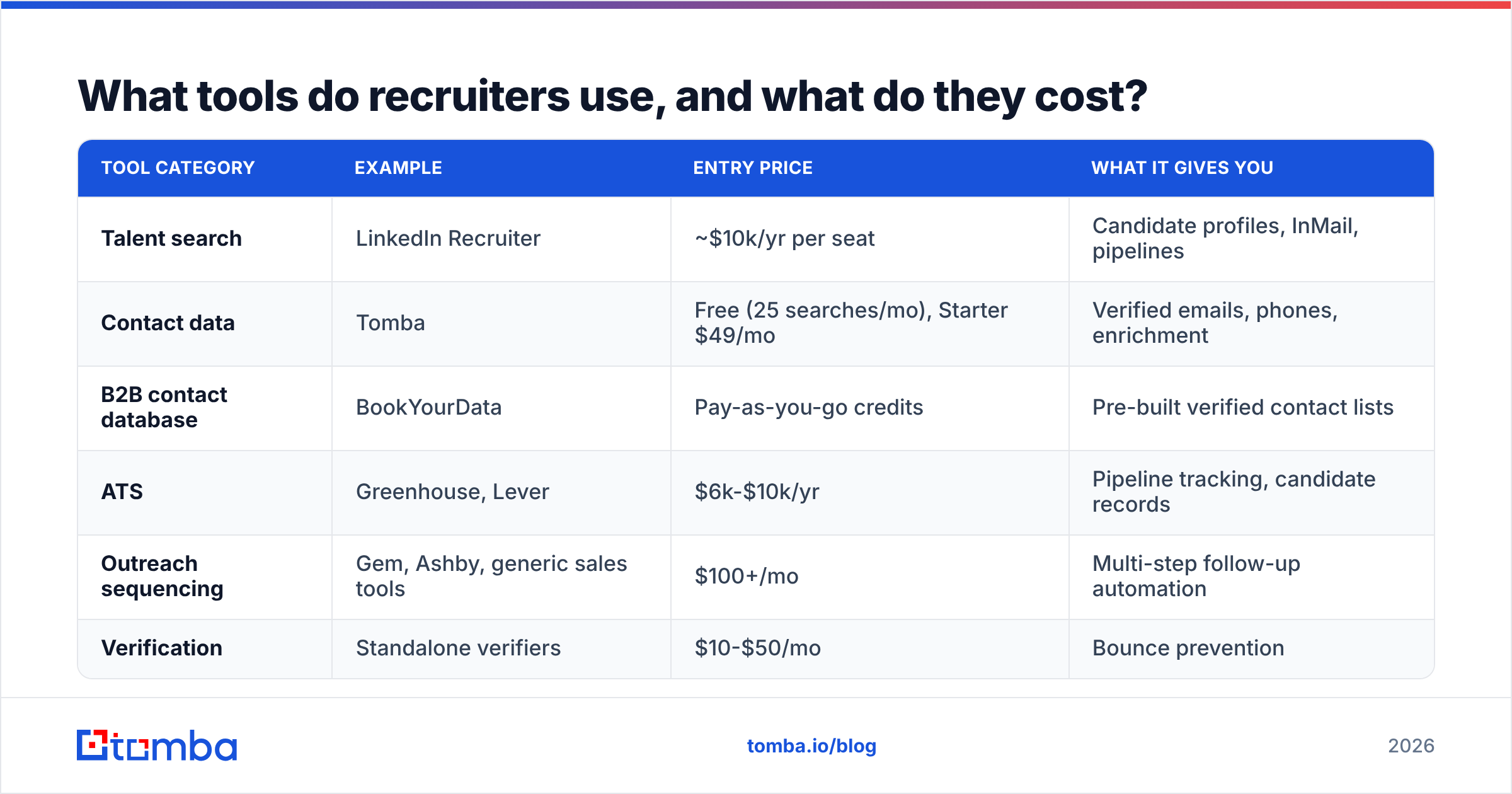
What tools do recruiters use, and what do they cost?#
| Tool category | Example | Entry price | What it gives you |
|---|---|---|---|
| Talent search | LinkedIn Recruiter | ~$10k/yr per seat | Candidate profiles, InMail, pipelines |
| Contact data | Tomba | Free (25 searches/mo), Starter $49/mo | Verified emails, phones, enrichment |
| B2B contact database | BookYourData | Pay-as-you-go credits | Pre-built verified contact lists |
| ATS | Greenhouse, Lever | $6k-$10k/yr | Pipeline tracking, candidate records |
| Outreach sequencing | Gem, Ashby, generic sales tools | $100+/mo | Multi-step follow-up automation |
| Verification | Standalone verifiers | $10-$50/mo | Bounce prevention |
A note on budget. Most hiring spend goes to the search tier. That tier is also the one where every team looks the same. Everyone has LinkedIn.
Few teams have a clean, verified contact layer under it. That is why reply rates vary so much between teams using the same candidate sources.
Running a small team? The honest stack is short: LinkedIn at any tier, a contact-data tool, the ATS you already pay for, and a spreadsheet.
Tomba's pricing starts free at 25 searches a month. Paid plans run $49 for Starter, $99 for Growth, and $249 for Pro. Set that against one agency fee and it rounds to zero. BookYourData fits when you would rather buy ready-made lists than search name by name.
What mistakes make recruiter outreach fail?#
- Sending to unverified addresses. Bounces pile up. Your fifth campaign suffers for your first one.
- Leading with the job description. Candidates skim. Say why them first. The role comes second.
- One and done. One message is a lottery ticket. Send four.
- Reusing a sales sequence. Candidates are not buyers. Hard urgency reads as desperate.
- Ignoring reply data. If a channel returns 3% across 200 messages, drop it. Track response rate per channel and move your time.
- Skipping the ATS. Your own database is full of people who already wanted the job. Search it first.
Frequently asked questions#
Do recruiters see my LinkedIn profile if I do not apply? Yes. Recruiter accounts search every member, whether you applied or not. Open-to-work signals lift your rank. They are not required.
Is it legal for recruiters to email me at work? In most countries, yes, for real business contact. GDPR wants a lawful basis, and legitimate interest usually covers hiring. It also wants a clear opt-out. CAN-SPAM in the US wants honest headers and an unsubscribe link. Do both and you are fine.
How many candidates does a recruiter contact per hire? About 100-200 sourced contacts for a mid-level role. That yields 20-40 replies, 8-15 screens, 3-5 onsites, and one offer. Niche and executive searches run much higher.
What is a good reply rate for recruiting outreach? Aim for 15-25% on cold email to a verified address with a specific opener. Under 10% means your targeting or your message is off. It is usually the message.
Start with the contact layer#
The candidates are findable. LinkedIn, GitHub, your ATS, and a decent Boolean string give you more names than you can work in a quarter.
The gap sits between having a name and having a way to reach that person. That gap is where recruiters burn hours guessing formats and watching mail bounce.
Close it with tooling. The Tomba Email Finder turns a name and a company into a verified email in seconds. Use it one at a time, in bulk, or straight into your ATS through the API.
That is how recruiters find candidates fast in 2026. Start free at 25 searches a month, watch what a verified list does to your reply rate, then scale.
Related guides#
Ready to find emails that actually work?
Join 150,000+ professionals who stopped guessing and started sending. Free credits on signup — no credit card required.
Get the Tomba newsletter
Practical outbound tactics and product updates — once every two weeks.
About the author