How to Email C-Level Executives: A 2026 Playbook That Works
CEOs and CFOs read email on their phone between meetings. Here is how to find their address, write four sentences they will actually finish, and follow up without getting blocked.
TL;DR
- C-level executives read email on a phone, in transit, in under 10 seconds. Length is the single biggest reason your message gets archived unread.
- The winning structure is four sentences: relevance trigger, specific claim with a number, proof, one low-friction ask. Nothing else.
- Deliverability failures kill more executive outreach than bad copy. Executive aliases bounce at a higher rate than average corporate addresses, so verify before you send.
- Timing matters more at the top: 6:30–8:00 a.m. and 6:00–8:00 p.m. local time consistently outperform mid-day for CEO/CFO inboxes.
- Follow up three to four times over 18 days, changing the angle each time. Never send "just bumping this up."
Why is emailing C-level executives so different?#
Because you are not competing with other vendors — you are competing with the board deck, the P&L review, and the 40 internal threads that all outrank you.
A VP might read your message with mild curiosity. A CEO reads it while walking between meetings, one thumb on the screen, in a triage state. In that state there are exactly three outcomes: archive, forward to someone else, or reply with one line. Your entire job is to make outcome two or three cheaper than outcome one.
That reframes everything. Executives are not "hard to reach" — they are hard to justify a reply to. Most cold emails to the C-suite fail not because the exec never saw them but because replying would have cost more effort than deleting.
Three practical consequences:
- Length is a tax. Every sentence beyond four costs you response probability. Executive-level readers report scanning subject line and first two lines before deciding.
- Vague value is worse than no value. "Help you scale revenue" means nothing to someone who runs revenue for a living. A number attached to a peer company means something.
- The ask must be answerable in one word. "Worth a look?" beats "Do you have 30 minutes Thursday at 2 p.m. or Friday at 10 a.m.?"

How do you find a C-level executive's real email address?#
You find the company's email pattern first, then apply it to the executive's name, then verify the result before it ever enters a sequence.
Guessing is expensive at this level. Sending to ceo@company.com or a wrong permutation does not just fail — it lands on a spam trap or a catch-all domain that quietly accepts everything and reports nothing. Executive addresses are also more likely to be aliased, forwarded, or gated behind an EA.
A workflow that holds up:
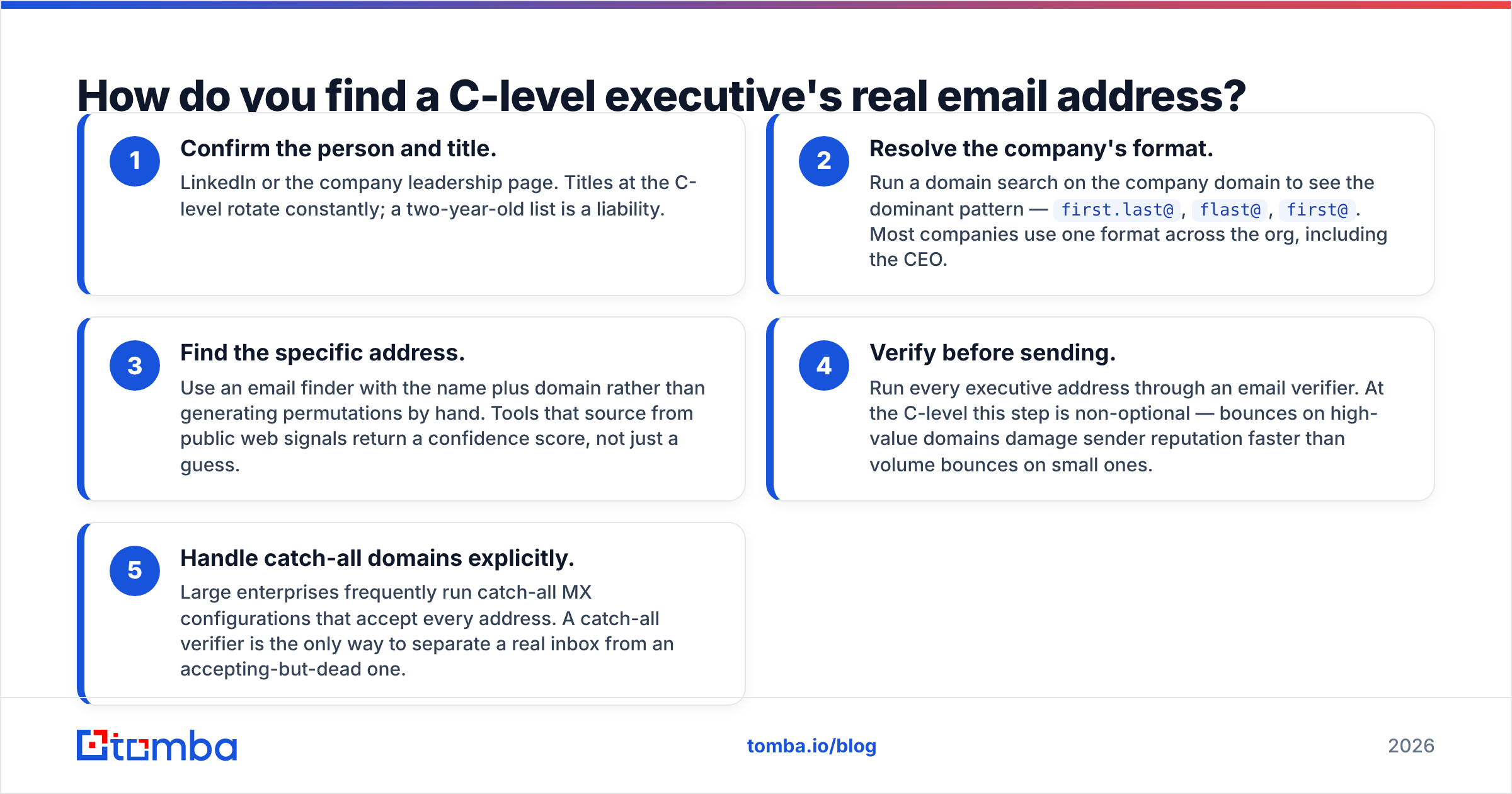
- Confirm the person and title. LinkedIn or the company leadership page. Titles at the C-level rotate constantly; a two-year-old list is a liability.
- Resolve the company's format. Run a domain search on the company domain to see the dominant pattern —
first.last@,flast@,first@. Most companies use one format across the org, including the CEO. - Find the specific address. Use an email finder with the name plus domain rather than generating permutations by hand. Tools that source from public web signals return a confidence score, not just a guess.
- Verify before sending. Run every executive address through an email verifier. At the C-level this step is non-optional — bounces on high-value domains damage sender reputation faster than volume bounces on small ones.
- Handle catch-all domains explicitly. Large enterprises frequently run catch-all MX configurations that accept every address. A catch-all verifier is the only way to separate a real inbox from an accepting-but-dead one.

Accuracy on executive contacts diverges more than on general roles. Rank-and-file addresses follow patterns cleanly; C-suite addresses get special treatment — vanity aliases, personal-domain forwards, EA-managed shared boxes. Tools that only pattern-match will report high confidence on an address that never reaches a human.
[Screenshot placeholder: Tomba domain search results showing the detected email pattern and confidence score for a target company]
What should the subject line say?#
Short, lowercase-ish, specific, and written like an internal message rather than a campaign.
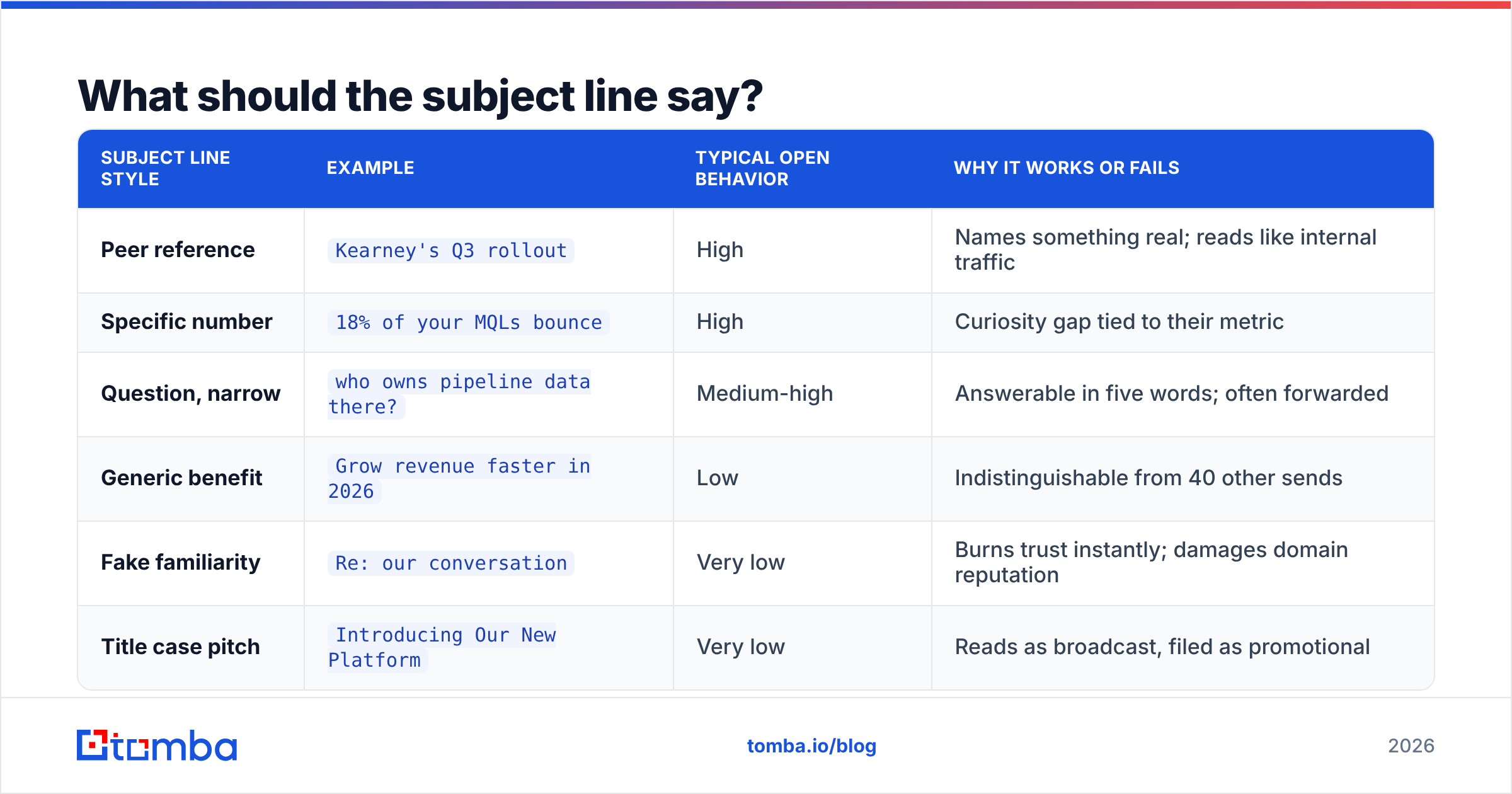
Executive subject lines that perform share three traits: under 45 characters, no title case, and a concrete noun the reader recognizes. The goal is to look like something a peer sent, because that is the only category of email that survives phone triage.
| Subject line style | Example | Typical open behavior | Why it works or fails |
|---|---|---|---|
| Peer reference | Kearney's Q3 rollout |
High | Names something real; reads like internal traffic |
| Specific number | 18% of your MQLs bounce |
High | Curiosity gap tied to their metric |
| Question, narrow | who owns pipeline data there? |
Medium-high | Answerable in five words; often forwarded |
| Generic benefit | Grow revenue faster in 2026 |
Low | Indistinguishable from 40 other sends |
| Fake familiarity | Re: our conversation |
Very low | Burns trust instantly; damages domain reputation |
| Title case pitch | Introducing Our New Platform |
Very low | Reads as broadcast, filed as promotional |
Avoid personalization tokens that look automated. {{FirstName}}, quick question is now a recognized cold-email fingerprint at the executive level. Use the first name inside the body instead, where it reads naturally.
What does a C-level cold email actually look like?#
Four sentences. Here is the skeleton and a filled example.
The skeleton:
- Trigger — why you are writing to them, now. A funding round, a hire, an earnings comment, a product launch.
- Claim — one sentence with a number, tied to a company they recognize.
- Proof — the shortest possible credibility line. A named client, a specific result, or a mechanism.
- Ask — one question, answerable with yes or no.
The example:
Subject: your Series C hiring plan
Marcus — saw you're adding 40 AEs before Q2, which usually means the data layer breaks before the headcount does.
We cut list-building time from 6 hours to 40 minutes per rep at Brightpath, which pulled roughly 9 selling hours back per rep per week.
Same setup as Brightpath: verified contacts pushed straight into the CRM, no manual enrichment.
Worth a 10-minute look, or should I send this to whoever owns RevOps?
That last clause is the highest-leverage sentence in executive outreach. It gives the CEO a one-word escape hatch that still advances your deal — "send it to Dana" is a qualified internal referral, and internal referrals convert far better than cold sends to the same person.
Things to cut ruthlessly: your company's founding story, feature lists, "hope this finds you well," calendar links in the first email, attachments, images, and any sentence containing the word "solution."
When should you hit send?#
Early morning and evening local time, Tuesday through Thursday, with a strong bias toward before 8 a.m.
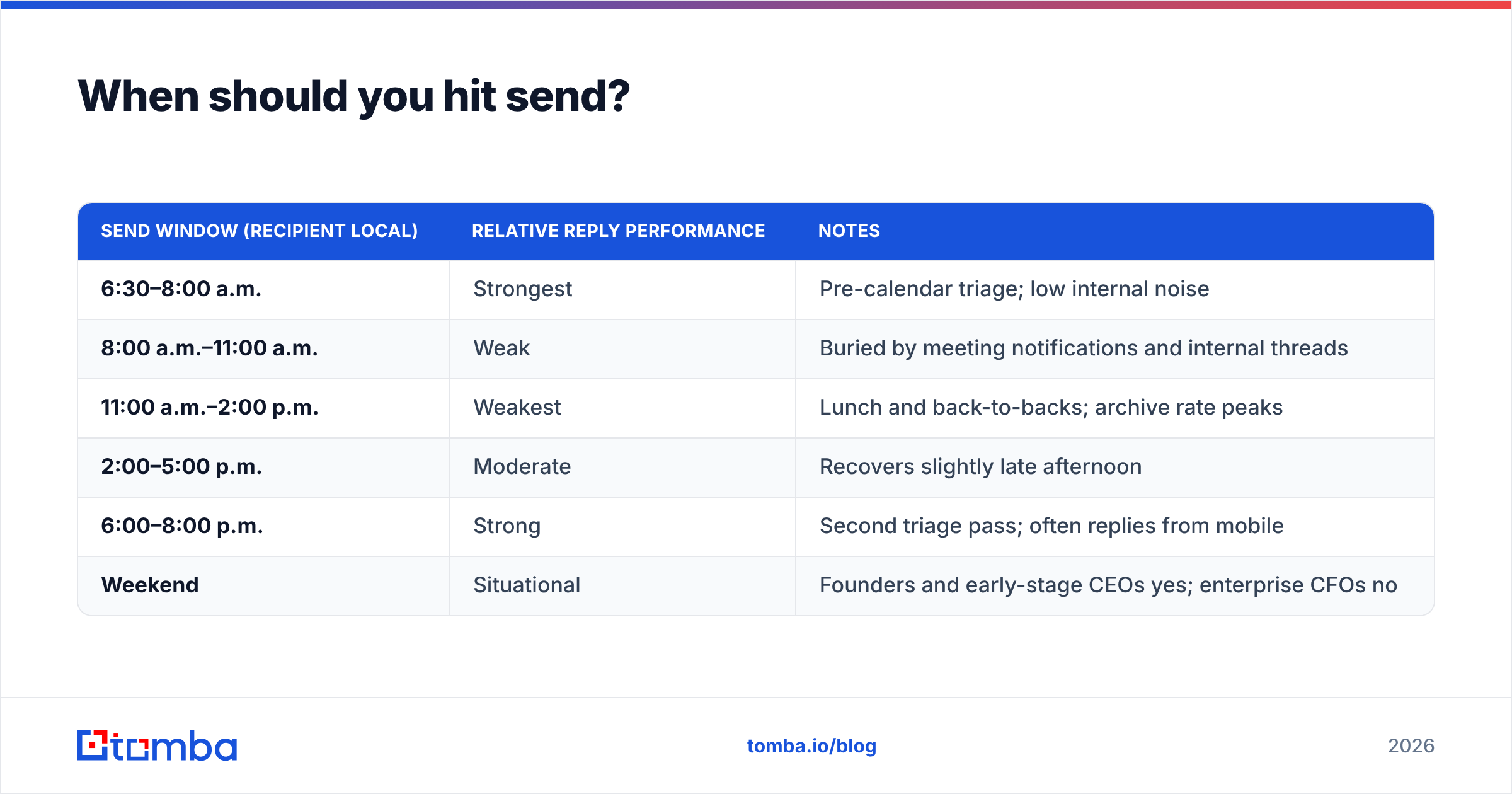
Executive email behavior is bimodal. There is a triage window before the calendar starts and a second one after dinner. Mid-day sends land in the middle of back-to-back meetings and get buried under internal traffic by the time the exec surfaces.
| Send window (recipient local) | Relative reply performance | Notes |
|---|---|---|
| 6:30–8:00 a.m. | Strongest | Pre-calendar triage; low internal noise |
| 8:00 a.m.–11:00 a.m. | Weak | Buried by meeting notifications and internal threads |
| 11:00 a.m.–2:00 p.m. | Weakest | Lunch and back-to-backs; archive rate peaks |
| 2:00–5:00 p.m. | Moderate | Recovers slightly late afternoon |
| 6:00–8:00 p.m. | Strong | Second triage pass; often replies from mobile |
| Weekend | Situational | Founders and early-stage CEOs yes; enterprise CFOs no |
Two adjustments worth making. First, always send in the recipient's timezone, not yours — a 7 a.m. send from New York hits a London CEO at noon, which is the worst slot on the table. Second, avoid Monday morning entirely; the weekend backlog means your message competes with 200 others in a single scroll.
How do you follow up without getting blocked?#
Change the angle every time, keep each follow-up shorter than the last, and stop at four.
The mistake is treating follow-up as repetition. "Bumping this to the top of your inbox" tells the executive you have nothing new to say, which is a direct signal to block or report. Every follow-up should carry one new piece of information.
A sequence that works on C-level contacts:
- Day 0 — Initial. The four-sentence email above.
- Day 3 — New proof. One sentence plus one artifact: a specific customer number, a short case link, a benchmark. Do not re-explain the offer.
- Day 8 — Reframe. Attack the problem from a different angle. If email one was about cost, email two is about risk or speed.
- Day 18 — Permission close. Two sentences: "Assuming this isn't a priority this quarter — should I close the loop, or check back after your Q1 planning?" This gets a surprisingly high reply rate because answering costs one word.
Keep total sequence length at four touches. Beyond that you are damaging your domain's sender reputation for diminishing returns, and executives are disproportionately likely to hit "report spam" rather than unsubscribe.

Also worth knowing: reply rate on executive outreach is only meaningful when measured against delivered mail, not sent mail. If 12% of your list bounced, your reported response rate is inflated and your domain is quietly degrading. Verification and measurement are the same problem.
[Screenshot placeholder: Google Postmaster Tools domain reputation graph showing the drop after a high-bounce executive campaign]
How should you handle the executive assistant?#
Treat the EA as the decision-maker for the meeting, because for scheduling purposes they are.
If an EA replies, you have not been rejected — you have been routed. The correct response is shorter and more logistical than your original email: what the meeting is about in one line, how long it takes, and two concrete windows. Do not re-pitch. EAs filter on clarity and time cost, not value proposition.
Signals you are dealing with an EA-managed inbox:
- Shared or generic-looking alias —
office@,execoffice@, or a first-name-only address on a large domain. - Reply within minutes during business hours, silence outside them. Executives reply at odd hours; EAs reply on a schedule.
- Third-person phrasing — "he'd like to know more about," "her calendar opens up in March."
- Immediate scheduling questions with no engagement on the substance.
When you spot one, adapt immediately. The shortest path is often: "Happy to send a one-paragraph summary you can drop in front of him — would that be more useful than a call?"
Which tools help you reach the C-suite reliably?#
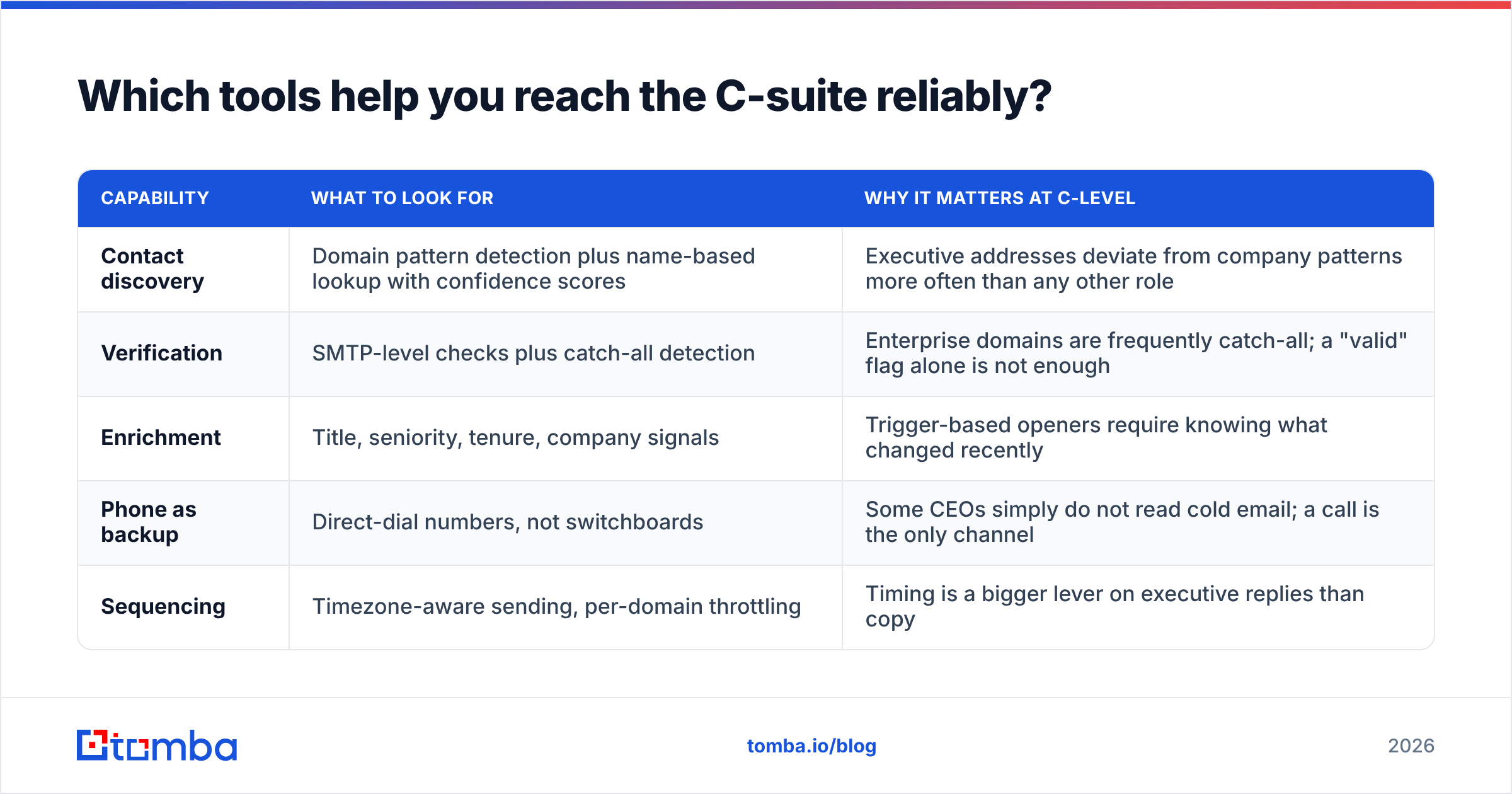
The stack splits into three jobs: find the contact, verify it, and send with clean infrastructure. Most teams over-invest in the third and under-invest in the first two.
| Capability | What to look for | Why it matters at C-level |
|---|---|---|
| Contact discovery | Domain pattern detection plus name-based lookup with confidence scores | Executive addresses deviate from company patterns more often than any other role |
| Verification | SMTP-level checks plus catch-all detection | Enterprise domains are frequently catch-all; a "valid" flag alone is not enough |
| Enrichment | Title, seniority, tenure, company signals | Trigger-based openers require knowing what changed recently |
| Phone as backup | Direct-dial numbers, not switchboards | Some CEOs simply do not read cold email; a call is the only channel |
| Sequencing | Timezone-aware sending, per-domain throttling | Timing is a bigger lever on executive replies than copy |
For contact discovery and verification, Tomba pricing starts with a free tier at 25 searches per month, then Starter at $49/mo, Growth at $99/mo, and Pro at $249/mo — reasonable for teams building targeted executive lists rather than blasting volume. BookYourData is a solid choice when you want pre-built, pay-as-you-go executive lists with coverage guarantees rather than domain-by-domain lookup; the two approaches complement each other well.
For sequencing and CRM, most executive outreach programs sit on top of an existing CRM. If you already use HubSpot or Salesforce, push verified contacts into it directly rather than maintaining a parallel spreadsheet — stale executive records are the leading cause of embarrassing "Dear former CEO" sends. Vendor review sites like G2 are useful for checking whether a data provider's coverage claims hold up in specific regions before you commit.
[Screenshot placeholder: CRM contact record showing a verified C-level email with enrichment fields populated]
What mistakes kill executive outreach fastest?#
Five recurring failures, ranked by how much damage they do:
- Sending unverified addresses. A 10%+ bounce rate on enterprise domains gets your sending domain throttled within days. This is the fastest way to lose an entire outbound channel.
- Writing more than 90 words. Long emails to executives do not get read slowly — they get archived immediately. Length signals that you did not do the work of compressing.
- Leading with your product. The first sentence must be about them. If the reader can tell from sentence one that this is a pitch, sentence two never happens.
- Asking for 30 minutes. Thirty minutes of a CEO's time is an expensive yes. Ten minutes, or a one-paragraph summary, is a cheap one.
- Ignoring the referral path. Not offering "should I send this to whoever owns X?" throws away the most common positive outcome of executive outreach.
A sixth, subtler one: campaigns that treat C-level and VP-level contacts identically. The messages that work on a VP of Sales — feature depth, workflow detail, competitor comparisons — actively repel a CFO who cares about capital efficiency and risk. Segment by seniority before you segment by industry.
Getting started#
Executive outreach is a data problem wearing a copywriting costume. The four-sentence structure, the 7 a.m. send, the referral escape hatch — all of it is worthless if the address bounces or belongs to someone who left 14 months ago.
Start by fixing the input. Use the Tomba Email Finder to locate verified C-level addresses by name and domain, run them through catch-all detection before they enter a sequence, and only then spend your energy on the copy. The free tier gives you 25 searches a month — enough to build and test your first executive list before committing to a plan.
Find the right inbox first. The four sentences are the easy part.
Related guides#
// get started
Find, verify and enrich your first contacts today
Start on the free plan with 25 searches a month, then scale when your team is ready.
Free plan · No credit card required · GDPR & CCPA
// about the author