How to Engage Buyers During Demos: A 2026 Playbook
Most demos lose the room in the first four minutes. Here are seven tested techniques to keep B2B buyers talking, clicking, and moving toward a decision instead of nodding politely.
TL;DR
- Buyers disengage in demos for one reason: you are showing software instead of solving a named problem they already told you about.
- The single highest-leverage change is the tell-show-tell loop — state the outcome, show the click path, confirm it landed. Do it every 3-5 minutes.
- Multi-threaded demos (3+ attendees) close at materially higher rates, but only if you assign each attendee a reason to speak in the first five minutes.
- Silence is data. If nobody interrupts you in the first ten minutes, the deal is already drifting — stop and ask a diagnostic question.
- Engagement starts before the call: accurate contact data, verified attendee research, and a pre-demo discovery recap do more than any slide.
Why do buyers disengage during demos?#
Because most demos are structured for the seller's convenience, not the buyer's decision.
Think of it like a house tour. A bad agent walks you through every room in floor-plan order, narrating the crown molding. A good agent asks what you actually need — home office, short commute, room for a dog — then walks you to those three things first and lets you open the cabinets yourself. Same house. Completely different outcome.
The sales version of crown molding is the feature tour. You open with your logo slide, move to the dashboard, then work left-to-right through the nav bar. Meanwhile the VP of Ops on the call is silently calculating whether this thing solves the specific reporting mess that made her take the meeting. You never mention it. She stops listening at minute six.
Three failure patterns account for most disengagement:
- The uninterrupted monologue. Anything over about four minutes of continuous seller talk trains the room to treat the call as a webinar. Webinars get multitasked.
- The unresearched attendee. Someone joins whose role you never anticipated — a security lead, a finance approver — and you have no question for them. They stay silent, then kill the deal offline.
- The generic use case. You demo with "Acme Corp" sample data instead of their actual workflow, so the buyer has to do the translation work themselves. Most won't.
None of these are charisma problems. They are preparation and structure problems, which means they are fixable.
What does an engaged demo actually look like?#
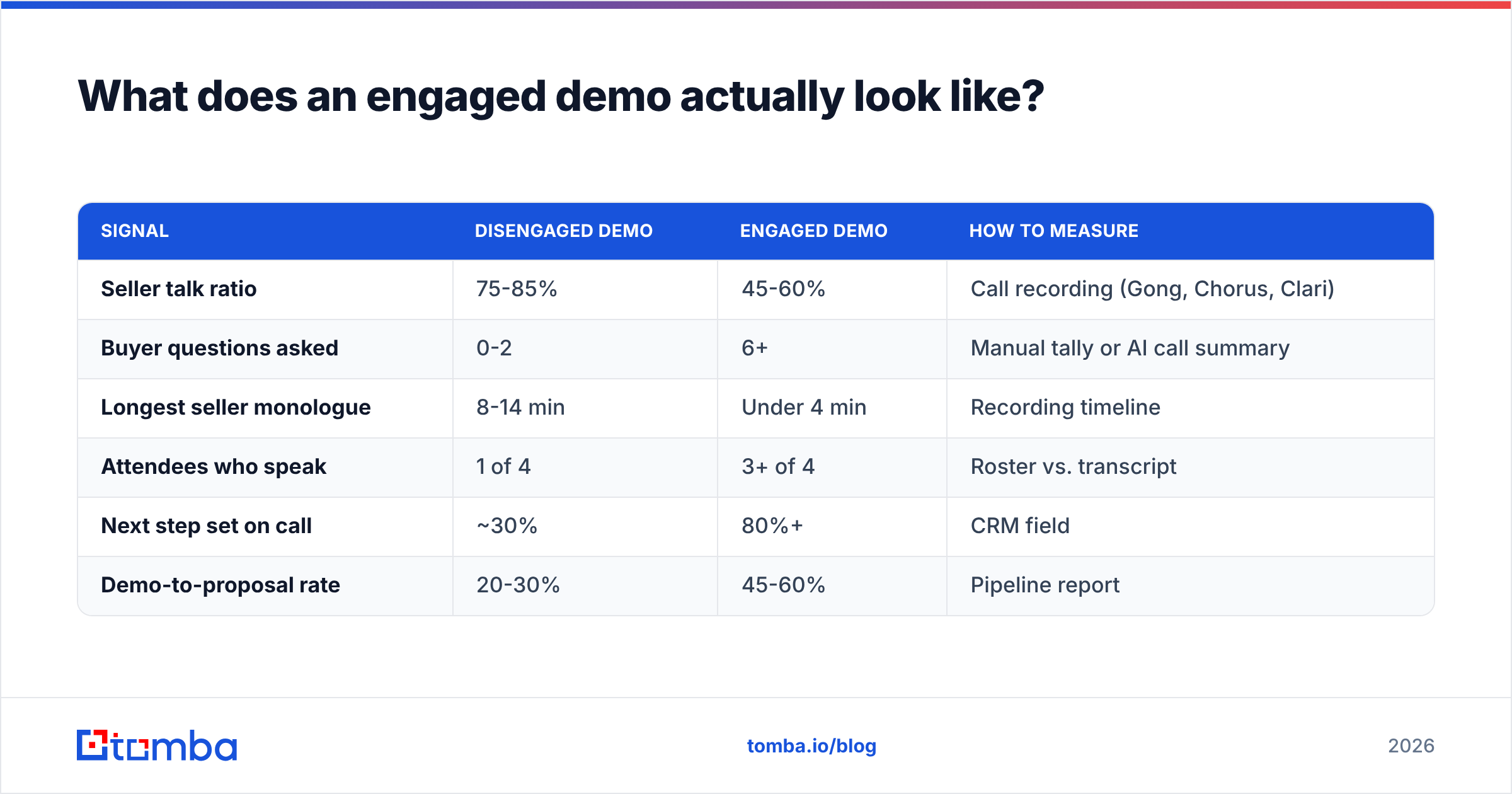
An engaged demo has a measurable shape. Track these against your current calls:
| Signal | Disengaged demo | Engaged demo | How to measure |
|---|---|---|---|
| Seller talk ratio | 75-85% | 45-60% | Call recording (Gong, Chorus, Clari) |
| Buyer questions asked | 0-2 | 6+ | Manual tally or AI call summary |
| Longest seller monologue | 8-14 min | Under 4 min | Recording timeline |
| Attendees who speak | 1 of 4 | 3+ of 4 | Roster vs. transcript |
| Next step set on call | ~30% | 80%+ | CRM field |
| Demo-to-proposal rate | 20-30% | 45-60% | Pipeline report |
The talk ratio row is the one to obsess over. Conversation-intelligence vendors have published this pattern consistently for years: winning discovery and demo calls sit closer to a balanced split, while losing ones skew hard toward the seller. You do not need a $30k platform to check it — record three calls this week and time yourself with a stopwatch.
The second-most-diagnostic row is "attendees who speak." A four-person demo where only the champion talks is not a multi-threaded deal. It is a single-threaded deal with an audience.
How do you engage buyers during demos step by step?#
Seven techniques, ordered by how much they move the needle relative to the effort they cost.
1. Open with a discovery recap, not an agenda slide. Spend the first 90 seconds repeating what they told you in discovery — in their words, with their numbers. "Last time you said your SDRs burn about six hours a week hand-checking emails, and that bounce rate on the Q3 campaign hit 11%. I'm going to show you three things that hit those two numbers. Anything change since we spoke?" That closing question is the point: it forces a verbal response inside the first two minutes and sets the norm that this is a conversation.
2. Run the tell-show-tell loop. Before every click sequence, say the outcome in plain language. Then show it. Then confirm: "Does that match how your team would actually run it?" Three sentences, one demo move, one check. Repeat every 3-5 minutes. This single structure does more for engagement than any other habit on this list because it makes silence impossible to sustain.
3. Demo with their data. Load their domain, their competitor names, their real job titles. If you are demoing a prospecting tool, run a live domain search against their actual target account list. If you are demoing a CRM, import ten of their real deal names beforehand. Generic sample data forces translation; real data forces reaction.
4. Give the mouse away. Hand over control for one specific task — "search your own domain and tell me what you see." Buyers who touch the product during the call retain more and object less. If your tool cannot support that, at minimum ask them to describe the next click they'd want to make before you make it.
5. Assign every attendee a question. Before the call, map the roster. Security lead gets a compliance question at minute eight. Finance gets a cost-per-record question at minute twenty. Write them down. Nobody sits silent for forty minutes and then champions you internally.
6. Use the deliberate pause. After a key screen, stop talking for a full three seconds. It feels like an eternity. It is the most reliable way to surface a question the buyer was politely suppressing.
7. Close by writing the next step on screen. Open a shared doc or the CRM and type the next step while they watch: date, owner, deliverable. Verbal next steps evaporate. Watched-being-typed next steps stick.
How much preparation does an engaging demo need?#
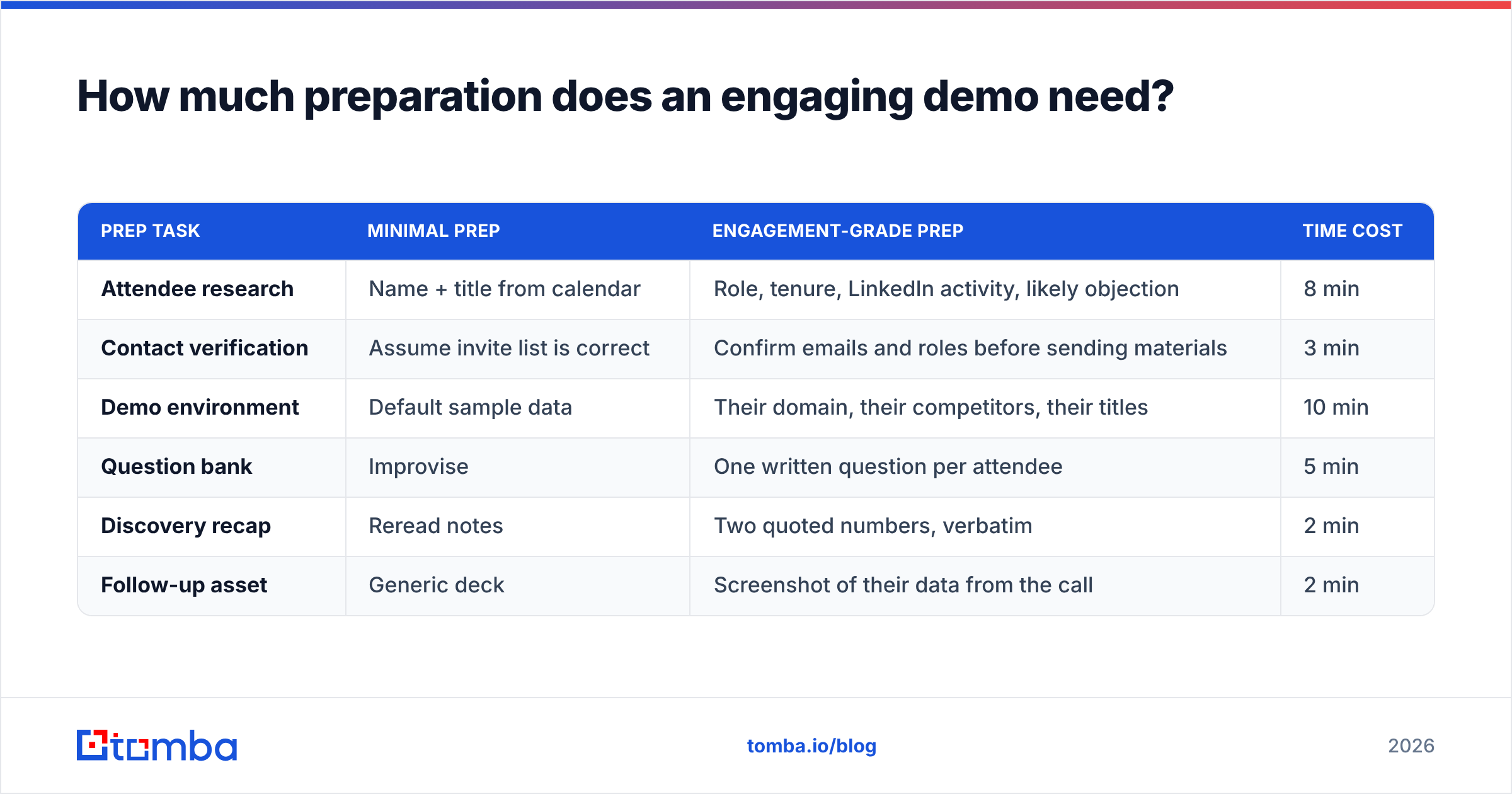
Roughly 20-30 minutes of prep per demo, front-loaded on the roster.
Here is what that looks like against a lower-effort approach:
| Prep task | Minimal prep | Engagement-grade prep | Time cost |
|---|---|---|---|
| Attendee research | Name + title from calendar | Role, tenure, LinkedIn activity, likely objection | 8 min |
| Contact verification | Assume invite list is correct | Confirm emails and roles before sending materials | 3 min |
| Demo environment | Default sample data | Their domain, their competitors, their titles | 10 min |
| Question bank | Improvise | One written question per attendee | 5 min |
| Discovery recap | Reread notes | Two quoted numbers, verbatim | 2 min |
| Follow-up asset | Generic deck | Screenshot of their data from the call | 2 min |
The contact-verification row is the one teams skip and then regret. If the follow-up recap bounces because you had a stale address for the CFO who joined late, your engagement work dies on the vine. Running the roster through an email verifier before the call takes under three minutes and protects everything downstream. The same goes for the attendee who joins unannounced — a quick reverse email lookup on the address in the calendar invite tells you who you are actually talking to before you say the wrong thing.
Prep also compounds. The account research you do for the demo becomes the account research for the mutual action plan, the business case, and the exec readout.
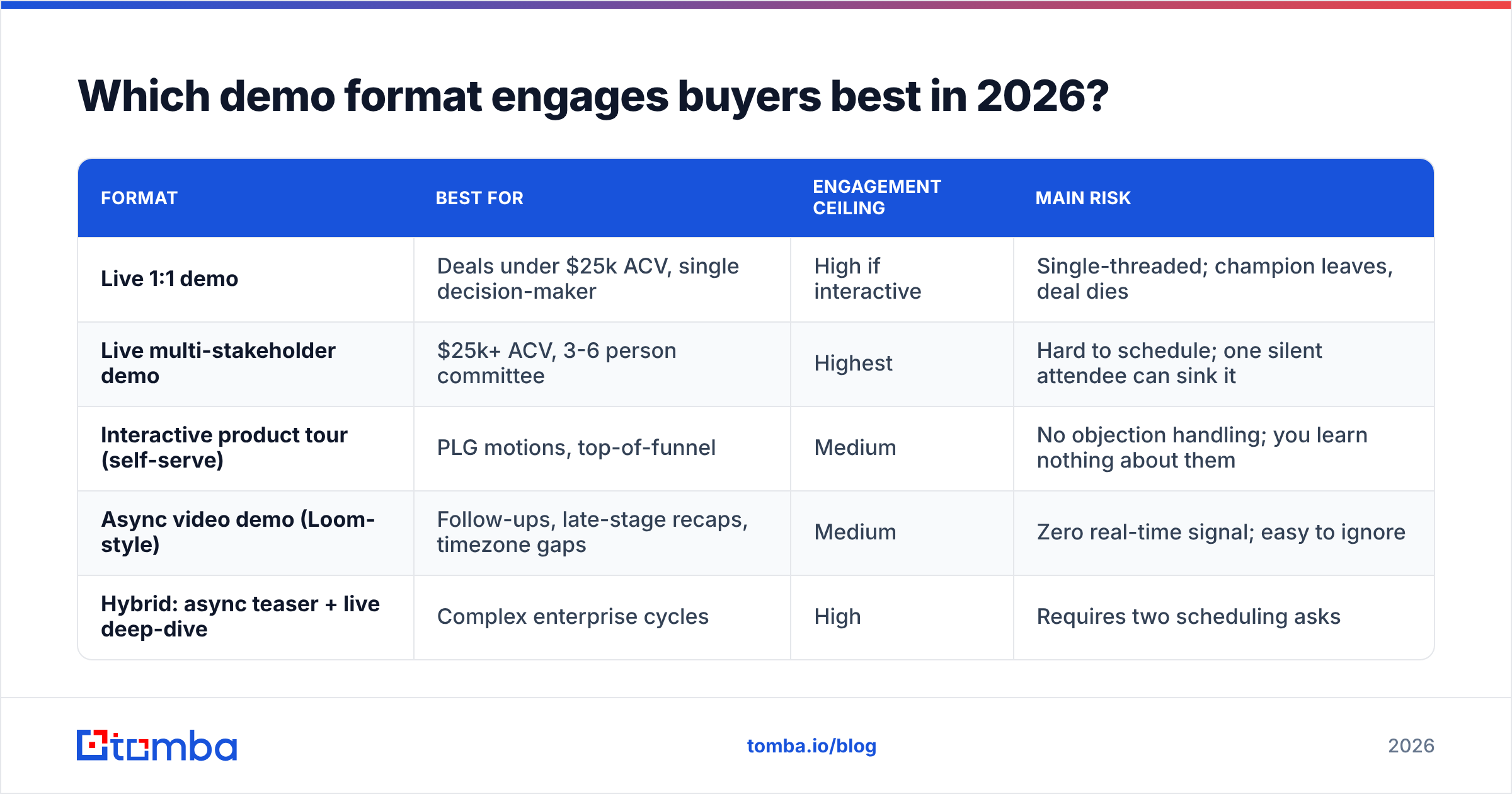
Which demo format engages buyers best in 2026?#
Depends on deal size and buying-committee count. There is no universal answer, but there is a defensible default.
| Format | Best for | Engagement ceiling | Main risk |
|---|---|---|---|
| Live 1:1 demo | Deals under $25k ACV, single decision-maker | High if interactive | Single-threaded; champion leaves, deal dies |
| Live multi-stakeholder demo | $25k+ ACV, 3-6 person committee | Highest | Hard to schedule; one silent attendee can sink it |
| Interactive product tour (self-serve) | PLG motions, top-of-funnel | Medium | No objection handling; you learn nothing about them |
| Async video demo (Loom-style) | Follow-ups, late-stage recaps, timezone gaps | Medium | Zero real-time signal; easy to ignore |
| Hybrid: async teaser + live deep-dive | Complex enterprise cycles | High | Requires two scheduling asks |
The hybrid is underrated. Send a four-minute async walkthrough 48 hours ahead, then use the live call entirely for questions and their-data exploration. You skip the boring parts, and the buyer arrives with actual questions instead of a blank stare. HubSpot's sales research has consistently shown buyers wanting more self-directed evaluation before talking to a rep — the hybrid respects that without giving up the live conversation.
For committee deals, the multi-stakeholder live demo is still the highest-engagement format available, which is why the "assign every attendee a question" technique matters so much. Gartner's B2B buying research puts the typical enterprise buying group in the 6-10 person range — you are rarely selling to one brain.

What questions should you ask mid-demo?#
Not "does that make sense?" — that question only ever gets a polite yes.
Use questions that require a specific, non-yes answer:
- Workflow-anchored: "Who on your team would be the one clicking this on a Monday morning?"
- Comparison-anchored: "How does this compare to how you're doing it in the spreadsheet today?"
- Consequence-anchored: "If this ran automatically every week, what would your team stop doing?"
- Objection-inviting: "What about this screen would give your security team pause?"
- Priority-forcing: "Of the three things I've shown, which one would you actually turn on first?"
That last one is the most valuable question in the entire demo. The answer tells you what to write in the proposal, what to lead with in the exec readout, and which feature to never mention again.
Avoid the two engagement killers: "any questions so far?" (invites silence) and "let me just show you one more thing" (signals you are running a script, not a conversation).
How does data quality affect demo engagement?#
More than most reps expect, because bad data breaks engagement at both ends of the call.
Before the demo, weak contact data means you invite the wrong people. You get a manager when you needed a director, or you miss the technical evaluator entirely, and the call becomes an unpaid training session for someone with no budget. Building the invite list from verified, role-accurate contacts — via a LinkedIn finder or straight domain-level research — is not a data-ops chore; it is demo preparation.
After the demo, bad data kills the momentum you just built. The recap email bounces. The mutual action plan goes to a shared inbox nobody reads. The champion forwards your deck to a colleague whose address you never captured. Every one of those is a fixable data problem, and each one costs you the engagement you spent forty minutes earning.
A practical rule: before any demo with three or more attendees, verify every address on the invite and capture at least one backup contact in the same department. If your champion goes on parental leave two weeks after a great demo, that backup contact is the difference between a stalled deal and a re-engaged one. Teams running this at volume typically wire it into their CRM with a bulk enrichment step rather than doing it by hand.
How do you measure whether your demos are actually engaging?#
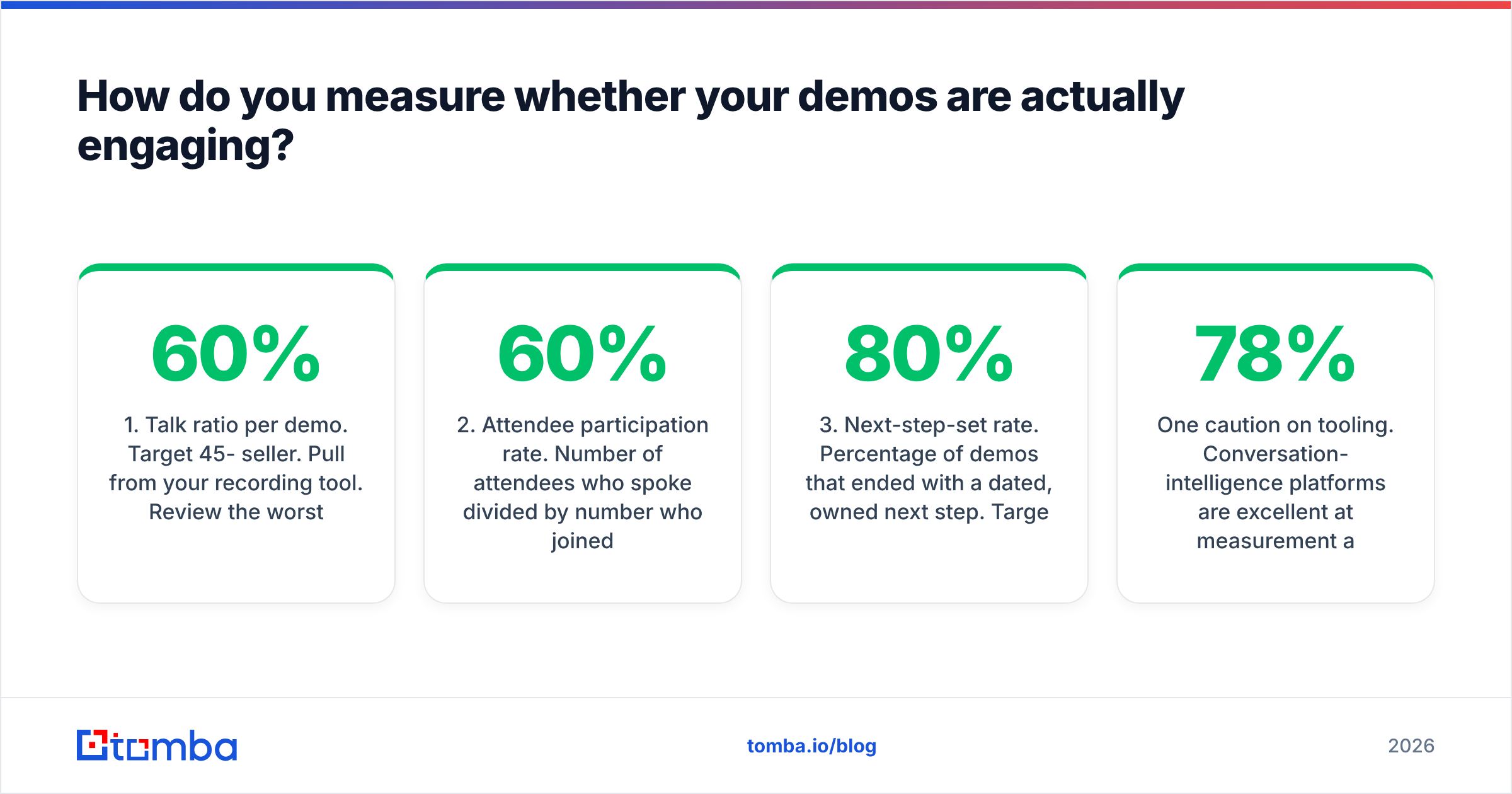
Pick three metrics and review them weekly. More than three and nobody looks.
- Talk ratio per demo. Target 45-60% seller. Pull from your recording tool. Review the worst call each week as a team.
- Attendee participation rate. Number of attendees who spoke divided by number who joined. Target above 60%.
- Next-step-set rate. Percentage of demos that ended with a dated, owned next step. Target 80%+. This is the truest engagement proxy because disengaged buyers do not commit to calendars.
Two secondary metrics worth tracking quarterly: demo-to-proposal conversion, and the average number of buyer questions per call. Both are lagging, but they confirm whether the leading indicators are real.
One caution on tooling. Conversation-intelligence platforms are excellent at measurement and mediocre at diagnosis — they will tell you your talk ratio was 78% but not that you lost the room because you demoed reporting to a room full of practitioners. Peer review of one recorded call per rep per week catches what the software misses. Compare tool options on G2 before committing budget, since the category has consolidated significantly.
What should you do in the first 48 hours after the demo?#
Engagement does not end when the call does — it either compounds or evaporates.
- Within 2 hours: Send the recap with the buyer's own numbers, a screenshot of their data from the call, and the next step you typed on screen.
- Within 24 hours: Send a role-specific note to each attendee who spoke, referencing what they specifically asked. Five sentences maximum.
- Within 48 hours: Deliver whatever you promised live — a pricing sheet, a security doc, a trial environment. Late delivery undoes a great demo faster than a mediocre demo does.
- Ongoing: If the champion goes quiet for a week, reach the backup contact you captured before the call rather than sending a fourth follow-up to the same inbox.
The single most-skipped step is the role-specific note. Everyone sends the group recap. Almost nobody sends the security lead a two-line answer to the exact question they asked. That note is what turns a silent attendee into an internal advocate.
Where should you start?#
Pick one technique and run it on your next five demos before adding a second. The tell-show-tell loop is the highest-return starting point — it costs zero prep time and structurally prevents the monologue that causes most disengagement.
Then fix the data layer underneath. An engaging demo delivered to the wrong roster, or followed up to a bouncing address, is wasted work. Build your invite lists from verified contacts, capture a backup stakeholder in every account, and make sure your follow-ups land in real inboxes.
Start with the Tomba Email Finder to build accurate, role-verified attendee lists before your next demo — the free tier covers 25 searches a month, and paid plans start at $49/mo on the Starter tier. Check current Tomba pricing for team-scale volume. Better rosters in, better conversations on the call, fewer dead follow-ups after it.
Related guides#
// get started
Find, verify and enrich your first contacts today
Start on the free plan with 25 searches a month, then scale when your team is ready.
Free plan · No credit card required · GDPR & CCPA
// about the author