How to Find a Person's Email Address for Free in 2026
Nine free methods to find anyone's work email — from Google operators and GitHub commits to free finder tiers — plus how to verify the guess before you hit send.
TL;DR
- Most B2B email addresses follow one of six predictable patterns. Once you know the company's pattern, finding one person's address is arithmetic, not detective work.
- The highest-hit-rate free methods are: Google search operators, GitHub commit history, free tiers of email finder tools, and the company's own press/careers pages.
- Free tiers are real: Tomba gives you 25 searches a month at zero cost, and most competitors offer something similar. Stacking two or three free tiers covers a lot of prospecting.
- Never send to an unverified guess. A single bounce on a cold domain costs you more than the ten minutes verification takes.
- Scraped personal Gmail addresses are a trap — low reply rates, high spam complaints, and GDPR exposure. Stick to business addresses with a legitimate-interest basis.
You need to reach one specific person. You have their name, maybe their company, maybe a LinkedIn profile. What you don't have is a budget, and the tools that promise "unlimited emails" want $99 before they'll show you a single character.
Good news: the free path is genuinely viable for low-volume work. If you need ten addresses this week, you can get them for nothing. If you need ten thousand, free stops working and you should know why before you waste a weekend on it.
Here's every method that still works in 2026, ranked roughly by hit rate.
What Are the Free Methods That Actually Work?#
Not all "free" techniques deserve your time. Some were killed by platform changes years ago and still circulate in listicles. These are the ones with a real success rate:
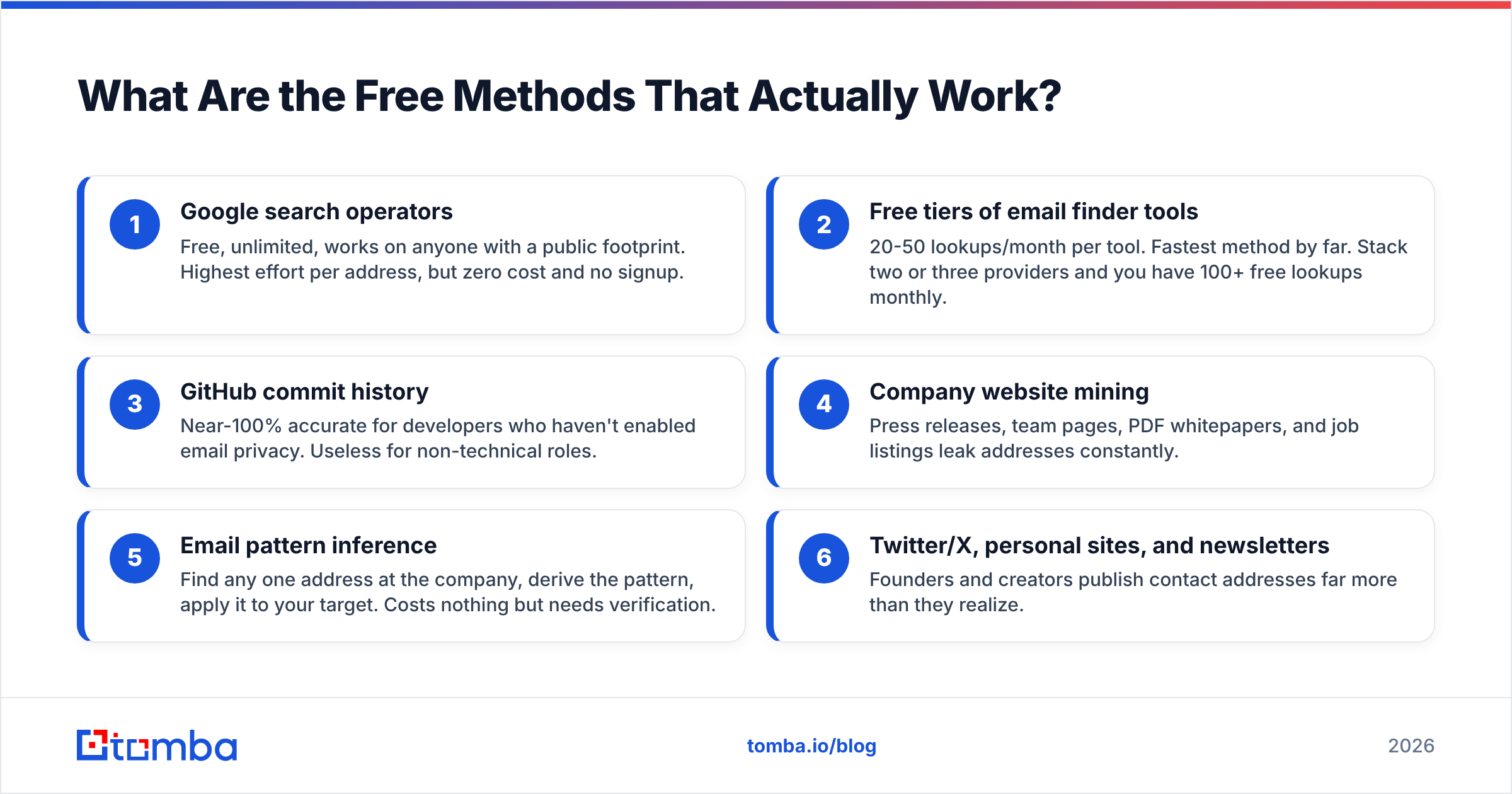
- Google search operators — Free, unlimited, works on anyone with a public footprint. Highest effort per address, but zero cost and no signup.
- Free tiers of email finder tools — 20-50 lookups/month per tool. Fastest method by far. Stack two or three providers and you have 100+ free lookups monthly.
- GitHub commit history — Near-100% accurate for developers who haven't enabled email privacy. Useless for non-technical roles.
- Company website mining — Press releases, team pages, PDF whitepapers, and job listings leak addresses constantly.
- Email pattern inference — Find any one address at the company, derive the pattern, apply it to your target. Costs nothing but needs verification.
- Twitter/X, personal sites, and newsletters — Founders and creators publish contact addresses far more than they realize.
The workflow that beats all of them individually: infer the pattern, then verify. Pattern inference gives you a candidate in thirty seconds; a free email checker tells you whether it's real before you risk a bounce.

How Do You Use Google Search Operators to Find an Email?#
Google indexes far more contact data than people expect. The trick is narrowing the query so you're not fighting the entire web.
Start with the most specific form and loosen it:
site:company.com "firstname lastname" email"firstname lastname" "@company.com"site:company.com "@company.com" -www"firstname" "lastname" ("email" OR "contact") site:company.com filetype:pdfThat last one is underrated. Conference programs, investor decks, and academic papers are published as PDFs with author contact blocks intact, and they're fully indexed.
A few operator notes that save time:
- Quotes force exact match. Without them Google will happily show you a different Sarah Chen.
filetype:pdfandfiletype:xlsxsurface documents nobody remembered to scrub.-wwwand-jobscut the noise from the marketing site.- Try Bing too. It indexes some directory sites Google has deranked, and its results differ enough to be worth the extra minute.
Expect a hit rate somewhere around 15-25% for typical B2B targets. It's the cheapest method and the slowest. For a handful of high-value contacts, it's fine. For a list of 200, it's a full workday.
Where Else Do People Leak Their Work Email?#
Public sources are stranger and richer than most guides admit.
GitHub. If your target is an engineer, run their commits through the API:
https://api.github.com/users/USERNAME/events/publicLook at the payload.commits[].author.email field. Developers who haven't turned on GitHub's email-privacy setting expose their real address in every commit. Accuracy here is effectively perfect — it's the address their Git client is configured with. It's also the address they actually read.
Press releases and newsroom pages. PR contacts are published deliberately. Even when the listed person isn't your target, you've now confirmed the company's email pattern for free.
Job listings. Smaller companies routinely write "send your CV to hiring-manager@company.com." That's a real mailbox and a real pattern sample.
Conference speaker pages and academic profiles. University and event sites publish addresses as a matter of course.
Personal websites and newsletters. Founders, consultants, and creators want to be reachable. Check the footer, the /about page, and the CAN-SPAM footer of any newsletter they send — that footer is legally required to contain a physical address and usually contains an email too.
Whois records. Mostly redacted since GDPR, but small businesses and older domains still slip through. Free to check, takes ten seconds.
Podcast show notes and YouTube "About" tabs. The About tab on YouTube has a business-email field that a surprising number of creators fill in.
Can You Guess an Email Address from a Name?#
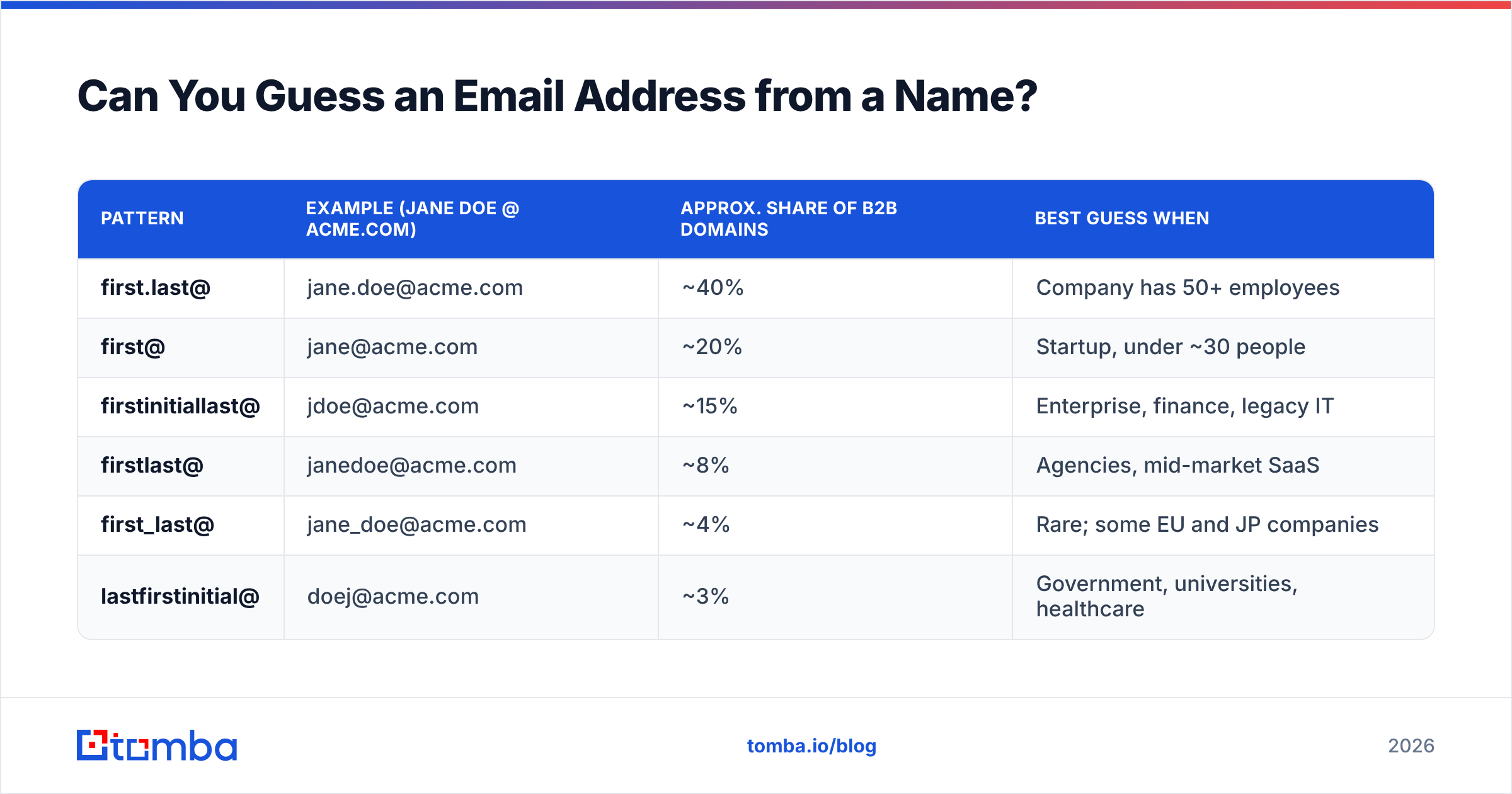
Yes, and it's more reliable than it sounds — roughly 70% of B2B domains use one of the top three patterns.
| Pattern | Example (Jane Doe @ acme.com) | Approx. share of B2B domains | Best guess when |
|---|---|---|---|
| first.last@ | jane.doe@acme.com | ~40% | Company has 50+ employees |
| first@ | jane@acme.com | ~20% | Startup, under ~30 people |
| firstinitiallast@ | jdoe@acme.com | ~15% | Enterprise, finance, legacy IT |
| firstlast@ | janedoe@acme.com | ~8% | Agencies, mid-market SaaS |
| first_last@ | jane_doe@acme.com | ~4% | Rare; some EU and JP companies |
| lastfirstinitial@ | doej@acme.com | ~3% | Government, universities, healthcare |
The method: find one confirmed address at the domain (press page, GitHub, a signature in a forum post), decode the pattern, and apply it to your target. A company email pattern checker does this lookup for you and returns the dominant format for a domain.
Two things that break naive guessing:
- Duplicate names. If there are two Jane Does, IT appended something. Your guess is wrong and you can't tell without verification.
- Legacy migrations. Companies that changed domains often keep both live, or route only one correctly.
@acme.comand@acmegroup.commay behave very differently.
Which is why guessing is a step, never the final answer.
Why Does Verification Matter More Than Finding?#
Because a bounce is more expensive than a missing contact.
Mailbox providers treat hard bounces as a signal of list quality. Push your bounce rate above roughly 2-3% and Google and Microsoft start throttling your domain — not just for that campaign, but for everything you send afterward. Recovering sender reputation takes weeks. Skipping a contact takes zero seconds.
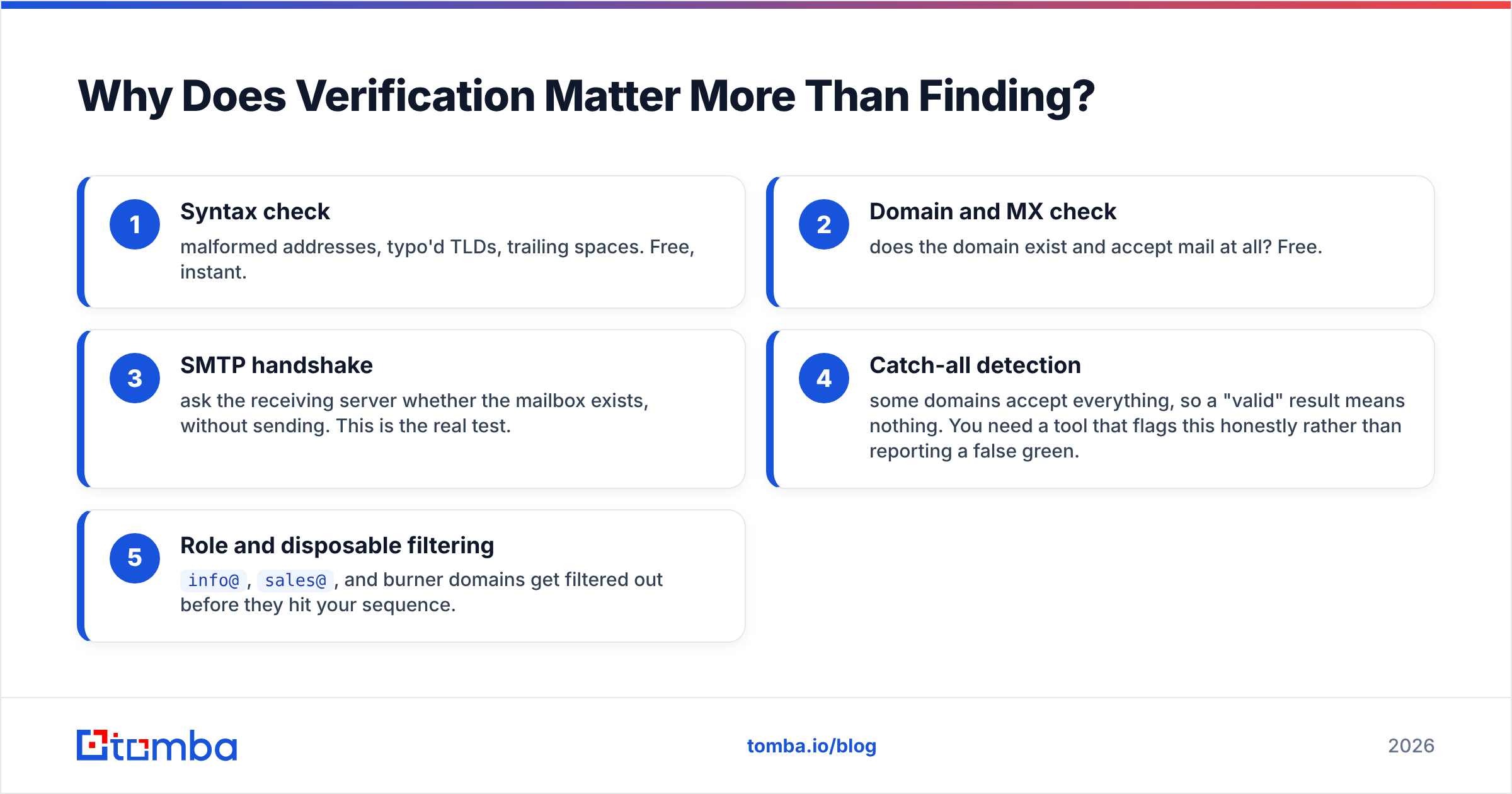
The verification chain, in order:
- Syntax check — malformed addresses, typo'd TLDs, trailing spaces. Free, instant.
- Domain and MX check — does the domain exist and accept mail at all? Free.
- SMTP handshake — ask the receiving server whether the mailbox exists, without sending. This is the real test.
- Catch-all detection — some domains accept everything, so a "valid" result means nothing. You need a tool that flags this honestly rather than reporting a false green.
- Role and disposable filtering —
info@,sales@, and burner domains get filtered out before they hit your sequence.
Catch-all domains are where cheap verifiers quietly fail. They return "valid" for asdkjh@company.com because the server accepts all mail. A proper catch-all verifier detects the condition and tells you the result is inconclusive — which is the honest answer, and the one that protects your domain.

Which Free Email Finder Tools Are Worth Using?#
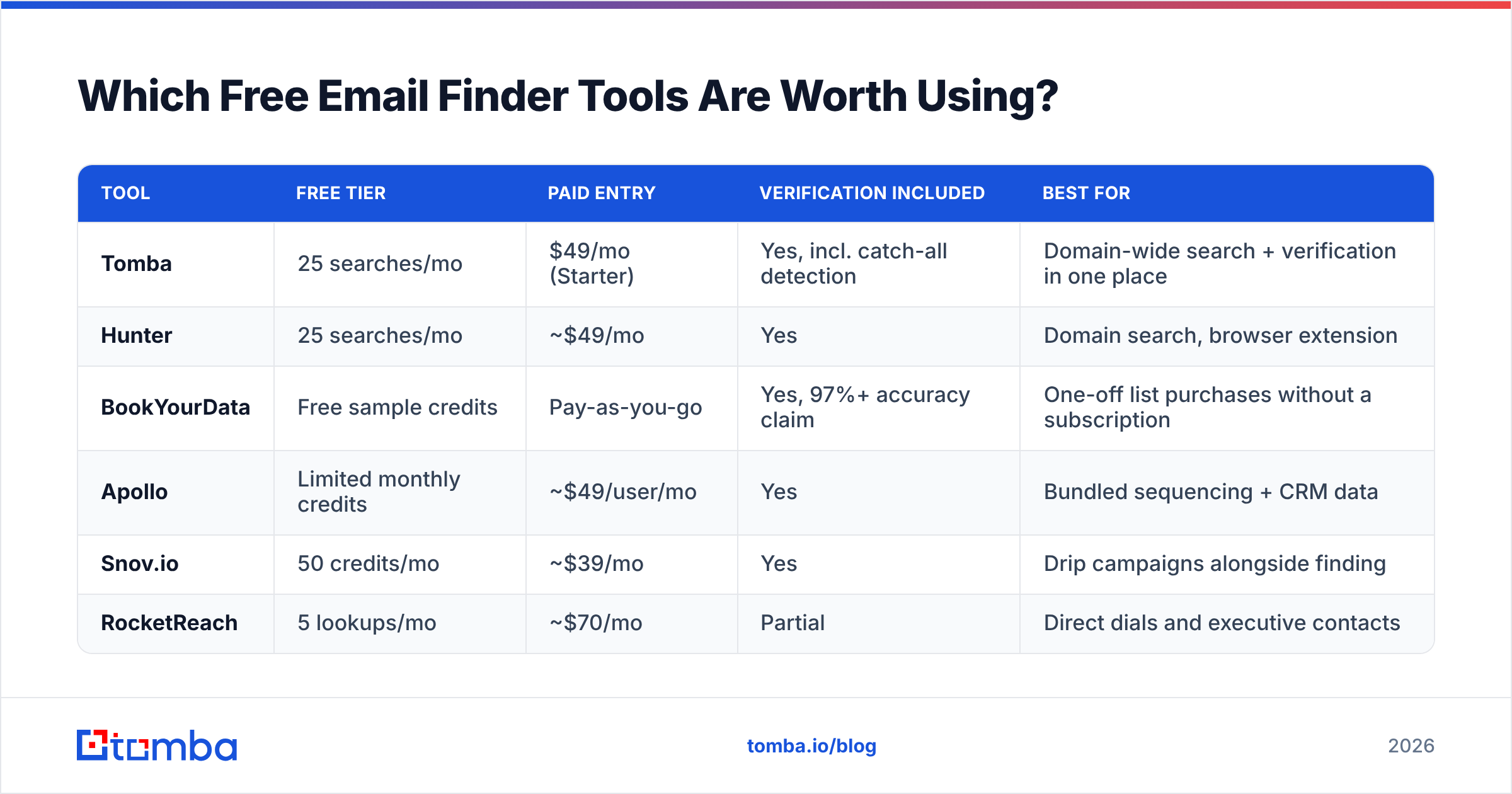
Free tiers are the fastest route to a verified address. Every serious provider offers one because it's their acquisition funnel. Use that.
| Tool | Free tier | Paid entry | Verification included | Best for |
|---|---|---|---|---|
| Tomba | 25 searches/mo | $49/mo (Starter) | Yes, incl. catch-all detection | Domain-wide search + verification in one place |
| Hunter | 25 searches/mo | ~$49/mo | Yes | Domain search, browser extension |
| BookYourData | Free sample credits | Pay-as-you-go | Yes, 97%+ accuracy claim | One-off list purchases without a subscription |
| Apollo | Limited monthly credits | ~$49/user/mo | Yes | Bundled sequencing + CRM data |
| Snov.io | 50 credits/mo | ~$39/mo | Yes | Drip campaigns alongside finding |
| RocketReach | 5 lookups/mo | ~$70/mo | Partial | Direct dials and executive contacts |
Free tiers reset monthly, and nothing stops you from using three of them. Sixty to a hundred free verified lookups per month is enough for founder-led sales, recruiting, or a targeted partnerships push.
What the free tiers deliberately don't give you: bulk uploads, API access, and CRM sync. That's the line between "find ten people" and "build a pipeline." If you're crossing it, compare Tomba pricing against your current per-contact cost rather than paying per-seat for features you don't touch.
Independent review sites are worth a scan before committing — G2's email-finder category aggregates enough verified reviews to spot the tools whose accuracy claims don't survive contact with real data.
What About LinkedIn — Can You Get Emails There?#
Partly, and with caveats.
LinkedIn shows the contact info a member chose to publish. Click "Contact info" on a profile: some people list their email openly, particularly consultants, recruiters, and anyone actively job hunting. That's free, permitted, and takes five seconds. Do this first for any target.
What LinkedIn does not do is expose emails at scale. Automated scraping violates the User Agreement and gets accounts restricted. Tools that promise to "extract 10,000 emails from Sales Navigator" are operating in a grey zone at best.
The compliant approach is to use LinkedIn as an identity source — name, company, current title — and resolve the email from public web data separately. That's how a LinkedIn finder works: it takes the profile identity and matches it against indexed business email data rather than pulling anything private out of LinkedIn itself.
For LinkedIn outreach, the honest framing: a connection request plus a follow-up message often outperforms a cold email to the same person, and it's free. Use email when you need to reach someone outside your network degree or when LinkedIn's inbox is clearly abandoned.
When Should You Stop Using Free Methods?#
There's a clear crossover point, and it's about your time, not the tools.
Free methods are the right call when:
- You need fewer than ~30 contacts a month.
- The contacts are high-value enough to justify manual work (enterprise ABM, fundraising, partnerships, executive recruiting).
- You're validating whether outbound works before committing budget.
- You're a solo founder and your hourly cost is nominally zero.
Switch to paid when:
- You're spending over an hour a week on lookups. At any realistic hourly rate, a $49/mo plan pays for itself in the first two hours saved.
- You need bulk. Uploading a CSV of 500 names and getting verified addresses back is a paid feature everywhere, for good reason — it's the expensive part.
- You need API or CRM integration. Enriching records automatically as they enter your CRM is not something free tiers support.
- Bounce rates are hurting you. Free-method guesses without proper verification are the single most common cause of a wrecked sending domain.
A rough calculation: if manual research takes you 8 minutes per contact and you need 40 contacts, that's over five hours. A $49/mo plan doing the same job in twenty minutes is not a close call.
What Are the Legal and Ethical Limits?#
Finding a business email is legal in most jurisdictions. What you do next is where the rules bite.
GDPR (EU/UK). Business contact data can be processed under legitimate interest, but you must be able to justify the relevance of your outreach, disclose where you got the data if asked, and honour deletion requests immediately. Personal addresses (@gmail.com, @web.de) are much harder to defend.
CAN-SPAM (US). Cold email is legal. You need accurate headers, a real physical address, a working unsubscribe link, and honest subject lines. No opt-in required.
CASL (Canada). Stricter — generally requires express or implied consent. Published business addresses relevant to the recipient's role can qualify as implied consent, with conditions.
Practical rules regardless of jurisdiction: don't email personal accounts, don't obscure who you are, unsubscribe on first request, and don't send the same person a sixth follow-up. The FTC's CAN-SPAM compliance guide is short and worth ten minutes of your time before you launch anything.
Ethically, the test is simple: would this person consider your email a reasonable business approach if they knew exactly how you found them? If the honest answer is no, the address wasn't the problem.
What's the Fastest Free Workflow, Start to Finish?#
Four steps, about three minutes per contact once you've done it a few times:
- Confirm identity. Name, current company, current title — LinkedIn or the company team page. Job changes are the top cause of dead addresses.
- Get the domain pattern. One known address at the company decodes the format for everyone. Check press pages, GitHub, or run a domain search to see published addresses at that domain.
- Build the candidate. Apply the pattern to your target's name. If the pattern is ambiguous, generate the top three variants with an email permutator.
- Verify before sending. Run the candidate through verification. Valid, send. Catch-all, treat as risky and send from a secondary domain or skip. Invalid, try the next variant.
Skip step four and the previous three were wasted effort — worse than wasted, since a bounce costs you future deliverability you haven't earned yet.
Ready to stop guessing?#
Free methods will get you your first ten contacts. Past that, the bottleneck isn't the tools — it's your afternoon. Tomba's email finder starts with 25 free searches a month, no card required, and returns a confidence score plus verification status with every result, so you know whether an address is safe to send to before you send it. When 25 stops being enough, the Starter plan is $49/mo — roughly what one wasted research afternoon costs you.
Start with the free tier, verify everything, and only pay when the volume actually demands it.
Related guides#
// get started
Find, verify and enrich your first contacts today
Start on the free plan with 25 searches a month, then scale when your team is ready.
Free plan · No credit card required · GDPR & CCPA
// about the author