How to Find Corporate Email Addresses: 7 Proven Methods
Seven tested ways to find corporate email addresses in 2026 — from free pattern guessing to API enrichment — plus what each method actually costs you in bounce rate.
TL;DR
- Corporate email addresses follow patterns. About 70% of B2B domains use
first.last@orfirst@, so pattern logic plus verification gets you most of the way there. - Free methods (Google operators, site footers, WHOIS, GitHub commits) work fine for 5-20 contacts. They fall apart above that.
- Paid tools trade money for hit rate and SMTP verification. Expect 60-85% coverage on real B2B lists, not the 99% on vendor landing pages.
- Never send to an unverified address. A 5% bounce rate is enough to damage inbox placement for the rest of the campaign.
- The practical stack: pattern detection → email finder → verifier → catch-all handling. Skipping the last two steps is what kills domains.
Finding a corporate email address is not hard. Finding 500 of them, correctly, without torching your sending domain, is. This guide covers both — the manual tricks that cost nothing, and the tooling that makes the process repeatable.
What counts as a corporate email address?#
A corporate email address is a mailbox hosted on a company-owned domain: sarah.chen@stripe.com, not sarahchen92@gmail.com. It matters for three reasons.
- Deliverability. Corporate domains have real MX records, real SPF/DKIM setups, and predictable spam filtering. Free-mail addresses in a B2B list are usually stale or personal.
- Verifiability. Company mail servers respond to SMTP probes in ways that let you confirm a mailbox exists. Gmail and Outlook consumer domains mostly do not.
- Intent signal. Someone who gives a work address is operating in a work context. That's the buyer you want.
The catch: corporate domains increasingly hide behind catch-all configurations, which accept mail for any address at the domain — asdkjh@company.com included. Catch-alls now cover roughly a third of mid-market domains, and they're the single biggest source of false positives in every email finding workflow.
What are the fastest ways to find a corporate email address?#
Here are the seven methods that actually work, ordered from free-and-manual to paid-and-automated.
- Guess the pattern, then verify. Find one known email at the company, infer the format, apply it to your target's name. A company email pattern checker does this in one lookup.
- Google search operators.
site:company.com "@company.com"or"firstname lastname" email site:company.comsurfaces addresses published in PDFs, press pages, and staff directories. - Company website surfaces. Footers,
/about,/team,/press, and investor-relations pages leak addresses constantly. Press release boilerplate is the richest single source. - GitHub and public commit logs.
git logexposes committer emails. For engineering-led companies, this is the highest-yield free method there is. - Author bylines and bios. Writers list contact info on personal sites and Substacks. An author finder automates the byline → email hop.
- LinkedIn + finder tools. You have the name, company, and title from the profile; a LinkedIn email extractor resolves that to a work mailbox.
- Email finder APIs and bulk lookups. For anything past 50 contacts, upload a CSV of names and domains and let the tool return verified addresses at scale.
Which free method should you try first?#
Start with search operators — they cost nothing and take 30 seconds.
site:acme.com "@acme.com"
site:acme.com filetype:pdf "@acme.com"
"john smith" "acme.com" email -site:linkedin.com
The filetype:pdf variant is underrated. Conference decks, annual reports, and compliance filings are full of employee contact details that nobody thought to scrub.
If that fails, check the domain's email pattern. Once you know Acme uses first.last@acme.com, every future contact at Acme is a five-second job. Tools like Tomba's email permutator generate all plausible variants for a name so you can test them in one batch rather than guessing one at a time.
The failure mode with free methods is silent: you generate a plausible-looking address, it doesn't exist, it bounces, and your sender reputation takes the hit. Free methods must always be paired with verification.
How do the main approaches compare?#
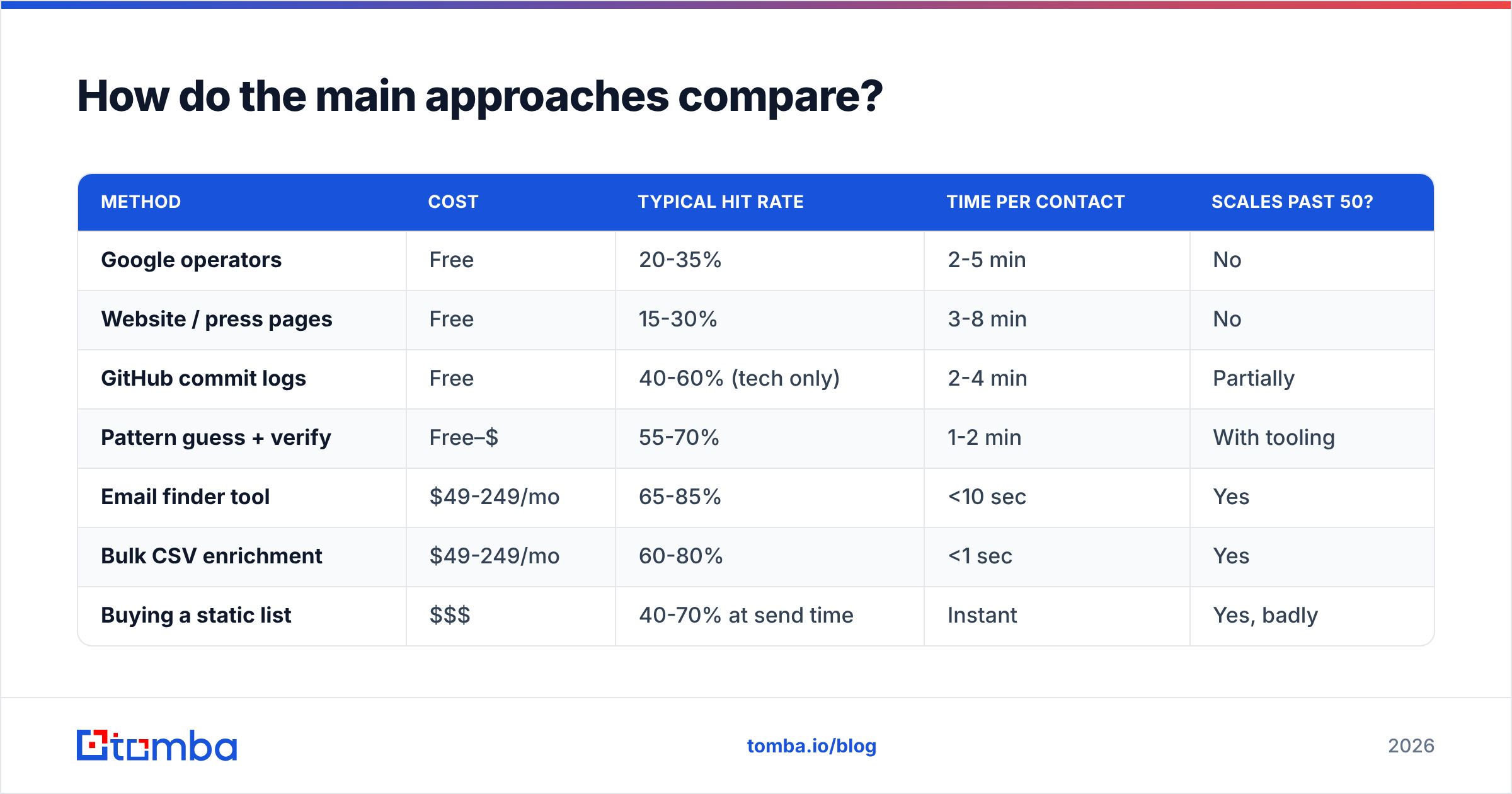
| Method | Cost | Typical hit rate | Time per contact | Scales past 50? |
|---|---|---|---|---|
| Google operators | Free | 20-35% | 2-5 min | No |
| Website / press pages | Free | 15-30% | 3-8 min | No |
| GitHub commit logs | Free | 40-60% (tech only) | 2-4 min | Partially |
| Pattern guess + verify | Free–$ | 55-70% | 1-2 min | With tooling |
| Email finder tool | $49-249/mo | 65-85% | <10 sec | Yes |
| Bulk CSV enrichment | $49-249/mo | 60-80% | <1 sec | Yes |
| Buying a static list | $$$ | 40-70% at send time | Instant | Yes, badly |
Two things stand out. First, no method clears 85% on a mixed B2B list — anyone claiming 95%+ is measuring on a cherry-picked sample of large, well-indexed companies. Second, the cost gap between free and paid is small relative to the time gap: 3 minutes versus 10 seconds per contact means a 50-person list is 2.5 hours of manual work or 8 minutes of tooling.
Static purchased lists deserve a specific warning. B2B contact data decays at roughly 22-30% per year as people change jobs, so a list compiled 18 months ago is close to half wrong on arrival. Providers who refresh continuously and verify at export — BookYourData is a solid example in the pay-as-you-go segment — avoid most of this, but a raw CSV from an unnamed broker will not.
How accurate are email finder tools really?#

Accuracy claims are the most abused number in this category, because vendors measure three different things and call them all "accuracy":
- Coverage / hit rate — of 100 names submitted, how many returned any address. This is what most people care about and what vendors quote least.
- Precision — of the addresses returned, how many are real, deliverable mailboxes. This is what determines bounce rate.
- Verification confidence — an internal score, usually derived from SMTP response plus pattern confidence. Not independently auditable.
A tool returning 90 addresses out of 100 names at 70% precision is worse for your domain than one returning 60 addresses at 97% precision. The second gives you 58 usable contacts and almost no bounces; the first gives you 63 usable contacts and 27 bounces, which is a deliverability incident.
When you evaluate, run the same 100-row test list through every candidate and check the bounces yourself with a third-party email verifier. Vendor-reported confidence scores are not evidence. Independent review sites like G2 at least give you volume of real user reports, though they don't test accuracy directly either.
What does a real workflow look like end to end?#
Here's the pipeline that survives contact with a 2,000-row list.
Step 1 — Build the input list. You need first name, last name, and company domain. Not company name — domain. Name-only lookups force the tool to guess which "Acme" you mean, and the guess is often wrong. Resolve names to domains first with a company website finder.
Step 2 — Detect domain patterns in bulk. Group your list by domain. For any domain where you already have one confirmed address, apply the pattern to everyone else at that company before spending a lookup credit. On a list concentrated in 50 accounts, this alone resolves a large share of rows for free.
Step 3 — Run the finder. Push the remainder through a bulk email finder or hit the email finder API directly from your enrichment job. Batch sizes of 500-1,000 keep rate limits comfortable.
Step 4 — Verify everything. Every address, including ones you found manually. Verification checks syntax, domain MX records, disposable-domain lists, role accounts (info@, sales@), and SMTP mailbox existence.
Step 5 — Deal with catch-alls separately. SMTP verification returns "accept" for every address on a catch-all domain, so it tells you nothing. Route these to a catch-all verifier that uses secondary signals, or segment them into a lower-priority send with tighter volume caps.
Step 6 — Suppress and enrich. Drop role accounts unless you're deliberately targeting shared inboxes, dedupe, and enrich the survivors with title, company size, and tech stack so your copy has something to work with.

What are the legal and compliance limits?#
Finding a work email address is legal in most jurisdictions. Sending to it without a lawful basis is where people get into trouble.
- GDPR (EU/UK). Business email addresses are personal data. B2B cold email is generally defensible under legitimate interest, but you need a documented balancing test, a clear opt-out in every message, and you must honour deletion requests. Personal-format addresses (
john.smith@) get more protection than generic ones (info@). - CAN-SPAM (US). No opt-in requirement, but you must include a physical postal address, honest headers and subject lines, and a working unsubscribe that you process within 10 business days.
- CASL (Canada). Strictest of the three — express or implied consent required before the first message. Implied consent exists for published business addresses relevant to the recipient's role, which covers most B2B prospecting, but the window is limited.
- Scraping terms of service. Many platforms prohibit automated extraction in their ToS. That's a contract question, not a criminal one, but it can get accounts terminated. The FTC's guidance on CAN-SPAM is the clearest plain-language reference on the US side.
Practical takeaway: source from public and licensed data, keep provenance records for each contact, and make unsubscribing trivially easy. That combination handles most of the risk.
How do you keep bounce rate under control?#
Bounce rate is the number that decides whether any of this work pays off. Mailbox providers treat high bounce rates as a spam signal, and the damage persists after you fix the list.
Targets worth holding yourself to:
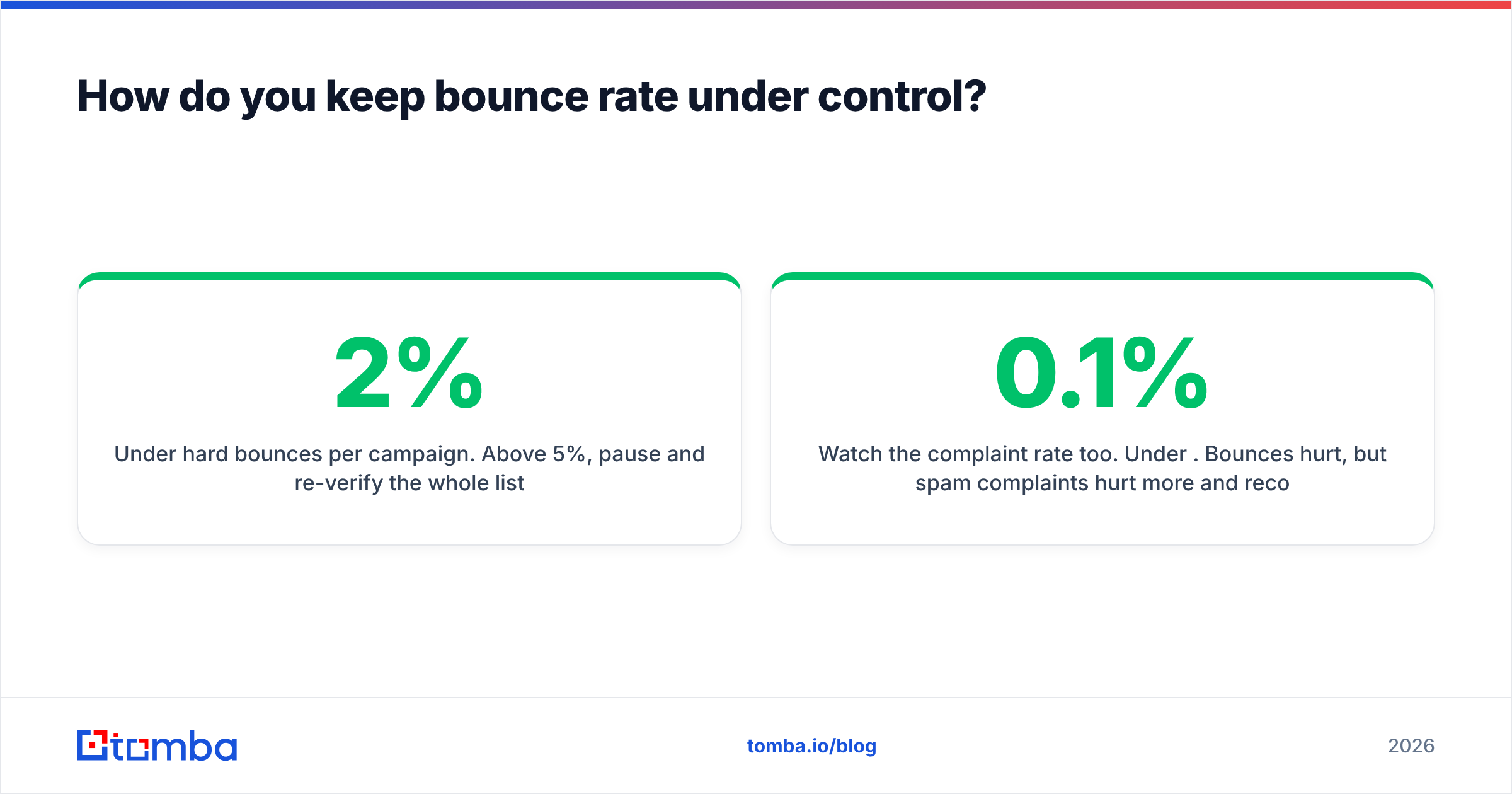
- Under 2% hard bounces per campaign. Above 5%, pause and re-verify the whole list.
- Verify within 30 days of sending. Verification is a snapshot; a result from three months ago is stale data.
- Cap new-domain volume. A fresh sending domain should ramp over 3-4 weeks, not start at 200/day.
- Segment catch-alls. Send to them last, in smaller batches, after your main list has established a clean reputation.
- Watch the complaint rate too. Under 0.1%. Bounces hurt, but spam complaints hurt more and recover slower.
Run the whole list through a verifier before every major send, not just when you build it. People leave jobs weekly, and a contact you verified in January is a coin flip by summer. If email deliverability is already shaky, fix authentication (SPF, DKIM, DMARC) before you blame the data.
Which method should you actually use?#
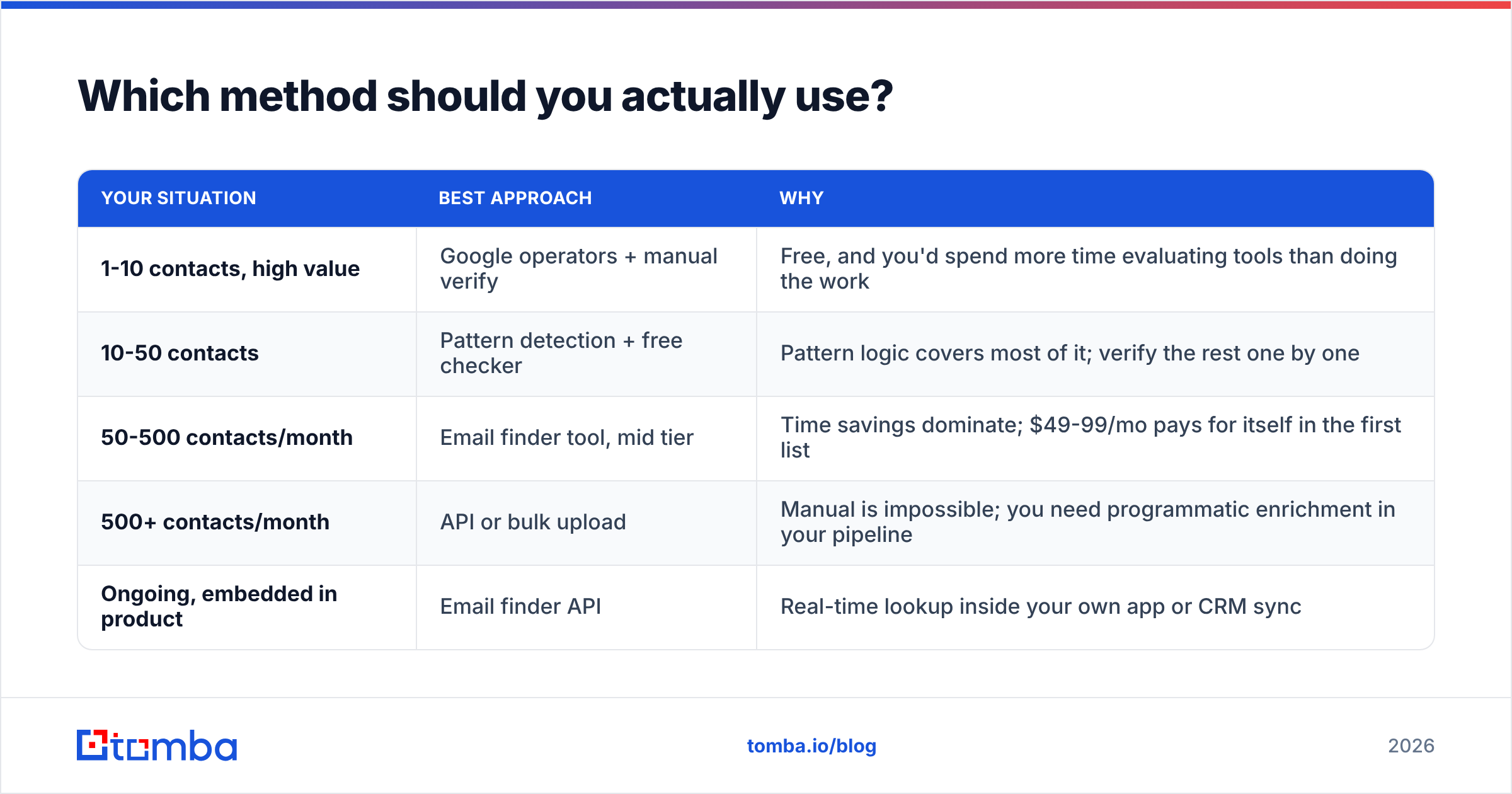
Match the method to the volume:
| Your situation | Best approach | Why |
|---|---|---|
| 1-10 contacts, high value | Google operators + manual verify | Free, and you'd spend more time evaluating tools than doing the work |
| 10-50 contacts | Pattern detection + free checker | Pattern logic covers most of it; verify the rest one by one |
| 50-500 contacts/month | Email finder tool, mid tier | Time savings dominate; $49-99/mo pays for itself in the first list |
| 500+ contacts/month | API or bulk upload | Manual is impossible; you need programmatic enrichment in your pipeline |
| Ongoing, embedded in product | Email finder API | Real-time lookup inside your own app or CRM sync |
The mistake most teams make is jumping to the paid tier before they've tested whether their list quality is the problem. If your targeting is wrong, a better email finder just delivers your bad message to more correct addresses, faster.
Getting started#
If you're finding a handful of corporate addresses, start free: search operators, the company's press page, and a pattern checker will cover you.
Once you're past about 50 contacts a month, the math flips. Tomba's Email Finder resolves a name and domain to a verified work address in under a second, with SMTP verification and catch-all handling built into the same call rather than bolted on afterwards. The free tier gives you 25 searches a month to test it against your own list — which is the only benchmark that matters. Paid plans start at $49/mo for Starter, $99/mo for Growth, and $249/mo for Pro; full Tomba pricing is on the site.
Run your 100-row test list through it, check the bounces, and decide from the numbers.
Related guides#
// get started
Find, verify and enrich your first contacts today
Start on the free plan with 25 searches a month, then scale when your team is ready.
Free plan · No credit card required · GDPR & CCPA
// about the author