How to Find Email Addresses Free: 9 Methods That Work
Free email lookup works — until it doesn't. Here are 9 methods that actually return valid addresses in 2026, what each one costs you in time, and the exact point where free stops paying off.
TL;DR
- You can find most B2B email addresses free, but "free" is a trade of money for your time — expect 3-8 minutes per contact using manual methods versus a few seconds with a tool's free tier.
- The highest-hit-rate free methods are company domain search, pattern deduction plus verification, GitHub commit logs, and author bylines on published content.
- Never send to an unverified guess. An SMTP-level check is the difference between a 0.5% bounce rate and a 12% one that torches your sender reputation.
- Free tiers from real tools (Tomba gives 25 searches/month at no cost) beat manual guessing on both accuracy and time, and they hand you a verification signal you can't get by hand.
- The break-even point is roughly 40-60 contacts per month. Below that, free methods are genuinely fine. Above it, you're paying yourself minimum wage to do data entry.
Finding someone's work email without paying for a data platform is completely doable. What people get wrong is assuming "free" means "no cost" — it means you're the one absorbing the cost, in clicks and time and the occasional bounced message that quietly damages your domain.
This guide walks through nine methods that still work in 2026, ranks them by realistic hit rate, and tells you exactly where the free approach stops making sense.
What does "finding an email address free" actually mean?#
There are three distinct things people mean by free, and confusing them is why so many guides feel useless:
- Fully manual and genuinely free — Google operators, LinkedIn scraping by hand, GitHub commit logs, WHOIS records. Costs nothing but your attention. Hit rate: 30-55% depending on how public the person is.
- Free tiers of paid tools — a monthly credit allowance from a real provider. Tomba's free plan gives 25 searches per month; other vendors sit in the 10-50 range. Hit rate: 80-95%, plus a confidence score you can act on.
- "Free" scrapers and leaked-database sites — no credit limit, no verification, no legal basis. Skip these. The data is stale, the bounce rates are brutal, and under GDPR you have no defensible source of processing.
This post covers 1 and 2. Method 3 is how people end up on blocklists.
Which free methods actually find email addresses?#
Ranked by hit rate in practical use, highest first.
1. Company domain search. Instead of hunting one person, pull every published address on a company's domain and pattern-match from there. If you can see that sarah.chen@acme.com and mike.torres@acme.com exist, you know the format is first.last@. A domain search returns the pattern plus the known addresses in one call — this is the single highest-leverage move and it's why it sits at the top of the list.
2. Pattern deduction + verification. Once you know the company format, construct the address and verify it. Roughly 70% of B2B domains use one of five patterns: first.last@, first@, flast@, firstl@, first_last@. Generate the candidates with an email permutator, then run each through a checker. Constructing without verifying is the mistake — you'll be right about 40% of the time, which is a catastrophic bounce rate.
3. Author bylines and published content. Anyone who writes publicly — blog posts, whitepapers, research papers, conference talks — usually has a contact route attached. Academic PDFs are especially rich; corresponding-author emails are printed in the header of nearly every published paper. An author finder automates the byline-to-email step for article URLs.
4. GitHub and open-source commit history. Every git commit carries the author's email in its metadata. If your target is technical, run git log on any repo they've contributed to, or hit https://api.github.com/users/<username>/events/public and read the commit payloads. Hit rate on engineers: very high. On everyone else: zero.
5. Google search operators. Still works, still underrated:
site:acme.com "@acme.com"
site:acme.com "email" "sarah chen"
"sarah chen" "@acme.com" -site:linkedin.com
intext:"@acme.com" filetype:pdf
PDFs are the goldmine — press kits, investor decks, event sponsor sheets, and conference programs leak contact details constantly.
6. X/Twitter and personal sites. Bios, pinned posts, and the "contact" page of a personal domain. Many people obfuscate (sarah [at] acme [dot] com) — search for "at acme dot com" variants too.
7. WHOIS records. For small companies and solo founders who registered their own domain, WHOIS still sometimes exposes a real admin email. GDPR redaction killed most of this for EU registrants, but non-EU and older registrations often remain visible.
8. Newsletter and gated-content replies. Subscribe to the company's newsletter with a real address. The From: header is frequently a person's actual mailbox rather than noreply@. Reply to it and you're in a real inbox.
9. Ask a human. Front-desk email, a mutual connection, or the support address. "I'm trying to reach whoever handles partnerships — who should I contact?" resolves faster than an hour of scraping, and it's how a surprising share of enterprise deals actually start.
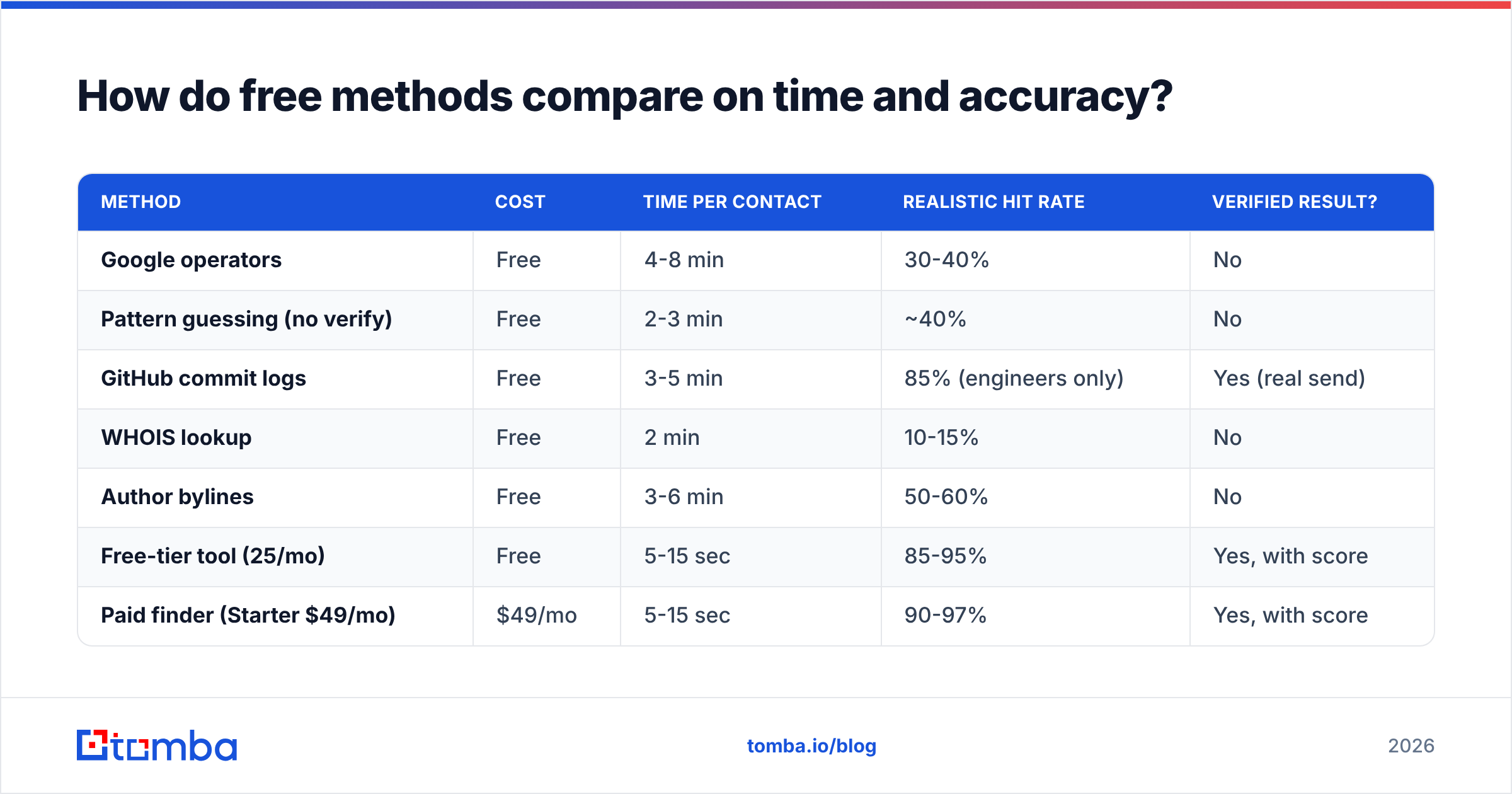
How do free methods compare on time and accuracy?#
| Method | Cost | Time per contact | Realistic hit rate | Verified result? |
|---|---|---|---|---|
| Google operators | Free | 4-8 min | 30-40% | No |
| Pattern guessing (no verify) | Free | 2-3 min | ~40% | No |
| GitHub commit logs | Free | 3-5 min | 85% (engineers only) | Yes (real send) |
| WHOIS lookup | Free | 2 min | 10-15% | No |
| Author bylines | Free | 3-6 min | 50-60% | No |
| Free-tier tool (25/mo) | Free | 5-15 sec | 85-95% | Yes, with score |
| Paid finder (Starter $49/mo) | $49/mo | 5-15 sec | 90-97% | Yes, with score |
The column that matters is the last one. Every manual method returns a candidate, not a confirmed address. Confirmation requires an SMTP conversation with the receiving mail server, and that's not something you can do reliably by hand from a residential IP without getting rate-limited or blocked.

Why does verification matter more than finding?#
Because a wrong address costs more than a missing one.
Mailbox providers score you on bounce rate. Google's own Postmaster Tools documentation and Microsoft's sender guidelines both treat elevated invalid-recipient rates as a spam signal. Cross roughly 2% hard bounces and your delivery to every recipient degrades — including the addresses that were correct. One bad batch of guessed emails can undo months of careful email deliverability work.
The math is unforgiving. Send 200 guessed addresses at a 40% accuracy rate and you've generated 120 hard bounces in a single session. That's not a campaign, that's a self-inflicted blocklist entry.
So the rule is simple: find free, but always verify. Free verification exists — Tomba's free email checker runs syntax, MX, disposable-domain, and mailbox checks without an account. Run every manually-derived address through something like it before it enters your sending tool.
One caveat: catch-all domains. Some servers accept mail for every address at the domain, so a standard verifier can't distinguish real from invented. That's what a dedicated catch-all verifier exists for — it uses secondary signals rather than the SMTP handshake alone. If a domain returns "accept-all," treat any guessed address there as unproven no matter how confident the pattern looks.
Is a free tier better than doing it manually?#
Usually, yes — and the reason isn't the credits, it's the verification signal.
Run the numbers on a realistic week. You need 30 contacts:
- Manual route: 30 contacts × 5 minutes average = 2.5 hours, ~40% of them unverified guesses, expect 8-10 bounces.
- Free-tier route: 25 contacts in about 8 minutes with confidence scores attached, remaining 5 done manually. Total: under 30 minutes, near-zero bounces.
You saved two hours and protected your domain. At any sensible hourly rate, that's the whole argument.
Where free tiers genuinely run out is volume. Twenty-five searches evaporate fast when you're building a list of 300 accounts. At that point you're choosing between stitching together multiple vendors' free tiers — which fragments your data and wastes more time than it saves — or paying for one.
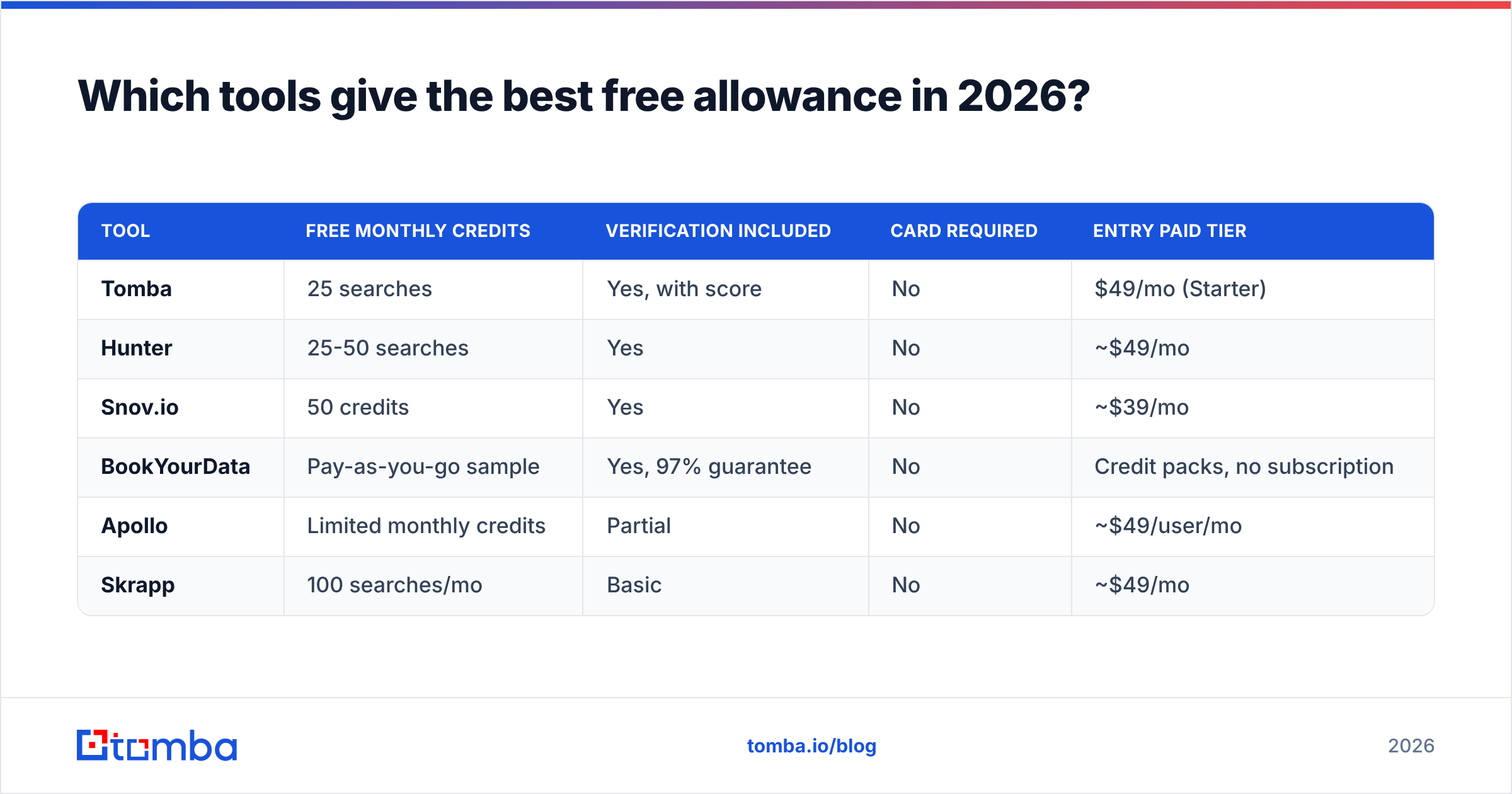
Which tools give the best free allowance in 2026?#
| Tool | Free monthly credits | Verification included | Card required | Entry paid tier |
|---|---|---|---|---|
| Tomba | 25 searches | Yes, with score | No | $49/mo (Starter) |
| Hunter | 25-50 searches | Yes | No | ~$49/mo |
| Snov.io | 50 credits | Yes | No | ~$39/mo |
| BookYourData | Pay-as-you-go sample | Yes, 97% guarantee | No | Credit packs, no subscription |
| Apollo | Limited monthly credits | Partial | No | ~$49/user/mo |
| Skrapp | 100 searches/mo | Basic | No | ~$49/mo |
A few honest notes on this table. Raw credit count is the least useful number on it — a tool that hands you 100 unverified guesses is worse than one that hands you 25 confirmed addresses. Skrapp's headline allowance looks generous until you compare confirmed-deliverable results.
BookYourData works differently from the rest: it's a pay-as-you-go database with a 97% accuracy guarantee rather than a subscription, which suits teams who buy a list occasionally instead of prospecting continuously. If your pattern is "one big list per quarter," that model often costs less than any monthly plan here.
Tomba's free tier includes the same verification pipeline as paid plans, which is the part that matters. If you outgrow it, Tomba pricing runs Starter at $49/mo, Growth at $99/mo, and Pro at $249/mo — and everything is accessible through the Tomba API if you'd rather script your workflow than click through a UI.

What's the fastest free workflow, step by step?#
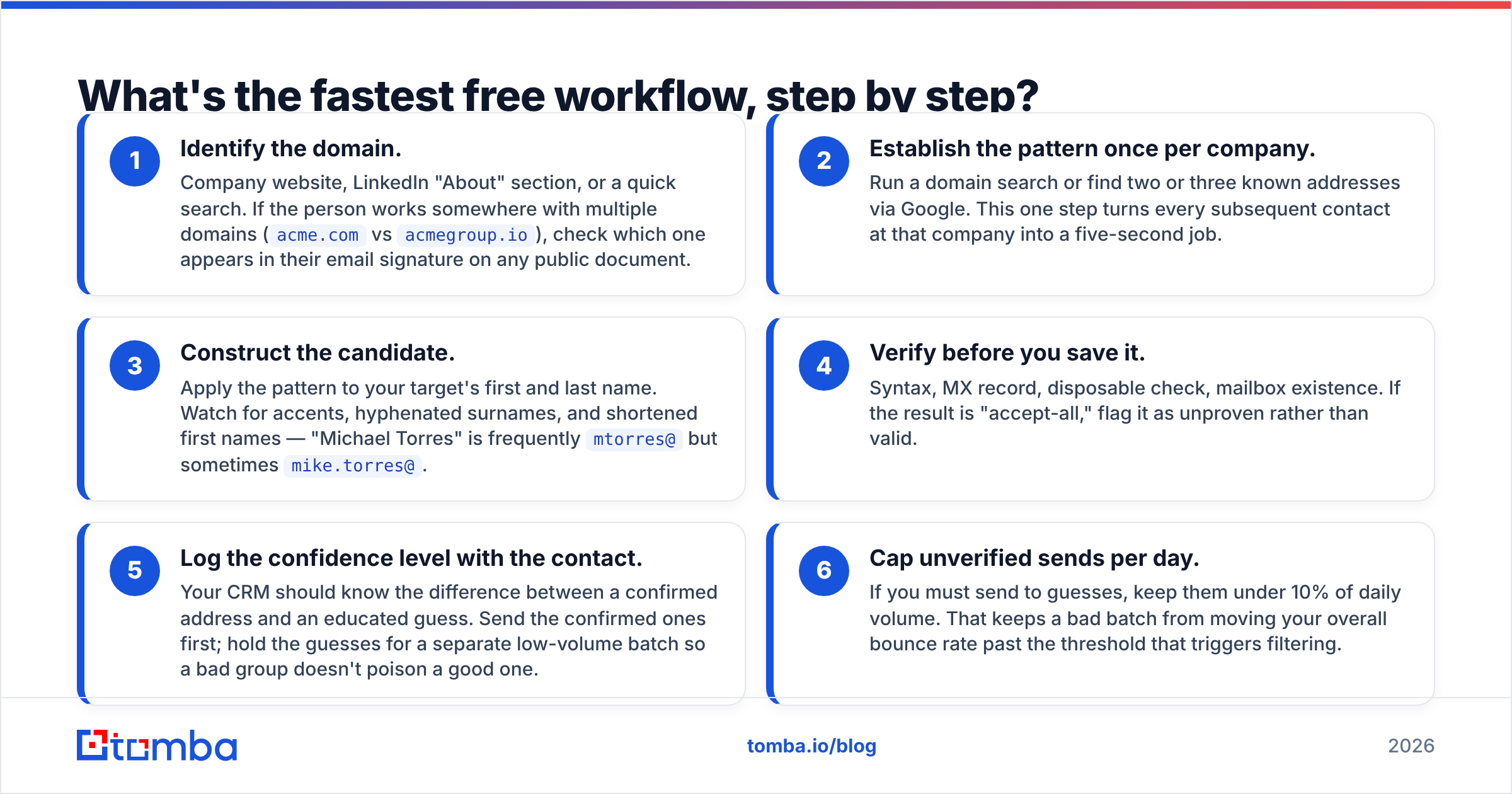
Here's the sequence that gets the best result per minute spent:
- Identify the domain. Company website, LinkedIn "About" section, or a quick search. If the person works somewhere with multiple domains (
acme.comvsacmegroup.io), check which one appears in their email signature on any public document. - Establish the pattern once per company. Run a domain search or find two or three known addresses via Google. This one step turns every subsequent contact at that company into a five-second job.
- Construct the candidate. Apply the pattern to your target's first and last name. Watch for accents, hyphenated surnames, and shortened first names — "Michael Torres" is frequently
mtorres@but sometimesmike.torres@. - Verify before you save it. Syntax, MX record, disposable check, mailbox existence. If the result is "accept-all," flag it as unproven rather than valid.
- Log the confidence level with the contact. Your CRM should know the difference between a confirmed address and an educated guess. Send the confirmed ones first; hold the guesses for a separate low-volume batch so a bad group doesn't poison a good one.
- Cap unverified sends per day. If you must send to guesses, keep them under 10% of daily volume. That keeps a bad batch from moving your overall bounce rate past the threshold that triggers filtering.
For bulk work, steps 3 and 4 are where manual effort collapses under its own weight — a bulk email finder processing a CSV does in one pass what would take a full day by hand.
When should you stop using free methods?#
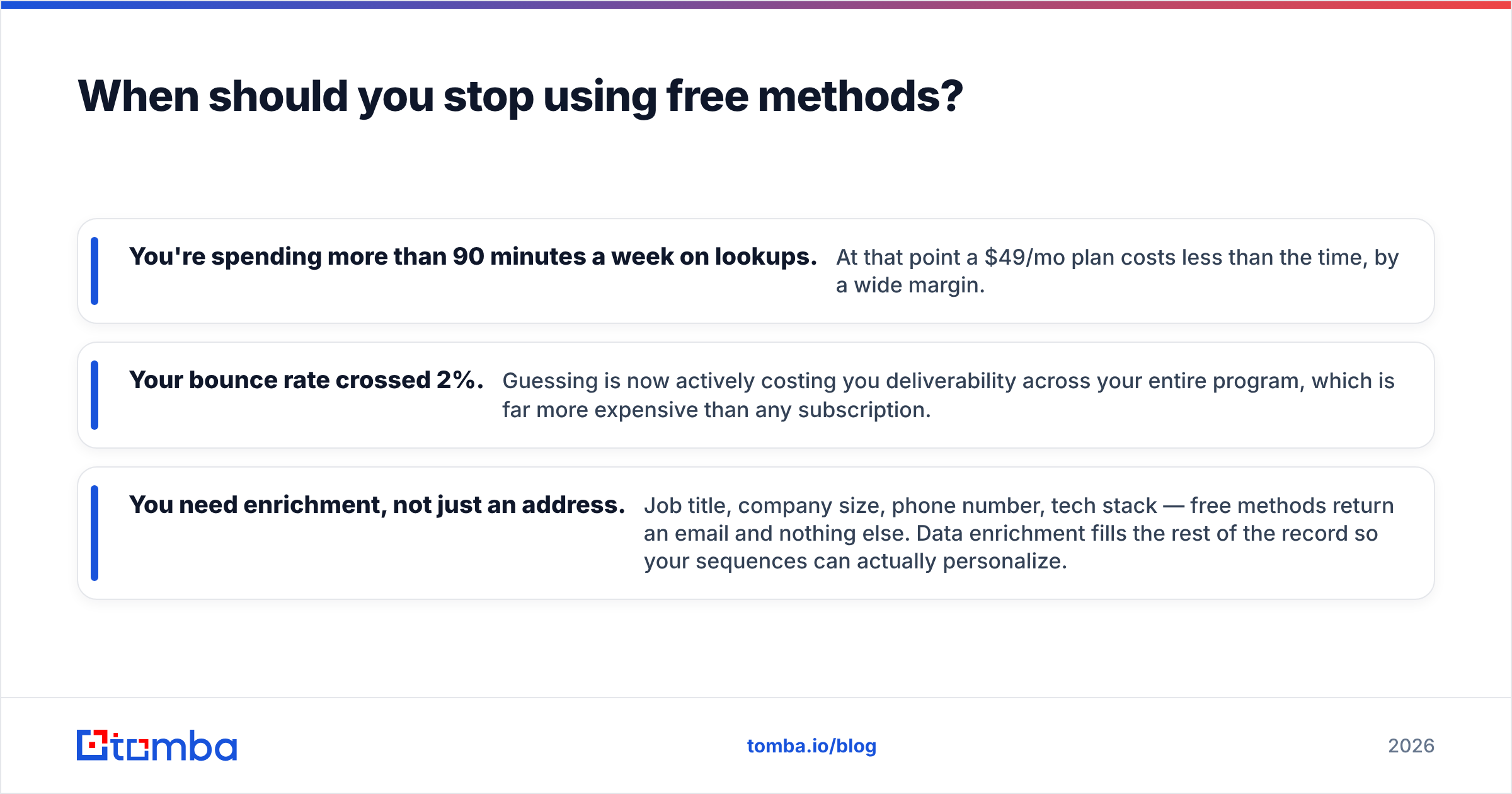
Three clear signals:
- You're spending more than 90 minutes a week on lookups. At that point a $49/mo plan costs less than the time, by a wide margin.
- Your bounce rate crossed 2%. Guessing is now actively costing you deliverability across your entire program, which is far more expensive than any subscription.
- You need enrichment, not just an address. Job title, company size, phone number, tech stack — free methods return an email and nothing else. Data enrichment fills the rest of the record so your sequences can actually personalize.
If none of those apply — you're sending 20 emails a month to carefully chosen people — free methods plus a verification step are entirely sufficient. Don't let anyone tell you a subscription is mandatory at that volume.
For a broader view of how the category is priced and evaluated, G2's lead intelligence grid is a reasonable place to sanity-check vendor claims against actual user reviews.
Start free, then scale when the math flips#
The honest answer to "how to find email addresses free" is that you can, most of the time, if you're willing to trade minutes for dollars and you never skip verification. Google operators, domain patterns, GitHub logs, and author bylines will carry you a long way at low volume.
What free methods can't give you is a confirmed mailbox at scale. That requires infrastructure — SMTP validation, catch-all detection, and a database that gets refreshed rather than scraped once and forgotten.
Start with the Tomba Email Finder free tier: 25 searches a month, no card, verification scores included on every result. Use it for the contacts that matter most and handle the rest manually. When you find yourself out of credits in the first week — that's your signal the math has flipped, and $49/mo is buying back hours you were spending on data entry.
Related guides#
// get started
Find, verify and enrich your first contacts today
Start on the free plan with 25 searches a month, then scale when your team is ready.
Free plan · No credit card required · GDPR & CCPA
// about the author