How to Find Hidden Email Addresses in 2026: 7 Proven Methods
Most "hidden" B2B emails are not hidden at all — they are just unindexed. Here are seven methods, ranked by hit rate and cost, plus how to verify every address before you send.
TL;DR
- "Hidden" almost never means encrypted or secret. It means the address exists on a mail server but is not indexed on a public web page.
- Seven methods work in practice: domain search, pattern permutation, LinkedIn-to-email resolution, byline/author lookup, WHOIS and DNS records, GitHub commit metadata, and paid database lookup.
- Hit rates vary wildly by company size. Expect 85-95% coverage on companies with 50+ employees and under 50% on solo consultants using custom domains.
- Never send to an unverified guess. A single 3% bounce spike can pull your whole domain into spam folders for weeks.
- The fastest reliable workflow is: domain search first, permutation second, SMTP verification always, catch-all handling last.
What does a "hidden" email address actually mean?#
Think of a company's mail server like an apartment building with no name plates on the buzzer panel. The apartments exist. The mailboxes work. Nobody published the directory.
That is the real situation with 90% of B2B contacts. The address sarah.chen@acme.com is live and accepting mail right now, but it appears on zero indexed pages. It is not hidden by encryption or by any privacy technology. It is simply unpublished.
This matters because it tells you which techniques will work. You are not breaking anything. You are reconstructing a naming convention and then asking the mail server whether the reconstruction is correct. That is the entire game.
Three categories of "hidden" cover almost every case you will hit:
- Unpublished but conventional — the person exists, the company uses
first.last@, nobody listed them. Highest success rate, roughly 90%+ with the right tools. - Published but obfuscated — the address sits behind a contact form, an image, or
name [at] company [dot] com. Recoverable with scraping and text normalization. - Genuinely private — personal domains, aliased addresses,
+tagrouting, or people who route everything through a shared inbox. Lowest success rate and usually not worth chasing.
Sorting your target list into these three buckets before you start saves hours. Most people burn credits hammering bucket three when bucket one is 80% of their list.
Why are professional emails harder to find in 2026 than they were in 2020?#
Four things changed at once.
Scraping got harder. LinkedIn, Crunchbase, and most SaaS company sites now serve content behind aggressive bot detection. The old trick of pulling a team page with a simple HTTP request fails on a large share of modern sites.
Privacy defaults tightened. WHOIS records are redacted by default under most registrars post-GDPR. Company "About" pages increasingly link to a contact form instead of listing individual inboxes.
Alias adoption grew. Apple's Hide My Email, Gmail's plus-addressing, and corporate catch-all routing mean the address a person uses publicly is often not the address that reaches their actual inbox.
Mail providers got stricter. Google and Yahoo's bulk sender requirements made bounce rate a hard gate rather than a soft signal. In 2020 you could guess-and-send. In 2026 that behavior kills your domain reputation fast.
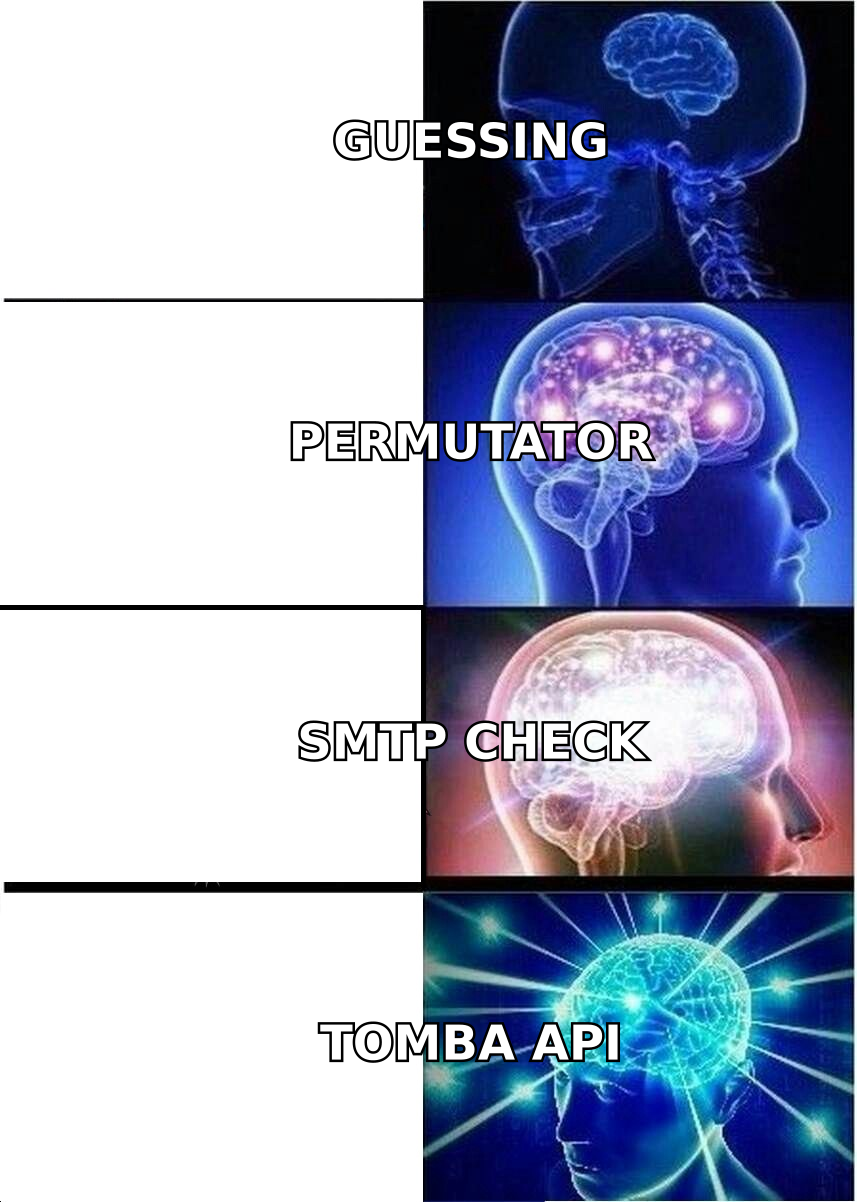
The net effect: guessing is dead, but structured reconstruction plus verification works better than ever, because the underlying naming conventions have not changed at all.

What are the 7 methods that actually find hidden email addresses?#
Here are the seven, ordered roughly by how much output they produce per minute of effort.
- Domain search — Give a tool the company domain and get back every address it has observed or inferred for that domain, along with the dominant pattern. This is the single highest-yield move and should always be step one. Tomba's domain search returns the format alongside the contacts, which feeds directly into method two.
- Pattern permutation plus verification — Once you know a company uses
f.last@, you can construct any employee's address from their name. Generate the candidates with an email permutator, then verify each one. Permutation without verification is guessing; permutation with verification is deduction. - LinkedIn-to-email resolution — Take a profile URL and resolve it to a work address. This is the workhorse for account-based outbound because your target list usually starts as a LinkedIn search. A LinkedIn finder handles the mapping without you touching the profile page.
- Author and byline lookup — For content marketers, journalists, and analysts, the byline on an article is the key. Author-finder tools match the name on a published URL to the publication's mail pattern. Hit rates here are unusually high because writers are almost always in the company directory.
- DNS, WHOIS, and MX inspection — Redacted WHOIS is common, but not universal. Smaller registrars, older domains, and non-EU registrants still leak an admin contact. MX records also tell you whether the domain runs Google Workspace, Microsoft 365, or something exotic, which changes how verification behaves.
- Git commit metadata — Every git commit carries an author email. For engineering-led companies,
git logon a public repository is a goldmine that most sales teams never touch. Search GitHub's commit API for a person's username and read the address off the commit object. - Licensed B2B databases — Rather than inferring, you query a pre-built contact set. Coverage is instant but staleness is the risk: a database record written 14 months ago has roughly a one-in-three chance of pointing at someone who changed jobs.
Methods one through four cover the overwhelming majority of real work. Five and six are situational. Seven is a fallback when inference fails.
How accurate is each method, and what does it cost?#
Accuracy is the only metric that matters, because an address you cannot verify is worse than no address — it costs you a bounce, and bounces cost you deliverability.
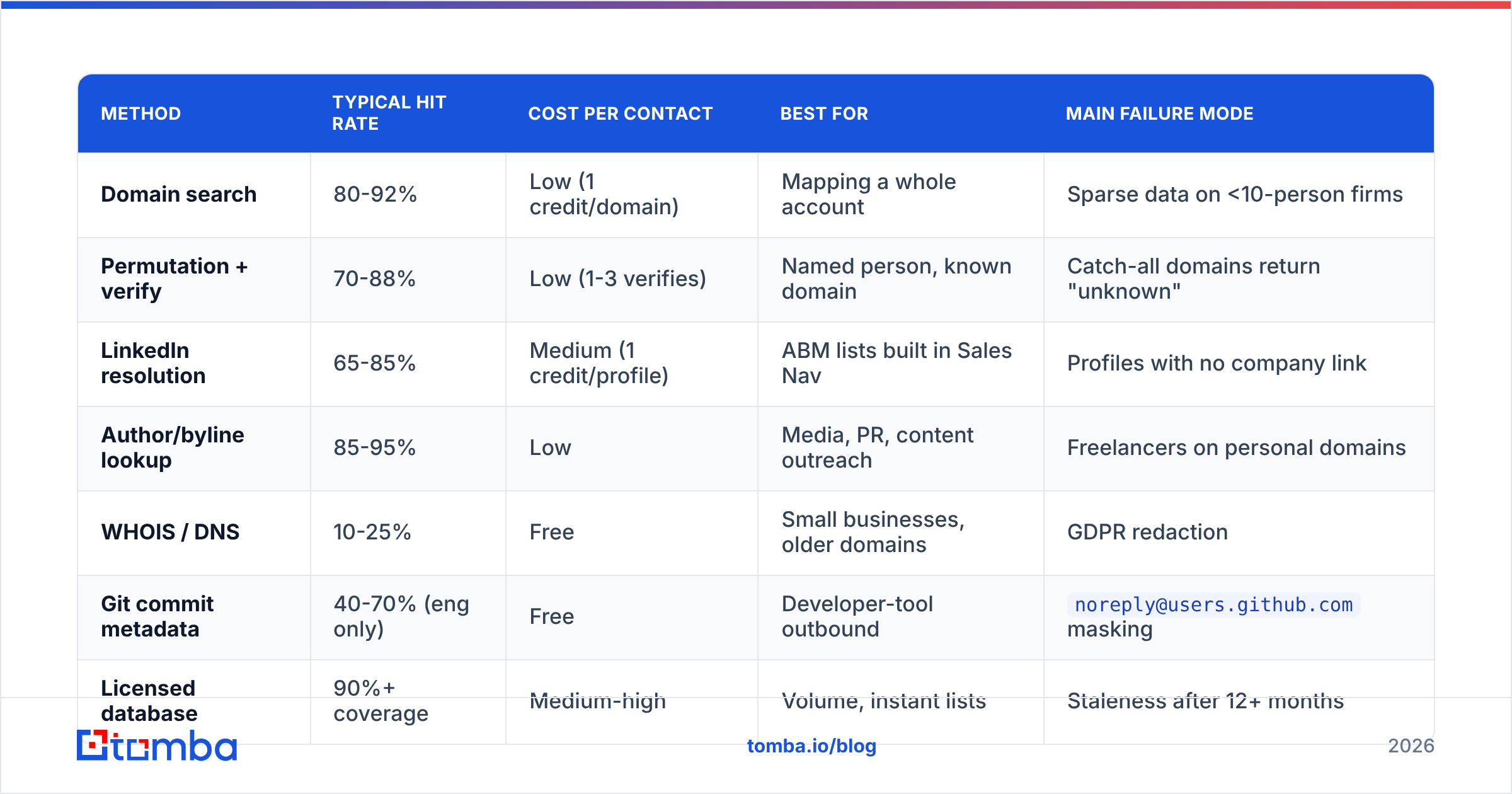
| Method | Typical hit rate | Cost per contact | Best for | Main failure mode |
|---|---|---|---|---|
| Domain search | 80-92% | Low (1 credit/domain) | Mapping a whole account | Sparse data on <10-person firms |
| Permutation + verify | 70-88% | Low (1-3 verifies) | Named person, known domain | Catch-all domains return "unknown" |
| LinkedIn resolution | 65-85% | Medium (1 credit/profile) | ABM lists built in Sales Nav | Profiles with no company link |
| Author/byline lookup | 85-95% | Low | Media, PR, content outreach | Freelancers on personal domains |
| WHOIS / DNS | 10-25% | Free | Small businesses, older domains | GDPR redaction |
| Git commit metadata | 40-70% (eng only) | Free | Developer-tool outbound | noreply@users.github.com masking |
| Licensed database | 90%+ coverage | Medium-high | Volume, instant lists | Staleness after 12+ months |

Two numbers in that table deserve a note. First, "hit rate" is not the same as "accuracy" — a tool can return an address for 95% of your list and still be wrong on a quarter of them. Always separate coverage from correctness when you evaluate a vendor. Second, the author/byline number is genuinely that high, because publications maintain real staff directories and writers need to be reachable by sources.
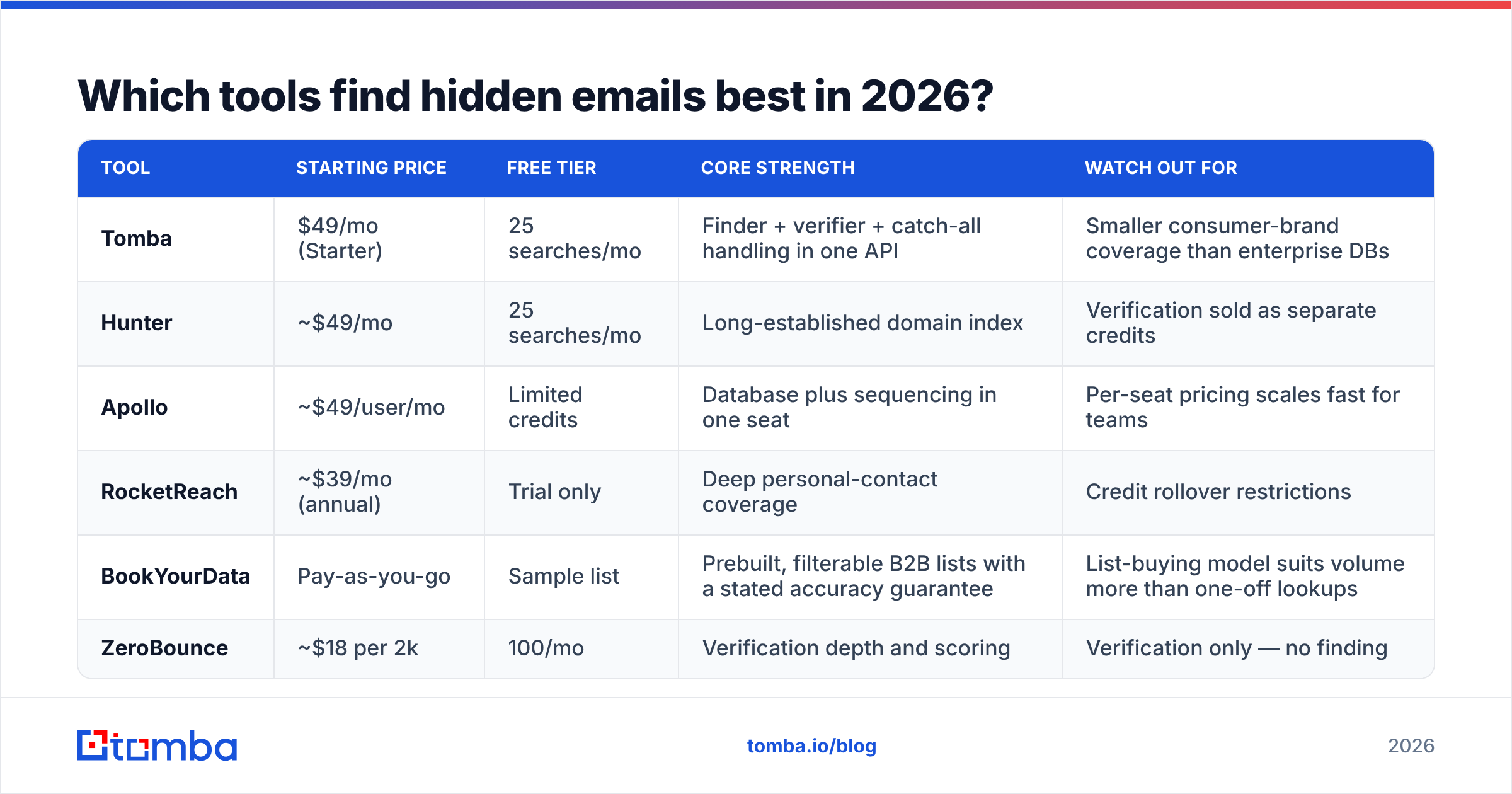
Which tools find hidden emails best in 2026?#
The market splits into three shapes: finders that infer, verifiers that confirm, and databases that look up. Most teams need at least two of the three.
| Tool | Starting price | Free tier | Core strength | Watch out for |
|---|---|---|---|---|
| Tomba | $49/mo (Starter) | 25 searches/mo | Finder + verifier + catch-all handling in one API | Smaller consumer-brand coverage than enterprise DBs |
| Hunter | ~$49/mo | 25 searches/mo | Long-established domain index | Verification sold as separate credits |
| Apollo | ~$49/user/mo | Limited credits | Database plus sequencing in one seat | Per-seat pricing scales fast for teams |
| RocketReach | ~$39/mo (annual) | Trial only | Deep personal-contact coverage | Credit rollover restrictions |
| BookYourData | Pay-as-you-go | Sample list | Prebuilt, filterable B2B lists with a stated accuracy guarantee | List-buying model suits volume more than one-off lookups |
| ZeroBounce | ~$18 per 2k | 100/mo | Verification depth and scoring | Verification only — no finding |

A practical read on this: if your motion is account-based and you know your target companies, an inference-first tool with built-in verification is cheaper and fresher. If your motion is volume and you need 20,000 contacts matched to a firmographic filter this week, a licensed database is the faster path. Teams running both usually use the database for the top-of-funnel pull and the finder for the named accounts that actually matter. Independent category reviews on G2's lead intelligence listings are a reasonable sanity check on any vendor's own accuracy claims.
How do you verify an address before you send?#
Verification is where "found" becomes "usable." The process runs in four layers, each cheaper than the one after it.
Layer 1 — Syntax and formatting. Does the string parse as a valid address? Catches typos, double dots, and stray whitespace. Free and instant.
Layer 2 — Domain and MX check. Does the domain resolve, and does it have mail exchanger records? A domain with no MX record cannot receive mail at all, so every address on it is dead.
Layer 3 — SMTP handshake. The verifier opens a connection to the receiving mail server and issues an RCPT TO command without sending a message body. A clean server answers "250 OK" for real mailboxes and "550" for nonexistent ones. This is the core of the SMTP protocol and it is the layer that produces the real verdict.
Layer 4 — Catch-all resolution. Some domains answer "250 OK" to every address, real or not. These accept-all configurations make layer 3 useless on their own. A catch-all verifier uses secondary signals — historical send data, pattern confidence, engagement history — to score the address instead of accepting a meaningless "OK."
Roughly 15-20% of B2B domains are catch-all, and this is where most cheap verifiers quietly fail. They mark everything on those domains as "valid," you send, and 40% of them bounce. If you do nothing else after reading this post, check how your current tool handles catch-alls. Run your list through an email verifier that reports catch-all status explicitly rather than collapsing it into a binary valid/invalid flag.
Is it legal to find hidden email addresses?#
Short answer: finding a business email address is legal in almost every jurisdiction. What you do with it is regulated.
Under GDPR, a work email tied to a named individual is personal data, which means you need a lawful basis to process it. Legitimate interest covers B2B prospecting in most EU readings, provided you can show relevance, you disclose where you got the data on first contact, and you honor opt-outs immediately. CAN-SPAM in the US is looser: no consent required, but you must include a physical address, a working unsubscribe, and no deceptive headers. CASL in Canada is the strictest of the three and generally requires consent or a documented existing business relationship.
Three rules keep you safe regardless of jurisdiction:
- Only target business addresses at business domains. Personal Gmail accounts belong to people, not roles.
- Keep provenance. Log where each address came from. If someone asks, "how did you get this," you need a real answer. Vendors that publish their data sources make this straightforward.
- Process deletion requests same-day. Suppression lists are cheap. Regulatory attention is not.
Also worth noting: aggressive scraping can violate a site's terms of service even when it does not violate privacy law. Those are separate risks with separate consequences.
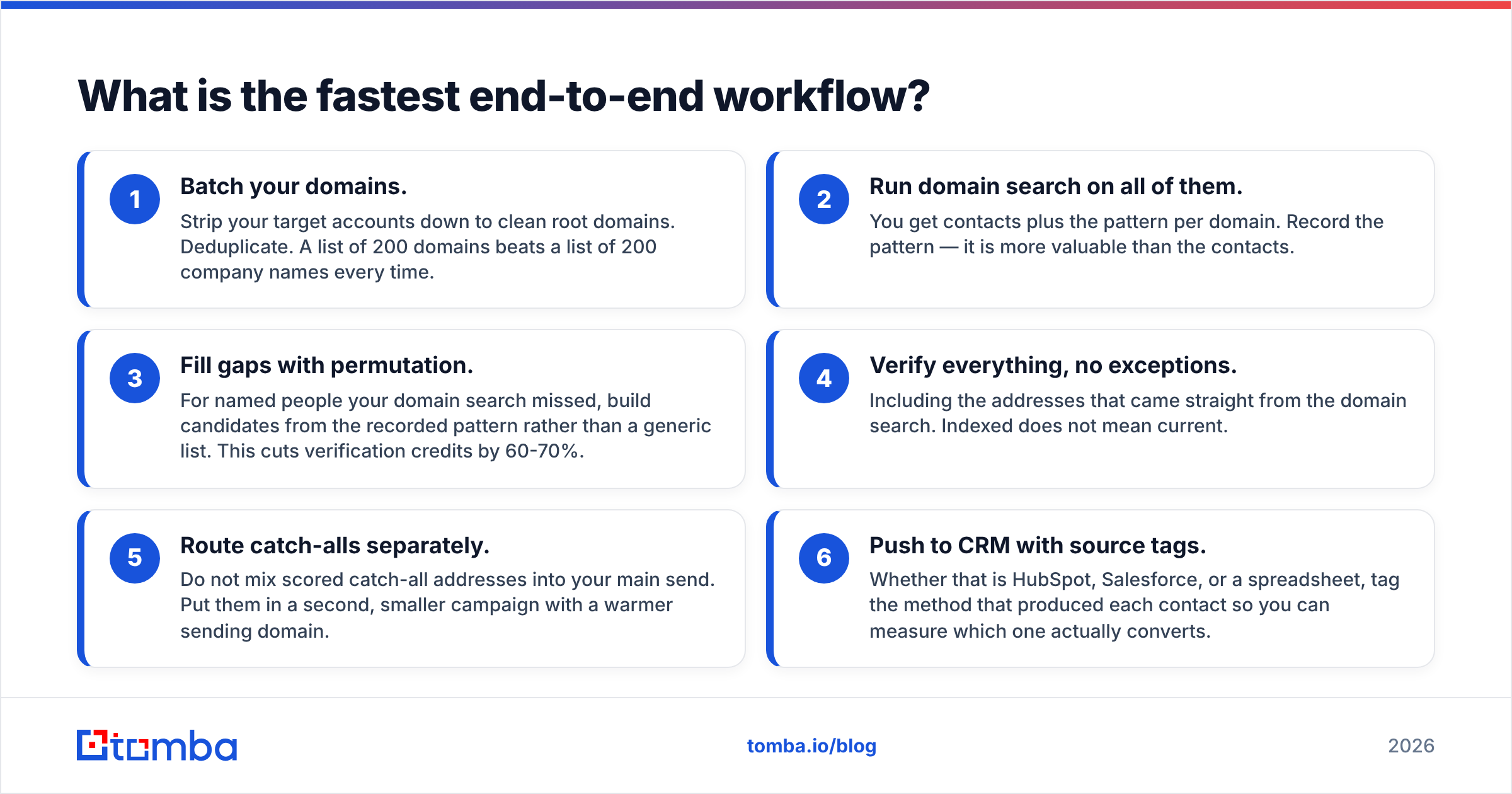
What is the fastest end-to-end workflow?#
Here is the sequence that produces the highest verified-contact-per-minute rate for a list of target companies.
- Batch your domains. Strip your target accounts down to clean root domains. Deduplicate. A list of 200 domains beats a list of 200 company names every time.
- Run domain search on all of them. You get contacts plus the pattern per domain. Record the pattern — it is more valuable than the contacts.
- Fill gaps with permutation. For named people your domain search missed, build candidates from the recorded pattern rather than a generic list. This cuts verification credits by 60-70%.
- Verify everything, no exceptions. Including the addresses that came straight from the domain search. Indexed does not mean current.
- Route catch-alls separately. Do not mix scored catch-all addresses into your main send. Put them in a second, smaller campaign with a warmer sending domain.
- Push to CRM with source tags. Whether that is HubSpot, Salesforce, or a spreadsheet, tag the method that produced each contact so you can measure which one actually converts.
Teams that run this loop weekly rather than as a one-time list build see the biggest difference, because the pattern library they accumulate makes every subsequent batch faster and cheaper.
What should you do next?#
Start with the domain, not the person. Nine times out of ten the address you think is hidden is just a pattern you have not observed yet, and the fastest way to observe it is to look at a company's known addresses in bulk.
The Tomba Email Finder handles that whole loop in one place — domain search to surface the pattern, name-plus-domain lookup to construct the address, SMTP verification and catch-all scoring to confirm it before you send. The free tier gives you 25 searches a month to test it against contacts you already know are correct, which is the only honest way to benchmark any finder. Paid plans start at $49/mo on Starter and scale to $99/mo on Growth; full Tomba pricing is public if you want to model credit cost against your list size before committing.
Test it on ten contacts whose addresses you can independently confirm. If the hit rate holds, scale it. If it does not, you have lost nothing but ten free credits.
Related guides#
// get started
Find, verify and enrich your first contacts today
Start on the free plan with 25 searches a month, then scale when your team is ready.
Free plan · No credit card required · GDPR & CCPA
// about the author