How To Find How Many Employees A Company Has (2026 Guide)
Headcount is the fastest way to qualify a B2B account, and the easiest number to get wrong. Here is how to find how many employees a company has, with 8 free and paid methods ranked by accuracy.
Want to know how to find how many employees a company has? Pick the source that fits the company. Public firms publish an exact count in the 10-K. Private US firms file a participant count on Form 5500. European firms file an average headcount with the national registry. LinkedIn is fast, but it counts profiles, not payroll.
TL;DR
- LinkedIn's "employees on LinkedIn" number is a profile count, not a payroll count. It overstates tech firms and understates manufacturing, logistics, and healthcare.
- For US private companies, the best free signals are state filings, job-posting volume, and 401(k) Form 5500 filings. Form 5500 reports real participant counts.
- Public companies list exact headcount in the 10-K, under Item 1, "Human Capital." No guessing needed.
- To prospect at scale, use an enrichment API that returns a headcount range plus a source. Do not scrape one site and trust it.
- Never treat one number as fact. Check two independent sources before you size a deal or route a lead.
Why does company headcount matter for B2B teams?#
Because headcount is the cheapest proxy for budget, complexity, and buying process you will ever get.
If you sell seat-based software, headcount is close to a revenue estimate. If you sell to IT, it predicts device count. If you sell recruiting services, headcount growth predicts hiring spend. And in almost every ICP, the first filter is a size band: 11–50, 51–200, 201–1,000.
The problem: "how many employees" is not one question. It is at least four.
- Full-time employees (FTEs) — people on payroll. This is the number a CFO would quote.
- Total workforce — FTEs plus contractors, part-timers, and seasonal staff.
- LinkedIn profile count — people who list the company as their current employer. It includes leavers who never updated, plus advisors and interns.
- Legal-entity headcount — the count tied to one registered subsidiary. It can be a small slice of the global group.
A vendor can say Acme has 340 employees while the 10-K says 210. Both can be right. They answer different questions. Keep that in mind for every method below.

How to find how many employees a company has: 8 methods#
Start with the source that matches the company type. Public company? Go to filings. Private startup? Go to job boards and funding news. Established private firm? Go to the registry.
Here are the first four, ranked by how much you can trust the output:
- SEC 10-K filings (public companies) — Item 1 of every annual report has a "Human Capital" section with an exact count on a stated date. Search the company on EDGAR and read the number. Accuracy: near-perfect, but up to 12 months old.
- Form 5500 filings (US firms with a 401(k)) — every plan sponsor files a participant count each year with the Department of Labor. It is a legally attested number for private firms, and it is free to search. It undercounts firms where enrollment is optional.
- LinkedIn company page — the "employees on LinkedIn" figure plus the declared size band. Fast, global, and wrong in ways you can predict. More on that below.
- The company's own About or Careers page — "we're a team of 60" is self-reported but often recent. Check the page date. Some sit untouched for years.
The next four are signals more than counts. Use them to support a number you already have:
- Job-posting volume — a firm running 40 open roles is not a 20-person shop. Cross-check Indeed, the ATS subdomain (jobs.company.com, boards.greenhouse.io/company), and LinkedIn Jobs.
- Companies House and other national registries — the UK, France, Germany, and the Nordics require an average-employee figure in annual accounts. Free, and filed by law.
- Press coverage and funding announcements — a Series B release almost always states team size. True on the day it ships, stale within a year.
- B2B data providers and enrichment APIs — the only option that scales past a handful of accounts. Every provider models the number rather than counting it.
For a single account, methods 1, 2, and 6 win. For 5,000 accounts, method 8 is the only one that scales. Spot-check it against the others on a sample.
Is the LinkedIn employee count accurate?#
No. But the error runs in a direction you can predict, so you can correct for it.
LinkedIn counts profiles that list the company as a current employer. That creates three systematic distortions:
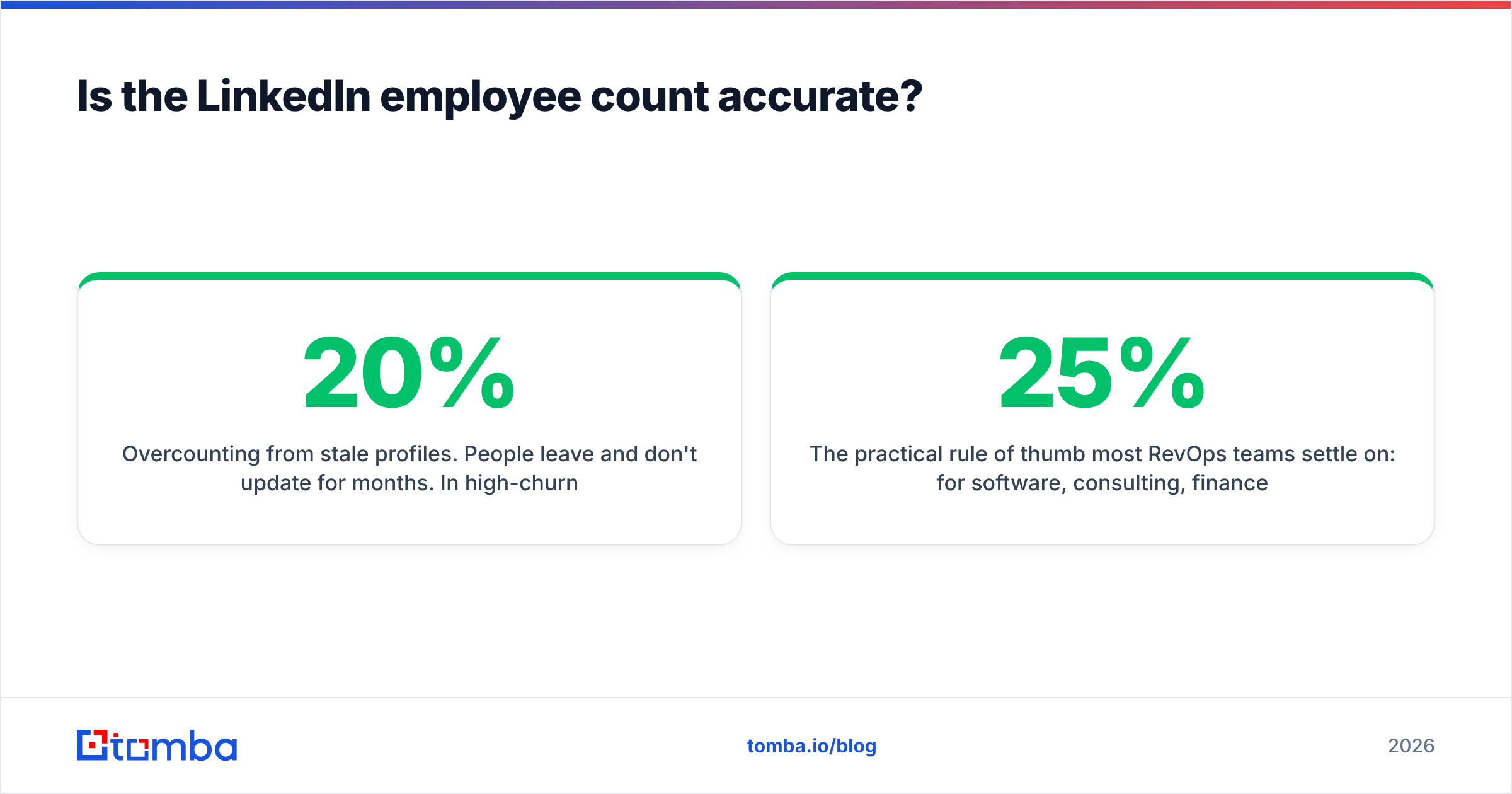
- Overcounting from stale profiles. People leave and do not update for months. In high-churn industries, 10–20% of listed "current" staff have already gone.
- Overcounting from non-employees. Advisors, board members, contractors, and agency staff often list the brand as their employer.
- Undercounting from low-adoption workforces. Warehouse, factory, retail, healthcare, and hospitality workers rarely keep a profile. A 4,000-person logistics firm can show 600 on LinkedIn.
Most RevOps teams settle on a rough rule. For software, consulting, finance, and media, LinkedIn runs 10–25% above real FTE count. For manufacturing, logistics, retail, healthcare, and construction, it runs 40–70% below. Under 20 people, it is close to right, because everyone there is a knowledge worker with a profile.
There is a second failure mode: multi-entity groups. A global group with 12 country subsidiaries may show all 12,000 people on one page. The entity you sell to may employ 90. If you sell into one region, the group number is worse than useless. It routes your lead to the wrong segment and the wrong rep.
How do you verify headcount for private companies?#
Private companies file no 10-K. They still leave a paper trail. This is where most people asking how to find how many employees a company has get stuck. The trick is knowing which filings carry a headcount field.
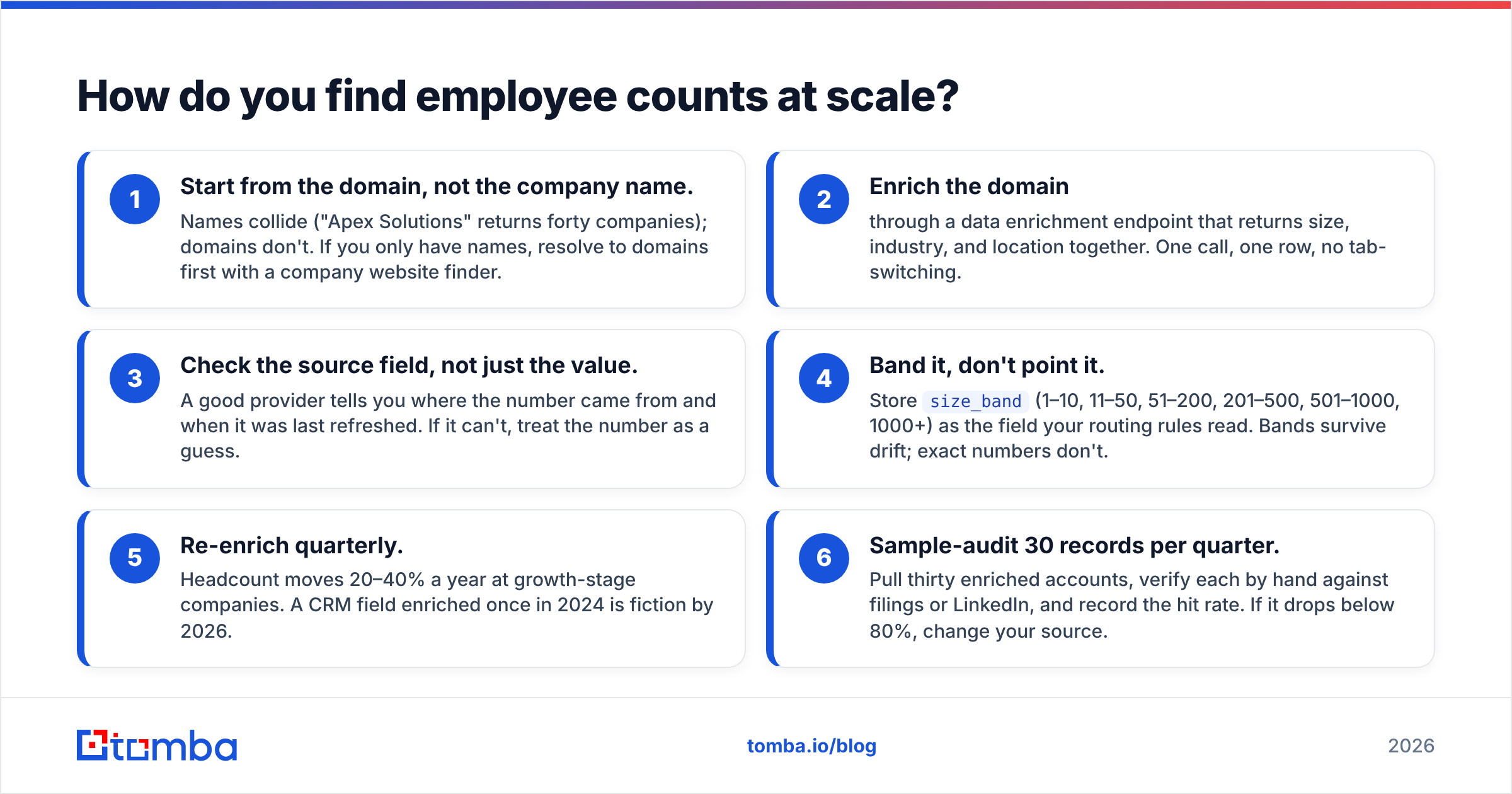
| Source | Coverage | Accuracy | Freshness | Cost |
|---|---|---|---|---|
| SEC 10-K (Item 1) | US public companies only | Exact, attested | Annual, up to 12 mo stale | Free |
| DOL Form 5500 | US firms with a 401(k) plan | Participant count, high | Annual, ~9 mo lag | Free |
| UK Companies House | UK limited companies | Average employees, filed | Annual | Free |
| LinkedIn employee count | Broad, global | Directionally useful only | Real-time | Free |
| Job-posting volume | Any hiring company | Growth signal, not a count | Real-time | Free |
| Enrichment API (Tomba, etc.) | Millions of domains | Modeled range + source | Continuous refresh | Paid |
| Manual outreach ("how big is your team?") | One account at a time | Highest | Real-time | Rep time |
Two notes on the free filings. Form 5500 is the most underused source in B2B research. It is a government-attested participant count for private American companies, and almost nobody in sales knows it exists.
European registries are often more generous than US ones. UK, French, and German annual accounts usually include an average-employees figure for the period. That is exactly the number you want.
For everything else, you triangulate. Take the LinkedIn count. Apply the industry correction. Cross-check open roles and office footprint. Then record a range instead of a point estimate. "200–350" that you believe beats "287" that you invented.
How do you find employee counts at scale?#
Knowing how to find how many employees a company has for one account is a different job from doing it for a thousand. Manual research works for ten accounts. It collapses at a thousand.
At scale you need an enrichment layer. Feed it a domain, get firmographics back — headcount band, industry, location, tech stack — in one call. The build looks like this:
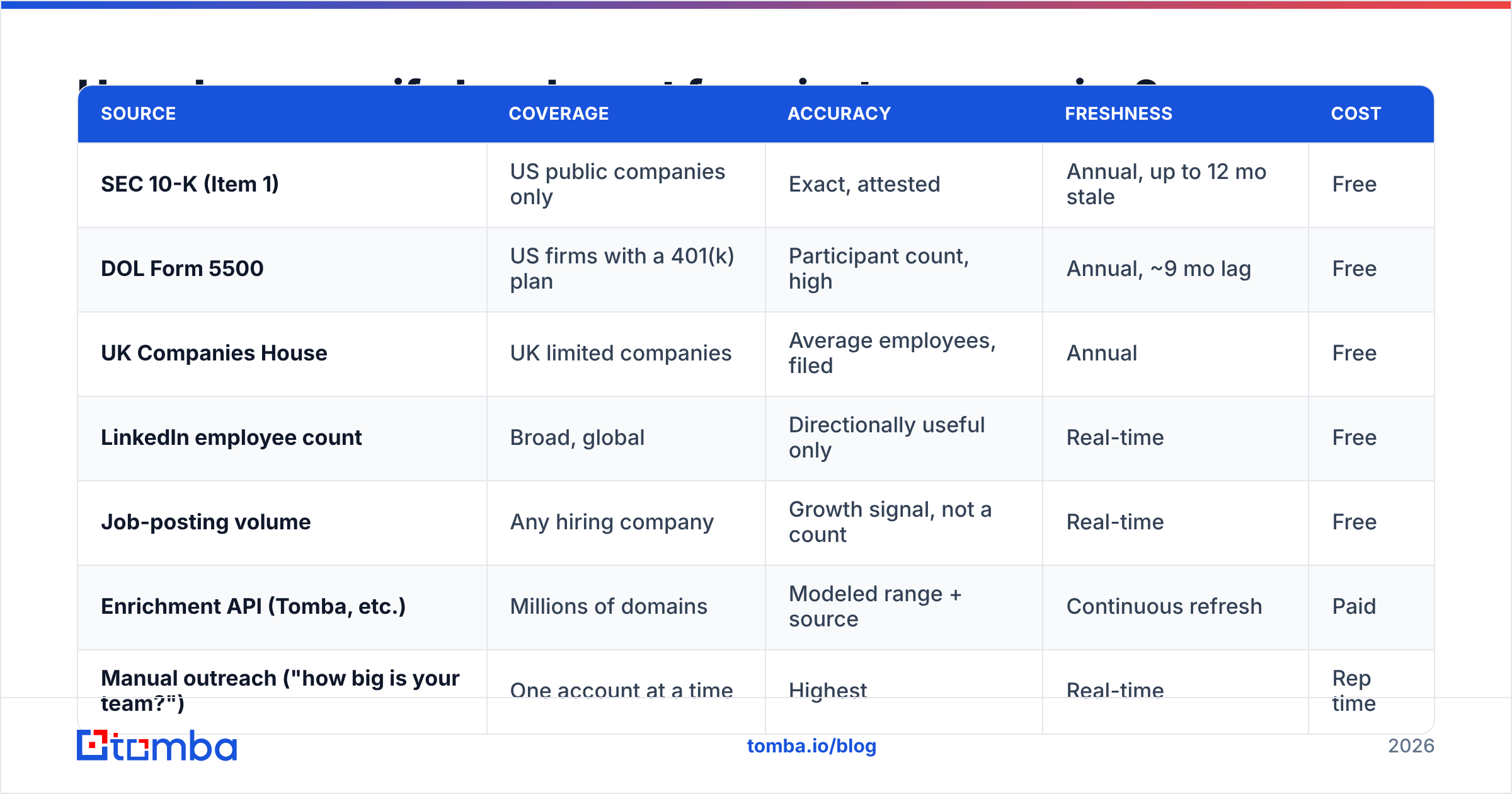
- Start from the domain, not the company name. Names collide; "Apex Solutions" returns forty companies. Domains do not. If you only have names, resolve them first with a company website finder.
- Enrich the domain through a data enrichment endpoint that returns size, industry, and location together. One call, one row, no tab-switching.
- Check the source field, not just the value. A good provider tells you where the number came from and when it was last refreshed. If it cannot, treat the number as a guess.
Then make the data survive contact with your CRM:
- Band it, do not point it. Store
size_band(1–10, 11–50, 51–200, 201–500, 501–1000, 1000+) as the field your routing rules read. Bands survive drift. Exact numbers do not. - Re-enrich quarterly. Headcount moves 20–40% a year at growth-stage companies. A CRM field enriched once in 2024 is fiction by 2026.
- Sample-audit 30 records per quarter. Verify each by hand against filings or LinkedIn, and log the hit rate. If it drops below 80%, change your source.
Once you have the size band, headcount stops being trivia. It becomes routing logic: which sequence fires, which rep owns the account, and whether it goes to self-serve or to a demo.

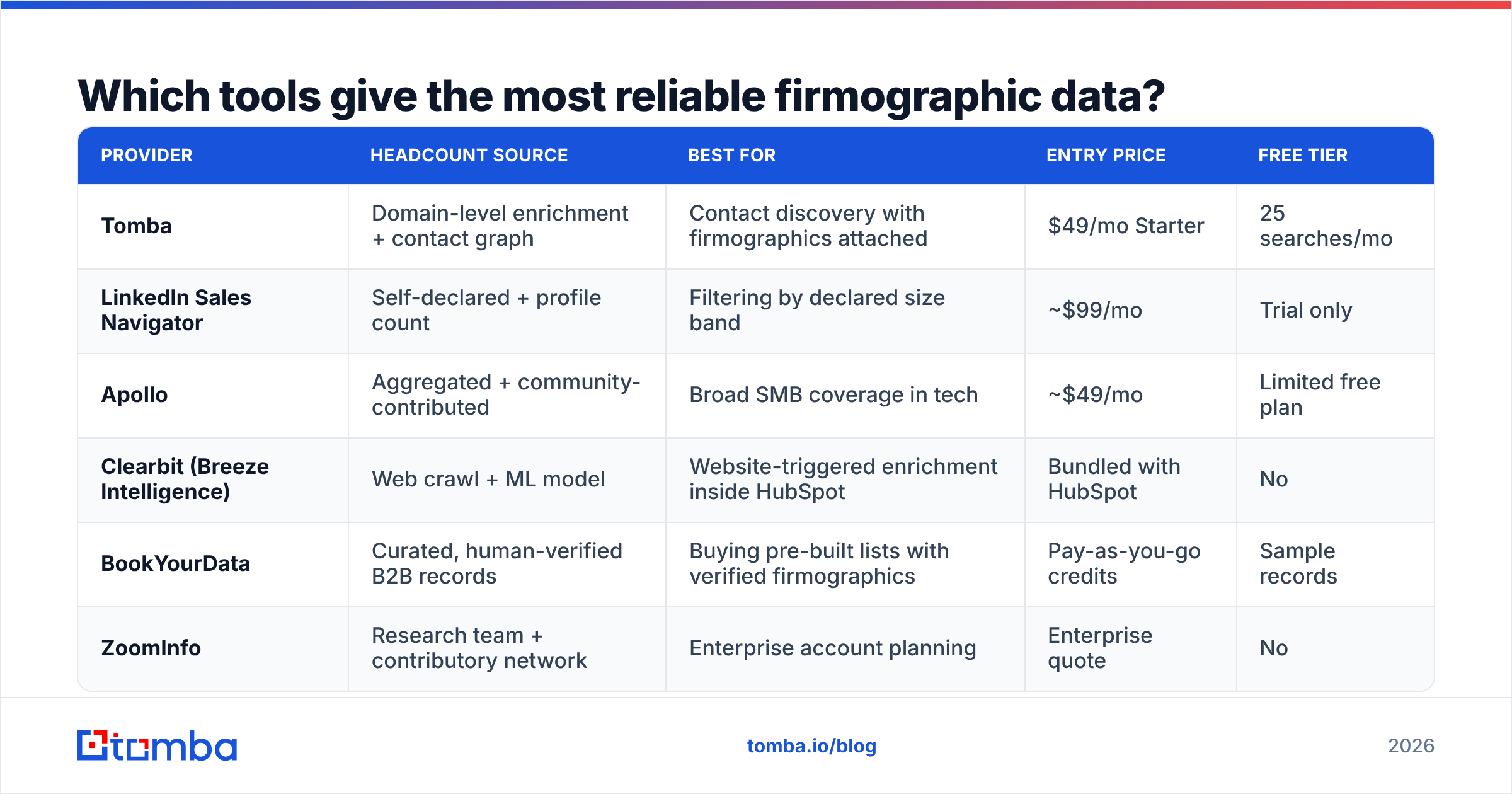
Which tools give the most reliable firmographic data?#
Every provider builds its headcount estimate differently. The gaps show up where you would expect: non-tech industries, small companies, and multi-entity groups.
| Provider | Headcount source | Best for | Entry price | Free tier |
|---|---|---|---|---|
| Tomba | Domain-level enrichment + contact graph | Contact discovery with firmographics attached | $49/mo Starter | 25 searches/mo |
| LinkedIn Sales Navigator | Self-declared + profile count | Filtering by declared size band | ~$99/mo | Trial only |
| Apollo | Aggregated + community-contributed | Broad SMB coverage in tech | ~$49/mo | Limited free plan |
| Clearbit (Breeze Intelligence) | Web crawl + ML model | Website-triggered enrichment inside HubSpot | Bundled with HubSpot | No |
| BookYourData | Curated, human-verified B2B records | Buying pre-built lists with verified firmographics | Pay-as-you-go credits | Sample records |
| ZoomInfo | Research team + contributory network | Enterprise account planning | Enterprise quote | No |
Two honest caveats. First, no provider "knows" private-company headcount. They all model it from signals, and confidence should scale with company size. Anyone quoting an exact count for a 30-person private firm is showing you false precision.
Second, match the tool to the job. If your real goal is reaching the people inside the company, a firmographics-only database leaves you halfway. A combined approach wins: use domain search to pull the contacts at an account, and let the firmographic fields ride along on the same record.
For teams wiring this into a product or an internal ops pipeline, the Tomba API returns company and contact data from one domain lookup. That removes the reconciliation step entirely.
How should you use headcount data without getting burned?#
Treat it as a range with a confidence level. Never as a fact.
Three guardrails for the data itself:
- Route on bands, report on trends. The value is not the number, it is the delta. A company that went from 80 to 140 in a year is a buying signal. One sitting at 120 for three years is not.
- Weight your ICP by industry. If your ICP is "50–200 employees" and half your target market is manufacturing, a LinkedIn-derived filter quietly drops your best accounts.
- Check entity versus group. Before a large-account play, confirm whether the number covers the global group or the entity you are selling into.
Two more for the conversation:
- Never quote a headcount number back to a prospect. "I saw you have 240 employees" invites a correction and makes you look like you bought a list. Ask instead: "How is the team split between engineering and ops right now?"
- Pair headcount with a contact. A perfectly sized account with no reachable decision-maker is a spreadsheet row, not pipeline. Once it qualifies, run the domain through an email finder and verify the result before it enters a sequence.
Anything that touches a send list should also pass through an email verifier. Great firmographics on a bouncing address hurt your sender reputation just as fast as a bad list. Account quality does not protect you from the deliverability hit.
What's the fastest workflow for a single account?#
Need one company's headcount in the next two minutes? Do this in order:
- Search the company on EDGAR. If it is public, read Item 1 of the latest 10-K and stop.
- If it is private and US-based, search the DOL Form 5500 database for the plan sponsor name. Note the participant count and the filing year.
- If it is private and European, pull the latest annual accounts from the national registry.
- Open the LinkedIn page. Note both the profile count and the declared band.
- Count open roles on the careers page or ATS subdomain.
- Write down a range, not a number, plus the date you checked it.
Six steps, two minutes, and a defensible answer instead of a copied LinkedIn figure. That is how to find how many employees a company has when you only have one account to check. For the multi-account version, G2's data provider category is a fair place to compare vendors against your industry mix before you sign a contract.
Getting from headcount to a conversation#
Knowing a company has 180 employees only helps if it shortens the path to a reply. The number qualifies the account. The contact starts the deal.
The Tomba Email Finder closes that gap. Feed it a domain and it returns verified professional email addresses for the people at that company, with firmographic context on the same record. The free tier covers 25 searches a month, so you can test it against accounts you already researched by hand. Paid plans start at $49/mo on Starter, with Growth at $99/mo for teams running higher volume. See full Tomba pricing for the breakdown.
Qualify on the range. Reach out to the person. Skip the spreadsheet archaeology.
Related guides#
// get started
Find, verify and enrich your first contacts today
Start on the free plan with 25 searches a month, then scale when your team is ready.
Free plan · No credit card required · GDPR & CCPA
// about the author