How To Identify Customer Pain Points: A 2026 Playbook
Most teams guess at customer pain points and build outreach on top of the guess. Here are seven research methods that surface real problems, ranked by cost, speed, and how much evidence each one gives you.
TL;DR
- Pain points are not complaints. A real pain point has a cost attached to it — hours, dollars, churn, or risk. If you can't quantify it, you found a preference, not a pain.
- The highest-signal sources are the cheapest ones you're already ignoring: lost-deal notes, support tickets, and competitor review sites. Start there before you commission research.
- Run win/loss interviews on at least 10 closed deals per quarter. Nothing else tells you why buyers actually chose or rejected you.
- Score every candidate pain on frequency, severity, and willingness to pay. Pains that score high on all three become messaging; the rest become backlog notes.
- Once you know the pain, you need the people who have it. Build a list of the exact job titles who own that problem, then find their contact data with a email finder rather than spraying a generic ICP.
What is a customer pain point, exactly?#
A customer pain point is a specific, recurring problem that costs your buyer something measurable and that they are already spending time or money trying to solve.
That definition does three pieces of work. Specific rules out "we need better data." Recurring rules out one-off incidents that nobody budgets against. Costs something measurable rules out mild annoyances. And "already spending time or money" is the qualifier most teams skip — if a buyer isn't currently paying for a workaround, they don't have a funded problem, they have an opinion.
Think of it like a leaky roof. Everybody says they'd like a nicer house. Only the person with a bucket in the hallway has a pain point. The bucket is your signal.
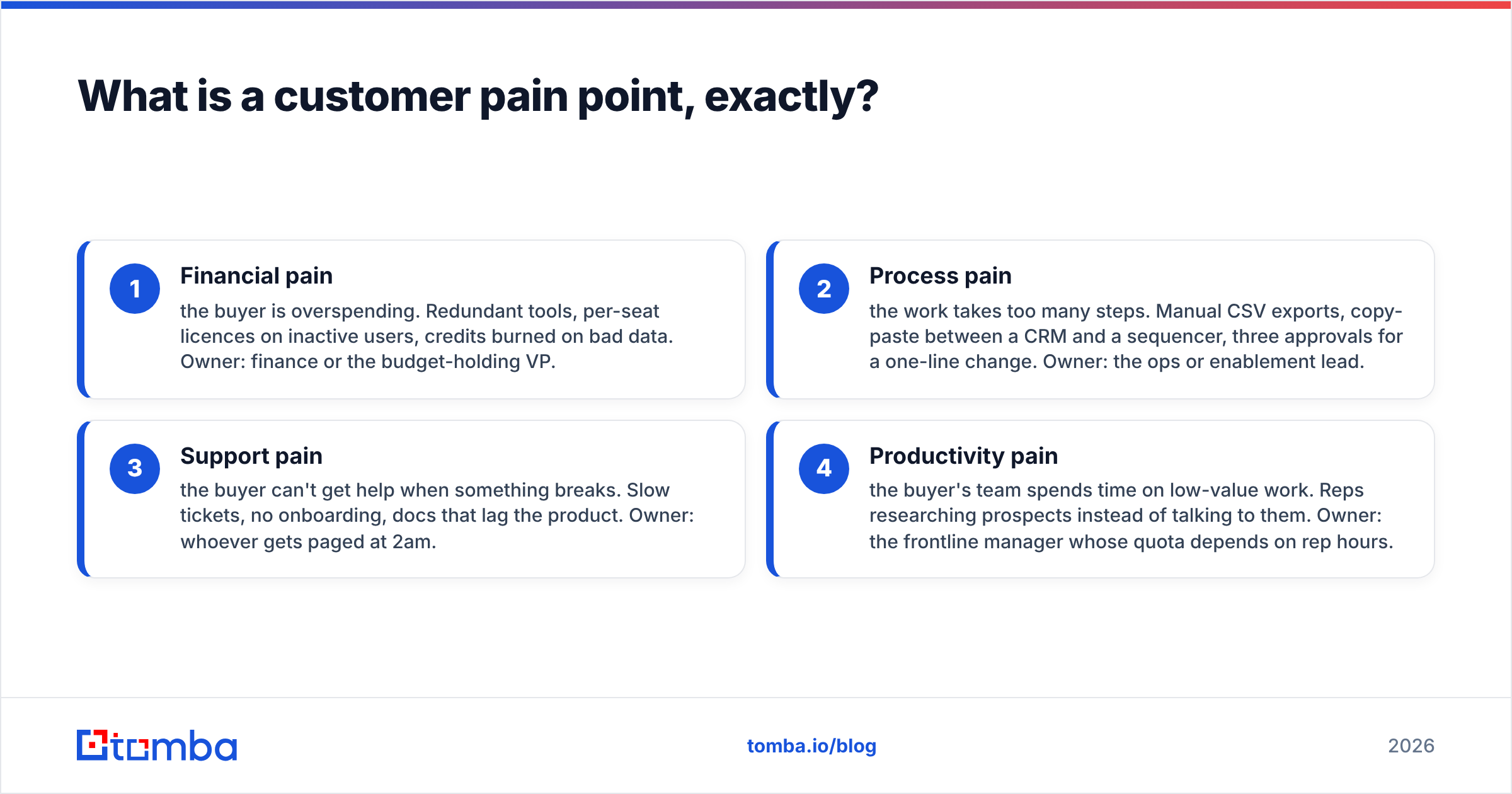
Pain points cluster into four types, and knowing which one you're looking at changes who you sell to:
- Financial pain — the buyer is overspending. Redundant tools, per-seat licences on inactive users, credits burned on bad data. Owner: finance or the budget-holding VP.
- Process pain — the work takes too many steps. Manual CSV exports, copy-paste between a CRM and a sequencer, three approvals for a one-line change. Owner: the ops or enablement lead.
- Support pain — the buyer can't get help when something breaks. Slow tickets, no onboarding, docs that lag the product. Owner: whoever gets paged at 2am.
- Productivity pain — the buyer's team spends time on low-value work. Reps researching prospects instead of talking to them. Owner: the frontline manager whose quota depends on rep hours.
Most messaging fails because it names a pain type the recipient doesn't own. Telling a sales rep about licence consolidation savings is a wasted email — that's the CFO's pain, not theirs.

Why do most pain point exercises produce nothing useful?#
Because they're run as internal workshops. A team books two hours, fills a whiteboard with sticky notes, and ships a persona doc that is really a record of what the loudest person in the room believes.
Four failure modes show up over and over:
- Confirmation shopping. You already have a product. You go looking for pains it solves, and you find them, because you're asking leading questions.
- Sampling only customers. Your customers bought. Their pains are, by definition, the ones you already address. The people who didn't buy are where the interesting gaps live.
- Recording the symptom, not the cause. "Our data is bad" is a symptom. "We buy lists from three vendors and nobody dedupes them before import" is a cause you can actually attack.
- No cost attached. If the output doesn't include a number — hours per week, dollars per month, percentage of deals lost — you can't prioritise, and everything ends up equally important, which means nothing is.
Gartner's research on B2B buying consistently finds that buyers spend the majority of their purchase journey away from vendors, doing independent research. That means the pain has usually been articulated somewhere public — a review, a forum thread, a job posting — before you ever get a meeting. Your job is to go read it.
What are the seven methods for identifying customer pain points?#
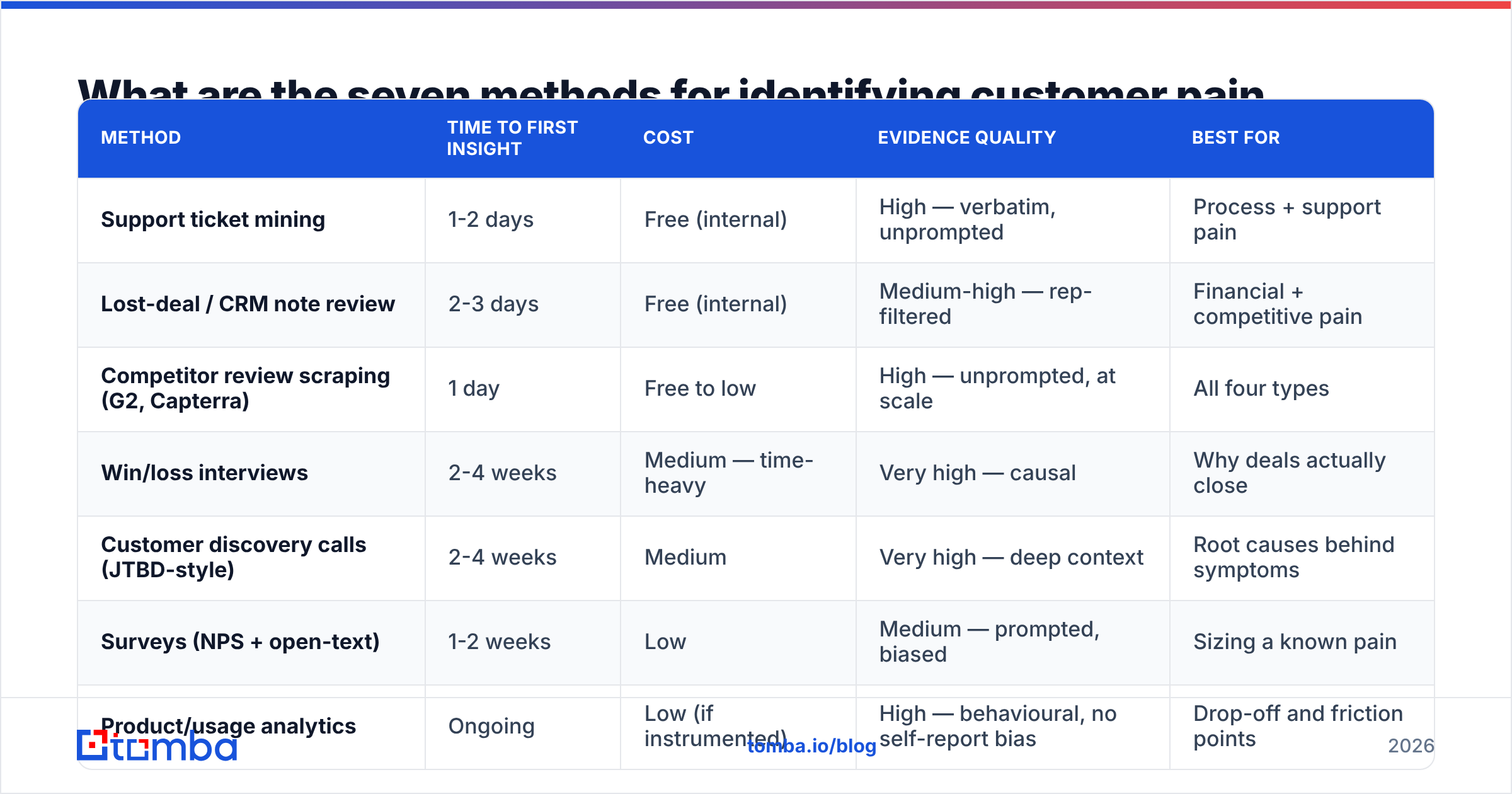
Here's the full method set, ranked by evidence quality against effort. Run them roughly in this order.
| Method | Time to first insight | Cost | Evidence quality | Best for |
|---|---|---|---|---|
| Support ticket mining | 1-2 days | Free (internal) | High — verbatim, unprompted | Process + support pain |
| Lost-deal / CRM note review | 2-3 days | Free (internal) | Medium-high — rep-filtered | Financial + competitive pain |
| Competitor review scraping (G2, Capterra) | 1 day | Free to low | High — unprompted, at scale | All four types |
| Win/loss interviews | 2-4 weeks | Medium — time-heavy | Very high — causal | Why deals actually close |
| Customer discovery calls (JTBD-style) | 2-4 weeks | Medium | Very high — deep context | Root causes behind symptoms |
| Surveys (NPS + open-text) | 1-2 weeks | Low | Medium — prompted, biased | Sizing a known pain |
| Product/usage analytics | Ongoing | Low (if instrumented) | High — behavioural, no self-report bias | Drop-off and friction points |
A few notes on reading that table. Support ticket mining is first because it's free, fast, and unprompted — nobody writes a ticket to be polite. Surveys sit low not because they're bad but because they only measure what you already thought to ask; use them to size a pain you discovered elsewhere, never to discover one. And win/loss interviews are the expensive one everybody skips, which is exactly why they're the highest-leverage.
How do you mine support tickets and CRM notes?#
Export the last 6-12 months of tickets and closed-lost opportunities. Then:
- Strip to the free-text fields. Category dropdowns are useless — reps pick whatever's first in the list.
- Cluster by verb, not noun. "Can't export", "won't sync", "keeps failing" cluster into a workflow-breakage theme faster than product-area tags do.
- Count frequency per account, not per ticket. Ten tickets from one furious admin is one account's pain, not ten.
- Pull the exact wording. The phrases customers use become your subject lines. If five accounts say "reconciling the list", stop writing "data hygiene."
- Tag by pain type using the four categories above, so you know which persona owns each cluster.
How do you run win/loss interviews that aren't a waste of time?#
Interview the buyer, not your rep. Your rep's version of why a deal died is a story that protects the rep. Aim for 10-15 interviews per quarter, split roughly 60/40 losses to wins.
Three questions do most of the work:
- "Walk me through the day you decided you needed to solve this. What happened?" — surfaces the trigger event, which is what your outbound timing should key on.
- "What did you try before talking to vendors?" — surfaces the workaround, which is your real competitor.
- "What almost stopped you from buying anything at all?" — surfaces the status-quo bias you have to beat.
Never ask "what features do you want." You'll get a feature list and no understanding of why.
How do you tell a real pain point from a nice-to-have?#
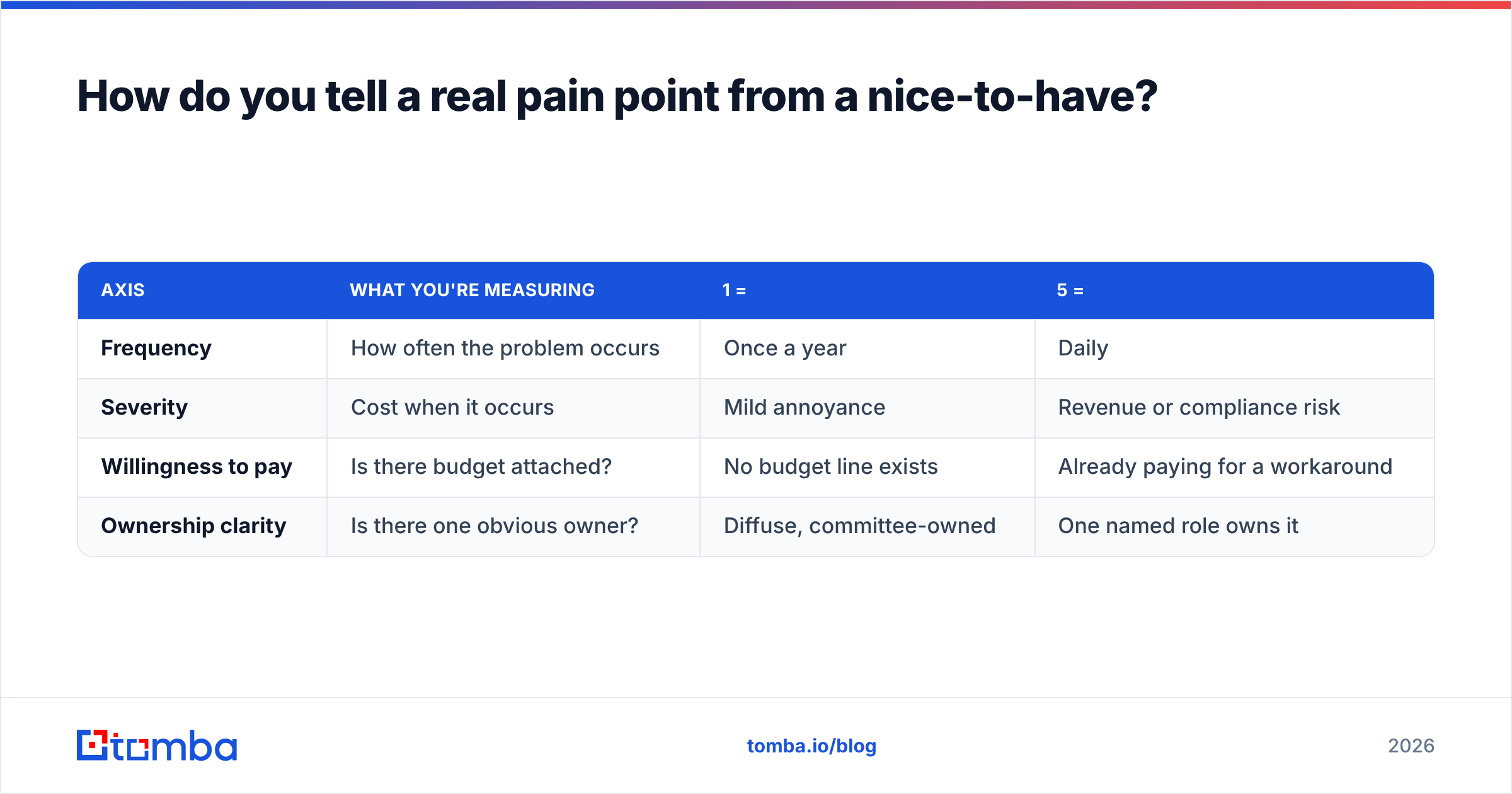
Score each candidate pain on three axes, 1-5, and multiply. Anything under 27 (roughly 3×3×3) goes in the backlog, not the messaging.
| Axis | What you're measuring | 1 = | 5 = |
|---|---|---|---|
| Frequency | How often the problem occurs | Once a year | Daily |
| Severity | Cost when it occurs | Mild annoyance | Revenue or compliance risk |
| Willingness to pay | Is there budget attached? | No budget line exists | Already paying for a workaround |
| Ownership clarity | Is there one obvious owner? | Diffuse, committee-owned | One named role owns it |
The fourth row is the tiebreaker. Two pains can score identically on the first three and one will still be unsellable, because no single person has the authority to fix it. Committee-owned pains produce long sales cycles and no-decision outcomes.
A worked example. A mid-market sales ops lead reports that reps waste time verifying contact data before sequences. Frequency: 5 (daily). Severity: 3 (hours lost, no direct revenue hit). Willingness to pay: 4 (they already pay for two data vendors). Ownership: 5 (the ops lead owns it). Score: 300 — high, sellable, and it maps cleanly to an email verifier or bulk verification workflow. Compare that to "our CRM UI is dated": frequency 5, severity 1, willingness to pay 1, ownership 2. Score: 10. Real complaint, unsellable pain.
Where do you find pain point evidence outside your own data?#
Your own data only tells you about people who already found you. For the rest:
- G2 and Capterra reviews of your competitors. Filter to 2- and 3-star reviews — 1-star is usually a billing dispute, 5-star is usually incentivised. The 2-3 star band is where honest, specific friction lives. G2's category pages let you read hundreds of these in an afternoon.
- Job postings. When a company posts for a "RevOps Analyst — data hygiene and enrichment," they've just published their pain point and attached a salary to it. That's willingness to pay, in public.
- Community threads. Subreddits, Slack communities, and niche forums where practitioners complain to each other rather than to vendors.
- Vendor changelogs and docs. What a competitor shipped last quarter tells you what their customers were shouting about. HubSpot's product updates are a good example of a public roadmap you can read as a pain signal.
- Support docs with high traffic. If a competitor's "how to fix duplicate contacts" article ranks for a thousand queries, that's a thousand people with the pain.
Wikipedia's overview of customer relationship management is a reasonable primer if you're mapping where in the lifecycle each pain type tends to appear, but treat it as background, not research.
How do you turn a pain point into outreach that lands?#
The gap between "we identified the pain" and "we booked meetings" is where most of this work dies. Three steps close it.
Step 1 — Map pain to title, not to company. A pain point belongs to a role. Financial pain sits with the budget owner; process pain sits with the ops lead. Write down the two or three exact titles that own each high-scoring pain. This is the single biggest lift to reply rate, because it stops you sending the CFO message to the SDR manager.
Step 2 — Build the list against those titles. Once you know you need "Head of Revenue Operations at 200-1000 employee SaaS companies," you need contact data for exactly those people. A domain search across target accounts pulls the people and email patterns per company; for larger runs, a bulk email finder handles the volume. The important part is that the list is derived from the pain, not the other way round.
Step 3 — Write the first line as the pain, in their words. Use the verbatim phrasing you pulled from tickets and reviews. "Most ops leads we talk to are reconciling three vendor lists by hand before every campaign" outperforms "we help improve data quality" because the first one proves you've met someone like them.
Then measure. If a pain-led sequence doesn't beat your control on response rate within two cycles, the pain you identified is either wrong, owned by a different title, or not funded. All three are useful findings.
How often should you refresh your pain point research?#
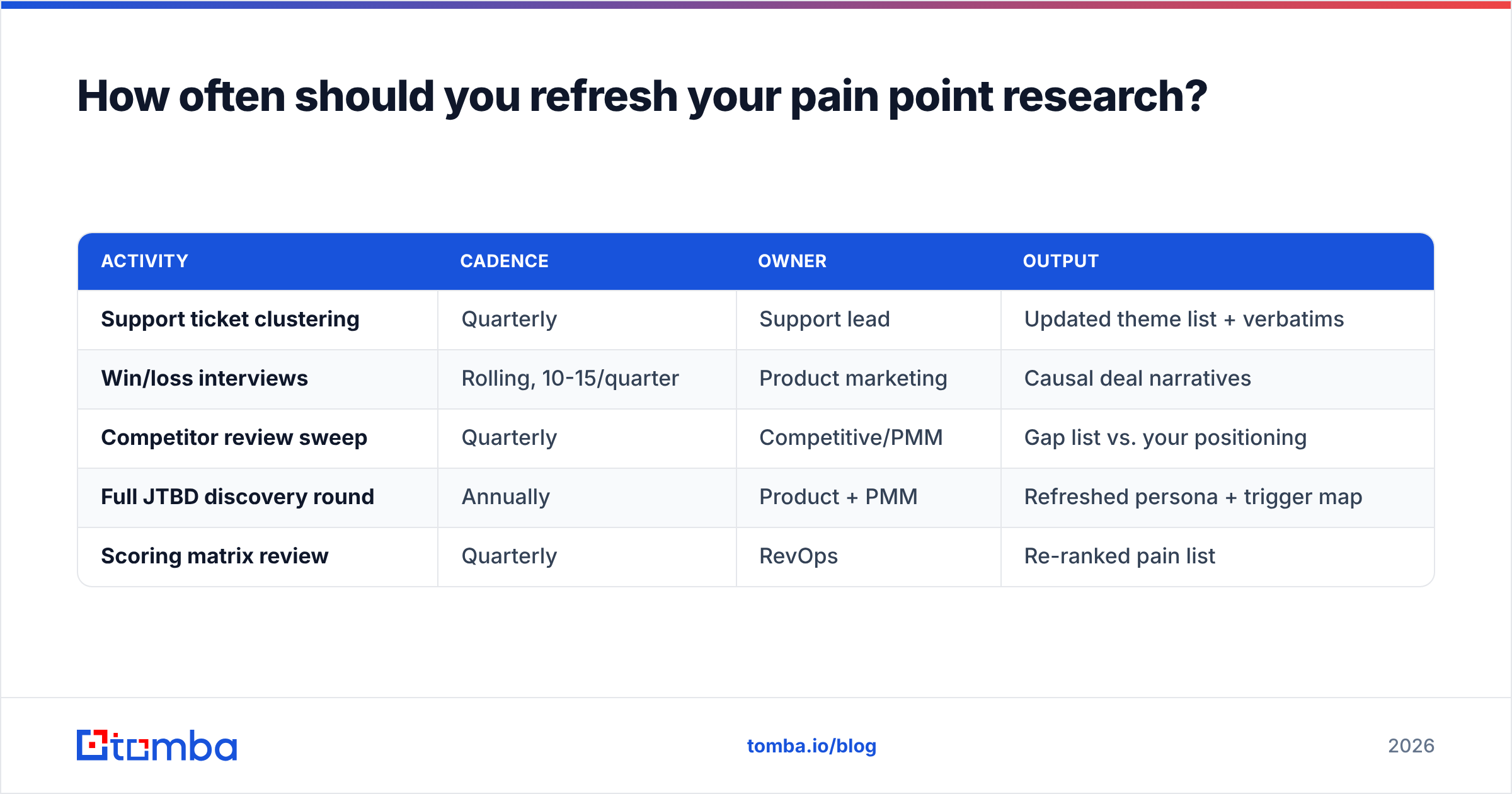
Quarterly for the cheap methods, annually for the expensive ones.
| Activity | Cadence | Owner | Output |
|---|---|---|---|
| Support ticket clustering | Quarterly | Support lead | Updated theme list + verbatims |
| Win/loss interviews | Rolling, 10-15/quarter | Product marketing | Causal deal narratives |
| Competitor review sweep | Quarterly | Competitive/PMM | Gap list vs. your positioning |
| Full JTBD discovery round | Annually | Product + PMM | Refreshed persona + trigger map |
| Scoring matrix review | Quarterly | RevOps | Re-ranked pain list |
The trap is treating this as a project with an end date. Pain points move when the market moves — a new regulation, a competitor's pricing change, or a platform deprecation can create a funded pain in a single quarter that didn't exist the quarter before. Teams that re-run the cheap methods quarterly notice those shifts about two quarters before teams that refresh annually.
One practical safeguard: keep a single living document with every candidate pain, its score, its evidence links, and the date it was last validated. Anything not re-validated in two quarters gets flagged. It's unglamorous and it's the difference between research that compounds and research that rots in a slide deck.
Common mistakes to avoid#
- Interviewing only champions. Your happiest users have the least useful pain data. Talk to the skeptic who almost blocked the deal.
- Confusing urgency with severity. A loud complaint isn't necessarily an expensive one. Score it.
- Letting product own the whole exercise. Sales hears objections product never sees; support hears failures sales never sees. Pull from all three.
- Stopping at the pain. A pain point without a named title who owns it and a way to reach them is a research artefact, not a pipeline.
- Over-indexing on one loud account. Enterprise logos generate disproportionate ticket volume. Weight by account, then by segment.
Turn identified pain into a contactable list#
Once your scoring matrix tells you which pains are real, funded, and owned by a specific role, the bottleneck moves from research to reach. You know the titles. You know the account profile. What's missing is verified contact data for the people who actually own the problem you just documented.
That's the job the Tomba Email Finder is built for — find professional email addresses by domain, name, or company, so a pain-led target list becomes a working sequence in an afternoon rather than a sprint. The free tier gives you 25 searches a month to test the workflow on a small segment before committing; Starter is $49/mo and Growth $99/mo when you scale up, with full Tomba pricing laid out per plan. Start with the ten highest-scoring accounts on your list, verify before you send, and let reply rate tell you whether the pain you identified was the real one.
Related guides#
// get started
Find, verify and enrich your first contacts today
Start on the free plan with 25 searches a month, then scale when your team is ready.
Free plan · No credit card required · GDPR & CCPA
// about the author