How To Improve Sales Productivity: 9 Fixes That Actually Work
Most sales teams try to fix productivity by adding headcount or activity quotas. The real leak is selling time. Here are nine concrete fixes, a task-by-task automation table, and the metrics that prove it worked.
TL;DR
- Sales productivity is output per hour of selling time — not activity volume. Adding calls to a broken process just burns reps faster.
- The biggest recoverable loss is not motivation. It's admin: list building, data entry, research, and chasing bad contact data.
- Fix the data layer first. Bad emails and missing phone numbers silently tax every downstream step, from bounce rates to CRM hygiene.
- Automate in this order: contact discovery → verification → CRM logging → sequencing → reporting. Anything else is optimizing the wrong end.
- Measure selling-time ratio, meetings per 100 verified contacts, and pipeline per rep-hour. If those three don't move in 90 days, the change didn't work.
What is sales productivity, and how do you actually measure it?#
Sales productivity is revenue output divided by the input it took to produce it — usually rep hours, sometimes fully loaded rep cost. That's it. Everything else is a proxy.
The reason teams get this wrong is that "productivity" gets quietly swapped for "activity." A manager sees 40 calls a day and calls it productive. But 40 calls into a list where a third of the numbers are wrong is not productivity — it's a treadmill with a dashboard attached.
Here's the measurement stack that actually holds up:
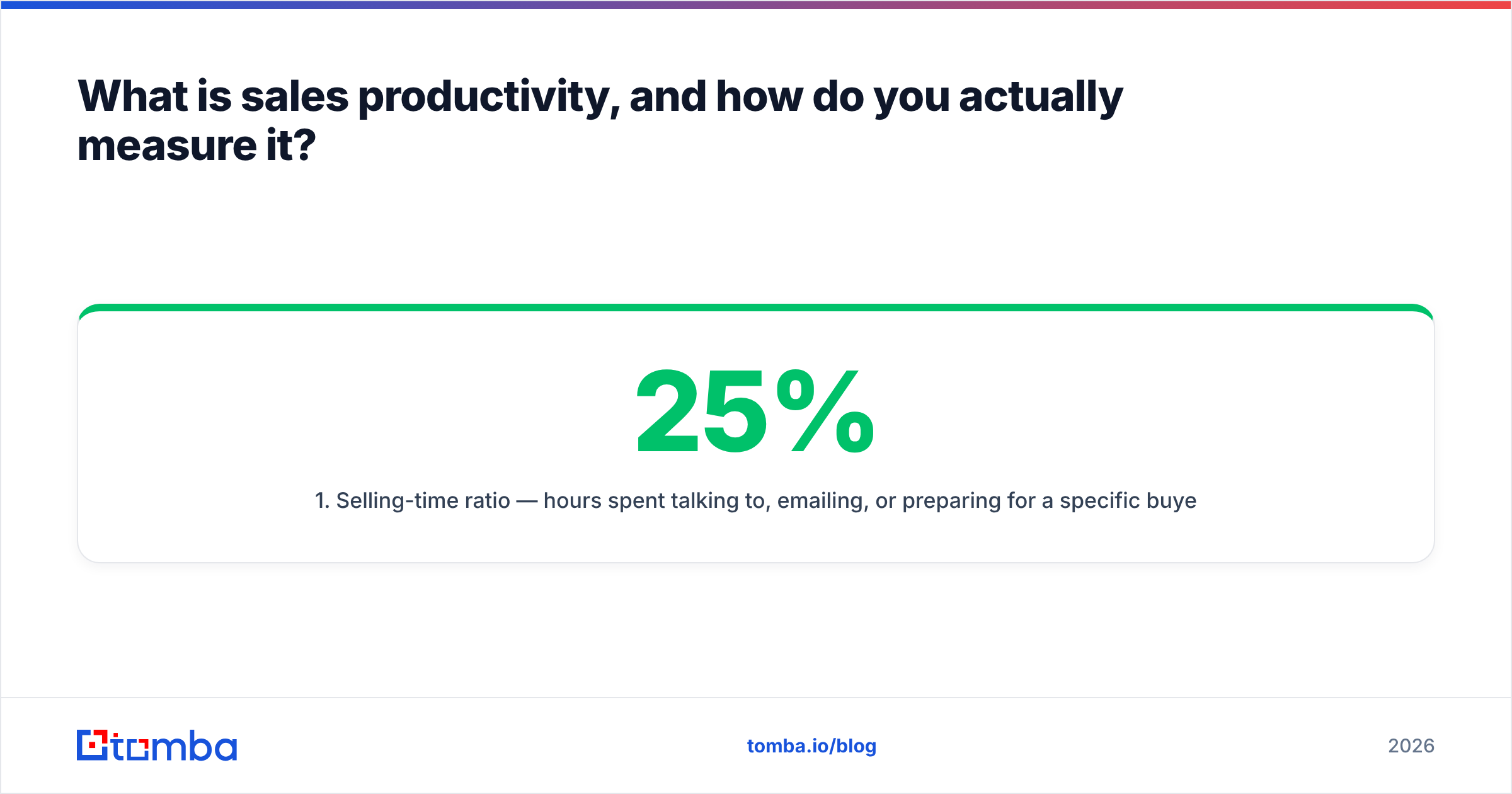
- Selling-time ratio — hours spent talking to, emailing, or preparing for a specific buyer, divided by total working hours. Most teams land between 25% and 40%. Anything under 30% means admin is eating your quarter.
- Pipeline per rep-hour — qualified pipeline created divided by rep hours. This is the cleanest single number for whether a change worked, because it survives seasonality better than raw bookings.
- Meetings per 100 verified contacts — not per 100 records. Per 100 verified contacts. This isolates messaging quality from data quality, which are two completely different problems with two completely different fixes.
- Cost per qualified opportunity — tooling plus rep time divided by SQLs. Rises fast when you add tools without removing steps.
- Ramp time to first closed deal — a lagging indicator, but the one that tells you whether your process is teachable or tribal.
- Cycle time by stage — where deals actually sit. Usually not where reps say they sit.
Track the first three weekly. Track the rest quarterly. Salesforce's State of Sales research has consistently found reps spend the minority of their week on active selling, and that gap — not effort — is where the recoverable margin lives.
Why do most sales productivity fixes fail?#
Because they add work instead of removing it.
The standard playbook is: buy a tool, mandate a new field in the CRM, add a stand-up, raise the activity floor. Every one of those is additive. The rep's day is already full, so the new requirement gets absorbed by cutting the one thing nobody audits — prep and research quality. Then conversion drops, and the response is to raise activity again.
Three specific failure patterns show up over and over:
The tool-stack tax. Each new tool has a login, a sync, a place where data goes to die. Past four or five tools in a rep's daily path, the coordination cost exceeds the individual gain. G2's sales software category lists hundreds of options; the winning teams use fewer, wired together tightly, not more.
Fixing the message before fixing the list. You cannot A/B test your way out of a bad list. If 20% of your emails bounce and another 15% go to people who left the company, your reply rate is measuring your data vendor, not your copy.
Measuring the manager's comfort, not the rep's output. Dials, logged activities, and CRM field completion are easy to count and weakly correlated with revenue. They persist because they're auditable.

How much selling time do reps actually lose, and to what?#
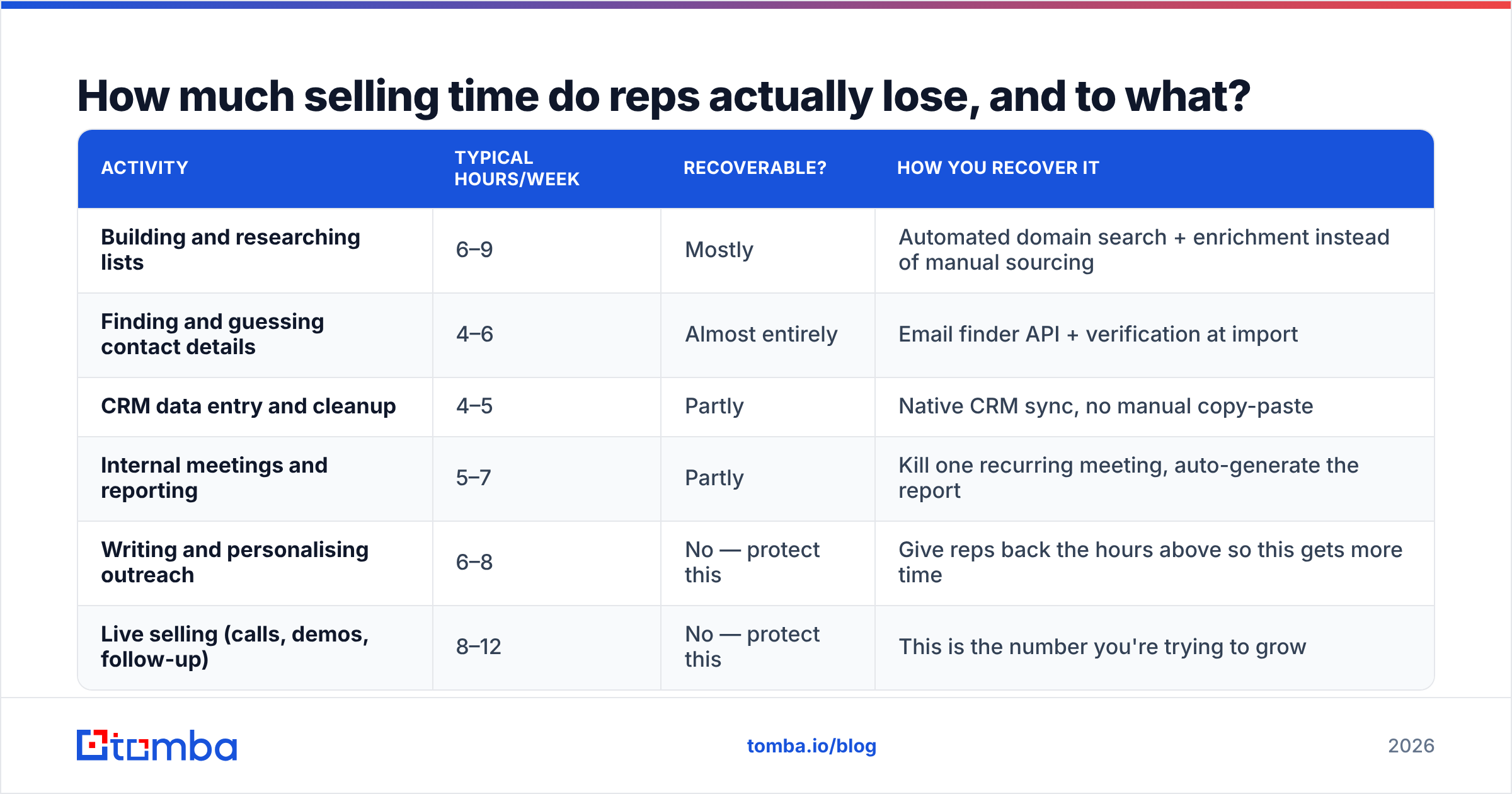
Break a typical 40-hour SDR or AE week into where the hours go. The numbers below are a composite from mid-market B2B teams — your split will differ, but the shape usually doesn't.
| Activity | Typical hours/week | Recoverable? | How you recover it |
|---|---|---|---|
| Building and researching lists | 6–9 | Mostly | Automated domain search + enrichment instead of manual sourcing |
| Finding and guessing contact details | 4–6 | Almost entirely | Email finder API + verification at import |
| CRM data entry and cleanup | 4–5 | Partly | Native CRM sync, no manual copy-paste |
| Internal meetings and reporting | 5–7 | Partly | Kill one recurring meeting, auto-generate the report |
| Writing and personalising outreach | 6–8 | No — protect this | Give reps back the hours above so this gets more time |
| Live selling (calls, demos, follow-up) | 8–12 | No — protect this | This is the number you're trying to grow |
The pattern: roughly 10 to 15 hours a week sit in the "recoverable" bucket. You are not trying to make reps work harder in the protected rows. You are trying to move hours into them.
That reframe matters, because it changes what "good" looks like. A rep who makes fewer calls but into a verified, well-researched list will beat a rep grinding an unverified one — and the second rep will burn out first.
How do you improve sales productivity in 2026?#
Nine changes, ordered by payback speed. The first four are data and process; the rest compound on top of them.
1. Verify every contact before it enters a sequence. This is the highest-ROI single change available to most teams, and it's boring, which is why it gets skipped. Bounces damage sender reputation, which suppresses deliverability for your good contacts too. Run lists through an email verifier as a gate, not as a cleanup step after the damage is done.
2. Stop building lists by hand. Manual sourcing — LinkedIn tab, company site, guess the email format, paste into a sheet — costs 3 to 5 minutes per contact. At 200 contacts a week that's over 12 hours. A bulk email finder run reduces the same job to minutes and produces a consistent, auditable list.
3. Enrich at the point of entry, not in a monthly batch. When a lead hits your CRM missing a title, company size, or phone number, the rep either researches it (expensive) or skips it (worse). Contact enrichment wired into the intake step removes the decision entirely.
4. Cut one field and one meeting. Audit your CRM required fields. If nobody has run a report on a field in six months, delete it. Same test for recurring meetings. This costs nothing and buys back 1–3 hours a week per rep.
5. Standardise the first 90 seconds. Not a script — a structure. Reps who improvise the opening spend prep time re-deciding solved problems. HubSpot's sales statistics roundup is a decent starting point for what actually correlates with connect rates.
6. Separate research time from execution time. Context switching between "find the person" and "write to the person" is where hours vanish invisibly. Block them. Research Monday, send Tuesday through Thursday.
7. Route leads in minutes, not days. Speed-to-lead is still the most under-exploited lever in B2B. If a form fill sits in a queue for four hours, you've spent marketing budget to buy a cold lead.
8. Give reps phone numbers, not just emails. Multi-channel sequences outperform email-only, but only if the phone data is real. A phone finder plus validation beats a dialer pointed at stale records.
9. Report on selling-time ratio in the same review as pipeline. What gets reviewed gets defended. If you only review pipeline, admin creep returns within a quarter.

Which tasks should you automate first?#
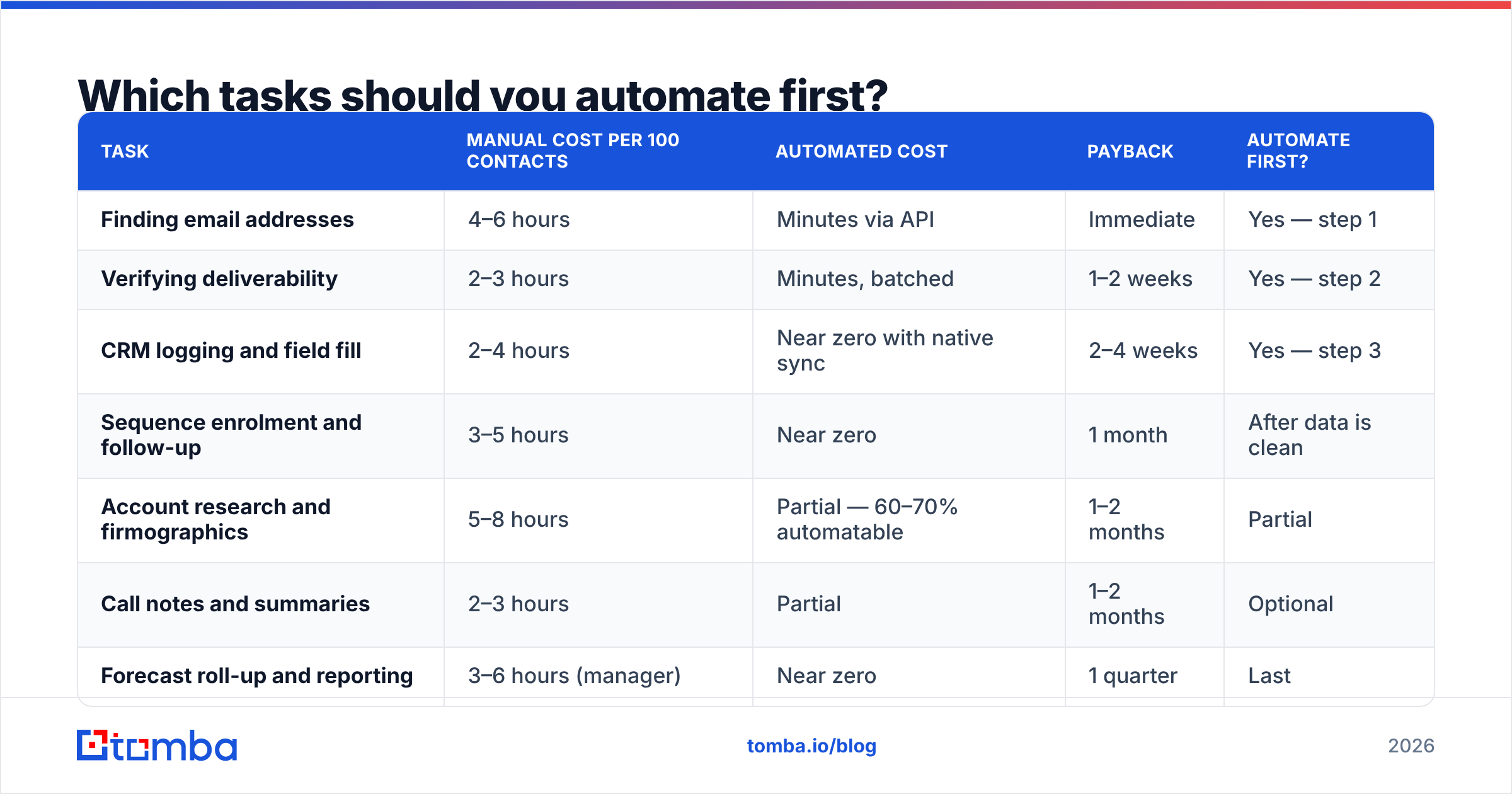
Automate in dependency order. Automating sequencing before you've fixed contact data just sends bad emails faster.
| Task | Manual cost per 100 contacts | Automated cost | Payback | Automate first? |
|---|---|---|---|---|
| Finding email addresses | 4–6 hours | Minutes via API | Immediate | Yes — step 1 |
| Verifying deliverability | 2–3 hours | Minutes, batched | 1–2 weeks | Yes — step 2 |
| CRM logging and field fill | 2–4 hours | Near zero with native sync | 2–4 weeks | Yes — step 3 |
| Sequence enrolment and follow-up | 3–5 hours | Near zero | 1 month | After data is clean |
| Account research and firmographics | 5–8 hours | Partial — 60–70% automatable | 1–2 months | Partial |
| Call notes and summaries | 2–3 hours | Partial | 1–2 months | Optional |
| Forecast roll-up and reporting | 3–6 hours (manager) | Near zero | 1 quarter | Last |
The rows at the top are mechanical, high-volume, and fully rule-based — perfect automation candidates. The rows at the bottom involve judgment, so automation there produces output someone has to check anyway, which eats the savings.
What tools improve sales productivity the most?#
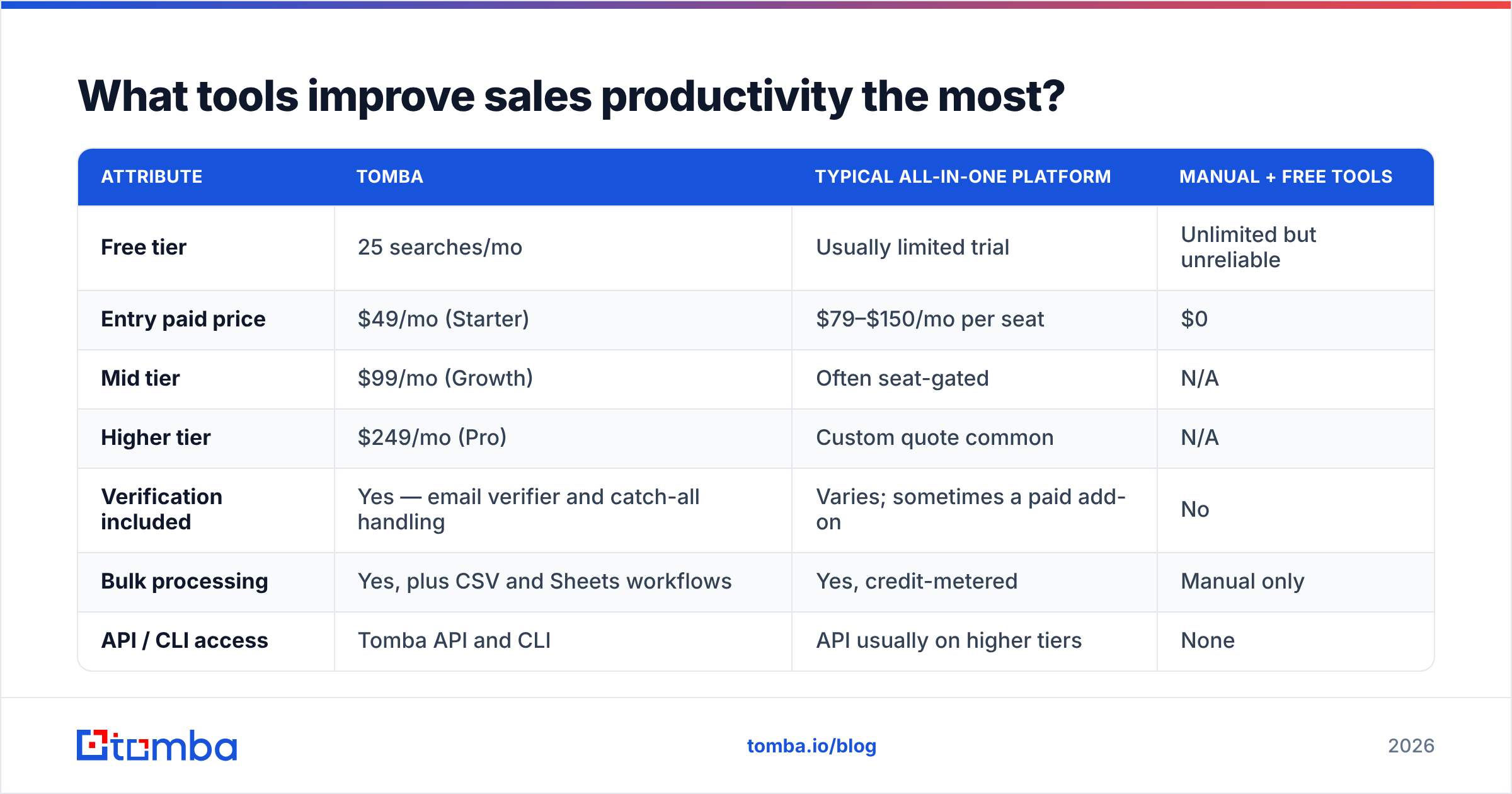
There's no single stack, but there is a shape: one data source, one engagement layer, one CRM, and as few connectors as you can survive with. Here's how the data-layer options compare on the attributes that affect rep hours.
| Attribute | Tomba | Typical all-in-one platform | Manual + free tools |
|---|---|---|---|
| Free tier | 25 searches/mo | Usually limited trial | Unlimited but unreliable |
| Entry paid price | $49/mo (Starter) | $79–$150/mo per seat | $0 |
| Mid tier | $99/mo (Growth) | Often seat-gated | N/A |
| Higher tier | $249/mo (Pro) | Custom quote common | N/A |
| Verification included | Yes — email verifier and catch-all handling | Varies; sometimes a paid add-on | No |
| Bulk processing | Yes, plus CSV and Sheets workflows | Yes, credit-metered | Manual only |
| API / CLI access | Tomba API and CLI | API usually on higher tiers | None |
| Spreadsheet workflow | Google Sheets and Excel add-ins | Sometimes | Copy-paste |
| Time cost per 100 contacts | Minutes | Minutes | 4–6 hours |
Two honest caveats. First, an all-in-one platform that also runs your sequencing can be the right call if you value one login over best-in-class data — the trade is usually accuracy and per-seat cost. Second, price comparisons age fast; check current Tomba pricing and each vendor's own page before you budget. Peers like BookYourData take a different route — prepaid, list-first purchasing — which suits teams that buy in large batches rather than enriching continuously. Match the buying model to how your team actually works.
For CRM-side wiring, the practical move is a native connection rather than a middleware chain. A direct HubSpot integration or Salesforce integration removes the "which system is right?" argument that eats fifteen minutes of every pipeline review.
How do you know the productivity change actually worked?#
Set a baseline before you change anything. Two weeks minimum, four is better. Capture:
- Selling-time ratio, sampled via calendar audit or time tracking
- Bounce rate on outbound sends
- Meetings booked per 100 verified contacts
- Qualified pipeline per rep-hour
- Average time from lead created to first touch
Then change one layer at a time. If you swap your data provider, tighten verification, and launch a new sequence template in the same week, you will never know which one moved the number — and you'll keep paying for all three.
Reasonable 90-day targets for a team starting from a messy baseline: bounce rate under 3%, selling-time ratio up 5 to 8 points, and meetings per 100 verified contacts up 15% to 30%. If bounce rate drops but meetings don't move, your data is now fine and your messaging is the constraint. That's a useful, specific answer — which is the whole point of isolating variables.
Gartner's sales practice research is worth reading on the governance side: productivity programs that survive are the ones with an owner and a review cadence, not the ones with the best tooling.
What does a realistic 30/60/90 rollout look like?#
Days 1–30 — stop the bleeding. Audit contact data quality on your current lists. Run everything through verification before the next send. Delete unused CRM fields. Cancel one recurring meeting. Establish the baseline metrics above. Expect the bounce rate improvement here, nothing else yet.
Days 31–60 — remove the manual steps. Wire your data source into your CRM directly. Move list building from manual sourcing to domain search plus enrichment. Introduce a research block and an execution block in the weekly calendar. Selling-time ratio should start moving.
Days 61–90 — compound it. Add phone data to the sequences that email alone underperforms on. Tighten lead routing to sub-hour. Review the metrics in the same meeting as pipeline, permanently. This is where pipeline per rep-hour moves — and where teams that stopped at day 30 quietly regress.
One warning: resist the urge to raise activity quotas in the same 90 days. If you free up ten hours and immediately fill them with more dials, you've converted a productivity gain into an activity gain and learned nothing about whether the process improved.
Where should you start this week?#
Start where the hours are, not where the enthusiasm is. For nearly every B2B team, that's contact data — the sourcing, the finding, and the verifying that sits upstream of every call and every send.
Point Tomba Email Finder at the accounts already in your CRM, run the results through verification, and time how long it takes compared to the manual process your reps use today. The free tier gives you 25 searches a month to run that test honestly, and Starter is $49/mo if the numbers hold up. Measure the delta in hours, not in credits — because hours are what you're actually buying back.
Related guides#
// get started
Find, verify and enrich your first contacts today
Start on the free plan with 25 searches a month, then scale when your team is ready.
Free plan · No credit card required · GDPR & CCPA
// about the author