How to Prevent Email Blacklisting: A 2026 Playbook
Blacklists do not happen by accident. Here is the exact list-hygiene, authentication, and sending-volume playbook that keeps your domain and IP off Spamhaus, SORBS, and Barracuda in 2026.
TL;DR
- Blacklisting is almost always a consequence, not an accident: bad list data, missing authentication, or a volume spike you did not earn.
- The three checks that prevent most listings are valid recipients, aligned SPF/DKIM/DMARC, and a sending ramp that matches your domain age.
- Spam-trap hits are the fastest route to a Spamhaus listing, and they come almost entirely from stale or purchased lists.
- Monitor before you get burned: Google Postmaster Tools, Microsoft SNDS, and a weekly blacklist check take ten minutes total.
- If you do get listed, delisting is easy. Staying delisted requires fixing the sending behavior that caused it.
What Does Email Blacklisting Actually Mean?#
A blacklist (or blocklist) is a database of IP addresses and domains that a reputation provider believes send spam. When your mail server connects to a recipient's mail server, that server queries one or more of these lists in real time. If you are on it, your message is rejected at the SMTP handshake or silently routed to spam.
Think of it like a bouncer with a shared clipboard. Any club in the city can add a name, and every other club reads the same clipboard. Getting off the list is a phone call. Getting your reputation back takes weeks.
There are three broad categories you need to care about:
- Public DNSBLs — Spamhaus (SBL, XBL, PBL, DBL), SORBS, Barracuda, SpamCop. These are queried by tens of thousands of mail servers. A Spamhaus listing is the one that actually hurts.
- Private / mailbox-provider blocklists — Google, Microsoft, and Yahoo run internal reputation systems you cannot query directly. There is no delisting form; you fix behavior and wait.
- ESP-internal suspension — your sending platform cuts you off before the public lists ever see you. Annoying, but usually the cheapest failure mode.
The distinction matters because the fix is different. Public listings have a removal form. Private reputation damage has only a slow recovery curve.
Why Do Senders Get Blacklisted in the First Place?#
Almost every listing traces back to one of six root causes. Ranked by how often they cause damage:
- Spam traps. Recycled addresses (abandoned mailboxes reactivated as traps) and pristine traps (addresses seeded on the web that no human ever typed) sit inside purchased and scraped lists. A single pristine-trap hit can trigger a Spamhaus SBL listing.
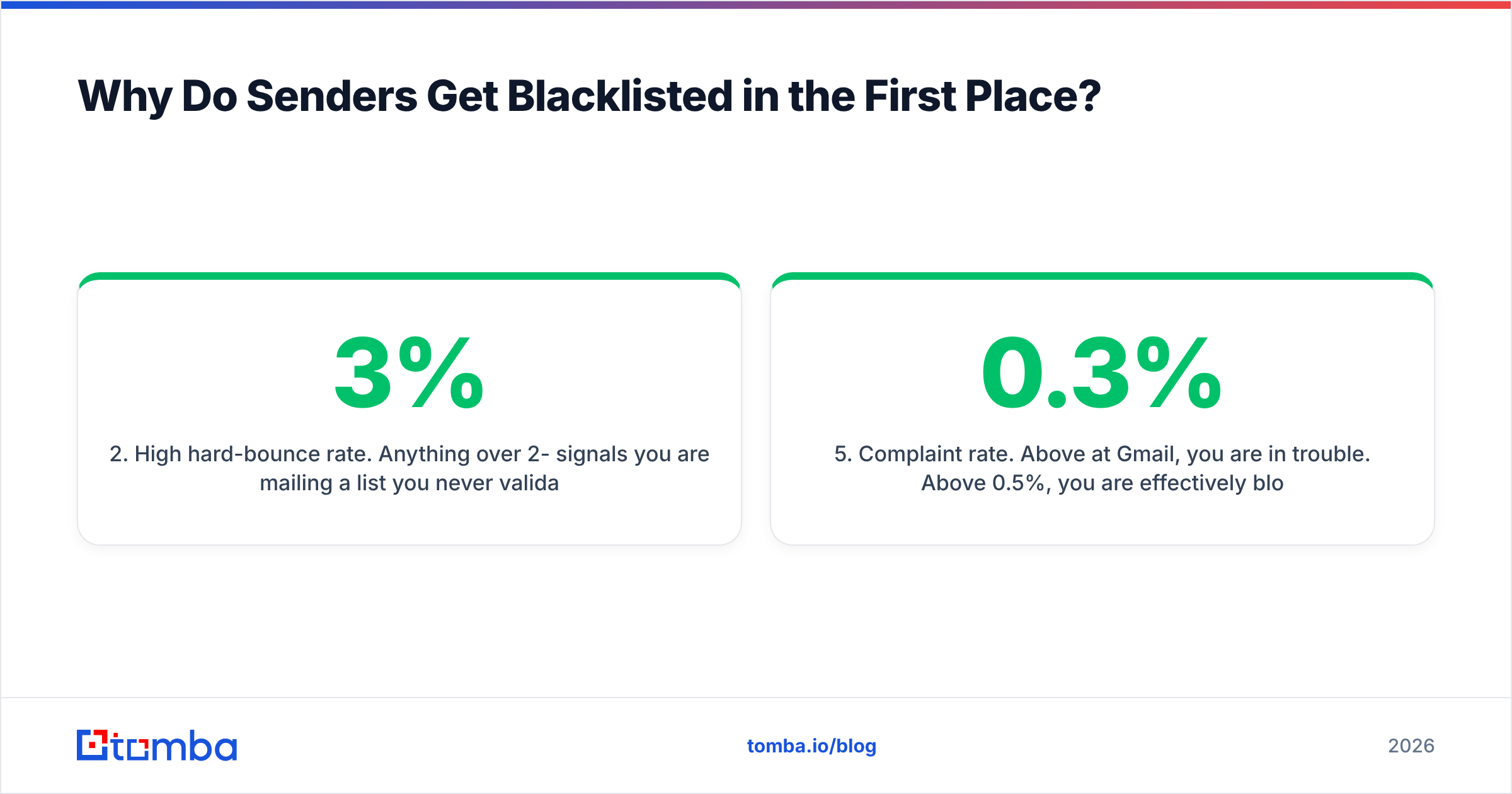
- High hard-bounce rate. Anything over 2-3% signals you are mailing a list you never validated. Providers read this as list-buying behavior.
- Volume spikes. Going from 200 sends/day to 5,000 on a three-week-old domain is the single most reliable way to get throttled and then listed.
- Missing or misaligned authentication. No SPF, no DKIM, no DMARC policy — your mail is trivially spoofable and providers treat it accordingly.
- Complaint rate. Above 0.3% at Gmail, you are in trouble. Above 0.5%, you are effectively blocked.
- Compromised infrastructure. A shared IP neighbor, a hacked form, or an open relay sending on your behalf.
Notice that five of the six are entirely inside your control. The sixth is an argument for a dedicated IP once you exceed roughly 50,000 sends per month.

How Do You Prevent Email Blacklisting? The Seven Controls#
Here is the working checklist. Run through it once before you send, and quarterly thereafter.
1. Verify every address before it enters your sender. Not just at import — at send time. Addresses decay at roughly 22-30% per year as people change jobs. A list you validated in January is measurably worse by June. Use an email verifier as a gate on your CRM, not as a one-off cleanup project.
2. Authenticate all three ways. SPF, DKIM, and DMARC are table stakes since Google and Yahoo's February 2024 bulk-sender requirements. Publish an SPF record, sign with DKIM at 2048-bit, and start DMARC at p=none with an rua reporting address before tightening to quarantine.
3. Ramp volume on a schedule. New domain or new IP: start at 20-30 sends/day, increase ~30% every two days, and hold whenever bounce or complaint rate moves. Full ramp to 2,000/day takes about 6-8 weeks. There is no shortcut, and every tool that promises one is selling you a listing.
4. Segment by engagement. Stop mailing addresses that have not opened in 180 days. Providers weight recent engagement heavily; a list of dormant contacts drags your whole sender reputation down even if none of them complain.
5. Handle catch-all domains deliberately. Catch-all servers accept everything, so a "valid" result means nothing. Route them through a catch-all verifier and treat unresolved ones as a separate, lower-volume segment rather than mixing them into your main sends.
6. Make unsubscribing trivial. One-click list-unsubscribe headers (RFC 8058) are mandatory for bulk senders. A visible unsubscribe converts would-be complaints into harmless opt-outs. Complaints hurt; opt-outs do not.
7. Monitor weekly, not after the fire. Google Postmaster Tools for Gmail reputation, Microsoft SNDS for Outlook, MXToolbox for the 100+ public DNSBLs, and your DMARC aggregate reports for anything spoofing you.
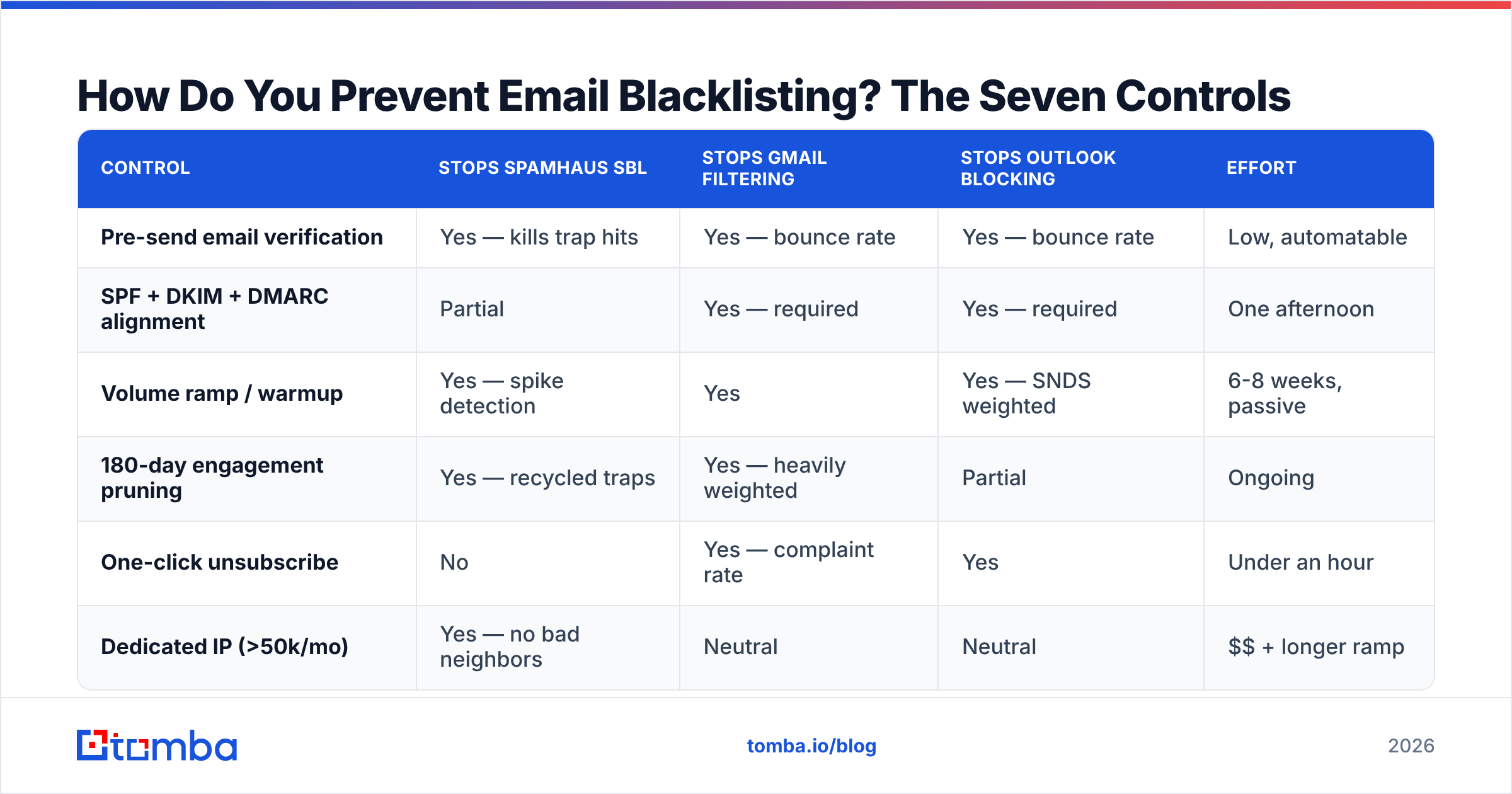
Which Controls Stop Which Blacklists?#
| Control | Stops Spamhaus SBL | Stops Gmail filtering | Stops Outlook blocking | Effort |
|---|---|---|---|---|
| Pre-send email verification | Yes — kills trap hits | Yes — bounce rate | Yes — bounce rate | Low, automatable |
| SPF + DKIM + DMARC alignment | Partial | Yes — required | Yes — required | One afternoon |
| Volume ramp / warmup | Yes — spike detection | Yes | Yes — SNDS weighted | 6-8 weeks, passive |
| 180-day engagement pruning | Yes — recycled traps | Yes — heavily weighted | Partial | Ongoing |
| One-click unsubscribe | No | Yes — complaint rate | Yes | Under an hour |
| Dedicated IP (>50k/mo) | Yes — no bad neighbors | Neutral | Neutral | $$ + longer ramp |
What Are the Real Numbers You Should Sit Under?#
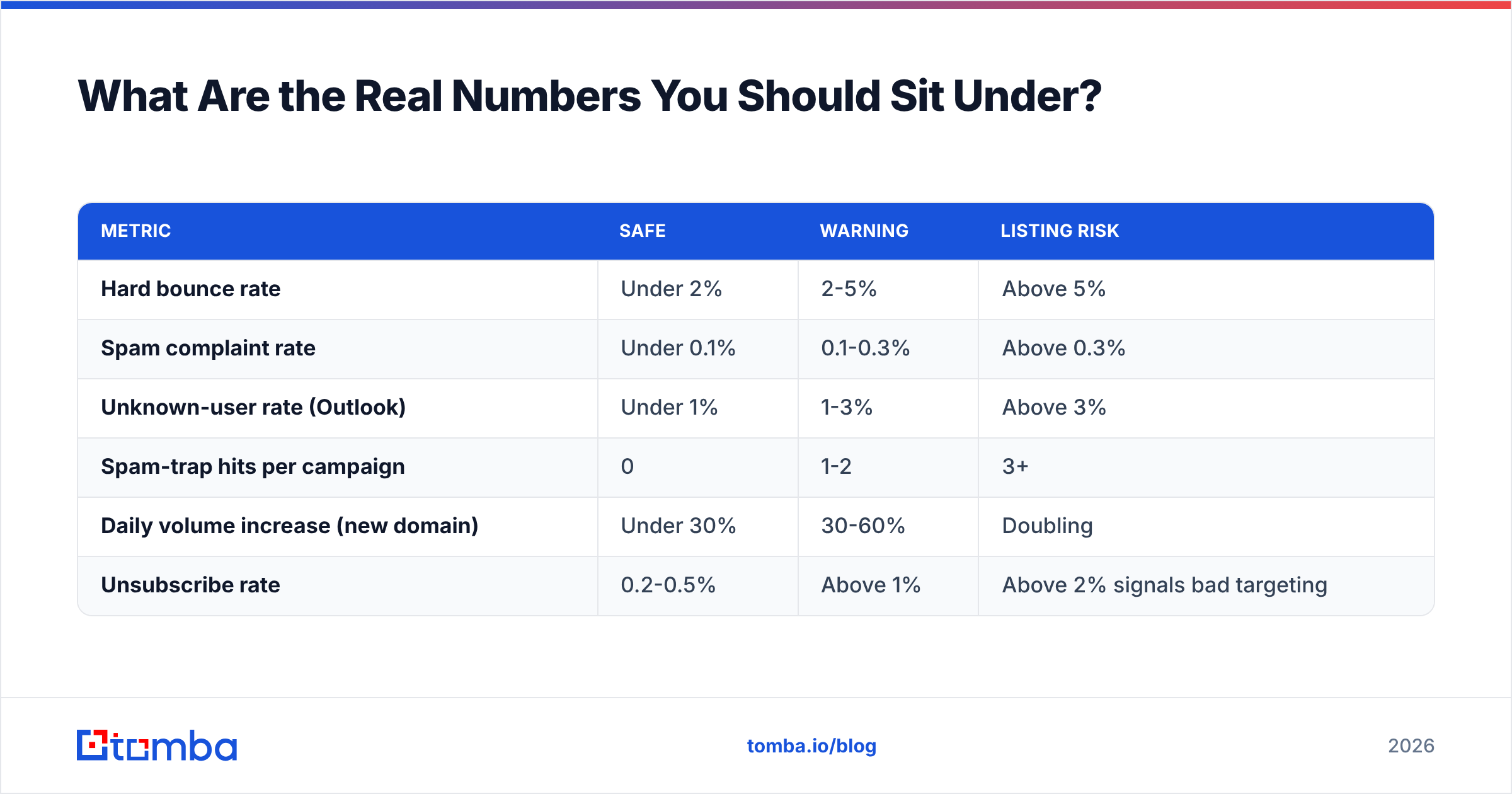
Vague advice like "keep bounces low" is useless. These are the thresholds that mailbox providers and blocklist operators actually act on:
| Metric | Safe | Warning | Listing risk |
|---|---|---|---|
| Hard bounce rate | Under 2% | 2-5% | Above 5% |
| Spam complaint rate | Under 0.1% | 0.1-0.3% | Above 0.3% |
| Unknown-user rate (Outlook) | Under 1% | 1-3% | Above 3% |
| Spam-trap hits per campaign | 0 | 1-2 | 3+ |
| Daily volume increase (new domain) | Under 30% | 30-60% | Doubling |
| Unsubscribe rate | 0.2-0.5% | Above 1% | Above 2% signals bad targeting |
If you are running cold outreach, the complaint threshold is the one that ends campaigns. A 0.3% complaint rate on 1,000 sends is three people clicking "report spam" — which is trivially easy to hit with poor targeting.
Is Buying a List Ever Safe?#
Short answer: buying is not automatically fatal, but scraping is. The difference is provenance and freshness.
A reputable B2B data vendor that verifies at delivery, discloses sourcing, and honors suppression requests is a different product than a $50 CSV of 200,000 "verified" addresses from a marketplace. Vendors like BookYourData sell pay-as-you-go, verified B2B contacts with accuracy guarantees, and their lists behave very differently from scraped dumps — the trap density is the whole story.
That said, the safest pattern is not buying lists at all. It is building them: identify the accounts you want, then resolve contacts individually with an email finder or domain search at the moment you intend to reach out. Freshly resolved addresses carry near-zero trap risk because they were never sitting in a stale file.
Whichever route you pick, run the result through verification before the first send. Vendor-verified and independently-verified are not the same claim, and the second one is the one your sender reputation cares about.
How Do You Check If You Are Already Blacklisted?#
Do this now, before you read further — it takes four minutes.
- Multi-list scan. MXToolbox's blacklist check queries roughly 100 DNSBLs against your IP or domain in one shot. Run it against your sending IP and your envelope domain, since DBL listings target domains.
- Spamhaus lookup. Query directly at spamhaus.org for the authoritative answer, including which sub-list (SBL, CSS, DBL) you are on. Each has a different cause and a different fix.
- Google Postmaster Tools. Requires DKIM-authenticated volume above a threshold. Shows domain reputation as Bad/Low/Medium/High, plus spam rate and authentication pass rates.
- Microsoft SNDS. Free, IP-based, and the only real window into Outlook/Hotmail filtering. Sign up before you need it — the data is not retroactive.
- Seed-list testing. Send to a spread of Gmail, Outlook, Yahoo, and corporate mailboxes you control. Inbox placement across providers tells you more than any single score.
Test your message content too. A spam checker will flag link-heavy bodies, spammy phrases, and broken authentication before you send to a real list, and a blacklist checker confirms your IP status in seconds.
What Do You Do If You Are Already Listed?#
Fix the cause first, then request removal. Delisting before you fix the behavior gets you relisted within days, and repeat listings are treated far more harshly.
- Identify the specific list and reason. Spamhaus tells you exactly why — trap hit, snowshoe pattern, compromised host. Do not guess.
- Stop all sending on that IP/domain. Continuing to send while listed compounds the damage and can escalate an SBL into a CSS listing.
- Purge and re-verify the entire list. Not the segment you think caused it — all of it. Use a bulk email finder workflow to re-resolve and revalidate in one pass.
- Audit authentication. Confirm SPF includes every sending source, DKIM signs on all streams, and DMARC alignment passes for the exact domain in the From header.
- Submit the removal request. Spamhaus, Barracuda, and SORBS all have self-service forms. Be specific about what you changed — vague requests get denied and rate-limited.
- Ramp back slowly. Treat your infrastructure as brand new. Restart at 10-20% of previous volume and rebuild across 4-6 weeks.
Most first-time SBL listings clear within 24-48 hours if the underlying issue is genuinely resolved. Second listings on the same IP take longer and require more evidence.
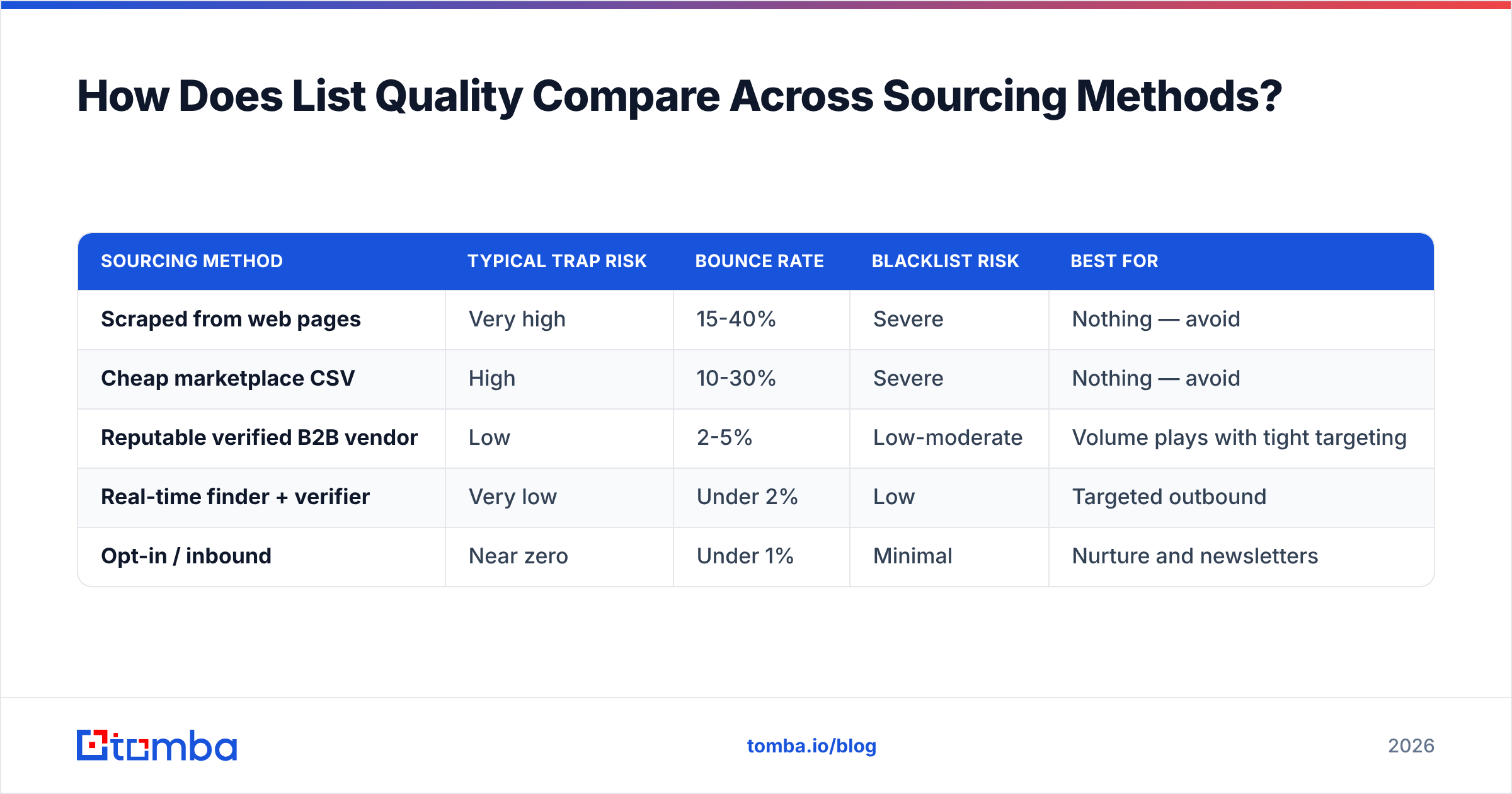
How Does List Quality Compare Across Sourcing Methods?#
Where your addresses come from predicts your blacklist risk better than any other single variable.
| Sourcing method | Typical trap risk | Bounce rate | Blacklist risk | Best for |
|---|---|---|---|---|
| Scraped from web pages | Very high | 15-40% | Severe | Nothing — avoid |
| Cheap marketplace CSV | High | 10-30% | Severe | Nothing — avoid |
| Reputable verified B2B vendor | Low | 2-5% | Low-moderate | Volume plays with tight targeting |
| Real-time finder + verifier | Very low | Under 2% | Low | Targeted outbound |
| Opt-in / inbound | Near zero | Under 1% | Minimal | Nurture and newsletters |
The pattern is consistent: the closer your address resolution sits to the moment of sending, the lower your risk. Batch-and-blast from an aging file is what blocklist operators are specifically built to catch, and their email deliverability heuristics have gotten sharper every year since Gmail's 2024 sender rules landed.
What Should Your Ongoing Cadence Look Like?#
Prevention is a routine, not a project. A workable rhythm:
- Daily — watch bounce and complaint rates in your sending platform. Any spike, pause immediately.
- Weekly — MXToolbox blacklist scan on IP and domain, plus a Postmaster Tools glance.
- Monthly — re-verify any segment older than 90 days; prune 180-day non-openers.
- Quarterly — full authentication audit (SPF lookup count under 10, DKIM key rotation, DMARC policy tightening).
- Before every new campaign — verify the target segment, seed-test placement, and confirm your ramp headroom.
Teams that follow this get listed roughly never. Teams that skip it get listed roughly annually and lose two to four weeks of pipeline each time. G2 reviews of deliverability tooling are full of the same story: the fix was always hygiene, never a magic setting.
Where Does Tomba Fit?#
If your blacklist risk traces back to list quality — and for most B2B senders it does — the fix starts before the send. Tomba's Email Finder resolves professional addresses by domain, name, or company and returns a confidence score with sources, so you are mailing addresses that exist right now rather than ones that existed when someone built a CSV two years ago. Pair it with the built-in verifier to catch catch-alls, disposables, and role accounts before they ever reach your sequencer.
The free tier includes 25 searches per month to test the accuracy on your own target accounts; Starter is $49/mo and Growth is $99/mo with bulk processing and API access — full Tomba pricing is on the site. Start with a list you actually trust, and the blacklist problem mostly stops being a problem.
Related guides#
// get started
Find, verify and enrich your first contacts today
Start on the free plan with 25 searches a month, then scale when your team is ready.
Free plan · No credit card required · GDPR & CCPA
// about the author