How to Respond to Buying Signals Fast (2026 Playbook)
Most buying signals die within an hour. Here is the tiered response playbook — signal scoring, SLA windows, channel choice, and the exact messages that convert intent into booked meetings.
TL;DR: how to respond to buying signals
- Speed beats polish. A signal loses most of its value in an hour. After a day, it is close to dead. Your reply time matters more than your copy.
- Not all signals are equal. Tier them. Tier 1 is your pricing page and demo abandons. Tier 2 is job posts and tech installs. Tier 3 is content and social. Each tier gets its own SLA and channel.
- Never cite a signal you can't cite honestly. "I saw you on our pricing page" is creepy. "I saw you're hiring three SDRs" is research.
- The real block is contact data, not detection. Most teams spot signals they can't act on. They have a company name, and no named person to email.
- Run a five-step loop: detect → qualify → find the contact → reply inside the SLA → log the result. Then cut the signal types that never convert.
You already have signal data. Your site analytics show anonymous companies. LinkedIn tells you who changed jobs. Job boards tell you who's scaling a team. G2 tells you who's shopping around. The gap isn't detection. It's the 40 minutes between "signal fired" and "rep sends something useful." It's also the fact that half those signals resolve to a company name with no reachable human attached.
This is a working playbook for how to respond to buying signals. It covers how to score them, how fast to move on each tier, which channel to use, what to say, and how to turn a signal into a person you can email.
What counts as a buying signal in B2B?#
A buying signal is any observable behavior that suggests an account has moved from passive to active — they've started allocating attention, budget, or headcount toward a problem you solve.
Signals fall into four families, and each one carries different intent weight:
- First-party behavioral — pricing page views, demo form abandons, repeat visits from the same company, docs/API page reads, trial signups that stall. Highest intent, lowest volume. These are people touching your asset.
- Hiring and org signals — new job posts for roles adjacent to your category, a new VP of Sales, a first RevOps hire, a team that doubled in six months. Strong intent for tooling purchases, and publicly verifiable.
- Technographic and infrastructure — a company installs a CRM, drops a competitor's script, adds a marketing automation tag, or migrates stacks. Useful for displacement plays and integration pitches.
- Third-party and social — review-site category browsing, funding announcements, competitor complaints on LinkedIn, conference attendance, podcast appearances. Lower precision, but great for warm-context openers.
The mistake most teams make is treating all four the same. A pricing-page visit and a LinkedIn post like are not comparable events, and giving them the same workflow guarantees you'll either over-respond to noise or under-respond to real intent.
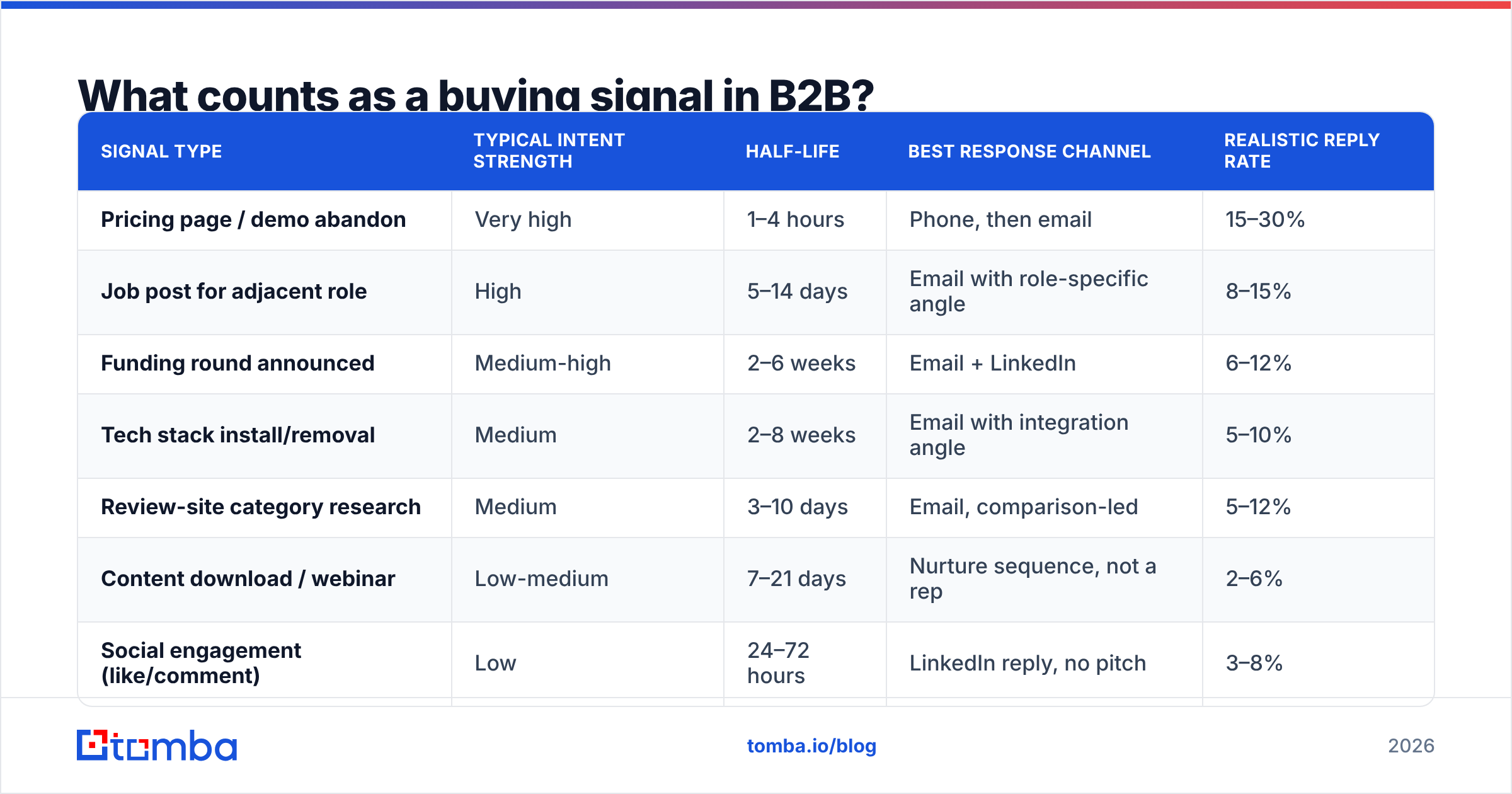
| Signal type | Typical intent strength | Half-life | Best response channel | Realistic reply rate |
|---|---|---|---|---|
| Pricing page / demo abandon | Very high | 1–4 hours | Phone, then email | 15–30% |
| Job post for adjacent role | High | 5–14 days | Email with role-specific angle | 8–15% |
| Funding round announced | Medium-high | 2–6 weeks | Email + LinkedIn | 6–12% |
| Tech stack install/removal | Medium | 2–8 weeks | Email with integration angle | 5–10% |
| Review-site category research | Medium | 3–10 days | Email, comparison-led | 5–12% |
| Content download / webinar | Low-medium | 7–21 days | Nurture sequence, not a rep | 2–6% |
| Social engagement (like/comment) | Low | 24–72 hours | LinkedIn reply, no pitch | 3–8% |
Use these as directional starting points and replace them with your own numbers after 60 days. The ranking matters more than the absolute figures.

Why does response speed matter more than message quality?#
Because intent decays on a curve, not a line.
Think of a buying signal like a restaurant table that just opened up on a Friday night. The table is worth a lot at 7:02pm and nothing at 7:40pm — not because the table changed, but because someone else took it. When a prospect reads three vendor pricing pages, they are in an active evaluation window. Whoever shows up inside that window gets to frame the criteria. Everyone else responds to criteria a competitor already set.
The research on lead response timing has said the same thing for over a decade. Contact rates and qualify rates fall as the minutes pass. The Harvard Business Review analysis of lead response management found firms that replied within an hour were far more likely to qualify a lead. Firms that waited a few hours were not. Nothing has softened that curve. If anything, faster tools on the buyer's side make the window shorter each year.
Practical implication: a mediocre email sent in 20 minutes outperforms a brilliant email sent in two days. Optimize your workflow for latency first, then improve copy inside the fast lane.
Set explicit SLAs per tier and enforce them the way support teams enforce first-response time:
- Tier 1 (high intent, first-party): respond within 60 minutes during business hours. Phone first, email second, same day.
- Tier 2 (hiring, funding, tech installs): respond within 24 hours. Email with a specific, referenceable reason.
- Tier 3 (content, social, category browsing): respond within 72 hours, or route to nurture entirely.
- Anything past its half-life: don't fake urgency. Repackage it as a normal outbound touch with the signal as context, not as a reason.
How do you score and tier buying signals?#
Score on two axes: intent strength and fit. Then act only where both are strong. A perfect-fit account reading a blog post is not the same as a bad-fit account asking for a demo. Neither one earns a rep's first hour.
Here is a scoring model a RevOps team can build in a sheet, long before it buys a platform:
- Base intent score (0–50) — assign points per signal type using the half-life table above. Pricing page = 40, demo abandon = 45, job post = 25, funding = 20, social like = 5.
- Recency multiplier (0.2–1.0) — full weight inside the signal's half-life, decaying to 0.2 past it. This single rule kills most "we emailed them three weeks after they visited" awkwardness.
- Fit score (0–30) — ICP match on employee count, industry, region, and tech stack. No fit, no rep time, whatever the intent score says.
Then add the three rules that decide who gets a rep's time:
- Stacking bonus (0–20) — two or more independent signals inside 14 days. Stacked signals are the strongest predictor you have. A job post plus a pricing visit is a different animal than either alone.
- Suppression rules (hard stop) — existing customer, open opportunity, active sequence, competitor domain, or contacted in the last 30 days. Skipping this step is how you send an "I noticed you're evaluating tools" email to an account your AE is already closing.
- Route by total — 70+ goes to a rep with an SLA clock. 40–69 goes to a light-touch sequence. Below 40 goes to marketing nurture or nowhere.
The scoring model's real job isn't precision — it's forcing the team to agree in advance on what deserves a human. Without it, reps chase whatever notification is loudest.
How do you turn a signal into a contactable person?#
This is where most signal programs quietly fail. You detect that Acme Corp visited your pricing page four times this week. Congratulations — now email who?
Visitor ID tools match traffic to a company domain, not a named person. Job posts give you a company and a role, not a hiring manager's inbox. Funding news gives you a press release. Each of those needs one more step before a rep can act.
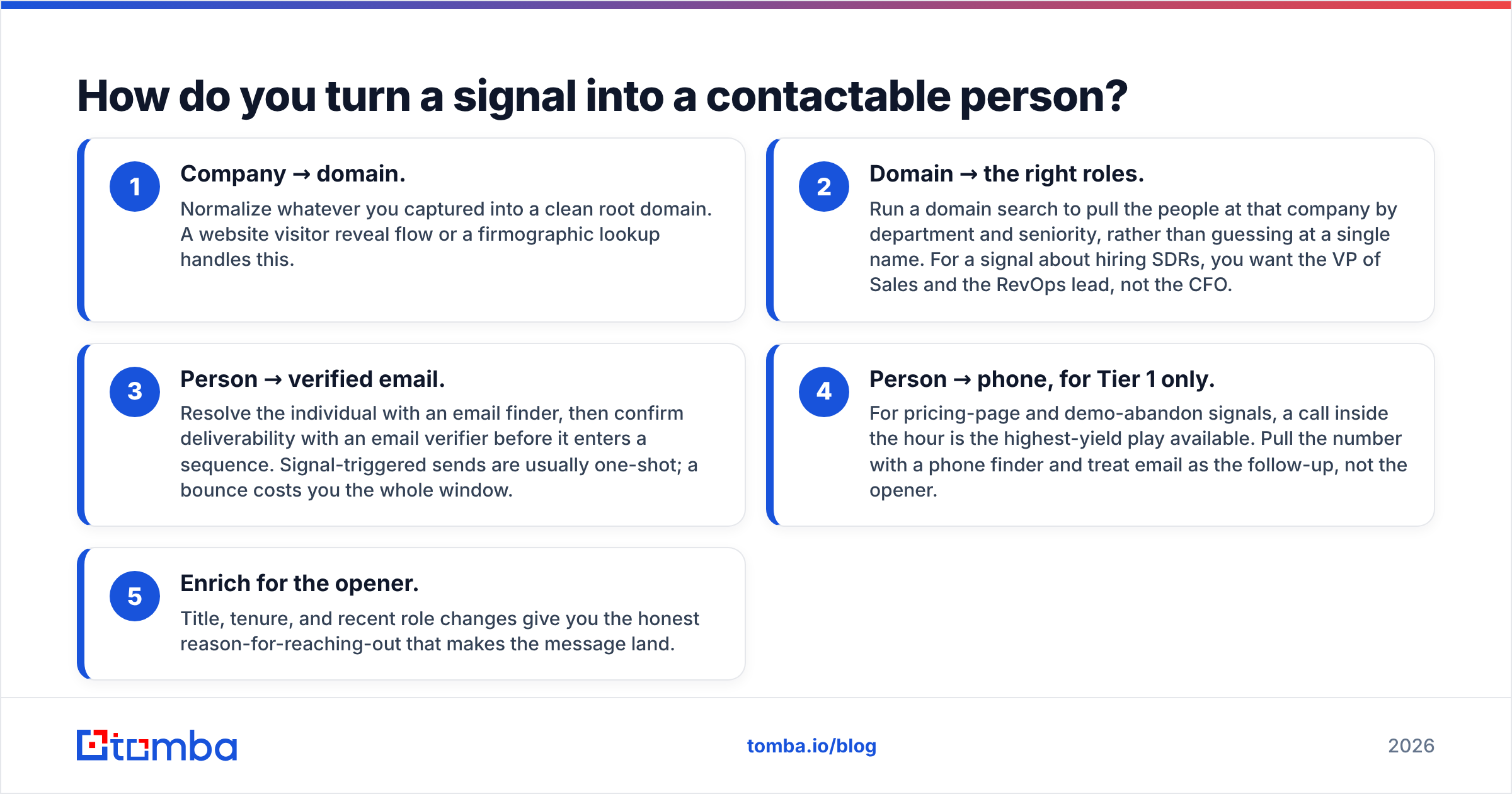
The resolution chain that works:
- Company → domain. Normalize whatever you captured into a clean root domain. A website visitor reveal flow or a firmographic lookup handles this.
- Domain → the right roles. Run a domain search to pull the people at that company by department and seniority, rather than guessing at a single name. For a signal about hiring SDRs, you want the VP of Sales and the RevOps lead, not the CFO.
- Person → verified email. Find the person with an email finder. Then check the address with an email verifier before it enters a sequence. A signal send is a one-shot, and a bounce costs you the whole window.
Two more steps turn that contact into a reply:
- Person → phone, for Tier 1 only. For pricing-page and demo-abandon signals, a call inside the hour is the highest-yield play available. Pull the number with a phone finder and treat email as the follow-up, not the opener.
- Enrich for the opener. Title, tenure, and recent role changes give you the honest reason-for-reaching-out that makes the message land.
Do this in your workflow tool, not by hand. If the lookup makes a rep open three tabs, your 60-minute SLA is already gone. The Tomba API and tools like Zapier or Make fire the whole chain from the signal webhook. The rep's alert then arrives with a verified address on it.
What should you actually say when a signal fires?#
Reference the signal only if you can do it without sounding like surveillance. That single rule fixes 80% of bad signal outreach.
There are two categories of signal, and they demand different handling:
Public signals — job posts, funding, leadership changes, review-site activity, conference talks, tech stack changes visible in the page source. Reference these directly. They're research, and buyers read them as effort.
"Saw you posted for two mid-market AEs in Austin. Usually when a team adds AEs faster than SDRs, list-building becomes the bottleneck by month two. Is that the shape of it for you, or is your pipeline coming from somewhere else?"
Private signals — your own site analytics, email opens, ad clicks, video watch time. Never reference these explicitly. Use them for timing and targeting only, then find a public reason to reach out.
Bad: "I saw you were on our pricing page three times yesterday."
Good: "You're heading into Q4 planning with a team that just doubled — figured now's when the tooling question comes up. Worth 15 minutes?"
Same trigger, same timing advantage, zero creep factor.
Three structural rules for signal-triggered messages:
- Lead with the observation, not your product. The first sentence should be about them and verifiable. If they can't confirm it's true, it reads as a mail merge.
- Make one specific inference. "You're hiring AEs" is an observation. "Which usually means list quality becomes the constraint" is an inference — that's what earns the reply.
- Ask a diagnostic question, not for a meeting. Signal responses convert on curiosity, not calendar links. Your response rate on a question-ended email will beat a meeting-ask consistently in the signal-triggered context, because you're arriving earlier than they expected.
Keep it under 90 words. You're interrupting an active evaluation, not building a relationship from scratch.
Which tools do you need for a signal response workflow?#
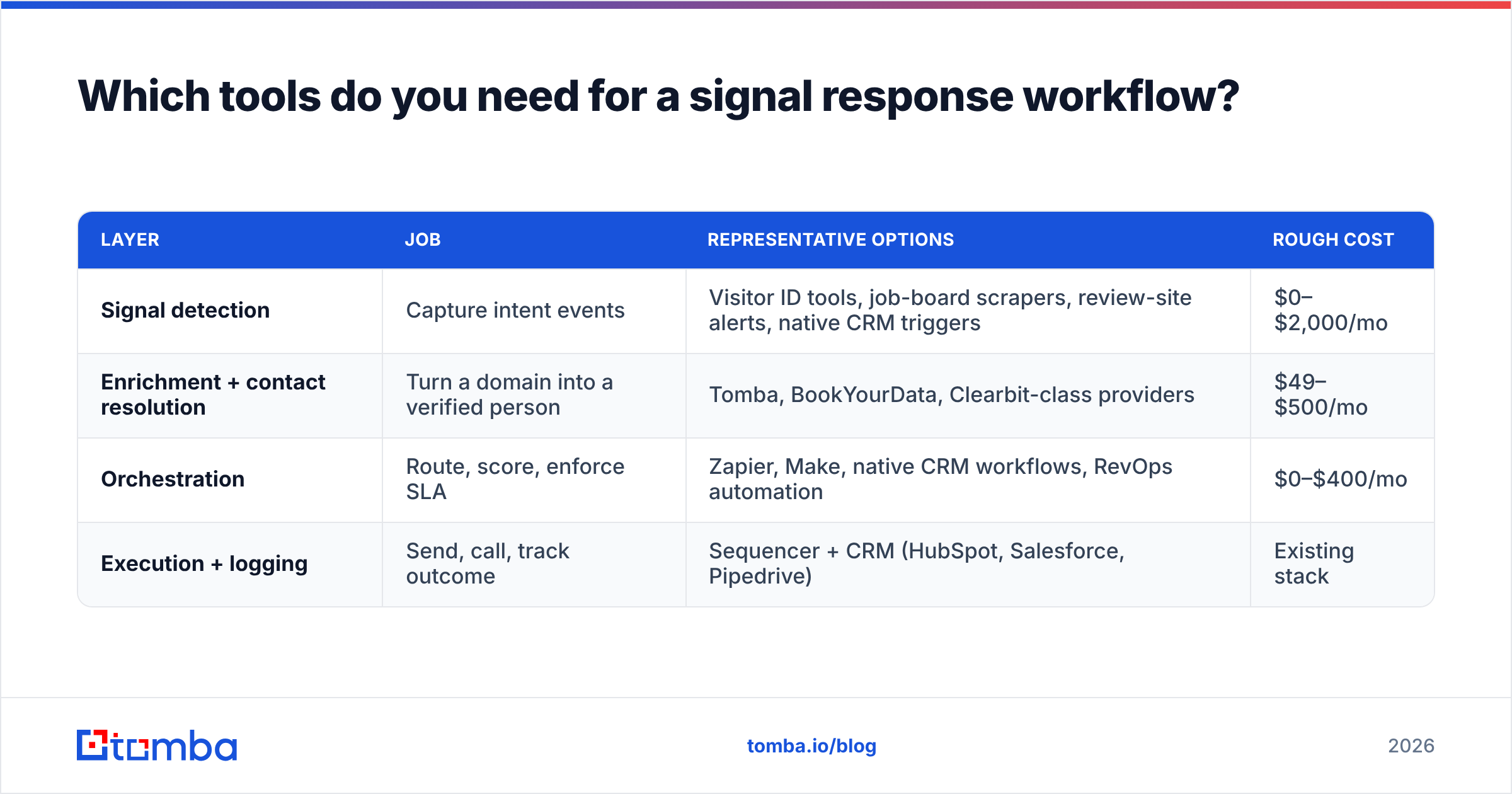
You need four layers, and most teams over-buy on layer one while ignoring layer three.
| Layer | Job | Representative options | Rough cost |
|---|---|---|---|
| Signal detection | Capture intent events | Visitor ID tools, job-board scrapers, review-site alerts, native CRM triggers | $0–$2,000/mo |
| Enrichment + contact resolution | Turn a domain into a verified person | Tomba, BookYourData, Clearbit-class providers | $49–$500/mo |
| Orchestration | Route, score, enforce SLA | Zapier, Make, native CRM workflows, RevOps automation | $0–$400/mo |
| Execution + logging | Send, call, track outcome | Sequencer + CRM (HubSpot, Salesforce, Pipedrive) | Existing stack |
On the contact layer, Tomba pricing starts free at 25 searches a month. Paid plans run $49/mo Starter, $99/mo Growth, and $249/mo Pro. That matters, because signal work comes in bursts. You want per-lookup pricing that survives a week where three job boards fire at once. BookYourData is a solid pick if you would rather buy lists by role and region and layer signals on top. Both routes work, and plenty of teams run one of each.
Whatever you pick, hold the stack to three requirements:
- API-first. If the enrichment step can't be triggered by a webhook, your SLA depends on a human remembering.
- Verification included. A signal-triggered send is a single shot. Unverified addresses turn a hot lead into a bounce and a small sender reputation hit.
- Outcome logging back to the CRM. If you can't report reply rate by signal type after 60 days, you're guessing about which signals to keep.
To judge the detection layer, read buyer reviews on G2 and Capterra. They beat vendor benchmarks, because intent-data accuracy swings a lot by region and company size.
How do you measure whether signal response is working?#
Track four numbers and ignore the rest for the first quarter:
- Median time-to-first-touch, per tier. Not average — average hides the disasters. If Tier 1 median is above 60 minutes, nothing else you measure matters yet.
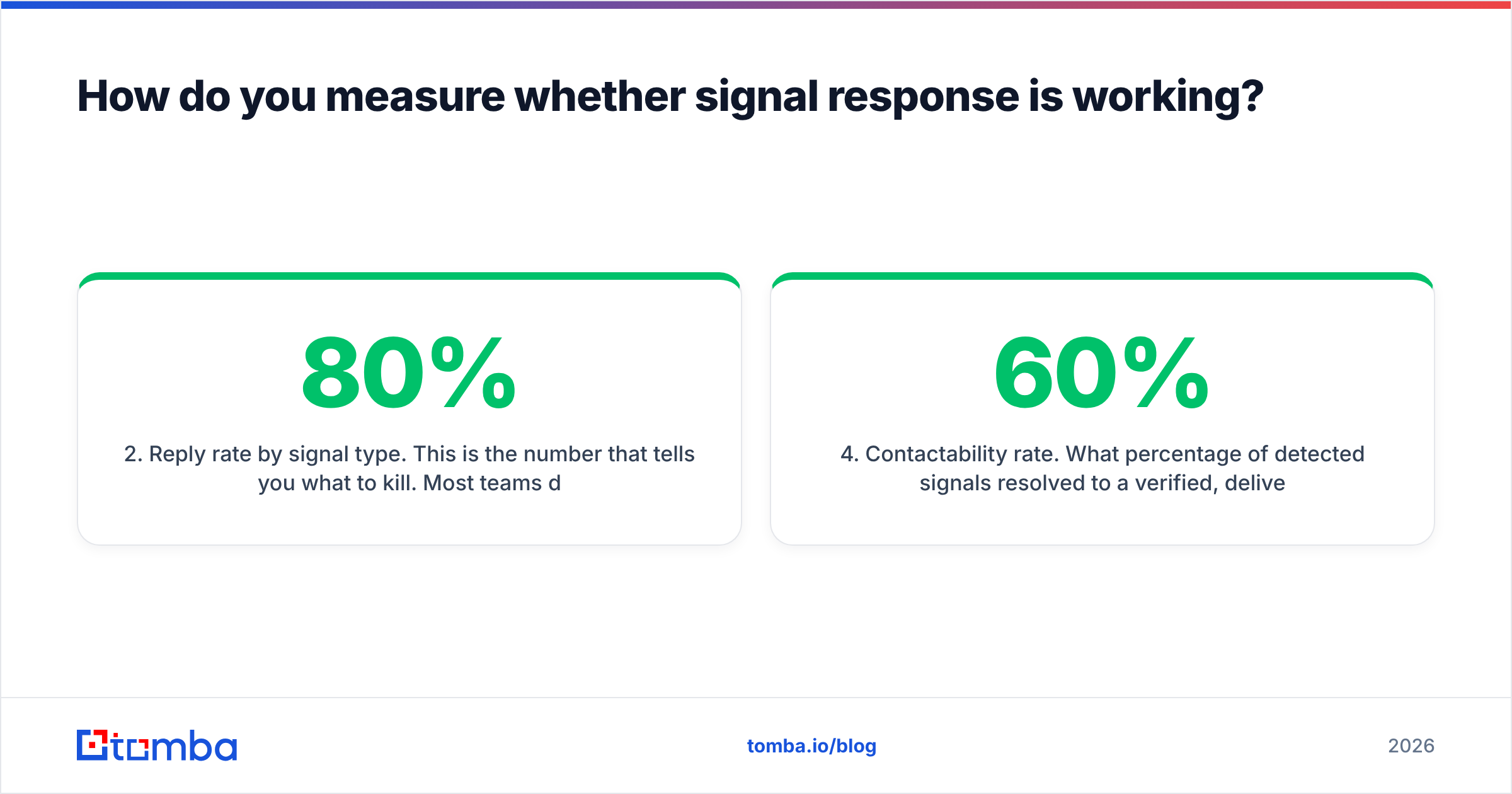
- Reply rate by signal type. This is the number that tells you what to kill. Most teams discover two or three signal types produce 80% of replies and the rest are theater.
- Signal-to-meeting conversion. Compare it against your baseline cold outbound rate. If signal-triggered outreach isn't beating cold by at least 2x, your resolution or messaging layer is broken, not your detection.
- Contactability rate. What percentage of detected signals resolved to a verified, deliverable email? Below 60% means you're paying for detection you can't act on — fix enrichment before buying more signals.
Run a monthly review where you prune. Any source that hasn't beaten baseline in 90 days comes out of routing. Signal programs rot by pile-up. Teams add sources and never subtract. Reps end up with 40 alerts a day, and start to ignore all of them. A dead signal is worse than no signal, because it trains the team to ignore the live ones.
Also watch for the stacking pattern. Review your closed-won deals. Count how many had two or more signals in a 14-day window before first contact. If that number is high, route stacks ahead of single events. It is usually the biggest win on the board.
How to respond to buying signals: the fastest way to start#
Pick one signal, one tier, one SLA, and run it for 30 days before adding anything.
The best first signal for most B2B teams is job posts for roles next to your category. They are public, so you can cite them honestly. They have a long half-life, so a 24-hour SLA is fine. They are free to watch, and they track closely with budget being set. Build this loop:
- Monitor 50 target accounts on a job board for three specific role titles.
- When a post appears, pull the hiring manager and their skip-level via domain search.
- Verify the email, enrich the title and tenure.
- Send within 24 hours, referencing the post, with one inference and one question.
- Log the reply, tag the signal type, review after 30 days.
That's a workflow one person can build in an afternoon. Once it's producing replies above your cold baseline, add a second signal type and repeat. Add tooling only where the manual version already proved it works — the reverse order is how teams end up with a $2,000/mo intent platform and no response process.
If your block is step 2 and 3 — turning a company or a job post into a person you can email inside the SLA window — that is what the Tomba Email Finder is built for. Start on the free tier at 25 searches a month. Test whether signal replies beat your cold baseline, then move to Starter at $49/mo once the workflow fires daily. Pair it with the email verifier so every send lands the first time. Learning how to respond to buying signals is half the job. The other half is having an address that works, because a signal rarely fires twice.
Related guides#
// get started
Find, verify and enrich your first contacts today
Start on the free plan with 25 searches a month, then scale when your team is ready.
Free plan · No credit card required · GDPR & CCPA
// about the author