How to Start an Email to Someone You Don't Know (2026 Guide)
Cold opens fail in the first nine words. Here are five tested opening formulas for emailing a stranger, what to write instead of "I hope this email finds you well," and how to verify the address before you send.
TL;DR
- The first line of a cold email is read in the inbox preview, before the recipient decides to open. Treat it as ad copy, not as a greeting.
- Delete "I hope this email finds you well." It signals mass send, consumes preview space, and says nothing about the reader.
- Five openers work reliably with strangers: the trigger event, the specific observation, the mutual connection, the direct-ask, and the named-referral.
- Use the recipient's real first name and a verified address. A wrong name or a bounce kills the email before your copy matters.
- Personalization is only worth it if the fact is checkable in under 60 seconds. Anything slower doesn't scale and usually doesn't convert better.
Why does the first line of a cold email matter more than the rest?#
Because most recipients never read the rest.
In Gmail, Outlook, and virtually every mobile mail client, the inbox row shows three things: sender name, subject line, and roughly 40-90 characters of the body's first line. That preview snippet is the second-most-read piece of copy you write. If it says "Hi Sarah, I hope this email finds you well," you've spent your entire preview budget on a phrase that appears in a few hundred million other emails.
Think of it like the storefront window of a shop on a busy street. Nobody stops to read the fine print inside. They glance at the window for a second and keep walking. Your first line is the window.
There's a second, less obvious reason. Opening lines that read as templated raise the reader's guard immediately. Once a stranger has classified your message as "mass outreach," every sentence after it is read skeptically. A specific, checkable opening line does the opposite — it buys you three or four more sentences of genuine attention.
What should you never write in the first line?#
Cut these before anything else:
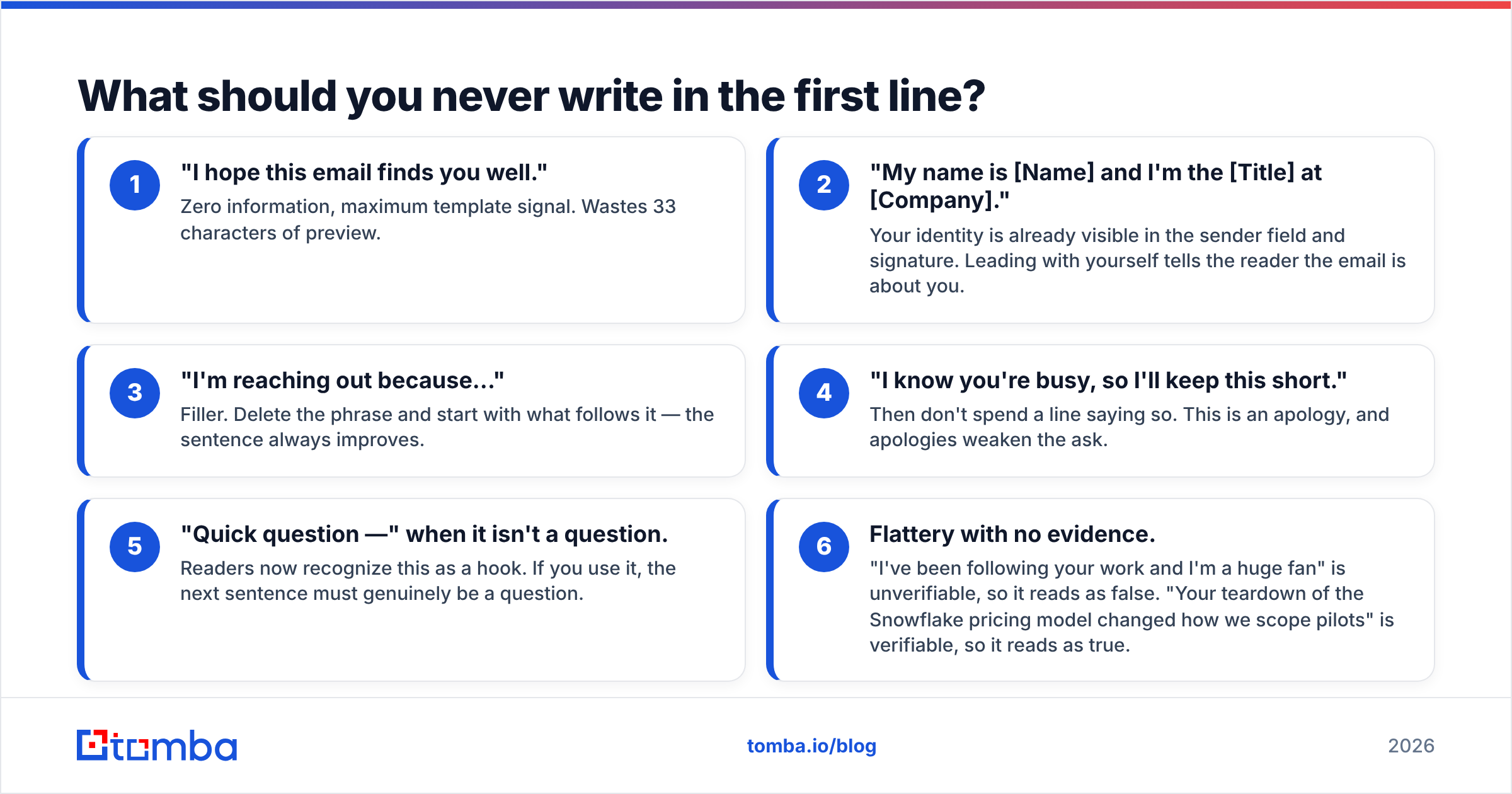
- "I hope this email finds you well." Zero information, maximum template signal. Wastes 33 characters of preview.
- "My name is [Name] and I'm the [Title] at [Company]." Your identity is already visible in the sender field and signature. Leading with yourself tells the reader the email is about you.
- "I'm reaching out because..." Filler. Delete the phrase and start with what follows it — the sentence always improves.
- "I know you're busy, so I'll keep this short." Then don't spend a line saying so. This is an apology, and apologies weaken the ask.
- "Quick question —" when it isn't a question. Readers now recognize this as a hook. If you use it, the next sentence must genuinely be a question.
- Flattery with no evidence. "I've been following your work and I'm a huge fan" is unverifiable, so it reads as false. "Your teardown of the Snowflake pricing model changed how we scope pilots" is verifiable, so it reads as true.

How do you start an email to someone you don't know?#
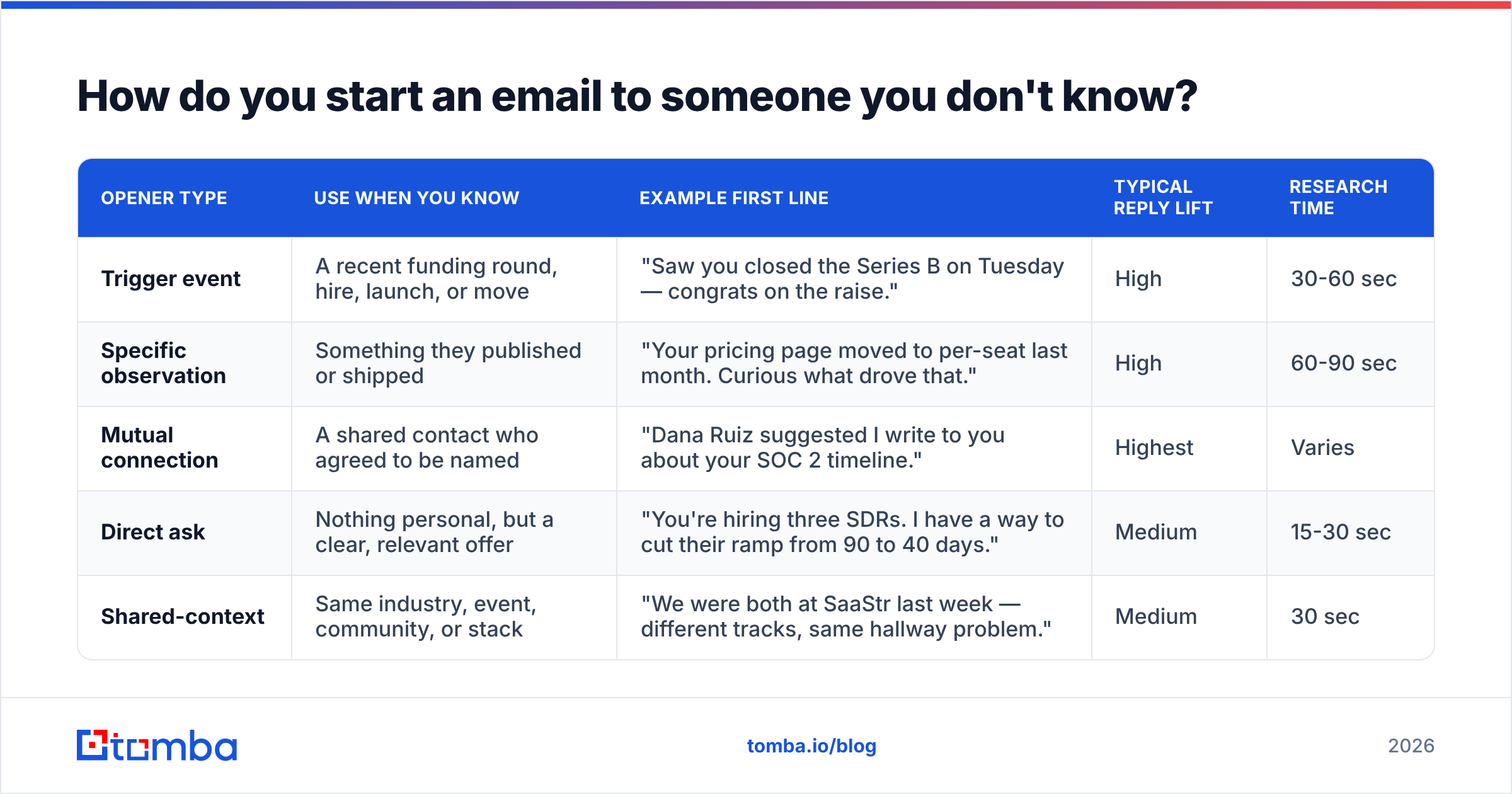
Pick one of five openers based on what you actually know about the person. That constraint matters — the right opener is determined by your research, not by your preference.
| Opener type | Use when you know | Example first line | Typical reply lift | Research time |
|---|---|---|---|---|
| Trigger event | A recent funding round, hire, launch, or move | "Saw you closed the Series B on Tuesday — congrats on the raise." | High | 30-60 sec |
| Specific observation | Something they published or shipped | "Your pricing page moved to per-seat last month. Curious what drove that." | High | 60-90 sec |
| Mutual connection | A shared contact who agreed to be named | "Dana Ruiz suggested I write to you about your SOC 2 timeline." | Highest | Varies |
| Direct ask | Nothing personal, but a clear, relevant offer | "You're hiring three SDRs. I have a way to cut their ramp from 90 to 40 days." | Medium | 15-30 sec |
| Shared-context | Same industry, event, community, or stack | "We were both at SaaStr last week — different tracks, same hallway problem." | Medium | 30 sec |
A few notes on picking between them.
Trigger events beat everything except a warm referral. A funding announcement, a leadership hire, a product launch, or a new office gives you a legitimate reason to write today rather than any other day. Timeliness is itself a form of relevance.
Specific observations require you to actually look. The failure mode is writing "I loved your recent LinkedIn post" without naming the post. That's worse than no personalization, because it proves you skimmed.
Direct asks are underrated for busy operators. Some recipients — engineering leaders, CFOs, founders past Series C — prefer you skip the warm-up entirely. If you can state the value in one clause, do that.
What does a good cold open look like in full?#
Here are three complete openings, each running only as far as the first ask.
Trigger event, to a VP of Sales
Saw the Denver office announcement on Monday. Congrats.
Opening a second region usually means the SDR team doubles before the data ops person gets hired. If that's the sequence you're on, we built the list-hygiene layer that keeps the new reps from burning their domains in month one.
Worth 15 minutes next week?
Specific observation, to a Head of Growth
Your Q3 teardown said you killed the free trial in favor of a demo-gated flow. That's a bold call.
The thing that usually breaks next is lead routing — demo requests arrive un-enriched and sit for hours. We fix that at the form level.
Want me to send the two-minute version?
Direct ask, to a technical founder
You have 340 signups on the waitlist and no way to tell which ones are buyers.
Our API enriches a signup email into company, headcount, and stack in about 200ms, so you can sort the list before you email it.
Docs are public if you'd rather just read them: tomba.io/api
Notice what all three share. The first sentence is about the reader. The second sentence connects the reader's situation to a problem. The third makes one small, low-friction ask. No paragraph exceeds three lines. No sentence contains a subordinate clause you have to re-read.
How much personalization is actually worth it?#
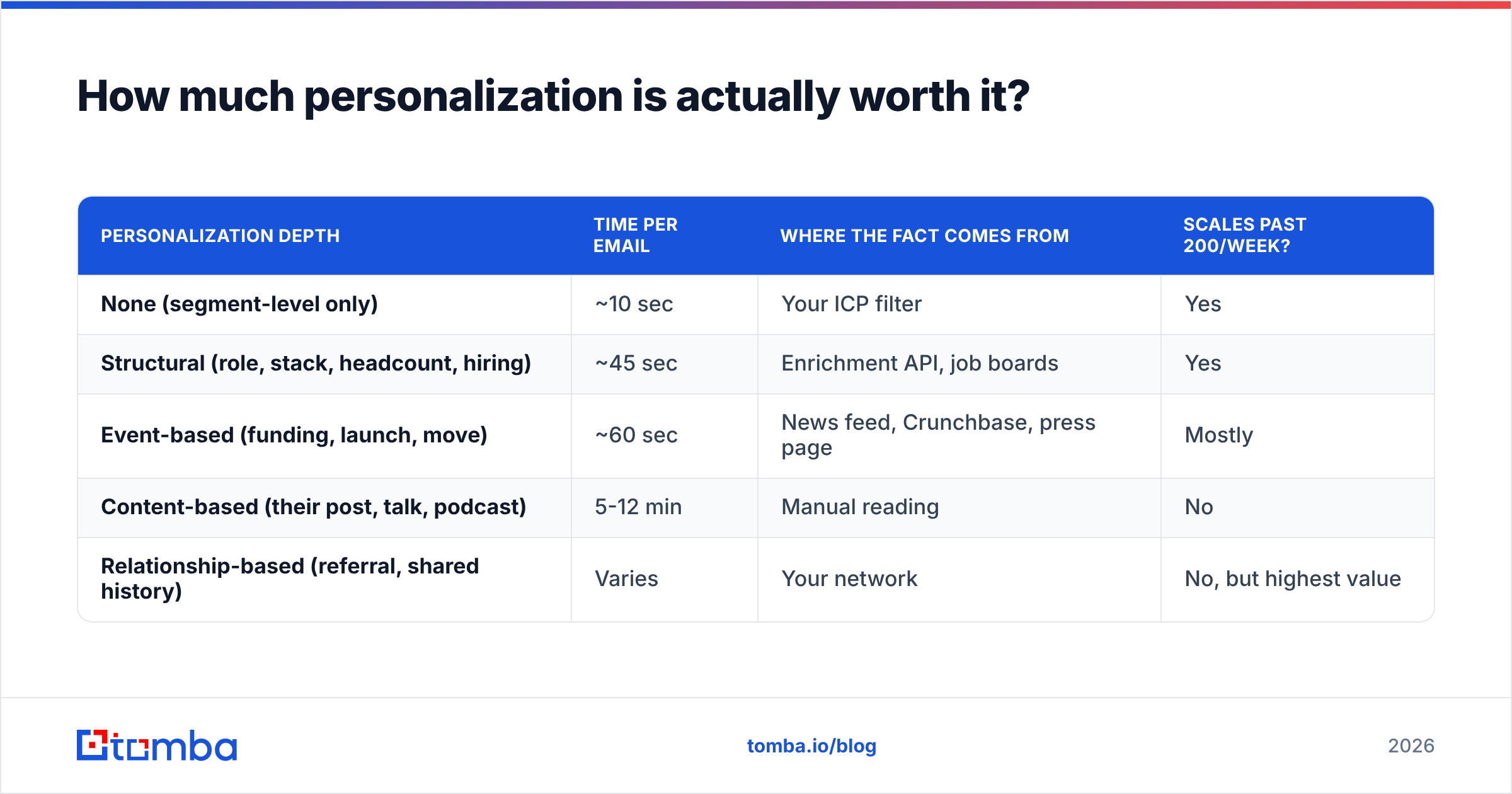
Only as much as you can verify in 60 seconds.
There's a persistent myth that deeper personalization always wins. It doesn't — it wins per email, but it loses per hour. If a hand-researched email takes 12 minutes and gets a 9% reply rate, and a lightly-personalized one takes 90 seconds and gets 4%, the second approach produces more meetings per working day by a wide margin.
The practical rule: personalize on facts that are structurally available — things you can pull from a company's website, a funding database, a job board, or a public profile, ideally programmatically. Those are the facts that survive scale.
| Personalization depth | Time per email | Where the fact comes from | Scales past 200/week? |
|---|---|---|---|
| None (segment-level only) | ~10 sec | Your ICP filter | Yes |
| Structural (role, stack, headcount, hiring) | ~45 sec | Enrichment API, job boards | Yes |
| Event-based (funding, launch, move) | ~60 sec | News feed, Crunchbase, press page | Mostly |
| Content-based (their post, talk, podcast) | 5-12 min | Manual reading | No |
| Relationship-based (referral, shared history) | Varies | Your network | No, but highest value |
Layer them. Run structural personalization across your whole list, then hand-write the top 10% where a real content or relationship hook exists. Most teams invert this and hand-write everything for two weeks before burning out.
For the structural layer, data enrichment turns a bare email or domain into the fields your opener needs — company size, industry, tech stack, seniority — so the "specific" line writes itself from a merge field rather than from a browser tab.
Does the greeting itself matter?#
Yes, but less than people think. Get these three things right and move on.
Use the first name alone. "Hi Sarah," outperforms "Dear Ms. Chen," in almost every B2B context outside of law, government, academia, and some parts of financial services and healthcare. When in doubt, look at how the person signs their own public writing.
Get the name right. This is not a style question — it's the single most damaging error you can make. Sending "Hi Sara" to Sarah, or using a legal first name nobody uses ("Hi Robert" to someone who goes by Bob), tells the reader you pulled them from a list. Check the name against the person's own profile or byline, not against your CRM record.
Skip "Dear Sir or Madam" and "To Whom It May Concern" entirely. If you can't find a name, you haven't finished your research. Use domain search to pull the named contacts at a company and their role, then write to a person instead of a job function.
One more: don't put a comma after "Hi" and then start the next line with a lowercase letter, and don't stack a greeting on its own line followed by a blank line followed by "I hope this email finds you well." You've now spent two lines and produced no information.
What breaks a cold open before the copy even matters?#
Deliverability and data quality. A perfectly written opener sent to a dead address is worth exactly nothing, and a bounce rate above roughly 3% starts damaging your sender reputation at the mailbox-provider level.
Three checks before any send:
- Verify every address. Bounces are the fastest way to get filtered into spam for the next 90 days. Run the list through an email verifier and drop anything that isn't a confirmed deliverable. Catch-all domains need a separate treatment — they accept everything at the SMTP layer, so a standard verifier can't confirm them.
- Authenticate the sending domain. SPF, DKIM, and DMARC are table stakes now. Google and Yahoo both tightened bulk-sender requirements, and unauthenticated mail from a new domain is routinely rejected outright. Google's own sender guidelines are the authoritative reference here.
- Warm the domain before volume. A brand-new domain sending 300 cold emails on day one will land in spam regardless of how good the opener is. Ramp over four to six weeks.
If you're sending from a domain that has been quiet for months, treat it as new. Reputation decays.
How do you find the right person to email in the first place?#
Work backwards from the job to be done, not from the org chart.
Ask: who feels this problem in their weekly numbers? That person is your recipient, even if they're two levels below the title you'd normally target. A VP of Marketing may own the budget, but the Demand Gen Manager owns the pain, and the manager will forward a good email upward far more often than the VP will forward one downward.
Once you have the name, you need the address. A few reliable paths:
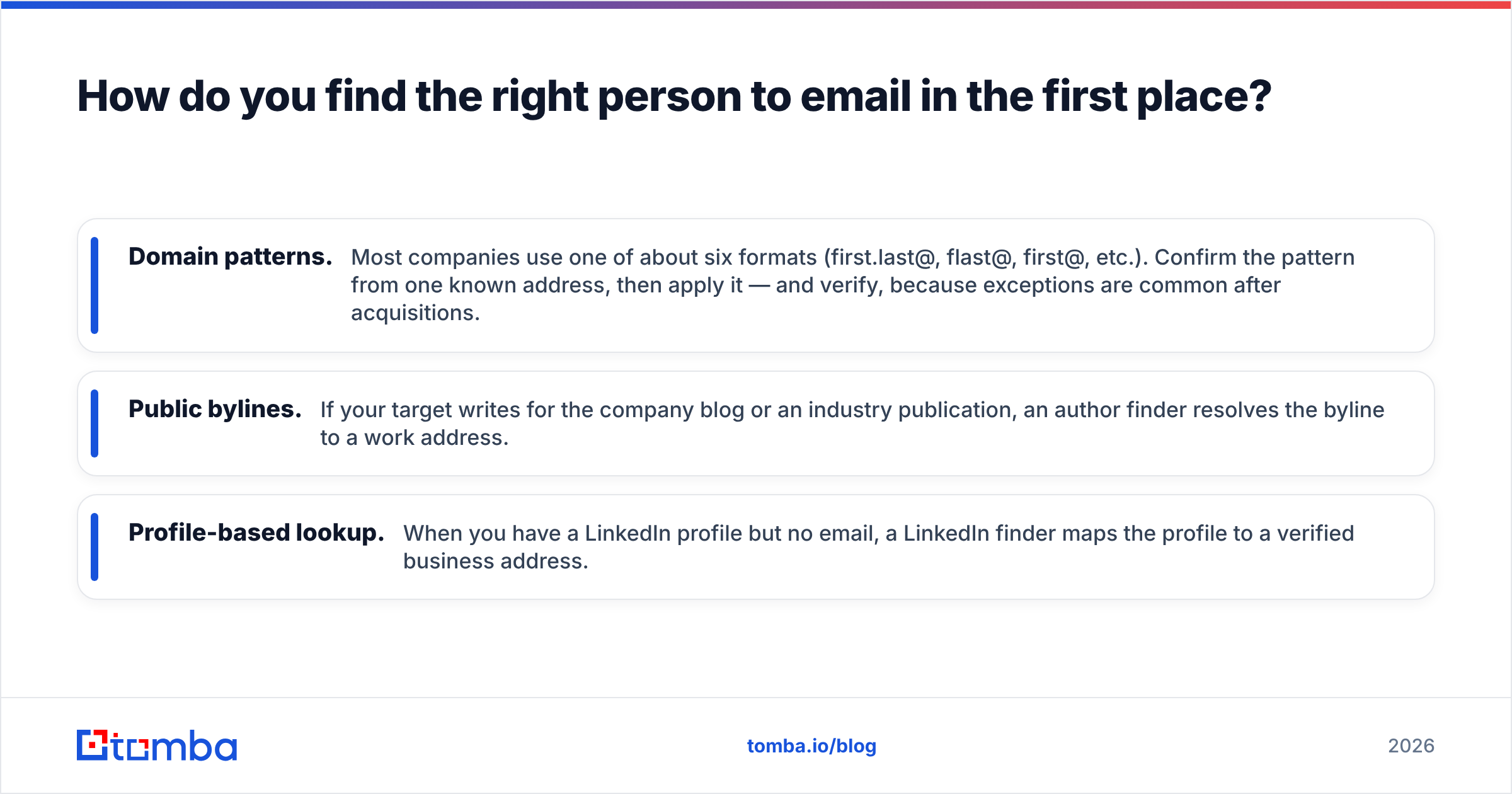
- Domain patterns. Most companies use one of about six formats (first.last@, flast@, first@, etc.). Confirm the pattern from one known address, then apply it — and verify, because exceptions are common after acquisitions.
- Public bylines. If your target writes for the company blog or an industry publication, an author finder resolves the byline to a work address.
- Profile-based lookup. When you have a LinkedIn profile but no email, a LinkedIn finder maps the profile to a verified business address.
Before you rely on any of these at scale, check the vendor's stated accuracy and coverage for your target geography. G2's lead intelligence category is a reasonable neutral starting point for comparing options — pay attention to review recency, because coverage in this space shifts quickly.
What about the rest of the email?#
The opener earns you the second paragraph. Don't waste it.
Structure that works consistently for strangers:
- Line 1 — them. The trigger, observation, or referral. One sentence.
- Line 2 — the bridge. Why that fact means they might have the problem you solve. One or two sentences, no jargon.
- Line 3 — the proof. A number, a comparable customer, or a specific mechanism. One sentence. Skip if you don't have one that's true.
- Line 4 — the ask. One thing. A question they can answer with yes/no, or an offer of a specific artifact.
- Signature. Name, role, company, one link. No banner images, no legal footer, no "sent from my iPhone" theater.
Total: under 100 words on desktop, ideally under 80. Anything longer gets skimmed, and skimming means the ask gets missed. HubSpot's ongoing research on sales email length has landed on similar numbers across multiple study iterations.
And on the ask itself: don't ask for 30 minutes. Ask for a reply. "Is this a problem you're actually dealing with?" gets answered far more often than "Do you have 30 minutes Thursday?" because the first costs the reader four seconds and the second costs them a calendar decision.
How should you follow up on a cold open?#
Send two or three follow-ups, spaced 3-4 business days apart, and make each one add something.
The most common mistake is the bare bump — "Just following up on the below." It adds no information and reminds the reader they ignored you once already. Instead, each follow-up should carry a new angle: a different problem framing, a relevant customer story, a piece of research, or a genuinely easier ask.
Your final message should close the loop cleanly: "I'll assume the timing's off and stop here — if that changes, this thread is the fastest way to reach me." No guilt, no "just checking one last time." Recipients respond to that message surprisingly often, because it removes the pressure that was blocking the reply.
Track response rate by opener type, not just in aggregate. Within four to six weeks you'll know which of the five openers works for your specific ICP, and you can stop guessing.
Start with the right address#
Every opener in this guide assumes one thing: the email reaches a real person whose name you spelled correctly. That's a data problem, not a copywriting problem, and it's the one most teams fix last.
Tomba Email Finder resolves a name and company domain into a verified professional address, with the role and company data you need to write the opening line. The free tier includes 25 searches a month, Starter is $49/mo, and Growth is $99/mo — see Tomba pricing for the full breakdown. Find the person first, then write them something worth opening.
Related guides#
// get started
Find, verify and enrich your first contacts today
Start on the free plan with 25 searches a month, then scale when your team is ready.
Free plan · No credit card required · GDPR & CCPA
// about the author