How to Turn a Lead Into a Prospect: A 2026 Playbook
Most leads never become prospects because nobody qualified them. Here is the 6-step conversion framework — scoring thresholds, enrichment, and the first-touch sequence that actually gets replies.
TL;DR
- A lead is anyone who showed a signal. A prospect is a lead you have qualified against fit, authority, need, and timing — and confirmed you can actually reach.
- The conversion step most teams skip is data completion. You cannot qualify a record that is a first name and a company guess.
- Use a two-gate model: fit gate (firmographics + ICP match) then intent gate (behavior + recency). Only records clearing both get a human touch.
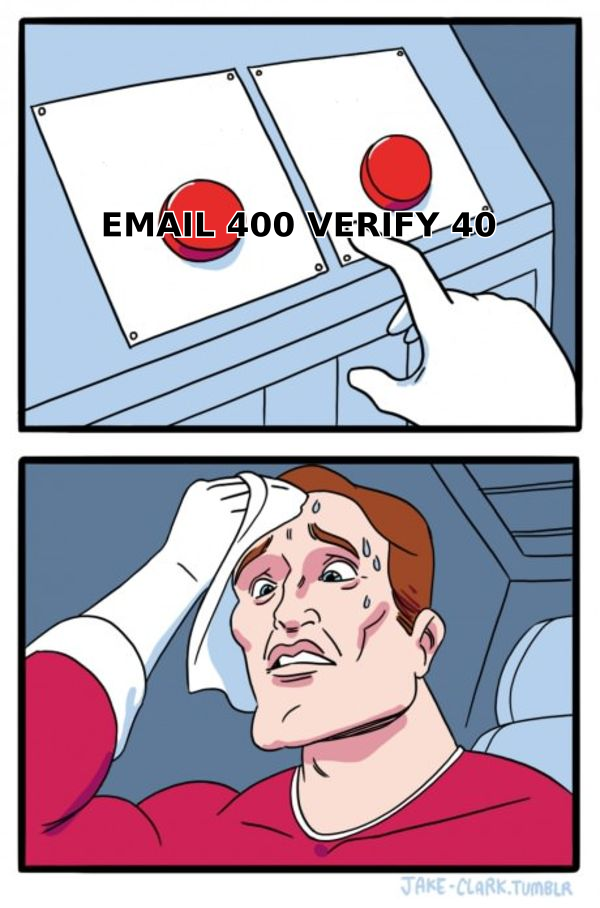
- Verified contact data is the difference between "we contacted 400 leads" and "we reached 340 people." Bounces kill the whole exercise before qualification matters.
- Target: 15–25% of raw leads should survive to prospect status. If 80% pass, your criteria are decoration.
What Is the Actual Difference Between a Lead and a Prospect?#
A lead is a name with a signal attached. A prospect is a lead you have qualified and can reach.
Think of it like a restaurant reservation list. Everyone who called is a lead. The people who confirmed the date, the party size, and gave you a working phone number are prospects — they are the ones you actually plan the kitchen around. Everyone else is noise you carry on a clipboard.
The distinction matters because the two states demand completely different work. Leads need enrichment and scoring. Prospects need sequences and calls. Teams that blur the line end up doing sequence work on unqualified records — which is exactly how you get 0.4% reply rates and a burned sending domain.
| Attribute | Lead | Prospect |
|---|---|---|
| Definition | Showed any signal (form fill, download, list import) | Qualified against ICP + reachable |
| Data completeness | Often name + email only | Role, company size, tech stack, verified email |
| Qualification status | Unverified | Passed fit and intent gates |
| Ownership | Marketing / demand gen | Assigned AE or SDR |
| Right next action | Enrich and score | Sequence, call, book meeting |
| Typical volume (per 1,000) | 1,000 | 150–250 |
| Cost of touching wrongly | Low (automated nurture) | High (rep hours burned) |
The volume row is the one to sit with. If your CRM shows 900 of every 1,000 leads flagged as prospects, you do not have a qualification process — you have a rename button.
Why Do Most Leads Never Become Prospects?#
Four failure modes account for nearly all of it:
- Missing data. A record with a personal Gmail address and no company field cannot be scored against an ICP. It sits in limbo forever.
- No defined threshold. "Good fit" is a feeling unless it is a number. Without a documented score cutoff, every rep applies a different bar.
- Latency. Research on lead response timing consistently shows conversion odds collapsing within the first hour. A lead that sits for three days is functionally cold regardless of how good the fit was.
- Unreachable contacts. You qualified them beautifully. The email bounces. Nothing downstream matters.

The fourth one is the quiet killer, and it is the easiest to fix. Bounce rates above 3% start damaging sender reputation, which then suppresses delivery to the contacts who were real. One dirty list poisons the next three campaigns.
What Data Do You Need Before You Can Qualify Anything?#
You need enough to answer four questions: who is this person, what company do they work for, does that company match your ICP, and can you reach them.
That translates to a minimum viable record:
- Verified work email — not a catch-all guess, not a personal address. Run it through an email verifier before it enters any sequence.
- Job title and seniority — a "Marketing Manager" at a 12-person startup and at a 4,000-person enterprise are different buyers entirely.
- Company domain and headcount — the two firmographics that carry the most predictive weight for most B2B ICPs.
- Industry / vertical — needed for relevance in your first touch, not just for scoring.
- Signal source and timestamp — a demo request from yesterday and a whitepaper download from March are not the same lead.
- Secondary channel — a phone number or LinkedIn profile gives you a fallback when email goes quiet.
Enrichment is what closes the gap between the form fill you got and the record you need. If your inbound form asks for email only, data enrichment fills in the other five fields automatically at import time — which is far better than asking for six fields on the form and watching conversion drop 40%.
For outbound-sourced leads, the flow runs the other direction: you start with a company and a role, then use domain search to pull the contacts and their email patterns before scoring anything.
How Do You Actually Score a Lead for Fit?#
Split scoring into two gates that must both pass. A single blended score hides the failure mode where a terrible-fit company with high engagement outranks a perfect-fit company that has only visited twice.
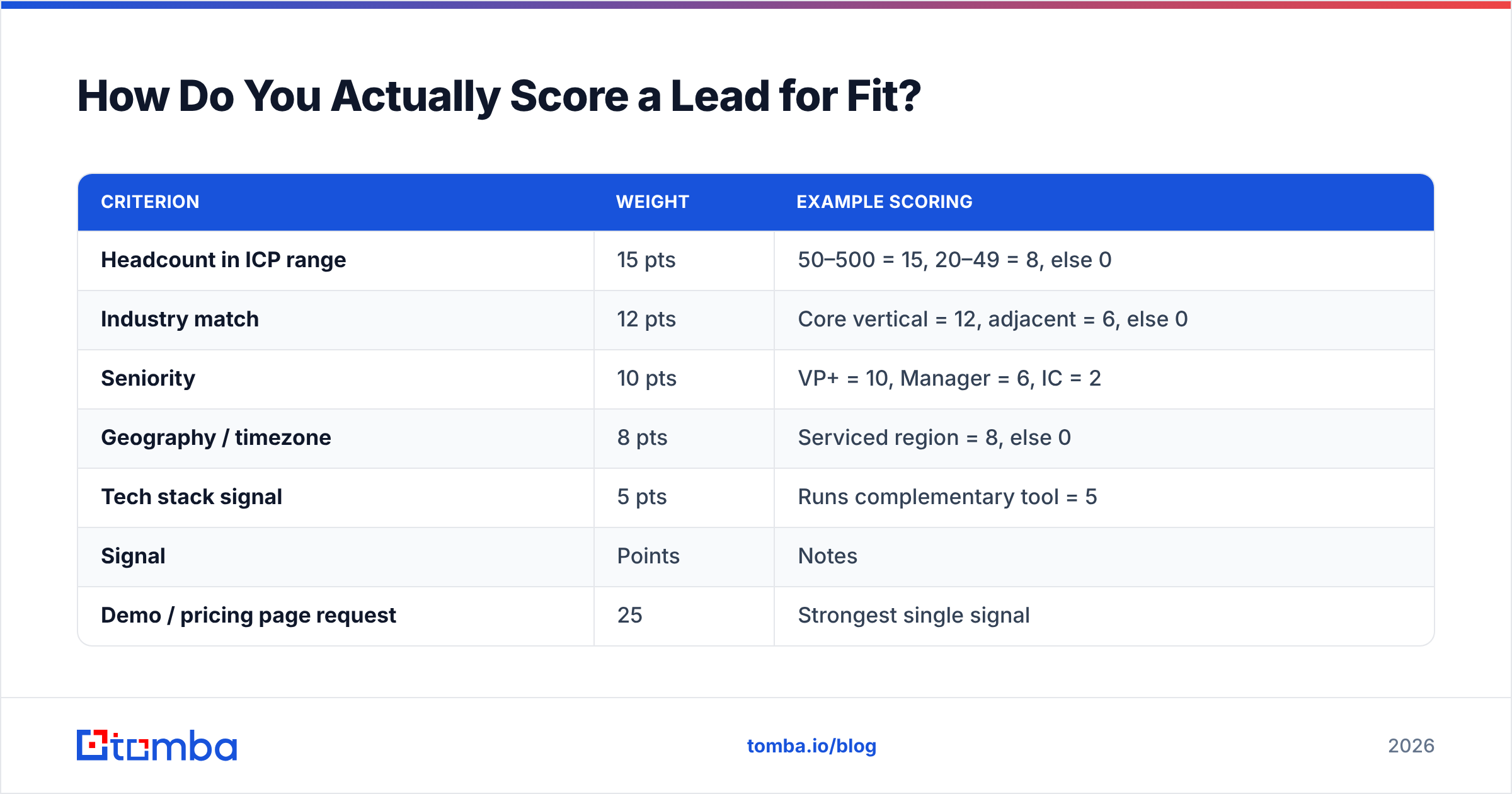
Gate 1 — Fit (firmographic, static). Score 0–50:
| Criterion | Weight | Example scoring |
|---|---|---|
| Headcount in ICP range | 15 pts | 50–500 = 15, 20–49 = 8, else 0 |
| Industry match | 12 pts | Core vertical = 12, adjacent = 6, else 0 |
| Seniority | 10 pts | VP+ = 10, Manager = 6, IC = 2 |
| Geography / timezone | 8 pts | Serviced region = 8, else 0 |
| Tech stack signal | 5 pts | Runs complementary tool = 5 |
Gate 2 — Intent (behavioral, decaying). Score 0–50 with a 30-day half-life:
| Signal | Points | Notes |
|---|---|---|
| Demo / pricing page request | 25 | Strongest single signal |
| Repeat site visits (3+ in 14 days) | 15 | Requires visitor identification |
| Content download | 8 | Weak alone, useful as a stack |
| Email engagement (opened + clicked) | 7 | Clicks only; opens are unreliable post-MPP |
| Webinar attendance | 10 | Attendance, not registration |
Set your prospect threshold at fit ≥ 30 AND intent ≥ 20. Both, not either. A record that clears fit but not intent goes to nurture. A record that clears intent but not fit gets a polite decline path — chasing enthusiastic non-ICP buyers is how you build a churn problem 14 months out.
Recalibrate the weights quarterly against closed-won data. If your last 40 wins skewed to 200–800 headcount but your model rewards 50–500, the model is describing last year's business.
What Are the Six Steps to Convert a Lead Into a Prospect?#
Here is the operational sequence. Steps 1–3 should be automated; 4–6 are where human judgment earns its keep.
- Capture and timestamp. Every lead enters with a source and an arrival time. Latency is measured from this stamp, not from when a rep noticed it.
- Enrich immediately. Append firmographics, title, and contact data within minutes of capture. Batch-enriching nightly costs you the golden hour.
- Verify reachability. Run the email through verification. Catch-all domains need a catch-all verifier rather than a pass/fail check — a catch-all that accepts everything tells you nothing on its own.
- Apply both gates. Score fit, score intent, compare against thresholds. Route: pass both → prospect queue. Pass one → nurture. Pass neither → suppress.
- Assign and research. A named owner and five minutes of research: recent funding, a job posting, a product launch, a LinkedIn post. One specific detail is what separates a first touch from spam.
- First touch within 24 hours. Email plus a second channel. Reference the actual signal that triggered qualification — "you looked at pricing" is a legitimate opener; "I wanted to reach out" is not.
Step 5 is where most teams cheat, and the cost shows up immediately. A qualified prospect who gets a generic template converts about as well as an unqualified one. You did the work of qualification and then threw away the advantage.
How Do You Handle the Reachability Problem?#
Treat contact data as a perishable input, not a one-time purchase.
B2B contact data decays at roughly 22–30% per year — people change jobs, companies rebrand, domains migrate. A list you bought or built in Q1 is materially wrong by Q4. That decay rate is why "we already have their email" is not the same as "we can reach them."
Practical handling:
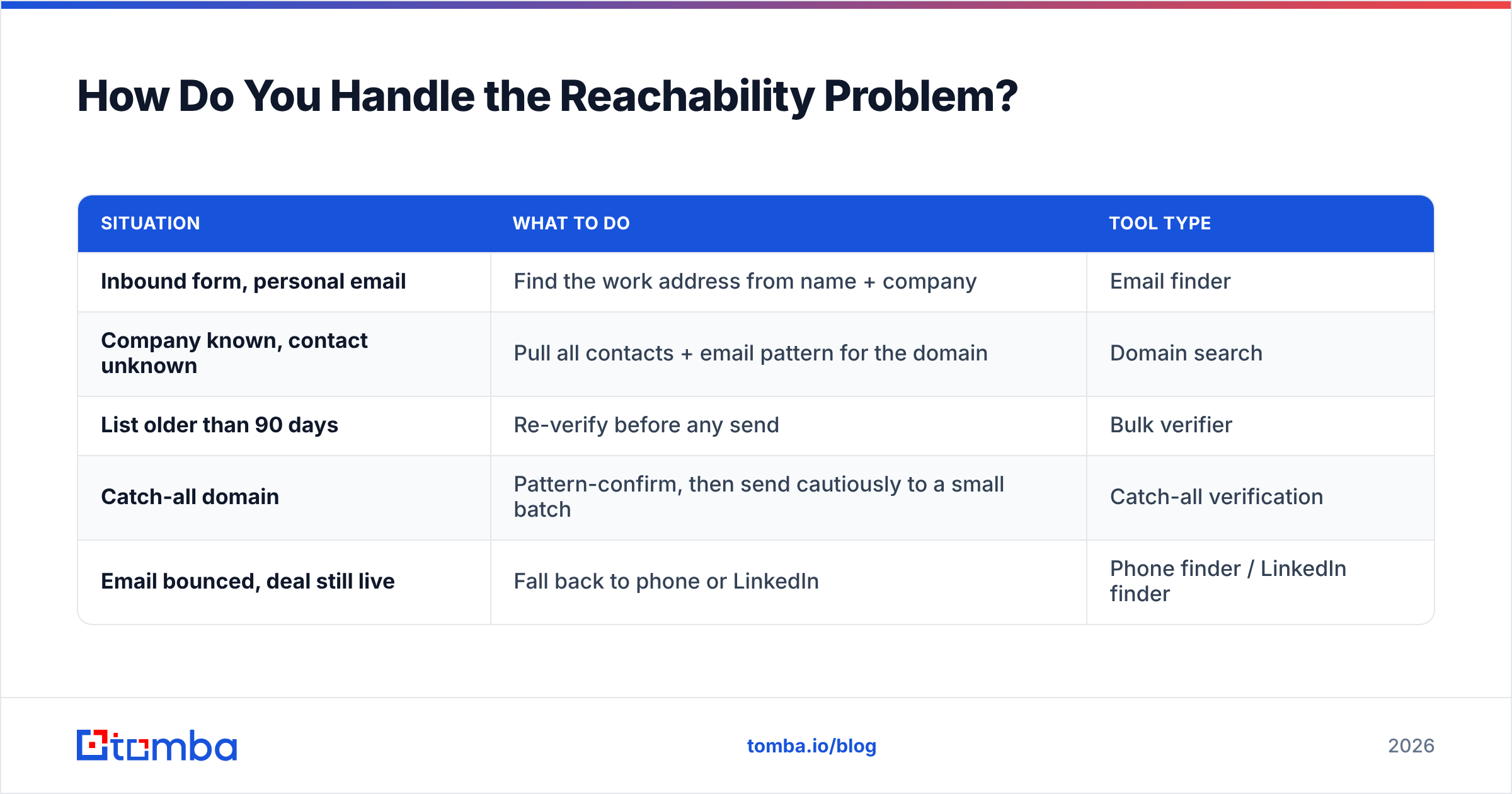
| Situation | What to do | Tool type |
|---|---|---|
| Inbound form, personal email | Find the work address from name + company | Email finder |
| Company known, contact unknown | Pull all contacts + email pattern for the domain | Domain search |
| List older than 90 days | Re-verify before any send | Bulk verifier |
| Catch-all domain | Pattern-confirm, then send cautiously to a small batch | Catch-all verification |
| Email bounced, deal still live | Fall back to phone or LinkedIn | Phone finder / LinkedIn finder |
For anything above a few hundred records, do this in bulk rather than one at a time. And keep the whole thing inside your existing stack — pushing verified records straight into HubSpot or Salesforce through an integration beats maintaining a CSV ritual that someone eventually forgets to run.
If you are building this into a pipeline rather than clicking through a UI, the Tomba API handles enrichment and verification as a step in your existing lead-routing logic, so a record is complete before it ever reaches a rep's queue.
How Do You Write the First Touch to a Newly Qualified Prospect?#
Lead with the signal, not with yourself.
The conversion from prospect to conversation depends almost entirely on whether the recipient believes the message was written for them. Three components do the work:
- The trigger reference. "Saw your team posted two SDR roles last month" or "you spent time on our integrations page." Specific, verifiable, and it explains why you are writing now.
- One relevant proof point. A single customer in their segment with a number attached. Not three logos and a feature list.
- A low-friction ask. "Worth a 15-minute look?" converts better than "book a demo." You are asking for interest, not commitment.
Keep it under 120 words. G2's buyer behavior research consistently shows B2B buyers doing most of their evaluation before talking to sales — your first email is not an education, it is a door.
Follow up three to four times over two weeks, then stop and return the record to nurture. A prospect who does not respond after four touches is not disqualified forever; they are just not in-market this month. Re-score them when a new intent signal fires.
What Metrics Tell You the Process Is Working?#
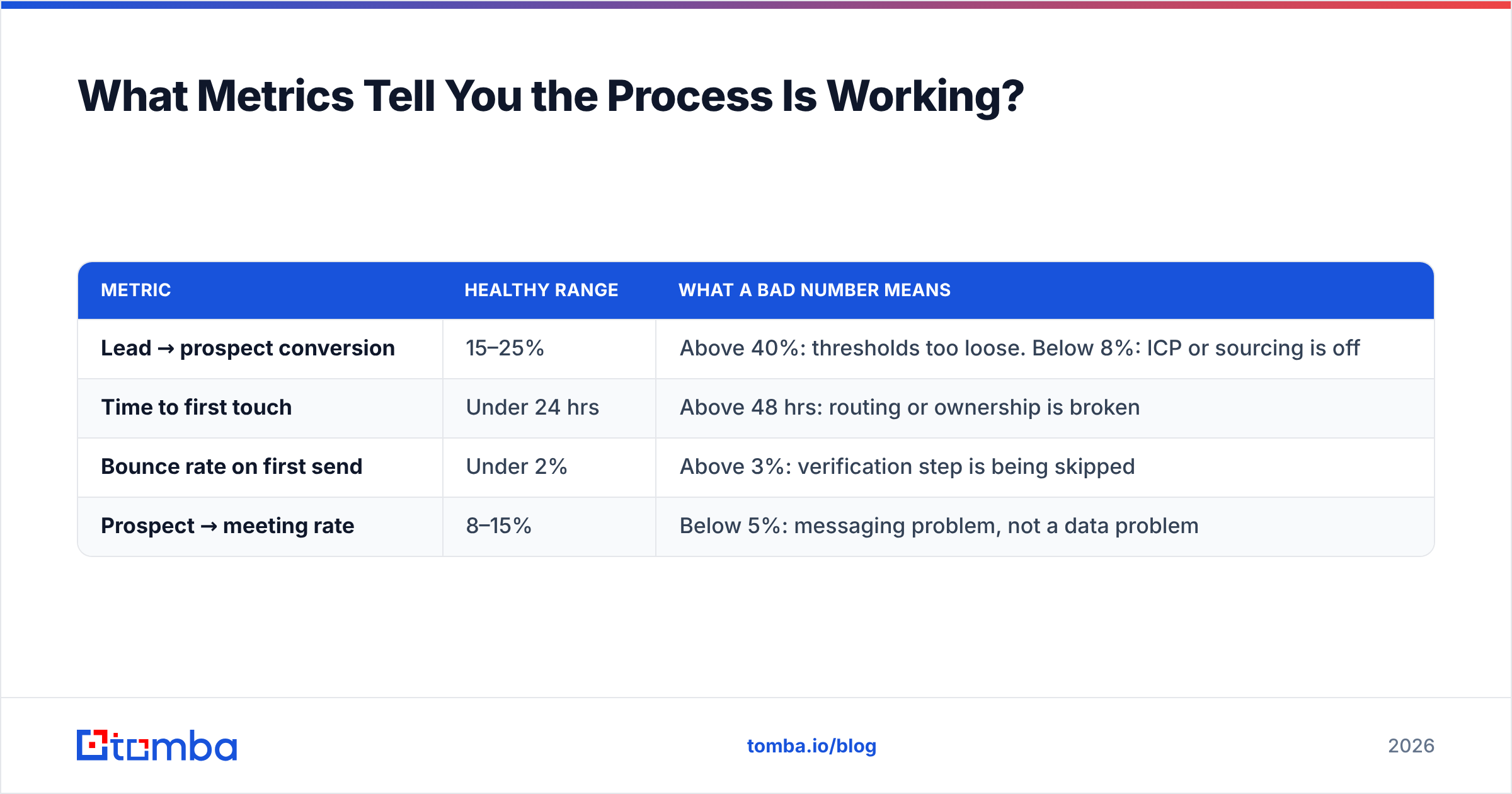
Track four, and track them weekly:
| Metric | Healthy range | What a bad number means |
|---|---|---|
| Lead → prospect conversion | 15–25% | Above 40%: thresholds too loose. Below 8%: ICP or sourcing is off |
| Time to first touch | Under 24 hrs | Above 48 hrs: routing or ownership is broken |
| Bounce rate on first send | Under 2% | Above 3%: verification step is being skipped |
| Prospect → meeting rate | 8–15% | Below 5%: messaging problem, not a data problem |
The last row is diagnostic. If your bounce rate is clean and your fit scores are honest but meetings still are not happening, stop adding leads. The problem is what you say, not who you say it to — and more volume just makes it worse faster.
Audit ten disqualified records a month by hand. You will find either criteria that are too aggressive or a data gap the enrichment step is not closing. Both are cheap fixes once you can see them.
Where Should You Start This Week?#
Pick your last 200 inbound leads and run them through the two gates manually in a spreadsheet. It takes about two hours and it will tell you three things: what percentage actually clear both bars, which data fields are missing most often, and how stale your contact records really are.
Then automate whatever that exercise proved you needed.
If the missing piece is contact data — and for most teams it is — start there. Tomba's Email Finder turns a name and a company domain into a verified work email, so records arrive at the qualification stage complete rather than half-empty. The free tier gives you 25 searches a month to test against your own list; paid plans start at $49/mo when you need volume. Run your last 200 leads through it before you build anything else — the answer will tell you whether your conversion problem is a data problem or a messaging one, and those need very different fixes.
Related guides#
// get started
Find, verify and enrich your first contacts today
Start on the free plan with 25 searches a month, then scale when your team is ready.
Free plan · No credit card required · GDPR & CCPA
// about the author