How to Write an Email to Sell a Product: Example + Templates
A full teardown of a sales email that actually books replies — line by line, with the subject line, body, CTA, and follow-up sequence you can copy in under 10 minutes.
TL;DR
- A sales email that works has five parts: a subject line under 45 characters, a first line about them, one specific problem, one piece of proof, and one low-friction ask.
- The most common failure is not bad writing — it's sending a good email to a bad address. Bounce rates above 3% will suppress your whole sending domain.
- Length matters less than specificity. A 90-word email with a real detail beats a 45-word template with none.
- Your CTA should ask for a reply, not a meeting. "Worth a look?" converts 2-4x better than "Do you have 15 minutes Tuesday?"
- Follow-ups drive roughly half of all replies. Send 3-4, spaced 3-4 business days apart, each adding new information.
Most "how to write a sales email" advice stops at the outline. This post gives you the actual email — the words, the subject line, the CTA, and the follow-up sequence — plus the reasoning behind each line so you can adapt it instead of copy-pasting into irrelevance.
What does a sales email actually need to do?#
One job: earn a reply. Not a demo, not a signature, not a click. A reply.
Think of it like knocking on a door in a neighborhood where everyone's used to solicitors. You're not going to sell the vacuum on the doorstep. You're trying to get the person to keep the door open for another ten seconds. Every line in the email either buys you those seconds or spends them.
That reframe changes what you write. If you're chasing a reply rather than a signature, you stop cramming in features, you stop attaching a PDF, and you stop asking for a 30-minute call from a stranger.
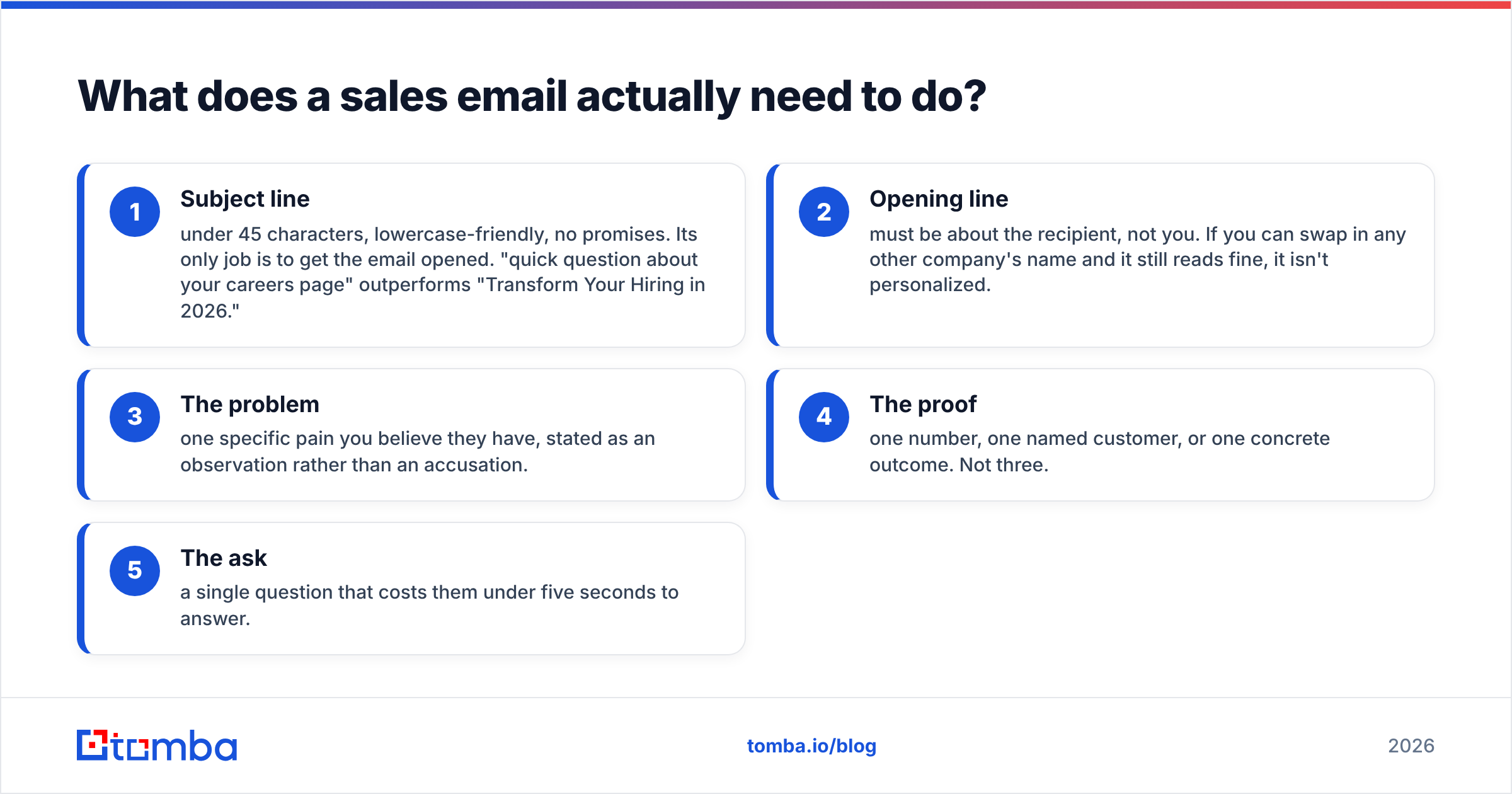
Here are the five components, in the order the reader encounters them:
- Subject line — under 45 characters, lowercase-friendly, no promises. Its only job is to get the email opened. "quick question about your careers page" outperforms "Transform Your Hiring in 2026."
- Opening line — must be about the recipient, not you. If you can swap in any other company's name and it still reads fine, it isn't personalized.
- The problem — one specific pain you believe they have, stated as an observation rather than an accusation.
- The proof — one number, one named customer, or one concrete outcome. Not three.
- The ask — a single question that costs them under five seconds to answer.
Miss any one and the email still works. Miss two and you're writing into a void.
What does a real sales email example look like?#
Here's a complete email selling a scheduling tool to a mid-market recruiting team. Read it once, then read the annotations.
Subject: 11 open roles on your careers page
Hi Dana,
I noticed Northwind has 11 engineering roles posted, and six of them went live in the last three weeks. That usually means your recruiters are spending more time coordinating interview slots than actually screening.
We built Sched for exactly that stretch. Talentwell cut their time-to-first-interview from 9 days to 4 after switching — same headcount, same process, just no back-and-forth on calendars.
Worth a look, or is scheduling not the bottleneck right now?
— Marcus
Sched | sched.example.com
Ninety-four words. Now the teardown:
Subject line: "11 open roles on your careers page." It's a fact about her company, not a claim about your product. There's nothing to disagree with, and it signals you looked. Subject lines that reference something observable get opened because they read like internal mail, not marketing.
Opening: "I noticed Northwind has 11 engineering roles posted..." This is the personalization that matters. It took 20 seconds to find, and it can't be swapped into another email. Compare it with "I hope this email finds you well" — a line that has never once caused a reply in the history of email.
Problem: "...spending more time coordinating interview slots than screening." Stated as a likely consequence of an observed fact, not as "You're probably struggling with X." The reader gets to agree or disagree without feeling diagnosed by a stranger.
Proof: "Talentwell cut time-to-first-interview from 9 days to 4." One customer, one metric, one timeframe. Adding two more logos here would dilute it. Specific numbers work because vague numbers ("save hours every week") register as noise.
Ask: "Worth a look, or is scheduling not the bottleneck right now?" This is the highest-leverage sentence in the email. It offers an easy exit, which paradoxically raises reply rates — a "no, our bottleneck is offer acceptance" is a useful reply that opens a real conversation.
Which email structure works best for your product?#
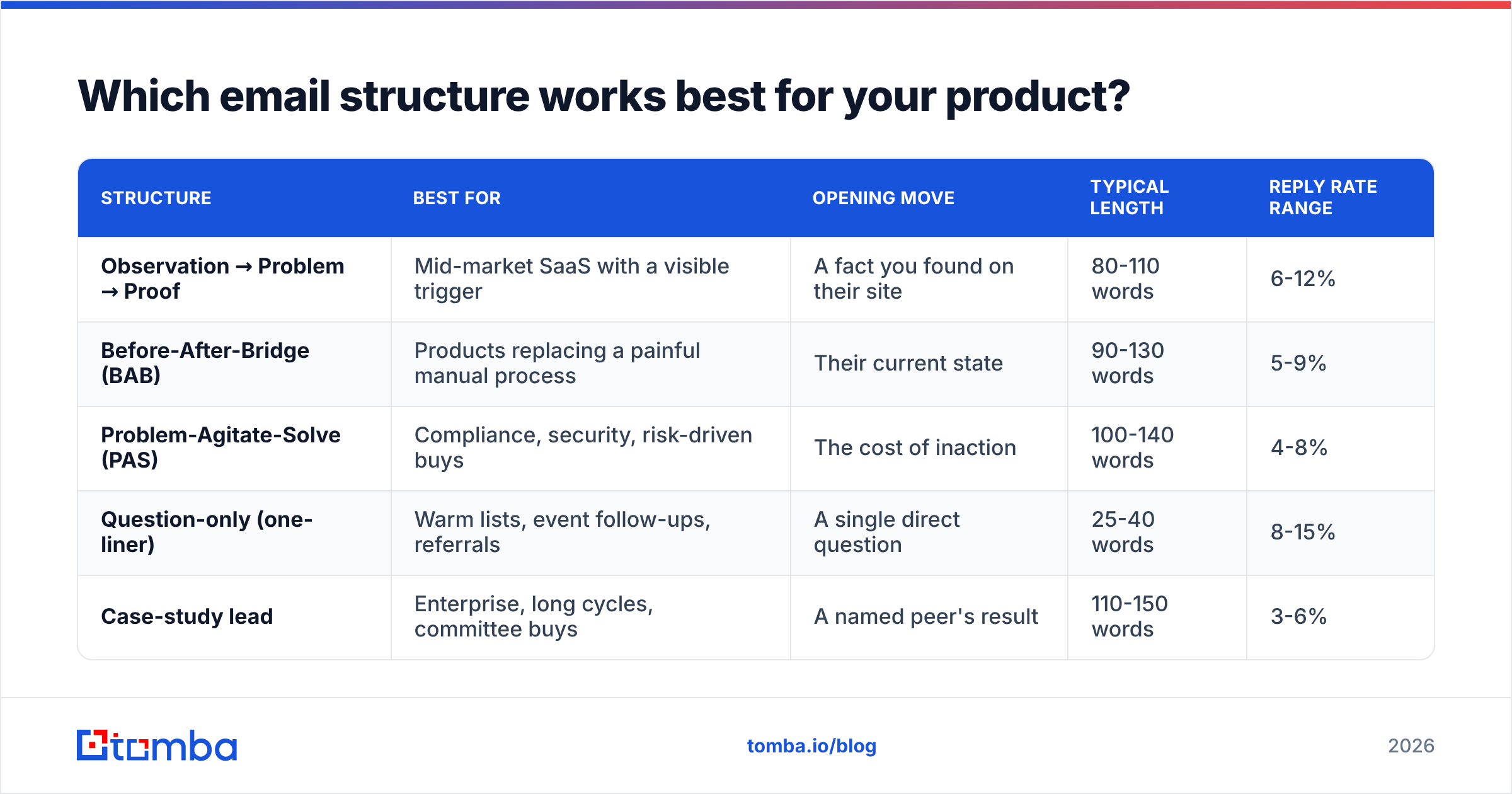
Not every product fits the observation-problem-proof shape. Here's how the four workhorse structures compare:
| Structure | Best for | Opening move | Typical length | Reply rate range |
|---|---|---|---|---|
| Observation → Problem → Proof | Mid-market SaaS with a visible trigger | A fact you found on their site | 80-110 words | 6-12% |
| Before-After-Bridge (BAB) | Products replacing a painful manual process | Their current state | 90-130 words | 5-9% |
| Problem-Agitate-Solve (PAS) | Compliance, security, risk-driven buys | The cost of inaction | 100-140 words | 4-8% |
| Question-only (one-liner) | Warm lists, event follow-ups, referrals | A single direct question | 25-40 words | 8-15% |
| Case-study lead | Enterprise, long cycles, committee buys | A named peer's result | 110-150 words | 3-6% |
The ranges assume a verified list and a warmed domain. On a cold, unverified list every one of those numbers collapses toward zero — which is the part most template posts skip.
A practical rule: if the prospect already knows they have the problem, use the question-only or observation structure. If they don't know yet, PAS or case-study lead earns the extra 40 words needed to build the case.
How do you personalize without spending 10 minutes per email?#
You don't personalize the whole email. You personalize one line and template the rest.
Pick a personalization variable that's mechanically findable across your whole list:
- A public trigger — new job posting, funding round, product launch, conference talk, pricing page change.
- A structural fact — team size, tech stack, number of locations, integrations they list.
- A published opinion — a blog post, podcast appearance, or LinkedIn post they wrote. Tools like an author finder let you pull the writer's contact from a byline so the reference and the recipient actually match.
- A shared node — a mutual customer, a former colleague, a shared investor.
Then build your email so that swapping just that one clause makes the whole thing feel written. In the Sched example, everything after "I noticed Northwind has 11 engineering roles posted" is reusable across every recruiting-heavy prospect.
Batch the research. Spend 30 minutes pulling the trigger fact for 40 prospects into a spreadsheet, then spend 20 minutes writing 40 emails. That's 75 seconds per email, and each one still lands as specific.
Why do good sales emails still get zero replies?#
Usually because they never arrived. Copy is the visible variable, so it gets all the attention — but delivery is the one that silently zeroes out your results.
Three things sink an otherwise-good email:
1. Invalid addresses. Every hard bounce is a signal to mailbox providers that you're guessing. Push past a 3% bounce rate and your messages start landing in spam for the valid addresses too. Run every list through an email verifier before the first send — it's the single highest-ROI 10 minutes in the whole process.
2. Cold domain, hot volume. A domain that sent 4 emails last month and 400 today looks exactly like a compromised account. Ramp over 3-4 weeks. Google's Postmaster Tools will show you your domain reputation as you scale, and it's free.
3. Authentication gaps. Missing SPF, DKIM, or DMARC records mean Gmail and Outlook can't confirm you are who you claim. Since the 2024 bulk-sender rules, this isn't a nice-to-have. Check your SPF record and DMARC alignment before you write a single line of copy.
There's a fourth, subtler one: sending to a role address. info@, sales@, contact@ — these route to shared inboxes where cold email dies quietly and complaint rates run high. Always aim for a named human.
Placeholder — screenshot: Google Postmaster Tools domain reputation graph showing a "High" reputation band across 30 days.
What should your CTA and follow-ups look like?#
The CTA is where most reps overreach. You've earned ten seconds of attention and you ask for thirty minutes of calendar time. The math doesn't work.
Ranked by friction, lowest to highest:
- Interest check — "Worth a look?" / "Is this on your radar for Q4?" Costs one word to answer.
- Permission ask — "Want me to send the two-minute breakdown?" Gets a yes/no, and a yes is a qualified lead.
- Routing question — "Are you the right person for this, or should I talk to someone on the ops side?" Nearly always answered, even by non-buyers.
- Soft meeting ask — "Open to a quick call next week?" Fine for warm leads, weak for cold.
- Hard calendar ask — "Does Tuesday 2pm work?" Only after they've shown interest. Cold, it reads as presumptuous.
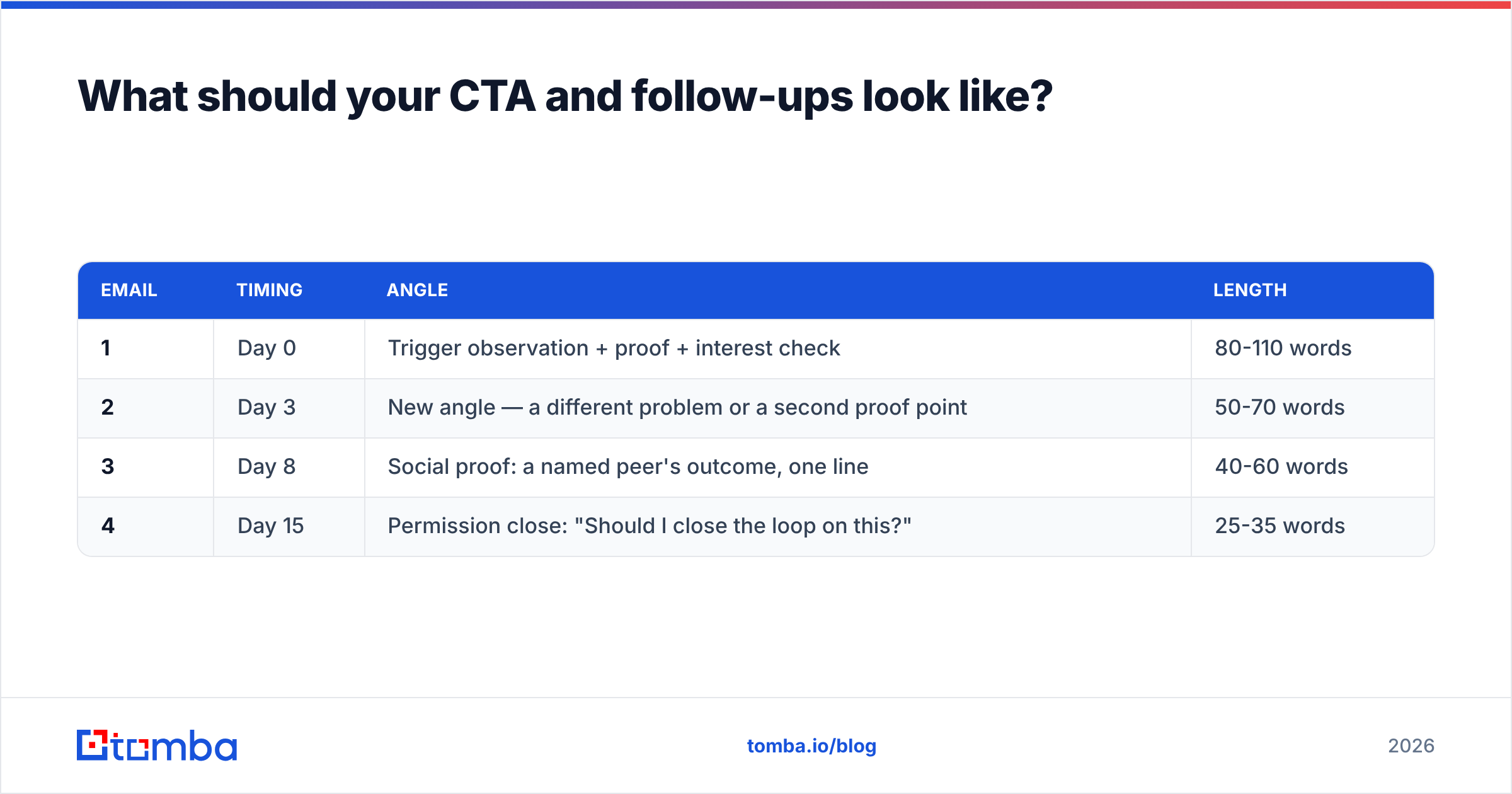
For the sequence, the pattern that works looks like this:
| Timing | Angle | Length | |
|---|---|---|---|
| 1 | Day 0 | Trigger observation + proof + interest check | 80-110 words |
| 2 | Day 3 | New angle — a different problem or a second proof point | 50-70 words |
| 3 | Day 8 | Social proof: a named peer's outcome, one line | 40-60 words |
| 4 | Day 15 | Permission close: "Should I close the loop on this?" | 25-35 words |
Never write "just bumping this to the top of your inbox." A follow-up that adds nothing teaches the reader to ignore you. Each message should be able to stand alone as the first thing they read.
Email 4 — the permission close — is quietly the best performer in most sequences. "Should I close the loop on this, or is it worth revisiting in a few months?" gives the reader a graceful out, and a surprising share of people answer with the second option.
What are five templates you can use today?#
Template 1 — Trigger observation (cold, mid-market)
Subject: [specific fact about their business]
Hi [First], noticed [observable trigger]. Usually that means [likely consequence].
[Customer] handled it by [outcome with a number].
Worth a look, or is [problem] not a priority right now?
Template 2 — Before-After-Bridge (replacing manual work)
Subject: still doing [process] in spreadsheets?
Hi [First], most [role]s at [company size] companies still run [process] manually — [specific pain].
Teams that switch to [category] typically get [outcome].
[Product] does that in [timeframe]. Want the 90-second version?
Template 3 — One-liner (warm list, event follow-up)
Subject: after [event name]
[First] — you mentioned [thing they said] at [event]. We solve exactly that. Worth 10 minutes?
Template 4 — Routing question (unknown buyer)
Subject: right person for [topic]?
Hi [First], we help [company type] with [outcome]. Are you the right person for this at [company], or should I reach out to someone else?
Happy to send details either way.
Template 5 — Permission close (final follow-up)
Subject: closing the loop
Hi [First], haven't heard back — completely fine. Should I close this out, or check back after [natural timeframe]?
Every one of these is designed to be answered in under ten words. That's the bar. If your reader has to compose a paragraph to reply, most won't.
For a wider set of ready-made frameworks, the cold email templates library covers sequences by industry and persona, and the subject line generator is useful when you're stuck on the opener.
How do you measure whether the email is working?#
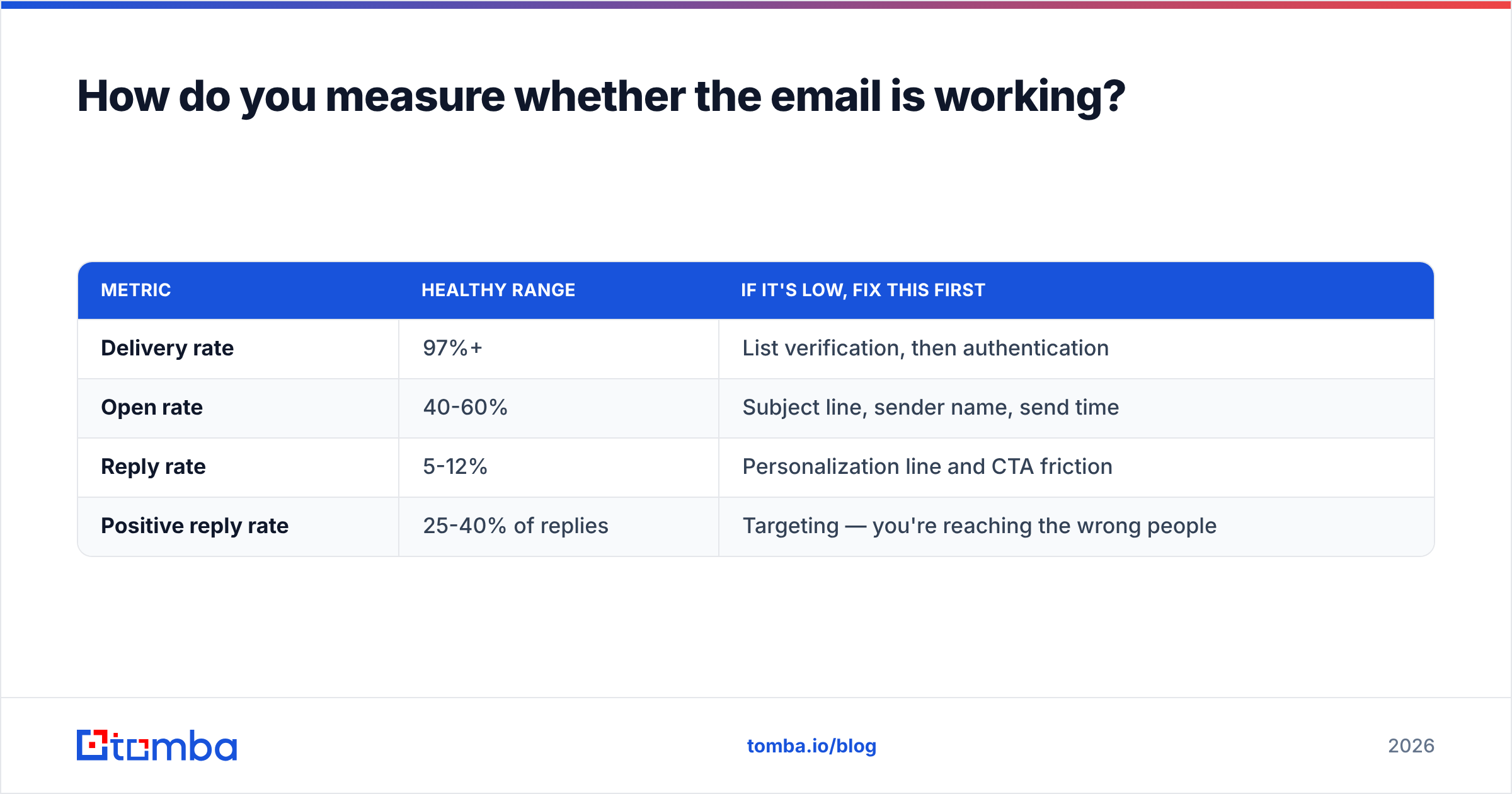
Track four numbers, in this order. Fix them in this order too.
| Metric | Healthy range | If it's low, fix this first |
|---|---|---|
| Delivery rate | 97%+ | List verification, then authentication |
| Open rate | 40-60% | Subject line, sender name, send time |
| Reply rate | 5-12% | Personalization line and CTA friction |
| Positive reply rate | 25-40% of replies | Targeting — you're reaching the wrong people |
There's an ordering discipline here that most teams skip: don't A/B test subject lines while your bounce rate is 8%. You'll be measuring noise. Get delivery clean, then optimize opens, then replies.
Also watch your response rate by segment rather than in aggregate. A 6% blended rate can hide a 14% segment and a 1% segment — and knowing which is which tells you where to spend next month.
According to HubSpot's sales benchmark research, the majority of reps stop after two follow-ups while most positive replies arrive later in the sequence. The fix isn't better copy. It's finishing the sequence you already wrote.
What's the fastest way to go from template to sent?#
Work in this order:
- Build the list. Define the trigger, not just the ICP. "Series B SaaS" is a filter; "Series B SaaS that posted a RevOps role in the last 30 days" is a reason to email.
- Find the named contact. Skip role inboxes. A domain search returns the people at a company with their titles and email patterns, so you're writing to a person rather than a department.
- Verify before sending. Non-negotiable. Bounces cost you deliverability that takes weeks to rebuild.
- Write one email, personalize one line. Batch the research separately from the writing.
- Load the full sequence. All four messages, scheduled upfront, so follow-up isn't a decision you have to make again on a busy Thursday.
- Read the delivery numbers before the copy numbers.
The copy is the part you can control in an afternoon. The list is the part that determines whether the copy ever gets read — which is why teams with mediocre templates and clean data consistently beat teams with beautiful templates and guessed addresses.
Ready to send to real people?#
The best sales email in the world bounces if the address is wrong. Start with Tomba Email Finder to pull verified, named contacts by domain, name, or company — then run the list through verification before your first send. The free tier includes 25 searches a month, and paid plans start at $49/mo; full Tomba pricing is on the site if you're scaling past a single sequence.
Write the email once. Send it to people who actually exist. That's the whole trick.
Related guides#
// get started
Find, verify and enrich your first contacts today
Start on the free plan with 25 searches a month, then scale when your team is ready.
Free plan · No credit card required · GDPR & CCPA
// about the author