HubSpot Breeze Assistant Pricing, Reviews, Pros and Cons
HubSpot Breeze Assistant is bundled free, but Breeze Intelligence credits and Copilot workflows are not. Here is what the AI layer actually costs in 2026, what reviewers say, and where it breaks down.
TL;DR — HubSpot Breeze Assistant pricing in one minute
- HubSpot Breeze Assistant pricing is a trick question. The chat copilot is free on every HubSpot tier, even Free. The cost sits around it.
- The money is in Breeze Intelligence credits (data enrichment, buyer intent, form shortening) and Breeze Agents. Both are metered on top of your seat cost.
- Reviewers on G2 and Capterra praise the time saved on summaries and drafts. They flag two things: credit burn and weak output in niche B2B markets.
- A 5-seat Sales Hub Professional team using Breeze features spends $500–$900/mo. That is not the $100 sticker price most people quote.
- If you wanted Breeze mostly for contact data, a finder and verifier stack costs far less. It also travels with you if you ever leave HubSpot.
What is HubSpot Breeze Assistant?#
Breeze is HubSpot's brand for AI. It launched at INBOUND 2024 and grew through 2025 and 2026. It has three layers. Mixing them up is the top reason people get HubSpot Breeze Assistant pricing wrong.
- Breeze Copilot (the Assistant) — the chat helper built into the HubSpot UI. Ask it to sum up a deal, draft a follow-up, build a list, or explain why a contact went cold. This is what most people mean by "Breeze Assistant."
- Breeze Agents — semi-automatic workers: Prospecting, Customer, Content, Social Media, and Knowledge Base. They run tasks on a schedule instead of waiting for you to type.
- Breeze Intelligence — the data layer. It fills in company and contact records, adds buyer intent signals, and shortens forms. It runs on credits, and this is where your bill grows.
The Assistant really is free. HubSpot keeps Copilot open on every tier because it pulls people toward the paid layers below. That is a fair model. Just do not budget as if the whole AI stack is free.
HubSpot Breeze Assistant pricing in 2026: the real numbers#
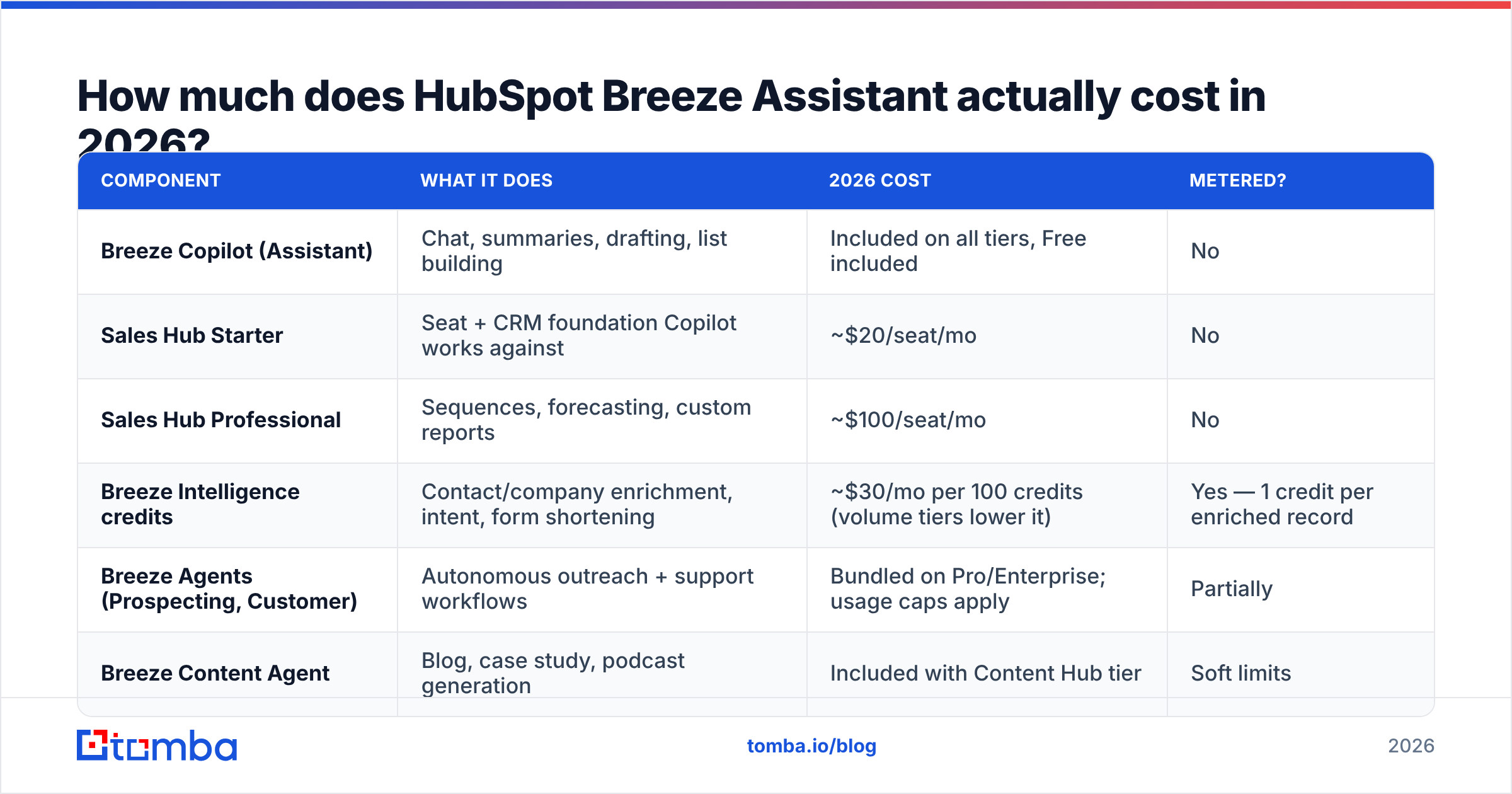
Here is the honest math. Breeze Copilot costs $0. Everything that makes Copilot useful at scale does not.
| Component | What it does | 2026 cost | Metered? |
|---|---|---|---|
| Breeze Copilot (Assistant) | Chat, summaries, drafting, list building | Included on all tiers, Free included | No |
| Sales Hub Starter | Seat + CRM foundation Copilot works against | ~$20/seat/mo | No |
| Sales Hub Professional | Sequences, forecasting, custom reports | ~$100/seat/mo | No |
| Breeze Intelligence credits | Contact/company enrichment, intent, form shortening | ~$30/mo per 100 credits (volume tiers lower it) | Yes — 1 credit per enriched record |
| Breeze Agents (Prospecting, Customer) | Autonomous outreach + support workflows | Bundled on Pro/Enterprise; usage caps apply | Partially |
| Breeze Content Agent | Blog, case study, podcast generation | Included with Content Hub tier | Soft limits |
The trap is credits. One credit enriches one record. Import a 5,000-row list and you burn 5,000 credits. That is about $1,500 at entry pricing. In practice the data comes back partial on mid-market and non-US companies. Nobody quotes that number in a demo.
Now compare a dedicated data provider. Tomba pricing starts free at 25 searches a month. Starter is $49/mo, Growth is $99/mo, and Pro is $249/mo. Those credits cover finding and verifying, not just filling fields on records you already own. That gap matters. Breeze Intelligence only enriches records already in your CRM. It does not go find new ones.
What do Breeze Assistant reviews actually say?#
Almost nobody complains about HubSpot Breeze Assistant pricing at the assistant level. They complain about the credits underneath it. These themes come from public review sites, not HubSpot case studies. Four points repeat across G2 and Capterra entries from 2025 and 2026.
What reviewers consistently like:
- Deal and thread summaries — the top-rated feature. A rep who inherits 40 open deals gets a useful brief in seconds. No more scrolling activity logs.
- No setup — Copilot reads your CRM records, so there is no integration project. Reviewers who came from bolted-on AI tools say this again and again.
- Draft-then-edit email flow — it is not "send this." It is "give me a start." Teams that treat it as a first draft are the happiest.
- Plain-English list building — "show me all contacts at manufacturing companies who opened twice but never replied" works well enough to replace clicking filters.
What reviewers consistently criticize:
- Credit use is hard to see — the most common gripe. Admins find the burn after the fact. The tool does not warn them in the moment.
- Bland output in niche markets — drafts read fine for SaaS and agencies. They read thin for regulated, industrial, or deeply technical fields.
- Patchy data coverage — strong on US mid-market and enterprise. Weaker on EMEA small business, non-English records, and firms under 20 people.
- Locked to HubSpot's data model — Copilot cannot reason about data outside HubSpot. Teams on many systems get partial answers, stated with full confidence.
That last point matters most. Breeze is a closed-loop assistant. Its ceiling is the quality of your HubSpot records. Feed it a CRM with 40% missing emails and stale job titles, and you get a smooth assistant that is confidently wrong.
Is Breeze Intelligence worth it for contact data?#
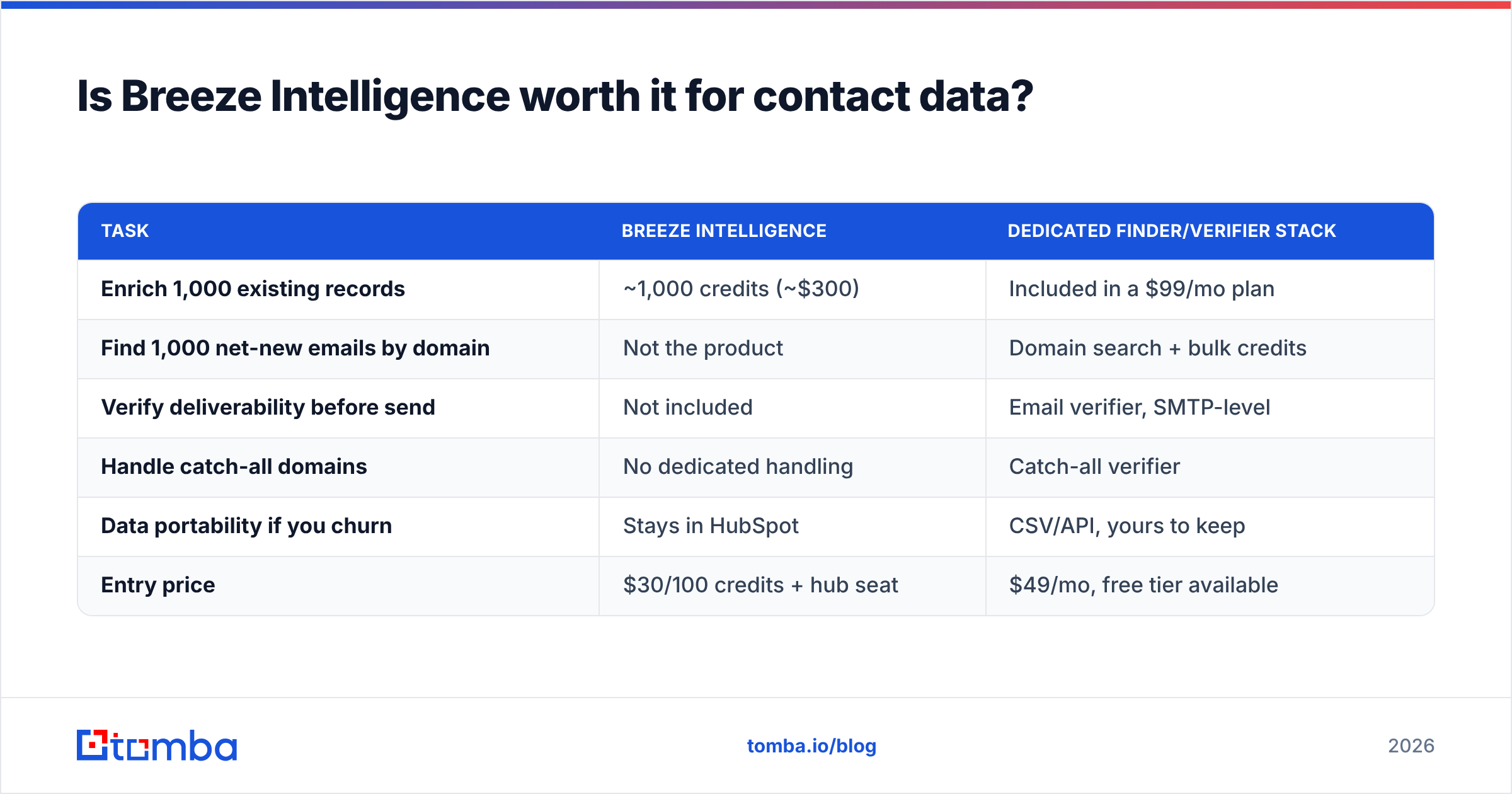
This is the layer where HubSpot Breeze Assistant pricing stops being free. Short answer: buy it only if your CRM already holds the right companies and you just need the fields filled in. It is a poor fit for building a pipeline from scratch.
Think of a home appraiser versus a house hunter. Breeze Intelligence appraises what you own. It tells you the headcount, revenue band, and tech stack of companies already in your CRM. It will not go find new addresses. For net-new contacts you still need a finder that starts from a domain or a name.
That is where the cost math turns against HubSpot:
| Task | Breeze Intelligence | Dedicated finder/verifier stack |
|---|---|---|
| Enrich 1,000 existing records | Included in a $99/mo plan | |
| Find 1,000 net-new emails by domain | Not the product | Domain search + bulk credits |
| Verify deliverability before send | Not included | Email verifier, SMTP-level |
| Handle catch-all domains | No dedicated handling | Catch-all verifier |
| Data portability if you churn | Stays in HubSpot | CSV/API, yours to keep |
| Entry price | $30/100 credits + hub seat | $49/mo, free tier available |
CFOs notice the portability line. Credits spent enriching HubSpot records create value that stays inside HubSpot. Move CRMs in year three and you buy that data again.
How does Breeze compare to standalone AI sales tools?#
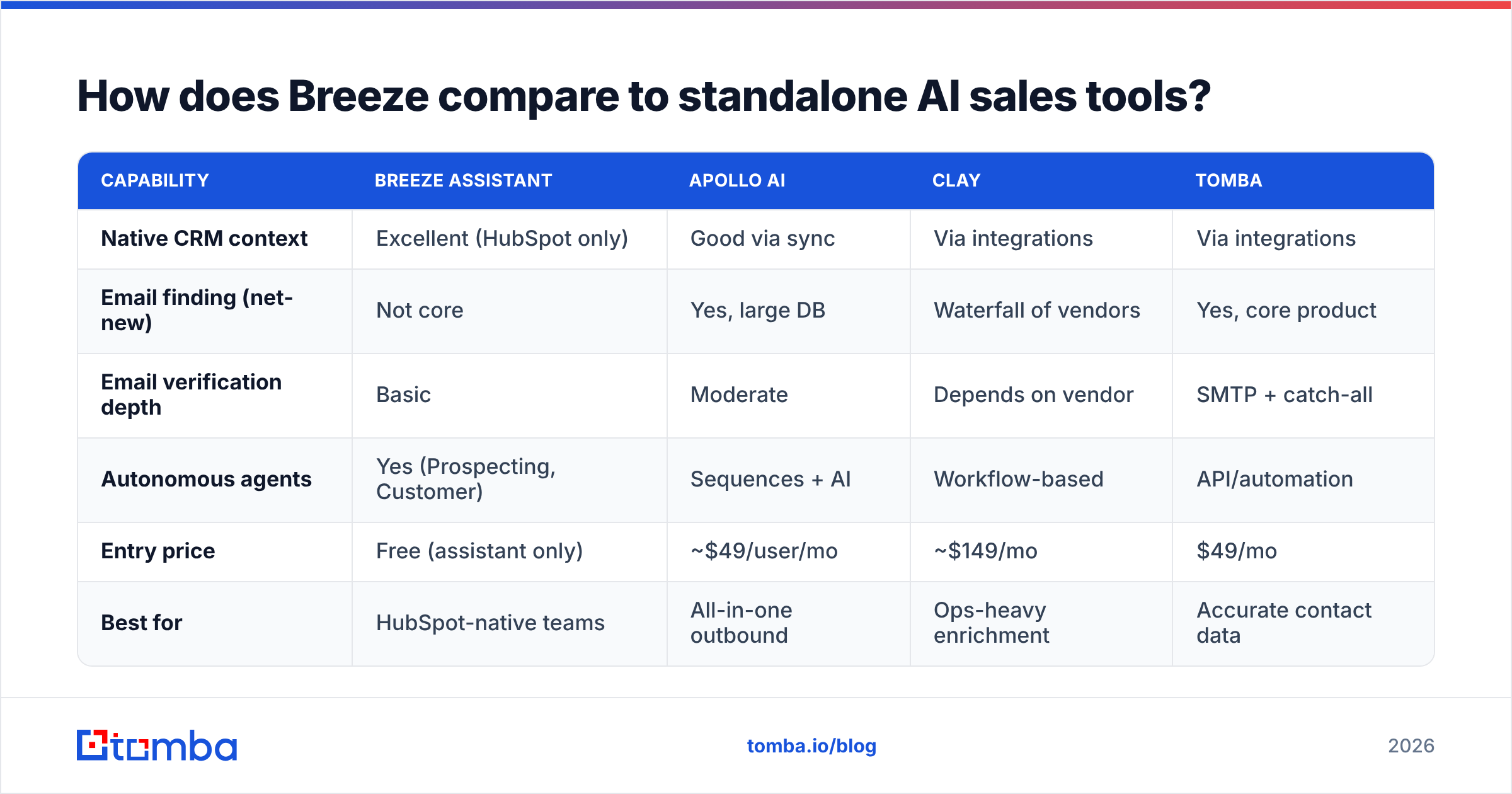
Breeze's pitch is "good enough, and already here." That is stronger than it sounds. Most teams do not want a fifth login. But feature by feature against specialists, the gaps are real.
| Capability | Breeze Assistant | Apollo AI | Clay | Tomba |
|---|---|---|---|---|
| Native CRM context | Excellent (HubSpot only) | Good via sync | Via integrations | Via integrations |
| Email finding (net-new) | Not core | Yes, large DB | Waterfall of vendors | Yes, core product |
| Email verification depth | Basic | Moderate | Depends on vendor | SMTP + catch-all |
| Autonomous agents | Yes (Prospecting, Customer) | Sequences + AI | Workflow-based | API/automation |
| Entry price | Free (assistant only) | ~$49/user/mo | ~$149/mo | $49/mo |
| Best for | HubSpot-native teams | All-in-one outbound | Ops-heavy enrichment | Accurate contact data |
Breeze is the only row where "free" is true at the assistant level and misleading at the workflow level. Apollo and Clay charge you in plain sight. HubSpot charges you through credits and hub upgrades. Neither way is dishonest. The second one is just easier to under-budget.
Weighing the wider HubSpot outbound stack? It is worth reading how Apollo alternatives compare on the data layer, since that is the axis where Breeze is weakest.

What are the real pros and cons of HubSpot Breeze Assistant?#
The pros and cons of HubSpot Breeze Assistant pricing come down to one split. The assistant is free. The data under it is not.
Pros
- Free at the assistant tier. No trial clock. No seat fee. On HubSpot Free, you still get Copilot.
- Best context of any assistant. No rival AI knows your HubSpot deals, tickets, and email threads as well.
- Cuts admin work you can measure. Summaries, meeting notes, and CRM clean-up prompts show the clearest return.
- Agents improve fast. The 2026 Prospecting Agent researches accounts far better than the 2024 version did.
- One vendor, one contract. If you already run on HubSpot, buying is easy.
Cons
- Credits are the real cost, and they are easy to miss. Budget for them or you will be surprised.
- Coverage is uneven outside the US mid-market. Check the data before you trust it, especially in EMEA and at firms under 20 people.
- It cannot find what is not there. Breeze fills in and reasons. It does not discover.
- Lock-in grows. The more you spend on Breeze-enriched records, the more a move costs.
- Quality drops in technical fields. Manufacturing, life sciences, and infrastructure teams edit more than they save on long drafts.
Who should actually buy into Breeze?#
Buy in fully if: you run on HubSpot, sell in the US, work mid-market, and your CRM already holds the right accounts. Breeze pays for itself on admin time alone. Your credits then fill in fields on companies you care about.
Use the free Assistant and skip the credits if: you prospect outbound-first and build lists from scratch. Copilot for summaries and drafts is free value. Pay for discovery and verification somewhere the unit economics are better.
Look elsewhere if: you run several CRMs, sell mostly outside North America, or need SMTP-grade email verification before each send to protect email deliverability. Breeze was not built for those jobs.
One hybrid works well in 2026. Keep Breeze Copilot for in-CRM reasoning, since it is free. Then run a separate finder and verifier upstream, so the records entering HubSpot are already clean. You spend fewer credits on junk, and your sender reputation stops taking bounce damage from unverified imports. HubSpot's own product documentation is clearer than most sales decks about which pieces are metered.
How to budget for HubSpot Breeze Assistant pricing in year one#
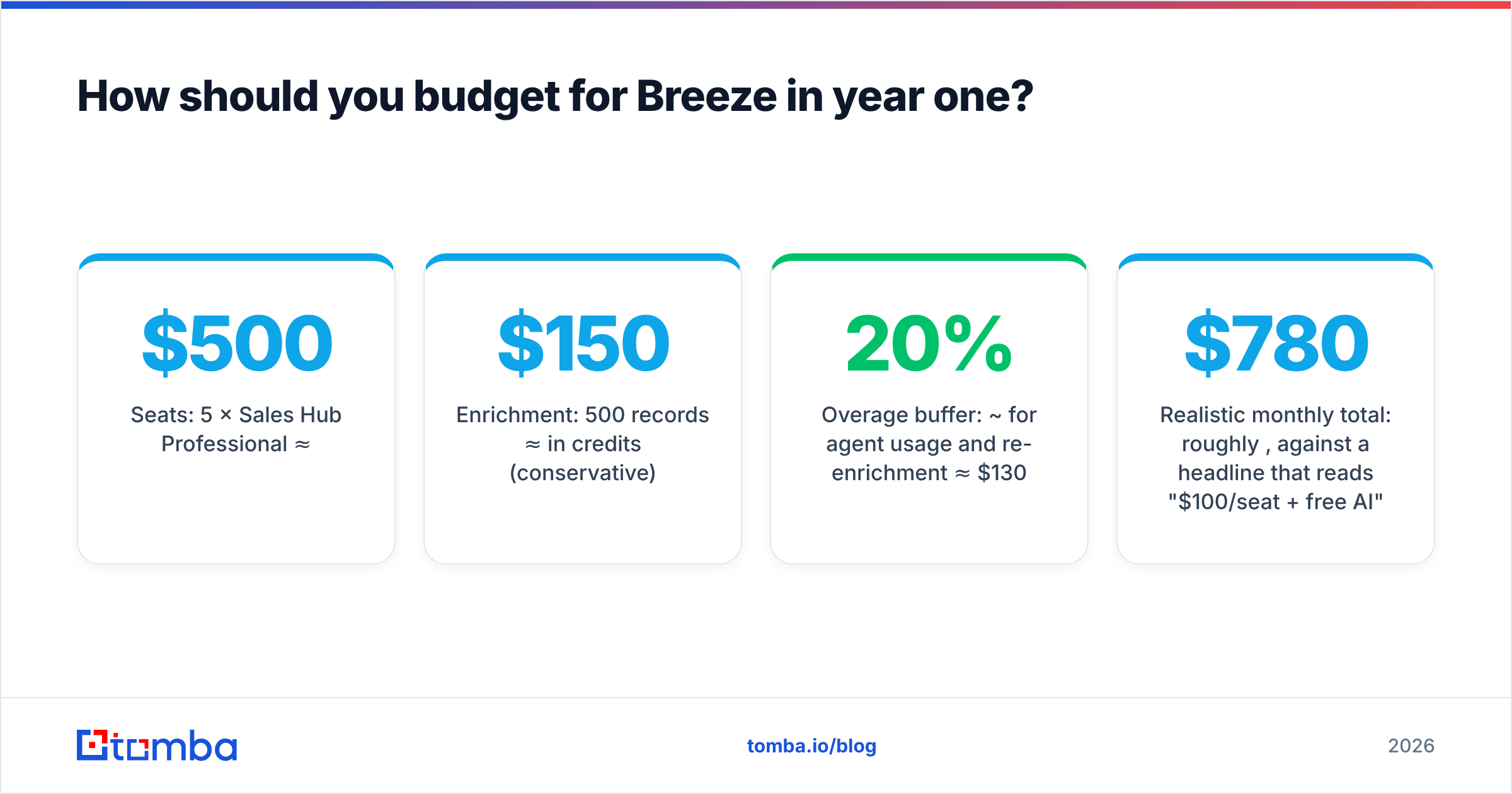
Run the math on a 5-rep team first:
- Seats: 5 × Sales Hub Professional ≈ $500/mo
- Enrichment: 500 records a month ≈ $150/mo in credits (conservative)
- Overage buffer: about 20% for agent use and re-enrichment ≈ $130/mo
- Realistic monthly total: roughly $780, against a headline that reads "$100/seat plus free AI"
Now price the other path. Put the same 5 reps on HubSpot Starter seats (about $100/mo total) and add a data plan at $99/mo for finding and verifying. You give up Pro-tier sequences and forecasting, which is a real trade-off. But you cut the AI data line by roughly 70%, and your contact data becomes portable.
Neither path is right for everyone. The point is to compare them with the credit line in plain view.
Ready to fix the data layer first?#
HubSpot Breeze Assistant pricing is really two prices. A good free product sits on top of a metered data product. Fix the data first and the assistant gets better for free. Start with the Tomba Email Finder. Find verified work emails by domain, name, or company. Push them into HubSpot clean. Stop spending credits on records that were never going to convert. The free tier gives you 25 searches a month, so you can test the accuracy against your own known-good list before you pay.
Related guides#
// get started
Find, verify and enrich your first contacts today
Start on the free plan with 25 searches a month, then scale when your team is ready.
Free plan · No credit card required · GDPR & CCPA
// about the author