HubSpot vs Ontraport 2026: Which CRM Actually Fits Your Team?
HubSpot scales but bills per seat and per contact. Ontraport bundles automation, payments, and pages at a flat rate. Here's the honest breakdown of where each one wins — and what both cost once you add real contact data.
HubSpot vs Ontraport comes down to one thing: how you pay. HubSpot bills per seat and per marketing contact. Ontraport bills by contact count and bundles the rest. Here is what that split means for your bill, your team, and your automation.
TL;DR
- HubSpot wins on ecosystem, reporting, and hiring. But it bills per seat and per marketing contact, so growth costs you twice. Sales Hub Professional starts at $100/seat/month with a 3-seat minimum.
- Ontraport wins on bundled scope. CRM, marketing automation, landing pages, payments, and a customer portal sit in one flat, contact-based price. It starts near $24/month for one user.
- Pick HubSpot if you have a real sales team. You need forecasting and multi-touch attribution, and you expect to add specialists.
- Pick Ontraport if you sell courses, memberships, coaching, or a small product line. Checkout and automation matter more to you than pipeline analytics.
- Neither platform finds contact data for you. Both charge you to store and message contacts you sourced elsewhere. Budget for a separate email finder and a verification layer.
HubSpot vs Ontraport: what each one actually is#
HubSpot is a multi-hub platform. You buy Sales Hub, Marketing Hub, Service Hub, Content Hub, or Operations Hub. Each one sits on top of a shared free CRM. The center of gravity is the CRM object model: companies, contacts, deals, tickets, custom objects, and the workflows that move records between them. HubSpot's own product documentation tells you what sits in which tier. Those tier lines move often, so check before you buy.
Ontraport is one app instead of five. It folds in CRM, email marketing, visual automation, landing pages, forms, order forms with payments, member portals, and basic reporting. It was built for the "one operator, many moving parts" business. Think of the consultant with a course, the agency with a retainer funnel, or the clinic with monthly billing. There is no hub to add. You get the whole surface and pay by contact count.
That one structural difference explains almost every argument between the two camps.
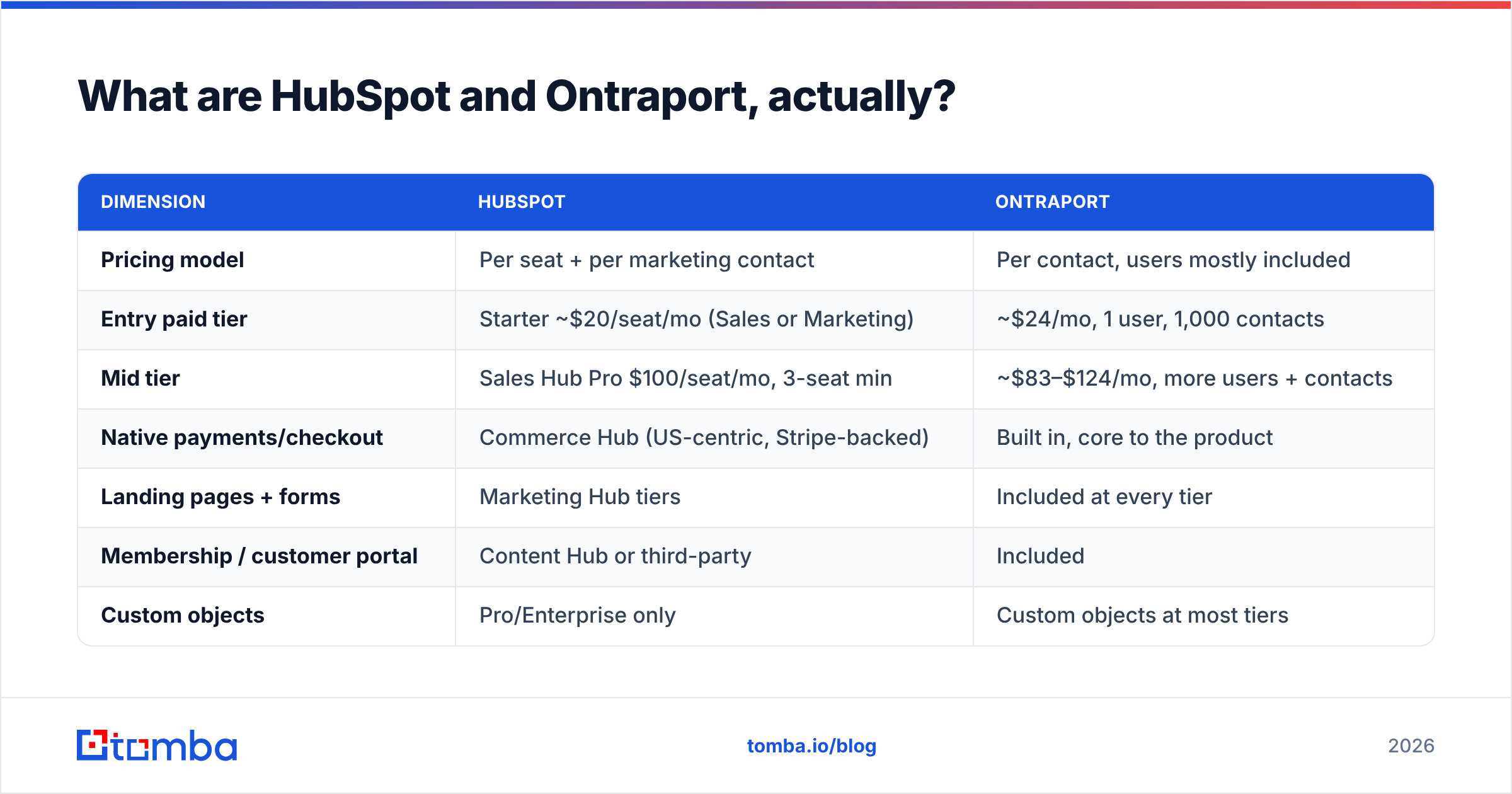
| Dimension | HubSpot | Ontraport |
|---|---|---|
| Pricing model | Per seat + per marketing contact | Per contact, users mostly included |
| Entry paid tier | Starter ~$20/seat/mo (Sales or Marketing) | ~$24/mo, 1 user, 1,000 contacts |
| Mid tier | Sales Hub Pro $100/seat/mo, 3-seat min | ~$83–$124/mo, more users + contacts |
| Native payments/checkout | Commerce Hub (US-centric, Stripe-backed) | Built in, core to the product |
| Landing pages + forms | Marketing Hub tiers | Included at every tier |
| Membership / customer portal | Content Hub or third-party | Included |
| Custom objects | Pro/Enterprise only | Custom objects at most tiers |
| Reporting depth | Deep — attribution, forecasting, dashboards | Works, but shallow by comparison |
| App marketplace | 1,700+ integrations | Roughly 100 + Zapier |
| Learning curve | Gentle start, steep at Enterprise | Moderate, quirky UI |
| Best for | Sales teams 5–200, marketing-led B2B | Solo operators, course/membership sellers |
How does the pricing compare at 10,000 contacts?#
Conclusion first: under about five users, Ontraport is much cheaper. Past ten users with a real sales motion, HubSpot's per-seat math starts to make sense. At that point, Ontraport starts to feel thin.
Run the numbers on a common setup. Three salespeople, two marketers, 10,000 contacts. You want automation, landing pages, and deal pipelines.
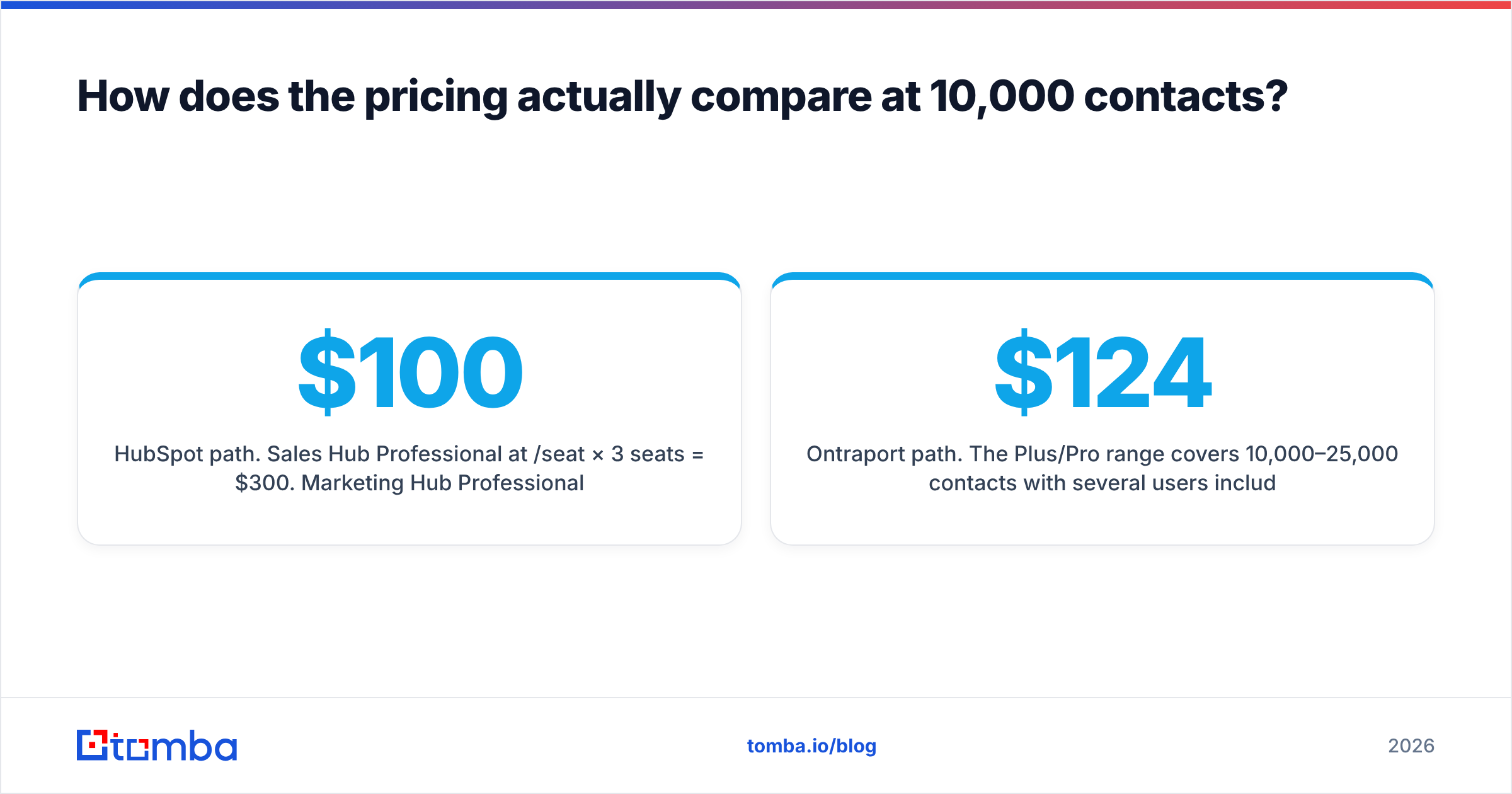
HubSpot path. Sales Hub Professional runs $100/seat/month. Three seats is $300. Marketing Hub Professional starts near $890/month for 2,000 marketing contacts. Ten thousand marketing contacts push that well higher, since HubSpot sells contacts in blocks of 5,000. You land near $1,100–$1,400/month before onboarding. That onboarding fee has run about $3,000, one time.
Ontraport path. The Plus/Pro range covers 10,000–25,000 contacts with several users included. That lands near $124–$249/month, all in. Payments, pages, and automation are in the box. There is no required onboarding fee.
The HubSpot vs Ontraport gap here is 5–8x for a similar feature footprint. The counter-argument is fair, though. HubSpot's reporting, sequences, forecasting, call insights, and integration depth are not things you get from Ontraport. If five reps hit quota because they can see the pipeline, that premium buys something real.
The trap in HubSpot pricing is the second axis. Seats are easy to predict. Marketing contacts are not. One good quarter of inbound or one webinar list import, and your bill steps up mid-contract. HubSpot lets you mark contacts as non-marketing to hold this down. But that takes steady hygiene, and most teams skip it until renewal. Clean your list with an email verifier before import. Then you never pay to store people you could not reach anyway.
Which one has better marketing automation?#
Ontraport wins one job: a prospect clicks, buys, gets access, then gets nurtured. HubSpot wins a different job: a lead scores up, routes to the right rep, triggers a sequence, and shows up in a revenue report.
Ontraport's visual campaign builder handles branches, delays, goals, and purchase events. Payments are native, so a sale is a first-class trigger. One automation can grant portal access, start the onboarding sequence, tag the record, and ping the coach. In HubSpot you build that from Commerce Hub or Stripe, plus a workflow, plus a membership tool, plus something for access control.
HubSpot's edge is different in kind. Workflows can act on any object, including custom ones at Professional and above. Branch logic reads enrichment fields, form submissions, meeting outcomes, and site behavior. Reporting sits on the same schema. So "which nurture path produced closed-won revenue" is a report, not a spreadsheet export.
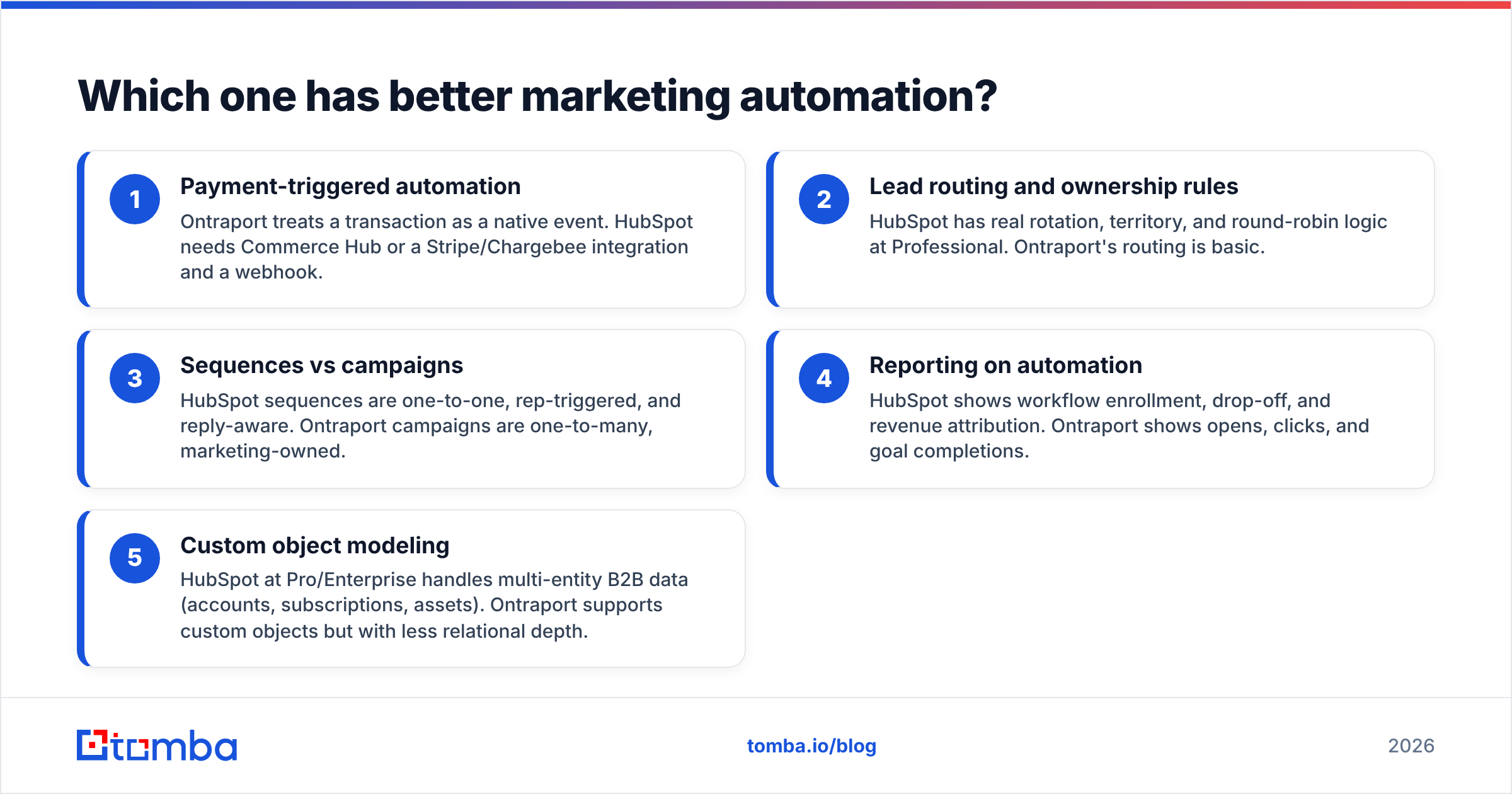
Five practical differences decide most evaluations:
- Payment-triggered automation — Ontraport treats a sale as a native event. HubSpot needs Commerce Hub or a Stripe/Chargebee integration plus a webhook.
- Lead routing and ownership rules — HubSpot has real rotation, territory, and round-robin logic at Professional. Ontraport's routing is basic.
- Sequences vs campaigns — HubSpot sequences are one-to-one, rep-triggered, and reply-aware. Ontraport campaigns are one-to-many and marketing-owned.
- Reporting on automation — HubSpot shows enrollment, drop-off, and revenue credit. Ontraport shows opens, clicks, and goal completions.
- Custom object modeling — HubSpot at Pro/Enterprise handles multi-entity B2B data such as accounts, subscriptions, and assets. Ontraport has custom objects, but with less relational depth.
Do humans do the closing in your sales automation motion? Then HubSpot's model fits. Does the software do most of the closing? Then Ontraport's does.
Is HubSpot's free CRM enough to skip Ontraport?#
Sometimes. Most comparison posts skip that answer.
HubSpot's free tier covers contact management, deal pipelines, email tracking, meeting links, live chat, and basic forms. Users are unlimited. For a two-person team testing a motion, that is enough for six to twelve months. Ontraport has no free tier and no on-ramp like it.
The catch: free HubSpot stores and tracks. It does not automate. You get no workflows, few sequences, and no custom reporting. HubSpot branding sits on your forms and emails. The moment you need a nurture path with branches, you move to Starter or Professional. That is where the price curve kicks in.
So the order is simple. Start free on HubSpot and learn what you actually need. Then decide. If what you needed was checkout plus automation plus a portal, move to Ontraport. If it was pipeline plus attribution plus more reps, upgrade inside HubSpot. Deciding before you have that proof is how teams end up paying $14,000 a year for a CRM they use as a contact list.
What do HubSpot and Ontraport not do?#
Both are demand-capture systems. Neither will find you a single new contact.
This gap quietly wrecks CRM ROI math. You buy a platform priced by contact volume. Then you find you have 1,400 real contacts and a market of 40,000 accounts. The CRM cannot help. It stores and messages what you already have.
Filling that gap is a separate stack decision:
- Sourcing — pulling verified work emails and direct dials for target accounts. A domain search run against your account list is the fastest version. Give it a company domain, get back the people and the email pattern.
- Verification — confirming addresses resolve before they enter a system that bills you per contact and punishes bounces. Catch-all domains need their own handling. In enterprise-heavy markets, a dedicated catch-all verifier is not optional.
- Enrichment — filling in title, seniority, company size, and tech stack. HubSpot lead scoring and Ontraport tagging need those fields to work. Data enrichment at import beats manual research at outreach.
There is a money argument here too. HubSpot bills marketing contacts. Ontraport bills every contact. Each dead address you import is rent you pay forever on a record that can never convert. Cleaning a list before import is one of the few CRM moves that pays back right away.
Which should you pick for your situation?#
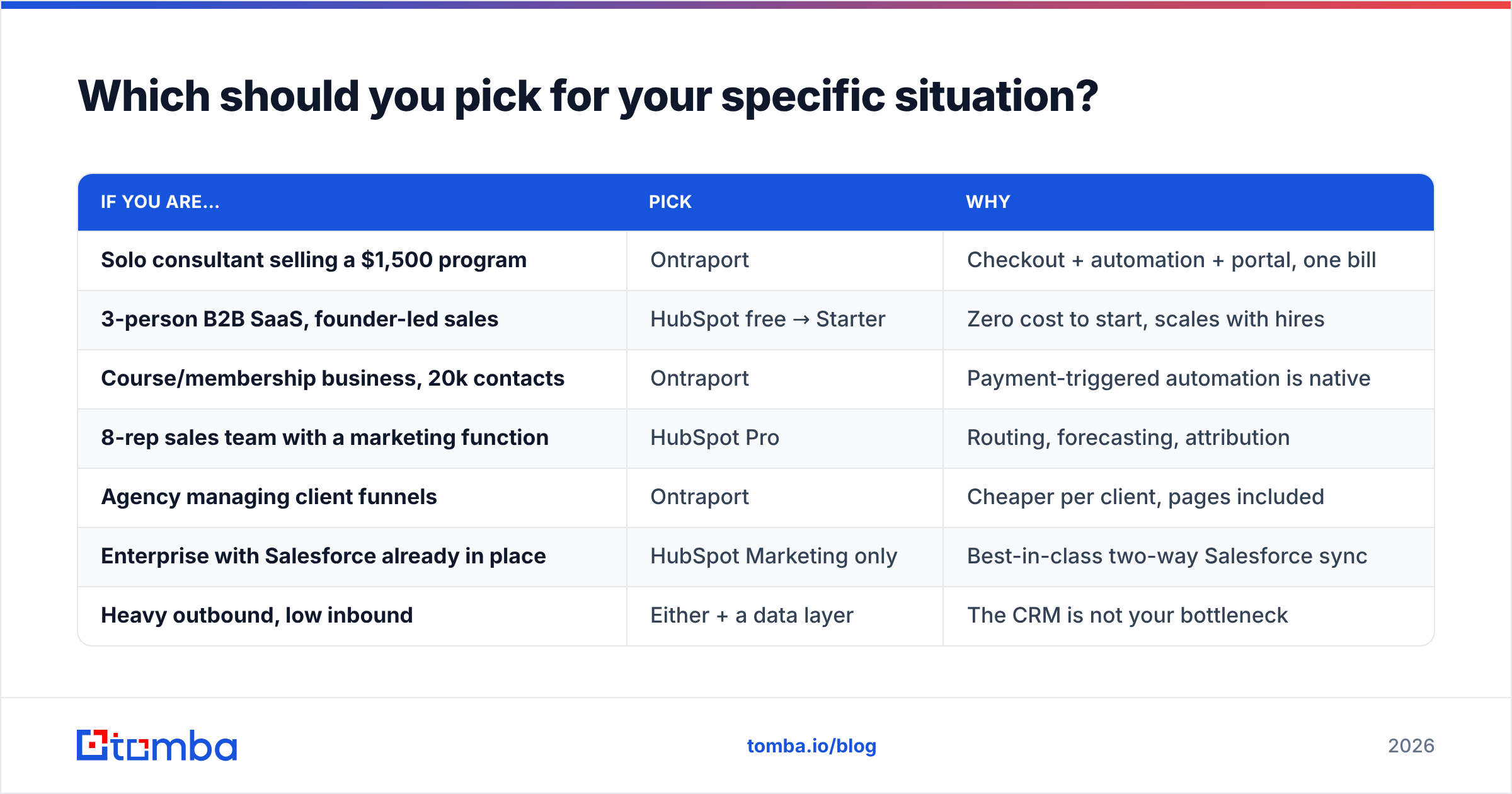
| If you are… | Pick | Why |
|---|---|---|
| Solo consultant selling a $1,500 program | Ontraport | Checkout + automation + portal, one bill |
| 3-person B2B SaaS, founder-led sales | HubSpot free → Starter | Zero cost to start, scales with hires |
| Course/membership business, 20k contacts | Ontraport | Payment-triggered automation is native |
| 8-rep sales team with a marketing function | HubSpot Pro | Routing, forecasting, attribution |
| Agency managing client funnels | Ontraport | Cheaper per client, pages included |
| Enterprise with Salesforce already in place | HubSpot Marketing only | Best-in-class two-way Salesforce sync |
| Heavy outbound, low inbound | Either + a data layer | The CRM is not your bottleneck |
A few decision rules hold up in practice:
Count your future seats, not your current ones. HubSpot's economics improve as headcount grows, because seats spread the platform's fixed value. Ontraport's economics get worse with headcount. You pay for a broad feature set that most seats only half use.
Weigh migration cost honestly. HubSpot has a large partner network, thousands of certified consultants, and a hiring pool that already knows the tool. Ontraport's talent market is a fraction of that. If your admin quits, someone can pick up a HubSpot instance in a week. An Ontraport instance with 40 linked campaigns takes much longer.
Check the integration list against your real stack, not the logo wall. HubSpot's marketplace is roughly 17x larger. Verify that your billing system, your data warehouse, and your outbound tools are covered. Reviews on G2 help with the "does this integration actually work" question. Vendor pages never answer it.
How do you get either platform to produce pipeline?#
Buying the CRM is step three, not step one. This order works:
- Define the account list. Set firmographic criteria, then name the accounts. Not "SaaS companies" — 400 specific domains.
- Source contacts at those accounts. Target the titles on your buying committee. Get verified emails and, where the motion needs it, B2B phone numbers.
- Verify before import. Bounces above 2–3% hurt sender reputation and burn the domain you need for the next year.
- Load into HubSpot or Ontraport with enrichment attached. Lead scoring and segmentation only work when the fields are filled in.
- Build one automation, measure it, then build the second. Both platforms tempt you into 15 campaigns on day one. The teams that win ship one and instrument it.
Steps 1 through 3 happen outside your CRM. Most comparison posts ignore that part of the stack. It is also where your response rate is really decided.
The verdict#
The HubSpot vs Ontraport choice is really a pricing-model choice.
HubSpot fits if you are building a sales organization. The per-seat cost buys reporting, routing, forecasting, a huge integration surface, and a talent pool that already knows the tool. You will pay more than you expect, mostly on marketing contacts. Plan for it and manage contact hygiene hard.
Ontraport fits if you are one to five people selling something with a checkout. The bundled scope replaces four separate subscriptions. The payment-native automation beats HubSpot's stitched-together version. Flat pricing does not punish list growth the way HubSpot's does. In exchange, you accept shallower reporting and a smaller ecosystem.
So the wrong question is "which CRM is better." The right one is simpler: which pricing axis matches how my business grows — seats, or contacts?
Whichever platform you land on, it needs contacts to work with. Tomba's Email Finder returns verified work emails by name, domain, or company. Every result carries a confidence score and a source. So what enters your CRM is reachable, not rented storage. Start free with 25 searches a month. Paid plans begin at $49/month, and full Tomba pricing scales past 50,000 lookups with no per-seat fees. Push results straight into HubSpot, Ontraport, or a spreadsheet via the Tomba API.
Related guides#
// get started
Find, verify and enrich your first contacts today
Start on the free plan with 25 searches a month, then scale when your team is ready.
Free plan · No credit card required · GDPR & CCPA
// about the author