HubSpot vs Salesforce (2026): Which CRM Should You Buy?
HubSpot is faster to launch and cheaper below 50 reps. Salesforce wins on complex process control at scale. Here's the honest cost, data, and migration breakdown for 2026.
TL;DR
- HubSpot wins below ~50 reps. Faster setup, one admin (often part-time), and Sales Hub Professional lands around $100/user/mo before the mandatory onboarding fee.
- Salesforce wins above ~150 reps or anywhere your process has real branching — multi-entity quoting, territory hierarchies, complex approvals, regulated audit trails.
- The sticker price is not the price. HubSpot charges a one-time onboarding fee on Pro and Enterprise; Salesforce effectively requires an admin (internal or agency) plus AppExchange add-ons that regularly double the line item.
- Both are equally worthless with bad contact data. Neither platform finds or verifies email addresses — that's a separate layer you have to buy or build.
- Migration is the real switching cost. Budget 6-12 weeks for a Salesforce → HubSpot move, and longer going the other way.
Most "HubSpot vs Salesforce" posts compare feature checklists. That's not the decision. Both platforms will store a contact, log an email, and show you a pipeline. The decision is about who pays the operating cost of the CRM — your reps' time, your admin's time, or your finance team's budget — and which of those you have the least of.
What is the actual difference between HubSpot and Salesforce?#
Think of it like buying a kitchen. HubSpot sells you a fitted kitchen: the cabinets, counters, and appliances arrive matched, installed in a week, and you cook dinner that night. Salesforce sells you a professional kitchen fit-out: every station is specified to your workflow, it takes months and a contractor, and once it's done nobody can outcook you — but you now employ a contractor.
Technically: HubSpot is an opinionated, all-in-one growth suite built on a single contact object shared across Marketing, Sales, Service, and CMS hubs. The data model is fixed enough that defaults work out of the box. Salesforce is a platform — Sales Cloud is one application on top of a metadata-driven engine (objects, flows, Apex, Lightning Web Components) that can model almost any business process, including ones no vendor anticipated.
That architectural split explains nearly every downstream difference:
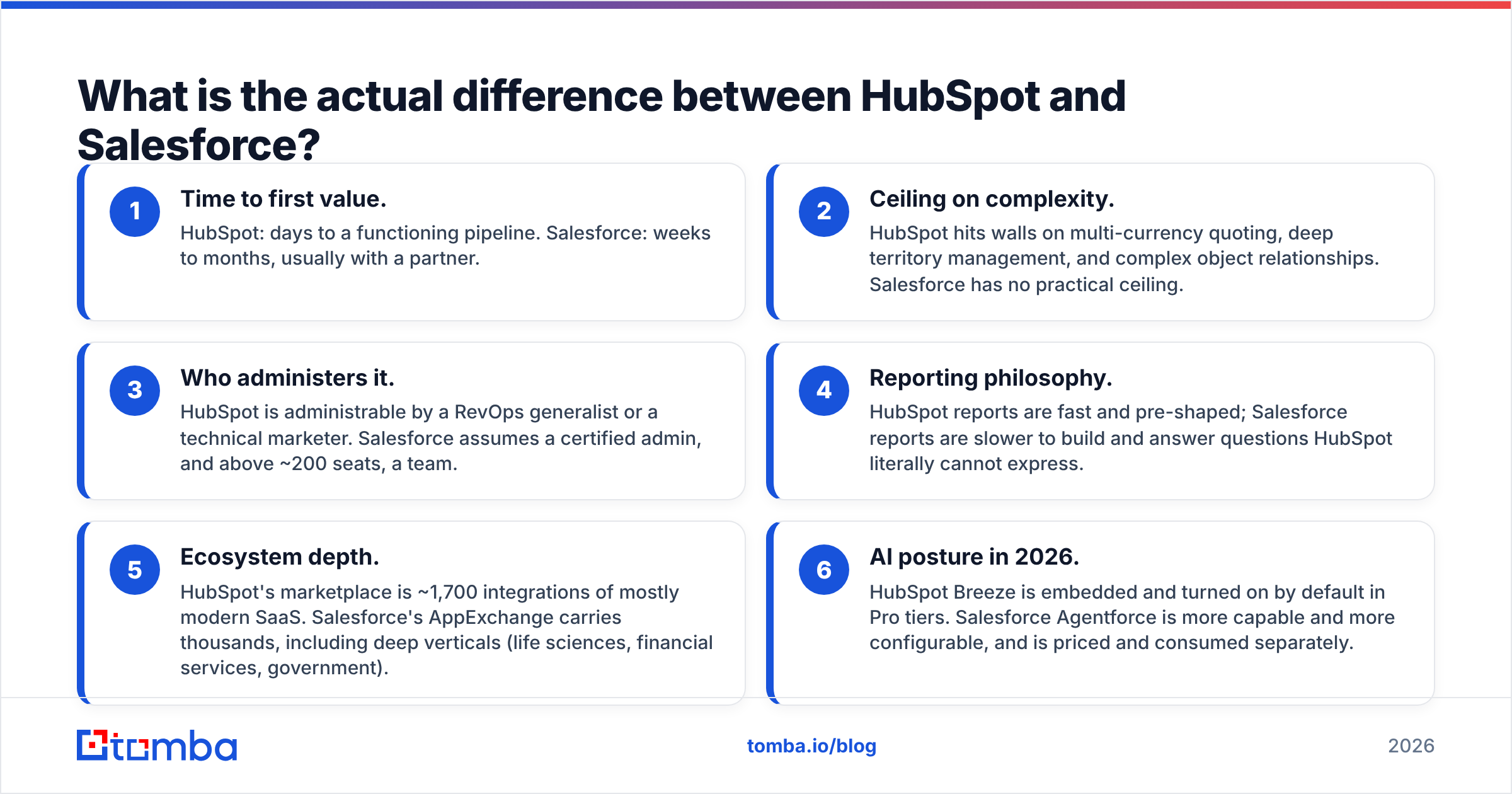
- Time to first value. HubSpot: days to a functioning pipeline. Salesforce: weeks to months, usually with a partner.
- Ceiling on complexity. HubSpot hits walls on multi-currency quoting, deep territory management, and complex object relationships. Salesforce has no practical ceiling.
- Who administers it. HubSpot is administrable by a RevOps generalist or a technical marketer. Salesforce assumes a certified admin, and above ~200 seats, a team.
- Reporting philosophy. HubSpot reports are fast and pre-shaped; Salesforce reports are slower to build and answer questions HubSpot literally cannot express.
- Ecosystem depth. HubSpot's marketplace is ~1,700 integrations of mostly modern SaaS. Salesforce's AppExchange carries thousands, including deep verticals (life sciences, financial services, government).
- AI posture in 2026. HubSpot Breeze is embedded and turned on by default in Pro tiers. Salesforce Agentforce is more capable and more configurable, and is priced and consumed separately.
How do HubSpot and Salesforce pricing compare in 2026?#
Both vendors publish list prices that almost nobody pays. Discounts of 15-30% are normal on annual commitments, and both push multi-year deals hard. Here's the list-price shape, which is what you should model before negotiation.
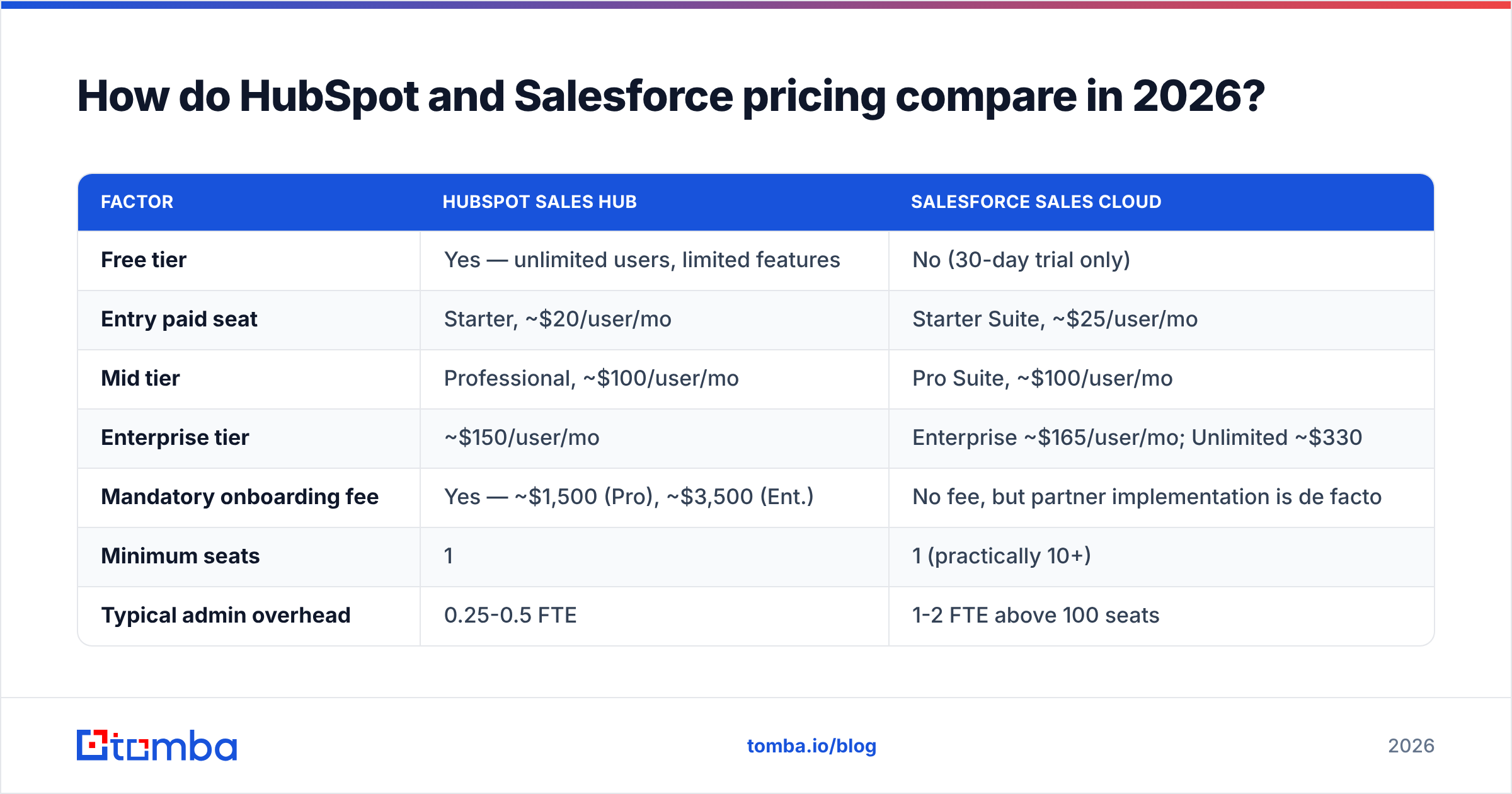
| Factor | HubSpot Sales Hub | Salesforce Sales Cloud |
|---|---|---|
| Free tier | Yes — unlimited users, limited features | No (30-day trial only) |
| Entry paid seat | Starter, ~$20/user/mo | Starter Suite, ~$25/user/mo |
| Mid tier | Professional, ~$100/user/mo | Pro Suite, ~$100/user/mo |
| Enterprise tier | ~$150/user/mo | Enterprise ~$165/user/mo; Unlimited ~$330 |
| Mandatory onboarding fee | Yes — ~$1,500 (Pro), ~$3,500 (Ent.) | No fee, but partner implementation is de facto |
| Minimum seats | 1 | 1 (practically 10+) |
| Typical admin overhead | 0.25-0.5 FTE | 1-2 FTE above 100 seats |
| Contract flexibility | Annual, seat reductions at renewal only | Annual/multi-year, seat count locked mid-term |
| Native CPQ | Included in Sales Hub Pro (basic quotes) | Revenue Cloud, priced separately |
| Sandbox environments | Enterprise only | Enterprise and above, multiple types |
Two numbers matter more than the per-seat rate.
First: the fully loaded cost per rep. Take the seat price, add the amortized implementation, add admin salary divided by headcount, add the add-ons you'll actually buy. A 30-rep team on HubSpot Pro realistically runs $105-125/user/mo all-in. The same team on Sales Cloud Enterprise with a part-time admin and two AppExchange tools lands closer to $230-260/user/mo. At 300 reps, that gap narrows sharply because admin cost stops scaling linearly — and Salesforce's ceiling starts earning its keep.
Second: the cost of the thing the CRM doesn't do. Neither platform generates pipeline. You still need contact data flowing in, and both charge premium rates when you buy it from them — Salesforce via Data Cloud credits, HubSpot via Breeze Intelligence credits. Sourcing verified contacts from a dedicated email finder and pushing them in through the HubSpot integration or Salesforce integration is usually a fraction of the in-platform enrichment price.
Which CRM is better for small and mid-market teams?#
HubSpot, in most cases — and the margin isn't close under 50 reps.
The free tier is genuinely usable, not a demo. You get unlimited users, contact and deal management, email tracking, meeting links, and basic reporting at $0. Teams routinely run 18 months on free plus a couple of Starter seats before they need Professional. Salesforce has no equivalent; Starter Suite is a real product, but you're paying from day one and still inherit Salesforce's configuration mindset.
The second argument is adoption. CRM projects fail on rep behavior, not on features. HubSpot's UI requires roughly zero training for a rep who has used Gmail; Salesforce Lightning requires a walkthrough and usually a written playbook. When your VP of Sales is the de facto admin, the platform that works without an admin wins.
Where mid-market teams outgrow HubSpot:
- Complex quoting. Multi-currency, tiered discounting, or approval matrices push you toward Salesforce Revenue Cloud or a third-party CPQ.
- Custom objects with deep relationships. HubSpot added custom objects at Enterprise, but the relationship modeling is shallower than Salesforce's.
- Territory and hierarchy management. Salesforce Enterprise Territory Management has no HubSpot equivalent.
- Regulated audit requirements. Field-level audit trails and validation rules are richer in Salesforce.
- Sales-marketing data separation. HubSpot's single-contact-object design is a feature until compliance requires it not to be.
Worth noting for anyone comparing purchased contact databases alongside CRMs: providers like BookYourData sell verified B2B lists that import cleanly into either platform, which is a reasonable alternative to paying CRM-vendor enrichment rates. The data layer and the CRM layer are separate purchase decisions and should stay that way.
Is Salesforce worth it for enterprise sales teams?#
Yes, and the reasons are unglamorous.
Process enforcement. Once you have 200 reps across three regions with different comp plans, "the CRM lets you do it your way" becomes a liability. Salesforce validation rules, required-field logic, and record-type-driven page layouts let RevOps force a single definition of a qualified opportunity. HubSpot can approximate this; it cannot enforce it at the same granularity.
The platform escape hatch. Every enterprise eventually needs something no vendor built. Apex, Flow, and the Salesforce API mean the answer is "we'll build it" rather than "we'll wait for the roadmap." That optionality is what you're paying $165-330/seat for. Gartner's CRM market analysis consistently reflects this: Salesforce's leadership position tracks extensibility more than usability.
Ecosystem gravity. If your data warehouse, BI layer, and CPQ were all bought assuming Salesforce, the migration math never clears. This is a real, legitimate reason to stay — just be honest that it's a switching-cost argument, not a product-quality one.
Where Salesforce genuinely underperforms: native marketing automation (Account Engagement, formerly Pardot, is widely considered the weakest major product in the suite), out-of-box reporting speed, and total cost transparency. Reviews on G2 surface the same three complaints year after year — cost, complexity, and support tiering.
What do HubSpot and Salesforce both fail at?#
Both platforms treat contact data as an input, not an output. That's the single biggest gap teams discover after signing.
Your CRM does not know a prospect's current work email. It stores whatever your rep typed or whatever your form captured — and B2B contact data decays at roughly 22-30% per year through job changes alone. Six months after import, a meaningful slice of your database bounces.
Practical consequences:
- Enrichment credits are expensive inside the CRM. Both vendors meter enrichment. Sourcing the same records externally and syncing them costs less per record at almost every volume.
- Neither validates deliverability. A CRM will happily store
jsmith@company.comwhen the actual pattern isjohn.smith@company.com. Running new records through an email verifier before import is the cheapest deliverability insurance you can buy. - Catch-all domains break both. Roughly 15-20% of B2B domains accept everything at the SMTP layer. Neither CRM flags this; a dedicated catch-all verifier does.
- Duplicates multiply on import. HubSpot dedupes on email only. Salesforce's matching rules are configurable but must be configured.
The operating rule: treat the CRM as the system of record, not the system of acquisition. Find and verify contacts upstream, then write clean records in. This is why teams on both platforms end up with a similar stack shape — CRM plus a data layer plus a sequencer.
Should you migrate from Salesforce to HubSpot (or back)?#
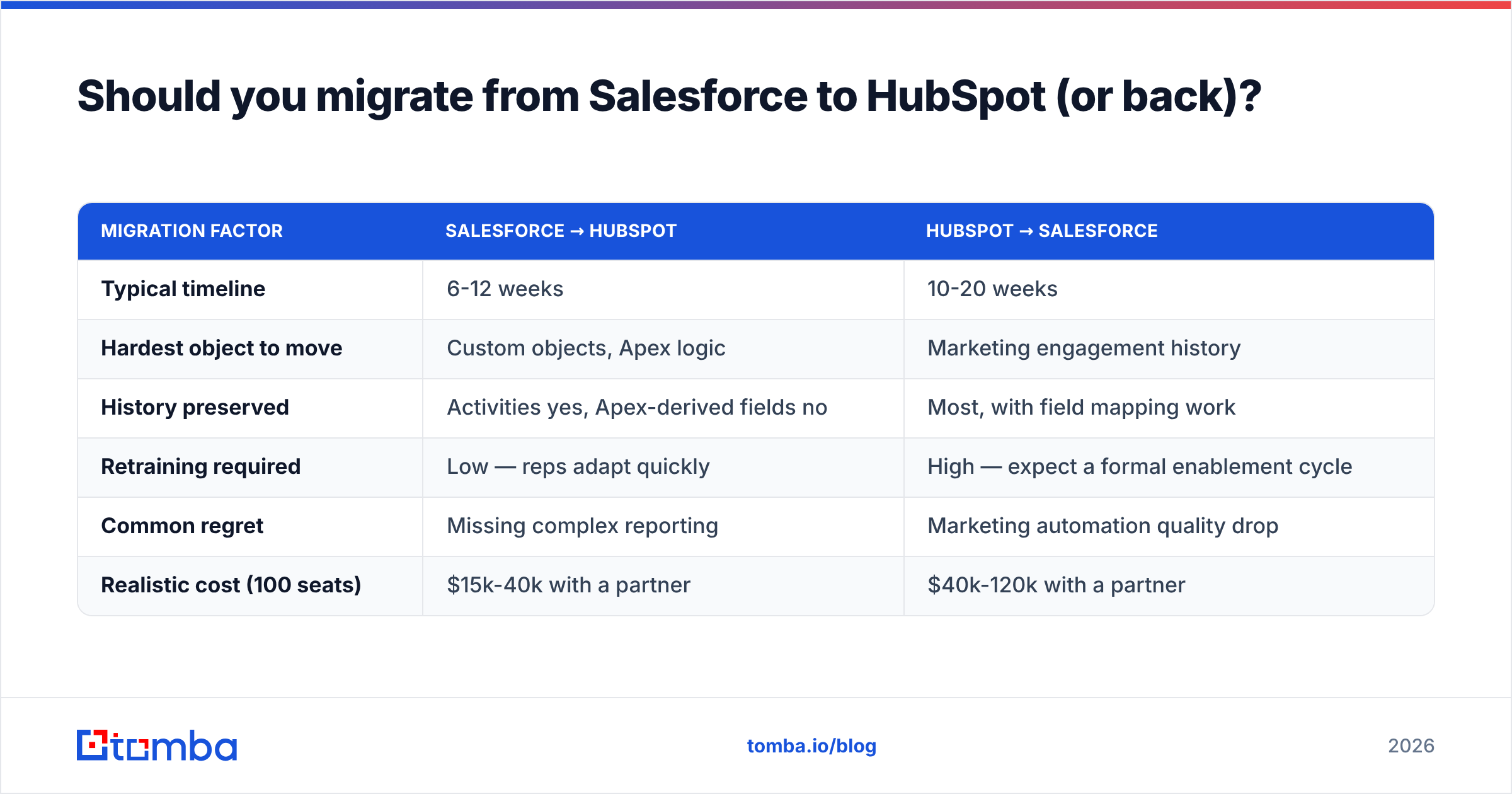
Only if the pain is structural, not cosmetic. Migrations are 6-12 weeks of RevOps time minimum, and the failure mode is silent data loss you discover a quarter later.
| Migration factor | Salesforce → HubSpot | HubSpot → Salesforce |
|---|---|---|
| Typical timeline | 6-12 weeks | 10-20 weeks |
| Hardest object to move | Custom objects, Apex logic | Marketing engagement history |
| History preserved | Activities yes, Apex-derived fields no | Most, with field mapping work |
| Retraining required | Low — reps adapt quickly | High — expect a formal enablement cycle |
| Common regret | Missing complex reporting | Marketing automation quality drop |
| Realistic cost (100 seats) | $15k-40k with a partner | $40k-120k with a partner |
Signals it's genuinely time to leave Salesforce: your admin spends more time maintaining the org than improving it; rep adoption is below 60% on activity logging; you're paying for Unlimited to get support response times.
Signals it's time to leave HubSpot: you've built more than three workarounds for the same missing capability; your finance team can't get quote-to-cash out of it; you've hit the association limits on custom objects.
Signals it's neither: someone new joined and prefers the tool they used last. That's not a business case.
How do you decide in one afternoon?#
Answer five questions honestly.
- How many reps in 24 months? Under 50 → HubSpot. Over 150 → Salesforce. Between → keep reading.
- Do you have or will you hire a dedicated CRM admin? No → HubSpot. Yes → either works.
- Does your sales process branch by product, region, or entity? Heavily → Salesforce.
- Is marketing automation core to pipeline generation? Yes → HubSpot, decisively.
- What's already in the stack? Data warehouse + CPQ + BI built on Salesforce → don't move.
If you land between 50 and 150 reps with a moderately complex process, the tiebreaker is usually admin availability. The best CRM is the one someone in your building can actually maintain.
One thing that doesn't change either way: the quality of what goes in. Before you migrate, before you buy a seat, run your existing database through a verification pass and see how much of it is real. Teams are routinely surprised — 20-35% invalid is common on lists older than two years, and every one of those records is inflating your seat math and deflating your deliverability.
Whichever CRM you pick, feed it clean data. Tomba's Email Finder sources verified professional email addresses by domain, name, or company, with real-time verification before anything hits your pipeline — and it pushes straight into HubSpot or Salesforce. Start on the free tier (25 searches/month), or check Tomba pricing — Starter runs $49/mo and scales to Growth at $99/mo when your outbound does. Your CRM is only as good as the records in it.
Related guides#
// get started
Find, verify and enrich your first contacts today
Start on the free plan with 25 searches a month, then scale when your team is ready.
Free plan · No credit card required · GDPR & CCPA
// about the author