HubSpot vs SuiteCRM (2026): Which CRM Actually Wins?
HubSpot is the polished hosted CRM that gets expensive fast. SuiteCRM is free, open-source, and costs you engineering hours instead. Here's the honest breakdown of where each one wins in 2026.
TL;DR
- HubSpot is a hosted, polished, all-in-one CRM. Free tier is genuinely usable; costs climb steeply once you add Sales Hub Professional seats, marketing contacts, and onboarding fees.
- SuiteCRM is free, open-source (AGPLv3), self-hosted, and infinitely customizable — but you pay in server admin, developer time, and a UI that looks a decade behind.
- Rough 3-year cost for a 10-person sales team: HubSpot lands around $35,000–$60,000. SuiteCRM lands around $6,000–$25,000, almost all of it labor and hosting.
- Pick HubSpot if you want speed, reporting, and a marketing engine attached. Pick SuiteCRM if you have data-residency requirements, an in-house dev, or a hard ceiling on recurring software spend.
- Neither one finds contact data for you. Both depend on an external enrichment source to keep records from rotting at ~25% per year.
What is HubSpot and who actually uses it?#
HubSpot started as a marketing automation tool and grew a CRM around it. That origin still shapes the product: the contact record is the center of gravity, and everything — email sequences, meeting links, ticketing, quotes, forecasting — is bolted onto that record with almost no configuration required.
The commercial model is a free CRM core with paid "Hubs" layered on top. Sales Hub, Marketing Hub, Service Hub, Content Hub, Operations Hub. You can run a small team on the free CRM indefinitely: unlimited users, one million contacts, deal pipelines, basic reporting. The moment you want sequences, custom reports, forecasting, or more than one deal pipeline, you're on a paid tier.
Typical HubSpot buyer: a 5–200 person B2B company that wants marketing and sales in one system, has no dedicated ops engineer, and would rather pay a subscription than maintain infrastructure. Adoption is fast because the UI is genuinely good and the onboarding is guided.
The friction shows up at renewal. Marketing Hub prices on marketing contacts, so your bill grows as your database grows — which is exactly the opposite of what you want when you're scaling outbound. Professional tiers also carry one-time onboarding fees, and annual contracts are the default.
What is SuiteCRM and where did it come from?#
SuiteCRM is an open-source fork of SugarCRM Community Edition, created in 2013 after SugarCRM stopped releasing an open version. It's maintained by SalesAgility, licensed AGPLv3, and downloadable for free. You install it on your own server — a $20/month VPS runs it fine for a small team — and you own every byte of data in the MySQL database behind it.
Feature-wise it's surprisingly complete: accounts, contacts, leads, opportunities, quotes, invoices, contracts, campaigns, workflow automation, a case/ticket module, and a reporting engine. SuiteCRM 8 modernized the front end on Angular and shipped a proper REST v8 API.
What you don't get: a vendor doing the work for you. No managed uptime, no automatic upgrades, no support SLA unless you buy one from SalesAgility or a partner. Every integration you want either exists as a community add-on of unpredictable quality, or you build it.
Typical SuiteCRM buyer: an agency, a public-sector body, a European company with GDPR data-residency constraints, or any team with a developer on staff who'd rather spend 40 hours configuring than $2,000/month forever.
HubSpot vs SuiteCRM: how do they compare on the things that matter?#
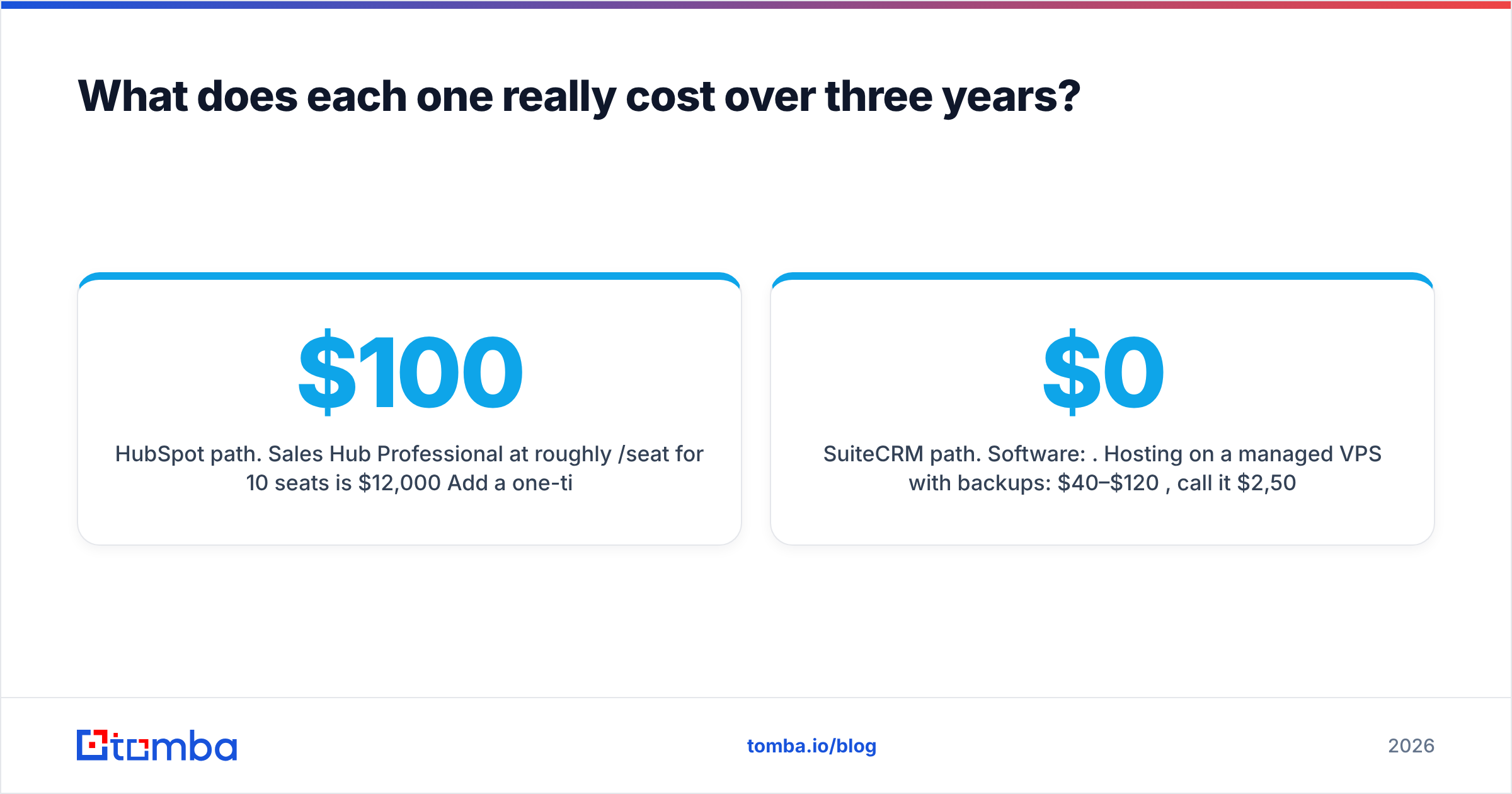
| Dimension | HubSpot | SuiteCRM |
|---|---|---|
| License / model | Proprietary SaaS | Open source, AGPLv3 |
| Free tier | Yes — unlimited users, core CRM | Entire product is free |
| Entry paid price | Starter ~$20/seat/mo | $0 software; ~$20–$100/mo hosting |
| Mid-tier price | Sales Hub Pro ~$100/seat/mo + onboarding | $0 + optional SalesAgility support |
| Hosting | Fully managed | You (VPS, Docker, or on-prem) |
| Time to first deal logged | Under an hour | 1–5 days including install + config |
| UI quality | Excellent, modern | Functional; dated compared to SaaS peers |
| Reporting | Strong dashboards, custom reports on Pro+ | Reports module works but is clunky |
| Email sequences | Native (Sales Hub Starter+) | Campaigns module or third-party |
| Workflow automation | Visual builder, very accessible | Workflow module, more technical |
| Marketplace / integrations | 1,700+ certified apps | Small community store + API builds |
| API | Well-documented REST, generous limits | REST v8, documented but thinner examples |
| Data ownership | HubSpot's cloud, export available | Your database, your server |
| Support | Included on paid tiers | Community forums or paid contract |
| Mobile app | Polished iOS/Android | Basic, community-maintained |
| Best for | Speed, marketing+sales alignment | Cost control, customization, data sovereignty |
The table hides the real decision, which isn't features — both cover the standard CRM object model fine. It's where you want your costs to live: in a predictable subscription line item, or in engineering hours you may or may not actually have.
What does each one really cost over three years?#
Run the numbers for a 10-person sales team, because that's where the gap becomes obvious.
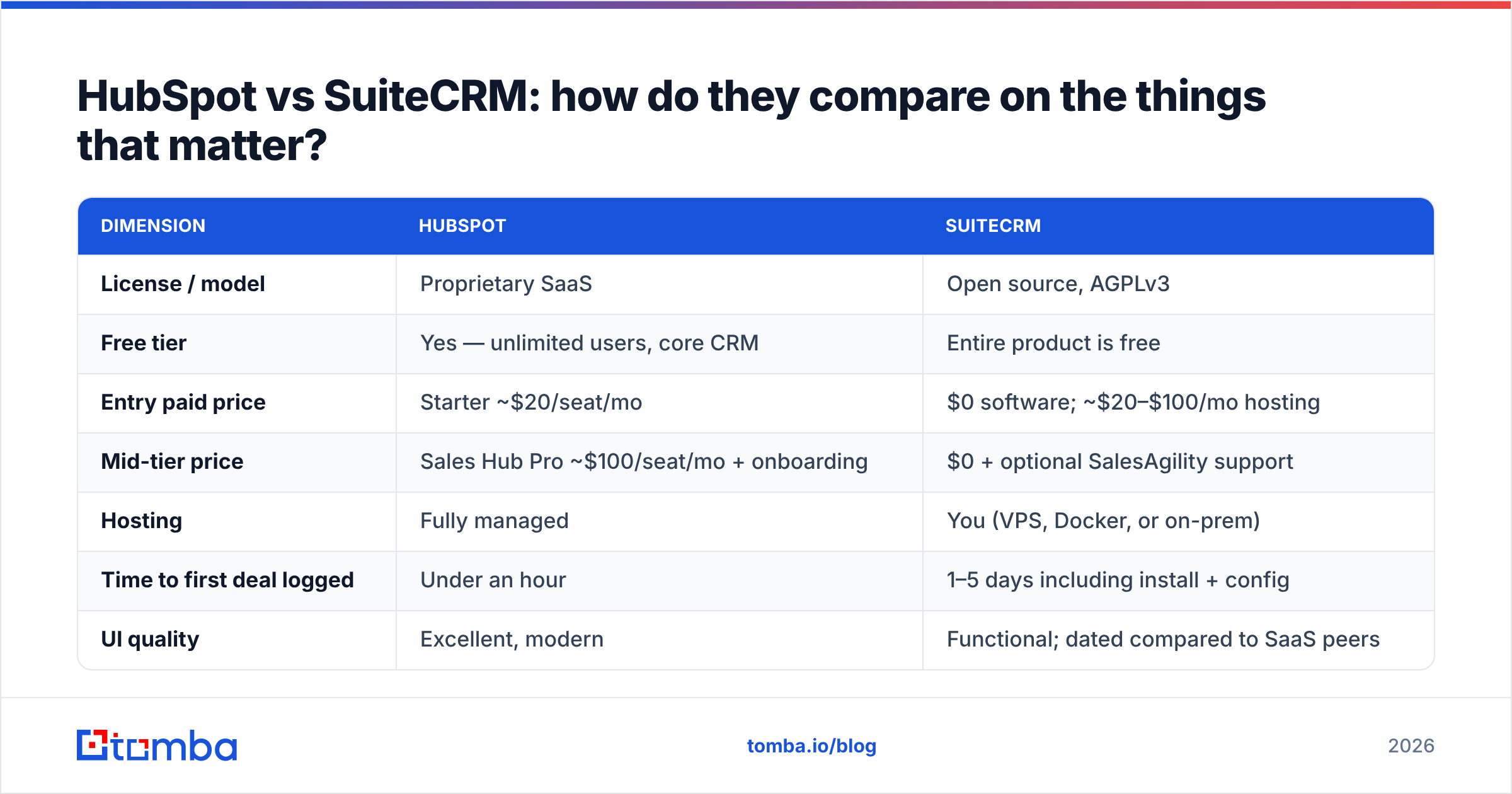
HubSpot path. Sales Hub Professional at roughly $100/seat/month for 10 seats is $12,000/year. Add a one-time Professional onboarding fee (commonly around $1,500–$3,000). Add Marketing Hub Professional if you want the automation that made HubSpot famous — that starts near $800/month at low contact tiers and scales with your marketing contact count. Realistic three-year total: $35,000 to $60,000+, and it rises as your database grows.
SuiteCRM path. Software: $0. Hosting on a managed VPS with backups: $40–$120/month, call it $2,500 over three years. Initial setup and customization: 40–120 developer hours at whatever your blended rate is — $4,000 to $18,000 if you're outsourcing, near-zero incremental if you have staff. Ongoing maintenance: roughly 2–5 hours/month for patching, upgrades, and breakage. Realistic three-year total: $6,000 to $25,000.
The catch is that SuiteCRM's cost is lumpy and unpredictable. A botched upgrade eats a weekend. A community plugin abandoned by its author eats a sprint. HubSpot's cost is high but you can forecast it to the dollar, and finance teams value that more than most engineers expect.
There's a third factor nobody prices properly: opportunity cost of adoption. A CRM your reps don't use is worth zero regardless of price. HubSpot's usability advantage is real and it translates directly into data hygiene. If your team quietly keeps working out of spreadsheets because SuiteCRM's interface annoys them, the "free" CRM cost you your entire pipeline visibility.
Which one is easier to customize and extend?#
SuiteCRM wins on ceiling. HubSpot wins on floor.
With SuiteCRM you have PHP source code, a MySQL schema, Studio for point-and-click field and module changes, and Module Builder for entirely new objects. Want a custom object with a bespoke relationship graph and a business rule that fires against an internal ERP? You can build it. Nobody's rate limit stops you. Nobody deprecates your workflow in a product update.
With HubSpot you have custom objects (Enterprise tier), custom properties (all tiers), workflows, and a good REST API. It covers 90% of what mid-market teams need without writing code. But you live inside HubSpot's object model, HubSpot's API limits, and HubSpot's roadmap. When you hit the wall, you don't dig through it — you file a feature request.
Here's the practical extension checklist for either platform:
- Field-level changes — trivial on both. HubSpot: properties UI. SuiteCRM: Studio.
- New objects/modules — HubSpot gates this behind Enterprise. SuiteCRM's Module Builder is free.
- Workflow logic — HubSpot's visual builder is faster for non-technical ops; SuiteCRM's is more powerful but assumes you understand the data model.
- Third-party sync — HubSpot has native connectors for most tools you'd name. SuiteCRM usually means Zapier-style middleware or a custom integration.
- Data enrichment — neither ships meaningful contact data. Both need an external source, wired through the API.
- Reporting — HubSpot dashboards ship ready; SuiteCRM reporting is serviceable but you'll likely export to a BI tool for anything executive-facing.
How do you keep either CRM from filling with dead data?#
This is the question that decides whether your CRM investment pays back, and it's independent of which platform you pick.
B2B contact data decays somewhere around 22–30% per year. People change jobs, companies rebrand, domains migrate, and email formats shift after acquisitions. A CRM is a container — it doesn't refresh itself. Both HubSpot and SuiteCRM will happily store a contact whose email started bouncing eighteen months ago and report it in your total contact count as if it were an asset.
Three habits keep the container clean:
- Verify on entry. Every contact that enters the CRM — form fill, imported list, rep manual entry — should pass through an email verifier before it gets written. This is a single API call at the point of ingestion and it prevents the majority of downstream bounce problems.
- Enrich on a schedule. Run your contact table through data enrichment quarterly to refresh titles, company changes, and missing fields. In HubSpot this is a workflow plus a webhook; in SuiteCRM it's a cron job hitting the REST API.
- Fill gaps at prospecting time, not later. When a rep adds an account, resolve the contacts immediately with domain search rather than leaving a half-populated record that nobody ever revisits.
Both platforms support this identically well through their APIs. The Tomba API returns a confidence score with each result, so you can set a threshold — write anything above 90, queue anything between 70 and 90 for manual review, discard the rest. That single rule does more for pipeline accuracy than any CRM feature comparison.
If you're on HubSpot specifically, the HubSpot integration pushes verified contacts directly into the CRM without a middleware layer. On SuiteCRM you'll write a small script against the v8 REST endpoints — maybe 100 lines, and it's stable once it works.
Is HubSpot better than SuiteCRM for a growing sales team?#
For most growing teams: yes, in the first two years. Then it depends.
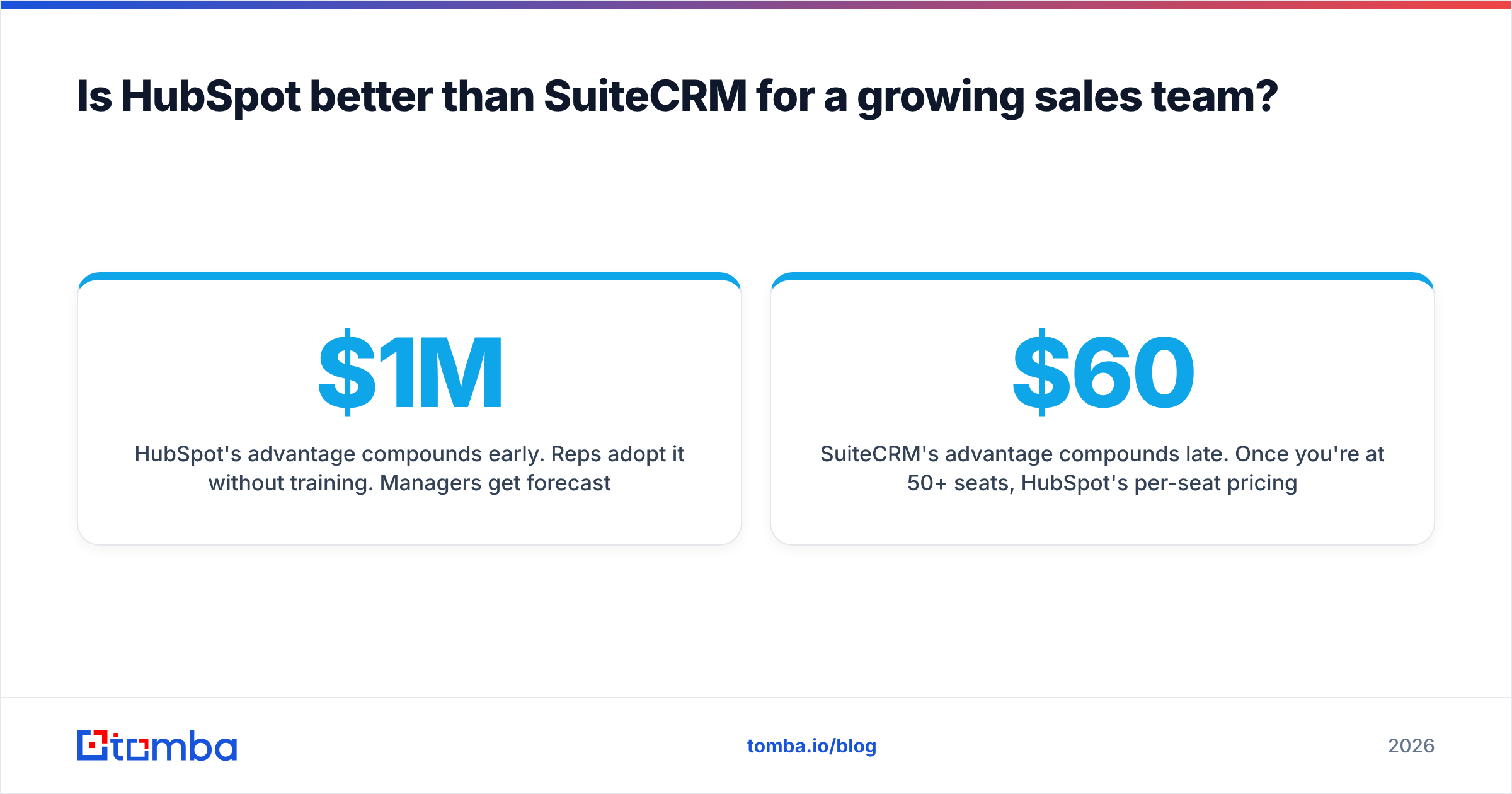
HubSpot's advantage compounds early. Reps adopt it without training. Managers get forecasting dashboards without a data analyst. Marketing and sales share a contact record instead of arguing about which system is authoritative. When you're trying to go from $1M to $5M ARR, removing friction from tool adoption is worth more than the $12,000/year you'd save going open source.
SuiteCRM's advantage compounds late. Once you're at 50+ seats, HubSpot's per-seat pricing turns into real money — $60,000/year and up — while SuiteCRM's cost curve stays nearly flat. At that scale you probably also have RevOps headcount who can maintain it, and you may have compliance requirements (data residency, sector-specific rules, air-gapped deployments) that a US-hosted SaaS simply cannot satisfy.
The honest failure mode for each:
- HubSpot fails when a finance review kills the renewal and you have to migrate 200,000 contacts and eight years of activity history out of a system that was never designed for exit. Export works, but rebuilding the automation elsewhere is a quarter of work.
- SuiteCRM fails when the one person who understood the installation leaves. Undocumented customizations, a PHP version that's now EOL, and a database nobody wants to touch. This happens more often than open-source advocates admit.
If you're evaluating alternatives beyond these two, check independent review volume on G2 rather than vendor comparison pages — including this one. The category has real depth: Pipedrive, Zoho, Odoo, Close, and Attio all occupy defensible middle ground between HubSpot's polish and SuiteCRM's price.
What's the migration path if you pick wrong?#
Plan the exit before you sign anything.
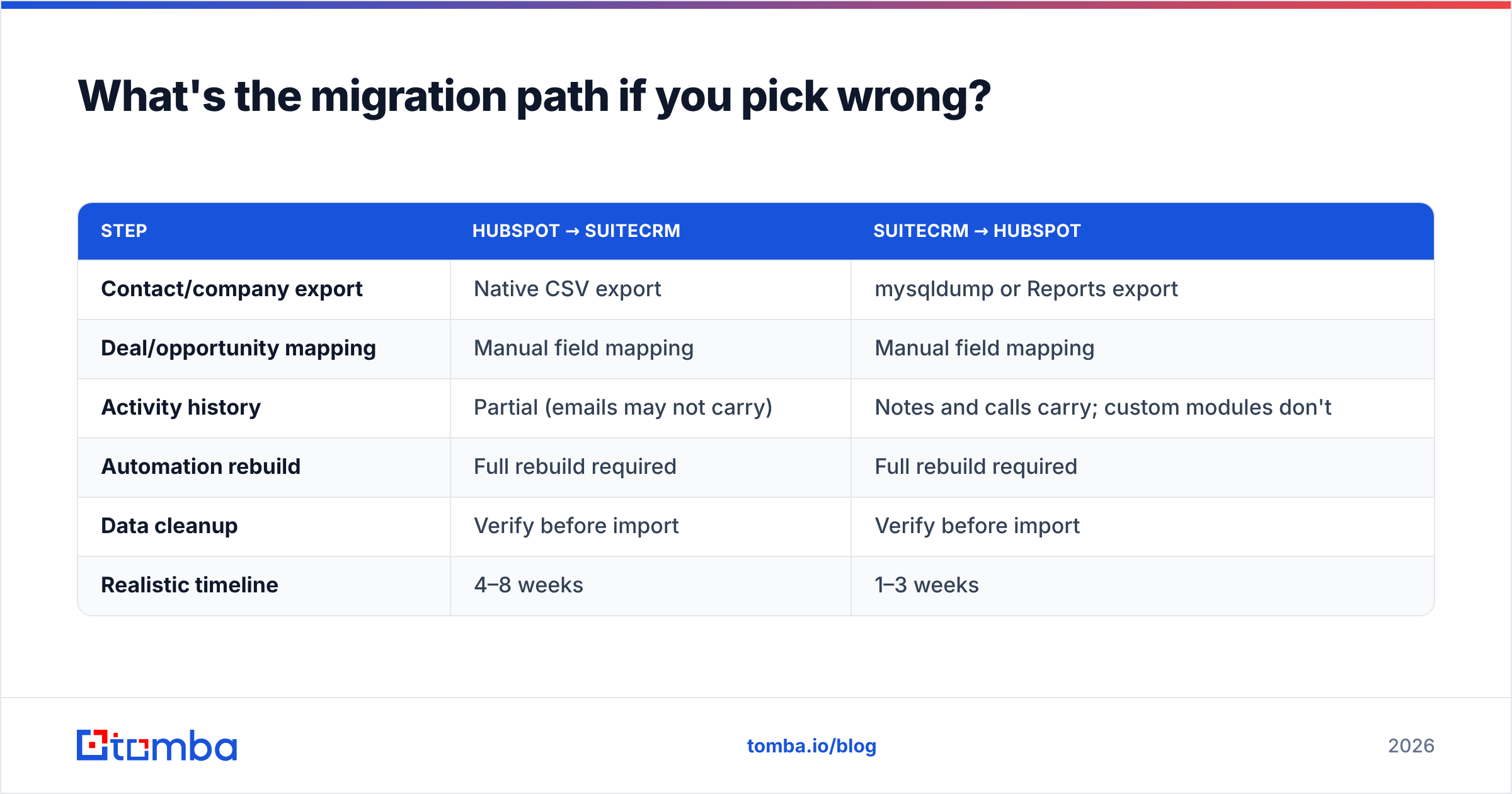
SuiteCRM → HubSpot is the easier direction. Export your MySQL tables to CSV, map fields to HubSpot properties, import through the UI or API. Activity history maps imperfectly — notes and calls come across, but custom module data usually needs to become a custom object or get flattened into properties. Budget one to three weeks.
HubSpot → SuiteCRM is harder. HubSpot's export gives you contacts, companies, deals, and engagement data, but the workflow logic, sequences, and reporting definitions don't export at all. You're rebuilding automation from screenshots. Budget four to eight weeks and expect to lose some historical email threads.
Either direction, the data quality problem travels with you. Migrating 80,000 contacts of which 30% are stale means you now pay to store and process 24,000 dead records in a new system. Run a bulk verify pass before migration, not after — it typically cuts import volume by 15–30% and makes the whole project faster and cheaper.
A migration checklist that holds for both directions:
| Step | HubSpot → SuiteCRM | SuiteCRM → HubSpot |
|---|---|---|
| Contact/company export | Native CSV export | mysqldump or Reports export |
| Deal/opportunity mapping | Manual field mapping | Manual field mapping |
| Activity history | Partial (emails may not carry) | Notes and calls carry; custom modules don't |
| Automation rebuild | Full rebuild required | Full rebuild required |
| Data cleanup | Verify before import | Verify before import |
| Realistic timeline | 4–8 weeks | 1–3 weeks |
Which should you actually choose?#
Choose HubSpot if: you have fewer than 40 seats, no dedicated ops engineer, you want marketing automation in the same system, and predictable subscription cost is acceptable to finance. The free tier means you can validate the fit before spending anything.
Choose SuiteCRM if: you have data-residency or compliance requirements that rule out US SaaS, you have at least one developer who owns the deployment, your customization needs exceed what a hosted platform allows, or you're at a scale where per-seat pricing has become the largest line in your software budget.
Choose neither if your actual problem is empty pipeline. A CRM organizes deals you already have; it doesn't create them. Teams that switch CRMs hoping for revenue lift are usually solving the wrong problem — the constraint is almost always the quality and freshness of the contact data going in.
Whichever platform you land on, the input matters more than the container. Use the Tomba Email Finder to source verified, accurate contacts by domain or name, then push them into HubSpot or SuiteCRM through the API with a confidence threshold you control. The free tier gives you 25 searches a month to test the accuracy on your own target accounts; paid plans start at $49/month. See Tomba pricing for the full breakdown — it's a fraction of what either CRM decision costs you, and it's the part that determines whether the CRM is worth having at all.
Related guides#
// get started
Find, verify and enrich your first contacts today
Start on the free plan with 25 searches a month, then scale when your team is ready.
Free plan · No credit card required · GDPR & CCPA
// about the author